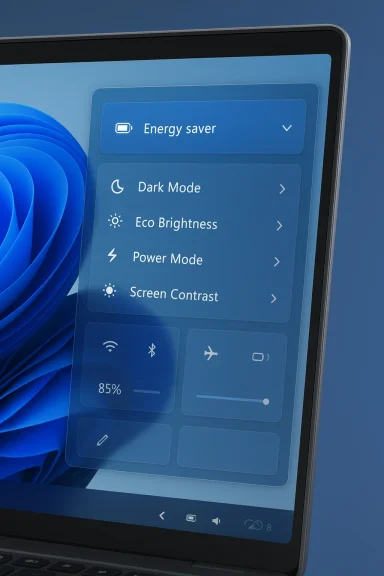
Microsoft appears to be quietly testing a restoration of a much‑requested customization option in Windows 11: the ability to remove unwanted quick‑action tiles from the Quick Settings panel. The change was first observed in the Dev‑channel preview build 26300.7965 and has been attributed to work discovered in the Energy Saver quick‑setting module, with screenshots and commentary shared publicly by Windows UI sleuths.
Quick Settings is the tray panel that gives fast access to connectivity and device toggles — Wi‑Fi, Bluetooth, Airplane mode, audio controls, battery/energy options and accessibility shortcuts. For power users and casual users alike, Quick Settings is a primary control surface for everyday system actions, replacing the older Action Center model in previous Windows versions.
Microsoft has iterated on Quick Settings since Windows 11’s debut. In particular, the Energy Saver toggle (which replaced or extended the older Battery Saver paradigm) is now a first‑class element in Quick Settings on recent Windows builds. The Energy Saver feature itself and its integration into Quick Settings have been formalized in Microsoft’s documentation and design guidelines.
Customization of Quick Settings has been inconsistent over several releases. At times Microsoft provided a simple edit mode where users could add, remove and rearrange tiles; at other times the UI shifted toward a scrollable list where removal controls were not as obvious or readily available. That inconsistency generated repeated user feedback asking for a reliable, on‑panel way to remove tiles rather than merely reorder them.
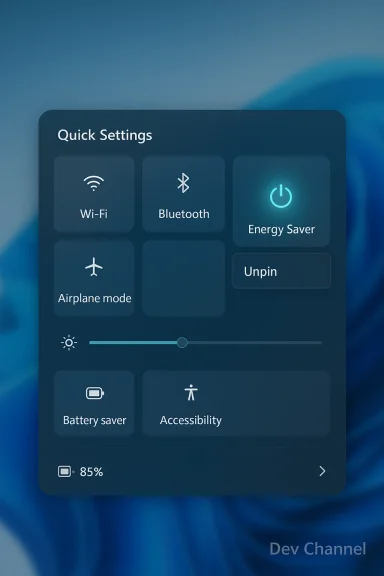
Independent Windows UI researchers and X (formerly Twitter) users monitoring the build found a hidden update inside the Energy Saver quick‑setting subpage indicating backend support for removing quick actions directly from the Quick Settings panel. The reports and screenshots show a context menu pattern (right‑click or press‑and‑hold) and an unpin/remove affordance associated with individual quick actions — behavior that would let users prune tiles they never use. Importantly, the discovery was of a backend capability and the removal control is not yet fully enabled or functional for typical Insiders in the Dev build.
Key, verifiable points from the discovery:
The finding in build 26300.7965 is therefore twofold: Microsoft is experimenting with deeper organization inside the Energy Saver subpage (for example, grouping theme toggles, power modes and eco brightness), and it appears to be reintroducing an edit/unpin mechanism on the Quick Settings surface itself. That combination — a richer subpage plus direct tile management — is what has excited many users and observers.
This is not the first time Microsoft has allowed hidden or gated Quick Settings behaviors to be visible in preview builds: previous features such as a new Volume Mixer, shared audio controls, and even color‑coded battery indicators have been discovered by UI sleuths in early builds and later shipped in altered forms, or subjected to further tweaks before roll‑out. The pattern indicates Microsoft uses the Dev channel to exercise multiple UI permutations before committing to a final design for public releases.
Community reactions to early sightings have been broadly positive: enthusiasts welcome the return of direct removal controls, and many have pointed to the persistent clutter problem on OEM systems and on devices where power users want only a handful of frequently used toggles. Several respected Windows observers who track hidden builds have flagged the change and shared screenshots, increasing confidence that Microsoft is at least seriously testing the capability.
At the same time, power users have reminded observers that previous hidden discoveries did not always ship, and even when they did, features were sometimes reworked. That pragmatic view has tempered exuberance with a recommendation to wait for official Microsoft documentation.
However, readers should maintain realistic expectations. The observed capability is currently hidden and under test; the feature’s final behavior, scope, and rollout timeline are still under Microsoft’s control and subject to change. Until Microsoft markets or documents the functionality in a shipping release, the correct posture is cautious optimism: promising discovery, useful potential, but not yet a completed product.
Windows 11 users who value a streamlined Quick Settings experience should monitor the Insider channels, consider participating in previews on non‑critical devices, and prepare to provide feedback once Microsoft exposes the feature publicly. If the feature ships as observed, basic personalization will return to a control surface many of us use dozens of times per day — a subtle improvement that could make Windows feel that much more personal and efficient.
Source: thewincentral.com Windows 11 May Bring Back Option to Remove Quick Settings Toggles
 Background: why Quick Settings matter — and why users asked for more control
Quick Settings is the tray panel that gives fast access to connectivity and device toggles — Wi‑Fi, Bluetooth, Airplane mode, audio controls, battery/energy options and accessibility shortcuts. For power users and casual users alike, Quick Settings is a primary control surface for everyday system actions, replacing the older Action Center model in previous Windows versions.Microsoft has iterated on Quick Settings since Windows 11’s debut. In particular, the Energy Saver toggle (which replaced or extended the older Battery Saver paradigm) is now a first‑class element in Quick Settings on recent Windows builds. The Energy Saver feature itself and its integration into Quick Settings have been formalized in Microsoft’s documentation and design guidelines.
Customization of Quick Settings has been inconsistent over several releases. At times Microsoft provided a simple edit mode where users could add, remove and rearrange tiles; at other times the UI shifted toward a scrollable list where removal controls were not as obvious or readily available. That inconsistency generated repeated user feedback asking for a reliable, on‑panel way to remove tiles rather than merely reorder them.
What was discovered in build 26300.7965
On March 6, 2026 Microsoft released Windows 11 Insider Preview Build 26300.7965 to the Dev Channel, an official update that includes a number of experimental and in‑flight changes intended for internal validation and feedback. The presence of a change does not guarantee it will ship to the broader user base; feature flags and hidden UI paths are commonly used during development.Independent Windows UI researchers and X (formerly Twitter) users monitoring the build found a hidden update inside the Energy Saver quick‑setting subpage indicating backend support for removing quick actions directly from the Quick Settings panel. The reports and screenshots show a context menu pattern (right‑click or press‑and‑hold) and an unpin/remove affordance associated with individual quick actions — behavior that would let users prune tiles they never use. Importantly, the discovery was of a backend capability and the removal control is not yet fully enabled or functional for typical Insiders in the Dev build.
Key, verifiable points from the discovery:
- The build in which the change was found is Dev channel build 26300.7965, which Microsoft published as an Insider preview.
- The new UX element appears to be located in the Energy Saver subpage within Quick Settings, and it shows an unpin/remove affordance for quick actions. The functionality is present in the code but not activated for general use in the current preview.
Why the Energy Saver toggle is important to this discovery
The Energy Saver module itself is a relatively recent consolidation of battery and power controls in Windows 11. Microsoft’s documentation notes that the Energy Saver experience replaces or extends the older Battery Saver functionality in newer Windows 11 branches, and the control is intended to make power management more discoverable in Quick Settings and in Settings > System > Power & battery. Because Microsoft has already grouped multiple power‑related controls under Energy Saver, the module is a natural place to prototype adjacent UI behavior — including contextual menus and per‑tile controls.The finding in build 26300.7965 is therefore twofold: Microsoft is experimenting with deeper organization inside the Energy Saver subpage (for example, grouping theme toggles, power modes and eco brightness), and it appears to be reintroducing an edit/unpin mechanism on the Quick Settings surface itself. That combination — a richer subpage plus direct tile management — is what has excited many users and observers.
How this differs from earlier Quick Settings behavior
Historically, Quick Settings offered an edit mode where users could add and remove tiles via an Edit or pencil icon. Over subsequent iterations the panel sometimes shifted to a design that prioritized showing more toggles in a scrollable list; in those designs the direct remove affordance could be harder to reach or absent, prompting complaints that users could only reorder but not remove certain items. The discovery in the Dev build suggests Microsoft intends to bring back a straightforward removal mechanism that is accessible directly from the panel — a behavior more akin to the original, more customizable Quick Settings experience.This is not the first time Microsoft has allowed hidden or gated Quick Settings behaviors to be visible in preview builds: previous features such as a new Volume Mixer, shared audio controls, and even color‑coded battery indicators have been discovered by UI sleuths in early builds and later shipped in altered forms, or subjected to further tweaks before roll‑out. The pattern indicates Microsoft uses the Dev channel to exercise multiple UI permutations before committing to a final design for public releases.
What this change means for users — practical benefits
If Microsoft completes this work and ships a remove‑tiles affordance to general Windows 11 users, the practical upsides include:- Cleaner Quick Settings: Users can remove seldom‑used or OEM‑installed toggles and keep the panel focused on personally relevant actions.
- Faster access to essentials: With fewer tiles occupying visual space, the most important toggles will be easier to find and actuate.
- Reduced cognitive load: Less clutter can mean fewer mistakes and quicker decision making when working on the desktop or when using touch on tablets and convertibles.
- Improved accessibility: Allowing users to curate the panel may help those who rely on screen readers or who prefer larger targets by removing distractions.
What businesses and IT administrators should watch for
The reintroduction of per‑tile removal has implications beyond consumer convenience:- Group Policy and management controls: Enterprises often lock down system UI elements to conform with corporate policy. Microsoft’s enterprise management features can disable or reconfigure parts of the user interface. Administrators should verify whether new Quick Settings edit functions are controllable via Group Policy, Intune, or other configuration channels before rolling preview builds to end users. Microsoft has introduced policies for managing energy settings in the past; this control plane will likely extend to new Quick Settings options.
- Support and training: If organizations permit personalization of Quick Settings, help desks may see new support questions (for example, users accidentally removing a necessary tile and needing assistance to add it back). IT departments should prepare updated guidance for user help resources.
- Security posture: While tile removal itself is low risk, administrators should consider whether sensitive toggles (for example, remote access, diagnostic telemetry controls, or device management switches) should be exposed to end users for removal. Locking essential management tiles prevents accidental configuration changes on managed endpoints.
Risks and limitations: what this early discovery does not prove
While the screenshots and preview reports are promising, there are clear limits and risks to assume the feature will ship unchanged:- The functionality observed in build 26300.7965 is hidden behind feature flags and is not enabled for general use in the Dev build — meaning Microsoft could change, delay, or scrap the feature based on testing and feedback. Early code presence is a good indicator of intent, not a guarantee of release.
- The scope of tile removal is not yet documented. It’s unclear whether Microsoft intends to allow removal of all tiles, or only for certain classes of quick actions. Some tiles may be tied to underlying system services where removal could create confusion (for example, connectivity indicators that are necessary for troubleshooting). Until Microsoft provides official release notes or documentation, the exact tile‑level policy remains speculative.
- Accessibility and discoverability must be handled carefully. If removal is controlled by a context menu or press‑and‑hold gesture, some users may have difficulty discovering the control; Microsoft will need to ensure the behavior is accessible to keyboard, assistive technologies, and touch users.
How Microsoft typically rolls out UI experiments — a quick primer
Understanding Microsoft’s release model helps set expectations for when and how this change might reach stable Windows 11 users:- Dev Channel: Early experiments land here first. Build numbers in this channel (such as 26300.7965) represent active development and are not guaranteed to ship outside Insiders. These builds often carry feature flags and experimental toggles.
- Beta / Release Preview: Features that survive Dev testing and are refined may migrate to Beta and then Release Preview. Microsoft uses these channels to broaden testing across more hardware configurations.
- Public Feature Update / Cumulative Update: After validation, Microsoft can include the feature in a cumulative update, a servicing release, or a scheduled feature update. The company may also perform a staged rollout server side or use phased feature enablement.
Reaction from the community: why this matters beyond a small UI tweak
The Quick Settings panel sits at the intersection of usability, discoverability and personalization. A simple removal affordance resonates with many because it’s one of the few lightweight ways users can make Windows feel like their machine without installing third‑party tools.Community reactions to early sightings have been broadly positive: enthusiasts welcome the return of direct removal controls, and many have pointed to the persistent clutter problem on OEM systems and on devices where power users want only a handful of frequently used toggles. Several respected Windows observers who track hidden builds have flagged the change and shared screenshots, increasing confidence that Microsoft is at least seriously testing the capability.
At the same time, power users have reminded observers that previous hidden discoveries did not always ship, and even when they did, features were sometimes reworked. That pragmatic view has tempered exuberance with a recommendation to wait for official Microsoft documentation.
Recommendations for users and Insiders
If you’re interested in this capability and you participate in the Windows Insider Program, here are sensible steps and considerations:- If you want to monitor progress, keep your Insider channel set to Dev (or Beta where the feature appears next) and watch official Windows Insider release notes for feature flag changes. The official Dev build announcement for 26300.7965 is the authoritative confirmation that Microsoft shipped that preview build for testing.
- Don’t expect hidden code presence to mean immediate availability. Treat screenshots and early posts as previews, not final product behavior. Plan to update support documentation only after Microsoft publishes public guidance.
- If you depend on consistent UI for accessibility or enterprise workflows, delay adoption of early Dev builds on production devices until the feature permanently ships with management controls documented. Enterprises should test internal policies to ensure the new behavior can be governed where necessary.
- If you’re an enthusiast who enjoys testing hidden features, follow trusted community reporters and use official feedback channels (Feedback Hub) to submit experiences and bugs rather than relying only on third‑party tools or registry hacks.
What Microsoft could do next (and what we’ll be watching for)
To make the feature truly useful and stable, Microsoft should consider the following during the development process:- Clear discoverability: add explicit edit affordances (an Edit pencil, or a persistent three‑dot menu) alongside context menus so users of all abilities can remove and restore tiles without guesswork.
- Restore/Reset options: a one‑click reset to factory Quick Settings would prevent users from accidentally locking themselves out of convenient toggles.
- Management controls for IT: provide Group Policy/Intune settings that enable or disable user ability to remove specific system or management tiles.
- Accessibility parity: ensure the remove/unpin action is keyboard reachable, labeled for screen readers, and exposed via UI Automation.
- Telemetry opt‑in: if Microsoft leverages telemetry to understand which tiles users remove most often, make that data collection transparent and optional.
Final analysis: small UI change, meaningful UX implications
Reintroducing a remove option for Quick Settings tiles would be a modest technical change with outsized usability benefits. It aligns with longstanding user feedback asking for a configurable control surface that adapts to each person’s workflow. The presence of backend support in Dev build 26300.7965 is a strong sign that Microsoft is listening and experimenting with practical UX improvements.However, readers should maintain realistic expectations. The observed capability is currently hidden and under test; the feature’s final behavior, scope, and rollout timeline are still under Microsoft’s control and subject to change. Until Microsoft markets or documents the functionality in a shipping release, the correct posture is cautious optimism: promising discovery, useful potential, but not yet a completed product.
Windows 11 users who value a streamlined Quick Settings experience should monitor the Insider channels, consider participating in previews on non‑critical devices, and prepare to provide feedback once Microsoft exposes the feature publicly. If the feature ships as observed, basic personalization will return to a control surface many of us use dozens of times per day — a subtle improvement that could make Windows feel that much more personal and efficient.
Source: thewincentral.com Windows 11 May Bring Back Option to Remove Quick Settings Toggles