Microsoft has pushed Windows 11 Insider Preview Build 26300.7760 (KB5077202) to the Dev Channel today, a small but strategically meaningful update that continues Microsoft’s pattern of shipping feature-ready binaries via enablement packages while using server-side gating to control who actually sees which features when.
Microsoft’s Insider releases now follow a two-part delivery model: the on-disk binaries arrive in regular cumulative updates and tiny enablement packages flip features on for targeted devices, while Controlled Feature Rollout (CFR) and entitlement checks determine feature exposure after install. This approach keeps install time and download size low, but it also means installing a build does not guarantee you’ll immediately see every advertised change.
The Dev Channel’s 26300 series is part of that same pattern: Microsoft is advancing the Dev servicing baseline while still basing these builds on Windows 11, version 25H2 via enablement packages. The practical implication is twofold. First, Dev is being used more for platform and plumbing work in addition to user-facing experiments, so known issues and driver interactions can differ from Beta. Second, there is often a short window to move from Dev back to Beta before a higher-numbered Dev enablement package installs; once that happens a simple one-click rollback may no longer be possible.
If you prefer Beta’s more conservative preview state, act before the Dev device installs the 26300 enablement package, because reversing the change later can require advanced recovery steps or a reinstall. For those who value early access to experimental platform changes, staying in Dev is still the right move—just do so with appropriate backups and test isolation.
Source: Microsoft - Windows Insiders Blog Announcing Windows 11 Insider Preview Build 26300.7760 (Dev Channel)
 Background / Overview
Microsoft’s Insider releases now follow a two-part delivery model: the on-disk binaries arrive in regular cumulative updates and tiny enablement packages flip features on for targeted devices, while Controlled Feature Rollout (CFR) and entitlement checks determine feature exposure after install. This approach keeps install time and download size low, but it also means installing a build does not guarantee you’ll immediately see every advertised change.The Dev Channel’s 26300 series is part of that same pattern: Microsoft is advancing the Dev servicing baseline while still basing these builds on Windows 11, version 25H2 via enablement packages. The practical implication is twofold. First, Dev is being used more for platform and plumbing work in addition to user-facing experiments, so known issues and driver interactions can differ from Beta. Second, there is often a short window to move from Dev back to Beta before a higher-numbered Dev enablement package installs; once that happens a simple one-click rollback may no longer be possible.
What landed in Build 26300.7760 — high-level summary
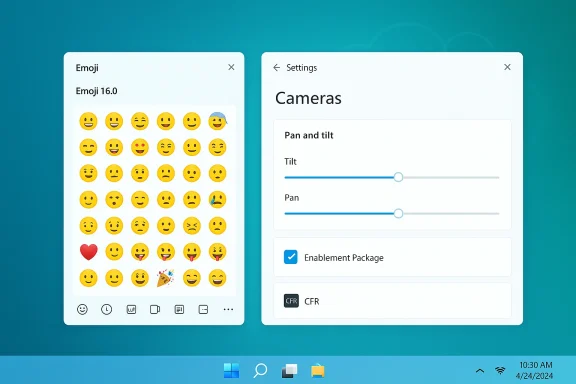
This flight is presented as a modest, primarily quality-focused update with two clearly highlighted staged rollouts and several performance and reliability improvements:- A gradual rollout of Emoji 16.0 to Insiders — a curated, cross-cultural set of new emoji exposed through the emoji panel for those in the staged cohort.
- New camera pan and tilt controls surfaced inside Settings (Settings → Devices & drivers → Cameras) for supported cameras, enabling direct control of pan/tilt axis from the OS.
- Broader visual and performance fixes, including improvements when the taskbar is set to autohide (reducing flicker), fixes for desktop icons unexpectedly flashing and causing degraded responsiveness, and addressing Windows Security credential pop-up behavior that interferes with sign-in flows.
Why this matters: enablement packages, CFR, and the Dev channel’s role
Enablement packages: what they are and why Microsoft uses them
Enablement packages are tiny activation updates that flip features on top of an existing OS image without performing a full reimage. The benefit is obvious: smaller downloads, faster installs, and the ability to ship feature work across multiple Insider channels while maintaining a single cumulative binary baseline. However, because the visible feature set can still be toggled server-side, the presence of a package on disk does not guarantee universal availability of every new capability.Controlled Feature Rollout (CFR)
CFR lets Microsoft roll experiences to a subset of users and gradually ramp them up while monitoring telemetry and feedback. That reduces blast radius for risky changes and allows A/B testing of UX variations, but it also creates heterogeneity: two otherwise identical PCs can have different features active. Insiders who want to be first should enable the toggle in Settings → Windows Update, but enterprises and production machines should treat CFR as a source of variability and keep the toggle off for production fleets.Dev channel as a platform lab
Microsoft has signaled that Dev is increasingly used to validate platform-level work (kernel, driver contracts, power, runtime changes) while Beta and Release Preview focus more on consumer-facing quality. That makes Dev the ideal early-warning lab for OEMs, driver developers, and security teams—but also the riskiest place to run your primary workstation. Expect differing known-issue footprints and be prepared to test drivers and agents.Deep dive: Emoji 16.0 — small change, outsized expectations
Emoji 16.0 isn’t a performance patch, but it’s culturally and practically meaningful—especially because emoji are widely used in modern communications and operate as a cross-platform shorthand in messaging, collaboration, and social apps.- What Microsoft shipped: a carefully curated set of new emoji, one from each major category, surfaced in the emoji panel and rolled out gradually to Insiders with the toggle enabled.
- Impact: little system overhead, but useful for localization, accessibility (visual affordances), and the many modern apps that rely on the OS emoji font and picker.
- Risk and verification: this is a low-risk staged rollout. Because emoji rendering depends on the system font stacks and app rendering engines, older apps that embed custom emoji fonts could display variations; normal process applies—test your high-volume messaging apps after the update.
Deep dive: Camera pan and tilt controls — why this matters to creators and hybrid workers
Adding OS-level pan/tilt controls for supported cameras is a clear usability win. Previously, such capabilities were locked to vendor apps or UVC extensions; bringing them into Settings means consistent discovery, a single surface for configuration, and potential policy controls for enterprises.- Where to find it: Settings → Devices & drivers → Cameras → Basic settings for the selected camera (if your camera supports pan/tilt).
- Practical benefits:
- Easier camera setup for hybrid meeting rooms and content creators.
- Consistent management in MDM or group policy scenarios once Microsoft extends administrative templates.
- Reduces reliance on vendor-specific apps that may be incompatible with enterprise control planes.
- Caveats:
- Hardware-dependent: only supported cameras expose these controls.
- Driver/firmware interplay: pan/tilt often requires firmware-level support; test with your OEMs and confirm driver versions before broad deployment. Share feedback via Feedback Hub under Devices and Drivers → Device Camera or Webcams.
Improvements and bug fixes included in this build
Microsoft called out several targeted improvements aimed at reducing visual glitches and responsiveness issues:- Taskbar autohide flicker and bottom-of-screen visual glitches have been improved.
- Desktop icons unexpectedly flashing—and the decreased responsiveness that can follow—should be mitigated by internal changes in the shell.
- Windows Security credential pop-up behavior that blocked or interfered with sign-in flows has been addressed in ways intended to reduce user friction.
Known issues and the Dev/Beta channel switching guidance
Microsoft’s recent 26300-series messaging repeatedly warns Insiders about channel mobility: once a device accepts certain 26300 enablement packages, the easy one-click switch from Dev back to Beta may be closed. Microsoft provides a pause-and-switch workaround—pause updates before applying the Dev offer, switch your Insider settings to Beta, then unpause—but the guidance matters.If you prefer Beta’s more conservative preview state, act before the Dev device installs the 26300 enablement package, because reversing the change later can require advanced recovery steps or a reinstall. For those who value early access to experimental platform changes, staying in Dev is still the right move—just do so with appropriate backups and test isolation.
Practical guidance — a testing and rollout playbook
Whether you’re an individual Insider, IT admin, or OEM partner, treat Dev-channel 26300-series flights with discipline. Below is a practical playbook.For individual Insiders
- Back up important files or create a full system image before installing preview builds.
- If you want the earliest staged features, turn ON Settings → Windows Update → Get the latest updates as they are available.
- If you prefer a stable preview, switch to Beta before the 26300 offer is applied; pause updates during the channel switch to avoid accidentally accepting Dev baseline packages.
For IT administrators and security teams
- Keep production devices off the staged-toggle and keep Dev flights limited to isolated test hardware.
- Pilot Sysmon (if present in your environment) and security telemetry ingestion in a controlled lab; Sysmon event volume can spike depending on configuration and filters.
- Validate drivers and firmware—priority areas include GPU, audio/MIDI, virtualization drivers, biometric/fingerprint firmware, and multi-monitor driver stacks.
- Run SIEM ingestion and retention tests to validate event parsing, storage and performance.
- Use phased rollouts and document a rollback plan; an enablement package flip can complicate simple rollbacks.
For OEMs and ISVs
- Prioritize compatibility testing across the 26300 series, especially for kernel-mode drivers and firmware. Coordinate driver updates and explicit validation for new platform behaviors. Treat Dev as an early-warning lab for upstream changes that may later reach Beta or GA.
Security, telemetry, and management considerations
The enablement + CFR pattern reduces install churn but increases variation in what telemetry looks like across your estate. If you enable staged features (or Sysmon if rolled in later flights), expect increased log volume and new event types. Before enabling inbox Sysmon or new auditing features:- Estimate ingestion rates and SIEM costs.
- Test filtering rules to avoid noise.
- Update parsing rules and dashboards to pick up new fields.
Risks, trade-offs, and what to watch for
- Fragmentation risk: CFR plus multiple servicing baselines means inconsistent feature exposure across devices—plan for that in triage and support workflows.
- Driver and firmware regressions: platform-level testing in Dev increases exposure to compatibility issues in GPU, audio, and virtualization stacks. Prioritize vendor coordination.
- Channel mobility: installing 26300-series enablement packages can close the easy Dev→Beta switch. If you care about being able to move to Beta, take action before Dev offers install.
- Unverifiable speculation: community chatter sometimes links 26300 labels to future public version numbers (26H1/26H2). Treat direct mappings as speculative until Microsoft confirms roadmap mapping; rely on Microsoft’s published blog notes and Flight Hub for authoritative signals.
How to provide high-impact feedback to Microsoft
Microsoft watches Feedback Hub telemetry closely for Insider flights. To make your reports useful:- Reproduce the issue with repro steps, test accounts, and hardware details.
- Attach diagnostics and include trace/event logs wherever possible.
- Mark the Feedback Hub category appropriately (e.g., Input and Language → Emoji panel for Emoji feedback; Devices and Drivers → Device Camera or Webcams for camera-related feedback).
- For enterprise-impacting issues, include reproduction steps that show interactions with management tools (Intune, SCCM), virtualization stacks, and common productivity apps.
Expectation setting — what will and won’t change
- Visible feature rollouts like emoji updates and camera controls are typically low-risk and will likely reach broader audiences after server-side ramping and telemetry validation.
- Platform-level changes exposed in Dev builds are where Microsoft expects to learn from Insider telemetry, so expect an iterative sequence of 26300.* builds that refine compatibility and driver interactions.
- Not every experiment previewed in Dev will ship to the general public—Microsoft explicitly notes some concepts may be removed or reworked based on feedback. Treat Dev as an experimental lab, not a deployment target for critical production devices.
Conclusion
Build 26300.7760 (KB5077202) is another example of Microsoft’s incremental, enablement-driven Insider strategy: small on-disk packages, targeted rollouts, and a Dev channel increasingly focused on platform-level experimentation. For users, the practical takeaways are straightforward: expect Emoji 16.0 and camera pan/tilt controls if you opt into staged updates, enjoy quieter but meaningful shell fixes, and be mindful that Dev remains an early-warning lab that can contain behavioral differences from Beta. For IT teams and OEMs, the moral is unchanged—pilot carefully, coordinate with vendors, and keep robust rollback and diagnostics plans in place. The enablement + CFR model is powerful for rapid iteration, but it makes disciplined testing and clear communication more important than ever.Source: Microsoft - Windows Insiders Blog Announcing Windows 11 Insider Preview Build 26300.7760 (Dev Channel)