

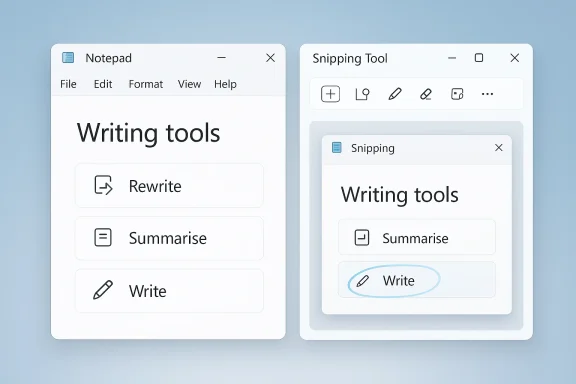
Microsoft is quietly doing something that looks small on the surface but says a lot about where Windows 11’s AI story is headed: it is stripping the Copilot label out of some first-party apps while keeping the underlying AI features in place. In Notepad, the old Copilot branding is being replaced with Writing tools, and in Snipping Tool the Copilot button is disappearing altogether. That makes this less a retreat from AI than a repackaging of it, with Microsoft trying to make the features feel more native, less noisy, and—at least in theory—more useful.
Microsoft’s current Windows strategy has been built around a simple idea: make AI feel like a core operating-system capability rather than a separate destination. Over the past year, that meant pushing Copilot into the taskbar, Settings, Notepad, Paint, Snipping Tool, Photos, and other stock apps. The logic was clear. If Windows could put AI a click away in places where users already spend time, adoption would be easier, and Copilot would become part of the daily workflow instead of a standalone chatbot.
That push, however, also created a branding problem. Not every product surface needs a visible Copilot badge, and not every utility benefits from AI-driven prompts. Microsoft appeared to recognize that tension when it said it would reduce “unnecessary Copilot entry points” in apps like Snipping Tool, Photos, Widgets, and Notepad. The phrase was carefully chosen. It signaled a design rethink without conceding that Microsoft was abandoning AI inside those apps.
This matters because Notepad and Snipping Tool occupy a different category from flagship AI experiences. They are utility apps, the sort of tools people expect to be simple, fast, and unobtrusive. If AI becomes a distraction in those contexts, the feature can feel like clutter instead of assistance. Microsoft’s challenge is to keep the usefulness of AI while removing the sense that the company is forcing a brand into every corner of Windows.
There is also a broader historical pattern here. Microsoft has repeatedly gone through cycles of over-branding new platform ideas and then later softening them when the user experience proves too loud. Windows itself has seen this with Metro, Cortana, Edge prompts, and previous attempts to center every interaction around a single strategic umbrella. In that sense, the current Copilot adjustment feels familiar: a move from broadcasting the platform theme to quietly embedding the capability.
The latest Notepad and Snipping Tool changes show that this is not just theory. Microsoft is already shipping a version of the plan to production users, not just Windows Insiders. That means the branding shift is real, even if the technology beneath it remains much the same.
That distinction is important because it changes how users perceive the tool. A Copilot button signals a branded assistant that might pull you into a separate AI experience. Writing tools sounds like an integrated editor feature, something closer to spellcheck or grammar assistance. The underlying action may be identical, but the mental model is different.
Microsoft’s own wording reinforces that shift. The feature is now described as “Smarter writing tools”, with functions such as Rewrite, Summarise, and Write. Those are productivity verbs, not brand slogans. They suggest refinement, condensation, and generation in a way that fits Notepad’s identity as a lightweight text editor.
At the same time, Microsoft is not being fully transparent about the continuity between the old and new labels. The functionality is still powered by AI, and it still uses Microsoft’s model-driven backend. In practical terms, Writing tools is Copilot by another name, even if the interface no longer says so.
That decision makes product sense. Snipping Tool’s core job is capture, annotate, and extract. If AI becomes too visible in that workflow, it can look like feature sprawl. Microsoft seems to be accepting that the screenshot app benefits more from speed and predictability than from a brand-forward Copilot entry point.
For some users, that will be a relief. The best utility apps often succeed by staying out of the way. A screenshot tool should feel like a knife, not a dashboard.
There is a practical irony here. As Microsoft removes Copilot from Snipping Tool, users may continue to expect core capture-related enhancements such as text extraction and smarter selection. That creates a tension between product minimalism and user expectations. If a feature becomes genuinely useful, users may not care whether it is branded as AI—but they will care if it disappears.
This is also a response to fatigue. Over the past few years, Microsoft has tried to give Copilot a prominent role across Windows, Microsoft 365, Edge, and the web. That strategy helped establish awareness, but it also risked making Copilot feel like a compulsory layer rather than a selective helper. Reducing entry points is one way to correct that.
The best software branding often follows utility, not the other way around. If a feature is genuinely helpful, it does not need to shout. If it needs to shout, the feature may not be ready.
Microsoft’s language also reveals a degree of caution. By saying it will be more intentional about where Copilot integrates, the company is leaving itself room to keep AI in some places and remove it from others without admitting inconsistency. That’s classic platform messaging, but it also reflects a more realistic understanding of Windows as a mixed ecosystem of power tools, consumer helpers, and legacy utilities.
That is especially relevant because Microsoft’s own documentation still frames Notepad’s AI as a managed capability. The company provides guidance for handling AI features in Notepad, which suggests that the feature is intended to exist within a policy-aware environment rather than as an always-on consumer novelty. In that context, reducing the Copilot label may make deployment conversations easier, even if the core functionality remains available.
That distinction matters because organizations are often less concerned with branding than with governance. If the feature can be disabled, audited, or limited by policy, then the naming becomes secondary. But if a branded AI surface starts popping up everywhere, it creates friction for desktop teams and support staff.
There is also a communication benefit here. A function-oriented label gives admins a better way to explain the feature to nontechnical employees. It is easier to say, “You can use writing assistance here,” than “You now have another Copilot experience inside Notepad.”
That perception problem is real. If Microsoft says it is reducing Copilot entry points, but the feature survives intact behind a new name, some users will feel the company is being semantic rather than transparent. On the other hand, most people do not care about the label nearly as much as they care about whether the tool helps them finish a task.
That’s why the success of this move will depend on whether Microsoft keeps the experience lightweight. A utility app with AI should still behave like a utility app. If it starts asking for too much attention, the rebrand will not solve the underlying problem.
There is also an emotional component. The Copilot name has been pushed across so many Microsoft experiences that some users have developed brand fatigue. Removing it from Notepad and Snipping Tool may improve goodwill even if the technology underneath is unchanged.
That puts Microsoft in the same broad conversation as Google, Apple, Adobe, and others that are trying to embed AI without making every app feel like a demo. In a market increasingly crowded with assistant layers, the winners may be the companies that make AI feel invisible until it is needed.
This may also help Windows compete on usability rather than novelty. If Microsoft can make features like Notepad’s writing assistance feel natural and unobtrusive, it can support productivity without turning every core app into a chatbot wrapper. That is likely a better long-term pitch for mainstream users.
At the same time, the company must avoid making AI feel hidden or diluted. If users do not know the feature exists, adoption will slow. If they know it exists but do not understand its benefits, adoption will also slow. Microsoft has to strike a delicate balance between visibility and restraint.
That is likely why the company is experimenting with more selective integration. Microsoft has already hinted at more ambitious AI plans elsewhere in Windows, including new agent-style experiences. That makes the reduction in visible Copilot entry points look less like retrenchment and more like segmentation.
That approach has several advantages. It reduces clutter, improves trust, and lets Microsoft tailor the experience by app category. It also allows the company to keep pushing AI innovation without forcing the same visual identity into every touchpoint.
Of course, this kind of shift only works if Microsoft maintains discipline. The danger is that the company starts renaming everything while leaving the product experience fundamentally unchanged. If that happens, users will eventually see through the language.
The most important thing to watch is whether Microsoft keeps separating utility from branding across the rest of Windows. Photos, Widgets, and other first-party apps may reveal whether this is a genuine shift in product philosophy. If it is, users may end up with a quieter, less crowded Windows experience that still preserves the AI features Microsoft wants to monetize and expand.
Source: Windows Latest Microsoft drops Copilot branding in Notepad for Windows 11 for everyone, but it’s really just a rename
 Background
Microsoft’s current Windows strategy has been built around a simple idea: make AI feel like a core operating-system capability rather than a separate destination. Over the past year, that meant pushing Copilot into the taskbar, Settings, Notepad, Paint, Snipping Tool, Photos, and other stock apps. The logic was clear. If Windows could put AI a click away in places where users already spend time, adoption would be easier, and Copilot would become part of the daily workflow instead of a standalone chatbot.That push, however, also created a branding problem. Not every product surface needs a visible Copilot badge, and not every utility benefits from AI-driven prompts. Microsoft appeared to recognize that tension when it said it would reduce “unnecessary Copilot entry points” in apps like Snipping Tool, Photos, Widgets, and Notepad. The phrase was carefully chosen. It signaled a design rethink without conceding that Microsoft was abandoning AI inside those apps.
This matters because Notepad and Snipping Tool occupy a different category from flagship AI experiences. They are utility apps, the sort of tools people expect to be simple, fast, and unobtrusive. If AI becomes a distraction in those contexts, the feature can feel like clutter instead of assistance. Microsoft’s challenge is to keep the usefulness of AI while removing the sense that the company is forcing a brand into every corner of Windows.
There is also a broader historical pattern here. Microsoft has repeatedly gone through cycles of over-branding new platform ideas and then later softening them when the user experience proves too loud. Windows itself has seen this with Metro, Cortana, Edge prompts, and previous attempts to center every interaction around a single strategic umbrella. In that sense, the current Copilot adjustment feels familiar: a move from broadcasting the platform theme to quietly embedding the capability.
The latest Notepad and Snipping Tool changes show that this is not just theory. Microsoft is already shipping a version of the plan to production users, not just Windows Insiders. That means the branding shift is real, even if the technology beneath it remains much the same.
What Changed in Notepad
In Notepad, the headline change is simple: Copilot is gone from the user-facing label, replaced by Writing tools. But the deeper reality is more nuanced. Microsoft is not removing the AI feature set from Notepad; it is recasting the same capability under a more generic and functional name.That distinction is important because it changes how users perceive the tool. A Copilot button signals a branded assistant that might pull you into a separate AI experience. Writing tools sounds like an integrated editor feature, something closer to spellcheck or grammar assistance. The underlying action may be identical, but the mental model is different.
Microsoft’s own wording reinforces that shift. The feature is now described as “Smarter writing tools”, with functions such as Rewrite, Summarise, and Write. Those are productivity verbs, not brand slogans. They suggest refinement, condensation, and generation in a way that fits Notepad’s identity as a lightweight text editor.
Why the Rename Matters
This is more than cosmetic branding. It reflects a product strategy that tries to lower the intimidation factor of AI while keeping the usage path open. Users who dislike the Copilot brand, or who simply do not want a chatbot identity in a text editor, may be more comfortable with a utility-style label.At the same time, Microsoft is not being fully transparent about the continuity between the old and new labels. The functionality is still powered by AI, and it still uses Microsoft’s model-driven backend. In practical terms, Writing tools is Copilot by another name, even if the interface no longer says so.
- Rewrite still changes tone, structure, or style.
- Summarise still condenses longer content into highlights.
- Write still generates new text from a prompt or selection.
- The feature remains optional and can be turned off in Settings.
- The AI-generated output is still inserted into the user’s
.txtcontent.
Snipping Tool Gets the Cleaner Cut
Snipping Tool is the more decisive case. Here, Microsoft has removed the Copilot button entirely from the production build, and the change is broader than a rename. The result is a cleaner UI that strips away an AI surface that many users probably never considered essential to a screenshot utility.That decision makes product sense. Snipping Tool’s core job is capture, annotate, and extract. If AI becomes too visible in that workflow, it can look like feature sprawl. Microsoft seems to be accepting that the screenshot app benefits more from speed and predictability than from a brand-forward Copilot entry point.
Why This Removal Feels Different
Unlike Notepad, where Microsoft preserved the function and simply renamed it, Snipping Tool appears to be going through a more genuine simplification. That does not necessarily mean AI-related capabilities are gone from the broader capture flow, but the visible Copilot hook is no longer part of the mainstream experience.For some users, that will be a relief. The best utility apps often succeed by staying out of the way. A screenshot tool should feel like a knife, not a dashboard.
There is a practical irony here. As Microsoft removes Copilot from Snipping Tool, users may continue to expect core capture-related enhancements such as text extraction and smarter selection. That creates a tension between product minimalism and user expectations. If a feature becomes genuinely useful, users may not care whether it is branded as AI—but they will care if it disappears.
- The production build is now less cluttered.
- The visible Copilot affordance is gone.
- The app better matches its role as a fast utility.
- Microsoft may be testing a model where AI is less visible but still available elsewhere.
- Users who want advanced tools may need to look for them in other Windows surfaces.
Why Microsoft Is Dialing Back the Copilot Label
Microsoft’s new approach reflects a basic product truth: users tolerate AI more easily when it feels contextual rather than intrusive. A text editor, a screenshot tool, and a widget panel do not need a giant Copilot presence to justify their existence. The more often Microsoft can make AI feel like a quiet enhancement rather than a headline act, the better the user experience will probably be.This is also a response to fatigue. Over the past few years, Microsoft has tried to give Copilot a prominent role across Windows, Microsoft 365, Edge, and the web. That strategy helped establish awareness, but it also risked making Copilot feel like a compulsory layer rather than a selective helper. Reducing entry points is one way to correct that.
From Brand Expansion to Brand Discipline
The shift suggests a move from expansion to discipline. Microsoft is not giving up on AI; it is deciding where the Copilot logo actually improves the interface. That is a very different philosophy from the earlier phase, when visibility itself was the goal.The best software branding often follows utility, not the other way around. If a feature is genuinely helpful, it does not need to shout. If it needs to shout, the feature may not be ready.
Microsoft’s language also reveals a degree of caution. By saying it will be more intentional about where Copilot integrates, the company is leaving itself room to keep AI in some places and remove it from others without admitting inconsistency. That’s classic platform messaging, but it also reflects a more realistic understanding of Windows as a mixed ecosystem of power tools, consumer helpers, and legacy utilities.
- Microsoft is likely trying to reduce cognitive load.
- The company may be responding to user feedback about clutter.
- It is balancing AI adoption with interface restraint.
- Utility apps need to feel native, not promotional.
- Brand consistency matters less than task completion.
The Enterprise Angle
For enterprise users, these changes are not just cosmetic. Windows administrators often care about predictability, policy control, and whether a feature can be disabled or standardized across fleets. A branded Copilot button in Notepad may be harmless for a home user, but in a managed environment it becomes another variable to document, govern, and explain.That is especially relevant because Microsoft’s own documentation still frames Notepad’s AI as a managed capability. The company provides guidance for handling AI features in Notepad, which suggests that the feature is intended to exist within a policy-aware environment rather than as an always-on consumer novelty. In that context, reducing the Copilot label may make deployment conversations easier, even if the core functionality remains available.
Managed Environments Prefer Stability
Enterprise IT tends to favor features that are easy to describe and easy to control. “Writing tools” sounds like a controllable editor enhancement. “Copilot in Notepad” sounds like a broader AI platform surface that could raise questions about telemetry, data handling, licensing, and user access.That distinction matters because organizations are often less concerned with branding than with governance. If the feature can be disabled, audited, or limited by policy, then the naming becomes secondary. But if a branded AI surface starts popping up everywhere, it creates friction for desktop teams and support staff.
There is also a communication benefit here. A function-oriented label gives admins a better way to explain the feature to nontechnical employees. It is easier to say, “You can use writing assistance here,” than “You now have another Copilot experience inside Notepad.”
- Fewer brand surfaces may simplify support documentation.
- Renamed features can feel more policy-neutral.
- IT teams can present them as productivity tools, not AI experiments.
- Microsoft’s controls for Notepad suggest administrative awareness.
- Cleaner UI may reduce training overhead for end users.
Consumer Impact and User Perception
For consumers, the change is likely to land in one of two ways. Some users will appreciate the cleaner UI and the removal of a brand they never asked for. Others may see the rename as a bit slippery, since the AI capability remains in place even though the Copilot label is gone.That perception problem is real. If Microsoft says it is reducing Copilot entry points, but the feature survives intact behind a new name, some users will feel the company is being semantic rather than transparent. On the other hand, most people do not care about the label nearly as much as they care about whether the tool helps them finish a task.
What Users Actually Notice
The average user notices friction, not architecture. If Writing tools makes it easier to refine a paragraph or summarize notes, the rename may not matter. If the feature feels unnecessary or slows down a simple editor, then the label is almost irrelevant.That’s why the success of this move will depend on whether Microsoft keeps the experience lightweight. A utility app with AI should still behave like a utility app. If it starts asking for too much attention, the rebrand will not solve the underlying problem.
There is also an emotional component. The Copilot name has been pushed across so many Microsoft experiences that some users have developed brand fatigue. Removing it from Notepad and Snipping Tool may improve goodwill even if the technology underneath is unchanged.
- Some users will welcome the simpler interface.
- Others will see the rename as branding spin.
- The feature is more likely to succeed if it stays fast and optional.
- Microsoft can reduce pushback by making AI feel discreet.
- The strongest user response may come from reduced clutter, not AI itself.
The Competitive Landscape
Microsoft is not making this adjustment in a vacuum. Across the industry, software vendors are learning that AI features need to be integrated carefully or they will become annoying. The first wave of AI product design was about showing capability. The next wave is about showing restraint.That puts Microsoft in the same broad conversation as Google, Apple, Adobe, and others that are trying to embed AI without making every app feel like a demo. In a market increasingly crowded with assistant layers, the winners may be the companies that make AI feel invisible until it is needed.
The New Advantage Is Restraint
There is a strategic advantage in making AI feel optional rather than mandatory. Users trust software more when it does not constantly advertise its intelligence. Microsoft’s move suggests it understands that a quiet tool can sometimes be more powerful than an aggressively branded one.This may also help Windows compete on usability rather than novelty. If Microsoft can make features like Notepad’s writing assistance feel natural and unobtrusive, it can support productivity without turning every core app into a chatbot wrapper. That is likely a better long-term pitch for mainstream users.
At the same time, the company must avoid making AI feel hidden or diluted. If users do not know the feature exists, adoption will slow. If they know it exists but do not understand its benefits, adoption will also slow. Microsoft has to strike a delicate balance between visibility and restraint.
- Competitors are also trying to make AI feel native.
- Over-branding can make features feel cheaply promoted.
- Under-branding can make them feel invisible.
- Microsoft’s approach may become a model for utility-first AI.
- The market is moving toward contextual intelligence, not constant assistants.
What the Change Suggests About Windows 11’s AI Future
The biggest takeaway is that Microsoft is not backing away from AI in Windows 11. If anything, it is sharpening the boundaries around where AI belongs and where it does not. Not every feature needs the Copilot badge, and not every app benefits from an overt assistant persona.That is likely why the company is experimenting with more selective integration. Microsoft has already hinted at more ambitious AI plans elsewhere in Windows, including new agent-style experiences. That makes the reduction in visible Copilot entry points look less like retrenchment and more like segmentation.
AI Will Stay, but the Branding May Evolve
The future may be less about “Copilot everywhere” and more about invisible intelligence spread across the OS. In that model, users interact with practical features first, and the AI infrastructure behind them is presented only when it adds value.That approach has several advantages. It reduces clutter, improves trust, and lets Microsoft tailor the experience by app category. It also allows the company to keep pushing AI innovation without forcing the same visual identity into every touchpoint.
Of course, this kind of shift only works if Microsoft maintains discipline. The danger is that the company starts renaming everything while leaving the product experience fundamentally unchanged. If that happens, users will eventually see through the language.
- Expect more selective branding in Windows apps.
- Expect AI features to be presented as workflow tools.
- Expect some app surfaces to drop Copilot entirely.
- Expect Microsoft to emphasize usefulness over novelty.
- Expect the company to keep testing agentic features in other parts of Windows.
Strengths and Opportunities
This change has real upside if Microsoft uses it as part of a broader cleanup of Windows 11’s AI surfaces. The strongest opportunity is to make AI feel like a natural extension of familiar tools, not a banner that interrupts them. Done well, that can improve adoption without increasing friction.- Cleaner interfaces can make apps feel faster and more trustworthy.
- Functional labels such as Writing tools are easier for users to understand.
- Optional AI aligns better with the expectations of utility app users.
- Reduced branding noise may improve public sentiment around Windows 11.
- Enterprise admins may find neutral labels easier to manage and explain.
- Microsoft can still promote AI capability without overexposing Copilot branding.
- Contextual integration is more sustainable than forcing a single assistant identity everywhere.
Risks and Concerns
The most obvious risk is that Microsoft’s branding shift feels like a semantic workaround rather than a true product improvement. If users sense that the company is simply renaming Copilot to avoid criticism, trust could erode. That risk grows if the interface remains cluttered or the AI feature set is still promoted inconsistently across apps.- Perceived spin can damage credibility if users feel the rename is cosmetic.
- Feature confusion may rise if the same function has different names in different apps.
- Inconsistent rollout across Insider and production channels can frustrate users.
- Hidden AI behavior may concern privacy-minded customers.
- Enterprise compliance teams may still need to track the underlying capability.
- Product drift could occur if utility apps become too AI-heavy over time.
- User fatigue may increase if Microsoft keeps renaming rather than simplifying.
Looking Ahead
The next few months will show whether this is the beginning of a broader Windows 11 cleanup or just a one-off adjustment in a pair of apps. If Microsoft is serious about making Copilot more intentional, then more surfaces may follow the Notepad and Snipping Tool pattern. If not, these changes may end up feeling like isolated experiments.The most important thing to watch is whether Microsoft keeps separating utility from branding across the rest of Windows. Photos, Widgets, and other first-party apps may reveal whether this is a genuine shift in product philosophy. If it is, users may end up with a quieter, less crowded Windows experience that still preserves the AI features Microsoft wants to monetize and expand.
- Watch for more renames in first-party apps.
- Watch for further removal of Copilot buttons where they do not add value.
- Watch whether Writing tools remains stable in production builds.
- Watch for any signs of feature parity gaps between Insider and retail releases.
- Watch how Microsoft communicates AI disclosure inside renamed features.
- Watch whether administrative controls expand alongside the rebranding.
- Watch whether users respond better to practical labels than to Copilot branding.
Source: Windows Latest Microsoft drops Copilot branding in Notepad for Windows 11 for everyone, but it’s really just a rename
