

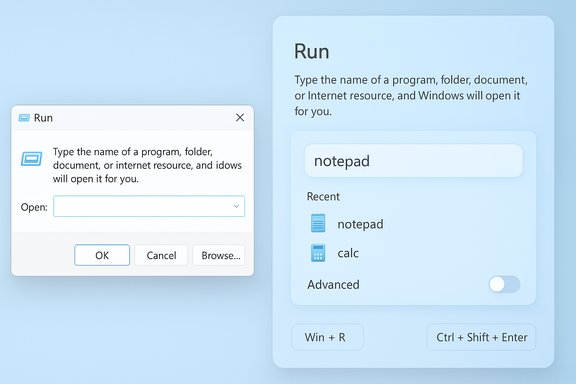
Microsoft’s decades-old Run box is finally getting a makeover — and for the first time in nearly 30 years you may find two Run experiences inside Windows 11: the classic compact dialog that millions of power users rely on, and a new, modernized Run dialog built with WinUI/Fluent visuals and an optional settings toggle that lets you choose between them.
The Run dialog (Win+R) is one of Windows’ oldest productivity primitives, dating back to Windows 95 and surviving every major shell redesign since. It’s compact, fast, and deliberately minimal: type a command or executable name, press Enter, and the system runs it. This muscle‑memory tool remains a staple for IT professionals, devs, and power users who value speed and keyboard-driven workflows. Several mainstream guides still list Win+R among essential Windows shortcuts. Until recently, the only notable user-facing refresh the Run dialog got was dark-mode support and some small theming tweaks. That changed when a Windows preview surfaced a Modern Run UI: a larger, WinUI/Fluent-styled overlay that adds a visible recent-commands area, app icons in search results, and spacing consistent with Windows 11’s design language. This modern Run appears to be gated in preview builds and is optional by default.
The most consequential impact will be human and operational: documentation, training, and help desks must prepare for two experiences. Admins must review privacy settings and automation scripts. Accessibility advocates should subject the modern Run to thorough testing.
For everyday users and power users who prefer keyboard workflows, the risk of regression appears low — provided Microsoft preserves keyboard-driven interactions like arrow navigation and the Ctrl+Shift+Enter elevation shortcut. Those protections are precisely why Microsoft has made the modern Run optional in previews: to collect feedback while minimizing disruption.
The Run dialog’s redesign is small in scope but high in symbolic value: Microsoft is still iterating on Windows 11’s details. Users should welcome a cleaner, themed Run as a quality‑of‑life improvement, but treat functional and rollout details as provisional until Microsoft publishes official guidance. In the meantime, PowerToys remains the go-to choice for anyone who needs a full-featured launcher, while administrators and power users should plan for a short transition period where both the old and the new Run dialog might be present on different machines.
Source: gHacks Technology News Windows 11 may soon have two Run boxes - gHacks Tech News
 Background
The Run dialog (Win+R) is one of Windows’ oldest productivity primitives, dating back to Windows 95 and surviving every major shell redesign since. It’s compact, fast, and deliberately minimal: type a command or executable name, press Enter, and the system runs it. This muscle‑memory tool remains a staple for IT professionals, devs, and power users who value speed and keyboard-driven workflows. Several mainstream guides still list Win+R among essential Windows shortcuts. Until recently, the only notable user-facing refresh the Run dialog got was dark-mode support and some small theming tweaks. That changed when a Windows preview surfaced a Modern Run UI: a larger, WinUI/Fluent-styled overlay that adds a visible recent-commands area, app icons in search results, and spacing consistent with Windows 11’s design language. This modern Run appears to be gated in preview builds and is optional by default. What surfaced and how it was discovered
The early leak and the evidence
The modern Run UI was first publicly noticed after screenshots and short writeups appeared from community sleuths and tech reporters covering Windows Insider and preview builds. Several outlets captured the same set of UI traits: a larger dialog, a recent history list above the input box, and result rows surfaced with icons — all hallmarks of a WinUI/Fluent redesign that visually aligns Run with current Windows 11 surfaces. Multiple technology sites corroborated those findings within hours of each other, describing identical UI elements in the preview artifacts. That consistent reporting from independent outlets makes the existence of the modern Run UI highly credible.Where it lives in Settings
Early reports indicate the modern Run experience is optional and must be enabled manually from Settings → System → Advanced (a “Run dialog” or “Modern Run” toggle). The default behavior in preview builds appears to favor the classic dialog while the new UI remains opt‑in during testing. That opt‑in approach mirrors other recent duality rollouts in Windows 11 (context menus, some legacy dialogs), and suggests Microsoft is trying to avoid upsetting workflows that rely on the compact classic Run experience.Build attribution — proceed with caution
Some coverage and social posts named a specific build (Build 26534) where the modern Run was first seen. Several outlets and community posts repeat that number, but independent verification across Microsoft release notes or the official Insider flight log is inconsistent. Community-centered analysis suggests build attributions may be provisional and gated server‑side, so treat single-build claims as unverified until Microsoft confirms them in official notes or the change appears broadly across the Insider channels.How the modern Run compares to existing launchers
PowerToys Run / Command Palette — influence and overlap
Microsoft’s PowerToys project long provided a richer launcher experience (PowerToys Run, and more recently Command Palette) that looks and behaves like macOS Spotlight or third‑party tools such as FlowLauncher. PowerToys Run and Command Palette support searching apps, files, folders, running processes (Window Walker), basic calculations, settings pages and plugins/extensions — a far broader feature set than classic Run. Microsoft’s official PowerToys documentation details these capabilities and positions Command Palette as PowerToys Run’s successor in functionality and extensibility. The modern Run UI shown in previews visually echoes some of this richer launcher aesthetic — larger field, icons, and a searchable recent list — but current evidence does not show full PowerToys-style extensibility (plugins, indexed file search, web integration). As of the previews, the modern Run looks like a visually modernized launcher-lite: design parity with Windows 11 but not yet a full Spotlight replacement. Several reporters note that the modern Run “looks similar” to PowerToys Run or Command Palette, but feature parity is unconfirmed.What PowerToys brings today
PowerToys Run/Command Palette is intentionally modular: it can search files and folders, list running processes (Window Walker), provide quick calculations, and extend via plugins. It runs in user space and is optional for people who want deeper launcher capabilities. If Microsoft’s modern Run remains intentionally lightweight, PowerToys will continue to hold value for users needing advanced features.Why Microsoft is modernizing Run now
Visual consistency and quality‑of‑life
Windows 11 has spent multiple releases stitching modern theming into legacy surfaces. Microsoft’s recent moves — dark mode for older dialogs, Fluent styling to historically Win32 controls, and incremental WinUI migrations — aim to remove jarring visual transitions when legacy windows appear. Updating the Run dialog is a logical extension of that work: it’s a tiny, high-visibility surface that appears millions of times daily, so modernizing it improves perceived polish.Accessibility and discoverability
A larger touch target, clearer contrast, and a visible recent list makes Run more approachable for non‑power users and those with accessibility needs. Aligning the dialog with modern accessibility APIs should improve screen-reader behavior and keyboard focus management — if Microsoft follows accessibility best practices during implementation. Community discussion emphasizes the need for explicit list semantics and focus handling so the modern Run remains usable without a mouse.Developer and power-user signaling
Microsoft appears to place the modern Run toggle under “Advanced” settings in preview builds. That placement could indicate the company is focusing early tests on developer/power-user audiences or intends to add developer-friendly features later. The strategic choice to make the modern Run optional suggests Microsoft is listening to the community and seeks to avoid forced changes that would break workflows.Benefits and improvements users can expect
- Modern visuals: Fluent/WinUI styling, rounded corners, and consistent spacing bring Run into line with the rest of Windows 11.
- Recent commands list: Faster access to frequently used commands without retyping, improving discoverability.
- Result icons: App and tool icons improve recognition, reducing guesswork when multiple matches exist.
- Optional toggle: Users who prioritize muscle‑memory speed can keep the classic compact Run, while others can opt in to the modern overlay.
- Better theming: The modern Run unifies dark/light presentation across Windows 11, eliminating jarring flashes when legacy dialogs appear.
Risks, limitations, and unanswered questions
1) Fragmentation and user confusion
Introducing two Run experiences — one legacy and one modern — creates another fork in the UI road. Users who train others, write documentation, or support endpoints will face a slight increase in complexity: which Run will be present on a given machine, which keyboard behavior to expect, and whether shortcuts still behave identically.2) Keyboard ergonomics and accessibility caveats
Run is primarily keyboard-driven. Any modernized UI must preserve quick Enter/Tab/arrow behavior, the ability to rerun recent commands with the keyboard, and predictable focus handling. Early previews hint at arrow-key navigation for history items, but full accessibility conformance remains to be validated. Community accessibility experts have already flagged that lists and icons must be properly exposed to assistive tech.3) Feature expectations vs reality
Because the modern Run visually echoes PowerToys Run/Command Palette, many users will expect the same advanced features (file indexing, plugin support, web search, window switching). If Microsoft’s built-in modern Run remains intentionally slim, users might be disappointed. Conversely, if Microsoft layers too many features into the system Run, it could duplicate PowerToys and raise questions about the future of the PowerToys project.4) Enterprise and automation implications
Some enterprise scripts and hard-coded automation may assume the classic Run’s behavior or position. Changes in how the Run UI surfaces results, its z-order, or how it interacts with focus/foreground automation tools could produce subtle breakages. Admins should test internal tooling before broadly enabling preview UI changes. Community guidance recommends treating preview UI changes as optional and piloting them in controlled rings first.5) Privacy and history concerns
A visible recent-commands list is convenient — but it raises privacy questions in multi-user or shared environments. Administrators may want to control whether the Run history records entries, or whether Windows’ telemetry/settings that surface app usage are enabled. Community reporting suggests some Run history behavior ties to the “Let Windows track app launches to improve Start and Search results” system setting; administrators should be aware this can affect what appears in Run’s recent list.6) Unverified claims and rumor hygiene
The modern Run’s appearance in preview builds is well-supported by multiple reports. However, precise claims such as a single build number attribution (e.g., Build 26534) or guarantees about preserved hotkeys require caution. Some specifics are currently traceable to early posts and secondary reports only; Microsoft has not published detailed release notes for this feature yet. Treat those precise numbers as provisional until official documentation confirms them.Keyboard behavior: will your old shortcuts still work?
A frequent concern among longtime users is whether familiar shortcuts like Ctrl+Shift+Enter (to run a typed command elevated) will still function. Historically, the Run dialog has allowed administrators to open elevated processes by typing the command and pressing Ctrl+Shift+Enter; numerous community and documentation sources still describe that workflow as valid in Windows 10 and 11. Early reporting indicates the modern Run preserves this hotkey, but that claim presently comes from the initial previews and reporter notes rather than a formal spec; therefore it’s plausible but not yet guaranteed across all builds and enterprise configurations.Practical advice for users, power users and admins
- If you run Windows Insider builds, treat the modern Run as a preview feature: test it in a lab or spare machine rather than on production devices. Expect server‑side gating and build‑to‑build variability.
- For IT teams, update internal documentation and training to show both experiences (classic and modern) until Microsoft declares a stable rollout path.
- If privacy is a concern, audit the related settings that drive history capture (Start/Search telemetry, app launch tracking) before enabling the modern Run for end users.
- Power users who depend on advanced launcher capabilities should continue using PowerToys Run or Command Palette. These tools remain more feature-rich and extensible than the new built-in Run, at least in current previews.
- Accessibility teams should validate the modern Run with screen readers and keyboard-only navigation to ensure parity with the classic experience before broad deployment.
How this fits into Microsoft’s broader UI strategy
The modern Run redesign is a small but telling signal: Microsoft is continuing the gradual process of unifying legacy and modern surfaces. Instead of sweeping replacements, the company is iterating incrementally — moving dialog boxes into WinUI/Fluent as discrete, gated changes and preserving the legacy surfaces while insiders and telemetry guide the transition. That conservatism reduces risk but increases surface-level duality across the OS; users will encounter legacy and modern variants of similar experiences for some time. At the same time, Microsoft’s PowerToys work (PowerToys Run → Command Palette) shows the company can also ship experimental, highly capable desktop utilities outside the core OS. The coexistence of a lighter built-in modern Run and a more extensible PowerToys/Command Palette aligns with a strategy that separates system-level features from optional power-user extensions.Verdict: meaningful polish, but not a paradigm shift — yet
The modern Run dialog is an earned and sensible UI refresh: it brings visual parity, better discoverability and the potential for modest usability improvements without immediately forcing changes on users. That said, it’s not (at least in current previews) a replacement for PowerToys-style launchers that do heavy lifting like file indexing, plugin ecosystems, and window switching.The most consequential impact will be human and operational: documentation, training, and help desks must prepare for two experiences. Admins must review privacy settings and automation scripts. Accessibility advocates should subject the modern Run to thorough testing.
For everyday users and power users who prefer keyboard workflows, the risk of regression appears low — provided Microsoft preserves keyboard-driven interactions like arrow navigation and the Ctrl+Shift+Enter elevation shortcut. Those protections are precisely why Microsoft has made the modern Run optional in previews: to collect feedback while minimizing disruption.
Final recommendations
- Keep an eye on Insider channels and Microsoft release notes for formal confirmation of build rollouts and behavior guarantees.
- Continue using PowerToys Run / Command Palette if you rely on advanced launcher features; the modern Run should be seen as a polished core alternative rather than a full feature superset.
- For enterprise environments, pilot the modern Run in a controlled test ring and update helpdesk documentation to show both experiences.
- Accessibility and privacy teams should evaluate how history is surfaced and whether recording defaults meet organizational policies.
The Run dialog’s redesign is small in scope but high in symbolic value: Microsoft is still iterating on Windows 11’s details. Users should welcome a cleaner, themed Run as a quality‑of‑life improvement, but treat functional and rollout details as provisional until Microsoft publishes official guidance. In the meantime, PowerToys remains the go-to choice for anyone who needs a full-featured launcher, while administrators and power users should plan for a short transition period where both the old and the new Run dialog might be present on different machines.
Source: gHacks Technology News Windows 11 may soon have two Run boxes - gHacks Tech News
