

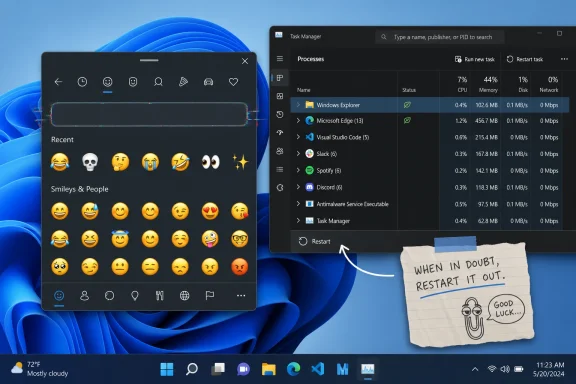
Windows 11 users in some recent builds, including at least one Insider Beta Channel configuration reported on May 13 and 14, 2026, are seeing the emoji picker’s search box disappear, with the quickest known workaround being a restart of Windows Explorer through Task Manager. The bug is small enough to sound comic and annoying enough to feel like Windows in miniature. It does not corrupt files, break boot, or crater enterprise uptime, but it does interrupt a basic input path that Microsoft has spent years turning into part of the operating system’s everyday vocabulary. The lesson is not that emoji search is mission-critical; it is that modern Windows still routes too many seemingly lightweight experiences through fragile shell plumbing.
The Windows emoji picker began life as one of those features many power users dismissed until they needed it. Press Win + period, type a word, pick the symbol, move on. In an era where work happens across Teams, Slack, Outlook, GitHub, browser apps, help desks, documentation portals, and customer-support consoles, that little panel is not just decoration.
Its search box is the feature that makes it usable. Without search, the picker becomes a tray of categories and visual hunting, which is tolerable for a smiley face and irritating for anything more specific. The difference between typing “check” and scrolling through symbols is the difference between a utility and a novelty.
That is why this bug has a peculiar sting. The emoji picker still opens. The panel still looks familiar. But the affordance that turns it from a wall of icons into an input tool simply vanishes, leaving users to wonder whether Microsoft removed it, hid it, or broke it.
The reports so far suggest the third option. Windows Central observed the behavior on an Insider Beta machine, gHacks amplified the workaround, and user reports elsewhere point to the same failure mode: the search box is gone until Explorer is restarted. That makes this less a design change than a rendering or shell-state failure, the sort of thing Windows veterans recognize instantly.
That matters because Explorer is not merely the file manager most people think of when they hear the name. In Windows, explorer.exe is deeply entangled with the desktop shell, taskbar, Start-adjacent surfaces, notification behaviors, and plenty of user-interface scaffolding that feels separate until it breaks together. Restarting it often feels like shaking the snow globe: the taskbar disappears, the desktop blinks, and Windows redraws the world.
In this case, that redraw appears to restore the missing emoji picker search box. The practical advice is simple: open Task Manager with Ctrl + Shift + Esc, find Windows Explorer, right-click it, and choose Restart. The taskbar will vanish briefly, return, and the emoji picker should once again show the search field when opened with Win + period.
The deeper diagnosis is murkier. Microsoft has not publicly acknowledged this specific bug at the time of reporting, and there is no official root-cause note tying it to a particular build, component, language setting, or input subsystem. But the workaround strongly suggests a shell rendering state that can be cleared without a full reboot.
That distinction matters for users. A reboot is a ritual; restarting Explorer is maintenance. One interrupts applications, remote sessions, unsaved work, and mental context. The other is a 30-second nuisance, assuming the user knows the trick.
But the Insider program is not one thing anymore. The old mental model, where Dev meant risky experiments and Beta meant near-finished polish, has become blurrier over time as Windows servicing, feature control, gradual rollouts, and parallel development tracks have grown more complicated. A user can be in a channel that sounds conservative and still encounter a strange shell bug that feels detached from whatever feature they thought they were testing.
That is not necessarily negligence. It is the cost of building an operating system where many experiences are delivered behind feature flags, staged rollouts, app packages, inbox components, and cumulative updates. A bug can appear “in Windows” without being easy to pin to Windows in the old monolithic sense.
Still, from the user’s chair, the distinction is academic. The emoji picker worked yesterday and does not work today. The search box is either there or it is not. Insider disclaimers explain risk; they do not make the interruption less real.
This is where Microsoft’s communication gap becomes visible. If a bug is widespread enough to hit reporters and surface in community threads, users will look for confirmation. Silence forces them into a familiar Windows ritual: compare builds, restart shell components, search forums, and hope someone else has already found the escape hatch.
A missing search box is not catastrophic, but it is highly visible. It teaches users that even basic interface components can disappear without explanation. It also creates ambiguity: did an update remove the feature, did a setting change, did a policy apply, did language indexing fail, or did the shell simply draw the wrong thing?
That ambiguity is expensive in IT environments. Help desks do not only triage blue screens and failed updates; they absorb the friction of “something looks different” and “I can’t find the thing I used yesterday.” A cosmetic bug can become a support ticket when the user does not know whether the change is intentional.
The emoji picker also sits in the broader category of Windows input surfaces: clipboard history, symbols, GIFs, kaomoji, IME interactions, touch keyboard behaviors, and search-driven selection. These are not all the same component, but they share a promise that Windows can mediate modern input fluidly. When one of them flickers, the promise looks less sturdy.
For administrators, the immediate risk is low. There is no evidence here of a security issue, data loss, or enterprise policy failure. But low-risk bugs still matter when they indicate instability in shell surfaces that employees use dozens of times per day.
But the fact that it works is also a reminder of how much Windows still asks users to know about its internal anatomy. A typical user does not think of the emoji picker as belonging to Explorer. They think of it as a keyboard feature, or a text-entry feature, or just “that pop-up with the emojis.” Asking them to restart Windows Explorer is asking them to understand a relationship Microsoft rarely explains.
This is not a new problem. Windows has long exposed recovery actions that are technically reasonable but conceptually strange. Restarting a shell process to restore an input panel search field is efficient for an IT pro and bewildering for everyone else.
The situation is better than it used to be. Task Manager now makes restarting Explorer more discoverable than in older Windows eras, and the process usually comes back cleanly. But “usually” is doing work. Users with unsaved File Explorer operations, shell extensions, network locations, or fragile desktop customizations may still hesitate before killing and relaunching the shell.
That is why Microsoft should treat bugs like this as paper cuts worth fixing quickly. The workaround is fine for enthusiasts. It is not a substitute for an operating system that keeps its input UI intact.
At the moment, the careful answer is that the clearest confirmation involves Insider Beta testing, while scattered user reports make the wider scope harder to judge. That is not enough to claim a broad stable-channel regression. It is enough to advise users who see the missing search box not to assume the feature has been removed.
The ambiguity is compounded by the way Windows 11 updates arrive. Two machines can both be “up to date” and still differ because of channel, enablement state, regional rollout, feature flags, language configuration, or staged deployment. For enthusiasts, that complexity is familiar. For ordinary users, it is indistinguishable from randomness.
Microsoft’s best move would be a quick acknowledgment in release notes or Feedback Hub, even without a full fix. A known issue entry that says the emoji picker search box may disappear and can be restored by restarting Explorer would reduce confusion immediately. Users do not need a white paper; they need confirmation that they are not imagining things.
Until then, the workaround will travel through articles, forum posts, and social media snippets. That is useful, but it is also the unofficial support network doing the job formal release communication should do.
That ambition raises the bar for reliability. A shell that merely launched programs could tolerate rough edges in a way a shell that brokers work, identity, search, input, and cloud context cannot. The more Microsoft asks users to live inside these surfaces, the less patience users will have when those surfaces fail in petty ways.
The emoji picker is a small example, but it belongs to that larger story. Windows is trying to feel more fluid, more expressive, and more connected. Yet the more fluid the system becomes, the more it depends on transient UI state, web-influenced components, packaged experiences, and background services behaving in concert.
When they do, Windows 11 feels modern. When they do not, the user is back in Task Manager, restarting Explorer like it is 2006.
That tension defines much of Windows 11’s current identity. It is an operating system trying to modernize itself while carrying decades of shell assumptions and compatibility obligations. The result can be powerful, but it can also produce bizarre bugs whose fixes sound like incantations.
That is especially true for Insider channels. The whole point of the program is feedback, but useful feedback requires shared vocabulary. “The emoji picker search box disappears until Explorer restart” is a better report than “emoji search is gone,” and it is much better than a user quietly abandoning the feature because they assume Microsoft changed it.
There is also a documentation opportunity. Windows has several user-facing panels that can be revived by restarting Explorer, but Microsoft rarely frames Explorer restart as a normal troubleshooting step for shell glitches. It remains a semi-official trick: accepted, common, and still oddly tribal.
A more transparent Windows would treat this differently. If shell surfaces fail to render, the system could offer a targeted recovery path or at least better self-healing. Users should not need to know which process owns which sliver of the interface.
The modern Windows promise is not just new icons, AI actions, and refreshed dialogs. It is resilience. When a small part of the UI fails, the system should recover gracefully enough that the user never has to learn the architecture by accident.
Source: gHacks Windows 11 Emoji Picker Search Box Disappears in Some Builds, Restarting Explorer Restores It - gHacks Tech News
 The Emoji Picker Is No Longer Just a Toy
The Windows emoji picker began life as one of those features many power users dismissed until they needed it. Press Win + period, type a word, pick the symbol, move on. In an era where work happens across Teams, Slack, Outlook, GitHub, browser apps, help desks, documentation portals, and customer-support consoles, that little panel is not just decoration.Its search box is the feature that makes it usable. Without search, the picker becomes a tray of categories and visual hunting, which is tolerable for a smiley face and irritating for anything more specific. The difference between typing “check” and scrolling through symbols is the difference between a utility and a novelty.
That is why this bug has a peculiar sting. The emoji picker still opens. The panel still looks familiar. But the affordance that turns it from a wall of icons into an input tool simply vanishes, leaving users to wonder whether Microsoft removed it, hid it, or broke it.
The reports so far suggest the third option. Windows Central observed the behavior on an Insider Beta machine, gHacks amplified the workaround, and user reports elsewhere point to the same failure mode: the search box is gone until Explorer is restarted. That makes this less a design change than a rendering or shell-state failure, the sort of thing Windows veterans recognize instantly.
Explorer Remains the Load-Bearing Wall of Windows
The suggested fix is telling. Users are not being told to reset the emoji panel, reinstall a language pack, repair a Store app, or toggle an accessibility setting. They are being told to restart Windows Explorer.That matters because Explorer is not merely the file manager most people think of when they hear the name. In Windows, explorer.exe is deeply entangled with the desktop shell, taskbar, Start-adjacent surfaces, notification behaviors, and plenty of user-interface scaffolding that feels separate until it breaks together. Restarting it often feels like shaking the snow globe: the taskbar disappears, the desktop blinks, and Windows redraws the world.
In this case, that redraw appears to restore the missing emoji picker search box. The practical advice is simple: open Task Manager with Ctrl + Shift + Esc, find Windows Explorer, right-click it, and choose Restart. The taskbar will vanish briefly, return, and the emoji picker should once again show the search field when opened with Win + period.
The deeper diagnosis is murkier. Microsoft has not publicly acknowledged this specific bug at the time of reporting, and there is no official root-cause note tying it to a particular build, component, language setting, or input subsystem. But the workaround strongly suggests a shell rendering state that can be cleared without a full reboot.
That distinction matters for users. A reboot is a ritual; restarting Explorer is maintenance. One interrupts applications, remote sessions, unsaved work, and mental context. The other is a 30-second nuisance, assuming the user knows the trick.
Insider Builds Are Supposed to Break, but Not Randomly
The most defensible version of Microsoft’s position is also the most obvious: this appears to involve Insider builds, and Insider builds are test flights. Anyone running Beta, Dev, or Canary Windows should expect bugs, regressions, and UI oddities. That is the bargain.But the Insider program is not one thing anymore. The old mental model, where Dev meant risky experiments and Beta meant near-finished polish, has become blurrier over time as Windows servicing, feature control, gradual rollouts, and parallel development tracks have grown more complicated. A user can be in a channel that sounds conservative and still encounter a strange shell bug that feels detached from whatever feature they thought they were testing.
That is not necessarily negligence. It is the cost of building an operating system where many experiences are delivered behind feature flags, staged rollouts, app packages, inbox components, and cumulative updates. A bug can appear “in Windows” without being easy to pin to Windows in the old monolithic sense.
Still, from the user’s chair, the distinction is academic. The emoji picker worked yesterday and does not work today. The search box is either there or it is not. Insider disclaimers explain risk; they do not make the interruption less real.
This is where Microsoft’s communication gap becomes visible. If a bug is widespread enough to hit reporters and surface in community threads, users will look for confirmation. Silence forces them into a familiar Windows ritual: compare builds, restart shell components, search forums, and hope someone else has already found the escape hatch.
Tiny UI Regressions Carry Outsized Trust Costs
It is tempting to wave away this bug because emoji are not BitLocker, Hyper-V, Defender, or the Windows kernel. That would be a mistake. Small UI regressions are exactly where user trust often erodes, because they happen in the path of ordinary work and look like carelessness.A missing search box is not catastrophic, but it is highly visible. It teaches users that even basic interface components can disappear without explanation. It also creates ambiguity: did an update remove the feature, did a setting change, did a policy apply, did language indexing fail, or did the shell simply draw the wrong thing?
That ambiguity is expensive in IT environments. Help desks do not only triage blue screens and failed updates; they absorb the friction of “something looks different” and “I can’t find the thing I used yesterday.” A cosmetic bug can become a support ticket when the user does not know whether the change is intentional.
The emoji picker also sits in the broader category of Windows input surfaces: clipboard history, symbols, GIFs, kaomoji, IME interactions, touch keyboard behaviors, and search-driven selection. These are not all the same component, but they share a promise that Windows can mediate modern input fluidly. When one of them flickers, the promise looks less sturdy.
For administrators, the immediate risk is low. There is no evidence here of a security issue, data loss, or enterprise policy failure. But low-risk bugs still matter when they indicate instability in shell surfaces that employees use dozens of times per day.
The Workaround Is Sensible, but It Is Also an Indictment
Restarting Explorer is one of the oldest Windows folk remedies, right next to rebooting, clearing caches, and toggling a setting off and on again. It works often enough that it has become part of the operating system’s oral tradition. In this case, it is the better workaround because it avoids a full system restart.But the fact that it works is also a reminder of how much Windows still asks users to know about its internal anatomy. A typical user does not think of the emoji picker as belonging to Explorer. They think of it as a keyboard feature, or a text-entry feature, or just “that pop-up with the emojis.” Asking them to restart Windows Explorer is asking them to understand a relationship Microsoft rarely explains.
This is not a new problem. Windows has long exposed recovery actions that are technically reasonable but conceptually strange. Restarting a shell process to restore an input panel search field is efficient for an IT pro and bewildering for everyone else.
The situation is better than it used to be. Task Manager now makes restarting Explorer more discoverable than in older Windows eras, and the process usually comes back cleanly. But “usually” is doing work. Users with unsaved File Explorer operations, shell extensions, network locations, or fragile desktop customizations may still hesitate before killing and relaunching the shell.
That is why Microsoft should treat bugs like this as paper cuts worth fixing quickly. The workaround is fine for enthusiasts. It is not a substitute for an operating system that keeps its input UI intact.
The Stable Channel Question Is the One That Matters
The current uncertainty is whether this bug is confined to Insider builds or also appears in production Windows 11 releases. That boundary is crucial. If the issue is limited to Beta Channel configurations, it is annoying but within the expected blast radius. If it reaches stable systems, it becomes another example of Windows feature servicing letting visible regressions escape into daily computing.At the moment, the careful answer is that the clearest confirmation involves Insider Beta testing, while scattered user reports make the wider scope harder to judge. That is not enough to claim a broad stable-channel regression. It is enough to advise users who see the missing search box not to assume the feature has been removed.
The ambiguity is compounded by the way Windows 11 updates arrive. Two machines can both be “up to date” and still differ because of channel, enablement state, regional rollout, feature flags, language configuration, or staged deployment. For enthusiasts, that complexity is familiar. For ordinary users, it is indistinguishable from randomness.
Microsoft’s best move would be a quick acknowledgment in release notes or Feedback Hub, even without a full fix. A known issue entry that says the emoji picker search box may disappear and can be restored by restarting Explorer would reduce confusion immediately. Users do not need a white paper; they need confirmation that they are not imagining things.
Until then, the workaround will travel through articles, forum posts, and social media snippets. That is useful, but it is also the unofficial support network doing the job formal release communication should do.
Windows Keeps Making the Shell More Ambitious
The timing is awkward because Microsoft continues to expand the role of Windows shell surfaces. The taskbar, Start menu, File Explorer, widgets, search, Copilot entry points, notification surfaces, and input panels are no longer just static operating-system furniture. They are delivery vehicles for services, cloud hooks, AI features, personalization experiments, and cross-device workflows.That ambition raises the bar for reliability. A shell that merely launched programs could tolerate rough edges in a way a shell that brokers work, identity, search, input, and cloud context cannot. The more Microsoft asks users to live inside these surfaces, the less patience users will have when those surfaces fail in petty ways.
The emoji picker is a small example, but it belongs to that larger story. Windows is trying to feel more fluid, more expressive, and more connected. Yet the more fluid the system becomes, the more it depends on transient UI state, web-influenced components, packaged experiences, and background services behaving in concert.
When they do, Windows 11 feels modern. When they do not, the user is back in Task Manager, restarting Explorer like it is 2006.
That tension defines much of Windows 11’s current identity. It is an operating system trying to modernize itself while carrying decades of shell assumptions and compatibility obligations. The result can be powerful, but it can also produce bizarre bugs whose fixes sound like incantations.
The Real Fix Starts With Better Bug Boundaries
Microsoft does not need to turn every UI regression into a public incident. But it does need clearer bug boundaries when visible shell components break. Users should be able to learn whether a problem is known, which builds are affected, and whether a workaround is safe.That is especially true for Insider channels. The whole point of the program is feedback, but useful feedback requires shared vocabulary. “The emoji picker search box disappears until Explorer restart” is a better report than “emoji search is gone,” and it is much better than a user quietly abandoning the feature because they assume Microsoft changed it.
There is also a documentation opportunity. Windows has several user-facing panels that can be revived by restarting Explorer, but Microsoft rarely frames Explorer restart as a normal troubleshooting step for shell glitches. It remains a semi-official trick: accepted, common, and still oddly tribal.
A more transparent Windows would treat this differently. If shell surfaces fail to render, the system could offer a targeted recovery path or at least better self-healing. Users should not need to know which process owns which sliver of the interface.
The modern Windows promise is not just new icons, AI actions, and refreshed dialogs. It is resilience. When a small part of the UI fails, the system should recover gracefully enough that the user never has to learn the architecture by accident.
The Thirty-Second Fix Reveals the Bigger Windows Habit
For now, this is a nuisance bug with a workable escape route, not a crisis. But it is a useful reminder that the smallest Windows regressions often tell us the most about where the platform is still brittle.- The missing emoji picker search box has been reported in recent Windows 11 builds, with the clearest confirmation coming from Insider Beta Channel testing.
- Restarting Windows Explorer from Task Manager is currently the fastest known workaround and is less disruptive than rebooting the entire PC.
- Microsoft has not publicly acknowledged the specific issue or provided an official fix timeline at the time of reporting.
- Users should avoid assuming the emoji search feature has been removed, because the behavior appears to be a bug rather than an intentional design change.
- Administrators should treat this as a low-severity usability issue unless evidence emerges that it affects stable builds broadly or signals a wider shell regression.
Source: gHacks Windows 11 Emoji Picker Search Box Disappears in Some Builds, Restarting Explorer Restores It - gHacks Tech News
