

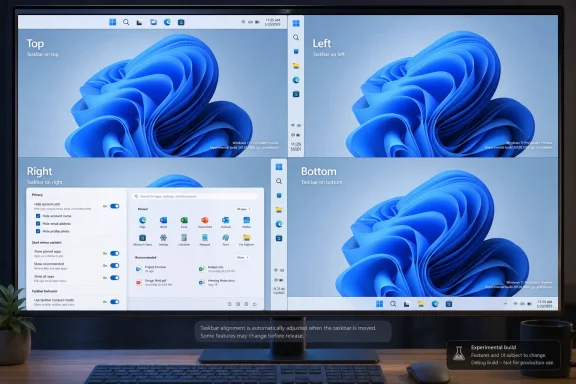
Microsoft is testing Windows 11 taskbar placement on the top, left, right, and bottom of the screen in its Experimental channel, alongside new Start menu controls that let users hide sections, resize the menu, and reduce visible account information. That is a small sentence for a large admission. After nearly five years of Windows 11, Microsoft appears to be conceding that the operating system’s clean-lined interface too often confused simplicity with inflexibility. The result is not merely a prettier desktop; it is a partial retreat from one of Windows 11’s most controversial design bets.
The movable taskbar should not feel revolutionary. Windows users spent decades dragging the taskbar to the top, sides, or bottom of the screen, depending on habit, monitor shape, accessibility needs, or simple preference. Windows 11 broke that expectation when it launched with a rebuilt taskbar that was visually tidier but functionally narrower.
That tradeoff became one of the earliest and most durable complaints about the operating system. Microsoft’s centered icons, simplified context menus, and stripped-down taskbar were meant to make Windows feel modern and approachable. But for many users, especially those coming from Windows 10, the redesign felt less like refinement and more like a landlord changing the locks.
The Experimental channel change reopens a door Microsoft had deliberately closed. The taskbar can now live on any side of the display, and Windows adjusts alignment behavior depending on where the bar sits. That matters because a vertical taskbar is not just an aesthetic preference. On modern widescreen monitors, side placement often makes more sense than consuming vertical pixels at the bottom.
The more revealing part is that Microsoft is not simply restoring a legacy switch. It is rebuilding surrounding behaviors as well: icon alignment, labels, smaller taskbar modes, and window identification all have to work in layouts that Windows 11’s original shell was not designed to prioritize. This is why the feature took years to return, but it is also why its return carries symbolic weight.
Windows 11 was designed around a fixed idea of how the desktop should look. This update suggests Microsoft is becoming more willing to let users decide how the desktop should work.
The Recommended section has always been awkward because it sits at the intersection of convenience, clutter, and suspicion. For some users, recent files and suggested items are genuinely useful. For others, they are wasted space, privacy risk, or an invitation for Microsoft to turn the Start menu into a promotional surface.
Windows 11 never fully resolved that tension. The operating system offered some controls, but they were often indirect or incomplete. Users could reduce recommendations, but empty space frequently remained. They could change some behaviors, but not truly reshape the menu around their own priorities.
The new controls appear to attack that problem more directly. A user who wants a Start menu centered on pinned apps can remove the rest. A user who lives in All Apps can make that more prominent. A user who wants recommendations can keep them without forcing that layout on everyone else.
That is the right model for Windows. The Start menu is not a news feed, a storefront, or a brand statement. It is one of the most-used navigation surfaces in the operating system. Its job is to get out of the way as quickly as possible.
In that environment, the Start menu can leak more than users intend. A name, account picture, or email address may be harmless at home but inappropriate in a classroom, livestream, client demo, support session, or conference room. The fact that Microsoft is giving users an explicit way to reduce that exposure shows a more practical understanding of how Windows is used.
This is not a grand privacy reform. It does not change telemetry policy, account integration, advertising controls, or cloud identity defaults. But it is a useful example of privacy as interface design rather than legal disclosure.
Good privacy controls are often mundane. They remove friction before it becomes embarrassing. They acknowledge that people use their computers in public, semi-public, and shared environments. In that sense, hiding account details in Start is exactly the kind of feature Windows should have had from the beginning.
Windows 11 arrived during a period when laptop displays were improving, but also when more work was being squeezed into browser windows, IDEs, Teams calls, dashboards, and cloud consoles. Vertical space became precious. That is one reason the inability to move the taskbar irritated developers, writers, spreadsheet users, and sysadmins more than Microsoft seemed to expect.
A smaller taskbar also gives Microsoft more room to satisfy competing constituencies. Touch users need larger targets. Desktop users often want density. Accessibility users may need scale and clarity. Power users may want labels, uncombined buttons, and maximum information. No single taskbar can satisfy all of those needs at once.
The only sane answer is flexibility. Microsoft does not have to pick one ideal taskbar for everyone. It has to provide coherent defaults and allow informed users to change them.
This is particularly true for users who keep many documents, browser windows, terminals, or remote sessions open at once. A row of identical icons may look clean in a marketing screenshot, but it is not always efficient in real work. Labels are messy because work is messy.
The combination of vertical taskbar placement and labels could be especially useful on wide monitors. A side taskbar can show more window titles without stealing height from content. That was one of the classic advantages of vertical taskbars, and it is good to see Microsoft acknowledging it rather than merely offering a decorative relocation option.
Still, this is where the Experimental label matters. Early reporting indicates the restored taskbar behavior is not yet a complete return to the Windows 10 model. Some behaviors, such as auto-hide and tablet-optimized layouts, may still be limited outside the bottom position. Microsoft is not flipping a switch back to 2019; it is rebuilding old freedoms inside a newer shell.
That does not mean Windows 11 is becoming Windows 10 again. Microsoft still wants a more modern, controlled, visually consistent desktop. The centered design language, simplified surfaces, and settings-driven customization model remain intact. But the company appears to be accepting that consistency cannot come at the cost of user agency.
This is the central tension of Windows as a product. It must serve beginners who want an uncluttered default and experts who want to tune every visible surface. It must work on tablets, desktops, laptops, ultrawides, virtual machines, cloud PCs, and accessibility setups. It must be opinionated enough to feel coherent and flexible enough not to feel hostile.
Windows 11 leaned hard toward coherence at launch. K2, if these changes are representative, looks like an attempt to rebalance the equation. The argument is no longer that Microsoft got everything wrong in 2021. The argument is that Microsoft overshot.
File Explorer stability is a good example. Nobody buys a PC because File Explorer crashes less often, but everyone notices when it stutters, hangs, loses focus, or behaves unpredictably. The more Microsoft modernizes Explorer with tabs, cloud integration, gallery views, context menu changes, and performance work, the more important it becomes to keep the basics reliable.
Accessibility improvements are similarly central rather than peripheral. Magnifier and Voice Access are not niche conveniences for a separate class of users. They are part of the operating system’s claim to be general-purpose. A Windows desktop that can adapt visually, spatially, and verbally is a stronger desktop for everyone.
This is why the taskbar story should not be read in isolation. Microsoft is not just adding a few toggles for enthusiasts. It is acknowledging that the Windows interface has to bend around different bodies, workflows, screen sizes, and privacy contexts.
That caveat is especially important here because taskbar behavior touches a lot of fragile territory. The taskbar interacts with notifications, app switching, window management, multi-monitor setups, system tray icons, widgets, Copilot surfaces, touch modes, and third-party utilities. Moving it to different edges sounds simple until every assumption in the shell has to be tested again.
Administrators should also avoid treating these changes as imminent fleet policy. There is no reason to build deployment plans around Experimental channel behavior until Microsoft documents what will ship, when it will ship, and how it can be managed. Enthusiasts can test now; enterprises should observe.
Still, preview builds are not meaningless. They show intent. Microsoft has publicly put engineering effort behind features users have been requesting since Windows 11’s debut. That changes the conversation from “why won’t Microsoft listen?” to “how completely will Microsoft follow through?”
That creates a different kind of frustration. When a feature never existed, users may accept its absence. When a feature existed for years and then disappears during a redesign, its absence feels punitive. Windows 11’s taskbar became a symbol of that problem because it looked modern while doing less.
Microsoft has faced this pattern before. The Windows 8 Start screen tried to impose a touch-first future on desktop users and provoked a backlash that shaped Windows 10. Windows 11’s changes were less dramatic, but they carried a similar lesson: Windows cannot simply declare a new interaction model and expect its installed base to forget decades of muscle memory.
The company’s challenge is that old Windows flexibility was not always elegant. It produced clutter, inconsistency, legacy code paths, and settings sprawl. But those flaws were also part of why Windows could fit into so many environments. The trick is not to recreate every old behavior exactly. It is to preserve the freedom that made those behaviors useful.
That is not ideal for anyone. Enthusiast tools can be excellent, but they also create support risk, compatibility problems, and uncertainty after cumulative updates. In managed environments, shell modification tools are often nonstarters. In consumer environments, they can become fragile dependencies.
When Microsoft restores core customization natively, it reduces the need for risky hacks. It also gives administrators a clearer support story and gives users a path that survives feature updates. The best Windows customization should not require registry spelunking or third-party shell surgery.
There will still be room for power-user utilities. Microsoft is unlikely to satisfy every preference, and Windows enthusiasts will always push beyond the supported surface. But the basics — taskbar placement, labels, menu sections, privacy display options — belong in Windows itself.
If Microsoft exposes these options cleanly through Settings, policy, provisioning, or configuration profiles, they become manageable. If they arrive as consumer-facing toggles without adequate administrative control, they become another wrinkle in the Windows 11 support story. The difference matters in schools, call centers, kiosks, VDI environments, and regulated workplaces.
There is also a deployment psychology issue. Windows 11 adoption has often been shaped by hardware requirements, application compatibility, and user resistance to interface changes. Restoring familiar taskbar and Start behaviors could remove one small but emotionally potent objection.
That does not make the upgrade case by itself. TPM requirements, refresh cycles, Windows 10 end-of-support planning, and enterprise app validation remain bigger forces. But user acceptance is real. A desktop that feels less alien is easier to deploy.
The less charitable reading is that Microsoft underestimated how much users valued these controls. The company treated certain legacy behaviors as clutter, then discovered that many people saw them as core functionality. That gap between design intent and user reality has haunted Windows 11 from the beginning.
Both readings can be true. Software design involves tradeoffs, and Windows carries more historical baggage than almost any consumer operating system. But Microsoft’s job is not merely to simplify Windows for screenshots. It is to simplify without flattening the operating system into something less capable.
The new Experimental build suggests Microsoft is moving in that direction. The company is not abandoning modern Windows 11 design. It is adding back the adjustable parts that make a general-purpose desktop feel owned by the person using it.
 Microsoft Finally Stops Treating the Bottom Edge as Sacred
The movable taskbar should not feel revolutionary. Windows users spent decades dragging the taskbar to the top, sides, or bottom of the screen, depending on habit, monitor shape, accessibility needs, or simple preference. Windows 11 broke that expectation when it launched with a rebuilt taskbar that was visually tidier but functionally narrower.That tradeoff became one of the earliest and most durable complaints about the operating system. Microsoft’s centered icons, simplified context menus, and stripped-down taskbar were meant to make Windows feel modern and approachable. But for many users, especially those coming from Windows 10, the redesign felt less like refinement and more like a landlord changing the locks.
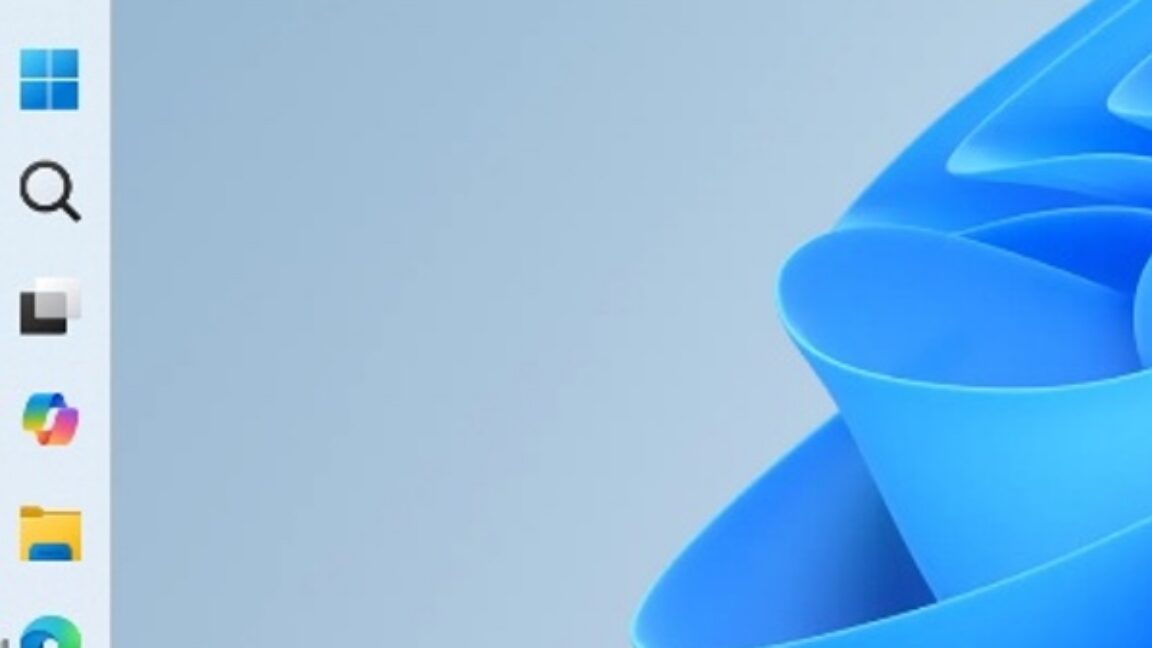
The Experimental channel change reopens a door Microsoft had deliberately closed. The taskbar can now live on any side of the display, and Windows adjusts alignment behavior depending on where the bar sits. That matters because a vertical taskbar is not just an aesthetic preference. On modern widescreen monitors, side placement often makes more sense than consuming vertical pixels at the bottom.
The more revealing part is that Microsoft is not simply restoring a legacy switch. It is rebuilding surrounding behaviors as well: icon alignment, labels, smaller taskbar modes, and window identification all have to work in layouts that Windows 11’s original shell was not designed to prioritize. This is why the feature took years to return, but it is also why its return carries symbolic weight.
Windows 11 was designed around a fixed idea of how the desktop should look. This update suggests Microsoft is becoming more willing to let users decide how the desktop should work.
The Start Menu Becomes Less of a Microsoft Editorial Page
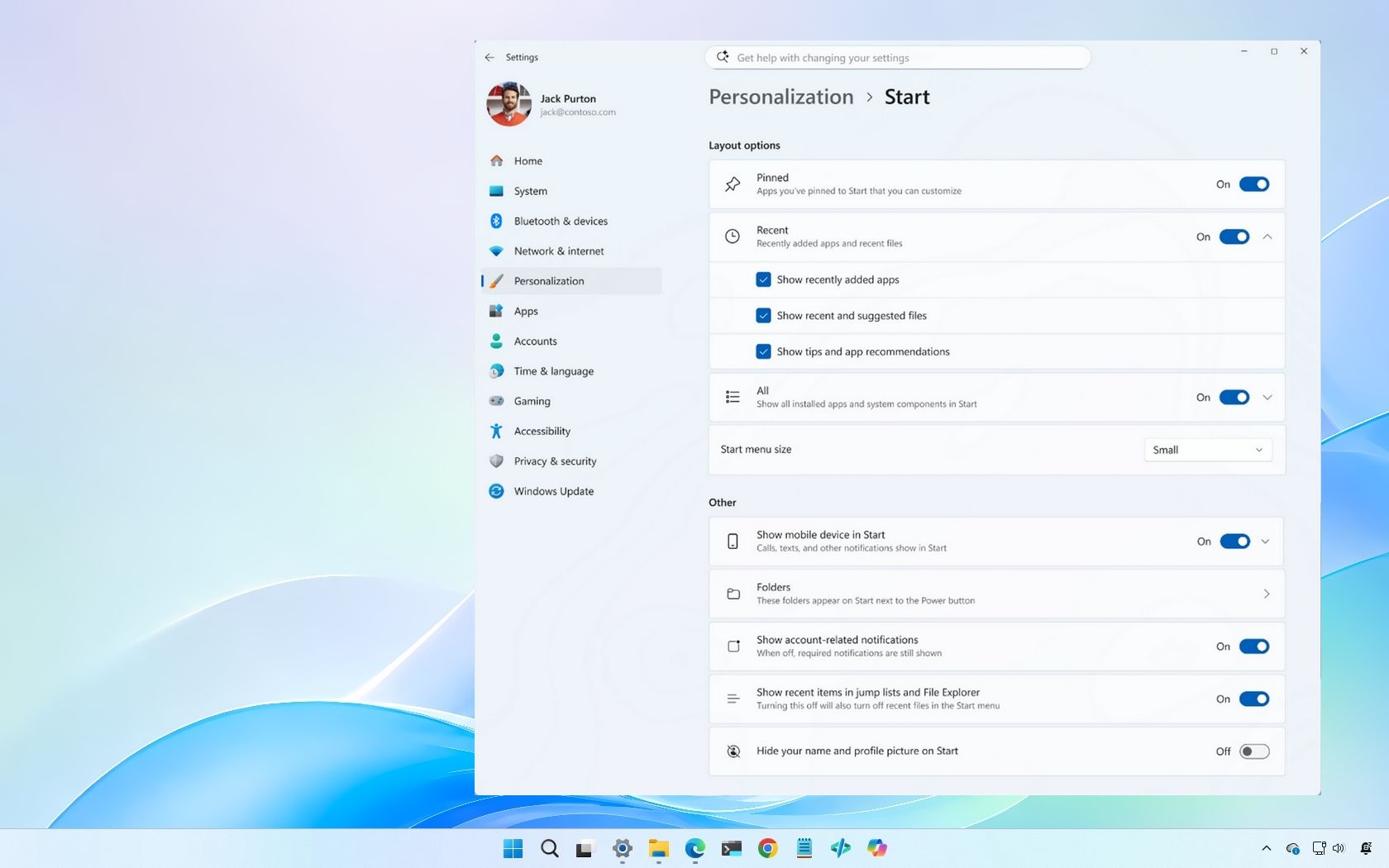
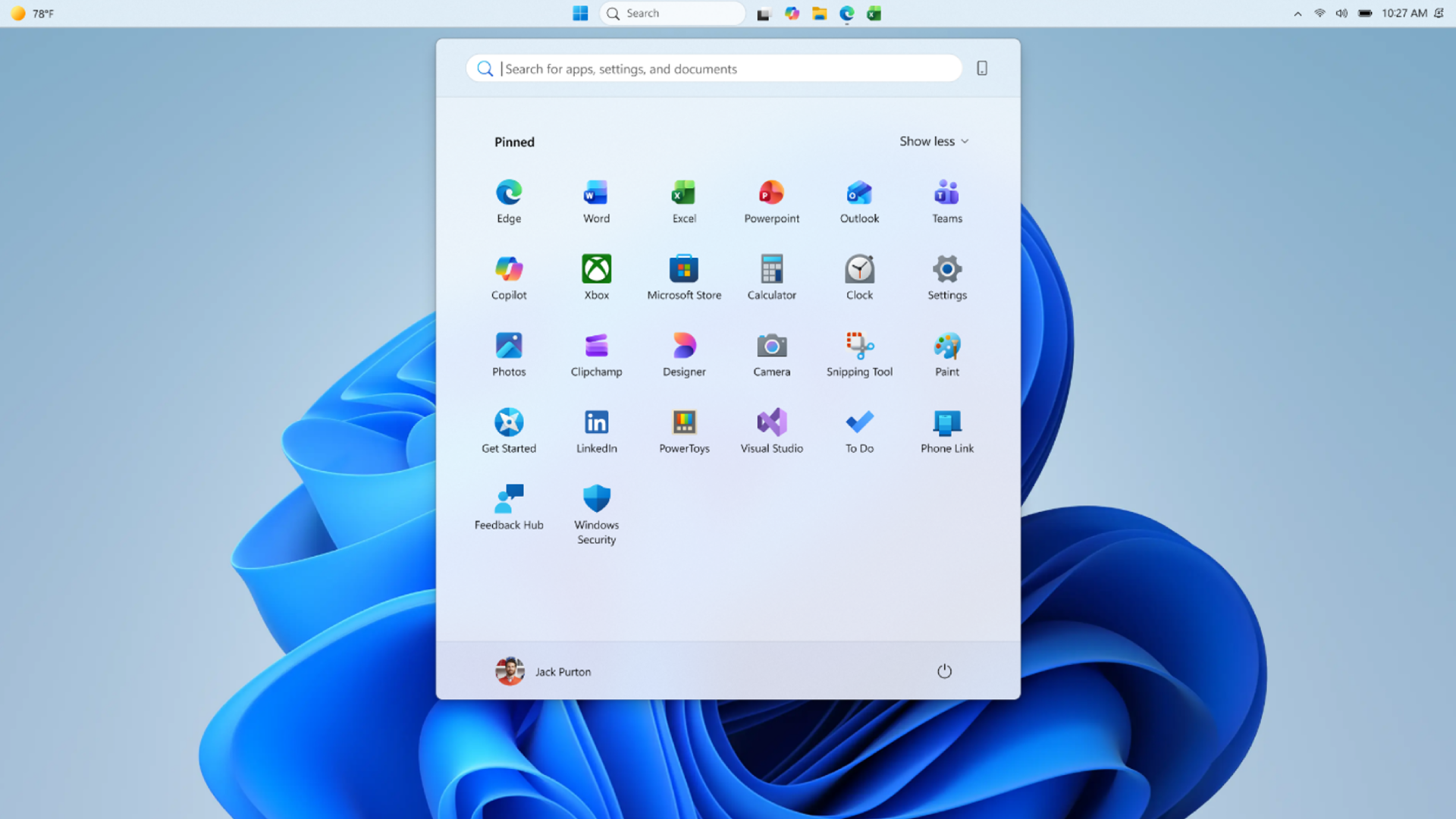
The Start menu changes are just as important, even if they are less visually dramatic. Microsoft is adding controls to show or hide the Pinned, Recommended, and All Apps sections, while also letting users adjust the menu’s size. That means the Start menu can finally behave less like a fixed landing page and more like a configurable launcher.The Recommended section has always been awkward because it sits at the intersection of convenience, clutter, and suspicion. For some users, recent files and suggested items are genuinely useful. For others, they are wasted space, privacy risk, or an invitation for Microsoft to turn the Start menu into a promotional surface.
Windows 11 never fully resolved that tension. The operating system offered some controls, but they were often indirect or incomplete. Users could reduce recommendations, but empty space frequently remained. They could change some behaviors, but not truly reshape the menu around their own priorities.
The new controls appear to attack that problem more directly. A user who wants a Start menu centered on pinned apps can remove the rest. A user who lives in All Apps can make that more prominent. A user who wants recommendations can keep them without forcing that layout on everyone else.
That is the right model for Windows. The Start menu is not a news feed, a storefront, or a brand statement. It is one of the most-used navigation surfaces in the operating system. Its job is to get out of the way as quickly as possible.
Privacy Gets a Small but Telling Desktop Win
The option to hide the name, email address, and profile information shown in Start may sound minor, but it addresses a very modern Windows problem. PCs are no longer private islands. They are constantly projected, streamed, screen-shared, recorded, and used in hybrid meetings.In that environment, the Start menu can leak more than users intend. A name, account picture, or email address may be harmless at home but inappropriate in a classroom, livestream, client demo, support session, or conference room. The fact that Microsoft is giving users an explicit way to reduce that exposure shows a more practical understanding of how Windows is used.
This is not a grand privacy reform. It does not change telemetry policy, account integration, advertising controls, or cloud identity defaults. But it is a useful example of privacy as interface design rather than legal disclosure.
Good privacy controls are often mundane. They remove friction before it becomes embarrassing. They acknowledge that people use their computers in public, semi-public, and shared environments. In that sense, hiding account details in Start is exactly the kind of feature Windows should have had from the beginning.
The Smaller Taskbar Is Really About Screen Economics
The compact taskbar option is another case where a cosmetic-looking change has practical consequences. On a 32-inch desktop monitor, shaving a few pixels from the taskbar may not matter. On a 13-inch laptop, a handheld gaming PC, a remote desktop window, or a virtual machine, every strip of usable space counts.Windows 11 arrived during a period when laptop displays were improving, but also when more work was being squeezed into browser windows, IDEs, Teams calls, dashboards, and cloud consoles. Vertical space became precious. That is one reason the inability to move the taskbar irritated developers, writers, spreadsheet users, and sysadmins more than Microsoft seemed to expect.
A smaller taskbar also gives Microsoft more room to satisfy competing constituencies. Touch users need larger targets. Desktop users often want density. Accessibility users may need scale and clarity. Power users may want labels, uncombined buttons, and maximum information. No single taskbar can satisfy all of those needs at once.
The only sane answer is flexibility. Microsoft does not have to pick one ideal taskbar for everyone. It has to provide coherent defaults and allow informed users to change them.
Labels Return Because Icons Alone Were Never Enough
App labels across different taskbar placements are another nod to the productivity crowd. Windows 11’s icon-first taskbar fits Microsoft’s modern design language, but icons are not always the fastest way to distinguish work. When several windows from the same app are open, labels can save time and reduce mistakes.This is particularly true for users who keep many documents, browser windows, terminals, or remote sessions open at once. A row of identical icons may look clean in a marketing screenshot, but it is not always efficient in real work. Labels are messy because work is messy.
The combination of vertical taskbar placement and labels could be especially useful on wide monitors. A side taskbar can show more window titles without stealing height from content. That was one of the classic advantages of vertical taskbars, and it is good to see Microsoft acknowledging it rather than merely offering a decorative relocation option.
Still, this is where the Experimental label matters. Early reporting indicates the restored taskbar behavior is not yet a complete return to the Windows 10 model. Some behaviors, such as auto-hide and tablet-optimized layouts, may still be limited outside the bottom position. Microsoft is not flipping a switch back to 2019; it is rebuilding old freedoms inside a newer shell.
Windows K2 Looks Like a Course Correction, Not a Revolution
The broader personalization push has been associated with Microsoft’s reported Windows K2 work, an internal effort aimed at improving core Windows experiences such as Start, taskbar, File Explorer, and everyday shell behavior. Whether Microsoft uses that branding publicly is less important than the pattern now visible in preview builds. The company is revisiting the places where Windows 11 felt most rigid.That does not mean Windows 11 is becoming Windows 10 again. Microsoft still wants a more modern, controlled, visually consistent desktop. The centered design language, simplified surfaces, and settings-driven customization model remain intact. But the company appears to be accepting that consistency cannot come at the cost of user agency.
This is the central tension of Windows as a product. It must serve beginners who want an uncluttered default and experts who want to tune every visible surface. It must work on tablets, desktops, laptops, ultrawides, virtual machines, cloud PCs, and accessibility setups. It must be opinionated enough to feel coherent and flexible enough not to feel hostile.
Windows 11 leaned hard toward coherence at launch. K2, if these changes are representative, looks like an attempt to rebalance the equation. The argument is no longer that Microsoft got everything wrong in 2021. The argument is that Microsoft overshot.
File Explorer and Accessibility Changes Matter Because the Shell Is a System
The same Experimental build also points to improvements in File Explorer and accessibility features such as Magnifier and Voice Access. Those details may be less headline-grabbing than the taskbar, but they matter because the Windows shell is not one feature. It is a network of small interactions repeated hundreds of times per day.File Explorer stability is a good example. Nobody buys a PC because File Explorer crashes less often, but everyone notices when it stutters, hangs, loses focus, or behaves unpredictably. The more Microsoft modernizes Explorer with tabs, cloud integration, gallery views, context menu changes, and performance work, the more important it becomes to keep the basics reliable.
Accessibility improvements are similarly central rather than peripheral. Magnifier and Voice Access are not niche conveniences for a separate class of users. They are part of the operating system’s claim to be general-purpose. A Windows desktop that can adapt visually, spatially, and verbally is a stronger desktop for everyone.
This is why the taskbar story should not be read in isolation. Microsoft is not just adding a few toggles for enthusiasts. It is acknowledging that the Windows interface has to bend around different bodies, workflows, screen sizes, and privacy contexts.
The Experimental Channel Is a Promise, Not a Shipping Date
There is a danger in overreading preview builds. Experimental features can change, stall, ship in pieces, or disappear. Microsoft often tests features with subsets of Insiders, and a feature appearing in one channel does not guarantee a fast or universal rollout to stable Windows 11 systems.That caveat is especially important here because taskbar behavior touches a lot of fragile territory. The taskbar interacts with notifications, app switching, window management, multi-monitor setups, system tray icons, widgets, Copilot surfaces, touch modes, and third-party utilities. Moving it to different edges sounds simple until every assumption in the shell has to be tested again.
Administrators should also avoid treating these changes as imminent fleet policy. There is no reason to build deployment plans around Experimental channel behavior until Microsoft documents what will ship, when it will ship, and how it can be managed. Enthusiasts can test now; enterprises should observe.
Still, preview builds are not meaningless. They show intent. Microsoft has publicly put engineering effort behind features users have been requesting since Windows 11’s debut. That changes the conversation from “why won’t Microsoft listen?” to “how completely will Microsoft follow through?”
The Real Competition Is Not macOS or Linux, but Windows’ Own Memory
The reason these changes resonate is that Windows users remember having them. This is not like demanding an exotic new window manager or a developer-only shell extension. Movable taskbars, labels, dense layouts, and configurable Start behavior are part of Windows’ own history.That creates a different kind of frustration. When a feature never existed, users may accept its absence. When a feature existed for years and then disappears during a redesign, its absence feels punitive. Windows 11’s taskbar became a symbol of that problem because it looked modern while doing less.
Microsoft has faced this pattern before. The Windows 8 Start screen tried to impose a touch-first future on desktop users and provoked a backlash that shaped Windows 10. Windows 11’s changes were less dramatic, but they carried a similar lesson: Windows cannot simply declare a new interaction model and expect its installed base to forget decades of muscle memory.
The company’s challenge is that old Windows flexibility was not always elegant. It produced clutter, inconsistency, legacy code paths, and settings sprawl. But those flaws were also part of why Windows could fit into so many environments. The trick is not to recreate every old behavior exactly. It is to preserve the freedom that made those behaviors useful.
Third-Party Tweakers Filled the Vacuum Microsoft Created
The slow return of taskbar flexibility also validates the ecosystem of tools and workarounds that emerged after Windows 11 launched. Utilities that modified the taskbar, restored old context menus, changed Start behavior, or patched Explorer became popular because Microsoft left obvious gaps.That is not ideal for anyone. Enthusiast tools can be excellent, but they also create support risk, compatibility problems, and uncertainty after cumulative updates. In managed environments, shell modification tools are often nonstarters. In consumer environments, they can become fragile dependencies.
When Microsoft restores core customization natively, it reduces the need for risky hacks. It also gives administrators a clearer support story and gives users a path that survives feature updates. The best Windows customization should not require registry spelunking or third-party shell surgery.
There will still be room for power-user utilities. Microsoft is unlikely to satisfy every preference, and Windows enthusiasts will always push beyond the supported surface. But the basics — taskbar placement, labels, menu sections, privacy display options — belong in Windows itself.
Enterprise IT Will Care About Predictability More Than Freedom
For sysadmins, the interesting question is not whether a left-side taskbar is nice. It is whether these changes introduce new management complexity. Any visible shell change can generate tickets, training issues, documentation drift, and help-desk confusion.If Microsoft exposes these options cleanly through Settings, policy, provisioning, or configuration profiles, they become manageable. If they arrive as consumer-facing toggles without adequate administrative control, they become another wrinkle in the Windows 11 support story. The difference matters in schools, call centers, kiosks, VDI environments, and regulated workplaces.
There is also a deployment psychology issue. Windows 11 adoption has often been shaped by hardware requirements, application compatibility, and user resistance to interface changes. Restoring familiar taskbar and Start behaviors could remove one small but emotionally potent objection.
That does not make the upgrade case by itself. TPM requirements, refresh cycles, Windows 10 end-of-support planning, and enterprise app validation remain bigger forces. But user acceptance is real. A desktop that feels less alien is easier to deploy.
Microsoft’s Design Lesson Is Arriving Late, but Not Too Late
The charitable reading is that Microsoft needed time. Windows 11’s taskbar was rebuilt, and rebuilding old capabilities into a new architecture takes engineering work. Supporting different placements, labels, scale options, touch behavior, animation, and accessibility is harder than exposing a hidden switch.The less charitable reading is that Microsoft underestimated how much users valued these controls. The company treated certain legacy behaviors as clutter, then discovered that many people saw them as core functionality. That gap between design intent and user reality has haunted Windows 11 from the beginning.
Both readings can be true. Software design involves tradeoffs, and Windows carries more historical baggage than almost any consumer operating system. But Microsoft’s job is not merely to simplify Windows for screenshots. It is to simplify without flattening the operating system into something less capable.
The new Experimental build suggests Microsoft is moving in that direction. The company is not abandoning modern Windows 11 design. It is adding back the adjustable parts that make a general-purpose desktop feel owned by the person using it.
The Desktop Starts Giving Space Back to the People Who Live There
The most concrete lesson from this preview wave is that Microsoft is beginning to restore choice where Windows 11 removed it. These are not all finished features, and they should not be treated as stable-channel guarantees yet. But they show a meaningful shift in what Microsoft thinks the Windows desktop should allow.- The Windows 11 taskbar is being tested with placement on the top, left, right, and bottom edges of the screen.
- The taskbar work includes alignment behavior, labels, and a smaller mode rather than only a simple location switch.
- The Start menu is gaining controls to hide Pinned, Recommended, and All Apps sections independently.
- Microsoft is adding Start menu size options and a way to hide visible account identity details.
- File Explorer, Magnifier, and Voice Access improvements suggest the build is part of a wider shell quality effort, not just a taskbar experiment.
- The Experimental channel status means users should treat these changes as directionally important but not yet guaranteed in their final form.
References
- Primary source: Qoo Media
Published: 2026-06-02T20:54:07.541591
Loading…
www.qoo10.co.id - Related coverage: windowscentral.com
“A cleaner, more useful Start menu” — Windows 11 is getting 4 upgrades soon
Microsoft is finally fixing some of the biggest frustrations with the Windows 11 Start menu, including resizing and better customization controls. www.windowscentral.com
- Official source: blogs.windows.com

Improving Windows quality: Making Taskbar and Start more personal
In our commitment to Windows quality, we outlined our plans to deliver improvements in performance, reliability, and craft. We are also committed to blogs.windows.com
- Related coverage: news.lavx.hu
Loading…
news.lavx.hu - Related coverage: alternativeto.net
- Related coverage: techspot.com
Loading…
www.techspot.com
- Related coverage: techradar.com
Loading…
www.techradar.com - Related coverage: arstechnica.com
Five years later, Windows 11 brings back much-missed taskbar options (and more)
Microsoft is also testing a smaller taskbar and more customizable Start menu. arstechnica.com
- Official source: techcommunity.microsoft.com
Loading…
techcommunity.microsoft.com - Related coverage: fdaytalk.com

How to Move Taskbar to Top on Windows 11 (5 Methods)
Learn how to move taskbar in Windows 11 to the top, left, or right using the Insider Settings option, Windhawk, ExplorerPatcher, or Start11. www.fdaytalk.com
- Related coverage: pcgamer.com
Microsoft announces plans to let you put the taskbar in Windows 11 pretty much anywhere you want
Top, bottom, left and right.www.pcgamer.com
- Related coverage: tech.slashdot.org

Microsoft Testing Adjustable Taskbar, Start Menu In Windows 11 - Slashdot
Microsoft is testing long-requested Windows 11 customization options, including a resizable taskbar, smaller taskbar buttons, and a more configurable Start menu that lets users reduce recommended content. BleepingComputer reports: Starting with Windows 11 Insider Preview Build 26300.8493, the...tech.slashdot.org