

Windows 11’s File Explorer is getting another quiet round of refinement — a mix of incremental design polish and a long‑running rendering bug fix — and both moves tell a larger story about how Microsoft balances visual modernization with the hard work of stability across a decades‑old platform.
File Explorer remains the single most frequently used graphical surface in Windows for almost every user. Small visual inconsistencies and performance regressions therefore get noticed quickly and loudly. Over the last year Microsoft has been iterating on File Explorer in two parallel ways: one, by applying WinUI/Fluent visual polish (rounded corners, consistent dark theme treatment, voice typing accessibility, and modest UX tweaks); and two, by addressing reliability and rendering regressions introduced while applying that polish. The recent Insider flight notes and community reports make both strands visible: experimental UI tweaks (some off by default) plus a documented fix for a jarring “white flash” that had persisted for months in certain configurations.
Microsoft’s approach is incremental. Changes land first in Insider channels (Canary, Dev, Beta) as controlled feature rollouts so telemetry and feedback can validate the changes before they reach production servicing rings. That process is working, but it’s also exposing the trade‑offs of modernizing a hybrid UI that mixes modern WinUI elements with legacy Win32 rendering paths. The recent episodes — a dark‑mode rollout that briefly introduced a bright white frame, followed by fixes pushed through Insider builds — are a clear case study.
Why this matters: UI consistency is a low‑glamour, high‑impact improvement. A few pixels of corner radius matter when a user spends hours working with files; mismatched corners and dialog shapes contribute to the perception of an unfinished product. Rounded corners are one of those tiny visual signals that, when applied broadly, make the OS feel cohesive and modern.
This was not a single‑user oddity. The regression persisted across several months and servicing channels, particularly affecting instances where File Explorer was set to open to This PC rather than Home, and remained a visible problem for a subset of users until Microsoft validated a fix in Insider builds.
For end users, the practical takeaway is straightforward: the white‑flash issue has been addressed in Insider builds and the fix should propagate to production channels in time; rounded corners and other small polish items are being tested but remain experimental. For IT teams and accessibility stakeholders, the episode is a reminder to treat UI regressions as operational and governance risks, to validate updates on representative hardware, and to keep rollback strategies at the ready.
Small changes — a few pixels of radius on an address bar, a fraction of a second shaved from a paint pipeline — can have outsized effects on trust, accessibility, and the day‑to‑day quality of the platform. The File Explorer story shows the industry truth: software quality is mostly built in hundreds of tiny, careful fixes, not in single dramatic releases.
Source: Windows Latest Windows 11 File Explorer might get more rounded corners, and Microsoft is also fixing white flashes in 'This PC'
 Background / Overview
File Explorer remains the single most frequently used graphical surface in Windows for almost every user. Small visual inconsistencies and performance regressions therefore get noticed quickly and loudly. Over the last year Microsoft has been iterating on File Explorer in two parallel ways: one, by applying WinUI/Fluent visual polish (rounded corners, consistent dark theme treatment, voice typing accessibility, and modest UX tweaks); and two, by addressing reliability and rendering regressions introduced while applying that polish. The recent Insider flight notes and community reports make both strands visible: experimental UI tweaks (some off by default) plus a documented fix for a jarring “white flash” that had persisted for months in certain configurations.Microsoft’s approach is incremental. Changes land first in Insider channels (Canary, Dev, Beta) as controlled feature rollouts so telemetry and feedback can validate the changes before they reach production servicing rings. That process is working, but it’s also exposing the trade‑offs of modernizing a hybrid UI that mixes modern WinUI elements with legacy Win32 rendering paths. The recent episodes — a dark‑mode rollout that briefly introduced a bright white frame, followed by fixes pushed through Insider builds — are a clear case study.
What’s changing: minor design refresh and rounded corners
The visible tweak: address and search bar rounding
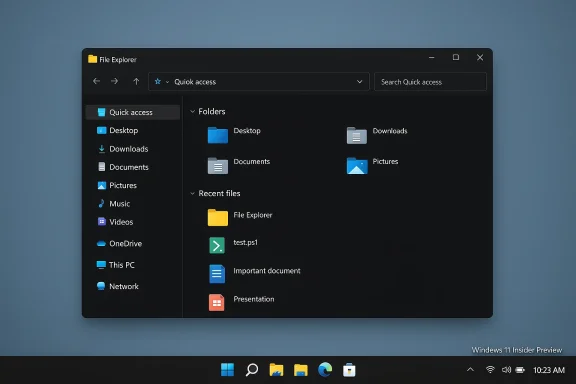
Community observers have noticed a subtle design change in File Explorer previews: the address bar and the search box now render with rounded corners that match the Settings app and other modern surfaces. The UI change is small — a radius tweak rather than a new feature — but it matters because it reduces visual inconsistency across the shell and makes Explorer feel less like a patched‑together surface and more like a unified Fluent UI component. Microsoft is testing this in Insider builds and, according to community posts, the feature is currently gated (disabled by default) while Microsoft validates it.Why this matters: UI consistency is a low‑glamour, high‑impact improvement. A few pixels of corner radius matter when a user spends hours working with files; mismatched corners and dialog shapes contribute to the perception of an unfinished product. Rounded corners are one of those tiny visual signals that, when applied broadly, make the OS feel cohesive and modern.
Scope and rollout expectations
- The change applies to top chrome elements inside File Explorer (address bar and search box) rather than reworking the entire window. This suggests Microsoft is pursuing targeted polish instead of sweeping redesigns.
- The tweak appears in Insider preview builds as an experimental flag or as part of a Controlled Feature Rollout. Expect the feature to be enabled gradually for Insiders, and only later included in a public cumulative update if telemetry is positive.
- Because the experiment is disabled by default in many preview builds, not all testers will see it immediately; conversely, seeing it in your build does not guarantee it will ship unchanged to the general population.
Caveats and cautionary notes
- The rounded‑corners observation currently comes from community spotting and Insider churn; Microsoft has not published a targeted post declaring a global rounded‑corner refresh for Explorer. Treat the appearance as experimental and subject to change.
- Small visual changes can reveal larger compatibility or accessibility issues on certain drivers, display setups, or assistive technologies. Microsoft’s staged rollout and telemetry gating are meant to catch such regressions before wide distribution.
The long‑running problem Microsoft acknowledged: the File Explorer “white flash”
What happened
In December 2025 Microsoft shipped an optional preview cumulative update (packaged as KB5070311) that extended dark mode coverage to more File Explorer surfaces (copy/delete dialogs, preview panes and similar). While the goal was to deliver a more cohesive dark experience, the preview unintentionally introduced a rendering regression: on systems set to Dark theme, File Explorer could briefly display a bright white frame — a full or near‑full‑window flash — during common operations such as opening new windows/tabs, switching views, or resizing panes. The bug was reproducible for many users and rapidly attracted attention because File Explorer is a high‑frequency surface and because flashes can be problematic for accessibility. Microsoft documented the behavior as a Known Issue in the preview notes and began triage.This was not a single‑user oddity. The regression persisted across several months and servicing channels, particularly affecting instances where File Explorer was set to open to This PC rather than Home, and remained a visible problem for a subset of users until Microsoft validated a fix in Insider builds.
Microsoft’s acknowledgement and timeline
Microsoft acknowledged the regression publicly in the KB5070311 release notes and treated it as a known issue while engineers worked on a fix. After months of iteration in Canary and Dev channels, Microsoft published Insider flight notes on March 6, 2026 that explicitly list the removal of the white flash as a corrections item. The fix appears in builds such as Windows 11 Insider Preview Build 26220.7961 (Beta channel) and Build 26300.7965 (Dev channel), with release packaging denoted in Insider announcements. Microsoft’s notes say the white flash when launching new Explorer windows/tabs (particularly when set to open to This PC) and when resizing elements has been removed in these flights.Why it mattered
- User experience: Dark mode aims to reduce glare and visual fatigue; an unexpected bright flash defeats that purpose and produces a jarring experience.
- Accessibility: Sudden bright flashes can trigger adverse reactions for users with photosensitivity or migraines, making the issue more than cosmetic.
- Enterprise risk: A regression on such a foundational surface forces IT teams to pause optional preview updates, delay pilots, and re‑examine update cadences — eroding confidence in update stability.
- Reputational: Visible regressions on UI staples like File Explorer get outsized attention and feed narratives about platform stability.
Technical anatomy: what likely caused the white flash (and what we can verify)
What we can verify
- The symptom is real and reproducible in the scenarios Microsoft documented: launching new File Explorer windows/tabs or resizing UI elements when File Explorer opens to This PC under Dark theme. Microsoft listed the removal of white flashes explicitly in the March Insider notes.
- The regression surfaced after a preview cumulative update (KB5070311) that changed the dark‑mode painting flow for File Explorer and related dialogs. The timing and causal link are described in multiple summaries of KB5070311.
Plausible root causes (why it happened)
Because Microsoft has not published a code‑level postmortem, the exact source of the bug remains undisclosed in public. However, the observable behavior and common rendering pitfalls point to a small set of plausible technical causes:- Painting order / initialization race: File Explorer is a hybrid surface composed of modern WinUI components and legacy Win32 shell elements. If the compositor or theme initialization completes after an initial background draw, a default white buffer can become briefly visible before the dark theme layer finishes painting.
- Fallback render buffers: A default background (often white) used by legacy controls might be exposed momentarily if modern style resources (dark brushes, acrylic) are applied asynchronously.
- GPU driver and vsync timing: Variants across integrated vs discrete GPUs and driver behavior can amplify the visible flash, making reproduction inconsistent across hardware.
- Controlled Feature Rollout interactions: Server‑side gating and partial exposure can make the flash appear for some users and not others, complicating public diagnosis.
What Microsoft shipped in the March Insider builds (practical changelog)
Across the March 6, 2026 Insider announcements the Explorer‑related changes included:- Removed white flash when launching new File Explorer windows or tabs when File Explorer was configured to open to This PC; also removed white flashes when resizing File Explorer elements.
- Voice typing (Win + H) enabled inside File Explorer rename fields to improve accessibility and dictation workflows.
- Reliability improvements for previewing downloaded files that had been blocked due to Mark‑of‑the‑Web security changes introduced in October 2025.
- Additional small UX refinements such as a tweaked sharing drag tray and various stability fixes surfaced in the same Insider notes.
Impact on users, administrators, and accessibility advocates
Home users and enthusiasts
- If you experienced the white flash and want the fix now, the practical route is to enroll a spare device in the Beta or Dev Insider channel and install the March Insider builds that include the remediation. But be cautious: Insider flights can contain other pre‑release changes and should not be used on critical production machines.
- If you prefer stability, wait for Microsoft to fold the Explorer fixes into a general cumulative update for production channels. Microsoft’s staged rollout model typically promotes fixes from Insider channels into the mainstream servicing cadence after telemetry and feedback are satisfactory.
IT administrators and organizations
- Avoid broad deployment of optional preview updates (the “C” / Release Preview preview cumulative packages) into production rings without validating them in a pilot group. KB5070311 demonstrates how optional previews can introduce regressions that affect fleet stability.
- Validate the March fixes in a representative set of hardware (Intel/AMD/NVIDIA GPUs, varied drivers, mixed DPI setups) before approving wide distribution. Visual regressions often surface only on specific driver stacks.
- Document and rehearse rollback procedures and Staged Update ring strategies (Group Policy, Intune rings) so you can isolate and mitigate unexpected regressions quickly. The episode is a reminder that UI regressions can carry accessibility and compliance repercussions.
Accessibility considerations
- The white flash had the potential to be a trigger for users with photosensitivity. Removing it was therefore more than cosmetic; it reduced a possible health hazard for a subset of users. If you or an organization supports users with photosensitivity, it’s prudent to delay preview deployments until production updates carry the fix, or to continue using Light theme where the symptom does not appear.
Wider implications: what the episode reveals about Windows engineering
- Modernizing legacy surfaces is hard. File Explorer mixes new WinUI components with older Win32 code paths. That hybrid model increases the chance of regressions when system theme and painting behaviors change.
- Insider channels and Controlled Feature Rollouts still work. The lifecycle here — symptom introduction in a preview package, community reporting, Microsoft acknowledgement, fix pushed through Insider channels, staged validation — demonstrates the feedback loop functioning as intended, though the time it took (roughly three months from regression to documented Insider fix) underlines that even small UI regressions can take time to resolve safely.
- Visual polish must be balanced with operational reliability. Organizations treat Explorer as a mission‑critical interface; regression risk on such a surface has disproportionate operational consequences. Microsoft’s response indicates an increasing prioritization of reliability and accessibility alongside new features.
Actionable recommendations
For home users:- If you want the Explorer visual polish (rounded corners) and the white‑flash fix now, install Insider Beta/Dev builds on a non‑critical machine and test your workflows. Remember: Insider builds are pre‑release and can introduce other changes.
- If stability matters more, wait for the fix to appear in a production cumulative update. Keep automatic updates enabled but avoid optional preview packages that could reintroduce regressions.
- As a short‑term mitigation for the flash, switch Explorer or system theme to Light if the sudden bright frame is problematic for you.
- Keep optional preview updates (like KB5070311) out of production rings until validated. Use pilot rings to test Insider/promotional updates and measure real‑world telemetry.
- Validate any March fixes across GPU vendors, multiple display configurations, and accessibility scenarios before broad rollout.
- Document the date and KB/build numbers in your change log when you approve or block updates to support compliance and auditability.
- Verify the absence of bright flashes on representative devices used by photosensitive users before moving to production.
- If uncertainty persists, continue using Light theme or deploy a third‑party file manager as a temporary mitigation for particularly sensitive users.
Critical analysis: strengths, risks, and what to watch next
Strengths
- Microsoft acknowledged the problem publicly and moved to fix it through the Insider channels, which indicates organizational responsiveness and an operational model that can remediate high‑impact regressions.
- The March Insider builds bundled the white‑flash remediation with other practical improvements (voice typing, preview reliability tweaks), demonstrating a focus on incremental quality and accessibility.
Risks and unresolved issues
- Microsoft has not published a full technical postmortem explaining the precise root cause and the code changes used to fix the regression. That’s normal for patch‑level fixes, but it leaves open questions about whether the fix addresses all permutations across drivers and rare hardware configurations. Until the fix reaches broad production, some users will continue to see symptoms due to controlled rollouts.
- Controlled Feature Rollouts can create a staggered experience where some users see fixes immediately while others don’t, potentially increasing support volume and user confusion. Administrators need to plan for this heterogeneity.
- Visual polish like rounded corners, while low‑risk in principle, can surface corner cases in accessibility tooling or third‑party shell modifications and may provoke compatibility work for customization tools such as ExplorerPatcher. Monitor third‑party extenders carefully.
What to watch next
- When the March Insider fixes appear in a named production cumulative update (Patch Tuesday or a servicing update), watch patch notes for KB identifiers and confirm testing across your device fleet before approving broad deployments.
- Track telemetry and user feedback for any remaining flicker, especially in multi‑monitor and mixed‑DPI environments.
- Observe whether Microsoft expands the rounded‑corner polish to additional Explorer surfaces (tabs, context menus) and whether third‑party customization tools adapt or push back.
Conclusion
The latest File Explorer developments are emblematic of the current Windows 11 engineering posture: incremental visual polish (rounded corners and small UX refinements) combined with an unglamorous but essential focus on reliability (removing the white flash). The white‑flash regression and subsequent Insider fixes illustrate the inherent tension between modernizing the UI and preserving stability on a platform with deep legacy roots. Microsoft’s staged approach — acknowledging the issue, iterating in Insider channels, and documenting fixes — is the right pattern for mitigating risk, but it will require patience from users and careful validation by administrators.For end users, the practical takeaway is straightforward: the white‑flash issue has been addressed in Insider builds and the fix should propagate to production channels in time; rounded corners and other small polish items are being tested but remain experimental. For IT teams and accessibility stakeholders, the episode is a reminder to treat UI regressions as operational and governance risks, to validate updates on representative hardware, and to keep rollback strategies at the ready.
Small changes — a few pixels of radius on an address bar, a fraction of a second shaved from a paint pipeline — can have outsized effects on trust, accessibility, and the day‑to‑day quality of the platform. The File Explorer story shows the industry truth: software quality is mostly built in hundreds of tiny, careful fixes, not in single dramatic releases.
Source: Windows Latest Windows 11 File Explorer might get more rounded corners, and Microsoft is also fixing white flashes in 'This PC'