

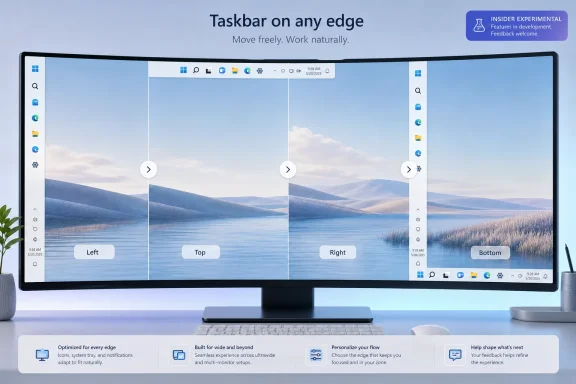
Microsoft began testing movable Windows 11 taskbars in May 2026 through its Windows Insider Experimental channel, letting testers place the taskbar on the bottom, top, left, or right edge of the screen from the Taskbar behaviors section in Settings. The change is small enough to fit inside a single dropdown, but large enough to reopen one of Windows 11’s longest-running arguments. After nearly five years of telling users, implicitly or explicitly, that the bottom taskbar was the future, Microsoft is now admitting that the desktop still belongs partly to the people who use it all day.
That is the real story here. Not that a strip of icons can move a few hundred pixels. The story is that Windows 11’s most conspicuous act of simplification has finally met the stubborn reality of Windows users: they do not all work the same way, they do not all use the same displays, and they do not regard personalization as cosmetic fluff.
When Windows 11 launched in 2021, the fixed taskbar was not merely a missing option. It was a symbol. Microsoft had rebuilt the shell around a cleaner, centered, more controlled desktop experience, and the old “put it anywhere” taskbar was one of the casualties.
For some users, that tradeoff was barely noticeable. The taskbar stayed where it had always been for them: along the bottom edge, a row of pinned apps, running windows, system tray icons, and clock. For others, especially those who had spent years with a left-side or top-mounted taskbar, Windows 11 felt less like modernization than a confiscation.
That complaint never really went away. Microsoft restored or reworked several other Windows 11 omissions over time, including taskbar drag-and-drop, taskbar labels, and “never combine” behavior. But taskbar position remained a particularly visible sore spot because it was so easy to explain: Windows 10 could do this; Windows 11 could not.
Now the option is back in testing. In the current Insider experiment, users can go to Settings, open Personalization, expand Taskbar behaviors, and select a taskbar position from a simple control. The options are familiar: bottom, top, left, and right. The taskbar moves without requiring a reboot, which makes the old limitation feel even more artificial to the people who have been waiting for it.
That reaction is understandable, but it is also incomplete. A vertical taskbar is not just a horizontal taskbar rotated ninety degrees. The Start menu, Search, jump lists, notifications, flyouts, animations, overflow behavior, touch affordances, and multi-monitor logic all have to understand the new geometry. Windows 11’s taskbar was not the Windows 10 taskbar with a coat of paint; it was a rebuilt shell component, and some of the old assumptions were deliberately left behind.
Still, engineering explanations only go so far. For users, the practical result was simple: a thing they could do for years suddenly disappeared. Microsoft has now decided that the cost of keeping that design line is higher than the cost of crossing it.
A side-mounted taskbar makes particular sense on modern widescreen and ultrawide monitors. Horizontal pixels are abundant; vertical pixels are precious. Developers staring at code, spreadsheet users working through rows, writers drafting long documents, and admins monitoring dashboards often get more usable space by moving persistent UI chrome to the side.
The preference also has a muscle-memory dimension. A user who has kept the taskbar on the left edge for a decade does not think of that placement as a tweak. It is where Start lives, where open windows stack, and where the eyes go when switching context. Windows is old enough now that its users have habits measured not in months but in careers.
That is why the Windows 11 taskbar backlash always had a different flavor from ordinary UI grumbling. People complain about icons, spacing, animations, and rounded corners. But the taskbar placement issue cut into the operating system’s implied contract with its most invested users.
That contract says Windows may change, but it should not unnecessarily take away the workflows that made Windows useful in the first place. Microsoft broke that expectation with Windows 11’s original taskbar. The new Insider feature is a partial repair.
It is also a reminder that power-user features often look niche only when measured by percentage. A small percentage of a massive Windows installed base is still a lot of people, and those people disproportionately include the users who administer fleets, help relatives, write guides, file Feedback Hub reports, and influence whether a new Windows release is described as polished or hostile.
That matters because the current implementation still has rough edges. Microsoft has said the company is still working through behavior around alternate positions, and early reporting indicates the new taskbar does not simply recreate the Windows 10 experience. Some settings and interactions remain different, and some features are still being refined.
The most important distinction is that Microsoft appears to be implementing taskbar movement through Settings rather than reviving the old direct-manipulation model where users could unlock the taskbar and drag it to another edge. That will bother purists. It also fits Windows 11’s broader design language, which prefers explicit settings over legacy right-click-and-drag behavior that many mainstream users never discovered.
In practice, that means this is both a restoration and a redesign. The option returns, but the implementation belongs to Windows 11. The taskbar can move, but it is moving inside a more managed shell.
That compromise may be the only politically viable path for Microsoft. Rebuilding every old behavior exactly as it existed in Windows 10 would undermine the architectural and design choices that defined Windows 11. Refusing to bring back any of them, however, would keep alienating the users most likely to notice the difference. The Experimental channel gives Microsoft a place to discover how much of the old flexibility users actually need.
Start has to open from the correct edge. Search has to avoid appearing as a misplaced remnant of the bottom taskbar era. System flyouts must anchor naturally. Notification surfaces and tray elements need to make sense when the taskbar is vertical. Tooltips, overflow menus, app labels, and window previews all need to behave predictably in layouts that many Windows 11 components were not originally built to support.
This is where the feature becomes more interesting than nostalgia. Microsoft is not only restoring taskbar movement; it is also trying to make surrounding interface elements adapt to the taskbar’s location. That includes alignment options that vary depending on whether the taskbar is horizontal or vertical, plus support for labeled app buttons in layouts where text can be more useful than a dense column of icons.
The company is also testing a smaller taskbar mode, another long-requested change. That matters because taskbar position and taskbar size are linked. A side taskbar that consumes too much horizontal space can feel clumsy, while a bottom taskbar that is too tall wastes precious vertical room. Giving users both placement and scale controls suggests Microsoft has accepted that one taskbar geometry cannot serve every display.
The larger point is that Windows 11’s desktop is becoming more adaptive after years of being stubbornly opinionated. The original Windows 11 shell was built around a strong default. The new direction, if it survives testing, looks more like a negotiated default: Microsoft still chooses the out-of-box experience, but users can bend it farther without resorting to registry hacks, unsupported shell replacements, or third-party utilities.
That is a healthy correction. Windows has always been at its best when it offers a sane default without mistaking that default for the only legitimate workflow.
But Microsoft is not making this change only because power users are loud. The company is making it because Windows 11 has entered a different phase of its life. The early launch-era priority was visual coherence, new hardware alignment, and a clean break from Windows 10. The current priority is refinement, retention, and convincing holdouts that Windows 11 will not make them less productive.
That shift is especially important as Windows 10 recedes from mainstream support. Many Windows 10 users skipped Windows 11 not because they could not understand the new interface, but because the upgrade felt like a downgrade in control. Every restored taskbar capability weakens that argument.
Enterprise IT also changes the stakes. A user annoyed by a missing feature is a support ticket. A department annoyed by a missing feature is upgrade resistance. A company annoyed by a missing feature is another reason to delay migration, standardize on workarounds, or treat Windows 11 as a managed imposition rather than an improvement.
The movable taskbar will not single-handedly drive enterprise adoption. But it belongs to a class of changes that reduce friction. In large Windows environments, reducing friction is often more valuable than adding spectacle.
The problem was that simplification often arrived as subtraction. Users lost the ability to move the taskbar. They lost familiar context-menu depth. They lost taskbar labels and ungrouped windows until Microsoft later began restoring them. Each omission could be defended individually, but together they created a pattern: Windows 11 looked cleaner because Microsoft had removed many of the handles users relied on.
That is a risky way to modernize a platform as old and broadly used as Windows. The desktop is not a phone home screen. It is a production environment, a gaming launcher, a remote administration console, a classroom tool, a trading station, a home office, and a weirdly personal space where people arrange decades of habits into something that works.
Microsoft’s challenge is that Windows must feel modern to new buyers without feeling punitive to old users. The company has often struggled with that balance. Windows 8 leaned too hard into reinvention. Windows 10 corrected by becoming more familiar and pragmatic. Windows 11, at launch, borrowed some of Windows 8’s confidence that users would adapt to a cleaner model.
The movable taskbar suggests that confidence has been tempered. Microsoft is still pursuing a more controlled design, but it is reintroducing customization where the cost of removal proved too high.
That ecosystem of workaround tools is both a compliment and an indictment. It is a compliment because Windows remains open enough that developers can often patch over Microsoft’s omissions. It is an indictment because core desktop behaviors should not require unsupported utilities to feel complete.
For enthusiasts, third-party customization is part of the fun. For businesses, it is another risk surface. Admins generally do not want to bless a shell modification tool across a fleet just to restore a taskbar behavior employees had before the upgrade. Security teams do not love adding another utility that hooks into Explorer. Help desks do not want to troubleshoot whether a taskbar bug is Microsoft’s fault or a customization tool’s fault.
If Microsoft ships movable taskbars properly, it will not eliminate the third-party customization market. There will always be users who want more control than Windows provides. But it will move a basic ergonomic choice back into the supported platform, where it belongs.
That distinction matters. Supported customization is manageable. Unsupported customization is debt.
Auto-hide, for example, is not just a visual flourish. On smaller screens, it is how some users reclaim space while keeping the taskbar accessible. If alternate taskbar positions do not support auto-hide consistently, the feature will feel incomplete to exactly the users who care most about positioning.
Touch is another unresolved area. A left or right taskbar might make perfect sense with a mouse on an ultrawide monitor, but less sense on a tablet or convertible depending on how edge gestures and system affordances are mapped. Microsoft cannot simply assume desktop ergonomics and touch ergonomics are the same problem.
Multi-monitor behavior may be the most consequential missing piece for advanced setups. Users with several displays may want the taskbar on different edges depending on monitor orientation, desk layout, or primary-display role. A fixed global setting is better than no setting, but it will not satisfy the full range of Windows workstation configurations.
That is why the Experimental channel rollout should be read as a negotiation. Microsoft is not only asking whether the taskbar should move. It is asking which behaviors must follow it for the change to feel real.
That pattern is frustrating, but it is not necessarily bad for the product in the long run. Some legacy behaviors deserve to be rethought. Some old options survived for years not because they were well designed, but because nobody wanted to risk removing them. Windows 11 gave Microsoft the courage to rebuild parts of the shell.
The issue is that courage without humility becomes arrogance. The fixed taskbar was the wrong kind of simplification because it treated a mature workflow choice as clutter. Bringing it back shows a more useful humility: Microsoft can still pursue a modern shell while admitting that user agency is part of the Windows brand.
There is also a competitive angle. macOS has its own conventions, ChromeOS its own managed simplicity, and Linux desktops their own customizability spectrum. Windows occupies the middle ground: mainstream enough to ship on hundreds of millions of PCs, flexible enough to support messy real-world work. If Windows becomes too rigid, it gives up one of its oldest advantages.
The taskbar is where that advantage is most visible. It is the part of Windows users touch constantly. Letting it move is not a gimmick. It is Microsoft remembering what kind of operating system Windows is supposed to be.
Start and taskbar changes are uniquely sensitive because they sit between users and everything else. A new AI feature can be ignored. A new app can be uninstalled. A redesigned Settings page can be tolerated. But the taskbar is always there, and Start remains the symbolic front door to the operating system.
That is why Microsoft’s messaging around “most requested” features matters. It is not just marketing language. It is an implicit acknowledgment that Feedback Hub complaints, forum threads, Reddit arguments, and tech press criticism have been aligned on this issue for years. The company is not inventing demand; it is responding to demand it previously chose not to satisfy.
The trust question now is whether Microsoft follows through. Insider features can change, stall, or disappear. The Experimental channel is explicitly not the same as broad availability. Users have learned not to treat every preview feature as a shipping commitment.
If Microsoft wants credit for listening, it needs to land the feature in a stable Windows 11 release with enough polish that it feels native rather than grudging. A half-finished movable taskbar would be worse than a delayed one. It would validate the argument that Windows 11’s shell still cannot comfortably support the flexibility Windows users expect.
But nostalgia is not the strongest case for the feature. The stronger case is practical. Display shapes have changed. Work habits have changed. More people use multiple monitors, ultrawides, portrait displays, remote desktops, and mixed laptop-dock setups. The idea that the same bottom-edge taskbar is optimal for all of them is less defensible now than it was in the Windows 7 era.
On a portrait monitor, a bottom taskbar may make sense. On an ultrawide, a side taskbar may be a better use of space. On a top-heavy workflow built around browser tabs, toolbars, or remote sessions, a top taskbar may reduce pointer travel or match long-established habits. These are not exotic preferences; they are ergonomic decisions.
The feature also helps accessibility in the broad sense, even if it is not formally framed that way. Different users navigate screens differently. Some rely on predictable corners. Some prefer shorter mouse movements. Some organize applications spatially. Giving people control over where the primary navigation surface lives can make the desktop feel less hostile.
This is the version of personalization that matters most. Wallpapers and themes make a computer feel owned. Layout controls make it feel usable.
A polished implementation should make the taskbar feel equally intentional on all four edges. That does not mean every position must behave identically. A vertical taskbar has different constraints than a horizontal one. But Start, Search, app labels, tray overflow, notifications, previews, and auto-hide should feel designed for the chosen edge, not merely tolerated there.
Microsoft should also be careful with defaults. The bottom taskbar will remain the default for good reason. It is familiar, predictable, and best for many users. But the presence of other positions in Settings should not be buried so deeply that only enthusiasts discover them. If the feature is worth building, it is worth making findable.
Documentation and enterprise controls will matter too. Admins will want to know whether taskbar position can be managed, preserved across upgrades, roamed, reset, or configured by policy. Users will want confidence that changing the taskbar will not break after the next cumulative update. The more Microsoft treats this as a serious shell capability, the more credible the restoration becomes.
The worst outcome would be a feature that technically checks the box but feels fragile. Windows users have waited long enough that “it moves, mostly” should not be the bar.
Microsoft’s reversal on taskbar positioning is a useful reminder that desktop operating systems mature through argument as much as through design. Windows 11 launched with a cleaner shell that too often confused elegance with restriction; five years later, the company is slowly rebuilding the escape hatches that make Windows feel like Windows. If Microsoft carries this approach through to a polished stable release, the movable taskbar will be more than a restored feature — it will be evidence that the future of Windows 11 can still be shaped by the people who live in it every day.
That is the real story here. Not that a strip of icons can move a few hundred pixels. The story is that Windows 11’s most conspicuous act of simplification has finally met the stubborn reality of Windows users: they do not all work the same way, they do not all use the same displays, and they do not regard personalization as cosmetic fluff.
 Microsoft Finally Blinks on the Windows 11 Taskbar
When Windows 11 launched in 2021, the fixed taskbar was not merely a missing option. It was a symbol. Microsoft had rebuilt the shell around a cleaner, centered, more controlled desktop experience, and the old “put it anywhere” taskbar was one of the casualties.For some users, that tradeoff was barely noticeable. The taskbar stayed where it had always been for them: along the bottom edge, a row of pinned apps, running windows, system tray icons, and clock. For others, especially those who had spent years with a left-side or top-mounted taskbar, Windows 11 felt less like modernization than a confiscation.
That complaint never really went away. Microsoft restored or reworked several other Windows 11 omissions over time, including taskbar drag-and-drop, taskbar labels, and “never combine” behavior. But taskbar position remained a particularly visible sore spot because it was so easy to explain: Windows 10 could do this; Windows 11 could not.
Now the option is back in testing. In the current Insider experiment, users can go to Settings, open Personalization, expand Taskbar behaviors, and select a taskbar position from a simple control. The options are familiar: bottom, top, left, and right. The taskbar moves without requiring a reboot, which makes the old limitation feel even more artificial to the people who have been waiting for it.
That reaction is understandable, but it is also incomplete. A vertical taskbar is not just a horizontal taskbar rotated ninety degrees. The Start menu, Search, jump lists, notifications, flyouts, animations, overflow behavior, touch affordances, and multi-monitor logic all have to understand the new geometry. Windows 11’s taskbar was not the Windows 10 taskbar with a coat of paint; it was a rebuilt shell component, and some of the old assumptions were deliberately left behind.
Still, engineering explanations only go so far. For users, the practical result was simple: a thing they could do for years suddenly disappeared. Microsoft has now decided that the cost of keeping that design line is higher than the cost of crossing it.
The Old Taskbar Was a Workflow, Not a Preference
The mistake Microsoft made in 2021 was treating taskbar placement like a visual preference. It is not. For a meaningful slice of Windows users, the taskbar’s location is part of the way they think, navigate, and allocate screen space.A side-mounted taskbar makes particular sense on modern widescreen and ultrawide monitors. Horizontal pixels are abundant; vertical pixels are precious. Developers staring at code, spreadsheet users working through rows, writers drafting long documents, and admins monitoring dashboards often get more usable space by moving persistent UI chrome to the side.
The preference also has a muscle-memory dimension. A user who has kept the taskbar on the left edge for a decade does not think of that placement as a tweak. It is where Start lives, where open windows stack, and where the eyes go when switching context. Windows is old enough now that its users have habits measured not in months but in careers.
That is why the Windows 11 taskbar backlash always had a different flavor from ordinary UI grumbling. People complain about icons, spacing, animations, and rounded corners. But the taskbar placement issue cut into the operating system’s implied contract with its most invested users.
That contract says Windows may change, but it should not unnecessarily take away the workflows that made Windows useful in the first place. Microsoft broke that expectation with Windows 11’s original taskbar. The new Insider feature is a partial repair.
It is also a reminder that power-user features often look niche only when measured by percentage. A small percentage of a massive Windows installed base is still a lot of people, and those people disproportionately include the users who administer fleets, help relatives, write guides, file Feedback Hub reports, and influence whether a new Windows release is described as polished or hostile.
The Experimental Channel Is Doing Exactly What Its Name Suggests
The movable taskbar is not shipping broadly yet. It is rolling out to Windows Insiders in the Experimental channel, which means it should be treated as a work in progress rather than a promise of imminent general availability. Microsoft has not announced a stable-channel release date, and anyone pretending otherwise is filling in blanks.That matters because the current implementation still has rough edges. Microsoft has said the company is still working through behavior around alternate positions, and early reporting indicates the new taskbar does not simply recreate the Windows 10 experience. Some settings and interactions remain different, and some features are still being refined.
The most important distinction is that Microsoft appears to be implementing taskbar movement through Settings rather than reviving the old direct-manipulation model where users could unlock the taskbar and drag it to another edge. That will bother purists. It also fits Windows 11’s broader design language, which prefers explicit settings over legacy right-click-and-drag behavior that many mainstream users never discovered.
In practice, that means this is both a restoration and a redesign. The option returns, but the implementation belongs to Windows 11. The taskbar can move, but it is moving inside a more managed shell.
That compromise may be the only politically viable path for Microsoft. Rebuilding every old behavior exactly as it existed in Windows 10 would undermine the architectural and design choices that defined Windows 11. Refusing to bring back any of them, however, would keep alienating the users most likely to notice the difference. The Experimental channel gives Microsoft a place to discover how much of the old flexibility users actually need.
The Settings Toggle Hides a Larger Shell Rebuild
The visible setting is almost comically simple: bottom, top, left, right. But the work behind that control touches nearly every visible part of the Windows desktop.Start has to open from the correct edge. Search has to avoid appearing as a misplaced remnant of the bottom taskbar era. System flyouts must anchor naturally. Notification surfaces and tray elements need to make sense when the taskbar is vertical. Tooltips, overflow menus, app labels, and window previews all need to behave predictably in layouts that many Windows 11 components were not originally built to support.
This is where the feature becomes more interesting than nostalgia. Microsoft is not only restoring taskbar movement; it is also trying to make surrounding interface elements adapt to the taskbar’s location. That includes alignment options that vary depending on whether the taskbar is horizontal or vertical, plus support for labeled app buttons in layouts where text can be more useful than a dense column of icons.
The company is also testing a smaller taskbar mode, another long-requested change. That matters because taskbar position and taskbar size are linked. A side taskbar that consumes too much horizontal space can feel clumsy, while a bottom taskbar that is too tall wastes precious vertical room. Giving users both placement and scale controls suggests Microsoft has accepted that one taskbar geometry cannot serve every display.
The larger point is that Windows 11’s desktop is becoming more adaptive after years of being stubbornly opinionated. The original Windows 11 shell was built around a strong default. The new direction, if it survives testing, looks more like a negotiated default: Microsoft still chooses the out-of-box experience, but users can bend it farther without resorting to registry hacks, unsupported shell replacements, or third-party utilities.
That is a healthy correction. Windows has always been at its best when it offers a sane default without mistaking that default for the only legitimate workflow.
Power Users Won the Argument, but Not by Themselves
It is tempting to frame the movable taskbar as a victory for power users. That is partly true. The loudest complaints came from exactly the sort of users who know how to file feedback, join Insider channels, install shell utilities, and explain why a vertical taskbar matters on an ultrawide display.But Microsoft is not making this change only because power users are loud. The company is making it because Windows 11 has entered a different phase of its life. The early launch-era priority was visual coherence, new hardware alignment, and a clean break from Windows 10. The current priority is refinement, retention, and convincing holdouts that Windows 11 will not make them less productive.
That shift is especially important as Windows 10 recedes from mainstream support. Many Windows 10 users skipped Windows 11 not because they could not understand the new interface, but because the upgrade felt like a downgrade in control. Every restored taskbar capability weakens that argument.
Enterprise IT also changes the stakes. A user annoyed by a missing feature is a support ticket. A department annoyed by a missing feature is upgrade resistance. A company annoyed by a missing feature is another reason to delay migration, standardize on workarounds, or treat Windows 11 as a managed imposition rather than an improvement.
The movable taskbar will not single-handedly drive enterprise adoption. But it belongs to a class of changes that reduce friction. In large Windows environments, reducing friction is often more valuable than adding spectacle.
The Return of Choice Exposes the Cost of Windows 11’s Clean Break
Windows 11’s original taskbar was part of a broader simplification push. Some of that push made sense. The Windows shell had accumulated decades of behaviors, many of them obscure, redundant, or poorly suited to modern input. A cleaner taskbar helped Windows 11 look more coherent, especially on new laptops and hybrid devices.The problem was that simplification often arrived as subtraction. Users lost the ability to move the taskbar. They lost familiar context-menu depth. They lost taskbar labels and ungrouped windows until Microsoft later began restoring them. Each omission could be defended individually, but together they created a pattern: Windows 11 looked cleaner because Microsoft had removed many of the handles users relied on.
That is a risky way to modernize a platform as old and broadly used as Windows. The desktop is not a phone home screen. It is a production environment, a gaming launcher, a remote administration console, a classroom tool, a trading station, a home office, and a weirdly personal space where people arrange decades of habits into something that works.
Microsoft’s challenge is that Windows must feel modern to new buyers without feeling punitive to old users. The company has often struggled with that balance. Windows 8 leaned too hard into reinvention. Windows 10 corrected by becoming more familiar and pragmatic. Windows 11, at launch, borrowed some of Windows 8’s confidence that users would adapt to a cleaner model.
The movable taskbar suggests that confidence has been tempered. Microsoft is still pursuing a more controlled design, but it is reintroducing customization where the cost of removal proved too high.
Third-Party Tools Filled the Gap Microsoft Created
One reason the taskbar debate stayed alive is that users did not simply accept the limitation. They found workarounds. Some relied on third-party shell tools. Others used registry edits in early builds, with mixed and often broken results. Still others stayed on Windows 10 because their taskbar workflow mattered more than Windows 11’s visual refresh.That ecosystem of workaround tools is both a compliment and an indictment. It is a compliment because Windows remains open enough that developers can often patch over Microsoft’s omissions. It is an indictment because core desktop behaviors should not require unsupported utilities to feel complete.
For enthusiasts, third-party customization is part of the fun. For businesses, it is another risk surface. Admins generally do not want to bless a shell modification tool across a fleet just to restore a taskbar behavior employees had before the upgrade. Security teams do not love adding another utility that hooks into Explorer. Help desks do not want to troubleshoot whether a taskbar bug is Microsoft’s fault or a customization tool’s fault.
If Microsoft ships movable taskbars properly, it will not eliminate the third-party customization market. There will always be users who want more control than Windows provides. But it will move a basic ergonomic choice back into the supported platform, where it belongs.
That distinction matters. Supported customization is manageable. Unsupported customization is debt.
The Limitations Are a Warning, Not a Footnote
The current Insider implementation is not the finish line. Reports and Microsoft’s own framing point to limitations around auto-hide behavior, tablet-optimized taskbar experiences, touch gestures, Search presentation, and possibly per-monitor behavior. Those details are not minor for the users most likely to use the feature.Auto-hide, for example, is not just a visual flourish. On smaller screens, it is how some users reclaim space while keeping the taskbar accessible. If alternate taskbar positions do not support auto-hide consistently, the feature will feel incomplete to exactly the users who care most about positioning.
Touch is another unresolved area. A left or right taskbar might make perfect sense with a mouse on an ultrawide monitor, but less sense on a tablet or convertible depending on how edge gestures and system affordances are mapped. Microsoft cannot simply assume desktop ergonomics and touch ergonomics are the same problem.
Multi-monitor behavior may be the most consequential missing piece for advanced setups. Users with several displays may want the taskbar on different edges depending on monitor orientation, desk layout, or primary-display role. A fixed global setting is better than no setting, but it will not satisfy the full range of Windows workstation configurations.
That is why the Experimental channel rollout should be read as a negotiation. Microsoft is not only asking whether the taskbar should move. It is asking which behaviors must follow it for the change to feel real.
A Better Windows 11 Is Emerging From the Features It First Removed
There is a pattern forming in Windows 11’s evolution. Microsoft launches with a simplified version of a legacy feature. Users complain. Microsoft defends the new model, waits, measures, and eventually restores some version of the missing capability. The restored version is often cleaner than the old one, but it arrives years later and under a different name or settings path.That pattern is frustrating, but it is not necessarily bad for the product in the long run. Some legacy behaviors deserve to be rethought. Some old options survived for years not because they were well designed, but because nobody wanted to risk removing them. Windows 11 gave Microsoft the courage to rebuild parts of the shell.
The issue is that courage without humility becomes arrogance. The fixed taskbar was the wrong kind of simplification because it treated a mature workflow choice as clutter. Bringing it back shows a more useful humility: Microsoft can still pursue a modern shell while admitting that user agency is part of the Windows brand.
There is also a competitive angle. macOS has its own conventions, ChromeOS its own managed simplicity, and Linux desktops their own customizability spectrum. Windows occupies the middle ground: mainstream enough to ship on hundreds of millions of PCs, flexible enough to support messy real-world work. If Windows becomes too rigid, it gives up one of its oldest advantages.
The taskbar is where that advantage is most visible. It is the part of Windows users touch constantly. Letting it move is not a gimmick. It is Microsoft remembering what kind of operating system Windows is supposed to be.
The Start Menu and Taskbar Are Becoming a Test of Trust
The return of taskbar positioning also lands amid broader work on Windows personalization. Microsoft has been adjusting Start, taskbar sizing, labels, alignment, and related shell behaviors in Insider builds. Taken together, these changes suggest the company understands that Windows 11’s interface debate is not over.Start and taskbar changes are uniquely sensitive because they sit between users and everything else. A new AI feature can be ignored. A new app can be uninstalled. A redesigned Settings page can be tolerated. But the taskbar is always there, and Start remains the symbolic front door to the operating system.
That is why Microsoft’s messaging around “most requested” features matters. It is not just marketing language. It is an implicit acknowledgment that Feedback Hub complaints, forum threads, Reddit arguments, and tech press criticism have been aligned on this issue for years. The company is not inventing demand; it is responding to demand it previously chose not to satisfy.
The trust question now is whether Microsoft follows through. Insider features can change, stall, or disappear. The Experimental channel is explicitly not the same as broad availability. Users have learned not to treat every preview feature as a shipping commitment.
If Microsoft wants credit for listening, it needs to land the feature in a stable Windows 11 release with enough polish that it feels native rather than grudging. A half-finished movable taskbar would be worse than a delayed one. It would validate the argument that Windows 11’s shell still cannot comfortably support the flexibility Windows users expect.
The Practical Win Is Bigger Than the Nostalgia
The nostalgic appeal of the movable taskbar is obvious. Longtime users remember dragging the taskbar around like a piece of desktop furniture. Bringing that back taps into the broader feeling that older Windows versions trusted users more.But nostalgia is not the strongest case for the feature. The stronger case is practical. Display shapes have changed. Work habits have changed. More people use multiple monitors, ultrawides, portrait displays, remote desktops, and mixed laptop-dock setups. The idea that the same bottom-edge taskbar is optimal for all of them is less defensible now than it was in the Windows 7 era.
On a portrait monitor, a bottom taskbar may make sense. On an ultrawide, a side taskbar may be a better use of space. On a top-heavy workflow built around browser tabs, toolbars, or remote sessions, a top taskbar may reduce pointer travel or match long-established habits. These are not exotic preferences; they are ergonomic decisions.
The feature also helps accessibility in the broad sense, even if it is not formally framed that way. Different users navigate screens differently. Some rely on predictable corners. Some prefer shorter mouse movements. Some organize applications spatially. Giving people control over where the primary navigation surface lives can make the desktop feel less hostile.
This is the version of personalization that matters most. Wallpapers and themes make a computer feel owned. Layout controls make it feel usable.
The Experimental Build Gives Microsoft a Chance to Avoid Another Half-Restoration
Microsoft has a habit of restoring features in stages, and the first stage often disappoints the people who cared in the first place. The company should resist that temptation here. Taskbar positioning is easy to market but difficult to finish well, and the difference will be obvious.A polished implementation should make the taskbar feel equally intentional on all four edges. That does not mean every position must behave identically. A vertical taskbar has different constraints than a horizontal one. But Start, Search, app labels, tray overflow, notifications, previews, and auto-hide should feel designed for the chosen edge, not merely tolerated there.
Microsoft should also be careful with defaults. The bottom taskbar will remain the default for good reason. It is familiar, predictable, and best for many users. But the presence of other positions in Settings should not be buried so deeply that only enthusiasts discover them. If the feature is worth building, it is worth making findable.
Documentation and enterprise controls will matter too. Admins will want to know whether taskbar position can be managed, preserved across upgrades, roamed, reset, or configured by policy. Users will want confidence that changing the taskbar will not break after the next cumulative update. The more Microsoft treats this as a serious shell capability, the more credible the restoration becomes.
The worst outcome would be a feature that technically checks the box but feels fragile. Windows users have waited long enough that “it moves, mostly” should not be the bar.
The Dropdown That Says Windows 11 Is Done Pretending One Size Fits All
The movable taskbar is not available to everyone yet, and its current Insider form should be treated with appropriate caution. But the direction is clear enough to draw a few conclusions.- Microsoft is testing taskbar placement on the bottom, top, left, and right edges of the Windows 11 desktop through the Insider Experimental channel.
- The option lives in Settings under Personalization, Taskbar, and Taskbar behaviors rather than returning as the old unlocked-taskbar drag behavior.
- The feature is part of a broader personalization push that includes alignment changes, app labels, smaller taskbar options, and adaptive shell behavior.
- The current implementation is still unfinished, with areas such as auto-hide, touch behavior, tablet optimization, Search presentation, and multi-monitor refinement requiring close attention.
- The change matters most for users with ultrawide monitors, multi-display setups, vertical workflows, and long-established taskbar muscle memory.
- Microsoft has not announced a stable release date, so Windows 11 users outside Insider testing should see this as a strong signal rather than a guaranteed near-term delivery.
Microsoft’s reversal on taskbar positioning is a useful reminder that desktop operating systems mature through argument as much as through design. Windows 11 launched with a cleaner shell that too often confused elegance with restriction; five years later, the company is slowly rebuilding the escape hatches that make Windows feel like Windows. If Microsoft carries this approach through to a polished stable release, the movable taskbar will be more than a restored feature — it will be evidence that the future of Windows 11 can still be shaped by the people who live in it every day.
References
- Primary source: thewincentral.com
Published: 2026-06-08T16:37:14.629501
Loading…
thewincentral.com - Official source: blogs.windows.com

Improving Windows quality: Making Taskbar and Start more personal
In our commitment to Windows quality, we outlined our plans to deliver improvements in performance, reliability, and craft. We are also committed to blogs.windows.com
- Related coverage: pcworld.com

Windows 11 dev accidentally leaks video of the new movable taskbar
In a video that has since been taken down, we see a movable Windows 11 taskbar in testing, with options to dock it top, bottom, left, or right. www.pcworld.com
- Related coverage: howtogeek.com

Windows 11 Lets You Move the Taskbar to the Left or Right, But It's Broken
Does this mean we could have an official option soon? www.howtogeek.com
- Related coverage: guidingtech.com
How to Move the Taskbar on Windows 11
Discover if it’s possible to move the taskbar in Windows 11, and how to move the taskbar on Windows 11 devices to suit your personal preferences.www.guidingtech.com
- Related coverage: pureinfotech.com

Microsoft is finally restoring Taskbar positions on Windows 11
Windows 11 finally brings back movable Taskbar support with top, left, and right positions now testing in Experimental builds. pureinfotech.com
- Related coverage: windowsnews.ai
Windows 11 Experimental Build 26300.8493 Restores Top, Left, Right Taskbar Positioning
Windows 11 experimental build 26300.8493 lets you move the taskbar to the top, left, or right edge. Learn about its features, history, and what it means for...windowsnews.ai
- Related coverage: windowscentral.com

The movable taskbar is finally back in Windows 11 — and yes, you can try it right now
Windows 11 Build 26300.8493 introduces the ability to move the Taskbar and resize icons, reversing a major launch-day limitation. www.windowscentral.com
- Related coverage: techradar.com
Loading…
www.techradar.com - Related coverage: pcgamer.com
Microsoft announces plans to let you put the taskbar in Windows 11 pretty much anywhere you want
Top, bottom, left and right.www.pcgamer.com
- Related coverage: ineasysteps.com
Loading…
ineasysteps.com