

Microsoft’s push to make Windows 11 an “agentic” operating system is no longer rhetorical: the company has quietly added platform primitives, developer tooling, and a preview path that let AI agents act on users’ behalf inside a contained Windows session — and it has baked a guarded security model into that rollout.
Microsoft’s vision for an agentic Windows surfaces two recurring ideas: first, that AI should move from passive assistance toward autonomous, multi‑step agents that can complete real tasks; and second, that doing so safely requires new platform controls, isolation primitives, and ecosystem standards. These themes were emphasized during Build 2025 and in subsequent Windows engineering posts and Insider previews. The company has layered three sets of announcements and components to enable that future:
The operating system is being reimagined to host autonomous helpers — and with that reimagination comes a responsibility that spans engineering, security, policy, and user communications. The preview phase is the inflection point: it is the moment to test assumptions, tighten controls, and build user trust before agentic automation becomes a daily reality on millions of Windows PCs.
Source: gHacks Technology News https://www.ghacks.net/2025/11/18/m...ng-windows-11-for-its-agentic-ai-future/?amp=
 Background
Microsoft’s vision for an agentic Windows surfaces two recurring ideas: first, that AI should move from passive assistance toward autonomous, multi‑step agents that can complete real tasks; and second, that doing so safely requires new platform controls, isolation primitives, and ecosystem standards. These themes were emphasized during Build 2025 and in subsequent Windows engineering posts and Insider previews. The company has layered three sets of announcements and components to enable that future:- Platform-level support for the Model Context Protocol (MCP) and a Windows AI Foundry runtime to connect models to system services and local hardware.
- A new user-facing capability called Copilot Actions, which allows agents to perform multi-step desktop workflows.
- Security and governance mechanisms — agent accounts, agent workspaces, and an explicit experimental toggle — designed to ensure actions are visible, revocable, and scoped by user consent.
What Microsoft has added to Windows 11
Copilot Actions: agents that act, not just answer
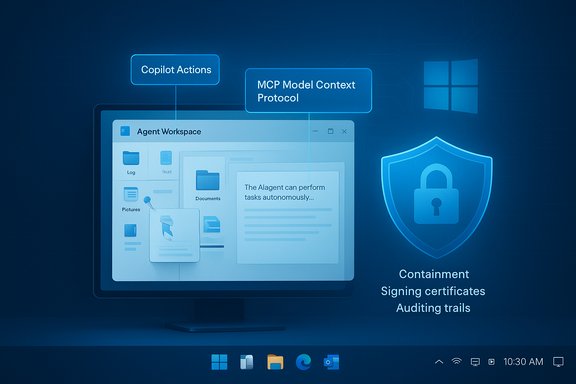
Copilot Actions is the concrete realization of the “agentic” idea: an agent can navigate UIs, click, type, open files, call web services, and perform chained operations like deduplicating photos or bundling invoices into a report. The feature operates under guardrails — it’s previewed in Copilot Labs and is disabled by default; users must opt in through a clearly labeled setting before agents can act. Key runtime characteristics:- Agents run within an Agent Workspace, a contained desktop session that lets the agent interact with apps in parallel to the user while preserving isolation.
- Each agent executes under a separate, non‑administrative agent account, enabling Windows to apply access control lists (ACLs) and revoke privileges without conflating agent actions with human user actions.
- Agents are expected to be cryptographically signed, allowing Microsoft and admins to revoke compromised or malicious agents.
MCP support, Windows AI Foundry, and the local model play
Microsoft has added support for the Model Context Protocol (MCP) — an emerging open standard for agent-to-tool communication — and introduced Windows AI Foundry, a framework to deploy and run models locally and on-device accelerators. The strategy is twofold: enable agents to call external tools and services securely, while also enabling local inference on Copilot+ hardware for latency and privacy advantages. Microsoft says MCP support will be mediated by Windows to prevent direct, unvetted communication between third‑party MCP servers and system services; early implementations rely on a curated MCP registry and proxy mediation to reduce prompt-injection and tool‑poisoning risks.Developer and management tooling
Developers get APIs and low‑code tooling to define agent workflows, and enterprise admins can test agent experiences via private previews and the Windows Insider channel. Microsoft also introduced features such as Copilot Tuning and agent management primitives in Power Apps and Visual Studio Code to let organizations tailor agents to internal processes and data.The security model: containment, consent, and revocation
Microsoft’s public documentation frames its approach as defense in depth for a novel threat class. The company lists several security building blocks intended to make agentic features auditable, controllable, and revocable.Four headline controls
- User Control: An explicit master toggle — Experimental agentic features — sits in Settings > System > AI components > Agent tools; Copilot Actions are off by default and must be enabled manually. This toggle also governs provisioning of agent accounts and workspaces for previews.
- Agent Accounts: Agents operate under separate standard accounts so agent activity can be separated from the human user at the OS level. That separation lets administrators and the OS apply standard permissions and auditing to agent behavior.
- Agent Workspace: A lightweight, contained desktop session isolates the agent’s GUI interactions and runtime. Microsoft describes the workspace as more efficient than a full VM while still providing isolation and parallel execution.
- Operational Trust: Agents must be signed and vetted; Windows will use signing, registries, and a layered proxy approach to prevent malicious or rogue agent tooling from accessing sensitive system surfaces.
What these controls actually buy users
Together, these primitives aim to deliver:- Non‑repudiation: agent actions remain observable and distinguishable from human actions.
- Scoped authority: agents get only the specific file and service permissions the user grants.
- Revocation: Microsoft can revoke signed agent certificates or block MCP servers that violate policy.
These are meaningful controls, but they are not panaceas; they reduce attack surface and increase transparency but do not eliminate the need for careful policy, monitoring, and patching.
Privacy, data flow, and on‑device vs. cloud tradeoffs
One of Microsoft’s stated goals is to let agents act while minimizing unnecessary data exposure. The combination of Windows AI Foundry and a two-tier device model addresses this by allowing:- Latency‑sensitive or privacy‑sensitive operations to run locally on Copilot+ hardware using NPUs and optimized runtimes.
- Less sensitive or more computationally intensive tasks to fall back to cloud models and services.
Developer and enterprise implications
What developers must do differently
Agent-enabled apps will be expected to:- Target the agent workspace model and adhere to signing and validation requirements.
- Use MCP-conformant tool interfaces and follow the Windows guidelines for least privilege.
- Provide transparent UI flows showing agent intent, steps, and checkpoints where users can pause or intervene.
Enterprise controls and rollout strategy
Enterprises get early access via private previews and will be able to test agent experiences before broader deployment. Integration with identity platforms (Azure Entra, Microsoft accounts) is on the roadmap, and Microsoft intends to extend platform controls for managed environments. IT organizations should plan:- A staged pilot with Insiders or dedicated test devices.
- Policy definitions for allowed agents and approved MCP servers.
- Monitoring and alerting for agent activity and file access.
Performance and hardware considerations
Windows’ agentic features are not purely cloud-dependent: Microsoft differentiates Copilot+ hardware — devices with local NPUs and firmware optimized for AI workloads — from standard Windows PCs. Copilot+ devices will host more on‑device processing and will be marketed for lower latency and greater privacy for certain flows. However, TOPS (tera‑operations per second) metrics and NPU figures are not a complete measure of real-world agent performance; memory bandwidth, model format support, pruning/quantization, and thermal design will also determine usability. Expect a two‑tier real‑world rollout:- Early preview and experimental features on Insiders and developer devices.
- Gradual expansion to broader Windows 11 installs, with Copilot+ devices getting richer local experiences sooner.
Community reaction, adoption risk, and user trust
Microsoft’s public framing of Windows as “evolving into an agentic OS” has provoked skepticism and pushback from parts of the Windows community. Critics point to recent frustrations — forced Microsoft Account prompts, aggressive Copilot and OneDrive integration, and recurring bugs — and worry that adding powerful agentic features before restoring baseline trust could intensify backlash. Social media responses to leadership statements have been notably negative. Risk factors include:- Perception risk: Users who already distrust aggressive feature pushes may resist agentic defaults, even when those defaults are conservative.
- Misconfiguration risk: Enterprises or end users who enable experimental features without proper governance could expose sensitive data or automation to mistakes.
- Supply-chain and signing risk: The agent signing and MCP registry model depends on robust vetting. If that process is weak, signed components could be abused.
Practical guidance for users and IT administrators
Microsoft’s messaging emphasizes opt-in experimentation. Still, practical steps will help reduce risk during preview and early deployment:- For individual users:
- Keep Experimental agentic features off unless you are participating in the preview and understand the permissions you grant. The toggle is found in Settings > System > AI components > Agent tools.
- When enabling agents, restrict them initially to non‑sensitive “known folders” and watch the runtime audit trail.
- Prefer local Copilot+ processing for privacy‑sensitive tasks where available.
- For IT administrators:
- Run an isolated pilot cohort on Windows Insider builds and Copilot Labs before any enterprise enablement.
- Define allowed agent identities and MCP endpoints via policy, and require agent signing from trusted issuers.
- Instrument logging and endpoint monitoring focused on agent accounts and workspaces; treat agent accounts as first‑class audit subjects.
- Train helpdesk staff to interpret agent activity trails and to take over or abort agent sessions when needed.
Where the roadmap is verifiable — and where it isn’t
Microsoft has published concrete artifacts: blog posts describing the security model and the Settings toggle, Insider Preview build notes (for example, Build 26220.7262 references the experimental agentic toggle), and Build 2025 developer announcements about MCP and Windows AI Foundry. Those are verifiable checkpoints that show Microsoft’s engineering intent and the preview mechanics. Unverifiable or open items:- Exact timeline for broad availability beyond preview windows and private partner rollouts remains uncertain.
- Real-world resilience to advanced adversarial techniques (prompt injection, tool poisoning) can be partially mitigated but is unlikely to be solved outright by initial platform controls; attackers adapt quickly.
- Business model impacts — such as how Microsoft will price Copilot+ features or how tightly it will tie certain agent capabilities to Microsoft accounts and cloud services — remain subject to future announcement.
Critical analysis: strengths and blind spots
Strengths
- Platform-level thinking: Building agent primitives into the OS (agent accounts, workspaces, MCP mediation) is the right architectural move to make agent behaviors observable and controllable, rather than bolting automation onto apps ad hoc.
- Opt‑in and staged preview: Shipping agentic features as experimental with a visible toggle and Insider previews is a cautious, responsible rollout strategy.
- Ecosystem openness (MCP): Supporting an open protocol like MCP — coupled with mediation — encourages interoperability and reduces vendor lock‑in while still allowing Windows to enforce a security boundary.
Blind spots and risks
- Trust deficit: Microsoft’s pace of feature changes and prior contentious UI/UX decisions have eroded trust among some Windows users; adding powerful automation before that trust is rebuilt could magnify backlash.
- Complex attack surface: Agents that can control UIs, read files, and call services create compound risk vectors (prompt injection, credential abuse, lateral movement) that go beyond traditional app vulnerabilities. Platform controls reduce but do not eliminate those risks.
- Operational complexity for admins: Enterprises must now manage agent identities, MCP endpoint whitelists, signing authorities, and new audit trails — a nontrivial governance burden that demands tooling and clear best practices.
Final assessment and recommended next steps
Microsoft’s architecture for an agentic Windows is a well‑engineered, multi‑layered attempt to balance empowerment and caution. The company has introduced sensible primitives — agent accounts, agent workspaces, a master toggle, an MCP mediation strategy, and local model support — that collectively reduce risk compared with an unconstrained agent model. That said, the success of this initiative will hinge on three factors:- Execution of the MCP registry and mediation — if these controls are robust and transparent, they materially reduce remote abuse risk.
- Transparent, audited revocation and signing processes — an operationally secure signing ecosystem is essential to prevent trusted agent certificates from becoming attack vectors.
- Clear enterprise governance tools — without admin-friendly policy controls, audit views, and logging, organizations face high operational load and risk when enabling agentic features.
- Treat agentic features as experimental and follow Microsoft’s staged rollout guidance.
- For IT teams: plan a dedicated pilot and define policy controls before exposing agents to business data or automating critical workflows.
- For privacy- and security‑conscious users: keep the experimental toggle off on primary devices and prefer local-only processing where possible.
The operating system is being reimagined to host autonomous helpers — and with that reimagination comes a responsibility that spans engineering, security, policy, and user communications. The preview phase is the inflection point: it is the moment to test assumptions, tighten controls, and build user trust before agentic automation becomes a daily reality on millions of Windows PCs.
Source: gHacks Technology News https://www.ghacks.net/2025/11/18/m...ng-windows-11-for-its-agentic-ai-future/?amp=
