

Microsoft’s Ignite-driven pivot to an “agentic” Windows is no marketing flash — it’s a coordinated product, platform, and research push that couples new Copilot entry points in the Taskbar with an on-device agent runtime, enterprise controls, and an open‑weight experiment called Fara‑7B that shows how compact models can see and act on a PC like a human would. At the same time the industry is sprinting everywhere else — Google shipped Nano Banana Pro for higher‑quality image generation, Perplexity pushed its Comet AI browser to Android, Xbox expanded cloud‑streaming quality and per‑game resolution control, and Microsoft quietly formalized an open‑source release of the classic Zork trilogy — all of which makes the closing months of the year one of the busiest, most consequential moments for Windows users, IT teams, and the broader PC ecosystem.
Microsoft used Ignite 2025 to frame Windows not simply as an OS but as a platform for agents — background, long‑running processes that can orchestrate tasks across applications, the cloud, and local files. The company introduced several concrete pieces of that vision:
Concurrently, Microsoft Research released Fara‑7B, an open‑weight 7‑billion‑parameter model designed as a Computer Use Agent (CUA) that ingests screenshots and a textual goal, then predicts action sequences (mouse coordinates, typing, scrolling, and tool calls) to complete multi‑step tasks. The release includes Magentic‑UI, a sandboxed human‑centered interface for running and observing agent behavior, and quantized, silicon‑optimized variants for devices with NPUs.
Outside of Microsoft, Google unveiled Nano Banana Pro — an image model built on Gemini 3 Pro aimed at higher fidelity, legible text, and 2K/4K outputs — while Perplexity launched the Comet AI browser on Android, bringing agentic browsing to mobile. In gaming, Xbox Cloud Gaming reported strong year‑over‑year usage gains, added user‑selected resolution controls and support for streaming up to 1440p for Game Pass Ultimate customers, and the ROG Xbox Ally handheld gained default game profiles to balance performance and battery life.
Finally, Microsoft and partners made a small but symbolic preservation step: the original Zork I–III source repositories were formalized with a permissive license to aid preservation and education.
But it also demands a serious maturity step from vendors, enterprises, and users: the tooling and operational patterns for managing autonomous agents are not yet mature. The new attack surfaces, brittleness of UI‑driven agents, regulatory obligations, and the need for explicit human‑in‑the‑loop controls require investment in sandboxing, auditing, and policy design.
For Windows users and administrators, the practical roadmap is familiar to anyone who’s managed scripting, mobile device management, or SaaS integrations: pilot, measure, instrument, and scale only when you can demonstrate safety, manageability, and clear productivity gain. The agentic OS is compelling because it promises a future where computers take the repetitive, boring parts of workflows off our plates. Delivering that future without creating new systemic risks is the work that starts now.
The coming months will show whether the combination of Ask Copilot, agents on the Taskbar, Copilot+ PCs, and on‑device models like Fara‑7B deliver robust, trustworthy automation — or whether the industry must temper agent ambitions with stronger governance, more conservative defaults, and clearer controls for IT. Either way, the desktop is changing: the agent is coming out of the lab and into the Taskbar, and Windows will be one of the first major operating systems to try running it safely at scale.
Source: Thurrott.com Windows Weekly 960: Snow & Claus
 Background / Overview
Microsoft used Ignite 2025 to frame Windows not simply as an OS but as a platform for agents — background, long‑running processes that can orchestrate tasks across applications, the cloud, and local files. The company introduced several concrete pieces of that vision:- Ask Copilot on the Taskbar: a unified opt‑in entry point for voice or text to reach Copilot and agents.
- Agents on the Taskbar: an app‑like appearance for running agents, with status badging and hover cards to monitor progress.
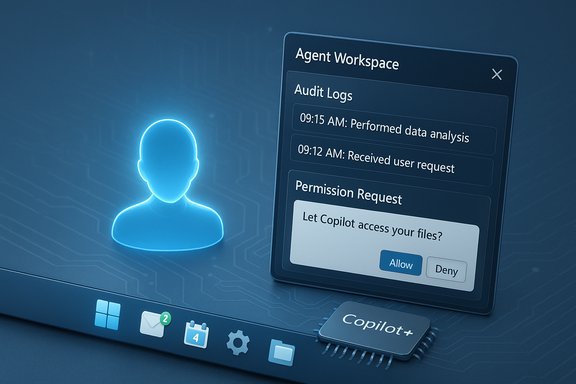
- Agent Workspace (preview): a sandboxed runtime and permission model for agents to operate with explicit consent and auditing.
- Copilot+ PCs: devices with NPUs and locally accelerated inference to run models and support offline features like writing assistance and Fluid Dictation.
- Writing Assistance & Click‑to‑Do improvements: system‑level AI affordances that work across apps and text boxes, including offline support on Copilot+ hardware.
Concurrently, Microsoft Research released Fara‑7B, an open‑weight 7‑billion‑parameter model designed as a Computer Use Agent (CUA) that ingests screenshots and a textual goal, then predicts action sequences (mouse coordinates, typing, scrolling, and tool calls) to complete multi‑step tasks. The release includes Magentic‑UI, a sandboxed human‑centered interface for running and observing agent behavior, and quantized, silicon‑optimized variants for devices with NPUs.
Outside of Microsoft, Google unveiled Nano Banana Pro — an image model built on Gemini 3 Pro aimed at higher fidelity, legible text, and 2K/4K outputs — while Perplexity launched the Comet AI browser on Android, bringing agentic browsing to mobile. In gaming, Xbox Cloud Gaming reported strong year‑over‑year usage gains, added user‑selected resolution controls and support for streaming up to 1440p for Game Pass Ultimate customers, and the ROG Xbox Ally handheld gained default game profiles to balance performance and battery life.
Finally, Microsoft and partners made a small but symbolic preservation step: the original Zork I–III source repositories were formalized with a permissive license to aid preservation and education.
What Microsoft actually announced at Ignite — the technical essentials
Agents, Ask Copilot, and the Taskbar as a control plane
Microsoft’s previewed changes convert the Taskbar into an agentic control plane. Ask Copilot acts as:- A one‑click opt‑in entry for the Copilot experience (voice and text).
- A router between local search, web results, Microsoft 365 Copilot, and agents.
- An ability to invoke agents directly (for example, by typing “@” to call an agent) and to monitor their status from Taskbar icons.
Agent Workspace and the runtime model
The agent runtime Microsoft showed includes:- Sandboxed workspaces where agents can run with defined permissions.
- Agent connectors to cloud services and app APIs, with explicit enterprise controls.
- Critical Points — places in an agent’s workflow where action must pause for user verification (logins, purchases, sending messages).
- Audit logs and management policies to allow IT to control which agents can run, which resources they can access, and whether they can leave the device.
Copilot+ PCs and local AI
Microsoft continues to push on‑device inference as a privacy and latency differentiator. Copilot+ PCs paired with lower‑latency NPUs aim to deliver offline writing assistance, fluid dictation (real‑time speech → polished text), and local agent execution. For enterprise customers, that promises reduced data egress and deterministic response times for routine automations.Writing assistance, accessibility, and integration
Small but meaningful features — Writing Assistance across text boxes, Outlook summaries, auto alt‑text for images in Word, and the voice features like Fluid Dictation — are Microsoft’s “better together” story linking Windows, Copilot, and Microsoft 365 AI. They’re positioned as productivity and accessibility wins that also showcase why OS‑level integration matters.Fara‑7B: why it matters — technical facts and implications
Microsoft’s Fara‑7B (7B parameters) is designed as a lean, on‑device Computer Use Agent. Key technical points that underpin its significance:- It is trained using a synthetic multi‑agent pipeline that produced ~145,000 multi‑step interaction trajectories and roughly a million steps of task data, distilled into a single model.
- The model uses screenshot grounding and predicts pixel coordinates for clicks and text insertion instead of relying on DOM trees or accessibility trees.
- It supports extremely long contexts (testing and demonstrations used long‑context windows), enabling multi‑step planning and task histories across multiple pages or app states.
- Microsoft released quantized and silicon‑optimized variants intended to run on Copilot+ hardware, and published model artifacts to encourage research and external validation.
- On‑device automation: For regulated industries, keeping screenshots and inferred actions local improves privacy and reduces cloud exposure.
- Efficiency: Fara‑7B’s design demonstrates a tradeoff: specialized small models can outperform general‑purpose huge models for narrow tasks while requiring far less compute.
- Open‑weight release: Providing the model under a permissive license accelerates scrutiny, reproducibility, and third‑party tooling — a double‑edged sword for safety auditors and malicious actors alike.
Industry context: Nano Banana Pro, Perplexity Comet, and the competitive landscape
The agentic OS story is one piece of a much wider industry shift:- Google’s Nano Banana Pro is a Gemini 3 Pro image model focused on higher fidelity, legible text rendering, and 2K/4K outputs. It demonstrates that major cloud players continue to push multimodal creative models to the edge of practical workflows (ads, infographics, rapid prototyping).
- Perplexity’s Comet browser on Android brings agentic browsing to mobile: cross‑tab summarization, voice‑based research, and in‑browser assistant affordances. The arrival of AI‑native browsers on phones shows that agents will not be confined to desktops.
- OpenAI and others continue to tune coding, agentic, and long‑context models; the landscape is competitive and fast‑moving, with frequent new models and optimizations appearing.
Xbox and gaming: cloud growth, 1440p, and handheld polish
The gaming announcements that intersect with the Windows story include:- Xbox Cloud Gaming reporting a strong year‑over‑year increase in usage metrics (reported as +45% YoY for Game Pass cloud playtime), alongside feature additions that now let players select per‑game streaming resolution and access up to 1440p for Game Pass Ultimate subscribers on select titles and devices.
- ROG Xbox Ally handhelds receiving default game profiles in preview across dozens of titles. These profiles balance TDP, FPS caps, and battery life automatically when on battery.
- Microsoft’s rework of Game Pass tiers — including the substantial price change for Ultimate — coupled with cloud‑streaming quality upgrades signals a business pivot toward tiered streaming value.
- The 45% figure is meaningful as a growth rate, but Microsoft did not publish absolute hours or headcount in those announcements. Relative percentages are useful for trend analysis, not for gauging scale on their own.
- Per‑game streaming resolution is a welcome user control that recognizes that cloud frames should be adjustable based on network conditions and user priorities.
Preservation and goodwill: Zork goes MIT
Microsoft’s decision to formalize the historic Zork I–III source under an MIT license is a small but culturally important move. It helps educators, archivists, and developers study early game engineering and the Z‑Machine virtual machine approach. This is the type of action that improves software preservation and offers a concrete example of how modern platforms can support both forward innovation and historical stewardship.Strengths — what the agentic Windows strategy gets right
- Pragmatic on‑device focus: By optimizing for Copilot+ hardware and releasing local model artifacts, Microsoft acknowledges that privacy and latency are real enterprise concerns. On‑device inference reduces data egress and improves responsiveness.
- Clear UX control points: Making agents visible in the Taskbar, and introducing critical‑point gating and audit logs, reduces the likelihood that agents act secretly or without oversight.
- Platform economics: Embedding Copilot into Windows and Microsoft 365 increases the stickiness of those subscriptions and surfaces AI across the entire user workflow.
- Accessibility and productivity gains: Features like Writing Assistance and Fluid Dictation are immediately useful to users with accessibility needs and to knowledge workers who type all day.
- Openness for research: Releasing models and tools (Fara‑7B, Magentic‑UI) to researchers enables independent validation and faster iteration on safety mechanisms.
Risks and unresolved governance questions
- A new endpoint attack surface: Agents that can click, type, and navigate the web expand the threat model for endpoints. Malware or compromised agents could perform credential stuffing or initiate unauthorized transactions without obvious UI signals unless the OS strictly enforces critical points.
- Robustness and drift: Agents trained on synthetic trajectories and screenshots may break when web pages change layout or when localization alters UI language or element positions.
- Open‑weight release tradeoffs: Publishing Fara‑7B enables scrutiny but also lowers barriers for both benign experimentation and potential misuse. The community must accept that transparency increases both auditability and the risk surface.
- Policy and compliance gaps: Running autonomous agents in regulated environments (healthcare, finance, government) demands rigorous documentation, risk assessments, and alignment with emerging AI regulations. Many enterprises are not yet staffed to do this well.
- User expectation and UI clutter: Taskbar agents, notifications, and background tasks may create new sources of distraction and consent fatigue if not carefully designed and configured.
- Economic friction: Xbox’s cloud quality improvements and Game Pass pricing changes raise consumer expectations while changing the subscription calculus; user backlash over price hikes can undercut goodwill for feature launches.
Practical guidance for IT admins and power users
- Start with small, sandboxed pilots:
- Use VMs or isolated Copilot+ test devices to evaluate agents before broader deployment.
- Run Fara‑7B and Magentic‑UI in isolated networks, and avoid production credentials in test environments.
- Enforce strict permissions and DLP:
- Create policies limiting which agents can access which folders, network endpoints, and cloud services.
- Require agent attestation and code signing for any agent allowed in corporate environments.
- Instrument and audit:
- Enable audit logs for agent actions and require human verification at critical points.
- Record agent sessions for red‑team analysis and compliance reviews.
- Train staff and users:
- Educate users about agent opt‑in, how to revoke agents, and reading taskbar agent badges.
- Provide runbooks for incident response when an agent behaves unexpectedly.
- Don’t assume local equals safe:
- Local execution reduces egress but does not eliminate risks. Local agents still see sensitive data on screen and can exfiltrate via local apps if permitted.
For developers: designing agent‑friendly, safe apps
- Expose well‑documented, authenticated APIs for automation rather than relying on brittle UI scraping.
- Support declarative intents and robust error handling for agent‑invoked flows.
- Implement explicit consent dialogs and graceful rollbacks for actions initiated by agents.
- Emphasize accessibility and semantic element tagging so agents that use DOM or accessibility trees can be more reliable.
- Consider rate limits and behavioral telemetry to detect anomalous agent usage patterns.
Claims that need caution or remain unverified
- Some industry chatter mentioned a new ChatGPT coding model “optimized for Windows”; that specific phrasing and the exact product context were not independently verifiable at the time of writing and should be treated as an unconfirmed claim.
- Reports that new Chromebook buyers universally receive one year of Nvidia GeForce NOW Fast Pass were not corroborated by primary OEM or Nvidia announcements at the time of this analysis. Treat any such offer as OEM‑ or region‑specific unless validated by Nvidia or the Chromebook vendor.
The bottom line: agentic Windows is a platform shift — handle it like one
Microsoft’s move to bake agents into Windows — coupled with an openly released research artifact like Fara‑7B — marks a transition from AI as a feature to AI as a platform capability. That creates tremendous opportunities for productivity, accessibility, and automation, especially when inference can run locally on Copilot+ hardware.But it also demands a serious maturity step from vendors, enterprises, and users: the tooling and operational patterns for managing autonomous agents are not yet mature. The new attack surfaces, brittleness of UI‑driven agents, regulatory obligations, and the need for explicit human‑in‑the‑loop controls require investment in sandboxing, auditing, and policy design.
For Windows users and administrators, the practical roadmap is familiar to anyone who’s managed scripting, mobile device management, or SaaS integrations: pilot, measure, instrument, and scale only when you can demonstrate safety, manageability, and clear productivity gain. The agentic OS is compelling because it promises a future where computers take the repetitive, boring parts of workflows off our plates. Delivering that future without creating new systemic risks is the work that starts now.
The coming months will show whether the combination of Ask Copilot, agents on the Taskbar, Copilot+ PCs, and on‑device models like Fara‑7B deliver robust, trustworthy automation — or whether the industry must temper agent ambitions with stronger governance, more conservative defaults, and clearer controls for IT. Either way, the desktop is changing: the agent is coming out of the lab and into the Taskbar, and Windows will be one of the first major operating systems to try running it safely at scale.
Source: Thurrott.com Windows Weekly 960: Snow & Claus
