

Microsoft has quietly converted Windows 11 from a familiar desktop operating system into an actively evolving platform built around two interlocking pillars: system-level AI and next-generation connectivity. Recent Insider builds, targeted feature drops, and hardware announcements show Microsoft is accelerating toward an AI-first, always-connected Windows that leans on on-device neural processing and richer network management to deliver faster, more private, and more resilient experiences. The shifts are not incremental tweaks; they change expectations about what an OS should do day-to-day, and they reshape how IT teams plan hardware, updates, and governance.
Windows historically shipped as a monolithic release every few years, with incremental fixes in between. That cadence has been supplanted by a continuous delivery model: frequent feature drops, monthly quality rollups, and aggressive Insider testing that surface major platform changes long before they reach mainstream channels. Users and administrators now live inside an operating system that evolves on a rolling basis rather than waiting for the next "big version." This new model enables Microsoft to iterate quickly on AI features and connectivity improvements while gathering telemetry and Insider feedback at scale.
Microsoft’s strategy has two clear technical vectors. The first is tightly integrating GenAI-style capabilities across the UI and core apps—moving Copilot from a reversible sidebar feature to a system-level assistant capable of seeing, hearing, and acting. The second is making Windows more network-aware, with enterprise-grade cellular management and device-side logic that chooses the right connection for workload, security, and battery life. Together, these directions aim to make Windows 11 more proactive, context-aware, and suited to hybrid work and always-online scenarios.
The practical effect is subtle but material: Copilot is designed to be the first responder for everyday tasks—rephrasing emails, summarizing content on screen, adjusting settings by natural language, or completing multi-application workflows. That system-level ambition carries benefits (speed, convenience) and new questions about control and governance for enterprise IT.
Hardware vendors are responding: Qualcomm’s Snapdragon X family has been updated with parts (the Snapdragon X2 Plus, announced at CES) that include an upgraded Hexagon NPU rated for high TOPS, plus Wi‑Fi 7 and optional 5G. The result is a new class of Windows laptops that can sustain local AI workloads while remaining light on power consumption. Expect a clear segmentation where the richest Copilot experiences are gated to Copilot+ compatible devices with dedicated NPU hardware.
For enterprises, that changes how mobility is managed. IT teams can treat 5G connectivity like Wi‑Fi or VPN: they can enforce application-level rules, quarantine suspicious traffic, and centralize billing and provisioning without manual SIM swaps. The combination of local AI (to steer connections based on latency or security) and cloud orchestration (for operator selection and policy) is a meaningful step toward scalable always‑connected fleets.
This network-awareness also targets battery efficiency. Modern cellular and Wi‑Fi silicon supports power modes that Windows can leverage. By combining NPU-assisted inference and smarter network selection, Microsoft aims to deliver always-connected behavior without the historical batterydrain penalty typical of legacy cellular laptops.
For users, this means frequent, smaller changes that continuously refine capability rather than infrequent massive upgrades. For IT, it demands a shift in update governance: controlling when feature drops arrive, testing new AI surfaces, and updating policies to account for system-level automation features.
This evolution will reward organizations and users who embrace a new update and governance model, but it will penalize those who ignore the hardware and policy changes required to keep up. The net effect is a faster, smarter Windows—but one that requires deliberate management and informed user consent to deliver benefits while limiting risk.
Source: WinCentral Windows 11 Rapidly Evolves With AI and Connectivity Push
 Background
Windows historically shipped as a monolithic release every few years, with incremental fixes in between. That cadence has been supplanted by a continuous delivery model: frequent feature drops, monthly quality rollups, and aggressive Insider testing that surface major platform changes long before they reach mainstream channels. Users and administrators now live inside an operating system that evolves on a rolling basis rather than waiting for the next "big version." This new model enables Microsoft to iterate quickly on AI features and connectivity improvements while gathering telemetry and Insider feedback at scale.Microsoft’s strategy has two clear technical vectors. The first is tightly integrating GenAI-style capabilities across the UI and core apps—moving Copilot from a reversible sidebar feature to a system-level assistant capable of seeing, hearing, and acting. The second is making Windows more network-aware, with enterprise-grade cellular management and device-side logic that chooses the right connection for workload, security, and battery life. Together, these directions aim to make Windows 11 more proactive, context-aware, and suited to hybrid work and always-online scenarios.
AI Is Becoming Core to the Windows Experience
Copilot: from accessory to system layer
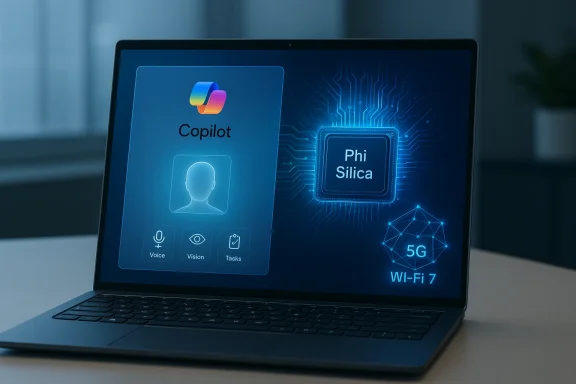
Microsoft has been explicitly repositioning Copilot as a system-level layer that touches search, settings, productivity flows, accessibility, and security. New Insider builds show Copilot expanding beyond typed prompts into voice activation (a wake phrase such as “Hey, Copilot”), vision (screen-aware intelligence that interprets what’s on the display), and agentic Actions that can perform multi-step tasks when the user grants permission. These features are shipping first to Copilot+ hardware and Insiders, and they mark a pivot from passive suggestions to proactive assistance baked into the OS.The practical effect is subtle but material: Copilot is designed to be the first responder for everyday tasks—rephrasing emails, summarizing content on screen, adjusting settings by natural language, or completing multi-application workflows. That system-level ambition carries benefits (speed, convenience) and new questions about control and governance for enterprise IT.
AI across settings, search, and productivity
Windows is adding multiple localized AI surfaces where users interact regularly. Expect to see:- An AI agent in Settings that understands natural language descriptions (e.g., “make my cursor larger” or “how do I set up voice control”) and then guides or automates the change. This is rolling out in Insider builds for Copilot+ PCs and expanding across hardware families.
- AI-assisted File Explorer and context menus that recommend actions based on file contents and workflows, reducing friction for routine tasks.
- Smarter system-wide search and Recall-style capabilities that surface previously viewed content and interactions—designed to help users re-find things quickly while emphasizing opt‑in privacy controls.
On-device AI: privacy, speed, and the NPU era
A central tenet of Microsoft's roadmap is moving heavy AI inference onto the device when feasible. Microsoft and partners are shipping optimized models and runtime components that use Neural Processing Units (NPUs) on Copilot+ PCs to accelerate local inference. Updates such as the Phi Silica component and new local models are explicitly tailored for NPU execution to reduce latency, limit cloud exposure, and preserve privacy for sensitive tasks.Hardware vendors are responding: Qualcomm’s Snapdragon X family has been updated with parts (the Snapdragon X2 Plus, announced at CES) that include an upgraded Hexagon NPU rated for high TOPS, plus Wi‑Fi 7 and optional 5G. The result is a new class of Windows laptops that can sustain local AI workloads while remaining light on power consumption. Expect a clear segmentation where the richest Copilot experiences are gated to Copilot+ compatible devices with dedicated NPU hardware.
Connectivity Enhancements Take Priority
Enterprise-grade 5G: policy-driven, managed cellular
Microsoft’s push to make laptops behave more like managed mobile endpoints is now a reality in Windows 11. Partnerships and integrations with carriers and infrastructure vendors—most notably Ericsson—embed 5G provisioning, eSIM lifecycle management, and policy-driven connection steering into the Windows stack and Intune management surface. This makes cellular a first-class networking option for managed devices: laptops can be provisioned centrally, switched automatically between operators, and have network policies enforced at the OS level.For enterprises, that changes how mobility is managed. IT teams can treat 5G connectivity like Wi‑Fi or VPN: they can enforce application-level rules, quarantine suspicious traffic, and centralize billing and provisioning without manual SIM swaps. The combination of local AI (to steer connections based on latency or security) and cloud orchestration (for operator selection and policy) is a meaningful step toward scalable always‑connected fleets.
Smarter network switching and battery-aware connectivity
Windows 11 is being built to make smarter routing decisions based on workload, signal quality, and battery impact. On-device intelligence will evaluate whether a video call needs the low-latency path of 5G, whether a background sync should wait for Wi‑Fi to save data, or whether a particular connection exposes the device to policy risk. Those heuristics are grounded in telemetry but executed locally, reducing decision latency and enabling per-app connectivity policies.This network-awareness also targets battery efficiency. Modern cellular and Wi‑Fi silicon supports power modes that Windows can leverage. By combining NPU-assisted inference and smarter network selection, Microsoft aims to deliver always-connected behavior without the historical batterydrain penalty typical of legacy cellular laptops.
Faster Updates, Continuous Evolution
From monolithic releases to feature drops
Windows 11’s new release model breaks features into digestible, testable drops rather than one large package once every few years. Insider builds (Dev, Beta, Canary), monthly quality updates, and staged feature rollouts allow Microsoft to iterate quickly and respond to real-world usage. This model reduces the blast radius for risky changes and accelerates the feedback loop from early adopters to mainstream users.For users, this means frequent, smaller changes that continuously refine capability rather than infrequent massive upgrades. For IT, it demands a shift in update governance: controlling when feature drops arrive, testing new AI surfaces, and updating policies to account for system-level automation features.
Insider channels as a preview lab
The Windows Insider program has become the testing ground for Microsoft’s more ambitious platform experiments—particularly Copilot expansions, agentic features, and connectivity stacks. Many of the agent features and Copilot+ experiences are visible first in Dev channel builds, where Microsoft can observe adoption patterns, bug rates, and security telemetry before widening the release. This staged approach helps reduce surprises but requires organizations to maintain active test fleets if they want early visibility.What This Means for Users and IT
Everyday users
General consumers will see a more responsive, context-aware OS that helps with routine tasks. Features like an AI agent in Settings, smarter search, and Describe Image or visual assistance in apps will remove friction for common activities like photo editing, accessibility support, and file discovery. Many of these experiences will be available on existing devices, while the most advanced Copilot+ features will be optimized for NPU-equipped hardware.Enterprise and IT
IT teams must contend with new vectors for policy and governance. Features that enable Copilot to automate changes or act on behalf of users raise questions about permissioning, auditing, and compliance. Likewise, the integration of 5G management into Intune and Windows simplifies deployment but increases the surface area for connectivity policy enforcement. Organizations will need to update their security baselines, test Copilot behaviors in controlled environments, and plan for lifecycle management of Copilot+ hardware.Developers and ISVs
An AI-native Windows presents new integration points: system-level actions, NPU-accelerated models, and smarter connectivity APIs. ISVs that optimize for Copilot+ devices, local inference, and network-aware behavior can deliver markedly improved user experiences. Microsoft’s on-device model components (e.g., Phi Silica) and local inference frameworks give developers a path to ship performant features without always depending on cloud endpoints.Notable Strengths and Opportunities
- Responsiveness and privacy: On-device inference reduces round-trip latency and limits cloud data exposure for sensitive tasks, delivering faster and more private experiences. The push toward Copilot+ PCs with NPUs amplifies this benefit.
- Enterprise mobility at scale: Policy-driven 5G and eSIM provisioning built into Windows 11, tied to management tools, finally make always-connected laptops manageable at fleet scale. This unlocks new hybrid scenarios for field workers and distributed teams.
- Continuous improvement: The feature-drop model allows Microsoft to iterate quickly and respond to real-world issues, shortening the time between idea and production rollout.
- Developer innovation: New hardware and runtime components open opportunities for developers to build high-throughput local AI features that run efficiently on modern silicon. Qualcomm’s Snapdragon X Series and other NPU-enabled platforms are accelerating that ecosystem.
Risks, Ambiguities, and Governance Concerns
Fragmentation and hardware gating
A two‑tier experience—standard Windows 11 vs. Copilot+ NPU-accelerated capabilities—risks creating fragmentation. Users on older hardware will receive a less capable Copilot experience, and organizations might face pressure to refresh fleets to access the full feature set. Microsoft’s strategy of gating richer experiences to NPU-equipped devices needs careful communication to avoid perception of artificial obsolescence.Privacy and user consent
Features that can “see” the screen, “listen” for a wake phrase, or act across apps raise legitimate privacy concerns. Microsoft has explicitly designed earlier features as opt-in and added governance controls, but the complexity of permissions, telemetry, and model behavior still leaves room for user confusion and administrative gaps. Enterprise deployments will need strict controls, audit trails, and well-defined consent workflows.Security implications of system-level agents
Agentic capabilities—where Copilot can execute multi-step automations—are powerful but create attack surfaces. An agent that changes settings or interacts with third-party apps must be safeguarded with robust authentication, tamper-resistant permissioning, and anomaly detection. Microsoft’s Insider notes show progress on safety gates, but security teams must validate these controls in their threat models.Dependence on vendor ecosystems
The integration of carrier services and vendor-specific NPUs means that full functionality often depends on an ecosystem rather than just Microsoft alone. Enterprises must evaluate supply-chain implications, vendor support lifecycles, and interoperability across different NPU vendors and cellular operators. This dependency complicates procurement and support.Practical Recommendations
- For IT leaders: establish a Copilot pilot program that includes privacy, security, and compliance reviews. Test agent behaviors and create rollback plans for unexpected automation.
- For procurement teams: map device requirements to workload needs. Reserve Copilot+ NPU hardware for roles that will materially benefit (creators, field operators, analysts) while using regular Windows 11 devices for general office tasks.
- For developers: invest in local model optimization and test across NPU vendors. Deliver graceful fallbacks for devices without dedicated NPUs.
- For privacy officers: implement clear opt-in flows, audit logging, and data minimization for any Copilot or Recall-style features that access user content. Make permission states transparent to end users.
The Bigger Picture: Windows as a Living Platform
Microsoft’s intent is clear: Windows 11 will be a continually adapting service that leans into AI and connectivity to stay relevant for the next decade. That philosophy reframes the OS from a static executor of user commands into an active participant in workflows—proactively surfacing suggestions, automating routine tasks, and keeping devices optimally connected. The approach aligns with broader industry trends toward local AI acceleration, policy-driven connectivity, and shorter software iteration loops.This evolution will reward organizations and users who embrace a new update and governance model, but it will penalize those who ignore the hardware and policy changes required to keep up. The net effect is a faster, smarter Windows—but one that requires deliberate management and informed user consent to deliver benefits while limiting risk.
Conclusion
Windows 11 is undergoing a substantive transformation: AI is no longer an experimental add-on but a foundational layer, and connectivity is being elevated to system-level intelligence with enterprise-grade controls. The combination of Copilot moving to the OS level, NPU-driven on-device models, and integrated 5G management marks a decisive pivot in how Microsoft sees the future of personal and enterprise computing. For users, developers, and IT teams, the window of opportunity is now—adopt the frameworks and controls that let you benefit from faster, smarter computing while building the governance and procurement strategies that will keep those gains secure and sustainable.Source: WinCentral Windows 11 Rapidly Evolves With AI and Connectivity Push
