

When Windows 11 first arrived it promised a cleaner UI, tighter hardware integration, and features that nudged Microsoft’s OS into the modern era. What’s become clear over the last two years is that Microsoft’s ambition for Windows 11 isn’t merely cosmetic: the company is transforming Windows into an AI-first operating system. The recent wave of announcements — from long-running AI agents surfaced in the taskbar to direct Copilot hooks in File Explorer and real‑time voice chat inside Microsoft 365 Copilot — signals a deliberate shift. Windows is being remade as a platform where autonomous, background AI processes, natural‑language interfaces, and productivity‑centric reasoning agents are first‑class citizens. This matters for every Windows user, enterprise IT team, and developer who must now weigh convenience, control, and compliance in a rapidly changing feature landscape.
Microsoft’s Copilot initiative began as a replacement for a fading Cortana and quickly expanded into a company‑wide AI strategy. Copilot moved from being a separate app to being embedded in the taskbar, integrated with Microsoft 365 apps, and now woven into core Windows experiences. More recently, Microsoft has layered agentic AI on top of Copilot: purpose‑built agents that run workflows, reason about data, and perform multi‑step tasks across apps and services.
This is not incremental polish. It is a strategic repositioning: Windows 11 is being reimagined as an environment where AI assists you proactively — not only by answering prompts, but by operating as persistent helpers, background workers, and in‑context copilots inside File Explorer, Notepad, Excel, and the notification/Agenda surfaces. That repositioning reflects Microsoft’s belief that the next wave of productivity gains will come when AI is tightly coupled with local files, cloud content, and business systems.
Microsoft appears to be aiming for a middle path: powerful, but governed. Feature rollout, enterprise contract offerings, EU data boundary commitments, and staged previews indicate a deliberate, controlled expansion rather than an unbridled push. That reduces the risk of sudden surprises, but it does not eliminate the fundamental trade‑offs: increased productivity versus increased dependency and governance burdens.
At the same time, this new era brings genuine responsibilities. Organizations must plan for governance, verification, and security; regulators will increasingly shape rollout cadence; and users must learn to treat agent output as a powerful but imperfect aid. For individuals and IT leaders alike, the sensible strategy is to embrace the productivity gains while building robust policies, training, and technical safeguards.
Windows 11 is no longer just a platform to run apps — it’s becoming a place where AI works continuously on our behalf. That promise is compelling, but whether it becomes a net positive will depend on how thoughtfully Microsoft and its customers balance power with accountability.
Source: Tech4Gamers Microsoft Expands AI Innovation: Integrated AI Agents Coming To Windows 11 And Voice Control To 365 Copilot
 Background: Windows 11’s AI pivot
Microsoft’s Copilot initiative began as a replacement for a fading Cortana and quickly expanded into a company‑wide AI strategy. Copilot moved from being a separate app to being embedded in the taskbar, integrated with Microsoft 365 apps, and now woven into core Windows experiences. More recently, Microsoft has layered agentic AI on top of Copilot: purpose‑built agents that run workflows, reason about data, and perform multi‑step tasks across apps and services.This is not incremental polish. It is a strategic repositioning: Windows 11 is being reimagined as an environment where AI assists you proactively — not only by answering prompts, but by operating as persistent helpers, background workers, and in‑context copilots inside File Explorer, Notepad, Excel, and the notification/Agenda surfaces. That repositioning reflects Microsoft’s belief that the next wave of productivity gains will come when AI is tightly coupled with local files, cloud content, and business systems.
What Microsoft announced — a practical summary
- Windows 11 is gaining deeper Copilot integration: Copilot can be summoned from the taskbar, the search box, and soon more tightly from File Explorer to answer questions about files or generate summaries.
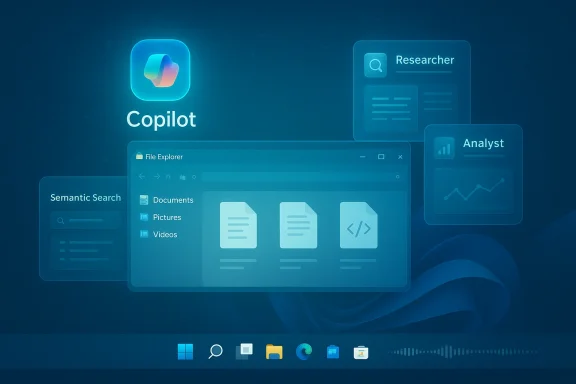
- Microsoft is introducing agentic AI inside Copilot and Microsoft 365: preconfigured “Researcher” and “Analyst” agents that perform deep research, multi‑step reasoning, spreadsheet analysis, and visible code execution for data transformation and reporting.
- Long‑running agents can be invoked directly from the taskbar composer, making them easier to start and monitor; Copilot will offer a “tools” menu and a shorthand (for example typing “@”) to tag agents and orchestrate workflows.
- File Explorer will expose AI actions and an “Ask Copilot” option on files and in the home view, enabling summarization, content extraction, or contextual guidance without switching apps.
- Microsoft 365 Copilot is gaining real‑time voice chat and voice control capabilities, allowing users to speak to Copilot, interrupt naturally, and get spoken responses grounded in corporate data.
- Some features will be gated by licensing (Copilot licenses, workplace plans) and by regional compliance constraints; advanced vision and agent features are being staged regionally where regulatory and data‑residency requirements permit.
Why this shift matters: from assistant to background agentic platform
Microsoft’s move is not just about convenience. It represents a new product philosophy:- From reactive to proactive: Copilot is evolving from a query/response tool into a system that can initiate helpful tasks — schedule briefings, summarize meetings, and execute repetitive workflows.
- From single‑task to multi‑step reasoning: The new agents are designed to chain operations together: ingest documents, extract insights, run computations, and present deliverables — effectively lowering the barrier between question and execution.
- From isolated cloud LLMs to blended local/cloud intelligence: Microsoft positions Copilot as both a cloud assistant and a local companion, using semantic search over local files, vision features, and cloud reasoning in tandem.
- From manual to automated productivity: For knowledge workers, the promise is dramatic time savings — fewer context switches, faster report assembly, and automated data wrangling.
What the new AI agents do (and what they won’t)
Agent types: Researcher and Analyst (and friends)
- Researcher agents are intended for open‑ended information gathering: synthesizing documents, collating findings across internal and third‑party systems, and producing structured summaries for decision making.
- Analyst agents are oriented to data: ingest spreadsheets or raw logs, execute visible calculations or Python snippets, and convert messy data into charts, tables, and narrative explanations.
Not everything is agentic (yet)
Microsoft’s road map suggests the first wave will focus on reasoning and data tasks rather than universal automation. Shopping bots, full desktop control agents, or consumer‑facing autonomous shopping assistants are not the immediate focus. That said, Microsoft has indicated further down the line capabilities that could generate code or orchestrate broader system control — features that will need serious guardrails.Copilot + File Explorer: AI where your files live
The integration of Copilot into File Explorer is emblematic: file management is a daily friction point, and embedding AI there reduces friction.- Hover over a file and ask Copilot to summarize its contents or extract action items.
- Right‑click a photo to run image‑editing AI actions like background removal or object cleanup.
- Ask for a semantic search of your device to find a file by meaning rather than filename.
Voice control in Microsoft 365 Copilot: hands‑free productivity
Voice adds a second modality for interacting with Copilot:- Real‑time voice chat supports conversational interruptions and natural dialogue flow.
- Users can request spoken summaries, generate presentation outlines, or ask Copilot to draft emails — and receive voice feedback in real time.
- Adjustable voice characteristics (speed, tone) make replies more usable in different contexts (meetings, quiet offices, mobile usage).
Strengths: where Microsoft’s approach has concrete advantages
- Seamless product integration: Microsoft’s vertical stack advantage is real. Copilot ties into Windows, Office, OneDrive, SharePoint, and Teams — enabling deeper context-aware assistance than third‑party add‑ons can deliver.
- Enterprise controls and contracts: For businesses that require contractual protections, Microsoft offers enterprise‑oriented Copilot deployments with data protections, auditability, and contractual assurances that consumer chatbots typically lack.
- Hybrid model flexibility: By combining local semantic search with cloud reasoning, Microsoft can preserve performance for local queries while leveraging large models for complex reasoning tasks.
- Production‑grade agents: Analyst agents that can run visible Python code and produce reproducible spreadsheets are close to practical automation for data teams — less hype, more measurable ROI.
- Iterative rollout and preview testing: Staged availability in Insider channels allows Microsoft to refine interactions, mitigate performance regressions, and gather telemetry before broad releases.
Risks, trade‑offs, and open questions
1. Privacy and data governance
AI that indexes local files and accesses corporate systems raises immediate governance challenges.- Enterprises must decide which files agents can access, who can invoke them, and how outputs are logged.
- The EU Data Boundary and other regional commitments help, but the nuance is complex: some advanced features are rolled out selectively to meet regulatory requirements, and not every capability will be available everywhere at launch.
- For regulated industries (finance, health, legal), even “enterprise” Copilot deployments may require additional compliance assessments and controls.
2. Accuracy, hallucinations, and explainability
Even “deep reasoning” agents can hallucinate or provide misleading correlations.- Analyst agents that transform data must expose their steps and intermediate computations so users can validate output. Visible code execution is helpful, but human review remains essential.
- Researcher agents aggregating internal and external sources depend on accurate source attribution. If provenance is weak, the risk of acting on incorrect information grows.
3. Vendor lock‑in and model sourcing
Microsoft’s platform approach increases dependency on its stack.- Tighter Copilot integration means better experiences for Microsoft shop environments — but it also raises switching costs for organizations that may later prefer alternative models or open‑source stacks.
- Microsoft’s historical investments in OpenAI and multi‑billion commitments complicate the ecosystem: some services rely on external models, others on Microsoft’s own models and agent frameworks.
4. Regional regulation and availability differences
Europe’s regulatory landscape (and other jurisdictions) has influenced feature timing.- Some vision and agent features have been staged or limited in EU markets to meet local rules and data‑residency commitments.
- The EU AI Act and strict data privacy norms will likely mean a slower, more controlled introduction of high‑risk agent capabilities in those regions.
5. Security surface area and privileged automation
Agents that can access multiple apps, run code, or orchestrate tasks amplify risk.- A compromised agent or insufficiently scoped permission can be a high‑impact attack vector.
- Runtime controls, ephemeral credentials, and tight least‑privilege enforcement are essential.
Practical recommendations for IT and power users
- Audit and classify data before enabling agentic features.
- Understand which data should be accessible to Copilot and where it must not go.
- Start with pilot groups and clearly defined use cases.
- Target teams with measurable outputs (finance, legal review, analytics) where agents can demonstrate ROI and where outputs can be verified.
- Enforce least‑privilege access and detailed logging.
- Treat agents like service accounts that require policy controls and audit trails.
- Enable human‑in‑the‑loop review for high‑risk outputs.
- Require manual sign‑off for code generation, large data transformations, or decisions with legal impact.
- Train staff on agent behavior and limitations.
- Communicate that agents speed work but are not infallible; teach users how to question, test, and validate AI responses.
- Plan for regional feature variance.
- Map expected feature availability by country and align rollout plans with compliance teams.
Developer and ecosystem impact
- Developers will get new APIs and low‑code tools to build agent flows and Copilot Studio experiences. This can accelerate automation but also invites the need for standardized testing and observability.
- The integration of agents into File Explorer and taskbar composer suggests new UX patterns: ambient assistants, persistent workflows, and semantic search will be design primitives.
- Open‑source projects and Linux ecosystems will watch closely. Some users concerned about autonomy and data control may choose alternatives — but Microsoft is also investing in enterprise‑friendly controls and in‑region processing options to keep corporate customers comfortable.
The product evolution question: incremental helper or OS takeover?
There’s a spectrum of possible futures. On one end, Copilot remains a feature-rich assistant that speeds tasks but yields full control to users and admins. On the other, Windows evolves into a platform where background agents perform proactive tasks — including scheduling, synthesizing, and even making decisions with minimal user intervention.Microsoft appears to be aiming for a middle path: powerful, but governed. Feature rollout, enterprise contract offerings, EU data boundary commitments, and staged previews indicate a deliberate, controlled expansion rather than an unbridled push. That reduces the risk of sudden surprises, but it does not eliminate the fundamental trade‑offs: increased productivity versus increased dependency and governance burdens.
Long‑term implications for users and organizations
- Productivity gains: For knowledge workers, automated synthesis, faster reporting, and natural‑language file discovery can cut hours from routine work.
- New job patterns: Roles will shift toward supervisor/validator functions — humans who assess, correct, and contextualize AI outputs. Teams that adapt will gain significant efficiency advantages.
- Regulatory complexity: Cross‑border organizations will need tighter policy coordination and possibly different feature sets per region.
- Platform economics: Businesses must budget for Copilot licensing and consider the strategic value of Microsoft’s bundling of OS + productivity + AI.
- Open‑source and alternative OS pressures: For users who prioritize full control or minimal telemetry, Linux and open‑source stacks will remain attractive. The question is whether the productivity gap closes enough that many knowledge workers will prefer the convenience of Windows’ AI integrations.
What to watch next
- Adoption metrics for agent features in pilot customers: do Researcher and Analyst agents meaningfully reduce time‑to‑insight?
- EU and UK feature parity: how quickly will vision and agentic features be certified for European markets under local rules?
- Security incident patterns: how are agents being abused, and can runtime protections keep up?
- Developer ecosystem uptake: are third‑party vendors and ISVs building agent‑aware apps or extensions for Copilot Studio?
- Pricing and licensing evolution: will Microsoft bundle agent capabilities into existing plans, or establish premium tiers that influence adoption?
Final assessment: measured optimism with guarded controls
Microsoft’s integration of agents into Windows 11 and the expansion of Copilot across File Explorer and Microsoft 365 mark a meaningful advance in making AI a day‑to‑day productivity tool. The company’s ability to combine OS integration, enterprise controls, and cloud reasoning creates real, tangible value: faster workflows, smarter file discovery, and an easier path from question to action.At the same time, this new era brings genuine responsibilities. Organizations must plan for governance, verification, and security; regulators will increasingly shape rollout cadence; and users must learn to treat agent output as a powerful but imperfect aid. For individuals and IT leaders alike, the sensible strategy is to embrace the productivity gains while building robust policies, training, and technical safeguards.
Windows 11 is no longer just a platform to run apps — it’s becoming a place where AI works continuously on our behalf. That promise is compelling, but whether it becomes a net positive will depend on how thoughtfully Microsoft and its customers balance power with accountability.
Source: Tech4Gamers Microsoft Expands AI Innovation: Integrated AI Agents Coming To Windows 11 And Voice Control To 365 Copilot
