

Microsoft’s quietly released Insider toggle for an autonomous AI background Agent in Windows 11 signals a significant shift in how the OS may behave: an optional, persistent assistant that runs in its own runtime, can access common user folders, and is designed to execute multi‑step tasks in the background — but not without meaningful tradeoffs in performance, privacy, and enterprise risk. Early appearances in Insider builds and Microsoft’s own preview documentation show the company is moving from assistant-as-advisor toward assistant-as-actor, and that change demands careful scrutiny from power users, IT teams, and security practitioners.
Background
The “agentic” vision for Windows — where the OS and its built‑in AI can proactively take multi‑step actions on behalf of a user — has been a visible theme of Microsoft’s recent announcements. At Build and in subsequent documentation, Microsoft framed new capabilities under the Copilot umbrella as Copilot Actions and an Agent Workspace, designed to let AI “click, type, scroll, and orchestrate” sequences of operations across local apps and files. The company characterizes these capabilities as experimental, opt‑in, and protected by a set of platform controls intended to keep agent activity auditable and constrained. Independent reporting and hands‑on tests from preview channels indicate Microsoft has already implemented a toggle in Insider builds that exposes an Experimental agentic features setting inside the Settings app, and that an Agent runtime can be provisioned per task. This presence in a public Insider build marks the feature as more than an academic concept — it’s a working platform primitive under active testing.What Microsoft shipped in preview
The core components
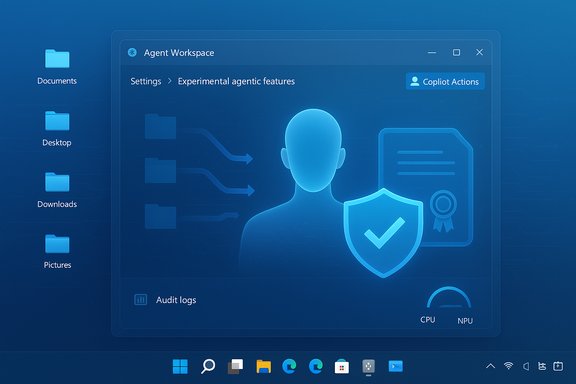
Microsoft’s preview architecture for agentic functionality can be summarized as a set of platform building blocks:- Agent Workspace — a contained desktop session where an agent runs independently of the user’s interactive desktop.
- Agent accounts — dedicated, standard Windows accounts used to run agent processes, making agent actions distinct in logs and ACLs.
- Scoped file access — agents begin with limited access (known folders such as Documents, Desktop, Downloads, Pictures) and must request additional permissions for other locations.
- Operational trust — agents are expected to be digitally signed, and the platform includes mechanisms to revoke trust if necessary.
Where to enable it in Insider builds
In the current preview, the feature can be toggled in Settings under: Settings > System > AI components > Agent tools > Experimental agentic features. Enabling it provisions agent runtimes when needed and exposes Copilot Action flows through Copilot Labs and other UI entry points. Microsoft’s documentation reiterates that the toggle is off by default and that agents require explicit user opt‑in.How the Agent runs — isolation model
Although not a full virtual machine, the Agent Workspace is implemented using a remote desktop child session model that gives the agent its own desktop instance and a separate account. This provides a visible isolation: the agent runs in parallel and you can observe its actions within that contained workspace. The separate account and desktop minimize direct visibility into your interactive session while still allowing the agent to interact with local apps or files it has permission to access.What this means in practice: behaviors and early observations
- When enabled, Agents can plan and execute multi‑step tasks — for example, gathering files, extracting structured data from documents, batch editing images, or filling multi‑page web forms — running those steps inside the Agent Workspace while the user continues to work.
- Agents run under their own standard Windows accounts; actions are auditable and separable from user actions, enabling administrators to apply ACLs and policy to agent identities.
- Early tester reports indicate Agents may remain active in the background even when idle, consuming CPU, memory, or NPU cycles depending on the workload and platform configuration. On systems without dedicated NPUs or with constrained hardware, this background activity is more noticeable. These resource observations were made during preview testing and may vary by device and configuration.
The good: productivity, accessibility, and platform benefits
There are legitimate reasons to explore agentic automation in Windows. The design Microsoft proposes includes measurable upsides:- Real productivity gains: Agents can automate repetitive multi‑app workflows that today require manual orchestration — e.g., extract tables from PDFs into Excel, compile files into reports, batch‑process images, or assemble assets and draft an email — saving time for knowledge workers.
- Improved accessibility: Voice + vision + agentic actions can reduce friction for users with mobility or dexterity impairments by providing an alternative to complex UI navigation. These capabilities lower barriers when correctly scoped and permissioned.
- Platform governance primitives: Agent accounts and audit trails give IT teams clear handles for governance. Because agents are first‑class principals in the OS, existing management tools (ACLs, Intune policies, Entra identities) can apply, enabling enterprise controls that simple process sandboxing cannot provide.
- Performance optimizations for Copilot+ hardware: On machines with NPUs and Copilot+ hardware, Microsoft intends parts of the agent workload to run locally and efficiently, reducing latency for sensitive flows and keeping some operations on device for privacy reasons.
The concerning tradeoffs: privacy, security, and performance risks
Every platform power gain carries risk. The preview exposes several non‑trivial concerns:Persistent background agents and resource use
Because Agents are intended to be able to operate autonomously and persistently, they may maintain background processes that impact system performance. Early tester reports and Microsoft’s own warnings indicate continuous background activity can consume CPU, memory, or NPU cycles and may be noticeable on lower‑end hardware. This is particularly relevant for laptops and small form factor devices where thermal and battery constraints magnify the effect.Broadened file access and privacy surface
Microsoft’s preview model scopes agents initially to well‑known user folders (Documents, Desktop, Downloads, Pictures), but granting an agent the ability to search, open, and modify files expands the OS’s data surface for automated interaction. That change raises classical privacy questions:- What data do agents log, transmit, or retain?
- How granular and revocable is agent file access in practice?
- Will users understand and consent to the scope of access they are enabling?
New attack surface: prompt injection, compromised agents, and privilege escalation
Agentic automation mixes UI automation with LLM reasoning — a risky pair. Two attack vectors stand out:- Prompt (or cross‑prompt) injection: Agents interpret content from web pages and documents to decide actions. Malicious content could attempt to manipulate an agent’s plan, causing it to perform unwanted operations or disclose data unless strict input sanitization and action gating are enforced. Microsoft acknowledges this class of threat as a design consideration.
- Compromised agents: An agent running under a separate account but with access to user folders could be an attractive target. If an agent process or its signing infrastructure is compromised, attackers could use agent privileges to access data or move laterally within a device. Microsoft’s signing and revocation design is a mitigation, but it depends on robust signing controls, fast revocation, and accurate detection of compromised agents.
Unclear recovery semantics and UX for errors
Automation that edits or deletes files demands clear rollback semantics. Microsoft’s preview emphasizes step‑by‑step visibility and explicit confirmation for sensitive actions, but public materials do not promise automatic atomic rollback or guaranteed recovery in all failure modes. Users and administrators cannot assume every agent action is reversible beyond normal Windows backup/restore practices. This gap raises legitimate concerns for business users and content creators.Enterprise implications and controls
Organizations must treat agentic Windows features like any new privilege or endpoint capability:- Policy gating and staged pilots: Enterprises should run controlled pilots and initially restrict agentic features to small, well‑scoped user groups. Microsoft intends to expose enterprise controls (Group Policy, Intune hooks), but some of these management features are still being refined in private previews. Administrators should verify the available policy granularity on their tenant before broad enablement.
- DLP/SIEM integration: Agents produce activity logs that can and should feed existing SIEM and DLP systems. Ensuring agent logs are consistently instrumented and sent to security monitoring infrastructure will be critical for detection and post‑incident analysis.
- Least privilege and file scope: Enterprises should enforce least privilege by default, restricting agent access to necessary folders only and using ACLs to manage additional access. Policy templates and documented guidance will be essential for safe deployments. Microsoft has signaled this direction, but third‑party verification of policy efficacy is still needed.
Recommendations for Insiders, power users, and admins
Whether you’re testing in the Insider channel or managing fleets, approach agentic features with a planned checklist:- Do not enable on production devices — Keep experimental agentic features in isolated test environments. Use non‑critical machines first.
- Document the exact setting path — Enable or disable at: Settings > System > AI components > Agent tools > Experimental agentic features. Confirm the toggle is off by default and remains off in your stable fleet.
- Monitor resource usage — If you enable the feature, observe CPU, memory, disk, and NPU utilization while agents are idle and under load. Keep thermal and battery considerations in mind for laptops.
- Audit agent accounts — Ensure agent accounts are visible in your identity directories, and forward agent logs to centralized logging to detect anomalous behavior.
- Test recovery scenarios — Run controlled experiments where agents manipulate sample files, then verify backup/restore and rollback behavior to understand risk.
- Update policies and DLP — Coordinate with security teams to map agent actions to existing DLP policies and confirm whether policy enforcement covers automated agent operations.
- Follow the signing model — Require agents to be digitally signed and validate that revocation and update paths behave as expected in your environment.
Comparing Microsoft’s approach with other agent frameworks
Agentic systems are not new; research and commercial tools have experimented with agents for years, and developer ecosystems (e.g., agent modes in code editors or web‑based agent orchestration) demonstrate similar tradeoffs between autonomy and control. Microsoft’s distinguishing platform aspects are:- OS‑level integration: Agents are first‑class principals in Windows, unlike browser extensions or userland automation macros.
- Runtime isolation by desktop session: The RDP child session model balances isolation and integration, avoiding a heavyweight VM while providing visual containment.
- Enterprise governance hooks: By mapping agents to Windows accounts, Microsoft enables familiar management and auditing models that many third‑party agents lack.
What Microsoft still needs to clarify
Based on available preview documentation and early reporting, several critical questions require clearer public answers:- Does enabling the experimental toggle grant immediate access to known folders without explicit per‑agent consent, or will agents still prompt the user before accessing each folder? Public reporting diverges on this point; Microsoft’s written guidance emphasizes consent, but third‑party testers reported default known folder access behavior during early tests. Until Microsoft publishes precise, step‑by‑step consent semantics, that behavior should be considered ambiguous.
- What are the guaranteed recovery semantics if an agent corrupts or deletes user files? The current preview documentation mentions confirmations and logs but does not promise atomic undo or automatic rollback for all actions. This remains a governance gap for enterprise adoption.
- How quickly can Microsoft revoke a compromised agent signing certificate, and what is the end‑to‑end latency on revocation across the Windows ecosystem? The model relies on signing and revocation; its real‑world efficacy depends on operational speed and distribution.
Long‑term implications: a new OS paradigm or a niche feature?
Microsoft’s move toward an agentic Windows is strategic: embedding automation primitives in the OS changes the locus of power from user scripts and app plugins to the system itself. That shift can lower friction dramatically for common tasks, but it also puts the OS at the center of a new privacy and security calculus.- If implemented with robust controls, transparent consent, and enterprise governance, agentic features could become a productivity multiplier for many users.
- If introduced prematurely or without clear defaults and recovery mechanisms, agentic automation could worsen perceptions of bloat, erode trust, and provoke pushback stronger than the current user reactions to the agentic OS rhetoric. Recent public backlash to Microsoft’s "agentic OS" messaging shows that perception management will be as important as technical rigor.
Practical next steps for users and IT leaders
- End users: Keep the Experimental agentic features toggle off unless you are intentionally testing in the Insider channel. When experimenting, use non‑critical files and monitor activity closely.
- Power users: If you want to explore the agent paradigm, prepare a test plan that verifies resource impact, privacy prompts, and recovery steps on representative hardware (including devices without NPUs).
- IT leaders: Treat agentic features as a privileged capability. Design pilot programs, update DLP policies, require agent signing and revocation procedures, and ensure agents are included in endpoint monitoring and incident response runbooks.
Conclusion
Microsoft’s preview of a background, autonomous Agent in Windows 11 is more than a feature toggle: it’s an architectural statement that the company intends to expand what an OS can do on a user’s behalf. The initial implementation uses sensible platform primitives — Agent Workspaces, separate agent accounts, and signing/revocation — and promises real usability and accessibility gains. However, the approach raises non‑trivial questions about performance, data access, fail‑safe recovery, and the practical limits of consent in mass deployments.For testers and administrators, the prudent route is cautious experimentation: validate the feature in contained environments, insist on clear auditability and policy hooks, and demand documented recovery guarantees before enabling agentic automation on production devices. The long arc of Windows’ AI journey will depend less on demoed capabilities and more on whether Microsoft can close the governance gaps, respond to user trust concerns, and make automation genuinely safe — and transparent — by default.
Source: www.guru3d.com Microsoft Tests Autonomous AI Background Agent in Windows 11
