

Microsoft released Windows 11 Insider Experimental Preview Build 26300.8758 in late June 2026 with a dedicated Taskbar Size setting that lets testers choose a smaller taskbar height and smaller taskbar icons from Settings. That is not a headline-grabbing AI feature, a security architecture rewrite, or a Copilot moment. It is more revealing than any of those.
For nearly five years, the Windows 11 taskbar has been the place where Microsoft’s modern Windows philosophy collided with the muscle memory of actual Windows users. The new small-taskbar option is a modest repair, but it is also an admission: the company’s cleaner, simpler, more locked-down shell went too far. Windows 11 is not suddenly becoming Windows 10 again, but Microsoft is slowly learning that polish without flexibility feels like subtraction.
Windows 11 launched with a taskbar that looked calmer, centered, and more modern than its predecessor. It also arrived with missing features that long-time Windows users treated less like niceties and more like basic plumbing. You could not move it to the top or sides of the screen, the context menu was stripped back, and customization that had survived multiple eras of Windows simply disappeared.
That mattered because the taskbar is not decorative trim. It is the operating system’s steering wheel. Users do not merely look at it; they reach for it hundreds of times a day, often without thinking. When Microsoft rebuilt it, the company changed not just the visual language of Windows but the physical rhythm of using a PC.
The controversy was never only about nostalgia. Windows users are unusually diverse: ultrawide-monitor users, laptop commuters, multi-monitor traders, accessibility-focused users, kiosk admins, gamers, developers, and the eternal cohort of people who just want their PC to behave the way it behaved yesterday. A one-size taskbar was always a strange bet for a platform whose historic advantage was that it rarely forced one size on everyone.
The irony is that the Windows 11 taskbar looked simpler because Microsoft had made its own job harder. Rebuilding the shell component meant shipping with fewer old affordances, then slowly deciding which ones deserved to return. The new Taskbar Size setting belongs to that long delayed payback period.
A compact taskbar is valuable precisely because it gives space back. On a 13-inch laptop, a few vertical pixels are not an abstraction; they are another line in a document, another row in Excel, another sliver of browser content. On a desktop, the difference may be aesthetic. On a small display, it is ergonomic.
Microsoft’s wording also signals that the company understood the discoverability problem. A setting called “show smaller taskbar buttons” suggests icon behavior, not taskbar geometry. A setting called Taskbar Size says the quiet part plainly. This is the kind of mundane naming cleanup that tends to matter more than a promotional demo because it reduces the friction between user intent and system behavior.
The refinement to transitions between taskbar sizes is another small but telling detail. Microsoft is not merely exposing a hidden switch; it is trying to make the behavior feel designed rather than bolted on. That is important because Windows 11 has often suffered when revived features return as compromises, half compatible with the new shell and half haunted by the old one.
For some users, a top taskbar is simply habit. For others, a left or right taskbar makes practical sense on wide monitors where horizontal space is cheap and vertical space is precious. The modern desktop is no longer a world of mostly 16:9 panels with a single fixed workflow, and Windows should be the operating system most willing to admit that.
The return is not necessarily the same as the old Windows 10 experience. Preview builds are test beds, and restored shell features can arrive with caveats around flyouts, animations, alignment, and app assumptions. But directionally, Microsoft is reversing one of Windows 11’s most unpopular design decisions.
That reversal should not be mistaken for pure generosity. Microsoft has a strategic reason to sand down irritations now. Windows 10 support pressure, Windows 11 adoption politics, and the next wave of Windows feature development all depend on users believing that the platform is improving rather than merely being rearranged. A taskbar that finally listens is a small trust-building exercise.
That is not entirely bad. Preview channels exist to test ideas before they land broadly, and the Windows shell is too widely used to change recklessly. A broken taskbar is not a niche bug; it is a productivity outage with rounded corners. Microsoft is right to stage these changes before pushing them into stable releases.
But the cadence also reveals a cultural issue. Windows 11’s launch-era taskbar did not fail because Microsoft lacked telemetry. It failed because telemetry can tell you what most people click, not what experienced users rely on when the system stops accommodating them. The value of a movable or smaller taskbar is easy to undercount if the metric is frequency rather than intensity.
That distinction is crucial for administrators and power users. The person who moves a taskbar to the left might be a minority user, but the preference may be deeply embedded in their workspace. The person who wants a smaller taskbar may not represent the median consumer, but they may represent precisely the kind of user who notices, complains, writes scripts, files feedback, and influences deployment sentiment.
That is the right target. Windows 11’s problem has rarely been a shortage of ideas. It has been the feeling that too many ideas arrived before the old contract with users had been renegotiated. Rounded corners, centered icons, new Settings pages, AI surfaces, and web-connected experiences do not compensate for a shell that withholds basic layout control.
The taskbar fix fits neatly into that repair campaign because it is both visible and low-concept. Nobody needs a keynote to understand why a smaller taskbar is useful. Nobody needs a Copilot prompt to explain why laptop users might want more room. It is the kind of improvement that makes Windows feel less like a product strategy and more like a tool.
That distinction is where Microsoft has sometimes lost the room. Enthusiasts can tolerate change when it feels like capability. They resist it when it feels like a managed experience designed around averages, nudges, and future monetization. A configurable taskbar is a reminder that personal computing still needs the personal part.
None of that will trend. All of it matters. File Explorer is another piece of Windows that carries decades of user expectation, and its modern cloud-connected role has made it more complicated than the old local-folder mental model. When previews fail, when OneDrive integration behaves differently under elevation, or when delete dialogs expose internal names, the system feels less trustworthy.
That word — trustworthy — is doing a lot of work. A desktop operating system earns trust through boring consistency. It tells you what file you are deleting. It shows the preview it promised. It makes cloud-backed storage feel like part of the file system rather than a web service wearing Explorer’s clothes.
These fixes are adjacent to the taskbar work because they point to the same product maturity problem. Windows 11 does not need every update to be spectacular. It needs more updates that remove papercuts without creating new ones.
There is a risk here, of course. Windows can become precious when it tries too hard to be atmospheric. The operating system should not behave like a wellness app. But sound design is part of perceived polish, and the best interface work is often cumulative rather than dramatic.
The bigger lesson is that Microsoft is paying attention to sensory coherence while also restoring practical options. That balance is the hard part. Users do not object to beauty; they object when beauty becomes the excuse for removing control. A refined dark-mode soundscape is harmless if the taskbar can still be made smaller, moved, and shaped around real workflows.
This is where Windows 11 can still find its identity. It does not have to choose between modern and capable. It has to stop treating those values as enemies.
A changed taskbar affects documentation, training screenshots, help desk scripts, accessibility guidance, and user support expectations. If Microsoft eventually ships taskbar resizing and positioning broadly, organizations will have to decide whether to allow personalization, standardize a layout, or manage the setting through policy if controls become available. The more Windows exposes choice, the more administrators must decide which choices are harmless and which ones complicate support.
That is not an argument against the feature. It is an argument for Microsoft to ship it predictably. Windows admins can handle options. What they dislike is ambiguity: features that appear for some users but not others, staged rollouts without clear controls, or settings that change names and locations between builds.
The best version of this taskbar comeback would be boringly manageable. Microsoft should document the behavior, keep the Settings path stable, clarify whether small taskbar mode is available across all taskbar positions, and avoid hiding enterprise-relevant knobs behind consumer experimentation. If the company wants Windows 11 to feel more respectful to power users, it should extend that respect to the people who manage fleets of PCs.
Windows 11’s Start menu has had its own identity crisis. It is cleaner than the Windows 10 tile era, but it has often felt less information-dense and less personal. Recommendations, pinned apps, account prompts, and layout constraints have made it feel at times like Microsoft’s space rather than the user’s launcher.
Taskbar resizing by itself cannot solve that. But it belongs to a broader correction: give users clearer control over the shell’s footprint, density, and location. The best desktop environments understand that screen real estate is not generic. It is contested territory between the operating system, applications, notifications, search, widgets, chat surfaces, and whatever Microsoft decides is strategically important this year.
If Microsoft is serious about reducing Windows 11 pain points, it should treat the shell as a working environment, not a billboard. The taskbar fix suggests the company is at least moving in that direction. The Start menu will test whether that lesson sticks.
Windows 11 sometimes behaved as if the future of personal computing required tidying those people up. The centered taskbar, simplified menus, and reduced options projected confidence, but they also narrowed the platform’s expressive range. That was always a dangerous move for Windows, whose competitive advantage is not purity but accommodation.
The smaller taskbar setting is a small restoration of that old accommodation. It says the desktop can be modern without being paternalistic. It says visual consistency does not require identical workflows. It says the operating system can make a recommendation without turning that recommendation into a wall.
Microsoft should internalize that lesson beyond the taskbar. The same principle applies to default apps, notifications, AI integration, account prompts, cloud storage, and Settings migrations. Users are more willing to try new things when they believe the old exits still exist.
Still, progress matters. Windows development is slow because compatibility, scale, and user diversity make everything slow. When Microsoft changes course on a shell decision, even incrementally, it signals that feedback is still capable of piercing the product plan.
The important caveat is that Insider builds are not promises to every stable-channel user. Features can change, roll out gradually, or be delayed. The version number and channel placement matter: this is a test of future Windows behavior, not a guarantee that every Windows 11 PC will receive the same setting tomorrow.
That is why the correct response is cautious approval. Microsoft has identified the right irritation. It has given the setting a clearer home. It appears to be connecting icon size with actual taskbar height. Now it has to ship the feature broadly, document it sanely, and resist the urge to declare the problem solved while related shell frustrations remain.
For nearly five years, the Windows 11 taskbar has been the place where Microsoft’s modern Windows philosophy collided with the muscle memory of actual Windows users. The new small-taskbar option is a modest repair, but it is also an admission: the company’s cleaner, simpler, more locked-down shell went too far. Windows 11 is not suddenly becoming Windows 10 again, but Microsoft is slowly learning that polish without flexibility feels like subtraction.
 The Taskbar Was Always Windows 11’s Loudest Compromise
Windows 11 launched with a taskbar that looked calmer, centered, and more modern than its predecessor. It also arrived with missing features that long-time Windows users treated less like niceties and more like basic plumbing. You could not move it to the top or sides of the screen, the context menu was stripped back, and customization that had survived multiple eras of Windows simply disappeared.That mattered because the taskbar is not decorative trim. It is the operating system’s steering wheel. Users do not merely look at it; they reach for it hundreds of times a day, often without thinking. When Microsoft rebuilt it, the company changed not just the visual language of Windows but the physical rhythm of using a PC.
The controversy was never only about nostalgia. Windows users are unusually diverse: ultrawide-monitor users, laptop commuters, multi-monitor traders, accessibility-focused users, kiosk admins, gamers, developers, and the eternal cohort of people who just want their PC to behave the way it behaved yesterday. A one-size taskbar was always a strange bet for a platform whose historic advantage was that it rarely forced one size on everyone.
The irony is that the Windows 11 taskbar looked simpler because Microsoft had made its own job harder. Rebuilding the shell component meant shipping with fewer old affordances, then slowly deciding which ones deserved to return. The new Taskbar Size setting belongs to that long delayed payback period.
A Smaller Taskbar Is a Bigger Concession Than It Looks
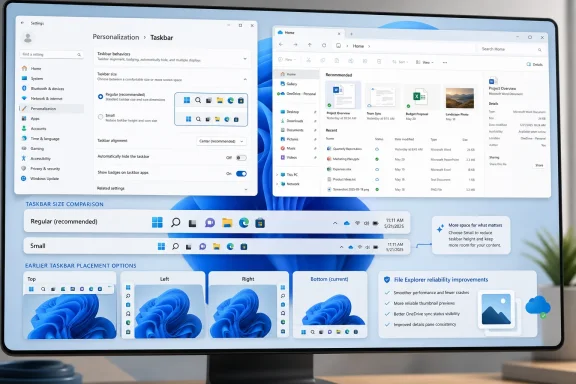
The change in Build 26300.8758 is straightforward: Settings now exposes a dedicated Taskbar Size option, with a small mode that reduces the taskbar’s height and uses smaller icons. That distinction matters because previous Insider work around smaller taskbar buttons did not always give users the thing they thought they were getting. Shrinking icons while leaving the bar itself at the same height is the kind of technically defensible compromise that feels absurd in daily use.A compact taskbar is valuable precisely because it gives space back. On a 13-inch laptop, a few vertical pixels are not an abstraction; they are another line in a document, another row in Excel, another sliver of browser content. On a desktop, the difference may be aesthetic. On a small display, it is ergonomic.
Microsoft’s wording also signals that the company understood the discoverability problem. A setting called “show smaller taskbar buttons” suggests icon behavior, not taskbar geometry. A setting called Taskbar Size says the quiet part plainly. This is the kind of mundane naming cleanup that tends to matter more than a promotional demo because it reduces the friction between user intent and system behavior.
The refinement to transitions between taskbar sizes is another small but telling detail. Microsoft is not merely exposing a hidden switch; it is trying to make the behavior feel designed rather than bolted on. That is important because Windows 11 has often suffered when revived features return as compromises, half compatible with the new shell and half haunted by the old one.
Microsoft Is Reopening a Door It Slammed in 2021
The taskbar-size change follows earlier Insider work that brought back the ability to place the taskbar on different screen edges. That restoration is even more symbolically loaded than resizing. The inability to move the Windows 11 taskbar was one of the clearest examples of Microsoft choosing visual consistency over user agency.For some users, a top taskbar is simply habit. For others, a left or right taskbar makes practical sense on wide monitors where horizontal space is cheap and vertical space is precious. The modern desktop is no longer a world of mostly 16:9 panels with a single fixed workflow, and Windows should be the operating system most willing to admit that.
The return is not necessarily the same as the old Windows 10 experience. Preview builds are test beds, and restored shell features can arrive with caveats around flyouts, animations, alignment, and app assumptions. But directionally, Microsoft is reversing one of Windows 11’s most unpopular design decisions.
That reversal should not be mistaken for pure generosity. Microsoft has a strategic reason to sand down irritations now. Windows 10 support pressure, Windows 11 adoption politics, and the next wave of Windows feature development all depend on users believing that the platform is improving rather than merely being rearranged. A taskbar that finally listens is a small trust-building exercise.
The Insider Program Is Becoming Microsoft’s Confession Booth
There is a familiar pattern in modern Windows development: Microsoft removes or reworks a feature in the name of modernization, waits through months or years of complaints, then tests a partial return in Insider builds. Sometimes the comeback is robust. Sometimes it is timid. Either way, the Insider Program becomes the place where the company negotiates with the users it frustrated earlier.That is not entirely bad. Preview channels exist to test ideas before they land broadly, and the Windows shell is too widely used to change recklessly. A broken taskbar is not a niche bug; it is a productivity outage with rounded corners. Microsoft is right to stage these changes before pushing them into stable releases.
But the cadence also reveals a cultural issue. Windows 11’s launch-era taskbar did not fail because Microsoft lacked telemetry. It failed because telemetry can tell you what most people click, not what experienced users rely on when the system stops accommodating them. The value of a movable or smaller taskbar is easy to undercount if the metric is frequency rather than intensity.
That distinction is crucial for administrators and power users. The person who moves a taskbar to the left might be a minority user, but the preference may be deeply embedded in their workspace. The person who wants a smaller taskbar may not represent the median consumer, but they may represent precisely the kind of user who notices, complains, writes scripts, files feedback, and influences deployment sentiment.
Windows K2 Sounds Like a Repair Campaign, Not a Rebrand
The broader context is Microsoft’s reported push to address Windows 11 pain points under the Windows K2 umbrella. The label matters less than the posture. Microsoft appears to be grouping together changes across performance, reliability, design, and everyday fit-and-finish — the unglamorous areas that determine whether an operating system feels dependable.That is the right target. Windows 11’s problem has rarely been a shortage of ideas. It has been the feeling that too many ideas arrived before the old contract with users had been renegotiated. Rounded corners, centered icons, new Settings pages, AI surfaces, and web-connected experiences do not compensate for a shell that withholds basic layout control.
The taskbar fix fits neatly into that repair campaign because it is both visible and low-concept. Nobody needs a keynote to understand why a smaller taskbar is useful. Nobody needs a Copilot prompt to explain why laptop users might want more room. It is the kind of improvement that makes Windows feel less like a product strategy and more like a tool.
That distinction is where Microsoft has sometimes lost the room. Enthusiasts can tolerate change when it feels like capability. They resist it when it feels like a managed experience designed around averages, nudges, and future monetization. A configurable taskbar is a reminder that personal computing still needs the personal part.
The File Explorer Fixes Tell the Same Story in Quieter Language
Build 26300.8758 is not only about the taskbar. Microsoft also notes reliability improvements for thumbnail previews of cloud files in the Details pane, a reorganization of that pane so file properties are easier to review, a fix for the OneDrive shortcut failing when File Explorer runs in administrative mode, and a correction for a permanent-delete confirmation dialog that could show an internal Recycle Bin file name instead of the original file name.None of that will trend. All of it matters. File Explorer is another piece of Windows that carries decades of user expectation, and its modern cloud-connected role has made it more complicated than the old local-folder mental model. When previews fail, when OneDrive integration behaves differently under elevation, or when delete dialogs expose internal names, the system feels less trustworthy.
That word — trustworthy — is doing a lot of work. A desktop operating system earns trust through boring consistency. It tells you what file you are deleting. It shows the preview it promised. It makes cloud-backed storage feel like part of the file system rather than a web service wearing Explorer’s clothes.
These fixes are adjacent to the taskbar work because they point to the same product maturity problem. Windows 11 does not need every update to be spectacular. It needs more updates that remove papercuts without creating new ones.
Dark-Mode Sounds Are Silly Until They Aren’t
Microsoft also says it improved system sounds when using Windows in dark mode. At first glance, that sounds like the kind of flourish people mock in changelogs. Yet it reflects a more ambitious design idea: that Windows should adapt not just visually but tonally to the mode a user chooses.There is a risk here, of course. Windows can become precious when it tries too hard to be atmospheric. The operating system should not behave like a wellness app. But sound design is part of perceived polish, and the best interface work is often cumulative rather than dramatic.
The bigger lesson is that Microsoft is paying attention to sensory coherence while also restoring practical options. That balance is the hard part. Users do not object to beauty; they object when beauty becomes the excuse for removing control. A refined dark-mode soundscape is harmless if the taskbar can still be made smaller, moved, and shaped around real workflows.
This is where Windows 11 can still find its identity. It does not have to choose between modern and capable. It has to stop treating those values as enemies.
Enterprise IT Will Care Less About Beauty Than Blast Radius
For IT departments, the immediate reaction to a smaller taskbar setting will likely be muted. Preview builds are not production policy, and administrators generally do not rebuild deployment plans around a UI toggle that has not reached broad release. Still, shell changes are never merely cosmetic in managed environments.A changed taskbar affects documentation, training screenshots, help desk scripts, accessibility guidance, and user support expectations. If Microsoft eventually ships taskbar resizing and positioning broadly, organizations will have to decide whether to allow personalization, standardize a layout, or manage the setting through policy if controls become available. The more Windows exposes choice, the more administrators must decide which choices are harmless and which ones complicate support.
That is not an argument against the feature. It is an argument for Microsoft to ship it predictably. Windows admins can handle options. What they dislike is ambiguity: features that appear for some users but not others, staged rollouts without clear controls, or settings that change names and locations between builds.
The best version of this taskbar comeback would be boringly manageable. Microsoft should document the behavior, keep the Settings path stable, clarify whether small taskbar mode is available across all taskbar positions, and avoid hiding enterprise-relevant knobs behind consumer experimentation. If the company wants Windows 11 to feel more respectful to power users, it should extend that respect to the people who manage fleets of PCs.
The Start Menu Is the Other Half of the Same Argument
The taskbar is not the only shell surface Microsoft has been revisiting. Recent Windows 11 preview work has also included Start menu customization, including efforts to address sizing and layout frustrations. That matters because the Start menu and taskbar form one continuous user habit, even if Microsoft treats them as separate features.Windows 11’s Start menu has had its own identity crisis. It is cleaner than the Windows 10 tile era, but it has often felt less information-dense and less personal. Recommendations, pinned apps, account prompts, and layout constraints have made it feel at times like Microsoft’s space rather than the user’s launcher.
Taskbar resizing by itself cannot solve that. But it belongs to a broader correction: give users clearer control over the shell’s footprint, density, and location. The best desktop environments understand that screen real estate is not generic. It is contested territory between the operating system, applications, notifications, search, widgets, chat surfaces, and whatever Microsoft decides is strategically important this year.
If Microsoft is serious about reducing Windows 11 pain points, it should treat the shell as a working environment, not a billboard. The taskbar fix suggests the company is at least moving in that direction. The Start menu will test whether that lesson sticks.
The Old Windows Lesson Was Hiding in Plain Sight
The most durable versions of Windows succeeded not because they were elegant in the abstract, but because they allowed inelegant people to do specific things. A sysadmin could pin tools in strange places. A developer could run a dense desktop. A finance worker could arrange windows and monitors with ritual precision. A home user could make the machine feel familiar and then leave it that way for years.Windows 11 sometimes behaved as if the future of personal computing required tidying those people up. The centered taskbar, simplified menus, and reduced options projected confidence, but they also narrowed the platform’s expressive range. That was always a dangerous move for Windows, whose competitive advantage is not purity but accommodation.
The smaller taskbar setting is a small restoration of that old accommodation. It says the desktop can be modern without being paternalistic. It says visual consistency does not require identical workflows. It says the operating system can make a recommendation without turning that recommendation into a wall.
Microsoft should internalize that lesson beyond the taskbar. The same principle applies to default apps, notifications, AI integration, account prompts, cloud storage, and Settings migrations. Users are more willing to try new things when they believe the old exits still exist.
This Is Progress, but It Is Not Vindication
It would be easy to overpraise Microsoft for returning functionality that many users believe should never have been removed. A smaller taskbar in a preview build is progress, not absolution. The company does not get full credit for rebuilding the bridge after forcing everyone onto a detour.Still, progress matters. Windows development is slow because compatibility, scale, and user diversity make everything slow. When Microsoft changes course on a shell decision, even incrementally, it signals that feedback is still capable of piercing the product plan.
The important caveat is that Insider builds are not promises to every stable-channel user. Features can change, roll out gradually, or be delayed. The version number and channel placement matter: this is a test of future Windows behavior, not a guarantee that every Windows 11 PC will receive the same setting tomorrow.
That is why the correct response is cautious approval. Microsoft has identified the right irritation. It has given the setting a clearer home. It appears to be connecting icon size with actual taskbar height. Now it has to ship the feature broadly, document it sanely, and resist the urge to declare the problem solved while related shell frustrations remain.
The Small Taskbar Carries a Large Message
The concrete takeaways are less complicated than the years of argument behind them. Microsoft is testing a taskbar that once again behaves more like part of a personal computer and less like a fixed appliance surface.- Windows 11 Insider Experimental Preview Build 26300.8758 adds a dedicated Taskbar Size setting for testers.
- The new small mode reduces both the taskbar’s height and the size of its icons, rather than merely shrinking buttons inside the same vertical space.
- The change follows earlier Insider work restoring taskbar placement options, including top, left, and right screen positions.
- File Explorer fixes in the same build reinforce Microsoft’s current focus on everyday reliability rather than only marquee features.
- The feature is still in preview, so production users should treat it as a direction of travel rather than an immediate stable-channel promise.
- The larger significance is that Microsoft is retreating from one of Windows 11’s most restrictive launch-era shell decisions.
References
- Primary source: Windows Central
Published: None
Loading…
www.windowscentral.com - Official source: learn.microsoft.com
Windows 11 Insider Experimental Preview Build 26300.8758 - Windows Insider Program | Microsoft Learn
Release notes for Windows 11 Insider Experimental Preview Build 26300.8758learn.microsoft.com - Related coverage: tomshardware.com
How to Change the Taskbar Size in Windows 11 | Tom's Hardware
You can get small, medium or large taskbar and icons.www.tomshardware.com - Related coverage: windowslatest.com
KB5055625 tests Windows 11's Show smaller taskbar buttons feature
Windows 11's Show smaller taskbar buttons is rolling out and you can find it under Settings > System > Taskbar > Taskbar behaviour. www.windowslatest.com
- Related coverage: windowsforum.com
Loading…
windowsforum.com - Related coverage: bleepingcomputer.com
Microsoft testing adjustable taskbar, Start menu in Windows 11
Microsoft has finally brought back the resizable taskbar and Start menu to Windows 11 in the latest preview version rolling out to Insiders in the Experimental channel.www.bleepingcomputer.com
- Related coverage: geeksforgeeks.org
How To Change Taskbar Size in Windows 11 - GeeksforGeeks
Your All-in-One Learning Portal: GeeksforGeeks is a comprehensive educational platform that empowers learners across domains-spanning computer science and programming, school education, upskilling, commerce, software tools, competitive exams, and more. www.geeksforgeeks.org
- Related coverage: basic-tutorials.com
Windows 11: New Options for Taskbar Size in the Insider Program - Basic Tutorials
Windows 11 is getting a dedicated setting for taskbar size in the Insider Program. Here's what the new option does and who can test it now.basic-tutorials.com - Related coverage: hothardware.com
Windows 11 Gets New Taskbar Settings, Other Improvements In Latest Build | HotHardware
The latest Windows 11 Insider Preview Builds feature taskbar size controls, File Explorer improvements, and new enterprise features.hothardware.com
- Related coverage: techradar.com
Windows 11 is getting some much-wanted features for the Start menu and taskbar, and that's great to see — but it's not the change I really want | TechRadar
The thing that tops my wish-list won't ever happen...www.techradar.com