

Microsoft has pushed a fresh Canary‑channel flight — Windows 11 Insider Preview Build 27982 — that quietly advances three user-facing experiences (lock‑screen widgets, a redesigned Widgets board with multiple dashboards, and a top‑of‑screen drag tray for sharing) while delivering a small but meaningful set of stability fixes and a couple of noteworthy regressions still under investigation.
Canary‑channel builds are the earliest public preview of Windows platform work, intended for experimentation rather than production use. They ship platform changes very early in the development cycle and frequently contain features that may evolve significantly, be gated to subsets of Insiders, or never ship at all. Microsoft explicitly uses staged, server‑side rollouts (Control Feature Rollout) to enable new experiences for a portion of Insiders and expand exposure as telemetery and feedback warrant. Treat Canary builds as testbeds: expect the newest ideas and the highest chance of instability.
This update continues that pattern: Build 27982 introduces visibility for three UX experiments that change how users glance at information (lock‑screen widgets), manage a persistent information surface (Widgets dashboards), and move/share files (Drag Tray). The announcements also include a handful of targeted fixes plus known issues that underscore the Canary channel’s trade‑offs between novelty and reliability. Public coverage and community excerpts of the official notes confirm the feature set and rollout approach.
Risk summary:
Where to file feedback:
Insiders who want the earliest look should install only on non‑critical hardware, file feedback through the Feedback Hub (the announcement points to specific Feedback Hub categories for lock screen, widgets, and sharing), and watch Microsoft’s staged rollout signals for broader availability. The Drag Tray and widget dashboard concepts are promising micro‑productivity wins; whether they land broadly will depend on developer integration, localization progress, and how Microsoft addresses the outstanding reliability issues flagged in this flight.
Source: Microsoft - Windows Insiders Blog Announcing Windows 11 Insider Preview Build 27982 (Canary Channel)
 Background
Canary‑channel builds are the earliest public preview of Windows platform work, intended for experimentation rather than production use. They ship platform changes very early in the development cycle and frequently contain features that may evolve significantly, be gated to subsets of Insiders, or never ship at all. Microsoft explicitly uses staged, server‑side rollouts (Control Feature Rollout) to enable new experiences for a portion of Insiders and expand exposure as telemetery and feedback warrant. Treat Canary builds as testbeds: expect the newest ideas and the highest chance of instability.This update continues that pattern: Build 27982 introduces visibility for three UX experiments that change how users glance at information (lock‑screen widgets), manage a persistent information surface (Widgets dashboards), and move/share files (Drag Tray). The announcements also include a handful of targeted fixes plus known issues that underscore the Canary channel’s trade‑offs between novelty and reliability. Public coverage and community excerpts of the official notes confirm the feature set and rollout approach.
What’s new in Build 27982 — at a glance
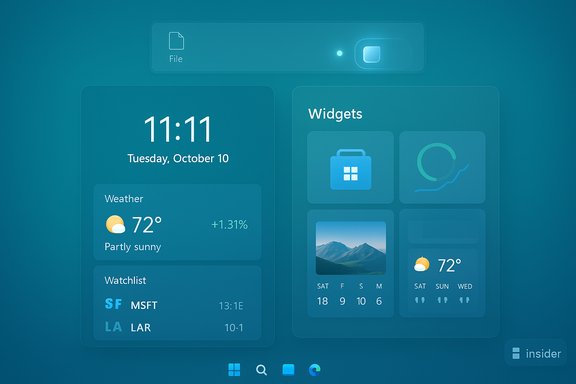
- Lock‑screen widgets: The old “Weather and more” lock‑screen quick content has been replaced by a full small‑widget model that can show Weather, Watchlist, Sports, and suggested widgets. Customization lives at Settings > Personalization > Lock screen. Rollout is staged to a subset of Canary Insiders.
- Widgets board: multiple dashboards and left‑side navigation: The Widgets board now supports multiple dashboards so you can pin different sets of widgets and switch between them quickly using a new left navigation bar; the Discover feed remains available as a personalized content stream. This is an evolution of the Widgets surface into a dashboarded, multi‑panel experience.
- New drag tray for sharing: Dragging a local file from File Explorer or the desktop now reveals a compact tray at the top of the screen. Drop onto a surfaced app to quickly send or share the file, or pick “More…” to open the classic Share dialog. The Drag Tray aims to reduce friction in common share and move flows.
- Stability fixes and bug patches: This build includes fixes for apps freezing when used with IMEs (Visio), an Arm64‑specific game crash reporting error, repeated explorer.exe crashes after long uptimes, and text rendering issues in multiline edit fields after prior updates. The official notes list these as addressed items in this flight.
- Known issues: The new Start menu may unexpectedly jump to the top (scroll reset), and some Insiders report sleep and shutdown failures after the latest Canary builds — Microsoft is investigating. These two items are flagged explicitly in the build notes.
Deep dive: Lock‑screen widgets — glanceable information reimagined
What changed
The lock screen’s prior “Weather and more” surface has been replaced by a widget model that supports small‑sized widgets (Weather, Watchlist, Sports, and more). Users can add, remove, and reorder widgets directly from the lock screen; suggested widgets are surfaced to help discovery. Configuration is available in Settings > Personalization > Lock screen. Rollout begins with a subset of Canary Insiders while Microsoft monitors feedback.Why this matters
The lock screen is Windows’ most glanceable information surface. Moving to a widget model does three things:- It standardizes the presentation so third‑party and first‑party cards can share size, layout, and interaction patterns.
- It increases discoverability by offering suggested widgets directly on the lock screen.
- It tightens parity with the Widgets board, making glanceability consistent whether the device is locked or unlocked.
Practical notes and guidance
- To customize lock‑screen widgets: open Settings > Personalization > Lock screen and use the widget controls.
- If you don’t see the experience, remember Microsoft is using a staged rollout; not every Canary device receives every feature immediately.
- Feedback should be filed through the Feedback Hub under Desktop Environment > Lock screen, so the team can triage localization, layout, and privacy concerns.
Deep dive: Widgets board — from single feed to multiple dashboards
What changed
The Widgets board now supports multiple dashboards, giving users space to organize widgets by task or context (for example, “Productivity”, “Personal”, “Travel”). A left‑side navigation bar makes switching between dashboards and the Discover feed easier and more discoverable. Like other Canary experiments, this is being rolled out incrementally.Benefits and use cases
- Personalized organization: Pin a set of widgets for work and another for personal life, reducing information clutter.
- Faster switching: The left nav bar removes a layer of friction previously required to switch contexts inside the Widgets board.
- Discoverability: The Discover feed remains available to surface stories, suggestions, and Copilot‑driven content when enabled.
Potential concerns
- Widgets frequently rely on network content and personalization. Users who are privacy‑sensitive or on metered connections should verify what data is shared and whether the widget’s content can be limited. Reported partial localizations in earlier preview drops also mean the experience may not yet feel polished in all languages.
Deep dive: Drag Tray — rethinking drag‑and‑drop sharing
What changed
When you begin dragging a local file from File Explorer or the desktop, a compact tray appears at the top of the screen. The tray surfaces apps and targets (apps, cloud destinations, and folders) so you can drop the file directly into a destination without opening the target app or invoking multiple menus. A “More…” entry opens the classic Share sheet when needed.What it solves
Drag‑and‑drop has been an awkward muscle memory on the desktop for years: moving files between windows, attaching to apps, and sharing across platforms involves many micro‑steps. The Drag Tray:- Reduces the number of clicks to share or move content.
- Prioritizes likely targets (based on context and recent usage).
- Supports multi‑file drags and direct drag‑to‑folder moves in experimental builds, streamlining reorganization workflows.
Real‑world behavior and caveats
Hands‑on community coverage shows the tray behaves like a unified, lightweight share surface: drop on an app icon to open its share flow, or drop on a folder target to move files directly. However, because the experience is staged and ties into app integration, behavior can vary depending on whether the target app supports the expected share contract or is full‑screen. Expect spotty availability across devices during the initial ramp.Fixes included in this flight
Build 27982 bundles a set of targeted fixes intended to reduce friction for some typical Insider pain points:- Fixed Visio freezing when interacting with an IME (input method editor).
- Resolved an Arm64‑specific issue that surfaced an error message saying “The game has crashed with error code 0x0”. This patch aims to improve gaming reliability on Arm64 laptops.
- Addressed explorer.exe crashes that could start occurring if a PC was kept running for extended periods without reboot.
- Fixed incorrect text rendering when editing multiline text boxes in certain apps after recent updates.
Known issues and risk assessment
Build 27982 also lists a couple of significant known issues:- Start menu scrolling: Insiders using the new Start menu may find it unexpectedly scrolls to the top, which is disruptive for large Start layouts.
- Power and sleep issues: There are reports that sleep and shutdown aren’t working correctly for some Insiders after recent Canary builds; this remains under investigation. Microsoft cautions Insiders to expect such regressions in Canary.
Risk summary:
- Canary channel stability risk: High — frequent experimental changes and partial rollouts.
- Data and privacy considerations: Medium — lock‑screen widgets and expanded Widgets dashboards surface content before unlock and may require scrutiny for what data is presented.
- App compatibility: Medium — UI experiments (Drag Tray, Widgets dashboards) depend on app integration that may be inconsistent across ecosystem partners.
How Microsoft is rolling these features out
Microsoft is using a staged, controlled rollout model where binaries are often shipped broadly, but functionality is enabled server‑side for subsets of Insiders. That means installing Build 27982 won’t guarantee immediate access to the new lock‑screen widgets, dashboards, or the Drag Tray; availability is determined by server flags, device eligibility (hardware, account type), and controlled experimentation. This rollout strategy is intended to collect feedback and telemetry from a smaller cohort before wider exposure.How to try Build 27982 and how to give feedback
If you’re already an Insider on the Canary channel, check Windows Update and install the preview build. Expect partial feature availability due to staged rollouts.Where to file feedback:
- Lock‑screen widget issues: Feedback Hub → Desktop Environment → Lock screen.
- Widgets board or dashboard problems: Feedback Hub → Desktop Environment → Widgets.
- Drag Tray/share issues: Feedback Hub → Desktop Environment → Share.
- Back up important data. Canary builds are experimental and may introduce regressions.
- Avoid installing on mission‑critical machines or primary workstations.
- If you need to leave Canary for a more stable channel later, be aware that switching to a channel with a lower build number will require a clean install of Windows 11. Microsoft repeats this restriction regularly in Canary channel notes.
Independent verification and reporting context
Multiple independent outlets and community sources have cataloged the same feature set and rollout pattern. Community archives and early hands‑on coverage corroborate the Drag Tray behavior, the shift to a dashboarded Widgets board, and the lock‑screen widget preview. Major Windows‑focused outlets have also covered recent Insider updates and noted Microsoft’s use of staged feature enables and Copilot‑era experiments across channels. Those independent reports align with the official build notes and the staged rollout model described by Microsoft. Caveat on unverifiable or context‑sensitive claims:- Any precise user‑facing timing (for example, “when the feature will reach all Insiders”) cannot be independently confirmed beyond Microsoft’s staged rollout statements. Those schedules are adjusted dynamically based on feedback and telemetry; expect variability. Treat statements about “availability” as provisional until server flags expand visibility.
Critical analysis — strengths, opportunities, and risks
Strengths
- Day‑to‑day productivity gains: The Drag Tray is a low‑friction UX improvement that addresses a longstanding desktop pain point, removing steps from sharing and moving files. Early hands‑on reactions indicate tangible micro‑efficiency wins for common workflows.
- Consistency and discoverability: Lock‑screen widgets and the multi‑dashboard Widgets board create a consistent content model across lock and unlock surfaces, supporting personalization and rapid access to key information.
- Controlled experimentation: Microsoft’s staged rollout approach helps catch regressions early and limits exposure while iterating, which is appropriate for Canary‑level changes.
Risks and concerns
- Privacy and pre‑sign‑in content: Expanding lock‑screen widgets raises questions about what third‑party data is visible before unlock. Organizations and privacy‑minded users should verify widget permissions and whether any personal data can be surfaced inappropriately.
- Fragmented availability and developer burden: Because feature visibility is server‑gated and sometimes hardware‑gated, third‑party apps may face inconsistent behaviors across devices and Insiders, complicating testing and support. Developers should not assume universal API behavior until features reach broader channels.
- Stability on daily machines: Known issues affecting Start menu scrolling and power states highlight the practical risks of running Canary as a primary OS. The sleep/shutdown issue in particular can disrupt work and battery life.
What this means for administrators, power users, and developers
- Administrators: treat Canary devices as isolated testing endpoints; do not deploy Canary to user fleets. Expect API and surface behavior to change over time, and plan update and recovery workflows accordingly.
- Power users: the Drag Tray and Widgets improvements are worth trialing if you’re comfortable with instability and can tolerate staged rollouts. Back up data before installing.
- Developers: if your app provides widgets or integrates with the Share contract, test interactions with the Drag Tray and small‑size widgets; however, expect behavior to change as these experiments mature and rollout expands. Pay attention to localization gaps in early drops.
Conclusion
Build 27982 is a representative Canary flight: small in scope but significant in intent. Microsoft is testing refinements that reshape everyday interactions — how users glance at the lock screen, curate widget panels, and drag files across the desktop. The changes are thoughtfully aimed at reducing friction and boosting discoverability, and they reflect a measured approach to rolling out UI experiments. At the same time, the Canary channel’s experimental nature introduces stability trade‑offs that make this build appropriate only for testers, enthusiasts, and developers who can tolerate regressions.Insiders who want the earliest look should install only on non‑critical hardware, file feedback through the Feedback Hub (the announcement points to specific Feedback Hub categories for lock screen, widgets, and sharing), and watch Microsoft’s staged rollout signals for broader availability. The Drag Tray and widget dashboard concepts are promising micro‑productivity wins; whether they land broadly will depend on developer integration, localization progress, and how Microsoft addresses the outstanding reliability issues flagged in this flight.
Source: Microsoft - Windows Insiders Blog Announcing Windows 11 Insider Preview Build 27982 (Canary Channel)
