Windows 11 Insider Build Adds Structured Math Reading and HD Voices

  • Thread Author
Microsoft’s latest Insider preview (Build 26220.7262, delivered as KB5070303) brings a focused but meaningful accessibility upgrade to Windows 11: Narrator can now read mathematical expressions in Microsoft Word in a structured, semantically aware way, and both Narrator and Magnifier gain higher-fidelity HD voices — features debuting in the 25H2 preview stream and intended to make STEM content more accessible to blind and low‑vision users.

Laptop screen shows a Word document with mathematical equations and a blue speech-bubble of formulas.Background​

Microsoft continues to roll Windows 11 version 25H2 as an enablement package delivered to Insider channels via small cumulative updates. Build 26220.7262 (KB5070303) is a preview‑quality flight targeting both the Dev and Beta channels and mixes strategic platform plumbing (an experimental agentic features toggle) with incremental accessibility, UX, and reliability work. The math‑reading capability in Narrator and the new HD voices are part of this measured update approach.
This preview is explicitly gated and staged: many items are opt‑in, region‑ and language‑limited initially (notably U.S. English for the HD voices), and Microsoft has signaled the rollout will broaden over time as telemetry and feedback guide further improvements. Insiders are the target testers for these behaviors before any wider release.

What shipped in KB5070303 (Build 26220.7262)​

Key user‑facing items​

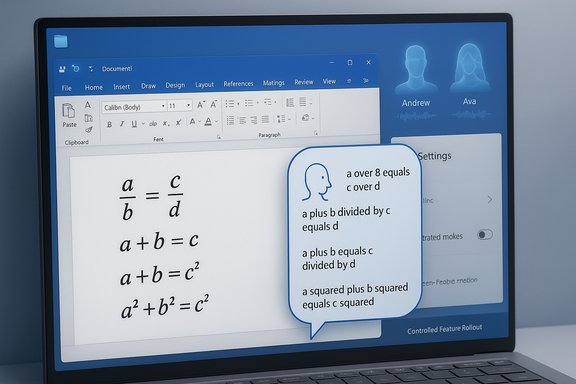
  • Structured math reading in Narrator — Narrator now parses and vocalizes equations in a hierarchical, semantically meaningful order rather than reading math as a flat stream of symbols. This first phase explicitly targets Microsoft 365 desktop apps such as Word.
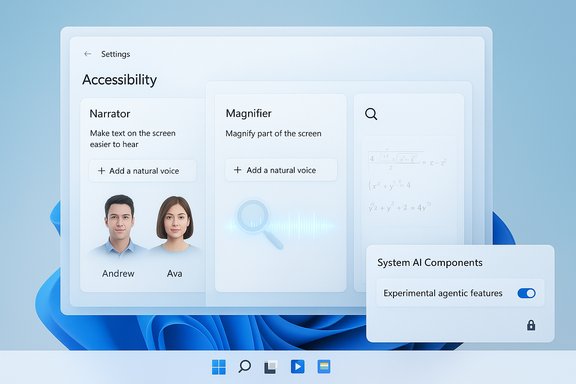
  • HD voices for Narrator and Magnifier — On‑device, higher‑capacity text‑to‑speech models (initially two HD voices labeled in preview builds as Andrew and Ava) provide smoother prosody and reduced listening fatigue for sustained reading. These voices are currently confined to en‑US in the preview.
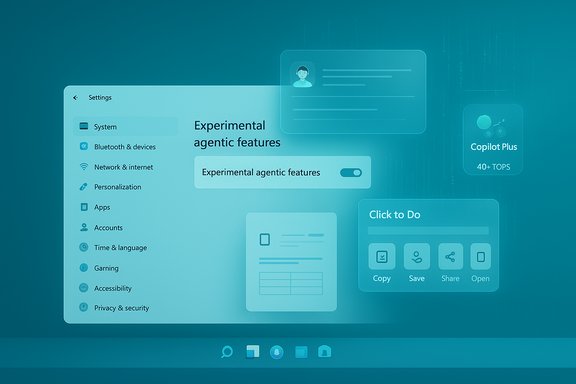
  • Experimental agentic features toggle — A new Settings control (System → AI components → Agent tools → Experimental agentic features) gates the provisioning of the runtime primitives required for agentic experiences (agents that can perform multi‑step actions on a user’s behalf). While not the focus of this article, the toggle is a consequential platform change that accompanies the preview.

Minor polish and temporary reconfigurations​

  • Click to Do context menu refinements, temporary disabling of Image Object Selection, and reconfiguration of File Explorer AI features under Controlled Feature Rollout (CFR) are part of the same preview package. These items illustrate Microsoft’s conservative, telemetry‑driven approach to exposing AI features.

Why structured math reading matters​

Mathematical expressions encode hierarchy and grouping (fractions contain numerators and denominators, exponents attach to bases, parentheses alter precedence). For sighted readers this structure is visible at a glance; for screen‑reader users, linear, symbol‑by‑symbol readouts have long been a major accessibility hurdle in STEM learning and professional workflows.
Structured math reading changes the listening model:
  • It communicates grouping and nesting (for example: “fraction, numerator: x plus y; denominator: z squared” rather than “x + y / z ^ 2”).
  • It uses prosodic cues — pacing, slight pauses and phrasing — to reflect mathematical structure.
  • It reduces cognitive load by preserving relationships between operators and operands, which is essential for comprehension of complex formulas.
Microsoft frames this as an accessibility-first improvement aimed at students and professionals who rely on screen readers to interact with mathematical content, and the initial support is focused on Microsoft 365 desktop apps, starting with Word. Test flights are the method chosen to refine parsing accuracy and speech patterns before wider availability.

How the math reading feature works (practical view)​

Activating Narrator and trying math reading​

  • Enable Narrator using the standard shortcut: Win + Ctrl + Enter.
  • Open a Microsoft 365 Word document that contains equations authored with Word’s equation editor or MathML/OMML.
  • Use standard Narrator reading commands; equations will be read back using the updated reading model that emphasizes structure and semantic relationships.
Narrator’s updated model attempts to preserve natural speech patterns and hierarchy so that listeners can follow exponentiation, fractions, and nested constructs logically rather than decoding a stream of punctuation and symbols. Because this is a phased rollout, coverage may vary by equation authoring method and document format; testing with representative course materials is recommended.

Supported scenarios and limitations​

  • Supported (initial phase): Microsoft 365 desktop apps (Word explicitly called out).
  • Not guaranteed (initial phase): web pages, PDFs, or non‑M365 editors and complex embedded formats. Microsoft plans to broaden coverage over time.
If you rely on Narrator for high‑fidelity math reading (for example, during grading, research reading, or exam review), validate the behavior with your actual content and report misreads through Feedback Hub to help shape improvements.

HD voices: what they are and why they matter​

The new HD voices are on‑device neural TTS models that aim to approximate the fluency and expressiveness of cloud neural TTS while keeping audio generation local. Key practical points:
  • The voices are downloadable through Settings → Accessibility → Narrator (and a parallel flow for Magnifier) via the “Add a natural voice” option. Once downloaded they run locally, reducing latency and potential cloud privacy exposure.
  • The preview provides two persona options (a male and a female voice, previewed as Andrew and Ava) and includes controls for playback speed and switching voices. These voices use richer prosody and pacing to reduce listening fatigue for long reading sessions.
  • Caveats: initially limited to English (United States) in this preview, and because the models are higher capacity they consume additional disk space when downloaded. Microsoft intends to expand language coverage and model options over time.
For many visually impaired users, the combination of improved math rendering and better voice naturalness can dramatically improve comprehension and stamina during study or review sessions.

Cross‑verification of key claims​

Multiple independent outlets and Microsoft’s Insider channels corroborate the most important technical facts:
  • The build identifier 26220.7262 and cumulative update KB5070303 are the preview package deployed to Dev and Beta channels in this wave.
  • Narrator’s structured math reading is explicitly mentioned as part of this preview, scoped initially to Microsoft 365 desktop apps such as Word.
  • HD voices for Narrator and Magnifier (on‑device, en‑US) are part of the build, with two initial voice options and the ability to download and switch voices in Settings.
  • The Experimental agentic features toggle and the agent workspace model are documented as part of the same preview package — an important platform change that accompanies accessibility work.
These cross‑checks come from the preview notes present in Windows Insider postings and from independent reporting that covers the same build details. Where rollout and scope are concerned, Microsoft’s communications emphasize a phased, telemetry‑driven approach; treat broader availability as probabilistic rather than certain until Microsoft updates public documentation.

Accessibility impact: strengths and practical benefits​

  • Improved comprehension for STEM content. Structured math reading addresses one of the largest friction points for screen‑reader users encountering equations, fractions, and scientific notation. This is an important win for education and professional use cases.
  • On‑device HD voices reduce latency and increase privacy. For long reading sessions (lectures, textbooks, lab notes), better prosody and smoother intonation materially lower listening fatigue. On‑device processing also reduces reliance on cloud TTS calls, which matters for privacy‑sensitive environments.
  • Testability and feedback loop. Because the feature is in preview, Insiders can file targeted feedback which helps refine parsing edge cases and pronunciation patterns — a pragmatic path to iterating on complex reading scenarios.

Risks, caveats, and what to watch​

While the improvements are promising, several important caveats and risk areas require attention:
  • Scope limitations in the initial phase. The math reading support targets Microsoft 365 desktop apps first; PDFs, web pages, and other formats may not behave the same. Expect uneven behavior across different equation encodings. If a workflow relies on precise rendering of complex symbolic math, validate results locally.
  • Language and region limits. HD voices are limited to en‑US for now. Multilingual users or non‑US English readers will not immediately benefit from the new HD voices until Microsoft expands language support.
  • Storage footprint. HD on‑device models are larger; devices with constrained disk space should be cautious about downloading multiple voices.
  • Preview churn and temporary rollbacks. Microsoft has temporarily disabled Image Object Selection and reconfigured some AI actions in the same preview, showing the company is ready to pull back features during stabilization. Expect feature availability to vary during the preview.
  • Enterprise management and security implications (agentic features). The broader KB and build also expose early hooks for agentic user agents. IT organizations should treat agentic capabilities with caution and pilot widely before enabling them in production. The agent model introduces new attack surfaces and administrative policy requirements (signing, revocation, auditing). These are separate but related concerns to accessibility improvements and should inform any organizational rollout strategy.
Where claims about future expansion, exact availability windows, or enterprise controls are made, those remain provisional until Microsoft publishes formal enterprise guidance and documentation — readers should treat roadmap statements as subject to change and verify before broad deployment.

Guidance for Insiders, users, and IT administrators​

For Insiders and power users​

  • Install the update via Settings → Windows Update when KB5070303 (Build 26220.7262) appears. Confirm you are on the Dev or Beta channel.
  • To test Narrator math: open Word with equations and enable Narrator (Win + Ctrl + Enter). Use normal Narrator reading commands to evaluate how equations are presented. Report misreads via Feedback Hub under Accessibility > Narrator.
  • To try HD voices: go to Settings → Accessibility → Narrator (or Magnifier) → Add a natural voice, download the HD voice, and switch playback options to compare quality.

For IT administrators​

  • Treat agentic features as experimental: keep the Experimental agentic features toggle off on production endpoints until policy guidance is clarified.
  • Pilot accessibility improvements with target user groups (assistive technology users, disability services) to validate math rendering fidelity and voice preferences.
  • Update MDM/Group Policy templates and EDR rules to recognize agent account processes and agent workspace telemetry before enabling agentic features enterprise‑wide.

Developer and assistive‑tech community considerations​

Developers and accessibility professionals should note:
  • When designing content that will be consumed by screen readers, prefer semantic math encodings (Office Math Markup Language, MathML) over images of equations to maximize compatibility with structured reading. The new Narrator model relies on semantic cues to produce hierarchical spoken output.
  • Provide sample documents and reproducible cases to Microsoft via Feedback Hub if you encounter misparses; community reporting during preview accelerates improvements and increases the likelihood of broader format coverage.
  • Consider integrating local validation and automated tests for math rendering in accessibility QA suites to detect regressions early as Microsoft iterates on parsing logic.

Final assessment​

KB5070303 (Build 26220.7262) is not a sweeping UI overhaul — it is an iterative, targeted preview that delivers tangible accessibility improvements while simultaneously exposing platform plumbing for future agentic experiences. The structured math reading in Narrator and the HD on‑device voices are clear, practical wins for users who depend on assistive technology, particularly in STEM contexts. At the same time, the rollout’s limited scope, language constraints, and preview status mean real‑world utility will vary until broader coverage and more mature enterprise controls are available.
For Insiders and accessibility practitioners, this build is worth testing on non‑critical devices now. For organizations, the responsible path is cautious piloting combined with updates to policy, monitoring, and rollback plans before any wide enablement. The interplay of improved assistive features with the emergent agentic runtime is an important trend to follow: accessibility progress is real and immediate, while agentic platform changes introduce operational questions that will shape Windows deployments in the months ahead.

In the short term, users who need better access to mathematical content should validate Narrator’s behavior with their specific documents and consider adopting the HD voices for longer reading sessions; IT teams should inventory affected endpoints and delay enabling the Experimental agentic features toggle until governance is in place. The KB5070303 preview is a measured step forward for accessibility on Windows — meaningful for many, provisional for enterprises — and one that emphasizes iterative improvement driven by real user feedback.
Source: Windows Report KB5070303 Preview Upgrades Narrator With Ability to Read Math in Microsoft Word
 

Microsoft’s latest Insider cumulative—delivered as KB5070303 and identified by Build 26220.7262—does more than tweak accessibility voices or a context menu: it formally exposes the first user-facing gate for agentic automation on Windows and redesigns Click to Do’s context surface, signaling that Microsoft is moving from conversational assistant features toward system-level agents that can act on users’ behalf.

Futuristic settings dashboard with experimental features and floating UI panels.Background / Overview​

Windows 11’s 25H2 preview stream continues to be distributed via compact cumulative updates that both patch and quietly surface enabling plumbing for larger feature sets. KB5070303 (Build 26220.7262) is the latest such package released to Insiders in the Dev and Beta channels, and it bundles a set of experimental AI/assistance changes alongside accessibility and UI refinements. The two headlines in this flight are:
  • The new “Experimental agentic features” toggle surfaced in Settings under System → AI components → Agent tools — a single, explicit opt-in control that permits Windows to provision an agent runtime and related agent workspaces.
  • A redesign of Click to Do’s context menu, favoring simpler primary actions and making the overlay more proactive when it detects large images or tables on screen.
Both items are being rolled out as staged, staged-by-entitlement features: not every Insider device will immediately see them, and many subfeatures remain region- or hardware-gated.

What KB5070303 actually installs: a practical summary​

Experimental agentic features toggle — what it is and where to find it​

  • Location: Settings → System → AI components → Agent tools → Experimental agentic features.
  • Default state: Off. The toggle must be explicitly enabled to provision agent runtime support on a device.
This single toggle acts as a master switch that allows signed AI agents to use Windows-level primitives to perform UI interactions, file operations and multi-step workflows in contained agent sessions. The explicitness of the control is important: Microsoft surfaces it up-front rather than hiding per-agent permissions across scattered dialogs.

Agent workspace and agent accounts — the isolation model​

Microsoft’s early design approach for agentic automation uses several layered controls:
  • Agent workspace: a contained desktop session where an agent executes UI interactions visible to users but isolated from the main session.
  • Agent accounts: agents run under distinct, standard Windows accounts (not the human user), enabling separate ACLs, auditing and the possibility of per-agent policy.
  • Scoped permissions: initial access is conservative — known folders (Documents, Desktop, Downloads, Pictures) are permitted by default only when explicitly authorized; connectors to cloud services use OAuth consent flows.
  • Signing and revocation: agent binaries and packages are expected to be digitally signed, enabling Microsoft and admins to revoke or block agents.
These primitives are deliberately lighter-weight than full virtual machines but stronger than unsandboxed processes; the design is meant to balance responsiveness and productivity with a safer operational boundary. Independent reporting and Microsoft documentation both describe this middle-ground model.

Click to Do redesign — faster, simpler, more proactive​

The Click to Do overlay and context menu have been simplified to surface the most common tasks — Copy, Save, Share, Open — more prominently. The overlay can automatically pop up when the system detects a large image or a table on-screen, reducing clicks for common extraction and conversion scenarios (for example, Convert to Excel). This is part of a larger push to make Copilot-era features feel like native productivity shortcuts inside the shell.

Accessibility improvements​

  • HD voices for Narrator and Magnifier (U.S. English initially, with sample voices labeled Andrew and Ava in preview) — these are on-device, neural TTS voices designed to lower latency and protect privacy.
  • Structured math reading in Narrator for Microsoft 365 desktop apps (Word equations) — Narrator will attempt semantically meaningful equation playback.

Verification of major technical claims​

Several of the article’s load-bearing technical points were explicitly verified against Microsoft and independent reporting:
  • KB5070303 maps to Build 26220.7262 and was published to the Dev & Beta Insider channels; this is reflected in the Windows Insider release notes captured in the preview post.
  • The Experimental agentic features toggle and the agent workspace model are documented as the way Microsoft intends to gate and isolate agent actions; security primitives (agent accounts, scoped known-folder access, signing/revocation) are described in Microsoft’s discussions of Copilot Actions and associated security guidance.
  • Click to Do context improvements, automatic popups for images/tables, and the streamlined action list are present in multiple Insider coverage notes and community summaries. The redesign is being rolled out gradually.
  • Copilot+ hardware gating: features that rely on on-device NPUs are tied to the Copilot+ program; Microsoft explicitly identifies 40+ TOPS NPU capability as a practical threshold for Copilot+ experiences. That hardware spec and the Copilot+ device guidance are present on Microsoft’s Copilot+ pages and developer documentation.
Where public specifics are incomplete (for example exact enterprise policy controls and audit APIs that will be available at general release), those items are noted as provisional or under development in Microsoft’s staged rollout notes and in community reporting. Readers should treat those as in progress rather than definitive.

Why this matters: two perspectives​

For power users and Insiders​

The Experimental agentic features toggle is your on-ramp to the earliest, interactive form of Copilot Actions — not just a conversational assistant but an entity that can open apps, click UI elements, read screens, extract tables, and chain multi-step automations. That’s substantial productivity compression when it works: a single instruction could replace many manual steps.
Benefits for Insiders include:
  • Rapid prototyping of agent workflows on test hardware.
  • Early exposure to agent-based automation patterns and debugging of failure modes (misrecognition, brittle UI automation).
  • Ability to test accessibility improvements like HD voices and math-reading in real documents.

For IT and security teams​

This capability changes the OS trust model: code that acts like a human in your desktop session raises new attack surfaces. Key enterprise implications:
  • Agents acting via UI automation can bypass conventional API-based detection. Endpoint defenders must adapt to monitor separate agent accounts and the agent workspace family of processes.
  • Data exfiltration risks tied to multi-step automation (e.g., assemble document → attach to email) require DLP policies and auditing that map to agent identities, not just the human sign-in.
  • Administrative policy controls must be able to disable agent provisioning centrally, manage allowed agent signing certificates, and audit agent actions.
Enterprises will need a staged pilot approach: test the agent toggle only on controlled hardware (preferably Copilot+ devices where on-device models can be constrained), instrument telemetry, and draft rollback policies before broad enabling.

Strengths — what Microsoft is doing well in this preview​

  • Clear opt‑in control: Exposing a single, discoverable toggle for experimental agentic features is a good UX/Trust move. It avoids surprising users and centralizes the decision to provision the agent runtime.
  • Isolation primitives: Agent workspaces and distinct agent accounts inject separation and auditability into workflows that would otherwise run in the user session. This is a meaningful improvement over letting third parties script user sessions directly.
  • Accessibility-first improvements: HD voices and structured math reading directly help users who rely on Narrator and Magnifier — these are not gimmicks but functional upgrades for long-form listening and STEM accessibility.
  • Pragmatic hardware gating: Tying heavier, on-device AI experiences to Copilot+ NPUs (40+ TOPS) is honest engineering: it sets realistic expectations for latency, privacy, and local inference capability. Microsoft’s Copilot+ documentation outlines the threshold.

Risks and unanswered questions​

The preview is deliberately conservative, but several substantial risks remain and should be considered by both consumers and IT pros.
  • Automation brittleness: UI-based agents are fragile. UI layouts change across app versions and locales; automations that click or read pixel regions can fail unpredictably. Robustness will require fallback strategies and declarative, API-driven connectors where possible.
  • Policy and audit gaps today: While Microsoft describes agent accounts and signing, the enterprise-grade policy tooling (fine-grained DLP per agent, attestation logs, SIEM playbooks that map agent actions to audit events) are still evolving. Do not assume mature enterprise management is available the moment the toggle appears on a device.
  • New attack surface: Agents that can interact with UIs, read screens and write files open avenues for credential capture and lateral actions that legacy endpoint protections might not see if they focus on typical process behavior. Security teams must extend detection to agent workspace processes and signed-agent identities.
  • Privacy and data governance: Click to Do and Copilot integrations may parse on-screen content and context. Enterprises must validate telemetry flows, cloud fallbacks, and storage/retention rules before enabling agentive features on production endpoints. Region gating is already being used; do not assume feature parity across jurisdictions.
Where a claim remains speculative — for instance, precise timelines for which enterprise management APIs will be available to Intune/Entra or the finalized set of ADMX policies — those are flagged in this coverage as not yet finalized. Organizations should treat those topics as in-flight and plan pilots accordingly.

How to try this safely (Insiders) — step‑by‑step​

  • Install the preview: Confirm Windows Update reports Build 26220.7262 (KB5070303) and install from Settings → Windows Update.
  • Use test hardware only: Deploy to a non-production machine (preferably a secondary device) or a VM snapshot you can revert.
  • Enable the toggle: Open Settings → System → AI components → Agent tools → flip Experimental agentic features to On. Expect provisioning; a reboot may be required.
  • Limit agent scope: When an agent requests access, grant only the minimal known-folder permissions you need for the workflow. Watch the agent workspace and verify visible steps.
  • Monitor logs: Use Event Viewer and local logs; file an issue in Feedback Hub for any unexpected behavior. Report security concerns immediately.

Recommendations for IT administrators​

  • Block on production endpoints until a controlled pilot and alerting rules are in place. Use Group Policy / Intune to prevent agent provisioning where possible.
  • Pilot with Copilot+ hardware to evaluate on-device model behavior and local-only fallback performance, since Copilot+ NPUs change latency and cloud dependency. Microsoft’s Copilot+ guidance states the hardware floor is 40+ TOPS for many on-device experiences.
  • Update detection rules to include agent account processes and the agent workspace family in endpoint monitoring and SIEM correlation. Treat agent signatures as an identity layer.
  • Test DLP and cloud connectors thoroughly: verify what happens when an agent attempts to access cloud mailboxes or third‑party storage; ensure OAuth consent flows are logged and that revocation works as expected.

The UX trade-offs: convenience vs. control​

The Click to Do redesign neatly demonstrates the broader tension: productivity features that work like magic for the user frequently require deeper privileges or richer local models. A proactive context menu that auto-appears for a table is delightful for fast tasks — but it also means Windows is scanning screen content and surfacing AI triggers in real time.
Microsoft’s approach so far tries to mitigate that trade-off by:
  • Making heavy AI experiences hardware-gated (Copilot+ NPU threshold).
  • Using an explicit opt-in toggle for agent runtime provisioning.
  • Running agents in separate, auditable accounts and contained workspaces.
Those are strong initial design decisions. What remains is the long work of operationalizing them: robust event telemetry, concise policy controls in Intune/ADMX, and clear enterprise guidance on acceptable agent behavior.

What to watch next​

  • Policy toolkit release: watch for the first Intune/Group Policy templates that explicitly manage agent provisioning and certificate allowlists. Until those ship, estate-wide control will be painful.
  • Agent supply chain controls: how Microsoft will vet third‑party agent publishers, apply attestation, and manage revocations at scale. The success of agentic automation depends as much on governance as on models.
  • Enterprise telemetry and SIEM guidance: Microsoft and vendors will need to publish mapping of agent workspace events to SIEM-ready signals. Expect partner security guidance and EDR updates in the months after broad rollout.
  • Localization and language expansion for Narrator HD voices and math reading beyond U.S. English. Early releases are intentionally limited; broader language support will follow.

Conclusion​

KB5070303 / Build 26220.7262 is a careful but consequential step: Microsoft is not merely adding a few interface niceties — it is surfacing the OS-level controls necessary to host agentic software. The new Experimental agentic features toggle, the agent workspace model and Click to Do refinements together make clear that Microsoft intends Windows to act as an execution layer for agents that can chain tasks and perform UI actions. That’s a powerful productivity idea, but it also requires a new set of operational, security and privacy guarantees before large-scale enterprise enablement.
For Insiders and enthusiasts, the preview is worth exploring on test devices to understand how agents behave and where automations break. For IT organizations, the sensible posture is cautious piloting: demand clear management hooks, insist on auditable agent identities, and prioritize DLP and telemetry updates before enabling agentic features broadly. The toggle gives users control today — what matters next is turning that control into dependable governance at scale.
Source: Windows Report KB5070303 Adds New AI Components Toggle and Redesigns Click to Do's Context Menu
 

Accessibility settings screen with Narrator and Magnifier cards and avatars.
Microsoft’s latest Insider preview — delivered as cumulative update KB5070303 and identified as Windows 11 Insider Preview Build 26220.7262 — brings a concrete accessibility upgrade to the 25H2 preview stream by adding high‑definition (HD) voices to Narrator and Magnifier, plus a first‑phase of structured math reading in Narrator and a set of experimental AI controls that together make this release notable for both assistive‑tech users and IT planners.

Background / Overview​

Windows 11 version 25H2 continues to be delivered to Insiders as an enablement‑package stream: many capabilities are present in binaries and are toggled via Controlled Feature Rollout (CFR). The build in this wave is 26220.7262, installed via the cumulative package KB5070303, and is being distributed to both the Dev and Beta channels while Microsoft stabilizes the 25H2 delivery. This update mixes three parallel themes:
  • Accessibility improvements, led by HD on‑device voices for Narrator and Magnifier and structured math reading for Microsoft 365 apps.
  • Experimental AI/agentic plumbing, surfaced as an “Experimental agentic features” toggle under System → AI components.
  • Polish and controlled rollouts, including Click‑to‑Do refinements, temporary reconfigurations of certain image‑based AI actions, and other UX fixes.
Taken together, KB5070303 is small in UI scope but consequential in capability, particularly for users who rely on speech output and for organizations tracking emergent agentic features.

What KB5070303 actually delivers​

HD voices for Narrator and Magnifier​

  • The update introduces high‑definition, on‑device text‑to‑speech (TTS) voices for Narrator and Magnifier. These voices are described as using Microsoft’s latest on‑device neural TTS models (deriving from Azure TTS research), delivering smoother prosody, improved pacing, and reduced listening fatigue during long reading sessions.
  • Initial availability is limited to English (United States). In this preview Microsoft surfaced two persona options: Andrew (male) and Ava (female). These voices are downloadable via Settings, and once installed they apply system‑wide to Narrator and Magnifier.
  • The intended user benefits are practical: clearer articulation, more natural cadence when reading long passages, and controls for switching voices and adjusting speaking speed directly inside the respective Accessibility settings.
Why on‑device matters: running the models locally reduces latency and minimizes the need for cloud round trips — an important privacy and reliability advantage for users who rely on screen readers in sensitive or low‑connectivity scenarios. Microsoft positions these voices as bringing “cloud‑quality” fluency to local assistive tech contexts.

Structured math reading in Narrator​

  • Narrator now includes structured math reading in this first phase of the rollout. When encountering equations created with Microsoft 365 authoring tools (for example, Word’s equation editor / OMML), Narrator attempts to read expressions in a hierarchical manner that reflects mathematical grouping (fractions, exponents, nested parentheses) instead of a flat, symbol‑by‑symbol stream.
  • This change is explicitly aimed at STEM accessibility: better prosody and phrasing improve comprehension for blind and low‑vision readers working with formulas and scientific notation. Microsoft calls the support “first phase” and limits early scope to Microsoft 365 desktop apps. Expect broader format support and refinements in future updates.

Experimental agentic features and AI controls​

  • KB5070303 surfaces a new toggle in Settings under System → AI components → Agent tools called “Experimental agentic features.” The toggle is off by default and must be enabled for the OS to provision agentic runtime primitives (agent accounts, agent workspaces) allowing agents to perform multi‑step actions on the user’s behalf.
  • Microsoft’s early safety architecture for agents includes running them in separate standard Windows accounts inside contained “agent workspaces,” scoped permission models (known folders by default), and digital signing + revocation controls. These controls are designed to reduce the risk surface inherent to software acting autonomously on user data or system state.

UX polish, temporary rollbacks, and known issues​

  • The build refines Click to Do context interactions and temporarily disables Image Object Selection while Microsoft adjusts its implementation. AI Actions in File Explorer are being reconfigured under CFR and may show uneven availability for Insiders. Smaller fixes include Task Manager and WinRE reliability patches. These temporary pauses and reconfigurations are normal for phased preview rollouts.

How to try the HD voices and math reading (practical steps)​

  1. Confirm you’re on the Dev or Beta Channel and that Windows Update shows Build 26220.7262 (KB5070303); install the cumulative update when it appears.
  2. To enable HD voices in Narrator:
    1. Open Settings → Accessibility → Narrator.
    2. Click “Add a natural voice” and choose a voice (Andrew or Ava in this preview). Download and install.
    3. Switch voices or adjust the speaking speed in Narrator settings any time after installation.
  3. To enable HD voices in Magnifier:
    1. Open Settings → Accessibility → Magnifier.
    2. Use the “Add a natural voice” flow to download and select your preferred voice.
  4. To test structured math reading:
    1. Open a Microsoft Word document containing equations authored with Word’s equation editor.
    2. Enable Narrator with Win + Ctrl + Enter and use the standard Narrator reading commands to hear how equations are vocalized. File specific misreads to Feedback Hub under Accessibility → Narrator.
Note: Because these are preview features, behavior may vary across documents and equation encodings; PDFs and web content are not guaranteed to be supported at this stage.

Why this matters: accessibility and user experience gains​

  • Improved comprehension for STEM content: Structured math reading tackles one of the longest‑standing pain points for screen‑reader users. Moving from a flat symbol stream to a semantically structured narration reduces cognitive load and improves comprehension for complex formulas.
  • Better long‑session listening: HD voices aim to reduce listener fatigue during long reading sessions (e.g., textbooks, long documents, or research papers) by using richer prosody and smoother pacing. For many assistive‑tech users this is a practical, immediate improvement.
  • Privacy and reliability: On‑device TTS models lower dependency on cloud processing, improving responsiveness and reducing cloud data exposure — a meaningful benefit for sensitive contexts and offline usage.
These improvements demonstrate Microsoft’s ongoing investment in making Windows’ built‑in assistive technology more capable and competitive with third‑party screen readers and cloud TTS solutions.

Critical analysis: strengths, limitations, and risks​

Strengths​

  • Clear user‑facing wins: The combination of on‑device HD TTS and structured math reading are tangible, measurable improvements that directly benefit users with visual impairments, especially those in STEM fields. Early reports confirm the features are available in the build and that they significantly reduce listening friction.
  • Thoughtful gating: Microsoft’s decision to make agentic features opt‑in (toggle off by default) and to run agents inside isolated workspaces with dedicated accounts shows an emphasis on least privilege and transparency at the architecture level. That design helps reduce the immediate security risk of allowing programs to act widely on a user’s behalf.
  • Iterative review model: The preview channel approach and the use of CFR allow Microsoft to collect telemetry and feedback from Insiders before broader exposure — a practical way to refine complex accessibility behaviors like math parsing and voice prosody.

Limitations and important caveats​

  • Language and region restrictions: HD voices are initially en‑US only; multilingual users or those using other English locales will not immediately see benefits. Microsoft intends to expand language support over time, but no concrete timetable is provided in the preview notes. Treat broader language availability as probable rather than confirmed.
  • Scoped support for math: Structured math reading is currently scoped to Microsoft 365 desktop apps (Word is explicitly called out). PDFs, web pages, LaTeX exports, and other equation encodings may not be supported yet, which limits immediate applicability for many academic workflows. Users should validate behavior in their real documents.
  • Unknown model footprint: The preview notes warn that HD on‑device models are higher capacity and will consume more disk space when downloaded. The exact model sizes are not published in the preview documentation and vary by voice and OS build; users with small SSDs should monitor storage usage when installing voices. This claim about disk footprint is plausible but currently unverifiable in exact numbers without downloading a voice and checking local storage usage.

Security, privacy, and enterprise risks​

  • Agentic features change threat models: Allowing agents to act on a user’s behalf introduces new administrative and security responsibilities: signing and revocation, auditing of agent accounts, MDM/Group Policy controls, EDR integration, and clear permission prompts. Enterprises should treat the feature as experimental and pilot in segmented environments before enabling broadly.
  • UX pitfalls: Agent consent dialogs and permission requests must be carefully designed; confusing UX could lead users to over‑privilege agents inadvertently. The early toggle and scoped folder model helps, but documentation, admin tooling, and audit logs will need to mature for enterprise trust.
  • Privacy edge cases: Even with local models and scoped folders, autonomous agents may process sensitive documents. Organizations will want clear retention and telemetry policies, plus Data Loss Prevention (DLP) integration before rolling this into production.

Guidance: who should install, who should wait, and how to pilot safely​

  • Install now (Insiders, assistive‑tech testers, power users)
    • Users who rely on Narrator or Magnifier and want to evaluate HD voice quality or structured math reading should install KB5070303 on non‑critical devices and provide Feedback via Feedback Hub if they see misreads or TTS artifacts.
  • Pilot with caution (IT administrators)
    1. Keep “Experimental agentic features” off on production endpoints by default.
    2. Test agent provisioning, signing, and revocation flows in a segmented lab.
    3. Update MDM/Group Policy templates and EDR rules to detect agent account processes and agent workspace sessions.
    4. Validate math reading fidelity using representative course materials and academic paperwork if the feature is to be used for accessibility accommodations.
  • Wait (general production rollout users)
    • Enterprises and users who require broad language support, consistent multi‑format math reading, or formal compliance guarantees should wait for broader release and documented admin controls. The preview status means availability and behavior can change rapidly.

Practical notes and known unknowns​

  • Confirm language settings: HD voices appear only when the device is configured for U.S. English; non‑US English systems may not show the “Add a natural voice” option for the HD voices yet.
  • Disk use: Microsoft’s preview notes indicate higher model capacity; exact storage size is not published. Users should monitor free disk space after downloading voices and remove unused voices as needed. This exact model size remains unverified until Microsoft publishes specifics or users report measured sizes.
  • Rollout variability: Expect feature availability to vary among Insiders due to CFR gating; if a feature doesn’t appear immediately, check Windows Update and the Settings path, and re‑verify language/region configuration.

Conclusion​

KB5070303 (Build 26220.7262) is an incremental but meaningful preview release for Windows 11 25H2 that advances accessibility and lays early groundwork for a more agentic Windows. The HD voices for Narrator and Magnifier and the first phase of structured math reading are practical wins for users who rely on speech output and for educational workflows in STEM. Microsoft’s decision to implement on‑device neural TTS models and to gate agentic features behind explicit toggles and workspace isolation is encouraging from a privacy and security posture perspective — but the preview status, language restrictions, and the still‑maturing enterprise control surface mean that careful piloting and ongoing scrutiny are required.
For Insiders and accessibility practitioners, the immediate next step is to test these features on non‑critical devices, file targeted Feedback Hub reports for misreads, and measure the actual impact on workflows. For IT administrators, the prudent posture remains cautious experimentation, readiness to enforce policy controls, and demand for clearer signing/auditing tooling before any broad deployment.
The updates surfaced in this preview show Windows evolving in two complementary directions: making built‑in assistive technology more capable and bringing agentic automation into the OS in a way that attempts to respect least privilege. Both moves are significant; both require measured validation as they move from preview into production.
Source: Windows Report KB5070303 Adds HD Voices to Narrator and Magnifier in Windows 11 25H2
 

Back
Top