

Microsoft’s latest Insider flights continue to reshape the Windows 11 desktop: the Dev Channel’s Build 26300.7939 (KB5077243) tightens batch-file security and expands shared audio, while the Canary Channel’s 28020-series keeps adding small but consequential UX features — camera pan/tilt, a Taskbar network speed test, and a refined Widgets settings page among them. These updates are rolling out as staged previews to Insiders, and together they reveal Microsoft’s dual-track approach: the Dev Channel is polishing platform-level controls and security for what looks like 26H2, while Canary is experimenting with user-facing niceties and device-specific enhancements.
Why this is notable:
Why this matters:
The most important takeaway: Microsoft is continuing a pragmatic rhythm — stabilizing core behavior in Dev while letting Canary play with the user experience — and that discipline matters. If you manage Windows devices, use these builds in a controlled test environment, audit automation and audio/driver scenarios, and provide targeted feedback. Your reports will decide whether features stay, evolve, or are quietly pulled — and that loop is the heart of the Insider Program’s purpose.
Source: WinCentral Windows 11 Insider Preview Build 26300.7939 for Dev Channel
Source: thewincentral.com Windows 11 Insider Preview Build 28020.1673 for Canary Channel
 Background
Why these builds matter
Windows Insider channels are where Microsoft prototypes changes before broad release. The Dev Channel hosts early, sometimes disruptive work-in-progress code that may later feed into major feature updates; its recent 26300-series marks the start of the 26H2 development stream. The Canary Channel, by contrast, functions as a rapid-testing runway for micro-features and platform plumbing — often device- or hardware-centric — that Microsoft either wants to validate quickly or quietly A/B test. Understanding these channel roles is crucial: features you see today in Canary may never graduate, while Dev work is more likely to shape the next big Windows update.What to expect from staged rollouts
Microsoft frequently splits announcements ingradually rolling out with the “Get latest updates as soon as they are available” toggle and items available to everyone in the channel immediately. That means not every Insider will see the same surface changes at the same time. Expect phased enablement, telemetry-driven gating, and occasional rollbacks if issues are detected. Community threads and forum mirrors show this staggered nature in action: many discoverability and reliability fixes are documented only after a subset of Insiders report results.Dev Channel deep dive — Build 26300.7939
Summary of the headline changes
Build 26300.7939 (KB5077243) is modest in scope but significant in intent. The release focuses on three headline areas:- Safer batch file execution via a new registry toggle that locks batch files during execution to prevent mid-run modifications.
- Expanded Shared Audio (preview) controls for Bluetooth LE Audio sharing, adding per-listener volume sliders and Taskbar indicators.
- Accessibility and reliability tweaks (Narrator customization, Windows Update reliability and other stabilization fixes).
The new batch-file protection: what it does and why it matters
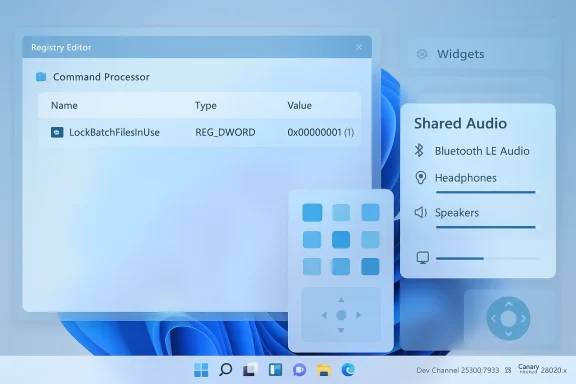
A new DWORD registry key exposed in this build — LockBatchFilesInUse at HKEY_LOCAL_MACHINE\Software\Microsoft\Command Processor — lets admins enable a mode where the command processor holds an exclusive lock on a running batch file. When enabled (value = 1), the OS prevents modifications to the file while it executes, which reduces race conditions, mid-execution edits, and certain classes of script corruption or tampering that can arise in uncontrolled environments. Microsoft frames this as a safety and performance optimization for environments where code integrity is enforced; it also reduces the cost of repeated signature validation by validating a script once rather than per statement.Why this is notable:
- In enterprise and automation-heavy environments, scripts can be targets for accidental edits, incomplete deployments, or malicious modification. Locking reduces one attack surface and improves script reliability.
- The change is opt-in via policy or registry, which helps avoid breaking legacy workflows that rely on self-modifying scripts (rare but existing).
- For security teams, the feature pairs well with Application Control for Business and code integrity policies, enabling a layered approach to script hygiene.
- Some advanced or intentionally self-modifying scripts will break if the lock is enforced. Administrators must audit automation to confirm compatibility.
- Rollout is gradual; behavior differences between Insiders who have the toggle enabled and those who don’t can complicate triage during troubleshooting.
Shared Audio (Bluetooth LE Audio) — preview improvements
The build also expands the Shared Audio (preview) experience. Microsoft adds more granular controls when sharing audio to two Bluetooth LE Audio endpoints, such as separate volume sliders per listener and a Taskbar indicator showing active sharing. The update broadens device support to include several modern earbuds and headsets, reflecting Microsoft’s push to integrate LE Audio features into Windows. For casual users and AV teams, this is a meaningful usability enhancement for co-listening scenarios.Accessibility and reliability updates
Dev builds continue to be an important testing ground for accessibility work. This flight includes new Narrator personalization settings and multiple reliability fixes across storage, input, and Windows Update. Such targeted improvements rarely headline coverage but materially improve the daily experience for assistive-technology users.Canary Channel highlights — Build 28020.x
What Canary is experimenting with
The 28020 series in Canary is focused on a mixture of device-controls, small UI refinements, and cross-device experiences. Recent Canary flights (including builds in the 28020.1362 → 28020.1619 range) introduced:- Camera pan and tilt settings surfaced in Device Properties for supported webcams.
- Taskbar network speed test invoking a browser-hosted test via a right-click on the network icon.
- Widgets dashboard moved from overlay dialogs to a dedicated settings page.
- Start menu account link additions and other small Start/Taskbar refinements.
Network speed test in the Taskbar — pros and cons
A particularly interesting Canary addition is a Taskbar-accessible network speed test. Right‑click the network icon and choose the test; Windows opens the browser to run a diagnostic page-based speed test (hosted by Bing). This meets a real user need — quick, easy verification of connectivity from the place users look first — but it also raises design questions:- Pros: Immediate troubleshooting isupport friction for average users.
- Cons: Implementation that requires launching a browser page means the experience is not purely native; reliance on an external web page introduces variability and telemetry implications.
Camera pan/tilt support
For devices and webcams that support hardware pan/tilt (or have firmware-controlled PTZ capabilities), Canary now exposes pan/tilt controls from Camera Properties. This is an expected improvement for hybrid work scenarios and creators who use higher-end webcams. As with other Canary features, availability depends on hardware and driver support.Widgets — from overlay to page
Moving Widgets configuration from an overlay dialog to a dedicated page reflects an ongoing trend inside Microsoft: turning transient dialogs into persistent, discoverable settings pages. This improves discoverability and allows more complex settings to live in a consistent Settings experience. For power users who rely on widget personalization, this is a welcome refinement.The Start menu and Taskbar — continuing evolution
A long-running redesign story
Microsoft’s Start menu has been the subject of iterative redesigns across Insider channels. Recent Dev/Beta previews introduced a single, vertically scrollable Start surface, new All apps browsing modes (Category, Grid, List), and options to collapse the Recommended area — changes aimed at reducing friction and making app discovery faster. Community playtesting and feedback are actively shaping the final experience.Why this matters:
- The move away from multi-pane navigation addresses a long-standing usability complaint about the extra step required to see all apps.
- Toggling the Recommended area recognizes different workflows: some users prefer a compact list; others value quick access to recent content.
Taskbar improvements and icon scaling
Insiders have been testing Taskbar icon scaling that automatically reduces icon size to avoid overflow, plus fixes to Taskbar previews, Task View layering, and general reliability. These incremental, pragmatic updates reduce everyday friction for users who keep many apps open or use multiple monitors. Forum posts and recent changelogs document fixes for issues like previews drawing offscreen, transparent Taskbar glitches, and icon duplication scenarios.Testing, deployment, and compatibility — practical guidance
For enthusiasts and power users (Insiders)
If you run Insider builds:- Back up your system (image backup recommended) before installing Dev or Canary builds.
- Expect features to be gated; use Feedback Hub and Diagnostics to report regressions and help shape the rollout.
- For Dev build 26300.7939, test any automation that uses batch files if you plan to enable the LockBatchFilesInUse mode, and document your scripts’ behavior under the lock.
For IT admins and enterprise
- Treat Dev/Canary as testbeds, not production services. Use VM lab environments or dedicated test hardware to validate sign-in, automation, and driver compatibility.
- Evaluate the new batch-file lock as part of your broader endpoint protection strategy. Where Application Control for Business is in play, the registry option can reduce intermittent script failures and improve integrity checks — but roll it out gradually after a compatibility audit.
For OEMs and device partners
Canary’s device-specific features (camera controls, LE Audio integration) are indicators of hardware-side attention. Partners should verify driver and firmware compatibility before a broad ship to ensure the settings surface functions as intended.Strengths: what Microsoft is getting right
- Measured prioritization: Dev focuses on security/platform-level fixes; Canary experiments with user-facing polish. This separation reduces risk while speeding innovation.
- Real-world problem solving: Small but impactful fixes — batch-file locking, per-listener audio controls, Taskbar network testing — address real, frequent user problems rather than chasing novelty.
- Accessibility focus: Narrator customization and other a11y updates show continued investment in assistive tech improvements.
Risks and open questions
- Compatibility friction: Changes like batch-file locking are powerful but can break legacy or intentionally self-altering tooling. Microsoft’s opt-in approach mitigates risk but doesn’t eliminate migration costs.
- Feature fragmentation: Staged rollouts and channel-specific experiments mean users in different rings will see diverging behavior, complicating support and documentation for mixed fleets.
- Telemetry and privacy trade-offs: Some Canary features rely on web-hosted experiences (e.g., the Taskbar’s network speed test), which nudges more user flows into the web and can raise telemetry/privacy questions for organizations.
How to try key features safely
- To enable the Dev build registry lock (testers only): back up the registry, then create the DWORD at HKEY_LOCAL_MACHINE\Software\Microsoft\Command Processor named LockBatchFilesInUse (set to 1 to enable). Test representative batch scripts and CI/CD jobs for compatibility before deploying in production. If you encounter problems, revert the DWORD to 0. This feature is designed to be opt-in — don’t flip it globally without a staged validation plan.
- To test Shared Audio preview: connect two compatible LE Audio devices, verify separate volume controls in the Quick Settings when sharing is active, and watch for the new Taskbar sharing indicator. Report device-specific issues to the Feedback Hub, noting make/model and driver revision.
- To validate Canary-only items: use a secondary test device with updated OEM drivers. Try camera pan/tilt controls only if your webcam advertises PTZ capabilities, and verify Widgets settings behavior after switching pages vs. overlay dialogs.
What this tells us about Windows 11’s trajectory
Microsoft’s approach in these flights is clear: refine the plumbing and security model in Dev, while iterating small, context-sensitive experiences in Canary. That combination suggests a future Windows where enterprise-grade integrity features coexist with consumer polish — provided Microsoft continues balancing rollout speed with stability.- Expect more platform-level controls to appear in Dev as Microsoft prepares 26H2.
- Canary will remain the proving ground for device-driven and usability experiments that may eventually be packaged into broader updates if they pass telemetry and feedback gates.
Final verdict
Build 26300.7939 and the 28020 Canary stream are incremental but meaningful steps: one strengthens the foundations (security, audio sharing, reliability), the other polishes the surface (camera controls, Widgets, Taskbar diagnostics). For Insiders and device partners, these flights offer practical wins and clear test targets. For administrators and enterprise teams, the new batch-file lock is a useful new control — but it requires careful validation.The most important takeaway: Microsoft is continuing a pragmatic rhythm — stabilizing core behavior in Dev while letting Canary play with the user experience — and that discipline matters. If you manage Windows devices, use these builds in a controlled test environment, audit automation and audio/driver scenarios, and provide targeted feedback. Your reports will decide whether features stay, evolve, or are quietly pulled — and that loop is the heart of the Insider Program’s purpose.
Source: WinCentral Windows 11 Insider Preview Build 26300.7939 for Dev Channel
Source: thewincentral.com Windows 11 Insider Preview Build 28020.1673 for Canary Channel
