

Microsoft is inching Windows 11 toward a more transparent, more user-driven model of experimentation, and that is a bigger deal than it may sound at first glance. A hidden Feature Flags page reportedly appearing in Insider build 26300.8155 suggests Microsoft may finally let enthusiasts see and toggle experimental features inside Settings instead of relying on Controlled Feature Rollout or third-party tools like ViVeTool. That would not end Microsoft’s phased delivery strategy, but it would make the process far easier to understand and far easier to test. For Windows power users, that is a very real shift in the relationship between the platform and the people who help break it. years, the modern Windows update model has been built around a tension that most everyday users never notice, but enthusiasts feel constantly. Microsoft ships code in one place, then decides later who actually gets to see it, thanks to phased enablement and Controlled Feature Rollout. That approach is sensible from an engineering standpoint because it limits blast radius, helps isolate regressions, and gives Microsoft telemetry before a broad launch. It is also deeply frustrating if you are the kind of person who wants to test what is already sitting on your machine.
This is why the Windows Insider community has developed a sort of shadow economy around hidden feature IDs, command-line tweaks, and tools like ViVeTool. Insiders were supposed to be the early-access audience, but in practice they often ended up waiting for invisible server-side switches just like everyone else. That mismatch between expectation and reality is a major reason a native flags page feels overdue.
Microsoft’s official support language now makes the broader rollout philosophy very explicit. The company says Windows devices receive non-security updates and feature changes at different times through several servicing technologies, including CFR, and it offers a toggle that lets users get the latest updates as soon as they are available. Security updates still arrive either way, but the pace of feature exposure can be accelerated for those who want it. ([support.microsoft.microsoft.com/en-us/topic/4911c7af-2644-41f7-a800-6660f9212448))
That same logic already exists in the enterprise world, where Microsoft documents policy-based controls for features that are temporarily hidden or staged behind servicing. In other words, Windows already has a rich internal language for “present but not enabled,” “available but gated,” and “controlled by policy.” The rumored Feature Flags page would simply bring a slice of that reality into the user interface. Microsoft Learn’s enterprise feature control documentation shows that this way of thinking is now part of Windows’ core servicing model, not a side experiment. (learn.microsoft.com)
What makes this moment different is timing. Windows 11 in 2026 is not being shipped as a series of dramatic one-off releases. It is increasingly a continuous platform, built around smaller updates, hidden toggles, and phased visibility. The new Feature Flags page appears to be Microsoft acknowledging that the community has already adapted to this model — and that the company may as well provide a first-party way to manage it.
The key idea is simple: instead of making users wait for features to appear or disappear based on rollout luck, Microsoft would expose a list of available experimental capabilities directly in Windows Settings. According to the report, the page would let Insiders manually enable or disable features, apply changes locally, and even view inactive entries that are not currently present on the device. That is a meanse it changes Windows from a system that merely delivers experiments into one that also describes them.
This is not the same as turning Windows into an unrestricted playground. The more likely scenario is a managed layer sitting on top of the same rollout machinery Microsoft already uses. Features could still be controlled server-side, still be limited by build and channel, and still be removed before release. But users would at least have visibility into what exists and whether it can be toggled.
That distinction will matter to users who assume “feature flags” means “I can force anything on.” In reality, the page would almost certainly reflect the constraints of the current build and Microsoft’s gating rules. Transparency is the promise; total freedom is probably not.
The broader significance is cultural as much as technical. Windows has historically hidden a lot of its experimentation machinery behind vague wording and unpredictable rollout behavior. A visible flags page would make the philosophy obvious and visible, which is exactly why enthusiasts are excited.
The timing also reflects a broader shift in how Microsoft thinks about development telemetry. Rather than waiting for users to stumble over hidden features, the company can give them a sanctioned way to opt in, document what they see, and provide cleaner feedback. That makes rollout data more meaningful and user reports more actionable.
In that sense, the feature is not just about convenience. It is about changing the feedback loop. And in Windows, the feedback loop is one of the most important product surfaces the company has.
The downside is that CFR can make the product feel incomplete even when the code is already there. Insiders do not just want to download a build; they want to see what they are testing. When the answer is “maybe later, depending on rollout state,” the preview experience starts to feel less like access and more like a lottery.
Microsoft’s own support materials reinforce this reality. The company says the “Get the latest updates as soon as they’re available” toggle moves users into earlier waves of non-security updates, but it also notes that users will still only be among the first, not guaranteed first, and that managed devices can have the behavior controlled by policy. That is a sane compromise, but it still leaves a lot of ambiguity. (support.microsoft.com)
This is why unofficial tools became so popular. They offered a way to sidestep opacity and get closer to what the build actually contained. Even if that approach carried obvious caveats, it answered a real user need. Microsoft’s reported response — a native feature flags surface — is basically an admission that the workaround ecosystem existed for a reason.
The broader consequence is that Insider testing has often felt less like participation and more like observation. A native panel would not solve every problem, but it would restore some of the agency that CFR quietly removed.
That distinction matters because Windows enthusiasts are not ordinary consumers in this context. They are the people who compare screenshots, write guides, test behavior across channels, and explain Microsoft’s sometimes tangled servicing model to everyone else. A clearer flags page would not just help them; it would improve the quality of the ecosystem around them.
That said, there is a big difference between “visible” and “fully interactive.” Microsoft will almost certainly want to preserve its ability to keep some experimental features locked behind service-side conditions. Otherwise, the company risks turning Insider builds into something closer to a public beta of everything, all at once.
That would still be a major improvement over the current situation. A lot of the pain today comes from not knowing whether a feature is unavailable because it has not shipped, has not been enabled, or has already been superseded. Even partial visibility would eliminate a lot of guesswork.
It would also be more aligned with Microsoft’s broader UI direction. Windows 11 increasingly prefers clearer settings surfaces over obscure switches buried in tools or registry edits. A native flags page would fit that trend well.
That caution is warranted. Experimental features can be unstable, incomplete, or incompatible with certain hardware configurations. A page full of flags can easily look friendlier than the reality behind it. Microsoft will need to make the risk obvious, not merely legalistic.
The emotional impact should not be underestimated. A lot of power users have felt that Windows testing lost some of its openness as Microsoft leaned harder into phased rollout. A visible flags page would not restore the old world, but it would reintroduce a sense of participation.
It would also make community comparisons far easier. Right now, two testers can run the same build and reach different conclusions simply because their rollout state differs. A first-party flags surface would reduce that ambiguity and give screenshots, write-ups, and forum posts a lot more credibility.
That is a big deal in a community where documentation is often as important as the feature itself. Windows enthusiasts are not merely users; they are interpreters. The better the system explains itself, the better the community can explain it to everyone else.
That means the consumer/Insider version of feature flags will almost certainly need to coexist with enterprise controls rather than replace them. In practice, that could be useful. IT teams often want visibility into feature state before they deploy broadly, and a better internal preview mechanism can help them stage change more cleanly.
So while enthusiasts will celebrate the freedom angle, enterprises will probably care more about the diagnostic angle. If Microsoft does this well, both groups can benefit — but for very different reasons.
That is a strategic issue as much as a technical one. If Windows becomes easier to experiment with, it may also become easier to talk about in the same language used for browsers, apps, and cloud services. That could make Microsoft look more aligned with modern software development practice, which is a branding win the company clearly wants.
That means the guardrails need to be stronger, the messaging clearer, and the risk boundaries much more carefully drawn. A browser flag can break a tab or a rendering path. A Windows flag can break a login flow, an accessibility workflow, or a managed deployment process. The stakes are much higher.
So the competitive comparison is useful, but it is not a blueprint. It is a reminder that Microsoft is trying to borrow a familiar idea and adapt it to a much more demanding environment.
That could be especially helpful in the current era of more visible change. Microsoft is shipping features more frequently, and it is increasingly comfortable with hidden and temporary controls. The more that happens, the more users need a trustworthy way to see what is going on.
There is also the support burden. If users can alter feature states directly, then bug reports become more complicated because each machine may be running a slightly different combination of visible, hidden, and partially enabled capabilities. That is manageable, but only if Microsoft gives support teams and admins a reliable way to determine the device’s exact state.
Microsoft will need to think carefully about whether toggles should be reversible, how resets work, what happens after updates, and how policy interacts with user choice. Those are not minor implementation details. They determine whether the page is a helpful control panel or a support nightmare.
That is why the warning language matters so much. The page has to clearly say that experimental features may affect performance or reliability. It cannot be treated as a mere formality. If Microsoft gets casual about the risk, users will too.
The other question is scope. Microsoft may start small, exposing only limited controls for features already in flight. That would be the safest route and the most likely one. If the company later expands the page, it could become a bigger part of how Windows Insider testing works.
If Microsoft gets that balance right, the Feature Flags page could be one of those quietly important changes that reshapes how the platform evolves without making a lot of noise. And for Windows enthusiasts, that may be the best possible outcome: a little more control, a little less mystery, and a lot less waiting.
Source: Digital Trends Windows 11 is adding feature flags, and I’m cautiously optimistic
This is why the Windows Insider community has developed a sort of shadow economy around hidden feature IDs, command-line tweaks, and tools like ViVeTool. Insiders were supposed to be the early-access audience, but in practice they often ended up waiting for invisible server-side switches just like everyone else. That mismatch between expectation and reality is a major reason a native flags page feels overdue.
Microsoft’s official support language now makes the broader rollout philosophy very explicit. The company says Windows devices receive non-security updates and feature changes at different times through several servicing technologies, including CFR, and it offers a toggle that lets users get the latest updates as soon as they are available. Security updates still arrive either way, but the pace of feature exposure can be accelerated for those who want it. ([support.microsoft.microsoft.com/en-us/topic/4911c7af-2644-41f7-a800-6660f9212448))
That same logic already exists in the enterprise world, where Microsoft documents policy-based controls for features that are temporarily hidden or staged behind servicing. In other words, Windows already has a rich internal language for “present but not enabled,” “available but gated,” and “controlled by policy.” The rumored Feature Flags page would simply bring a slice of that reality into the user interface. Microsoft Learn’s enterprise feature control documentation shows that this way of thinking is now part of Windows’ core servicing model, not a side experiment. (learn.microsoft.com)
What makes this moment different is timing. Windows 11 in 2026 is not being shipped as a series of dramatic one-off releases. It is increasingly a continuous platform, built around smaller updates, hidden toggles, and phased visibility. The new Feature Flags page appears to be Microsoft acknowledging that the community has already adapted to this model — and that the company may as well provide a first-party way to manage it.
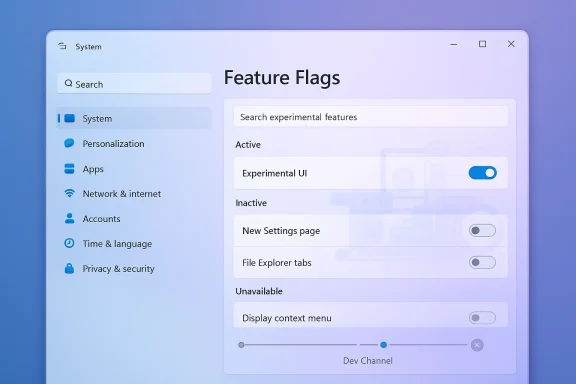 What Microsoft appears to be changing
The key idea is simple: instead of making users wait for features to appear or disappear based on rollout luck, Microsoft would expose a list of available experimental capabilities directly in Windows Settings. According to the report, the page would let Insiders manually enable or disable features, apply changes locally, and even view inactive entries that are not currently present on the device. That is a meanse it changes Windows from a system that merely delivers experiments into one that also describes them.This is not the same as turning Windows into an unrestricted playground. The more likely scenario is a managed layer sitting on top of the same rollout machinery Microsoft already uses. Features could still be controlled server-side, still be limited by build and channel, and still be removed before release. But users would at least have visibility into what exists and whether it can be toggled.
A more explicit control plane
If the screenshots and descriptions prove accurate, the page would function less like a master switch and more like a dashboard. That matters, because a dashboard tells you what state you are in, while a switch implies full control. Microsoft is very unlikely to surrender the latter. It is much more plausible that the company is trying to make the former much clearer.That distinction will matter to users who assume “feature flags” means “I can force anything on.” In reality, the page would almost certainly reflect the constraints of the current build and Microsoft’s gating rules. Transparency is the promise; total freedom is probably not.
The broader significance is cultural as much as technical. Windows has historically hidden a lot of its experimentation machinery behind vague wording and unpredictable rollout behavior. A visible flags page would make the philosophy obvious and visible, which is exactly why enthusiasts are excited.
- It could reduce confusion about why a feature appears on one PC but not another.
- It could shorten the path between discovery and testing.
- It could make documentation and forum comparisons more reliable.
- It could reduce dependence on unofficial enablement tools.
- It could make Windows feel less arbitrary and more intentional.
Why the timing matters
Microsoft’s April 3, 2026 Insider posts confirm that build 26300.8155 is part of the Dev Channel’s current rhythm of staged delivery and phased visibility. The build is described within the same broader pattern that has defined Windows 11 previewing throughout 2026: one build, different feature states, and gradual exposure depending on rollout state and user settings. That is the exact environment in which a flags page becomes logical infrastructure rather than a novelty. (blogs.windows.com)The timing also reflects a broader shift in how Microsoft thinks about development telemetry. Rather than waiting for users to stumble over hidden features, the company can give them a sanctioned way to opt in, document what they see, and provide cleaner feedback. That makes rollout data more meaningful and user reports more actionable.
In that sense, the feature is not just about convenience. It is about changing the feedback loop. And in Windows, the feedback loop is one of the most important product surfaces the company has.
How CFR created the frustration
Controlled Feature Rollout is, on paper, a rational system. Microsoft can test changes on smaller groups, identify regressions earlier, and widen exposure only when confidence improves. That is especially important in an operating system where a bad rollout can affect drivers, the shell, accessibility, update reliability, and enterprise policy all at once. In theory, CFR is exactly the kind of safety valve a platform like Windows needs.The downside is that CFR can make the product feel incomplete even when the code is already there. Insiders do not just want to download a build; they want to see what they are testing. When the answer is “maybe later, depending on rollout state,” the preview experience starts to feel less like access and more like a lottery.
Microsoft’s own support materials reinforce this reality. The company says the “Get the latest updates as soon as they’re available” toggle moves users into earlier waves of non-security updates, but it also notes that users will still only be among the first, not guaranteed first, and that managed devices can have the behavior controlled by policy. That is a sane compromise, but it still leaves a lot of ambiguity. (support.microsoft.com)
Why enthusiasts pushed back
The enthusiast frustration is not really about patience. It is about uncertainty. A build note might mention a feature, but the feature itself may not appear. One machine may get it immediately, another may not, and both machines can technically be on the same build. That makes comparison work harder and weakens the trust that preview communities need in order to function well.This is why unofficial tools became so popular. They offered a way to sidestep opacity and get closer to what the build actually contained. Even if that approach carried obvious caveats, it answered a real user need. Microsoft’s reported response — a native feature flags surface — is basically an admission that the workaround ecosystem existed for a reason.
The broader consequence is that Insider testing has often felt less like participation and more like observation. A native panel would not solve every problem, but it would restore some of the agency that CFR quietly removed.
- CFR is good for safety.
- CFR is bad for predictability.
- CFR is useful for telemetry.
- CFR is frustrating for enthusiasts.
- CFR makes documentation less consistent.
- CFR pushes users toward unsupported tools.
What the community wants instead
The community does not necessarily want unlimited control. It wants visible control. That is a subtler ask. It means knowing what the system is doing, why a feature is missing, and whether a toggle is meaningful or merely decorative.That distinction matters because Windows enthusiasts are not ordinary consumers in this context. They are the people who compare screenshots, write guides, test behavior across channels, and explain Microsoft’s sometimes tangled servicing model to everyone else. A clearer flags page would not just help them; it would improve the quality of the ecosystem around them.
What the new page could look like
Based on the reporting and discussion around the hidden build content, the page would likely show a list of available flags, a way to search or browse them, and controls to enable, disable, or reset them. It may also separate active and inactive entp explain whether something is currently present on the device or merely known to the system. That kind of classification would make the Windows experimentation layer much easier to reason about.That said, there is a big difference between “visible” and “fully interactive.” Microsoft will almost certainly want to preserve its ability to keep some experimental features locked behind service-side conditions. Otherwise, the company risks turning Insider builds into something closer to a public beta of everything, all at once.
The likely user experience
The most plausible implementation is a Settings page that is informative first and actionable second. That means the page could tell you what is in play, what has been rolled out, and what is dormant, but not necessarily allow you to force every dormant capability into life. A feature might be listed and still be blocked by channel, build, hardware, or policy.That would still be a major improvement over the current situation. A lot of the pain today comes from not knowing whether a feature is unavailable because it has not shipped, has not been enabled, or has already been superseded. Even partial visibility would eliminate a lot of guesswork.
It would also be more aligned with Microsoft’s broader UI direction. Windows 11 increasingly prefers clearer settings surfaces over obscure switches buried in tools or registry edits. A native flags page would fit that trend well.
What it probably will not do
It probably will not turn Windows into an unsupported hacking environment. Microsoft is too careful about supportability, telemetry quality, and enterprise risk for that. It also probably will not let casual users casually force-enable every experimental feature with no consequence.That caution is warranted. Experimental features can be unstable, incomplete, or incompatible with certain hardware configurations. A page full of flags can easily look friendlier than the reality behind it. Microsoft will need to make the risk obvious, not merely legalistic.
- The page will likely be constrained by current build state.
- Some flags may be visible but not fully actionable.
- Not every feature will be user-forced into existence.
- The interface should clarify risk and instability.
- Policy and channel rules will probably still matter.
- The design will need to avoid creating false confidence.
Why this matters for Windows Insiders
For the Insider audience, this could be one of those small-looking changes that has outsized impact. It would reduce friction, improve communication, and makece feel less random. That matters because the Insider Program works best when users feel they are exploring a living platform rather than waiting for a hidden switch to flip.The emotional impact should not be underestimated. A lot of power users have felt that Windows testing lost some of its openness as Microsoft leaned harder into phased rollout. A visible flags page would not restore the old world, but it would reintroduce a sense of participation.
Better feedback, better comparisons
One of the biggest practical gains would be cleaner reporting. If a user can see whether a feature is present, disabled, or unavailable, then bug reports become more specific and more useful. That means fewer vague complaints and more actionable evidence for Microsoft’s engineers.It would also make community comparisons far easier. Right now, two testers can run the same build and reach different conclusions simply because their rollout state differs. A first-party flags surface would reduce that ambiguity and give screenshots, write-ups, and forum posts a lot more credibility.
That is a big deal in a community where documentation is often as important as the feature itself. Windows enthusiasts are not merely users; they are interpreters. The better the system explains itself, the better the community can explain it to everyone else.
The enterprise angle is different
Enterprise users will care less about curiosity and more about governance. They need predictable behavior, supportability, and policy control. Microsoft already has policy-based feature control for managed environments, and the company’s documentation makes it clear that some features can be enabled, delayed, or suppressed through policy rather than user choice. (learn.microsoft.com)That means the consumer/Insider version of feature flags will almost certainly need to coexist with enterprise controls rather than replace them. In practice, that could be useful. IT teams often want visibility into feature state before they deploy broadly, and a better internal preview mechanism can help them stage change more cleanly.
So while enthusiasts will celebrate the freedom angle, enterprises will probably care more about the diagnostic angle. If Microsoft does this well, both groups can benefit — but for very different reasons.
The competitive context
Microsoft is not inventing feature flags from scratch. Google Chrome normalized them years ago, and the broader software industry has long used staged delivery, kill switches, and exanage product evolution. In that sense, Windows is catching up to a delivery culture that has already become standard elsewhere. The question is not whether the model is modern; it is whether Windows can expose it without making the OS feel fragile.That is a strategic issue as much as a technical one. If Windows becomes easier to experiment with, it may also become easier to talk about in the same language used for browsers, apps, and cloud services. That could make Microsoft look more aligned with modern software development practice, which is a branding win the company clearly wants.
Windows is not a browser
Still, Microsoft cannot simply copy Chrome’s model and expect it to work unchanged. Browsers are important, but they are not operating systems. Windows touches hardware, accessibility, identity, drivers, app compatibility, enterprise management, and update infrastructure in ways that browsers do not.That means the guardrails need to be stronger, the messaging clearer, and the risk boundaries much more carefully drawn. A browser flag can break a tab or a rendering path. A Windows flag can break a login flow, an accessibility workflow, or a managed deployment process. The stakes are much higher.
So the competitive comparison is useful, but it is not a blueprint. It is a reminder that Microsoft is trying to borrow a familiar idea and adapt it to a much more demanding environment.
A better story for Windows
There is also a narrative benefit. Windows has often been criticized for hiding too much of its own machinery, leaving users to guess why things happen when they do. A visible flags page would make the system feel less arbitrary and more explainable.That could be especially helpful in the current era of more visible change. Microsoft is shipping features more frequently, and it is increasingly comfortable with hidden and temporary controls. The more that happens, the more users need a trustworthy way to see what is going on.
- It modernizes Windows’ product story.
- It makes experimentation feel more intentional.
- It reduces the “Windows is hiding things” complaint.
- It aligns Windows more closely with modern dev tooling.
- It could improve public perception among creators and enthusiasts.
- It creates a clearer bridge between preview and release.
The risk of giving users too much rope
The biggest concern is not that the feature will exist. It is that users may overestimate whaggle appears in Settings, many people will assume the feature is safe, ready, and supported, even if Microsoft still considers it rough, incomplete, or temporary. That is a recipe for confusion unless the UI is extremely clear.There is also the support burden. If users can alter feature states directly, then bug reports become more complicated because each machine may be running a slightly different combination of visible, hidden, and partially enabled capabilities. That is manageable, but only if Microsoft gives support teams and admins a reliable way to determine the device’s exact state.
Supportability and troubleshooting
Troubleshooting is already hard in Windows because the platform runs across so many hardware configurations. Adding user-accessible feature controls makes that harder unless the system records changes clearly and exposes them in a way support teams can query. Without that, every issue risks becoming a detective story.Microsoft will need to think carefully about whether toggles should be reversible, how resets work, what happens after updates, and how policy interacts with user choice. Those are not minor implementation details. They determine whether the page is a helpful control panel or a support nightmare.
Stability remains the core tradeoff
The other concern is platform stability. Microsoft has spent years carefully managing update risk because Windows has to serve both hobbyists and enterprises. If the company makes it too easy to force features on, it could create more crashes, more regressions, and more frustrated users than the current CFR model does.That is why the warning language matters so much. The page has to clearly say that experimental features may affect performance or reliability. It cannot be treated as a mere formality. If Microsoft gets casual about the risk, users will too.
- Users may assume a flag implies maturity.
- Support teams may face harder triage.
- Device states may diverge more often.
- Experimental features may feel safer than they are.
- Policy conflicts could confuse admins.
- Stability expectations could be violated if messaging is weak.
Strengths and Opportunities
Microsoft’s reported move has a lot going for it, and most of the upside comes from reducing friction. Windows Insiders want to see what they are testing, not simply wait for a server-side lottery. A built-in Feature Flags page would make the process clearer, more self-service, and more aligned with the way modern software experimentation already works. It would also help Microsoft collect better feedback from people who actually want to exercise the new code rather than merely stumble into it.- More transparent access to experimental Windows 11 features.
- Less dependence on unofficial tools like ViVeTool.
- Cleaner comparison between devices on the same build.
- Better feedback from users who intentionally test features.
- Stronger community documentation and reporting.
- A more modern Windows identity around staged experimentation.
- Potentially clearer enterprise-adjacent controls later on.
Risks and Concerns
The biggest risk is mismatch between expectation and reality. If the page looks like a universal override but behaves like a constrained view into Microsoft’s rollout system, users may feel misled. That could be worse than no page at all, because disappointment would be built into the interface itself.- Users may mistake visibility for full control.
- Experimental features may appear safer than they are.
- Support and troubleshooting could become harder.
- Enterprise policy and user flags may be confused.
- Stability issues could increase if users over-enable features.
- Microsoft could frustrate enthusiasts if the page is too limited.
- The UI may expose complexity without truly simplifying it.
Looking Ahead
For now, the most important thing to watch is whether Microsoft turns this hidden surface into an official, supported part of the Insider experience. The company has already confirmed the broader rollout model, the CFR logic, and the existing update toggle that can move users into earlier waves of non-security changes. A native flags page would sit naturally on top of that system, but it would still be a meaningful philosophical change. (blogs.windows.com)The other question is scope. Microsoft may start small, exposing only limited controls for features already in flight. That would be the safest route and the most likely one. If the company later expands the page, it could become a bigger part of how Windows Insider testing works.
What to watch next
- Whether Microsoft mentions the page in an official Insider post.
- Whether the page appears in more than one channel or build family.
- Whether toggles affect only visibility or also activation.
- Whether enterprise policy tools are tied into the same model.
- Whether Microsoft adds clearer labels for active, inactive, and unavailable features.
If Microsoft gets that balance right, the Feature Flags page could be one of those quietly important changes that reshapes how the platform evolves without making a lot of noise. And for Windows enthusiasts, that may be the best possible outcome: a little more control, a little less mystery, and a lot less waiting.
Source: Digital Trends Windows 11 is adding feature flags, and I’m cautiously optimistic
