

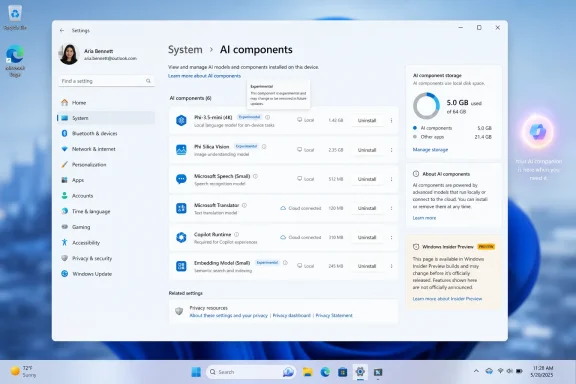
Microsoft is testing a hidden Windows 11 Settings control in Insider Preview Build 26300.8553 that appears to let users uninstall individual AI components or models from the operating system, according to reports published after testers found the option in early June 2026. The important word is appears, because Microsoft has not yet announced the feature in its official release notes. But even as an unadvertised experiment, the button says something larger about where Windows is heading. Microsoft is no longer merely adding AI to Windows; it is beginning to design escape hatches for users who do not want all of it.
The reported change lives in the least glamorous corner of Windows: Settings, under System, in an AI components area that most mainstream users have probably never opened. That is exactly why it matters. Microsoft tends to reveal its operating-system politics not in keynote demos, but in the quiet taxonomy of Settings pages, Group Policy entries, and toggles that say what the company considers optional.
The new subpages reportedly expose individual AI models or components and pair them with an uninstall button. That is a different posture from the familiar Microsoft pattern of giving users a visibility toggle while keeping the plumbing in place. Hiding Copilot from the taskbar was cosmetic. Removing a model package, if that is what this ultimately does, is architectural.
There is no evidence yet that this is a finished consumer feature. Insider builds are not promises, hidden features can vanish, and Microsoft’s public changelog for the build focused elsewhere. But Windows watchers have learned to take hidden Settings work seriously, because these experiments often reveal internal debates before marketing has settled on the language.
The larger story is that Microsoft seems to be learning that AI cannot be treated like wallpaper. A desktop operating system is not a web app where the vendor can keep rearranging the landing page and assume users will adapt. Windows sits between people and their files, credentials, workloads, battery life, storage, compliance rules, and patience. When AI features appear there, users ask harder questions.
That does not mean every AI feature is useless. Local models can make search more forgiving, accessibility tools more capable, image editing faster, and system help less dependent on exact keywords. The problem is not that Windows contains AI; it is that Windows has often failed to make a clean distinction between useful capability and vendor ambition.
A button that uninstalls AI components would make that distinction more legible. It would tell users that some of these pieces are packages, not sacred organs. It would acknowledge that an operating system can offer intelligence without requiring everyone to carry every model, every integration, and every branded pathway.
This is especially important on new PCs, where the first-run experience has become a negotiation over defaults. A user who buys a laptop for school, gaming, accounting, field work, or development may not see local AI models as value. They may see them as occupied disk space, unexplained background complexity, or another Microsoft surface competing for attention.
But the storage angle understates the stakes. Users are not only asking whether an AI component consumes space. They are asking what it does, when it runs, what data it touches, whether it talks to the cloud, and whether removing it will break some future Windows feature. The uninstall button is meaningful because it turns an opaque system ingredient into something the user can make a decision about.
Microsoft has spent years telling users that Windows is a service. That framing helps explain frequent updates, cloud-linked accounts, and evolving features, but it also weakens the old expectation that a purchased PC is a stable appliance under the owner’s control. AI makes that tension sharper because it carries heavier implications than a weather widget or a redesigned Start menu.
If Microsoft wants users to accept AI in Windows, it has to make refusal boring. Not dramatic. Not registry-deep. Not dependent on third-party debloat scripts. Boring refusal means a visible setting, a plain description, a reversible action, and no punishment for saying no.
Still, Microsoft’s Insider channels have become a live map of Windows strategy. The company tries interface ideas, measures telemetry, watches enthusiast reaction, and quietly decides which concepts are worth hardening. The fact that AI component uninstallation is being explored in Settings suggests that Microsoft is considering more granular management of AI payloads, even if the final shape changes.
That granularity matters because Windows AI is no longer a single thing. There is Copilot as an app. There are Copilot-branded experiences attached to Microsoft 365. There are AI actions in File Explorer and context menus. There are local models for semantic search and device-side inference. There are privacy-sensitive features like Recall on supported Copilot+ PCs. There are settings agents intended to translate natural language into system changes.
Lumping all of that under “AI” is convenient for marketing, but terrible for administration. A home user may want image-generation tools gone but keep accessibility improvements. A business may allow local semantic search but block cloud assistants. A school may want no generative AI entry points at all. An uninstall button per component begins to resemble the management model Windows should have had from the start.
But visibility is not the same as adoption. A button users ignore becomes visual debt. A feature users disable becomes an argument against the next feature. Worse, an assistant that feels imposed can poison genuinely useful AI work elsewhere in the system.
The reported uninstall control reads like a correction to that overreach. Microsoft is not abandoning AI in Windows; that would be implausible, given the company’s investments and the industry’s direction. It is instead inching toward a more defensible model: install the parts that deliver value, expose them clearly, and let users remove the parts they do not trust or need.
This is how mature platforms absorb controversial capabilities. They stop pretending every new layer is universal. They add controls, policies, and packaging boundaries. They allow enthusiasts to opt out without turning every update cycle into a cat-and-mouse game.
Enterprise IT has specific worries that consumer coverage often compresses into “privacy.” Admins need to know whether AI components are per-user or per-machine, whether removal survives feature updates, whether dependencies reappear through cumulative updates, whether policies can enforce the state, and whether logs clearly show what changed. They also need to know whether a component is local-only or connected to Microsoft services.
The ideal outcome would be a Windows AI management model that looks boringly familiar. Components should have package identities. Policies should be documented. Removal should be scriptable. Servicing behavior should be predictable. Microsoft should describe what each component does in terms that a compliance team can understand, not merely in product adjectives.
That is not just an enterprise courtesy. It is how Microsoft avoids turning AI into the next long-running Windows trust dispute. Windows administrators have seen bundled browsers, consumer apps, telemetry settings, cloud account nudges, Teams integrations, and Start menu promotions come and go. They will not simply accept “AI” as a magic category exempt from normal governance.
That does not mean every system component should be removable by casual clicking. Windows has dependencies, and Microsoft is right to avoid turning Settings into a self-destruct panel. But AI components are unusual because many of them are value-added experiences rather than core compatibility layers. If a model enables semantic search, Windows can explain that consequence. If an assistant powers suggested settings changes, Windows can say so before removal.
The key is specificity. “AI components” is not enough. Users need names, sizes, descriptions, and effects. They need to know whether uninstalling a component disables a feature, removes a model, stops background updates, or simply hides a UI entry. The more precise Microsoft is, the less the feature looks like an admission of guilt and the more it looks like competent platform design.
There is also a psychological benefit. Users who know they can remove something are often less hostile to trying it. Forced permanence turns optional software into a threat. Reversibility turns it into an experiment.
Many buyers still evaluate PCs by battery life, keyboard quality, display, thermals, repairability, price, and whether Windows stays out of the way. AI features may eventually become as ordinary as GPU acceleration, but they are not there yet. They remain politically and practically charged because they are associated with surveillance fears, subscription upsell, cloud dependence, and unwanted interface churn.
That is why an uninstall button is not anti-AI. It may be the thing that makes AI in Windows more acceptable. A platform that lets users prune AI components is making a claim that its AI can stand on merit. A platform that hides removal behind unsupported tools is making the opposite claim.
The best version of Windows AI is modular. A gamer should not need the same AI footprint as a legal office. A developer workstation should not inherit every consumer assistant. A classroom laptop should be able to run with a locked-down configuration. A Copilot+ PC should be able to showcase local intelligence without making every feature feel mandatory.
AI is more complicated because it is not one application. It is a capability layer that can attach to search, screenshots, file indexing, accessibility, shell commands, productivity apps, and the web. That makes the boundary harder to draw, but not impossible. In fact, it makes the boundary more necessary.
The reported Settings work suggests Microsoft may be moving from the “AI everywhere” phase to the “AI where it is justified” phase. That would be a healthier posture. The operating system should not be a billboard for the company’s strategic anxieties. It should be a platform that earns trust through clarity, performance, and restraint.
Restraint is not a fashionable word in AI product planning, but it is a valuable one in operating systems. Windows succeeds when it feels dependable. It fails when users suspect that every update is a delivery vehicle for someone else’s priorities.
Windows has a habit of reintroducing components through major updates, feature enablement packages, inbox app refreshes, or Microsoft Store updates. A user removes something in June and sees it return in October. An admin strips a component from an image and finds it back after an upgrade. That pattern is what turns inconvenience into distrust.
For AI components, durability is essential. If a user uninstalls a local model, Windows should not silently restore it because a new search feature wants it. If Microsoft believes the model is necessary for a new capability, it should ask, explain, or provide policy-controlled behavior. Anything else will make the uninstall button feel performative.
There is also the question of dependencies. If one component supports multiple features, Microsoft needs to show that relationship. Removing a model might affect search, suggestions, or accessibility behavior. That is acceptable if the user is told. It is not acceptable if Windows quietly degrades and then leaves the user to troubleshoot.
That would not satisfy every critic. Some users do not want Microsoft AI anywhere near the OS. Some administrators will still prefer image-level removal and strict policy enforcement. But it would move the debate out of the realm of suspicion and into the realm of configuration.
Right now, much of the frustration around Windows AI comes from diffusion. Controls are scattered. Branding overlaps. Copilot means different things in different places. A cloud assistant, a Microsoft 365 hub, a local model, and a shell integration can all appear to users as part of the same fog. A coherent AI components page would clear some of that fog.
The hidden uninstall button may be an early gesture toward that coherence. Or it may be a half-finished experiment that never ships. Either way, it points to the feature Windows needs if Microsoft intends to keep weaving AI into the OS.
But Microsoft’s silence is part of the story. The company is happy to announce AI features when they demonstrate ambition. It is more cautious when the feature is about removal, retreat, or user refusal. That asymmetry reveals the tension inside Windows: Microsoft wants AI to be a selling point, while many users want it to be a choice.
A good operating system can survive that tension. It can ship ambitious features without pretending every user has the same appetite. It can promote new capabilities without making the opt-out path feel like sabotage. It can integrate AI deeply where it helps, and modularize it where it does not.
If Microsoft gets this right, the uninstall button will not be remembered as an anti-AI concession. It will be remembered as the moment Windows AI started growing up.
The concrete takeaways are narrow but important:
 The Uninstall Button Is Small, but the Retreat Is Not
The reported change lives in the least glamorous corner of Windows: Settings, under System, in an AI components area that most mainstream users have probably never opened. That is exactly why it matters. Microsoft tends to reveal its operating-system politics not in keynote demos, but in the quiet taxonomy of Settings pages, Group Policy entries, and toggles that say what the company considers optional.The new subpages reportedly expose individual AI models or components and pair them with an uninstall button. That is a different posture from the familiar Microsoft pattern of giving users a visibility toggle while keeping the plumbing in place. Hiding Copilot from the taskbar was cosmetic. Removing a model package, if that is what this ultimately does, is architectural.
There is no evidence yet that this is a finished consumer feature. Insider builds are not promises, hidden features can vanish, and Microsoft’s public changelog for the build focused elsewhere. But Windows watchers have learned to take hidden Settings work seriously, because these experiments often reveal internal debates before marketing has settled on the language.
The larger story is that Microsoft seems to be learning that AI cannot be treated like wallpaper. A desktop operating system is not a web app where the vendor can keep rearranging the landing page and assume users will adapt. Windows sits between people and their files, credentials, workloads, battery life, storage, compliance rules, and patience. When AI features appear there, users ask harder questions.
Windows Users Have Always Known the Difference Between Features and Cargo
The term “AI bloat” is imprecise, but it has stuck because it captures a real user experience. Many Windows 11 users did not ask for an expanding cast of assistants, agents, recall systems, context-menu actions, cloud-connected prompts, and model packages. They turned on a PC and found Microsoft increasingly eager to intermediate ordinary tasks through AI.That does not mean every AI feature is useless. Local models can make search more forgiving, accessibility tools more capable, image editing faster, and system help less dependent on exact keywords. The problem is not that Windows contains AI; it is that Windows has often failed to make a clean distinction between useful capability and vendor ambition.
A button that uninstalls AI components would make that distinction more legible. It would tell users that some of these pieces are packages, not sacred organs. It would acknowledge that an operating system can offer intelligence without requiring everyone to carry every model, every integration, and every branded pathway.
This is especially important on new PCs, where the first-run experience has become a negotiation over defaults. A user who buys a laptop for school, gaming, accounting, field work, or development may not see local AI models as value. They may see them as occupied disk space, unexplained background complexity, or another Microsoft surface competing for attention.
The Storage Argument Is Really a Trust Argument
Reports around the feature have naturally emphasized disk space. That is understandable, because local AI models can be large, and storage pressure remains real on budget laptops and compact business machines. A few gigabytes here and there matters when a device ships with a modest SSD and a recovery partition, update cache, OneDrive sync folder, and OEM utilities already eating into usable capacity.But the storage angle understates the stakes. Users are not only asking whether an AI component consumes space. They are asking what it does, when it runs, what data it touches, whether it talks to the cloud, and whether removing it will break some future Windows feature. The uninstall button is meaningful because it turns an opaque system ingredient into something the user can make a decision about.
Microsoft has spent years telling users that Windows is a service. That framing helps explain frequent updates, cloud-linked accounts, and evolving features, but it also weakens the old expectation that a purchased PC is a stable appliance under the owner’s control. AI makes that tension sharper because it carries heavier implications than a weather widget or a redesigned Start menu.
If Microsoft wants users to accept AI in Windows, it has to make refusal boring. Not dramatic. Not registry-deep. Not dependent on third-party debloat scripts. Boring refusal means a visible setting, a plain description, a reversible action, and no punishment for saying no.
Insider Builds Are Where Microsoft Tests Product Philosophy
Build 26300.8553 is an experimental Windows 11 build, and experimental builds are full of caveats. Features may be hidden behind flags. Screens may exist before backend behavior is complete. UI strings can appear months before they become real, and sometimes they are abandoned entirely.Still, Microsoft’s Insider channels have become a live map of Windows strategy. The company tries interface ideas, measures telemetry, watches enthusiast reaction, and quietly decides which concepts are worth hardening. The fact that AI component uninstallation is being explored in Settings suggests that Microsoft is considering more granular management of AI payloads, even if the final shape changes.
That granularity matters because Windows AI is no longer a single thing. There is Copilot as an app. There are Copilot-branded experiences attached to Microsoft 365. There are AI actions in File Explorer and context menus. There are local models for semantic search and device-side inference. There are privacy-sensitive features like Recall on supported Copilot+ PCs. There are settings agents intended to translate natural language into system changes.
Lumping all of that under “AI” is convenient for marketing, but terrible for administration. A home user may want image-generation tools gone but keep accessibility improvements. A business may allow local semantic search but block cloud assistants. A school may want no generative AI entry points at all. An uninstall button per component begins to resemble the management model Windows should have had from the start.
Copilot Taught Microsoft That Presence Is Not Adoption
Microsoft pushed Copilot hard because it saw a strategic opening: if AI assistants become the next application layer, Windows cannot afford to be merely the place where competing assistants run. The company wanted Copilot to be visible, available, and normalized. That explains the taskbar button, the keyboard key on new hardware, the sidebar experiments, and the steady branding creep across Microsoft products.But visibility is not the same as adoption. A button users ignore becomes visual debt. A feature users disable becomes an argument against the next feature. Worse, an assistant that feels imposed can poison genuinely useful AI work elsewhere in the system.
The reported uninstall control reads like a correction to that overreach. Microsoft is not abandoning AI in Windows; that would be implausible, given the company’s investments and the industry’s direction. It is instead inching toward a more defensible model: install the parts that deliver value, expose them clearly, and let users remove the parts they do not trust or need.
This is how mature platforms absorb controversial capabilities. They stop pretending every new layer is universal. They add controls, policies, and packaging boundaries. They allow enthusiasts to opt out without turning every update cycle into a cat-and-mouse game.
Enterprise IT Will Care Less About the Button Than the Boundary
For administrators, the existence of an uninstall button is less interesting than what sits behind it. If AI components become separable packages, they can potentially be inventoried, removed, blocked, staged, or audited. If they remain tangled into the OS image, a Settings button may be little more than theater.Enterprise IT has specific worries that consumer coverage often compresses into “privacy.” Admins need to know whether AI components are per-user or per-machine, whether removal survives feature updates, whether dependencies reappear through cumulative updates, whether policies can enforce the state, and whether logs clearly show what changed. They also need to know whether a component is local-only or connected to Microsoft services.
The ideal outcome would be a Windows AI management model that looks boringly familiar. Components should have package identities. Policies should be documented. Removal should be scriptable. Servicing behavior should be predictable. Microsoft should describe what each component does in terms that a compliance team can understand, not merely in product adjectives.
That is not just an enterprise courtesy. It is how Microsoft avoids turning AI into the next long-running Windows trust dispute. Windows administrators have seen bundled browsers, consumer apps, telemetry settings, cloud account nudges, Teams integrations, and Start menu promotions come and go. They will not simply accept “AI” as a magic category exempt from normal governance.
The Consumer Version of Control Must Be Simpler Than the Admin Version
The danger is that Microsoft solves this only for managed fleets. Group Policy, Intune settings, provisioning packages, and registry values are important, but they do not help the ordinary user staring at a new PC with limited storage and a growing list of unfamiliar AI surfaces. Consumer Windows needs plain controls too.That does not mean every system component should be removable by casual clicking. Windows has dependencies, and Microsoft is right to avoid turning Settings into a self-destruct panel. But AI components are unusual because many of them are value-added experiences rather than core compatibility layers. If a model enables semantic search, Windows can explain that consequence. If an assistant powers suggested settings changes, Windows can say so before removal.
The key is specificity. “AI components” is not enough. Users need names, sizes, descriptions, and effects. They need to know whether uninstalling a component disables a feature, removes a model, stops background updates, or simply hides a UI entry. The more precise Microsoft is, the less the feature looks like an admission of guilt and the more it looks like competent platform design.
There is also a psychological benefit. Users who know they can remove something are often less hostile to trying it. Forced permanence turns optional software into a threat. Reversibility turns it into an experiment.
The AI PC Story Needs a User-Control Chapter
Microsoft and its hardware partners have spent the past two years trying to make the AI PC feel inevitable. Neural processing units, Copilot+ branding, on-device models, and AI-enhanced workflows are now part of the premium PC sales pitch. The problem is that inevitability is not the same as desire.Many buyers still evaluate PCs by battery life, keyboard quality, display, thermals, repairability, price, and whether Windows stays out of the way. AI features may eventually become as ordinary as GPU acceleration, but they are not there yet. They remain politically and practically charged because they are associated with surveillance fears, subscription upsell, cloud dependence, and unwanted interface churn.
That is why an uninstall button is not anti-AI. It may be the thing that makes AI in Windows more acceptable. A platform that lets users prune AI components is making a claim that its AI can stand on merit. A platform that hides removal behind unsupported tools is making the opposite claim.
The best version of Windows AI is modular. A gamer should not need the same AI footprint as a legal office. A developer workstation should not inherit every consumer assistant. A classroom laptop should be able to run with a locked-down configuration. A Copilot+ PC should be able to showcase local intelligence without making every feature feel mandatory.
Microsoft Has Been Here Before, and the Pattern Is Familiar
Windows history is full of features that arrived as strategy and later became settings. Internet Explorer, Cortana, OneDrive integration, Teams chat, widgets, recommended content, search highlights, and promoted Start menu experiences all followed some version of this arc. Microsoft inserts a service layer, users and regulators push back, administrators demand controls, and eventually the company redraws the boundary between Windows and the bundled experience.AI is more complicated because it is not one application. It is a capability layer that can attach to search, screenshots, file indexing, accessibility, shell commands, productivity apps, and the web. That makes the boundary harder to draw, but not impossible. In fact, it makes the boundary more necessary.
The reported Settings work suggests Microsoft may be moving from the “AI everywhere” phase to the “AI where it is justified” phase. That would be a healthier posture. The operating system should not be a billboard for the company’s strategic anxieties. It should be a platform that earns trust through clarity, performance, and restraint.
Restraint is not a fashionable word in AI product planning, but it is a valuable one in operating systems. Windows succeeds when it feels dependable. It fails when users suspect that every update is a delivery vehicle for someone else’s priorities.
The Real Test Will Be What Happens After Removal
If this feature ships, the first wave of coverage will likely be simple: here is where the button is, here is what it removes, here is how much space you get back. That will be useful, but it will not answer the deeper question. The real test is whether removal is durable.Windows has a habit of reintroducing components through major updates, feature enablement packages, inbox app refreshes, or Microsoft Store updates. A user removes something in June and sees it return in October. An admin strips a component from an image and finds it back after an upgrade. That pattern is what turns inconvenience into distrust.
For AI components, durability is essential. If a user uninstalls a local model, Windows should not silently restore it because a new search feature wants it. If Microsoft believes the model is necessary for a new capability, it should ask, explain, or provide policy-controlled behavior. Anything else will make the uninstall button feel performative.
There is also the question of dependencies. If one component supports multiple features, Microsoft needs to show that relationship. Removing a model might affect search, suggestions, or accessibility behavior. That is acceptable if the user is told. It is not acceptable if Windows quietly degrades and then leaves the user to troubleshoot.
A Better Settings Page Could Change the Tone of the Debate
Imagine a Windows Settings page that treats AI the way a serious platform should. It lists installed AI components, their sizes, whether they run locally or use cloud services, what features depend on them, when they were last updated, and whether an administrator manages them. It offers uninstall, disable, repair, and reinstall where appropriate. It links privacy controls to the components that actually use them.That would not satisfy every critic. Some users do not want Microsoft AI anywhere near the OS. Some administrators will still prefer image-level removal and strict policy enforcement. But it would move the debate out of the realm of suspicion and into the realm of configuration.
Right now, much of the frustration around Windows AI comes from diffusion. Controls are scattered. Branding overlaps. Copilot means different things in different places. A cloud assistant, a Microsoft 365 hub, a local model, and a shell integration can all appear to users as part of the same fog. A coherent AI components page would clear some of that fog.
The hidden uninstall button may be an early gesture toward that coherence. Or it may be a half-finished experiment that never ships. Either way, it points to the feature Windows needs if Microsoft intends to keep weaving AI into the OS.
The Button Microsoft Did Not Announce Says the Most
For now, the reported AI uninstall control should be treated as a preview-build finding, not a production guarantee. It was not highlighted in Microsoft’s official notes for the build. It may require hidden feature IDs. It may change names, move locations, or disappear before ordinary users ever see it.But Microsoft’s silence is part of the story. The company is happy to announce AI features when they demonstrate ambition. It is more cautious when the feature is about removal, retreat, or user refusal. That asymmetry reveals the tension inside Windows: Microsoft wants AI to be a selling point, while many users want it to be a choice.
A good operating system can survive that tension. It can ship ambitious features without pretending every user has the same appetite. It can promote new capabilities without making the opt-out path feel like sabotage. It can integrate AI deeply where it helps, and modularize it where it does not.
If Microsoft gets this right, the uninstall button will not be remembered as an anti-AI concession. It will be remembered as the moment Windows AI started growing up.
The Practical Reading for Windows 11 Users Right Now
This is not yet a reason to reinstall Windows, join an Insider channel, or start ripping packages out of a production machine. It is a signpost. Microsoft is experimenting with a control that many users and administrators have been asking for in spirit, even if not always in the exact language of “AI components.”The concrete takeaways are narrow but important:
- The reported uninstall button is tied to an experimental Windows 11 Insider build, not a broadly available stable release.
- Microsoft has not publicly committed to shipping this specific AI component removal interface.
- The feature appears aimed at individual AI components or models, which would be more granular than simply hiding Copilot or removing a visible app.
- Storage savings may be useful, but transparency, privacy confidence, and administrative control are the bigger stakes.
- The value of the feature will depend on whether removal is documented, durable across updates, and manageable through enterprise tools.
- Windows users should wait for official release notes or stable-channel confirmation before treating this as a supported cleanup method.
References
- Primary source: PCWorld
Published: Wed, 03 Jun 2026 15:28:00 GMT
Loading…
www.pcworld.com - Official source: learn.microsoft.com

Windows 11 Insider Experimental Preview Build 26300.8553 - Windows Insider Program
Release notes for Windows 11 Insider Experimental Preview Build 26300.8553learn.microsoft.com - Related coverage: windowscentral.com
Loading…
www.windowscentral.com - Related coverage: notebookcheck.net

Windows 11 Insider Build 26300.8553 finally lets you customize the Start menu
Windows 11 Insider Preview Build 26300.8553 brings a modular Start menu with Small, Large, and Automatic size presets and new privacy tools to the Experimental channel. www.notebookcheck.net
- Related coverage: techcrunch.com

Microsoft rolls back some of its Copilot AI bloat on Windows | TechCrunch
The company is reducing Copilot entry points on Windows, starting with Photos, Widgets, Notepad, and other apps. techcrunch.com
- Related coverage: pureinfotech.com
Loading…
pureinfotech.com
- Related coverage: techspot.com
Loading…
www.techspot.com - Related coverage: tomshardware.com
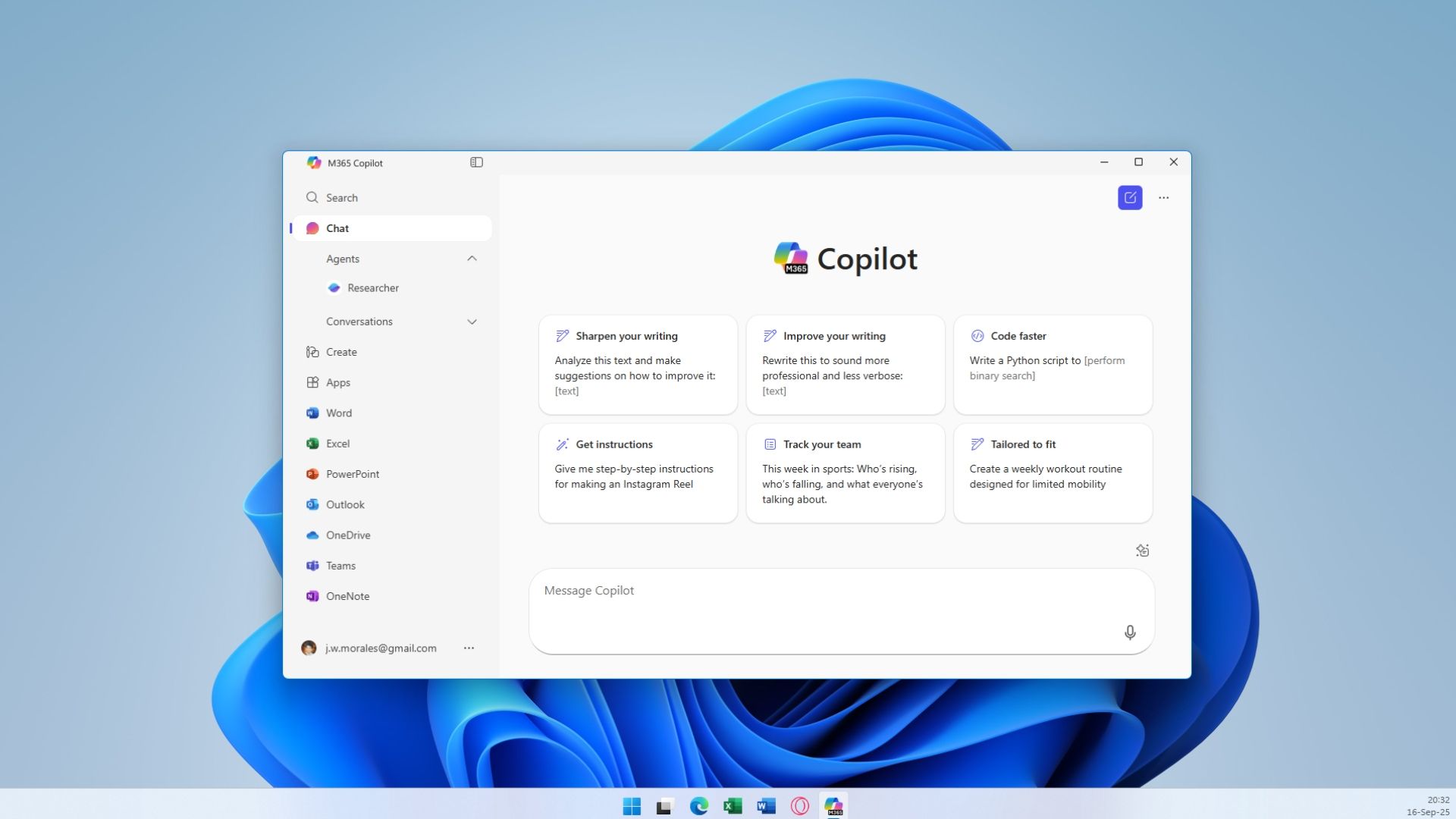
This GitHub script claims to wipe all of Windows 11's AI features in seconds — "RemoveWindowsAI" can disable every single AI feature in the OS, from Copilot to Recall and more
And you can disable what's left manually.www.tomshardware.com
- Related coverage: techradar.com
Loading…
www.techradar.com - Related coverage: windowsforum.com
Loading…
windowsforum.com - Related coverage: ddxgroup.com
Loading…
www.ddxgroup.com - Related coverage: libraryfreedom.org
Loading…
libraryfreedom.org - Related coverage: welcomehomevetsofnj.org
Loading…
www.welcomehomevetsofnj.org