

Microsoft’s May 22, 2026 Windows Insider release delivered Windows 11 preview builds 28020.2149, 29595.1000, 26300.8497, and 26220.8491 across Experimental, Experimental 26H1, Future Platforms, and Beta channels while continuing the staged transition to a redesigned Insider channel system. The interesting part is not the build arithmetic. It is that Microsoft is using a messy channel migration to test a cleaner idea of Windows: more adaptive, more accessibility-forward, and more dependent on local AI-style signal processing. For Insiders, the week’s headline is less “new builds” than a glimpse of where Microsoft thinks everyday PC usability still needs engineering, not branding.
The Windows Insider Program has always been part release pipeline, part weather system. Build numbers move, features appear and vanish, and the channel names often tell you as much about Microsoft’s internal development posture as they do about the code on your PC. This week’s announcement lands in that tradition, but with an added complication: Microsoft is rolling out the new Windows Insider Program experience to devices in channels already announced, while explicitly saying that devices in the Canary 29500 Series Channel have not yet begun moving to the new experience.
That caveat matters. The Canary 29500 series is included under the “Experimental Future Platforms” build bucket for Build 29595.1000, yet Microsoft is warning that the channel experience itself is still in transition. In other words, the map is being redrawn while travelers are still on the road.
For users who casually install Insider builds, that may sound like administrative trivia. For IT pros and Windows watchers, it is the signal. Microsoft is trying to make release notes easier to find by using the new channel system even for people who have not moved yet, which should reduce confusion in the long run but may increase it in the short term.
The practical advice is blunt: trust your build number more than your memory of the old channel labels. Microsoft’s reminder that the build number appears in the desktop watermark is not decorative. During a channel migration, that watermark is the closest thing to ground truth.
That spread reflects the modern Windows development model: not one road to the next release, but several synchronized roads with different destinations. Windows 11 version 25H2 is represented in the 26200-family base with enablement packages pushing Beta and Experimental forward into 26220 and 26300 territory. Windows 11 version 26H1, meanwhile, is not positioned as a conventional consumer feature update but as a platform change aimed at supporting specific silicon.
This is where Microsoft’s build numbers become more than trivia. The company is separating user-visible feature experimentation from platform enablement, silicon readiness, and future-facing work that may never arrive in exactly the form Insiders see today. That is a healthier engineering model than pretending every preview build is a near-final product announcement.
It is also less friendly to ordinary users. “Experimental,” “Experimental 26H1,” “Experimental Future Platforms,” “Beta,” and “Canary 29500 series” are not labels that explain themselves. Microsoft’s attempt to centralize release-note discovery is a necessary cleanup operation, but the need for that cleanup says plenty about how complicated the testing matrix has become.
For administrators, the lesson is to treat Insider builds as telemetry about Microsoft’s priorities, not as a linear upgrade guide. If you are testing app compatibility, driver behavior, accessibility features, or device management policy, the exact branch matters. A feature appearing in one Experimental lane does not mean it is marching directly toward your production fleet.
For years, accessibility features in mainstream operating systems were too often treated as compliance work or niche accommodation. The Windows 11 era has increasingly blurred that boundary. Captions, voice control, focus modes, display comfort settings, and assistive input are no longer just for users with formally recognized disabilities; they are also productivity, ergonomics, and inclusion features for everyone who spends too much time staring at a screen or working in imperfect environments.
Screen tint is a good example. Microsoft describes it as a color overlay that softens the intensity of the entire display, aimed at users who experience tired or sensitive eyes after long sessions. That overlaps with accessibility, eye comfort, neurodiversity support, migraine management, and plain old desk-worker fatigue.
The point is not that screen tint is revolutionary. Third-party utilities, monitor controls, night-light modes, and color filters have existed for years. The point is that Microsoft is continuing to pull these accommodations into first-party Windows settings, where they can be discovered, managed, and supported without asking users to become hobbyists.
If the tint is too weak, users who need it will ignore it. If it is too aggressive, color-sensitive work becomes unreliable. If it interacts badly with HDR, multiple monitors, color management, remote sessions, or screenshots, IT departments will hear about it very quickly.
The enterprise implications are subtle. A global tint setting may help employees with light sensitivity or visual-processing needs without requiring special hardware. But organizations that depend on accurate color workflows — design shops, medical imaging teams, print departments, media production groups — will want to understand whether the feature affects only visual output or also capture, streaming, and remote display scenarios.
Microsoft has not framed screen tint as a management feature, and at this stage it should not be treated as one. But Windows settings that begin as user comfort tools often become policy questions later. If screen tint proves popular, administrators will eventually ask whether it can be configured, disabled, audited, or preserved across device migrations.
The bigger philosophical shift is that Windows is becoming more willing to mediate the display rather than simply render to it. Night light did that for time-of-day warmth. Color filters did it for accessibility. Screen tint extends that logic into an everyday comfort layer.
HID support matters because standards reduce friction. A braille display that behaves like a plug-and-play device is not just more convenient; it is more reliable in schools, workplaces, labs, libraries, and support environments where users may not have admin rights or time to troubleshoot device-specific software stacks.
The promise here is refreshingly practical. Connect a compatible display by USB and start reading. Pair it through Bluetooth and use it wirelessly. No special ritual, no brittle setup path, no “ask IT to install this package first” delay.
For Windows as a platform, this is the sort of accessibility investment that strengthens the operating system’s institutional credibility. Enterprises do not just need features; they need features that can survive imaging, provisioning, hardware swaps, help desk workflows, and user turnover. Standards-based braille support checks more of those boxes than a bespoke integration would.
There is a lesson here for the rest of Windows. The best platform work often looks unglamorous from the outside. It removes steps. It makes hardware less weird. It turns what used to be a support ticket into a cable connection.
This is not just an accessibility feature for quiet rooms. It is an accessibility feature for the way people actually work: open offices, shared homes, classrooms, call centers, hospital stations, hotel lobbies, and hybrid work setups where “find a silent place” is not realistic advice.
The local-processing claim is important. Voice control is inherently sensitive because it can involve dictated text, commands, app names, document content, and contextual speech. If Voice Isolation can improve recognition without sending audio elsewhere, Microsoft gets to advance the feature while avoiding at least some of the privacy concerns that come with cloud speech processing.
Still, on-device processing does not magically eliminate risk. Administrators will want to know what hardware acceleration is used, whether the feature depends on neural processing units or works broadly across CPUs, how it behaves under battery constraints, and whether audio data is retained in any diagnostic pathway. Microsoft’s short announcement answers the broad privacy question but not the operational ones.
The more interesting direction is that Windows is getting better at deciding which signal in a room belongs to the user. That capability has implications beyond Voice Access. It points toward a Windows stack that increasingly treats audio, video, display, and input as adaptive surfaces rather than passive peripherals.
On-device processing gives Microsoft a cleaner story. It can say the feature is smarter without making the feature sound like surveillance. It can improve recognition in noisy environments without asking users to accept that their assistive commands are being shipped to a remote service.
That story is especially useful for Windows on modern silicon. Microsoft has spent years nudging the ecosystem toward PCs with dedicated AI acceleration, better microphones, stronger camera pipelines, and more local inference capacity. Accessibility may become one of the strongest justifications for that hardware, because the benefits are concrete rather than speculative.
A local feature that helps someone control their PC in a noisy room is easier to defend than an AI feature that summarizes content the user did not ask to summarize. It is also easier to test. Either Voice Access hears the right person or it does not.
For IT pros, the question becomes whether Microsoft can make these local-intelligence features predictable across a heterogeneous fleet. A premium Copilot-class laptop and a three-year-old business notebook may both run Windows 11, but they may not deliver the same experience. That gap is where support expectations go to become tickets.
By saying the 29500 series is included in the Future Platforms build release while also saying those devices have not begun moving to the new WIP experience, Microsoft is separating build availability from channel-experience migration. That distinction may be internally clean, but externally it reinforces a familiar Insider problem: channel names are never quite enough.
The old Insider mental model was simple enough for enthusiasts: Dev was risky, Beta was safer, Release Preview was closest to shipping, and Canary was chaos with a purpose. The new model appears to be more precise, but precision is not the same thing as clarity.
Experimental 26H1 and Experimental Future Platforms are more descriptive than “Dev” in one sense, because they say something about branch intent. They are less friendly in another, because they ask users to understand Microsoft’s platform roadmap. That may be acceptable for the audience these channels are meant to serve, but it narrows the gap between “Insider” and “unpaid ecosystem tester.”
There is nothing inherently wrong with that. The Insider Program is most valuable when participants understand they are testing software, not merely previewing tomorrow’s consumer features. But Microsoft must be careful not to make the program so channel-heavy that even willing testers lose track of where they are.
Historically, Windows releases were understood mainly through user-facing features, UI changes, and upgrade cycles. The new reality is more layered. A Windows version may matter because it enables a class of devices, supports new silicon capabilities, changes the driver model, updates platform plumbing, or prepares the operating system for experiences that will not arrive until later.
That makes 26H1 less exciting to the average user and more important to OEMs, silicon partners, driver developers, and IT teams planning hardware refreshes. A platform update that exists to support specific chips is not something most people will seek out. It is something that will arrive preinstalled, quietly shaping which devices work best and which features are available.
This is also where Microsoft’s Copilot PC strategy, Arm ambitions, and local AI direction intersect with mundane release management. If Windows needs new platform work to support upcoming silicon, the Insider Program becomes the proving ground long before consumers see the device shelf.
For admins, the practical consequence is that Windows version numbers alone will not explain capability. Two PCs may both be “Windows 11,” but one may have the platform build, drivers, firmware, NPU, and OEM integration required for the full feature set, while another receives only the broad OS experience. That fragmentation is manageable, but only if Microsoft documents it clearly.
The May 22 Beta release exists alongside Experimental Build 26300.8497 on the same broad 25H2 foundation, with enablement packages differentiating the build numbers. That enablement-package model has become one of Microsoft’s favorite tools because it lets the company stage features without forcing a full OS replacement each time.
The upside is agility. Microsoft can light up functionality, test subsets of users, and keep base-platform changes more stable. The downside is that Windows becomes harder to reason about from the outside. A build number may describe the underlying base, the enablement layer, the channel, and the feature state all at once.
That ambiguity matters in bug reporting. If a user says “I’m on 25H2,” that may no longer be enough. Support teams need the exact build, channel, feature rollout state, and sometimes the hardware class. Microsoft’s reminder to check the desktop watermark may sound basic, but it is a defensive move against precisely this complexity.
The Beta channel therefore remains useful, but not simple. It is not a safe harbor. It is a more disciplined test lane, and organizations should treat it as such.
That is a better design philosophy than asking users to be more patient, more technical, or more isolated. It also reflects a mature operating system problem. Windows is not lacking features. It is burdened by the fact that many features still require too much context to discover, configure, and trust.
Accessibility is where this burden becomes most visible. If a user needs voice control, braille output, or display softening, every extra setup step is not merely friction; it can be exclusion. The difference between “install drivers, configure a stack, and troubleshoot pairing” and “plug it in” is the difference between theoretical support and practical access.
The Windows platform has often been strongest when it absorbs complexity on behalf of the ecosystem. Plug and Play, driver distribution, Windows Update, class drivers, and inbox utilities all follow that pattern. This week’s Narrator update fits squarely in that tradition.
Voice Isolation does too, if it works. A user should not have to build a studio environment to use voice input. The operating system should become better at hearing what matters.
Microsoft is telling Insiders that Windows experimentation is moving along multiple tracks at once: platform readiness for future silicon, staged enablement for 25H2-era builds, and accessibility features that lean on better local processing and standards-based hardware support. That combination is a useful snapshot of where Windows is heading.
For enthusiasts, the temptation is to chase the newest branch. For professionals, the better move is to map features to risk. Screen tint is low-risk but needs workflow testing. HID braille support is high-value for affected users and support teams. Voice Isolation is promising but should be watched for hardware dependencies and privacy documentation.
This release also underlines why Insider participation is still valuable. Microsoft cannot fully test noisy homes, open offices, varied braille displays, multi-monitor tint behavior, Bluetooth edge cases, and fleet-management realities from Redmond alone. The Windows ecosystem is too broad for lab confidence.
That said, Microsoft owes Insiders clarity in exchange. If the new channel system is meant to reduce confusion, the company should keep pushing toward release notes that explain not just what build shipped, but why that branch exists and who should test it.
Microsoft’s May 22 Insider builds will not be remembered as a landmark release, and they do not need to be. Their importance is cumulative: a screen that can soften itself, a braille display that can connect without drama, a voice interface that can listen through noise, and a testing program trying to describe a more complicated Windows future. If Microsoft can make that future legible as well as capable, the Insider Program’s new map may finally become more useful than the old one.
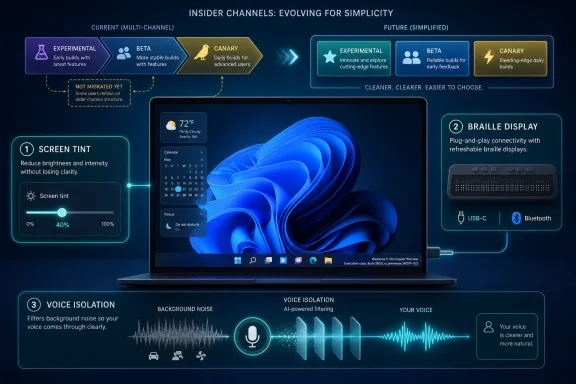 Microsoft Is Rewiring the Insider Program While Shipping Through It
The Windows Insider Program has always been part release pipeline, part weather system. Build numbers move, features appear and vanish, and the channel names often tell you as much about Microsoft’s internal development posture as they do about the code on your PC. This week’s announcement lands in that tradition, but with an added complication: Microsoft is rolling out the new Windows Insider Program experience to devices in channels already announced, while explicitly saying that devices in the Canary 29500 Series Channel have not yet begun moving to the new experience.That caveat matters. The Canary 29500 series is included under the “Experimental Future Platforms” build bucket for Build 29595.1000, yet Microsoft is warning that the channel experience itself is still in transition. In other words, the map is being redrawn while travelers are still on the road.
For users who casually install Insider builds, that may sound like administrative trivia. For IT pros and Windows watchers, it is the signal. Microsoft is trying to make release notes easier to find by using the new channel system even for people who have not moved yet, which should reduce confusion in the long run but may increase it in the short term.
The practical advice is blunt: trust your build number more than your memory of the old channel labels. Microsoft’s reminder that the build number appears in the desktop watermark is not decorative. During a channel migration, that watermark is the closest thing to ground truth.
Build Numbers Tell the Real Story of a Fragmented Future
The May 22 drop spans several branches. Experimental 26H1 receives Build 28020.2149. Experimental Future Platforms, including the Canary 29500 series, receives Build 29595.1000. The broader Experimental track receives Build 26300.8497, while Beta receives Build 26220.8491.That spread reflects the modern Windows development model: not one road to the next release, but several synchronized roads with different destinations. Windows 11 version 25H2 is represented in the 26200-family base with enablement packages pushing Beta and Experimental forward into 26220 and 26300 territory. Windows 11 version 26H1, meanwhile, is not positioned as a conventional consumer feature update but as a platform change aimed at supporting specific silicon.
This is where Microsoft’s build numbers become more than trivia. The company is separating user-visible feature experimentation from platform enablement, silicon readiness, and future-facing work that may never arrive in exactly the form Insiders see today. That is a healthier engineering model than pretending every preview build is a near-final product announcement.
It is also less friendly to ordinary users. “Experimental,” “Experimental 26H1,” “Experimental Future Platforms,” “Beta,” and “Canary 29500 series” are not labels that explain themselves. Microsoft’s attempt to centralize release-note discovery is a necessary cleanup operation, but the need for that cleanup says plenty about how complicated the testing matrix has become.
For administrators, the lesson is to treat Insider builds as telemetry about Microsoft’s priorities, not as a linear upgrade guide. If you are testing app compatibility, driver behavior, accessibility features, or device management policy, the exact branch matters. A feature appearing in one Experimental lane does not mean it is marching directly toward your production fleet.
Accessibility Is No Longer a Side Quest in Windows
The most notable features in this release are not Start menu experiments, taskbar adjustments, or another Copilot surface. They are accessibility changes: screen tint, improved Narrator braille display support, and Voice Isolation for Voice Access. That is a meaningful editorial choice by Microsoft, whether intentional or not.For years, accessibility features in mainstream operating systems were too often treated as compliance work or niche accommodation. The Windows 11 era has increasingly blurred that boundary. Captions, voice control, focus modes, display comfort settings, and assistive input are no longer just for users with formally recognized disabilities; they are also productivity, ergonomics, and inclusion features for everyone who spends too much time staring at a screen or working in imperfect environments.
Screen tint is a good example. Microsoft describes it as a color overlay that softens the intensity of the entire display, aimed at users who experience tired or sensitive eyes after long sessions. That overlaps with accessibility, eye comfort, neurodiversity support, migraine management, and plain old desk-worker fatigue.
The point is not that screen tint is revolutionary. Third-party utilities, monitor controls, night-light modes, and color filters have existed for years. The point is that Microsoft is continuing to pull these accommodations into first-party Windows settings, where they can be discovered, managed, and supported without asking users to become hobbyists.
Screen Tint Turns Display Comfort Into a First-Class Setting
Screen tint’s arrival in the Experimental channel suggests Microsoft is still working out exactly how it should behave and how much control users should have. The feature applies a color overlay across the display and includes presets and strength controls. That sounds simple, but display adjustments are surprisingly easy to get wrong.If the tint is too weak, users who need it will ignore it. If it is too aggressive, color-sensitive work becomes unreliable. If it interacts badly with HDR, multiple monitors, color management, remote sessions, or screenshots, IT departments will hear about it very quickly.
The enterprise implications are subtle. A global tint setting may help employees with light sensitivity or visual-processing needs without requiring special hardware. But organizations that depend on accurate color workflows — design shops, medical imaging teams, print departments, media production groups — will want to understand whether the feature affects only visual output or also capture, streaming, and remote display scenarios.
Microsoft has not framed screen tint as a management feature, and at this stage it should not be treated as one. But Windows settings that begin as user comfort tools often become policy questions later. If screen tint proves popular, administrators will eventually ask whether it can be configured, disabled, audited, or preserved across device migrations.
The bigger philosophical shift is that Windows is becoming more willing to mediate the display rather than simply render to it. Night light did that for time-of-day warmth. Color filters did it for accessibility. Screen tint extends that logic into an everyday comfort layer.
Narrator’s Braille Support Shows the Value of Boring Standards
The Narrator change is less flashy and arguably more important. Microsoft says refreshable braille displays that use the HID standard can now connect instantly with Narrator over USB, with Bluetooth pairing handled like any other accessory. That is the kind of feature that only sounds small if you have never had to fight assistive technology setup during a workday.HID support matters because standards reduce friction. A braille display that behaves like a plug-and-play device is not just more convenient; it is more reliable in schools, workplaces, labs, libraries, and support environments where users may not have admin rights or time to troubleshoot device-specific software stacks.
The promise here is refreshingly practical. Connect a compatible display by USB and start reading. Pair it through Bluetooth and use it wirelessly. No special ritual, no brittle setup path, no “ask IT to install this package first” delay.
For Windows as a platform, this is the sort of accessibility investment that strengthens the operating system’s institutional credibility. Enterprises do not just need features; they need features that can survive imaging, provisioning, hardware swaps, help desk workflows, and user turnover. Standards-based braille support checks more of those boxes than a bespoke integration would.
There is a lesson here for the rest of Windows. The best platform work often looks unglamorous from the outside. It removes steps. It makes hardware less weird. It turns what used to be a support ticket into a cable connection.
Voice Isolation Brings the Meeting-Room Problem to Voice Access
Voice Isolation for Voice Access is the feature most obviously connected to Microsoft’s broader on-device intelligence push. Voice Access already lets users control and dictate to Windows by voice. The new option is designed to help the system focus on the user’s voice even when other people are speaking nearby, filtering out other voices and background noise locally on the device.This is not just an accessibility feature for quiet rooms. It is an accessibility feature for the way people actually work: open offices, shared homes, classrooms, call centers, hospital stations, hotel lobbies, and hybrid work setups where “find a silent place” is not realistic advice.
The local-processing claim is important. Voice control is inherently sensitive because it can involve dictated text, commands, app names, document content, and contextual speech. If Voice Isolation can improve recognition without sending audio elsewhere, Microsoft gets to advance the feature while avoiding at least some of the privacy concerns that come with cloud speech processing.
Still, on-device processing does not magically eliminate risk. Administrators will want to know what hardware acceleration is used, whether the feature depends on neural processing units or works broadly across CPUs, how it behaves under battery constraints, and whether audio data is retained in any diagnostic pathway. Microsoft’s short announcement answers the broad privacy question but not the operational ones.
The more interesting direction is that Windows is getting better at deciding which signal in a room belongs to the user. That capability has implications beyond Voice Access. It points toward a Windows stack that increasingly treats audio, video, display, and input as adaptive surfaces rather than passive peripherals.
Local Processing Is Becoming Microsoft’s Trust Pitch
The phrase “all processing happens privately on your device” is doing a lot of work. Microsoft knows that users and regulators are more skeptical of cloud-connected AI features than they were a few years ago. It also knows that accessibility workflows can be deeply personal.On-device processing gives Microsoft a cleaner story. It can say the feature is smarter without making the feature sound like surveillance. It can improve recognition in noisy environments without asking users to accept that their assistive commands are being shipped to a remote service.
That story is especially useful for Windows on modern silicon. Microsoft has spent years nudging the ecosystem toward PCs with dedicated AI acceleration, better microphones, stronger camera pipelines, and more local inference capacity. Accessibility may become one of the strongest justifications for that hardware, because the benefits are concrete rather than speculative.
A local feature that helps someone control their PC in a noisy room is easier to defend than an AI feature that summarizes content the user did not ask to summarize. It is also easier to test. Either Voice Access hears the right person or it does not.
For IT pros, the question becomes whether Microsoft can make these local-intelligence features predictable across a heterogeneous fleet. A premium Copilot-class laptop and a three-year-old business notebook may both run Windows 11, but they may not deliver the same experience. That gap is where support expectations go to become tickets.
The Canary Exception Keeps the Old Insider Ambiguity Alive
Microsoft’s note about the Canary 29500 Series Channel not yet moving to the new Windows Insider Program experience is easy to skim past. It should not be. Canary has long been the place where Microsoft reserves the right to be unstable, non-linear, and occasionally opaque.By saying the 29500 series is included in the Future Platforms build release while also saying those devices have not begun moving to the new WIP experience, Microsoft is separating build availability from channel-experience migration. That distinction may be internally clean, but externally it reinforces a familiar Insider problem: channel names are never quite enough.
The old Insider mental model was simple enough for enthusiasts: Dev was risky, Beta was safer, Release Preview was closest to shipping, and Canary was chaos with a purpose. The new model appears to be more precise, but precision is not the same thing as clarity.
Experimental 26H1 and Experimental Future Platforms are more descriptive than “Dev” in one sense, because they say something about branch intent. They are less friendly in another, because they ask users to understand Microsoft’s platform roadmap. That may be acceptable for the audience these channels are meant to serve, but it narrows the gap between “Insider” and “unpaid ecosystem tester.”
There is nothing inherently wrong with that. The Insider Program is most valuable when participants understand they are testing software, not merely previewing tomorrow’s consumer features. But Microsoft must be careful not to make the program so channel-heavy that even willing testers lose track of where they are.
The 26H1 Branch Is a Silicon Story, Not a Feature Story
The presence of 26H1 in the May 22 release is a reminder that Windows versioning is increasingly tied to hardware readiness. Microsoft’s public positioning around 26H1 has been that it is not a conventional feature update for 25H2 but a platform release containing changes to support specific silicon. That is a very different kind of Windows milestone.Historically, Windows releases were understood mainly through user-facing features, UI changes, and upgrade cycles. The new reality is more layered. A Windows version may matter because it enables a class of devices, supports new silicon capabilities, changes the driver model, updates platform plumbing, or prepares the operating system for experiences that will not arrive until later.
That makes 26H1 less exciting to the average user and more important to OEMs, silicon partners, driver developers, and IT teams planning hardware refreshes. A platform update that exists to support specific chips is not something most people will seek out. It is something that will arrive preinstalled, quietly shaping which devices work best and which features are available.
This is also where Microsoft’s Copilot PC strategy, Arm ambitions, and local AI direction intersect with mundane release management. If Windows needs new platform work to support upcoming silicon, the Insider Program becomes the proving ground long before consumers see the device shelf.
For admins, the practical consequence is that Windows version numbers alone will not explain capability. Two PCs may both be “Windows 11,” but one may have the platform build, drivers, firmware, NPU, and OEM integration required for the full feature set, while another receives only the broad OS experience. That fragmentation is manageable, but only if Microsoft documents it clearly.
The Beta Channel Looks Stable Only by Comparison
Build 26220.8491 in Beta is the least exotic part of this week’s release, but Beta deserves attention precisely because it sits closer to what organizations may eventually care about. Beta builds are not production builds, yet they are often where admins begin to watch whether a feature has escaped the lab.The May 22 Beta release exists alongside Experimental Build 26300.8497 on the same broad 25H2 foundation, with enablement packages differentiating the build numbers. That enablement-package model has become one of Microsoft’s favorite tools because it lets the company stage features without forcing a full OS replacement each time.
The upside is agility. Microsoft can light up functionality, test subsets of users, and keep base-platform changes more stable. The downside is that Windows becomes harder to reason about from the outside. A build number may describe the underlying base, the enablement layer, the channel, and the feature state all at once.
That ambiguity matters in bug reporting. If a user says “I’m on 25H2,” that may no longer be enough. Support teams need the exact build, channel, feature rollout state, and sometimes the hardware class. Microsoft’s reminder to check the desktop watermark may sound basic, but it is a defensive move against precisely this complexity.
The Beta channel therefore remains useful, but not simple. It is not a safe harbor. It is a more disciplined test lane, and organizations should treat it as such.
The Most Important Features Are the Ones That Reduce Setup
A common thread runs through screen tint, HID braille support, and Voice Isolation: each feature tries to reduce the amount of adaptation required from the user. Screen tint changes the display to meet the user’s tolerance. HID braille support changes device setup to meet the user’s workflow. Voice Isolation changes speech recognition to meet the user’s environment.That is a better design philosophy than asking users to be more patient, more technical, or more isolated. It also reflects a mature operating system problem. Windows is not lacking features. It is burdened by the fact that many features still require too much context to discover, configure, and trust.
Accessibility is where this burden becomes most visible. If a user needs voice control, braille output, or display softening, every extra setup step is not merely friction; it can be exclusion. The difference between “install drivers, configure a stack, and troubleshoot pairing” and “plug it in” is the difference between theoretical support and practical access.
The Windows platform has often been strongest when it absorbs complexity on behalf of the ecosystem. Plug and Play, driver distribution, Windows Update, class drivers, and inbox utilities all follow that pattern. This week’s Narrator update fits squarely in that tradition.
Voice Isolation does too, if it works. A user should not have to build a studio environment to use voice input. The operating system should become better at hearing what matters.
The Week’s Builds Matter More for Direction Than Destination
This release is not a conventional “go install this now” moment. It is a direction-setting preview wrapped in channel-transition housekeeping. The build numbers matter, but the feature choices matter more.Microsoft is telling Insiders that Windows experimentation is moving along multiple tracks at once: platform readiness for future silicon, staged enablement for 25H2-era builds, and accessibility features that lean on better local processing and standards-based hardware support. That combination is a useful snapshot of where Windows is heading.
For enthusiasts, the temptation is to chase the newest branch. For professionals, the better move is to map features to risk. Screen tint is low-risk but needs workflow testing. HID braille support is high-value for affected users and support teams. Voice Isolation is promising but should be watched for hardware dependencies and privacy documentation.
This release also underlines why Insider participation is still valuable. Microsoft cannot fully test noisy homes, open offices, varied braille displays, multi-monitor tint behavior, Bluetooth edge cases, and fleet-management realities from Redmond alone. The Windows ecosystem is too broad for lab confidence.
That said, Microsoft owes Insiders clarity in exchange. If the new channel system is meant to reduce confusion, the company should keep pushing toward release notes that explain not just what build shipped, but why that branch exists and who should test it.
What the May 22 Builds Say Before the Next Windows Turn
The concrete reading of this release is straightforward, even if the channel machinery is not. Microsoft shipped multiple Insider builds, continued a staged program transition, held Canary 29500 devices outside the new WIP experience for now, and used the Experimental channel to highlight accessibility and local-processing improvements.- Microsoft is still expanding the redesigned Windows Insider Program experience, but Canary 29500 Series devices have not yet begun that move.
- Build 28020.2149 belongs to Experimental 26H1, while Build 29595.1000 lands under Experimental Future Platforms, including the Canary 29500 series.
- Build 26300.8497 serves the Experimental track and Build 26220.8491 serves Beta, both within the current 25H2-era testing structure.
- Screen tint is a new accessibility display overlay aimed at reducing visual intensity during long sessions.
- Narrator’s HID braille display support should make compatible USB and Bluetooth braille hardware behave more like ordinary plug-and-play devices.
- Voice Isolation for Voice Access is designed to filter nearby voices and background noise locally on the PC.
Microsoft’s May 22 Insider builds will not be remembered as a landmark release, and they do not need to be. Their importance is cumulative: a screen that can soften itself, a braille display that can connect without drama, a voice interface that can listen through noise, and a testing program trying to describe a more complicated Windows future. If Microsoft can make that future legible as well as capable, the Insider Program’s new map may finally become more useful than the old one.
References
- Primary source: Microsoft - Windows Insiders Blog
Published: Fri, 22 May 2026 17:10:30 +0000
Announcing new builds for 22 May 2026
Hello Windows Insiders, Today, we continue to expand the rollout of the new Windows Insider Program changes to devices in channels already announced. As a reminder, we have not yet begun moving devices in the Canary 29500 Series Channel blogs.windows.com