

Microsoft released Windows 11 Insider Preview builds on May 29, 2026, including Experimental 26H1 build 28020.2207 and Experimental “Future Platforms” build 29599.1000, while warning that some AMD System Guard-capable PCs will be blocked from this week’s Future Platforms flight. The build numbers are the easy part. The real story is that Microsoft is now asking Insiders to think less like channel subscribers and more like participants in a Windows platform split. For testers, OEM watchers, and IT admins, 26H1 is becoming the first Windows 11 release where the version number is not a simple invitation to upgrade.
The May 29 flight lands in the middle of Microsoft’s broader rework of the Windows Insider Program, and the company is clearly trying to keep testers from getting lost. The blog post tells Insiders to find release notes “based on the new channel system,” even if their own devices have not yet moved. That sentence sounds administrative, but it captures the transition: Microsoft is changing the vocabulary of Windows testing while continuing to ship builds through it.
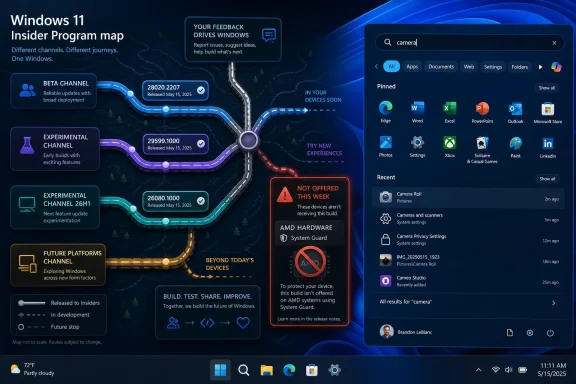
This week’s releases are therefore less a conventional Insider drop than a routing exercise. Beta gets build 26220.8544, Experimental gets build 26300.8553, Experimental 26H1 gets build 28020.2207, and the more speculative Future Platforms lane, including the Canary 29500 series, gets build 29599.1000. Those numbers are not merely bigger or smaller rungs on a ladder. They represent different assumptions about which Windows core a machine is supposed to be testing.
That matters because the old mental model of Insider builds was relatively simple. Canary was dangerous, Dev was forward-looking, Beta was closer to real, and Release Preview was almost shipping. The new arrangement is more surgical: some devices are validating feature work, some are validating servicing behavior, and some are being steered toward cores that may exist primarily to support hardware Microsoft has not yet fully mainstreamed.
The practical advice remains familiar — check the watermark, read the release notes, know what channel you are in — but the stakes have changed. If the wrong build line lands on the wrong test device, the consequence may not be a buggier afternoon. It may be a reinstall.
Microsoft says Insiders who selected 26H1 under Advanced options will begin receiving that version on June 5, 2026. That date is the warning bell. Anyone who opted in casually now has a few days to reconsider before their test PC enters a release track that Microsoft explicitly says does not behave like the normal annual update path.
The reason is architectural. Microsoft says Windows 11 26H1 is based on a different Windows core than 24H2, 25H2, and the upcoming second-half 2026 feature update. In plain English, 26H1 and the mainstream 2026 release are not simply two editions of the same train stopping at different stations. They are running on different track.
That distinction is easy to understate because Windows version names have trained users to expect chronology. 23H2 followed 22H2, 24H2 followed 23H2, and so on. But 26H1 does not mean “the one before 26H2” in the usual sense. It means “the one built for a specific generation of platform work before the rest of the Windows estate catches up later.”
For enthusiasts, that makes 26H1 interesting. For administrators, it makes 26H1 radioactive unless there is a clear business reason to test it.
After that, the path back is no longer an update operation. Microsoft says Insiders who take 26H1 and want to return to 25H2 will need a complete reinstall of Windows. That is the kind of sentence that should stop a casual tester cold.
A reinstall is not just an inconvenience. It means application rehydration, profile handling, BitLocker recovery planning, driver verification, and the usual cleanup after Windows has been asked to pretend the last experiment never happened. On a personal test laptop, that may be tolerable. On a fleet pilot, it is the difference between “we are evaluating this branch” and “we have created avoidable work for endpoint engineering.”
The fact that Microsoft is warning users in advance is welcome, but it also reveals the complexity of what the Insider Program is now being asked to do. A channel is no longer just a risk appetite. It can be a commitment to a core lineage.
That is especially important for anyone who treats Insider channels as a rolling lab for compatibility testing. If your goal is to understand how line-of-business apps will behave on the next broad Windows release, 26H1 may be the wrong signal. It may tell you something about Snapdragon X2-era Windows. It may tell you much less about the x86 and Arm PCs that remain on the 24H2/25H2 lineage heading toward the broader second-half update.
Windows on Arm has always lived with a tension between abstraction and specificity. Microsoft wants Windows to feel like Windows regardless of the chip underneath, but the performance, battery life, driver model, emulation layer, neural processing, and scheduler behavior all depend heavily on the platform. The more ambitious Arm PCs become, the harder it is to pretend every Windows release can serve every device equally at the same moment.
The 26H1 split is Microsoft acknowledging that reality. New silicon sometimes needs operating system work that is too deep to ship as a normal enablement package or monthly cumulative update. If Snapdragon X2-class machines require a newer core to hit their intended power and performance targets, Microsoft has two choices: hold the hardware back, or create a Windows branch that is ready for it.
The company has chosen the second path. That may be rational engineering, but it introduces messaging risk. Users have been trained to view Windows version numbers as a rough indicator of freshness and entitlement. If a new Snapdragon X2 PC ships with 26H1 while an Intel or AMD PC remains on 25H2 or later moves to a different 26H2 line, the simple question “which Windows is newer?” becomes harder to answer.
That confusion will not bother kernel engineers. It will bother buyers, help desks, software vendors, and the unlucky person writing procurement guidance for mixed-device fleets.
But even here, the build is not going to everyone. Microsoft says it found an internal issue causing crashes on AMD machines that support System Guard, so those devices will not be offered this week’s Future Platforms build. The company expects the problem to be fixed by the next flight.
That temporary block is a small but useful example of why Microsoft’s platform split matters. System Guard is part of the security fabric that modern Windows relies on for protecting boot integrity and related trust boundaries. A crash affecting AMD machines with that capability is not a cosmetic defect. It is exactly the kind of low-level interaction that appears when operating system branches are being pushed into new combinations of silicon, firmware, virtualization-based security, and device security assumptions.
The block also shows Microsoft using more selective flighting. Rather than ship the build broadly and let affected users discover the problem in the wild, the company is withholding it from a specific class of machines. That is the mature version of Insider chaos: still experimental, still risky, but bounded where telemetry and internal validation have already found a cliff.
For AMD testers, the immediate consequence is simple. If the build does not appear, it may not be a Windows Update malfunction. It may be Microsoft refusing to offer a known-bad payload to your hardware profile.
The renaming of Recommended to Recent is more than wordsmithing. “Recommended” has long carried the smell of algorithmic intrusion, especially in a Start menu that many users still consider personal territory. “Recent” is more literal and less presumptuous. It tells the user that Windows is surfacing activity, not pretending to know what they should do next.
The section-level toggles are the more important change. For years, Start has been a battleground between Microsoft’s desire to make Windows feel adaptive and users’ desire to make it predictable. Giving users direct controls over Pinned, Recommended, and All does not settle that philosophical fight, but it moves the interface in the right direction.
The option to hide the user name and profile picture also fits a broader pattern. Windows increasingly appears in shared rooms, open offices, classrooms, livestreams, screen recordings, and support sessions. A small privacy affordance in Start is not transformative, but it is one of those details that makes the shell feel less oblivious to how people actually use PCs.
The small and large Start menu choices may matter most to power users and accessibility-minded users. Automatic sizing is convenient until it guesses wrong. Explicit sizing restores a measure of agency to a part of Windows that Microsoft has redesigned often enough to exhaust even patient users.
Modern users do not name files the way operating systems once assumed. They paste words together, inherit filenames from apps, download documents with inconsistent casing, and rely on half-remembered fragments. A search system that fails because the user remembers the middle of a compound term instead of the beginning is technically explainable and practically infuriating.
Substring matching also narrows the gap between user expectation and system behavior. People have been trained by web search, code editors, launchers, and mobile interfaces to expect partial matching. When Windows Search cannot do it reliably, the problem is not merely discoverability. It makes the whole OS feel behind the times.
There is a performance and indexing tradeoff hidden underneath this feature, of course. Better substring search can mean more sophisticated indexing, more storage, more CPU, or more careful ranking. Microsoft’s challenge is to make the improvement feel invisible rather than turning Search into another background service that users blame for heat, fan noise, or battery drain.
Still, this is the kind of mundane quality-of-life change that Insider builds are supposed to surface early. It does not need a keynote. It needs months of testers throwing real filenames at it until the edge cases become boring.
That creates a communications problem. Microsoft can explain the engineering: 26H1 is based on a different core; 24H2 and 25H2 are on another line; the upcoming second-half 2026 feature update is not the successor path for 26H1 devices; a future Windows release will provide a path later. But users do not live in servicing diagrams. They live in Settings, Windows Update, release notes, and whatever their OEM installed.
For enterprises, the answer is likely to be conservative. Unless an organization is buying Snapdragon X2 devices or explicitly validating that class of hardware, 24H2 and 25H2 remain the more comprehensible baselines. Those releases align with existing management assumptions, deployment rings, app testing, and support documentation. 26H1 may be worth lab time, but it is not automatically a better pilot just because the version number starts with 26.
For OEMs, the split is more delicate. New hardware needs the operating system that makes it shine. If that OS sits outside the expected update path, the device story must be clear from day one. A laptop that is fast, efficient, and secure can still generate support friction if buyers discover that its Windows version does not update the way their other Windows 11 machines do.
For enthusiasts, this is both exciting and annoying. Exciting because Windows is doing real platform work again, not just moving furniture in the shell. Annoying because real platform work tends to expose the limits of tidy branding.
If you are running a sacrificial machine, the calculus is simple. Pick the branch that interests you, back up your data, and accept the blast radius. If you are running a machine that participates in work, school, family tech support, security research, or production-adjacent validation, the calculus changes. The 26H1 branch may make your test more interesting while making your results less generalizable.
The AMD System Guard block reinforces the same lesson. Microsoft is not just shipping “the next build.” It is making targeting decisions based on hardware capabilities and known failure modes. That is what administrators do with rings and deployment safeguards, and it is now visible in the public test program itself.
This is probably the future of Windows flighting. As PCs become more heterogeneous — x86, Arm, NPUs, varied security silicon, different firmware stacks, and increasingly specialized power management — Microsoft cannot treat all Insider devices as interchangeable endpoints. The more Windows depends on hardware-specific optimizations, the more the Insider Program becomes a matrix rather than a queue.
The upside is better validation. The downside is that participants need to understand which square of the matrix they occupy.
Microsoft’s May 29 announcement looks modest if you scan only for features, but it is significant if you read it as a map of Windows development in 2026. The Start menu gets more civilized, Search gets a little smarter, and AMD machines avoid a bad Future Platforms flight. Yet the core message is that Windows is splintering tactically so Microsoft can chase new hardware without dragging the whole installed base through every platform transition at once. If that strategy works, most users will never need to understand why 26H1 existed; if it fails, version numbers that once promised clarity will become one more thing Windows administrators have to decode before breakfast.
 Microsoft’s Insider Program Is Now Testing the Map, Not Just the Code
The May 29 flight lands in the middle of Microsoft’s broader rework of the Windows Insider Program, and the company is clearly trying to keep testers from getting lost. The blog post tells Insiders to find release notes “based on the new channel system,” even if their own devices have not yet moved. That sentence sounds administrative, but it captures the transition: Microsoft is changing the vocabulary of Windows testing while continuing to ship builds through it.This week’s releases are therefore less a conventional Insider drop than a routing exercise. Beta gets build 26220.8544, Experimental gets build 26300.8553, Experimental 26H1 gets build 28020.2207, and the more speculative Future Platforms lane, including the Canary 29500 series, gets build 29599.1000. Those numbers are not merely bigger or smaller rungs on a ladder. They represent different assumptions about which Windows core a machine is supposed to be testing.
That matters because the old mental model of Insider builds was relatively simple. Canary was dangerous, Dev was forward-looking, Beta was closer to real, and Release Preview was almost shipping. The new arrangement is more surgical: some devices are validating feature work, some are validating servicing behavior, and some are being steered toward cores that may exist primarily to support hardware Microsoft has not yet fully mainstreamed.
The practical advice remains familiar — check the watermark, read the release notes, know what channel you are in — but the stakes have changed. If the wrong build line lands on the wrong test device, the consequence may not be a buggier afternoon. It may be a reinstall.
26H1 Is Not the Next Windows for Everyone
The most important sentence in Microsoft’s announcement is not the one naming build 28020.2207. It is the reminder that Windows 11 version 26H1 is a targeted release for new device innovations in 2026, including machines with Qualcomm Snapdragon X2 Series processors. That makes 26H1 feel less like a traditional Windows feature update and more like a hardware enablement branch wearing a consumer-facing version label.Microsoft says Insiders who selected 26H1 under Advanced options will begin receiving that version on June 5, 2026. That date is the warning bell. Anyone who opted in casually now has a few days to reconsider before their test PC enters a release track that Microsoft explicitly says does not behave like the normal annual update path.
The reason is architectural. Microsoft says Windows 11 26H1 is based on a different Windows core than 24H2, 25H2, and the upcoming second-half 2026 feature update. In plain English, 26H1 and the mainstream 2026 release are not simply two editions of the same train stopping at different stations. They are running on different track.
That distinction is easy to understate because Windows version names have trained users to expect chronology. 23H2 followed 22H2, 24H2 followed 23H2, and so on. But 26H1 does not mean “the one before 26H2” in the usual sense. It means “the one built for a specific generation of platform work before the rest of the Windows estate catches up later.”
For enthusiasts, that makes 26H1 interesting. For administrators, it makes 26H1 radioactive unless there is a clear business reason to test it.
The Advanced Core Toggle Has Become a Point of No Easy Return
Microsoft’s “Advanced core selection” language sounds almost benign, like a firmware option for people who enjoy discovering new Settings pages. It is not benign. The company says Insiders who selected 26H1 but no longer want it should reselect 25H2 before 26H1 becomes available to those devices on June 5.After that, the path back is no longer an update operation. Microsoft says Insiders who take 26H1 and want to return to 25H2 will need a complete reinstall of Windows. That is the kind of sentence that should stop a casual tester cold.
A reinstall is not just an inconvenience. It means application rehydration, profile handling, BitLocker recovery planning, driver verification, and the usual cleanup after Windows has been asked to pretend the last experiment never happened. On a personal test laptop, that may be tolerable. On a fleet pilot, it is the difference between “we are evaluating this branch” and “we have created avoidable work for endpoint engineering.”
The fact that Microsoft is warning users in advance is welcome, but it also reveals the complexity of what the Insider Program is now being asked to do. A channel is no longer just a risk appetite. It can be a commitment to a core lineage.
That is especially important for anyone who treats Insider channels as a rolling lab for compatibility testing. If your goal is to understand how line-of-business apps will behave on the next broad Windows release, 26H1 may be the wrong signal. It may tell you something about Snapdragon X2-era Windows. It may tell you much less about the x86 and Arm PCs that remain on the 24H2/25H2 lineage heading toward the broader second-half update.
Snapdragon X2 Is Pulling Windows Into a More Hardware-Specific Era
Microsoft’s public rationale for 26H1 is hardware enablement. The company has pointed to Qualcomm Snapdragon X2 Series processors as one of the device innovations the release supports. That is a meaningful clue about where Windows is headed.Windows on Arm has always lived with a tension between abstraction and specificity. Microsoft wants Windows to feel like Windows regardless of the chip underneath, but the performance, battery life, driver model, emulation layer, neural processing, and scheduler behavior all depend heavily on the platform. The more ambitious Arm PCs become, the harder it is to pretend every Windows release can serve every device equally at the same moment.
The 26H1 split is Microsoft acknowledging that reality. New silicon sometimes needs operating system work that is too deep to ship as a normal enablement package or monthly cumulative update. If Snapdragon X2-class machines require a newer core to hit their intended power and performance targets, Microsoft has two choices: hold the hardware back, or create a Windows branch that is ready for it.
The company has chosen the second path. That may be rational engineering, but it introduces messaging risk. Users have been trained to view Windows version numbers as a rough indicator of freshness and entitlement. If a new Snapdragon X2 PC ships with 26H1 while an Intel or AMD PC remains on 25H2 or later moves to a different 26H2 line, the simple question “which Windows is newer?” becomes harder to answer.
That confusion will not bother kernel engineers. It will bother buyers, help desks, software vendors, and the unlucky person writing procurement guidance for mixed-device fleets.
The Future Platforms Build Shows the Other Half of the Bet
Alongside the 26H1 build, Microsoft is releasing build 29599.1000 for Experimental “Future Platforms,” including the Canary 29500 series. This lane is where the Windows Insider Program looks most like its old self: high-numbered builds, early code, and a strong assumption that breakage is part of the contract.But even here, the build is not going to everyone. Microsoft says it found an internal issue causing crashes on AMD machines that support System Guard, so those devices will not be offered this week’s Future Platforms build. The company expects the problem to be fixed by the next flight.
That temporary block is a small but useful example of why Microsoft’s platform split matters. System Guard is part of the security fabric that modern Windows relies on for protecting boot integrity and related trust boundaries. A crash affecting AMD machines with that capability is not a cosmetic defect. It is exactly the kind of low-level interaction that appears when operating system branches are being pushed into new combinations of silicon, firmware, virtualization-based security, and device security assumptions.
The block also shows Microsoft using more selective flighting. Rather than ship the build broadly and let affected users discover the problem in the wild, the company is withholding it from a specific class of machines. That is the mature version of Insider chaos: still experimental, still risky, but bounded where telemetry and internal validation have already found a cliff.
For AMD testers, the immediate consequence is simple. If the build does not appear, it may not be a Windows Update malfunction. It may be Microsoft refusing to offer a known-bad payload to your hardware profile.
Start Menu Changes Are the Crowd-Pleaser, but Control Is the Theme
The user-visible feature work in this announcement is concentrated in the Start menu and Windows Search. The Start menu changes are straightforward: “Recommended” becomes “Recent,” users get section-level toggles for Pinned, Recommended, and All, Start can be small or large in addition to the automatic default, and there is a new option to hide the user name and profile picture. Microsoft is also redesigning the Start menu settings page.The renaming of Recommended to Recent is more than wordsmithing. “Recommended” has long carried the smell of algorithmic intrusion, especially in a Start menu that many users still consider personal territory. “Recent” is more literal and less presumptuous. It tells the user that Windows is surfacing activity, not pretending to know what they should do next.
The section-level toggles are the more important change. For years, Start has been a battleground between Microsoft’s desire to make Windows feel adaptive and users’ desire to make it predictable. Giving users direct controls over Pinned, Recommended, and All does not settle that philosophical fight, but it moves the interface in the right direction.
The option to hide the user name and profile picture also fits a broader pattern. Windows increasingly appears in shared rooms, open offices, classrooms, livestreams, screen recordings, and support sessions. A small privacy affordance in Start is not transformative, but it is one of those details that makes the shell feel less oblivious to how people actually use PCs.
The small and large Start menu choices may matter most to power users and accessibility-minded users. Automatic sizing is convenient until it guesses wrong. Explicit sizing restores a measure of agency to a part of Windows that Microsoft has redesigned often enough to exhaust even patient users.
Search by Substring Is the Kind of Fix Windows Should Have Had Years Ago
The Windows Search improvement is narrower but arguably more satisfying. Microsoft says files with compound names or content, such as “MeetingNotesApril” or “ProjectStatusReport,” can now be found by typing substrings like “april” or “status.” That is not flashy, but it attacks one of the everyday frictions that makes local search feel dumber than it should.Modern users do not name files the way operating systems once assumed. They paste words together, inherit filenames from apps, download documents with inconsistent casing, and rely on half-remembered fragments. A search system that fails because the user remembers the middle of a compound term instead of the beginning is technically explainable and practically infuriating.
Substring matching also narrows the gap between user expectation and system behavior. People have been trained by web search, code editors, launchers, and mobile interfaces to expect partial matching. When Windows Search cannot do it reliably, the problem is not merely discoverability. It makes the whole OS feel behind the times.
There is a performance and indexing tradeoff hidden underneath this feature, of course. Better substring search can mean more sophisticated indexing, more storage, more CPU, or more careful ranking. Microsoft’s challenge is to make the improvement feel invisible rather than turning Search into another background service that users blame for heat, fan noise, or battery drain.
Still, this is the kind of mundane quality-of-life change that Insider builds are supposed to surface early. It does not need a keynote. It needs months of testers throwing real filenames at it until the edge cases become boring.
The Annual Update Story Is Getting Harder to Tell
Windows 11’s servicing model has already been through several identity shifts. Microsoft has emphasized annual feature updates, enablement packages, shared servicing branches, cumulative update predictability, and more recently a growing distinction between feature rollout and platform release. The May 29 announcement adds another layer: a version that is current, real, and important, but not meant to flow into the next annual feature update in the normal way.That creates a communications problem. Microsoft can explain the engineering: 26H1 is based on a different core; 24H2 and 25H2 are on another line; the upcoming second-half 2026 feature update is not the successor path for 26H1 devices; a future Windows release will provide a path later. But users do not live in servicing diagrams. They live in Settings, Windows Update, release notes, and whatever their OEM installed.
For enterprises, the answer is likely to be conservative. Unless an organization is buying Snapdragon X2 devices or explicitly validating that class of hardware, 24H2 and 25H2 remain the more comprehensible baselines. Those releases align with existing management assumptions, deployment rings, app testing, and support documentation. 26H1 may be worth lab time, but it is not automatically a better pilot just because the version number starts with 26.
For OEMs, the split is more delicate. New hardware needs the operating system that makes it shine. If that OS sits outside the expected update path, the device story must be clear from day one. A laptop that is fast, efficient, and secure can still generate support friction if buyers discover that its Windows version does not update the way their other Windows 11 machines do.
For enthusiasts, this is both exciting and annoying. Exciting because Windows is doing real platform work again, not just moving furniture in the shell. Annoying because real platform work tends to expose the limits of tidy branding.
Insider Flighting Is Becoming a Test of Governance
There is a habit among Windows enthusiasts to treat Insider builds as a personal adventure. That spirit is part of what made the program useful. But the May 29 release is a reminder that adventurous testing and responsible testing are no longer the same thing.If you are running a sacrificial machine, the calculus is simple. Pick the branch that interests you, back up your data, and accept the blast radius. If you are running a machine that participates in work, school, family tech support, security research, or production-adjacent validation, the calculus changes. The 26H1 branch may make your test more interesting while making your results less generalizable.
The AMD System Guard block reinforces the same lesson. Microsoft is not just shipping “the next build.” It is making targeting decisions based on hardware capabilities and known failure modes. That is what administrators do with rings and deployment safeguards, and it is now visible in the public test program itself.
This is probably the future of Windows flighting. As PCs become more heterogeneous — x86, Arm, NPUs, varied security silicon, different firmware stacks, and increasingly specialized power management — Microsoft cannot treat all Insider devices as interchangeable endpoints. The more Windows depends on hardware-specific optimizations, the more the Insider Program becomes a matrix rather than a queue.
The upside is better validation. The downside is that participants need to understand which square of the matrix they occupy.
The May 29 Builds Reward the Careful Insider
This week’s build drop is not a routine “new bits are available” post. It is a small governance test for anyone who uses the Insider Program seriously. Microsoft is giving testers more knobs, but it is also making those knobs more consequential.- Insiders who selected Windows 11 26H1 should switch back to 25H2 before June 5, 2026 if they do not want to enter a branch that requires a full reinstall to leave.
- Windows 11 26H1 should be treated as a targeted platform release for new hardware, not as the default next feature update for existing PCs.
- The Experimental Future Platforms build 29599.1000 is being withheld from AMD System Guard-capable machines this week because of a crash issue Microsoft found internally.
- Start menu changes in the Experimental channel give users more direct control over sections, sizing, identity display, and the language around recent content.
- Windows Search substring matching in Experimental and Beta is a practical improvement that should make real-world file discovery less brittle.
- IT teams should separate 26H1 hardware-enablement testing from mainstream Windows 11 deployment planning unless their 2026 device roadmap specifically includes the affected platforms.
Microsoft’s May 29 announcement looks modest if you scan only for features, but it is significant if you read it as a map of Windows development in 2026. The Start menu gets more civilized, Search gets a little smarter, and AMD machines avoid a bad Future Platforms flight. Yet the core message is that Windows is splintering tactically so Microsoft can chase new hardware without dragging the whole installed base through every platform transition at once. If that strategy works, most users will never need to understand why 26H1 existed; if it fails, version numbers that once promised clarity will become one more thing Windows administrators have to decode before breakfast.
References
- Primary source: Microsoft - Windows Insiders Blog
Published: Fri, 29 May 2026 17:05:27 +0000
Loading…
blogs.windows.com - Related coverage: tomshardware.com
Microsoft confirms Windows 11 26H1 will be for Arm devices only at launch — Snapdragon X2-powered devices officially shipping with 26H1
It's 24H2 all over again, but with the caveat that 26H1 will only support specific hardware for its entire lifecycle. Devices running 26H1 will not be able to upgrade to 26H2.www.tomshardware.com
- Related coverage: windowslatest.com
Microsoft releases Windows 11 26H1, but it's not for existing PCs. Windows 11 26H2 is coming for all PCs
Microsoft reached out to Windows Latest to confirm Windows 11 26H1 is real and rolling out. Existing PCs get version 26H2. www.windowslatest.com
- Official source: techcommunity.microsoft.com
What to know about Windows 11, version 26H1 - Windows IT Pro Blog
Explore this specialized Windows release designed to support the next generation of hardware innovation. techcommunity.microsoft.com
- Related coverage: windowscentral.com
Windows 11 version 26H1 won't be getting version 26H2 this fall
Microsoft's special offshoot version of Windows 11 that's exclusive to Snapdragon X2 devices won't be getting an upgrade to version 26H2 this fall. Here's why www.windowscentral.com
- Related coverage: winbuzzer.com
Loading…
winbuzzer.com