

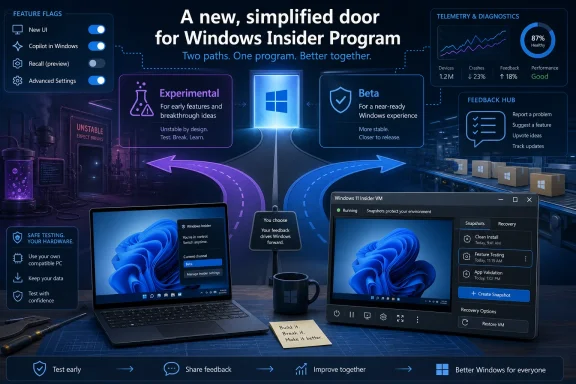
Microsoft is moving the Windows Insider Program for Windows 11 from the familiar Canary, Dev, Beta, and Release Preview arrangement toward a simpler Experimental-and-Beta model in spring 2026, changing how early testers choose builds, enable features, and exit preview software. The change sounds like a cleanup of labels, but it is really a reset of Microsoft’s bargain with its most technical users. Windows preview testing is no longer just about getting tomorrow’s Start menu today; it is about deciding how much uncertainty you are willing to run on real hardware.
For years, the Windows Insider Program has been both a gift and a trap. It gave enthusiasts and administrators a first look at features long before public release, but it also buried risk behind channel names that sounded more precise than they were. Microsoft’s latest simplification is an admission that the old map had become too hard to read, even for the audience most likely to tolerate rough edges.
The old Insider structure made sense if you already spoke Microsoft’s internal dialect. Canary meant the earliest platform work, Dev meant active feature development, Beta meant closer-to-release code, and Release Preview meant updates nearly ready for general availability. That was tidy on paper, but real builds did not always behave like a neat staircase.
Features could appear in one channel, skip another, vanish behind staged rollout controls, or arrive only for a subset of testers. A user could read about a new capability in a Windows blog post, install the latest build, and still not see the thing they were supposedly testing. The result was a preview program that often felt less like a product pipeline and more like a controlled experiment in expectation management.
The move toward Experimental and Beta is Microsoft’s attempt to make the decision sound like the one users were already making in practice. Do you want to test unfinished ideas, or do you want to test changes more likely to ship? That is a more honest distinction than asking people to infer risk from names like Canary and Dev.
But simplicity does not eliminate complexity; it relocates it. The channel names may be easier, while the underlying version branches, build numbers, staged rollouts, hardware requirements, and exit paths still matter. Anyone joining the program should treat the new interface as a clearer front door, not as a guarantee that preview Windows has become safe Windows.
The Experimental channel is where Microsoft can expose features and platform work before they have settled into the shape ordinary users will eventually see. Some of those changes may ship. Some may be redesigned. Some may disappear. That uncertainty is not a bug in the program; it is the point of the program.
That makes Experimental appealing for Windows enthusiasts, developers, accessibility testers, hardware watchers, and IT pros who need to see where Microsoft is steering the platform. It is also the wrong place for a machine that runs payroll, controls a classroom, edits billable work, or belongs to a relative who thinks “Windows Update” is a weather report.
The Beta channel is the more practical lane. It is still preview software, and it can still break things, but it is closer to the code Microsoft expects to deliver broadly. If Experimental is where Windows asks “what if,” Beta is where Windows asks “is this ready?”
That distinction matters because modern Windows is not just a shell and kernel. It is a bundle of cloud-connected features, Store-delivered components, inbox apps, drivers, security baselines, AI integrations, and account services. A preview build can behave differently not only because of the build itself, but because Microsoft flips a server-side switch after installation.
A spare PC is still the cleanest test bed. It gives you real firmware, real drivers, real power management, and real device quirks without gambling your daily workstation. For hardware enthusiasts, this is also where the Insider Program is most useful, because many Windows bugs only reveal themselves when the OS meets actual silicon, peripherals, sleep states, and display stacks.
Virtual machines are the safer path for most users. VMware Workstation Pro, Oracle VM VirtualBox, Hyper-V, and other virtualization tools can run Windows 11 builds in isolation, with snapshots available before risky updates. That matters because the fastest way out of a broken preview build is often not troubleshooting; it is rolling back to a known-good VM state.
The catch is that Windows 11’s hardware requirements follow you into the virtual world. Trusted Platform Module support, Secure Boot, memory allocation, CPU compatibility, and storage configuration can all decide whether your VM behaves like a supported Windows 11 system or a science project. The test environment is not an afterthought; it is the foundation of the whole exercise.
Once enrolled, Windows will ask for optional diagnostic data if it is not already enabled. This is one of those moments where Microsoft’s consumer language tends to soften the reality. You are not merely “joining a program”; you are agreeing to send more information about your device and its behavior so Microsoft can measure what preview software is doing in the field.
For many readers of WindowsForum.com, that trade is acceptable. Testers understand that Microsoft cannot fix what it cannot observe, and preview builds are supposed to surface bugs before they reach mainstream users. Still, it deserves to be said plainly: the Insider Program is not the right fit for users who want maximum privacy and minimum telemetry.
This also explains why Feedback Hub remains central to the process. Microsoft does not only want crash dumps and install success rates; it wants structured complaints, reproduction steps, upvotes, screenshots, and user sentiment. The Insider Program works best when testers act less like spectators and more like unpaid QA analysts with opinions.
The ISO route remains the most flexible for virtualization. An ISO can be mounted directly in a VM, archived for later use, or written to USB for physical hardware. Installation media created through Microsoft’s tool is more convenient for a spare PC, especially when you want a straightforward bootable drive.
Activation still matters. Preview access does not magically grant a Windows license. A test build may install and run for evaluation, but a long-term test environment should be activated properly with a valid product key or a digital license attached to the device or account.
There is a quiet discipline here that separates casual tinkering from useful testing. Keep notes on which build you installed, which channel you selected, whether the machine was upgraded or clean-installed, and what hardware or VM settings were in play. When something breaks, that context is the difference between a useful bug report and a forum post that says only, “It doesn’t work.”
The new feature flag approach is meant to narrow that gap, particularly in Experimental. Instead of waiting for Microsoft’s rollout machinery to bless a device, testers may get a more explicit way to enable or disable certain new experiences. That is a meaningful improvement because it makes the program less dependent on guesswork and third-party tools.
It also changes the nature of testing. If testers can turn features on more deliberately, Microsoft gets cleaner feedback from people who know they are evaluating a specific change. The old “do I have it yet?” dance was bad for users and bad for bug reports.
Still, feature flags can create their own mess. Two people on the same build may have different combinations of enabled experiences. A bug may come from the build, from the flag, from a dependency, from a staged service update, or from the interaction among all of them. The interface may be simpler, but the test matrix is not.
The new model aims to make switching between Experimental, Beta, and Release Preview easier when the device is on the same Windows core version. That phrase is doing a lot of work. If the builds are aligned closely enough, channel switching can be straightforward; if they are not, Windows may still require a reset, reinstall, or patience until the public release catches up.
This is where enthusiasts often get burned. They read that switching is supported, assume it is universally supported, and then discover that build numbers matter. A channel is not just a name; it is a route through Microsoft’s development branches.
Before changing channels, testers should check the current build, the target channel’s build, and Microsoft’s release notes. If the target path is not clearly supported, the safest assumption is that you may need a clean installation. That sounds conservative because it is, and conservative habits are what keep test machines from becoming emergency recovery projects.
Feedback Hub lets testers search existing reports, upvote issues, add comments, and submit new items with categories and details. That structure matters because Windows is too large for vague complaints to travel far. “File Explorer crashed when opening a network share after resuming from sleep on build X” is a signal; “Windows is broken” is weather.
For IT pros, Feedback Hub can also serve as an early warning system. If multiple testers are reporting the same driver failure, upgrade hang, policy regression, or shell instability, that chatter may help administrators delay internal pilots. Insider testing is not only about influencing Microsoft; it is about reading the room before Patch Tuesday becomes your problem.
The best feedback includes what changed, what you expected, what happened instead, how often it happens, and whether it reproduces after a reboot or clean profile. Screenshots and recordings help. So do logs, but even a well-written plain-English report beats silence.
Microsoft’s challenge is not collecting feedback. It is convincing users that feedback changes outcomes. The more visible feature flags and simplified channels become, the more pressure Microsoft will face to show that Insider participation is not just telemetry extraction with a community badge.
A sysadmin does not need every experimental animation or inbox app tweak. They need to know whether a new build changes deployment behavior, breaks VPN clients, affects endpoint security, alters default apps, shifts Group Policy behavior, disrupts printing, or creates user confusion that will land on the help desk. Preview builds can expose those changes early enough to prepare documentation, blocks, or pilot rings.
But organizations should resist the temptation to treat Insider builds as production pilots. Preview software is not a substitute for formal validation against release candidates, Release Preview builds, and documented update channels. The right enterprise posture is curiosity without dependency.
The Insider Program is especially useful for shops that support Windows power users, developers, or specialized hardware. It can reveal compatibility problems months before a broad rollout. It can also help administrators understand where Microsoft is likely to push users next, whether that means account integration, AI features, security defaults, or Settings app migrations.
The risk is political as much as technical. Once a preview feature appears on an executive’s test laptop, it can become an expectation. Admins should be explicit that Insider builds are observation windows, not promises.
A clearer channel model can help. Users can better understand that Experimental is unstable by design and Beta is closer to release. They can choose a lane without decoding a hierarchy of birds, developers, and previews.
But the deeper trust issue is whether Microsoft clearly distinguishes experiments from decisions. If a controversial feature appears in Experimental, users should know whether Microsoft is genuinely testing reaction or merely staging a rollout. If Beta receives a change, users will reasonably assume it is closer to inevitable.
That is why the new Insider structure matters beyond the small audience that installs preview builds. The program is where Microsoft rehearses its relationship with Windows users. When that rehearsal is confusing, opaque, or dismissive, the public release inherits the damage.
That raises the stakes. Windows is no longer refreshed only by big version jumps; it is continuously reshaped by cumulative updates, app updates, Store components, cloud-backed experiences, and controlled rollouts. The Insider Program is the preview layer for that living system.
For developers, early builds can reveal API changes, compatibility issues, WebView behavior, accessibility shifts, and packaging quirks. For security-minded users, they can expose new defaults, credential flows, Smart App Control behavior, Defender changes, and attack-surface reductions before they hit the general population. For ordinary enthusiasts, they offer the thrill of seeing the future, provided the future is not installed on the only PC in the house.
The new Experimental-and-Beta framing is therefore less a cosmetic rename than a necessary admission. Microsoft needs its testers to understand what they are signing up for, because Windows development has become too fluid for ambiguous channel branding.
Microsoft’s streamlined Insider Program is a better front door for early Windows 11 testing, but it does not change the essential bargain. Experimental and Beta make the choice clearer, not harmless. If Microsoft uses the new structure to pair early access with clearer controls, better off-ramps, and more visible responses to feedback, the program can become more useful for everyone from hobbyists to fleet administrators; if not, it will merely give an old maze cleaner signage.
Source: PCMag UK Become an Insider: How to Check Out Early Versions of Windows 11
For years, the Windows Insider Program has been both a gift and a trap. It gave enthusiasts and administrators a first look at features long before public release, but it also buried risk behind channel names that sounded more precise than they were. Microsoft’s latest simplification is an admission that the old map had become too hard to read, even for the audience most likely to tolerate rough edges.
 Microsoft Finally Admits the Insider Map Was Too Clever
The old Insider structure made sense if you already spoke Microsoft’s internal dialect. Canary meant the earliest platform work, Dev meant active feature development, Beta meant closer-to-release code, and Release Preview meant updates nearly ready for general availability. That was tidy on paper, but real builds did not always behave like a neat staircase.Features could appear in one channel, skip another, vanish behind staged rollout controls, or arrive only for a subset of testers. A user could read about a new capability in a Windows blog post, install the latest build, and still not see the thing they were supposedly testing. The result was a preview program that often felt less like a product pipeline and more like a controlled experiment in expectation management.
The move toward Experimental and Beta is Microsoft’s attempt to make the decision sound like the one users were already making in practice. Do you want to test unfinished ideas, or do you want to test changes more likely to ship? That is a more honest distinction than asking people to infer risk from names like Canary and Dev.
But simplicity does not eliminate complexity; it relocates it. The channel names may be easier, while the underlying version branches, build numbers, staged rollouts, hardware requirements, and exit paths still matter. Anyone joining the program should treat the new interface as a clearer front door, not as a guarantee that preview Windows has become safe Windows.
Experimental Is Not a Synonym for Early Access
The most dangerous misunderstanding about the Insider Program is that it is a loyalty club for impatient users. It is not. It is a telemetry, feedback, and validation system that happens to give the public access to pre-release software.The Experimental channel is where Microsoft can expose features and platform work before they have settled into the shape ordinary users will eventually see. Some of those changes may ship. Some may be redesigned. Some may disappear. That uncertainty is not a bug in the program; it is the point of the program.
That makes Experimental appealing for Windows enthusiasts, developers, accessibility testers, hardware watchers, and IT pros who need to see where Microsoft is steering the platform. It is also the wrong place for a machine that runs payroll, controls a classroom, edits billable work, or belongs to a relative who thinks “Windows Update” is a weather report.
The Beta channel is the more practical lane. It is still preview software, and it can still break things, but it is closer to the code Microsoft expects to deliver broadly. If Experimental is where Windows asks “what if,” Beta is where Windows asks “is this ready?”
That distinction matters because modern Windows is not just a shell and kernel. It is a bundle of cloud-connected features, Store-delivered components, inbox apps, drivers, security baselines, AI integrations, and account services. A preview build can behave differently not only because of the build itself, but because Microsoft flips a server-side switch after installation.
The First Rule Is Still: Do Not Sacrifice Your Main PC
The best advice in any Insider guide remains the oldest one: do not install preview Windows on a machine you cannot afford to rebuild. Microsoft can make channel selection friendlier, but it cannot repeal the basic physics of unfinished operating systems. Bugs will escape; drivers will misbehave; features will arrive half-dressed.A spare PC is still the cleanest test bed. It gives you real firmware, real drivers, real power management, and real device quirks without gambling your daily workstation. For hardware enthusiasts, this is also where the Insider Program is most useful, because many Windows bugs only reveal themselves when the OS meets actual silicon, peripherals, sleep states, and display stacks.
Virtual machines are the safer path for most users. VMware Workstation Pro, Oracle VM VirtualBox, Hyper-V, and other virtualization tools can run Windows 11 builds in isolation, with snapshots available before risky updates. That matters because the fastest way out of a broken preview build is often not troubleshooting; it is rolling back to a known-good VM state.
The catch is that Windows 11’s hardware requirements follow you into the virtual world. Trusted Platform Module support, Secure Boot, memory allocation, CPU compatibility, and storage configuration can all decide whether your VM behaves like a supported Windows 11 system or a science project. The test environment is not an afterthought; it is the foundation of the whole exercise.
The Microsoft Account Is the Ticket, but Telemetry Is the Price
Joining the Windows Insider Program begins with a Microsoft account. That requirement is not incidental. The program is built around identity, device enrollment, diagnostic data, and feedback loops, not anonymous ISO tourism.Once enrolled, Windows will ask for optional diagnostic data if it is not already enabled. This is one of those moments where Microsoft’s consumer language tends to soften the reality. You are not merely “joining a program”; you are agreeing to send more information about your device and its behavior so Microsoft can measure what preview software is doing in the field.
For many readers of WindowsForum.com, that trade is acceptable. Testers understand that Microsoft cannot fix what it cannot observe, and preview builds are supposed to surface bugs before they reach mainstream users. Still, it deserves to be said plainly: the Insider Program is not the right fit for users who want maximum privacy and minimum telemetry.
This also explains why Feedback Hub remains central to the process. Microsoft does not only want crash dumps and install success rates; it wants structured complaints, reproduction steps, upvotes, screenshots, and user sentiment. The Insider Program works best when testers act less like spectators and more like unpaid QA analysts with opinions.
Downloading Windows 11 Is the Easy Part
There are two practical ways to get Windows 11 ready for Insider testing. If the target machine or VM already runs Windows 11, enrollment can happen through Settings under Windows Update and the Windows Insider Program page. If you are starting from nothing, Microsoft’s Windows 11 download tools provide installation media or ISO files.The ISO route remains the most flexible for virtualization. An ISO can be mounted directly in a VM, archived for later use, or written to USB for physical hardware. Installation media created through Microsoft’s tool is more convenient for a spare PC, especially when you want a straightforward bootable drive.
Activation still matters. Preview access does not magically grant a Windows license. A test build may install and run for evaluation, but a long-term test environment should be activated properly with a valid product key or a digital license attached to the device or account.
There is a quiet discipline here that separates casual tinkering from useful testing. Keep notes on which build you installed, which channel you selected, whether the machine was upgraded or clean-installed, and what hardware or VM settings were in play. When something breaks, that context is the difference between a useful bug report and a forum post that says only, “It doesn’t work.”
Feature Flags Are Microsoft’s New Escape Hatch
One of the more important changes in the updated Insider experience is the emphasis on feature controls. Microsoft has been criticized for years for announcing features that do not appear for every Insider on the advertised build. The company’s gradual rollout system makes engineering sense, but it creates user confusion.The new feature flag approach is meant to narrow that gap, particularly in Experimental. Instead of waiting for Microsoft’s rollout machinery to bless a device, testers may get a more explicit way to enable or disable certain new experiences. That is a meaningful improvement because it makes the program less dependent on guesswork and third-party tools.
It also changes the nature of testing. If testers can turn features on more deliberately, Microsoft gets cleaner feedback from people who know they are evaluating a specific change. The old “do I have it yet?” dance was bad for users and bad for bug reports.
Still, feature flags can create their own mess. Two people on the same build may have different combinations of enabled experiences. A bug may come from the build, from the flag, from a dependency, from a staged service update, or from the interaction among all of them. The interface may be simpler, but the test matrix is not.
Switching Channels Is Improving, Not Becoming Risk-Free
Microsoft has also been working to make movement between Insider channels less punishing. Historically, choosing the wrong channel could strand a device on a build that had no easy path back to stable Windows without a clean install. That was especially true when a channel jumped ahead to a newer development branch.The new model aims to make switching between Experimental, Beta, and Release Preview easier when the device is on the same Windows core version. That phrase is doing a lot of work. If the builds are aligned closely enough, channel switching can be straightforward; if they are not, Windows may still require a reset, reinstall, or patience until the public release catches up.
This is where enthusiasts often get burned. They read that switching is supported, assume it is universally supported, and then discover that build numbers matter. A channel is not just a name; it is a route through Microsoft’s development branches.
Before changing channels, testers should check the current build, the target channel’s build, and Microsoft’s release notes. If the target path is not clearly supported, the safest assumption is that you may need a clean installation. That sounds conservative because it is, and conservative habits are what keep test machines from becoming emergency recovery projects.
Feedback Hub Is Where Complaints Become Engineering Signals
The least glamorous part of the Insider Program may be the most valuable. Installing a preview build and grumbling on social media does not give Microsoft much to act on. Filing precise feedback does.Feedback Hub lets testers search existing reports, upvote issues, add comments, and submit new items with categories and details. That structure matters because Windows is too large for vague complaints to travel far. “File Explorer crashed when opening a network share after resuming from sleep on build X” is a signal; “Windows is broken” is weather.
For IT pros, Feedback Hub can also serve as an early warning system. If multiple testers are reporting the same driver failure, upgrade hang, policy regression, or shell instability, that chatter may help administrators delay internal pilots. Insider testing is not only about influencing Microsoft; it is about reading the room before Patch Tuesday becomes your problem.
The best feedback includes what changed, what you expected, what happened instead, how often it happens, and whether it reproduces after a reboot or clean profile. Screenshots and recordings help. So do logs, but even a well-written plain-English report beats silence.
Microsoft’s challenge is not collecting feedback. It is convincing users that feedback changes outcomes. The more visible feature flags and simplified channels become, the more pressure Microsoft will face to show that Insider participation is not just telemetry extraction with a community badge.
The Admin’s View Is Colder Than the Enthusiast’s View
For home enthusiasts, the Insider Program is a playground with warning labels. For administrators, it is a reconnaissance tool. That difference should shape how organizations use it.A sysadmin does not need every experimental animation or inbox app tweak. They need to know whether a new build changes deployment behavior, breaks VPN clients, affects endpoint security, alters default apps, shifts Group Policy behavior, disrupts printing, or creates user confusion that will land on the help desk. Preview builds can expose those changes early enough to prepare documentation, blocks, or pilot rings.
But organizations should resist the temptation to treat Insider builds as production pilots. Preview software is not a substitute for formal validation against release candidates, Release Preview builds, and documented update channels. The right enterprise posture is curiosity without dependency.
The Insider Program is especially useful for shops that support Windows power users, developers, or specialized hardware. It can reveal compatibility problems months before a broad rollout. It can also help administrators understand where Microsoft is likely to push users next, whether that means account integration, AI features, security defaults, or Settings app migrations.
The risk is political as much as technical. Once a preview feature appears on an executive’s test laptop, it can become an expectation. Admins should be explicit that Insider builds are observation windows, not promises.
The Consumer Story Is Really About Trust
Microsoft’s simplification arrives at a time when Windows users are already sensitive to unwanted change. Start menu experiments, account nudges, Copilot integration, default app behavior, ads, widgets, Edge promotion, and privacy prompts have all trained users to scrutinize Windows updates. The Insider Program sits directly in that trust gap.A clearer channel model can help. Users can better understand that Experimental is unstable by design and Beta is closer to release. They can choose a lane without decoding a hierarchy of birds, developers, and previews.
But the deeper trust issue is whether Microsoft clearly distinguishes experiments from decisions. If a controversial feature appears in Experimental, users should know whether Microsoft is genuinely testing reaction or merely staging a rollout. If Beta receives a change, users will reasonably assume it is closer to inevitable.
That is why the new Insider structure matters beyond the small audience that installs preview builds. The program is where Microsoft rehearses its relationship with Windows users. When that rehearsal is confusing, opaque, or dismissive, the public release inherits the damage.
Windows 11’s Insider Era Has Fewer Excuses
Windows 11 is now the center of Microsoft’s client strategy, and the Insider Program reflects that reality. The days when Windows 10 and Windows 11 could split attention are effectively over for mainstream development. Preview builds now point more directly at where the Windows desktop is heading.That raises the stakes. Windows is no longer refreshed only by big version jumps; it is continuously reshaped by cumulative updates, app updates, Store components, cloud-backed experiences, and controlled rollouts. The Insider Program is the preview layer for that living system.
For developers, early builds can reveal API changes, compatibility issues, WebView behavior, accessibility shifts, and packaging quirks. For security-minded users, they can expose new defaults, credential flows, Smart App Control behavior, Defender changes, and attack-surface reductions before they hit the general population. For ordinary enthusiasts, they offer the thrill of seeing the future, provided the future is not installed on the only PC in the house.
The new Experimental-and-Beta framing is therefore less a cosmetic rename than a necessary admission. Microsoft needs its testers to understand what they are signing up for, because Windows development has become too fluid for ambiguous channel branding.
The Sensible Insider Builds a Lab Before Chasing the Future
The safest way to join the Insider Program is to treat it like a small lab, not a weekend upgrade. That does not require enterprise gear or elaborate process. It requires boundaries, backups, and the humility to assume unfinished software can waste your afternoon.- Install Insider builds on a spare PC, virtual machine, or dual-boot setup rather than on your primary work machine.
- Choose Experimental only if you are comfortable with unfinished features, changing behavior, and the possibility that tested work may never ship.
- Choose Beta if you want preview access with a better chance of seeing changes that are closer to public release.
- Keep installation media, recovery options, and backups ready before enrolling a device.
- Use Feedback Hub with specific reproduction details instead of relying on vague complaints in public threads.
- Check build numbers and Microsoft’s current guidance before switching channels or attempting to leave the program.
Microsoft’s streamlined Insider Program is a better front door for early Windows 11 testing, but it does not change the essential bargain. Experimental and Beta make the choice clearer, not harmless. If Microsoft uses the new structure to pair early access with clearer controls, better off-ramps, and more visible responses to feedback, the program can become more useful for everyone from hobbyists to fleet administrators; if not, it will merely give an old maze cleaner signage.
Source: PCMag UK Become an Insider: How to Check Out Early Versions of Windows 11
