

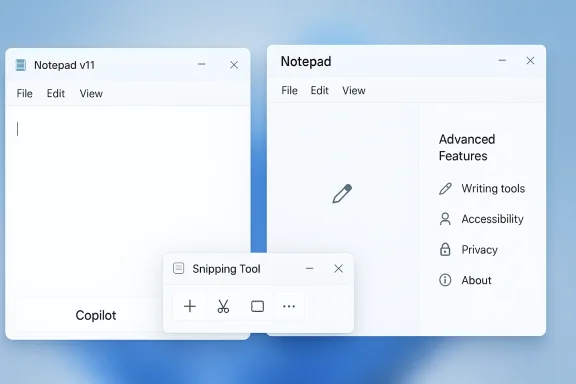
Microsoft’s latest Windows 11 Insider changes mark a subtle but telling shift: the company is not abandoning AI in core apps, but it is clearly backing away from the most visible Copilot branding. In Notepad v11.2512.28.0, the bright Copilot button has been replaced by a more neutral Writing tools label, while the settings page has been reframed from AI Features to Advanced Features. At the same time, Microsoft has reportedly removed AI integration from the Snipping Tool, underscoring a broader attempt to reduce the sense that Copilot is being pushed everywhere. (windowslatest.com)
Microsoft’s Copilot strategy has gone through several distinct phases, and the latest change is best understood as a response to the friction created by its earlier enthusiasm. When Microsoft first announced Copilot across Windows and Microsoft apps, the pitch was expansive: AI would help users write, summarize, edit, and create without leaving the operating system. That vision extended into apps like Notepad, Paint, Photos, and Snipping Tool, making Copilot feel less like one feature among many and more like a layer spread across the entire product. (blogs.microsoft.com)
The problem, as user feedback increasingly made clear, was not that the features existed. It was that the branding often felt intrusive, repetitive, and in some cases unnecessary for small utilities that people expect to stay simple. Notepad is the perfect example: a lightweight text editor became a showcase for AI-powered rewrite, summarize, and write capabilities, and Microsoft’s own support docs confirm those tools were powered by GPT and tied to Microsoft account sign-in and AI credits. (support.microsoft.com)
Then came Microsoft’s public acknowledgement that it needed to adjust course. In its March 20, 2026 Insider blog post, the company said it would be “more intentional” about how Copilot integrates across Windows and explicitly promised to reduce unnecessary Copilot entry points, starting with apps like Snipping Tool, Photos, Widgets, and Notepad. That was an unusually direct admission that the AI rollout had become too conspicuous for some users.
The current change looks like the practical follow-through on that promise. Rather than removing AI capabilities outright, Microsoft is changing the way they are presented. That distinction matters because it reveals the company’s underlying strategy: keep the functionality, soften the brand, and make the experience feel less like a sales surface and more like a native utility. In other words, this is not an AI retreat so much as an AI rebalancing. (windowslatest.com)
Microsoft also renamed the settings category from AI Features to Advanced Features. That sounds cosmetic, but user perception is often shaped by labels more than by implementation. The new wording makes the experience feel closer to a traditional productivity setting and less like an AI demo, even though the underlying engine remains AI-powered. (windowslatest.com)
That approach may be more sustainable than the earlier design. Notepad users tend to value speed, clarity, and low distraction, so a prominent AI badge can feel at odds with the app’s identity. A small, understated icon labeled Writing tools is far less likely to trigger backlash than a colorful Copilot mark screaming for attention in a utility app. This is branding discipline, not just redesign. (windowslatest.com)
That matters because Snipping Tool is not just another app. It is one of the first tools many people use every day, especially in technical support, documentation, and collaboration workflows. Any branding controversy there gets amplified because the app’s audience includes both casual users and power users who notice every extra click, every icon change, and every unnecessary prompt. (windowslatest.com)
The new direction suggests Microsoft is trying to separate capability from marketing. In other words, if a feature can be delivered without an obvious Copilot badge, Microsoft now seems willing to do exactly that. For a tool meant to be fast and invisible, that is a sensible correction. For Microsoft’s AI ambitions, however, it is a reminder that not every surface benefits from a loud AI identity.
That distinction is important because it explains the awkwardness of the earlier rollout. Microsoft had made Copilot the headline across many products at once, even when the value proposition in a given app was modest. In a tiny utility like Notepad, users did not want an AI-first identity; they wanted a text editor that happened to offer optional intelligence. (support.microsoft.com)
There is also a broader competitive dimension here. As AI becomes embedded in everything from browsers to operating systems, the companies that win may not be the ones that shout the loudest. They may be the ones that make AI feel useful, invisible, and optional rather than mandatory and omnipresent. Microsoft’s latest move reads very much like a test of that theory.
That post also framed the changes as part of a larger effort to improve the Windows experience: better updates, more taskbar customization, and a more disciplined product approach. That broader context makes the Notepad and Snipping Tool changes feel less like isolated app tweaks and more like evidence that Microsoft is trying to restore confidence in its Windows roadmap.
There is also a governance lesson here for large platform vendors. When a feature becomes a symbol, it can start to undermine the experience it was meant to enhance. Microsoft seems to be learning that lesson in real time, and Windows 11 users are seeing the first evidence of that recalibration now. The product is not just changing; the philosophy is changing.
The second benefit is control. Microsoft’s documentation confirms that Notepad AI features can be turned off, and the new design keeps that control accessible. In a world where users are increasingly wary of AI in everyday tools, giving them a straightforward off switch is not just a courtesy; it is a requirement for long-term acceptance. (support.microsoft.com)
At the same time, consumers should not read this as Microsoft suddenly becoming anti-AI. The functionality is still there, and the company is still investing heavily in AI across Windows 11. The real message is that AI should be there when useful, but not demanding attention when it is not. (support.microsoft.com)
Enterprises generally care less about what a feature is called and more about whether it can be controlled, audited, and disabled. A label like Advanced Features may be easier to explain in internal documentation than a flashy Copilot badge, especially when help desk teams are trying to describe what the feature does without overselling it. (learn.microsoft.com)
There is also a cultural layer to this. Many IT departments have spent the last two years fighting tool sprawl, shadow AI, and user confusion. Removing some Copilot branding may help lower support noise, but it does not remove the need for clear guidance about what the tools do, what data they use, and how they should be governed. If anything, the changes make that documentation work more important. (learn.microsoft.com)
That could matter for competitors that are pushing AI aggressively into operating systems, productivity suites, and browser experiences. If Microsoft succeeds by making AI less visually dominant while keeping the benefits, others may be forced to revisit how they present their own assistants. The winning formula may turn out to be less branding, more utility.
That should also help Microsoft in the long term by making its AI features less polarizing. When users feel that they are choosing tools rather than being steered toward a platform narrative, adoption becomes easier. In the AI era, design humility may prove to be a competitive advantage. (windowslatest.com)
The current rebrand may be an attempt to reconcile those two identities. By keeping the writing tools but removing the Copilot spotlight, Microsoft is saying that Notepad can grow without losing its personality. That is a delicate balance, and one that Windows has not always handled gracefully. (windowslatest.com)
This is why Microsoft’s new approach may be smarter than a hard sell. It acknowledges that feature-rich software does not need feature-loud branding. The best utility is still the one that gets out of your way. (windowslatest.com)
It also creates a better foundation for future rollout decisions. If Microsoft can learn where AI branding works and where it causes friction, it can introduce more capable features with less backlash. In that sense, this change is as much about product intelligence as it is about artificial intelligence.
There is also a risk that the changes create confusion about what is actually AI-powered. The new Writing tools label sounds more neutral, but some users may assume the functionality is no longer tied to Copilot or cloud services. That could create expectations that do not match reality, which is exactly the kind of disconnect that causes support problems later. (support.microsoft.com)
The other thing to watch is user reaction. If the toned-down presentation reduces backlash and improves adoption, Microsoft will likely expand the pattern elsewhere. If users remain unconvinced, then the company may need to go further and rethink not just the branding, but the defaults, the discoverability, and the scope of AI in core apps. That is the real test.
Source: Mezha Microsoft starts removing Copilot from Windows 11 apps
 Background
Microsoft’s Copilot strategy has gone through several distinct phases, and the latest change is best understood as a response to the friction created by its earlier enthusiasm. When Microsoft first announced Copilot across Windows and Microsoft apps, the pitch was expansive: AI would help users write, summarize, edit, and create without leaving the operating system. That vision extended into apps like Notepad, Paint, Photos, and Snipping Tool, making Copilot feel less like one feature among many and more like a layer spread across the entire product. (blogs.microsoft.com)The problem, as user feedback increasingly made clear, was not that the features existed. It was that the branding often felt intrusive, repetitive, and in some cases unnecessary for small utilities that people expect to stay simple. Notepad is the perfect example: a lightweight text editor became a showcase for AI-powered rewrite, summarize, and write capabilities, and Microsoft’s own support docs confirm those tools were powered by GPT and tied to Microsoft account sign-in and AI credits. (support.microsoft.com)
Then came Microsoft’s public acknowledgement that it needed to adjust course. In its March 20, 2026 Insider blog post, the company said it would be “more intentional” about how Copilot integrates across Windows and explicitly promised to reduce unnecessary Copilot entry points, starting with apps like Snipping Tool, Photos, Widgets, and Notepad. That was an unusually direct admission that the AI rollout had become too conspicuous for some users.
The current change looks like the practical follow-through on that promise. Rather than removing AI capabilities outright, Microsoft is changing the way they are presented. That distinction matters because it reveals the company’s underlying strategy: keep the functionality, soften the brand, and make the experience feel less like a sales surface and more like a native utility. In other words, this is not an AI retreat so much as an AI rebalancing. (windowslatest.com)
What Changed in Notepad
The most visible shift is in Notepad, where the new update removes the Copilot logo from the top-right toolbar area and replaces it with a simpler pen-style icon labeled Writing tools. The feature set behind it is still the same: rewrite, summarize, and generate text remain available. But the branding no longer puts the Copilot name front and center, which is precisely the point. (windowslatest.com)Microsoft also renamed the settings category from AI Features to Advanced Features. That sounds cosmetic, but user perception is often shaped by labels more than by implementation. The new wording makes the experience feel closer to a traditional productivity setting and less like an AI demo, even though the underlying engine remains AI-powered. (windowslatest.com)
Functionality stays, the label changes
The practical effect is that users still get the same writing assistance, including rewriting for tone and length, summarization, and generated drafts. Microsoft’s own documentation says these tools help refine, shorten, and generate text with GPT assistance. The difference is that users now encounter a cleaner interface that hides the Copilot identity unless they go looking for it. (support.microsoft.com)That approach may be more sustainable than the earlier design. Notepad users tend to value speed, clarity, and low distraction, so a prominent AI badge can feel at odds with the app’s identity. A small, understated icon labeled Writing tools is far less likely to trigger backlash than a colorful Copilot mark screaming for attention in a utility app. This is branding discipline, not just redesign. (windowslatest.com)
- The Copilot badge is gone from the toolbar.
- Writing tools now names the same AI actions.
- AI Features has been renamed to Advanced Features.
- Users can still disable the tools in settings.
- The core behavior appears unchanged. (windowslatest.com)
Snipping Tool Gets a Bigger Reset
If Notepad’s change is a rebrand, Snipping Tool looks like something closer to a rollback. According to the reporting, Microsoft has completely removed AI integration from the scissors utility, which is notable because Snipping Tool had become one of the more visible Windows examples of AI-powered capture and markup. It had previously been tied to features like text extraction and post-capture assistance, but that Copilot-framed surface appears to be disappearing. (windowslatest.com)That matters because Snipping Tool is not just another app. It is one of the first tools many people use every day, especially in technical support, documentation, and collaboration workflows. Any branding controversy there gets amplified because the app’s audience includes both casual users and power users who notice every extra click, every icon change, and every unnecessary prompt. (windowslatest.com)
Why Snipping Tool drew attention
The utility had increasingly moved beyond screenshots into a broader capture-and-edit workflow. Microsoft’s earlier Windows Insider posts described text extraction, annotation, and AI-assisted actions as part of the app’s evolution, which made it a logical candidate for Copilot integration. But it also made it a prime target for complaints when users felt the app was becoming more complicated than it needed to be.The new direction suggests Microsoft is trying to separate capability from marketing. In other words, if a feature can be delivered without an obvious Copilot badge, Microsoft now seems willing to do exactly that. For a tool meant to be fast and invisible, that is a sensible correction. For Microsoft’s AI ambitions, however, it is a reminder that not every surface benefits from a loud AI identity.
- Snipping Tool’s AI presence has been reduced or removed.
- The change is consistent with Microsoft’s March quality pledge.
- The utility’s role as a quick-access tool makes branding especially sensitive.
- Users often want capture tools to feel instantaneous, not promotional.
- Microsoft appears to be prioritizing usability over visible AI signaling.
Why Microsoft Is Dialing Back the Branding
Microsoft’s decision is best seen as a response to feedback rather than a rejection of AI itself. The company has continued to add AI capabilities across Windows 11, including broader experiences in Photos, Click to Do, Recall, and Copilot+ features. So the strategy is not to reduce AI’s footprint in the platform; it is to make that footprint less aggressive in the places where users found it irritating. (support.microsoft.com)That distinction is important because it explains the awkwardness of the earlier rollout. Microsoft had made Copilot the headline across many products at once, even when the value proposition in a given app was modest. In a tiny utility like Notepad, users did not want an AI-first identity; they wanted a text editor that happened to offer optional intelligence. (support.microsoft.com)
Branding versus behavior
The new naming convention gives Microsoft a way to preserve product momentum without constantly reminding users they are interacting with AI. For the company, that may reduce resistance and improve feature adoption. For users, it reduces visual clutter and makes it easier to treat the app as a tool instead of a platform message. (windowslatest.com)There is also a broader competitive dimension here. As AI becomes embedded in everything from browsers to operating systems, the companies that win may not be the ones that shout the loudest. They may be the ones that make AI feel useful, invisible, and optional rather than mandatory and omnipresent. Microsoft’s latest move reads very much like a test of that theory.
- Microsoft is softening presentation, not necessarily capability.
- The company still wants AI in Windows 11.
- It is learning that utility apps need restraint.
- Reduced branding may improve user acceptance.
- The shift may influence how rivals position their own AI features.
The Quality Pledge Behind the Change
The timing lines up almost perfectly with Microsoft’s March 20 “quality” message to Windows Insiders. In that post, Pavan Davuluri said Microsoft would be more intentional about how Copilot integrates across Windows and would reduce unnecessary entry points. The language was unusually candid and strongly implied that Microsoft had heard the criticism loud and clear.That post also framed the changes as part of a larger effort to improve the Windows experience: better updates, more taskbar customization, and a more disciplined product approach. That broader context makes the Notepad and Snipping Tool changes feel less like isolated app tweaks and more like evidence that Microsoft is trying to restore confidence in its Windows roadmap.
What the pledge really means
The key phrase was “more intentional,” and that is doing a lot of work. It suggests Microsoft wants to keep Copilot where it clearly helps and remove it where it feels bolted on. That is a much more mature position than the earlier phase, when AI was sometimes introduced as much for visibility as for utility.There is also a governance lesson here for large platform vendors. When a feature becomes a symbol, it can start to undermine the experience it was meant to enhance. Microsoft seems to be learning that lesson in real time, and Windows 11 users are seeing the first evidence of that recalibration now. The product is not just changing; the philosophy is changing.
- The March 20 blog post set the policy direction.
- Microsoft explicitly named Notepad and Snipping Tool.
- The company is trying to make AI integration feel more deliberate.
- The changes suggest feedback from Insiders carried real weight.
- Windows quality has become part of the AI story, not separate from it.
Consumer Impact
For consumers, the immediate benefit is psychological as much as practical. The apps should feel less noisy, less promotional, and less like they are trying to upsell an AI identity every time you open them. That matters because consumer trust often hinges on whether software respects the user’s intent and attention. (windowslatest.com)The second benefit is control. Microsoft’s documentation confirms that Notepad AI features can be turned off, and the new design keeps that control accessible. In a world where users are increasingly wary of AI in everyday tools, giving them a straightforward off switch is not just a courtesy; it is a requirement for long-term acceptance. (support.microsoft.com)
Why the redesign may reduce friction
The rename from AI Features to Advanced Features does more than soften wording. It lowers the emotional temperature of the setting, which may help some users discover the toggle without feeling they are entering an AI maze. That small shift can make the difference between a feature that is tolerated and one that is actively celebrated. (windowslatest.com)At the same time, consumers should not read this as Microsoft suddenly becoming anti-AI. The functionality is still there, and the company is still investing heavily in AI across Windows 11. The real message is that AI should be there when useful, but not demanding attention when it is not. (support.microsoft.com)
- The interface should feel calmer and less promotional.
- Users keep access to writing assistance.
- AI can still be disabled in settings.
- The changes may reduce complaints from casual users.
- Microsoft is trying to make AI feel optional, not forced. (windowslatest.com)
Enterprise and IT Admin Implications
For enterprise customers, the branding change is less important than the management model, but it still matters. Microsoft Learn confirms that Notepad AI features are enabled by default on managed devices and can be governed by IT administrators in commercial environments. That means this is not just a consumer UI issue; it touches policy, compliance, and software governance. (learn.microsoft.com)Enterprises generally care less about what a feature is called and more about whether it can be controlled, audited, and disabled. A label like Advanced Features may be easier to explain in internal documentation than a flashy Copilot badge, especially when help desk teams are trying to describe what the feature does without overselling it. (learn.microsoft.com)
Why admins should pay attention
The default-on model means AI in Notepad still arrives as part of the Windows experience unless explicitly managed. That makes policy clarity important, especially in regulated industries or in environments that want to limit cloud-based services. Microsoft’s own support docs note that the features rely on Microsoft account sign-in and cloud authorization. (support.microsoft.com)There is also a cultural layer to this. Many IT departments have spent the last two years fighting tool sprawl, shadow AI, and user confusion. Removing some Copilot branding may help lower support noise, but it does not remove the need for clear guidance about what the tools do, what data they use, and how they should be governed. If anything, the changes make that documentation work more important. (learn.microsoft.com)
- Admins still need policy decisions for AI-enabled apps.
- Default behavior matters in managed environments.
- Cloud authorization and account requirements remain relevant.
- Renaming can simplify internal communication.
- Governance needs have not gone away just because branding changed. (learn.microsoft.com)
Competitive Implications
Microsoft is not the only company dealing with AI fatigue. Across the industry, vendors are discovering that users like useful automation but dislike feeling trapped inside a marketing campaign. By toning down Copilot in Windows 11, Microsoft may be signaling that the next phase of AI competition is about restraint and integration, not just feature count.That could matter for competitors that are pushing AI aggressively into operating systems, productivity suites, and browser experiences. If Microsoft succeeds by making AI less visually dominant while keeping the benefits, others may be forced to revisit how they present their own assistants. The winning formula may turn out to be less branding, more utility.
The broader product lesson
The lesson is not that AI belongs in the background forever. It is that context matters. A document editor, a screenshot tool, and a photo editor each have different tolerance levels for AI signaling, and Microsoft appears to be mapping those boundaries more carefully now. (windowslatest.com)That should also help Microsoft in the long term by making its AI features less polarizing. When users feel that they are choosing tools rather than being steered toward a platform narrative, adoption becomes easier. In the AI era, design humility may prove to be a competitive advantage. (windowslatest.com)
- Microsoft is testing a less aggressive AI posture.
- Competitors may follow if users respond positively.
- Utility-first design can support adoption.
- Branding backlash can damage otherwise useful features.
- “Invisible AI” may become the new benchmark.
The Notepad Evolution Problem
Notepad’s transformation has been one of the most striking examples of Windows feature creep. Microsoft has added formatting, spell check, tabbed editing, tables, markdown support, and now AI writing assistance, pushing a once-minimal utility into something closer to a lightweight editor. That evolution can be useful, but it also risks alienating people who chose Notepad precisely because it was simple.The current rebrand may be an attempt to reconcile those two identities. By keeping the writing tools but removing the Copilot spotlight, Microsoft is saying that Notepad can grow without losing its personality. That is a delicate balance, and one that Windows has not always handled gracefully. (windowslatest.com)
Simplicity versus capability
There is a reason people still praise old-school utilities: they are predictable. Every new feature risks making the app feel slightly less trustworthy to users who value speed over novelty. Notepad’s AI tools are useful to some, but the more they dominate the interface, the more they erode the very simplicity that made Notepad iconic. (windowslatest.com)This is why Microsoft’s new approach may be smarter than a hard sell. It acknowledges that feature-rich software does not need feature-loud branding. The best utility is still the one that gets out of your way. (windowslatest.com)
- Notepad has steadily gained editor-like capabilities.
- AI is only the latest step in that evolution.
- The simpler the app’s reputation, the more branding matters.
- Microsoft may be trying to preserve the app’s core identity.
- User tolerance for “just one more feature” is finite.
Strengths and Opportunities
Microsoft’s pivot has several strengths. It preserves the investment in AI while responding to genuine user discomfort, and it does so without forcing a disruptive redesign of the underlying tools. That combination gives the company room to improve Windows 11 quality without publicly retreating from its AI roadmap.It also creates a better foundation for future rollout decisions. If Microsoft can learn where AI branding works and where it causes friction, it can introduce more capable features with less backlash. In that sense, this change is as much about product intelligence as it is about artificial intelligence.
- Reduces visual clutter in everyday apps.
- Preserves useful AI functions for those who want them.
- Improves the perceived fit of AI inside simple utilities.
- Aligns with Microsoft’s public Windows quality pledge.
- May lower user resistance to future AI features.
- Gives IT admins a more explainable control surface.
- Encourages a more mature, context-aware design language.
Risks and Concerns
The biggest risk is that Microsoft may have simply renamed a problem rather than solved it. If the underlying experience still feels unnecessary to users who do not want AI in Notepad, then the company may only have traded a visible complaint for a quieter one. Rebranding can buy time, but it does not replace product judgment. (windowslatest.com)There is also a risk that the changes create confusion about what is actually AI-powered. The new Writing tools label sounds more neutral, but some users may assume the functionality is no longer tied to Copilot or cloud services. That could create expectations that do not match reality, which is exactly the kind of disconnect that causes support problems later. (support.microsoft.com)
- Rebranding may not satisfy users who want AI gone entirely.
- The new terms could obscure the cloud-based nature of the tools.
- Microsoft may create more confusion than clarity if labels keep changing.
- Inconsistent treatment across apps could frustrate users.
- Overcorrection could slow down genuinely useful feature adoption.
- The company still needs to prove it can balance AI and simplicity.
- Aggressive AI elsewhere in Windows may undermine the goodwill here. (windowslatest.com)
Looking Ahead
The next few Insider builds will show whether this is a one-off cosmetic adjustment or the beginning of a larger Windows design reset. If Microsoft keeps stripping Copilot branding from adjacent apps while leaving the functions intact, we may see the company settle into a quieter, more pragmatic AI identity across Windows 11. That would be a notable shift from the louder phase of the last two years.The other thing to watch is user reaction. If the toned-down presentation reduces backlash and improves adoption, Microsoft will likely expand the pattern elsewhere. If users remain unconvinced, then the company may need to go further and rethink not just the branding, but the defaults, the discoverability, and the scope of AI in core apps. That is the real test.
Key things to watch
- Whether Photos and Widgets get similar branding changes.
- Whether more apps follow Snipping Tool in reducing AI surfaces.
- Whether Microsoft keeps AI features opt-in, default-on, or configurable by policy.
- Whether Windows 11 quality improvements continue to shadow AI adjustments.
- Whether the company introduces a broader redesign of Copilot’s role in the OS.
Source: Mezha Microsoft starts removing Copilot from Windows 11 apps
Last edited:
