

Microsoft is adding IAKerb and LocalKDC to Windows 11 Insider Canary previews in June 2026 so Kerberos can work in situations that previously forced Windows back to NTLM, including blocked domain-controller access and local-account authentication on standalone or workgroup machines. The move is not a cosmetic protocol swap. It is Microsoft laying the plumbing for a Windows future where NTLM is no longer the automatic escape hatch when authentication gets messy.
That matters because NTLM has survived for three decades not because anyone loves it, but because it handles ugly real-world cases Kerberos historically did not. Microsoft’s new bet is that Windows can finally make the secure path broad enough that the insecure fallback becomes exceptional rather than routine.
NTLM has always been one of Windows’ most stubborn security compromises. Administrators know it is old, attackers know it is useful, and Microsoft has known for years that simply telling customers to disable it would break too many networks. The protocol persists because compatibility is often stronger than policy.
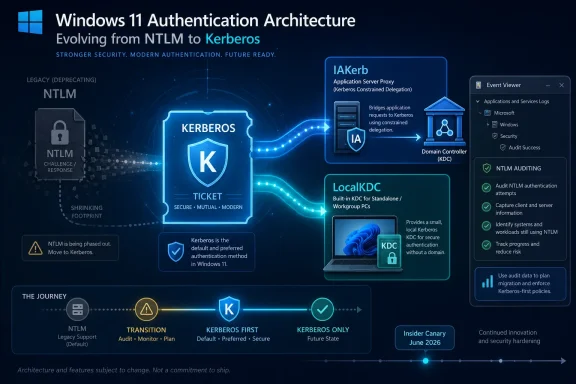
The latest Windows 11 authentication work is different because it targets the reasons NTLM remains alive. IAKerb addresses the case where a client cannot directly reach a domain controller. LocalKDC addresses the case where there is no domain controller at all because the account is local. Those are not edge cases in Windows land; they are the sort of deployment realities that keep legacy authentication stapled to modern operating systems.
Microsoft has already moved past the polite language of “use Kerberos where possible.” NTLM is deprecated, NTLMv1 has been removed from Windows 11 version 24H2 and Windows Server 2025, and newer Windows builds have gained expanded auditing and blocking options. The direction of travel is clear: first measure NTLM, then shrink it, then make it opt-in.
The hard part is that authentication is not a user-interface feature. If Start menu recommendations misbehave, users complain. If authentication breaks, businesses stop. That is why IAKerb and LocalKDC are best understood as compatibility engineering in service of a security goal.
When Kerberos cannot reach the KDC, Windows has often fallen back to NTLM. That fallback is convenient, but it is also precisely the habit Microsoft is trying to break. IAKerb changes the path without changing the destination: the client can send Kerberos messages through the target application server, which proxies them to the KDC.
That design matters because it preserves Kerberos semantics where network topology would otherwise defeat them. The client does not need to directly reach the domain controller if the server can relay the Kerberos exchange. In restricted environments, that can be the difference between strong authentication and another NTLM event in the logs.
This is not the same as pretending NTLM never existed. It is a recognition that Kerberos failed in some environments for architectural reasons, not because administrators forgot to check a box. IAKerb narrows one of the largest gaps between the ideal Windows identity model and the networks Windows actually inhabits.
For IT teams, the most interesting consequence may be operational rather than theoretical. If IAKerb works reliably across common application and file-access scenarios, the old argument that “we need NTLM because clients cannot always see a DC” becomes weaker. That does not make NTLM disappear, but it removes one of its best excuses.
Historically, that pushed local-account network authentication toward NTLM. That is why the phrase “disable NTLM” can sound simple in a security baseline and terrifying in a shop full of workgroup systems, lab machines, appliances, older NAS devices, imaging stations, and local admin workflows. The protocol is not merely a relic; it is embedded in patterns Windows has tolerated for decades.
LocalKDC changes the model by giving the local machine a lightweight Key Distribution Center for local credentials. Instead of treating local-account authentication as an NTLM-only island, Windows can generate Kerberos tickets locally. That is a significant conceptual shift: Kerberos stops being exclusively a domain story and becomes a broader Windows authentication substrate.
The practical promise is obvious. Standalone systems, small offices, test labs, and non-domain machines may gain a safer path without needing a full Active Directory deployment. That could be especially relevant for organizations trying to reduce local administrator exposure while still maintaining break-glass and maintenance workflows.
The risk is equally obvious. Local authentication is messy because local administration is messy. Microsoft will need to make LocalKDC predictable, observable, and manageable, or administrators will treat it as another black box in a part of Windows security they already distrust.
Still, the preview matters because authentication features need time in strange environments. Kerberos bugs do not always announce themselves on a clean test domain. They appear when a service principal name is wrong, when a device connects by IP address, when a firewall allows one direction but not another, when a service account has ancient encryption settings, or when an application developer hardcoded an assumption years ago and then left the company.
That is why this phase is less about enthusiasts flipping a switch and more about Microsoft gathering evidence from the edge cases. The features are aimed at Windows 11 version 24H2 and Windows Server 2025 in the second half of 2026, but the road from preview to default behavior will be shaped by what breaks. Authentication changes are among the few Windows changes where “slow rollout” is not corporate caution; it is survival.
Canary also gives security teams a chance to update their own mental model. Many NTLM migration projects still begin with an emotional question: “Can we disable it?” The better question is now more specific: “Which NTLM events remain after Kerberos has been given these new paths?” That is a different project, and a more achievable one.
The relevant events live under the Microsoft-Windows-NTLM operational log in Event Viewer. That placement is not glamorous, but it is exactly where the work begins. A migration away from NTLM is not a single policy change; it is a dependency-mapping exercise across applications, services, scripts, appliances, domain joins, file shares, remote management tools, and forgotten scheduled tasks.
The most useful logs are the ones that explain cause, not just occurrence. A flat count of NTLM authentications can scare management, but it does not tell an administrator what to fix. Events that distinguish local-account use, missing domain-controller access, hardcoded protocol selection, or other fallback causes give teams a path from panic to remediation.
This is where Microsoft’s phased strategy looks more credible than previous security cleanup campaigns. The company is not simply declaring NTLM bad and hoping customers comply. It is adding instrumentation, then adding Kerberos coverage, then planning default disablement. That sequence suggests Microsoft has learned from years of enterprise pushback against breaking changes delivered as moral instruction.
Attackers like NTLM because it often appears in the spaces between systems. A user accesses a share. A service connects to a host. A client is tricked into authenticating to something it should not trust. Credentials or derived material move through old paths, and the defensive assumption that “we use Kerberos” turns out to be only mostly true.
Microsoft has been tightening related surfaces for years. SMB signing, SMB encryption, NTLM blocking for SMB clients, auditing improvements, and NTLMv1 removal are all part of the same story. The operating system is being pushed toward authentication that can verify the server side and resist credential relay patterns more effectively.
The uncomfortable truth is that NTLM’s danger is amplified by invisibility. Many organizations do not know how often it is used until they turn on auditing. Once they do, they may discover that supposedly modern environments still have legacy islands: a scanner here, a backup service there, a line-of-business app that resolves servers by IP address, a NAS configuration nobody has touched since the pandemic.
That is why Microsoft’s latest move is not merely about cryptography. It is about making the secure path the path of least resistance. Security baselines fail when they demand heroism from every administrator. They succeed when the platform removes the reasons administrators keep making exceptions.
A hard removal would be cleaner for security architecture and disastrous for compatibility. Windows runs in hospitals, factories, schools, government offices, small businesses, labs, and industrial environments where legacy systems do not vanish on Redmond’s schedule. An explicit policy escape hatch gives Microsoft a way to raise the default security floor without pretending every dependency can be fixed overnight.
The danger is that “explicitly re-enabled” becomes the new “temporarily allowed,” and temporary exceptions in enterprise IT have a way of becoming infrastructure. That is where auditing and governance matter. If an organization re-enables NTLM without tracking which workload needs it and when it will be retired, it has not migrated; it has documented surrender.
Microsoft’s expected timeline also gives administrators a useful planning window. The second half of 2026 is the feature-enablement phase for IAKerb and LocalKDC on Windows 11 24H2 and Windows Server 2025. The later disable-by-default phase is aimed at the next major Windows Server release and associated client releases. That means the time to inventory is now, not when the default flips.
For software vendors, the message is sharper. Applications that still assume NTLM availability are living on borrowed time. If a product connects by IP address, mishandles SPNs, ignores Kerberos negotiation, or relies on local-account NTLM in ways that cannot be modernized, customers will increasingly see that as vendor debt rather than Microsoft’s problem.
A sensible first step is to enable and review the NTLM operational logs on representative Windows 11 24H2 and Windows Server 2025 systems. The goal is to identify recurring patterns, not chase one-off events. Which servers are still seeing NTLM? Which clients trigger it? Is the cause local accounts, missing SPNs, IP-based access, domain-controller reachability, or old application behavior?
From there, the work becomes architectural. Fix name resolution so clients use service names rather than addresses. Correct SPNs. Move service accounts away from outdated patterns. Test SMB NTLM blocking where Kerberos is available. Isolate systems that cannot be remediated and document the business owner responsible for them.
IAKerb and LocalKDC will help most when administrators already know which NTLM cases they are meant to replace. If the logs show fallback because clients lack DC line of sight, IAKerb is directly relevant. If local accounts are the driver, LocalKDC becomes interesting. If the culprit is an ancient appliance that only speaks NTLM, neither feature magically modernizes it.
That distinction is important because Microsoft’s announcement can easily be misread as “Kerberos will now cover everything.” It will not. It will cover more of the Windows-authentication map, and that is valuable. But legacy-only systems, third-party applications, misconfigured services, and brittle operational habits will still need human remediation.
LocalKDC is the more relevant feature for non-domain users because it addresses local-account scenarios. If Microsoft implements it cleanly, Windows could become less dependent on NTLM for small-network authentication without demanding that home users understand Active Directory. That would be a meaningful improvement, especially as Microsoft continues tightening insecure guest access and legacy SMB behaviors.
But the consumer and small-business edge is also where compatibility pain tends to be loudest. Old NAS devices, multifunction printers, media boxes, backup appliances, and embedded Windows systems often lag behind security expectations. When NTLM becomes less automatic, some of those devices may require firmware updates, configuration changes, or replacement.
That is not a reason to keep NTLM forever. It is a reason to communicate clearly. Microsoft’s challenge will be helping users distinguish between “Windows broke my network” and “Windows stopped silently using a legacy authentication path your device still depends on.” The difference matters, even if the error dialog does not explain it well.
That matters because NTLM has survived for three decades not because anyone loves it, but because it handles ugly real-world cases Kerberos historically did not. Microsoft’s new bet is that Windows can finally make the secure path broad enough that the insecure fallback becomes exceptional rather than routine.
 Microsoft Is Finally Attacking NTLM’s Survival Instinct
NTLM has always been one of Windows’ most stubborn security compromises. Administrators know it is old, attackers know it is useful, and Microsoft has known for years that simply telling customers to disable it would break too many networks. The protocol persists because compatibility is often stronger than policy.The latest Windows 11 authentication work is different because it targets the reasons NTLM remains alive. IAKerb addresses the case where a client cannot directly reach a domain controller. LocalKDC addresses the case where there is no domain controller at all because the account is local. Those are not edge cases in Windows land; they are the sort of deployment realities that keep legacy authentication stapled to modern operating systems.
Microsoft has already moved past the polite language of “use Kerberos where possible.” NTLM is deprecated, NTLMv1 has been removed from Windows 11 version 24H2 and Windows Server 2025, and newer Windows builds have gained expanded auditing and blocking options. The direction of travel is clear: first measure NTLM, then shrink it, then make it opt-in.
The hard part is that authentication is not a user-interface feature. If Start menu recommendations misbehave, users complain. If authentication breaks, businesses stop. That is why IAKerb and LocalKDC are best understood as compatibility engineering in service of a security goal.
IAKerb Turns the Application Server Into the Missing Route
Kerberos normally assumes the client can talk to a Key Distribution Center, usually on a domain controller. In clean enterprise diagrams, that line of sight exists. In real networks, firewalls, segmented zones, VPN designs, branch offices, cloud tunnels, and inherited routing rules often make that assumption false.When Kerberos cannot reach the KDC, Windows has often fallen back to NTLM. That fallback is convenient, but it is also precisely the habit Microsoft is trying to break. IAKerb changes the path without changing the destination: the client can send Kerberos messages through the target application server, which proxies them to the KDC.
That design matters because it preserves Kerberos semantics where network topology would otherwise defeat them. The client does not need to directly reach the domain controller if the server can relay the Kerberos exchange. In restricted environments, that can be the difference between strong authentication and another NTLM event in the logs.
This is not the same as pretending NTLM never existed. It is a recognition that Kerberos failed in some environments for architectural reasons, not because administrators forgot to check a box. IAKerb narrows one of the largest gaps between the ideal Windows identity model and the networks Windows actually inhabits.
For IT teams, the most interesting consequence may be operational rather than theoretical. If IAKerb works reliably across common application and file-access scenarios, the old argument that “we need NTLM because clients cannot always see a DC” becomes weaker. That does not make NTLM disappear, but it removes one of its best excuses.
LocalKDC Brings Kerberos to the Machines Domains Forgot
LocalKDC tackles a different survival mechanism: local accounts. Kerberos was built around a trusted authority issuing tickets. In Active Directory, that authority is the domain controller. On a standalone Windows machine or in a workgroup, the local Security Account Manager can validate credentials, but there is no domain KDC to issue Kerberos tickets.Historically, that pushed local-account network authentication toward NTLM. That is why the phrase “disable NTLM” can sound simple in a security baseline and terrifying in a shop full of workgroup systems, lab machines, appliances, older NAS devices, imaging stations, and local admin workflows. The protocol is not merely a relic; it is embedded in patterns Windows has tolerated for decades.
LocalKDC changes the model by giving the local machine a lightweight Key Distribution Center for local credentials. Instead of treating local-account authentication as an NTLM-only island, Windows can generate Kerberos tickets locally. That is a significant conceptual shift: Kerberos stops being exclusively a domain story and becomes a broader Windows authentication substrate.
The practical promise is obvious. Standalone systems, small offices, test labs, and non-domain machines may gain a safer path without needing a full Active Directory deployment. That could be especially relevant for organizations trying to reduce local administrator exposure while still maintaining break-glass and maintenance workflows.
The risk is equally obvious. Local authentication is messy because local administration is messy. Microsoft will need to make LocalKDC predictable, observable, and manageable, or administrators will treat it as another black box in a part of Windows security they already distrust.
The Canary Channel Is a Warning Label, Not a Deployment Plan
The new features are arriving first in public preview for Windows Insiders in the Canary Channel. That should temper expectations. Canary is where Microsoft exposes platform work early, not where enterprise administrators should infer final policy behavior or production readiness.Still, the preview matters because authentication features need time in strange environments. Kerberos bugs do not always announce themselves on a clean test domain. They appear when a service principal name is wrong, when a device connects by IP address, when a firewall allows one direction but not another, when a service account has ancient encryption settings, or when an application developer hardcoded an assumption years ago and then left the company.
That is why this phase is less about enthusiasts flipping a switch and more about Microsoft gathering evidence from the edge cases. The features are aimed at Windows 11 version 24H2 and Windows Server 2025 in the second half of 2026, but the road from preview to default behavior will be shaped by what breaks. Authentication changes are among the few Windows changes where “slow rollout” is not corporate caution; it is survival.
Canary also gives security teams a chance to update their own mental model. Many NTLM migration projects still begin with an emotional question: “Can we disable it?” The better question is now more specific: “Which NTLM events remain after Kerberos has been given these new paths?” That is a different project, and a more achievable one.
Auditing Is the Real Migration Tool
Microsoft’s enhanced NTLM auditing in Windows 11 version 24H2 and Windows Server 2025 is arguably as important as IAKerb and LocalKDC. Before administrators can disable NTLM, they need to know where it is being used, why Kerberos was not selected, and which clients and servers are involved. Without that visibility, NTLM removal is just an outage rehearsal.The relevant events live under the Microsoft-Windows-NTLM operational log in Event Viewer. That placement is not glamorous, but it is exactly where the work begins. A migration away from NTLM is not a single policy change; it is a dependency-mapping exercise across applications, services, scripts, appliances, domain joins, file shares, remote management tools, and forgotten scheduled tasks.
The most useful logs are the ones that explain cause, not just occurrence. A flat count of NTLM authentications can scare management, but it does not tell an administrator what to fix. Events that distinguish local-account use, missing domain-controller access, hardcoded protocol selection, or other fallback causes give teams a path from panic to remediation.
This is where Microsoft’s phased strategy looks more credible than previous security cleanup campaigns. The company is not simply declaring NTLM bad and hoping customers comply. It is adding instrumentation, then adding Kerberos coverage, then planning default disablement. That sequence suggests Microsoft has learned from years of enterprise pushback against breaking changes delivered as moral instruction.
NTLM Is a Security Debt With Interest
The case against NTLM is not new, but it remains compelling. NTLM does not provide the same server authentication guarantees as Kerberos, and its challenge-response design has long been attractive for relay, replay, pass-the-hash, and man-in-the-middle scenarios. In modern Windows security, it is less a feature than a liability tolerated for compatibility.Attackers like NTLM because it often appears in the spaces between systems. A user accesses a share. A service connects to a host. A client is tricked into authenticating to something it should not trust. Credentials or derived material move through old paths, and the defensive assumption that “we use Kerberos” turns out to be only mostly true.
Microsoft has been tightening related surfaces for years. SMB signing, SMB encryption, NTLM blocking for SMB clients, auditing improvements, and NTLMv1 removal are all part of the same story. The operating system is being pushed toward authentication that can verify the server side and resist credential relay patterns more effectively.
The uncomfortable truth is that NTLM’s danger is amplified by invisibility. Many organizations do not know how often it is used until they turn on auditing. Once they do, they may discover that supposedly modern environments still have legacy islands: a scanner here, a backup service there, a line-of-business app that resolves servers by IP address, a NAS configuration nobody has touched since the pandemic.
That is why Microsoft’s latest move is not merely about cryptography. It is about making the secure path the path of least resistance. Security baselines fail when they demand heroism from every administrator. They succeed when the platform removes the reasons administrators keep making exceptions.
The Future Default Will Still Have an Escape Hatch
Microsoft’s plan to disable network NTLM by default in a future Windows client and server release should not be confused with immediate removal. The protocol is expected to remain present and explicitly re-enableable through policy, at least during the next stage. That compromise is predictable, and probably necessary.A hard removal would be cleaner for security architecture and disastrous for compatibility. Windows runs in hospitals, factories, schools, government offices, small businesses, labs, and industrial environments where legacy systems do not vanish on Redmond’s schedule. An explicit policy escape hatch gives Microsoft a way to raise the default security floor without pretending every dependency can be fixed overnight.
The danger is that “explicitly re-enabled” becomes the new “temporarily allowed,” and temporary exceptions in enterprise IT have a way of becoming infrastructure. That is where auditing and governance matter. If an organization re-enables NTLM without tracking which workload needs it and when it will be retired, it has not migrated; it has documented surrender.
Microsoft’s expected timeline also gives administrators a useful planning window. The second half of 2026 is the feature-enablement phase for IAKerb and LocalKDC on Windows 11 24H2 and Windows Server 2025. The later disable-by-default phase is aimed at the next major Windows Server release and associated client releases. That means the time to inventory is now, not when the default flips.
For software vendors, the message is sharper. Applications that still assume NTLM availability are living on borrowed time. If a product connects by IP address, mishandles SPNs, ignores Kerberos negotiation, or relies on local-account NTLM in ways that cannot be modernized, customers will increasingly see that as vendor debt rather than Microsoft’s problem.
The Admin Playbook Starts With Boring Evidence
The right response from IT administrators is not to disable NTLM tomorrow because a preview feature sounds promising. It is to start collecting data, segmenting dependencies, and testing NTLM-blocked configurations in controlled environments. Authentication migrations punish bravado.A sensible first step is to enable and review the NTLM operational logs on representative Windows 11 24H2 and Windows Server 2025 systems. The goal is to identify recurring patterns, not chase one-off events. Which servers are still seeing NTLM? Which clients trigger it? Is the cause local accounts, missing SPNs, IP-based access, domain-controller reachability, or old application behavior?
From there, the work becomes architectural. Fix name resolution so clients use service names rather than addresses. Correct SPNs. Move service accounts away from outdated patterns. Test SMB NTLM blocking where Kerberos is available. Isolate systems that cannot be remediated and document the business owner responsible for them.
IAKerb and LocalKDC will help most when administrators already know which NTLM cases they are meant to replace. If the logs show fallback because clients lack DC line of sight, IAKerb is directly relevant. If local accounts are the driver, LocalKDC becomes interesting. If the culprit is an ancient appliance that only speaks NTLM, neither feature magically modernizes it.
That distinction is important because Microsoft’s announcement can easily be misread as “Kerberos will now cover everything.” It will not. It will cover more of the Windows-authentication map, and that is valuable. But legacy-only systems, third-party applications, misconfigured services, and brittle operational habits will still need human remediation.
Home Users Will Notice This Mostly When Something Breaks Less
For most Windows 11 consumers, IAKerb and LocalKDC will remain invisible, and that is probably the best outcome. Authentication plumbing is successful when the user never learns its name. The visible effects will show up around file sharing, local accounts, small networks, and NAS-style setups where Windows authentication has often been a confusing mix of prompts, remembered credentials, and policy toggles.LocalKDC is the more relevant feature for non-domain users because it addresses local-account scenarios. If Microsoft implements it cleanly, Windows could become less dependent on NTLM for small-network authentication without demanding that home users understand Active Directory. That would be a meaningful improvement, especially as Microsoft continues tightening insecure guest access and legacy SMB behaviors.
But the consumer and small-business edge is also where compatibility pain tends to be loudest. Old NAS devices, multifunction printers, media boxes, backup appliances, and embedded Windows systems often lag behind security expectations. When NTLM becomes less automatic, some of those devices may require firmware updates, configuration changes, or replacement.
That is not a reason to keep NTLM forever. It is a reason to communicate clearly. Microsoft’s challenge will be helping users distinguish between “Windows broke my network” and “Windows stopped silently using a legacy authentication path your device still depends on.” The difference matters, even if the error dialog does not explain it well.
The Kerberos Expansion Gives Windows Shops a Deadline With Tools
Microsoft’s NTLM strategy is now concrete enough that administrators can stop treating it as background noise. The important point is not that NTLM vanishes tomorrow; it is that Windows is being redesigned so fewer scenarios need it at all.- IAKerb is intended to keep Kerberos working when a client cannot directly contact a domain controller but the target server can proxy the exchange.
- LocalKDC is intended to bring Kerberos-style ticketing to local-account authentication on machines without domain infrastructure.
- Windows 11 version 24H2 and Windows Server 2025 already provide enhanced NTLM auditing that should be used before any broad disablement attempt.
- NTLMv1 is already gone from Windows 11 24H2 and Windows Server 2025, while NTLMv2 remains supported but is moving toward a disabled-by-default future.
- Legacy applications, old appliances, broken SPNs, IP-based access patterns, and hardcoded NTLM behavior will still require remediation even after IAKerb and LocalKDC arrive.
- The organizations that start mapping NTLM now will have options; the ones that wait for the default to change will have incidents.
References
- Primary source: Petri IT Knowledgebase
Published: 2026-06-11T13:09:07.998359
Loading…
petri.com - Official source: support.microsoft.com
Loading…
support.microsoft.com - Related coverage: windowscentral.com
Microsoft will disable NTLM as standard in Windows | Windows Central
Microsoft recently highlighted a three-phase plan to disable NTLM by default and encourage stronger Kerberos-based alternatives.www.windowscentral.com - Official source: techcommunity.microsoft.com
Loading…
techcommunity.microsoft.com - Related coverage: windowsforum.com
Loading…
windowsforum.com - Official source: blogs.windows.com
Loading…
blogs.windows.com
- Related coverage: heise.de
Loading…
www.heise.de - Related coverage: atworkstudio.it
Loading…
www.atworkstudio.it - Related coverage: archive.fosdem.org
Loading…
archive.fosdem.org - Related coverage: specterops.io
- Related coverage: cyber.gov.au
- Official source: learn.microsoft.com
Loading…
learn.microsoft.com - Official source: cdn-dynmedia-1.microsoft.com