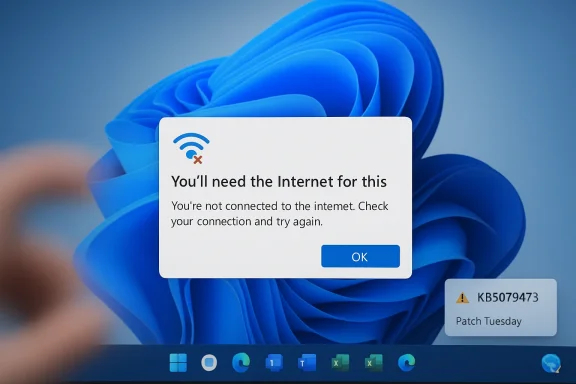
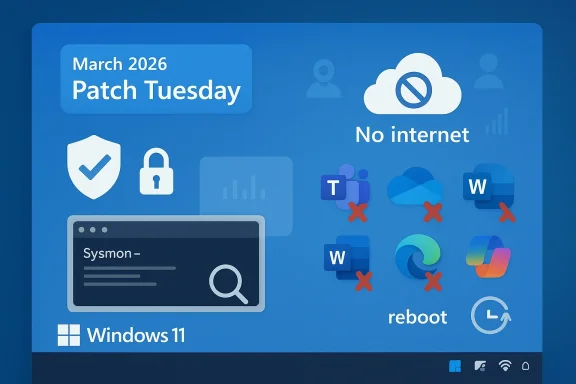
Microsoft’s March 2026 Patch Tuesday update for Windows 11, KB5079473, is a classic example of why modern servicing is so fraught: it arrived with security fixes and some genuinely useful improvements, but within days it also became associated with sign-in failures, misleading “no internet” prompts, and broader stability complaints. Microsoft’s own support page confirms that KB5079473 is the cumulative update for Windows 11 version 24H2 and 25H2, released on March 10, 2026, and that it carries both security and non-security changes from the previous preview cycle. Community reporting and Windows Forum coverage show the rollout quickly turned into a troubleshooting exercise fa routine Patch Tuesday and instead got app sign-in trouble across Teams, OneDrive, Edge, Word, Excel, and Microsoft 365 Copilot .
Patch Tuesday has always been a tradeoff between urgency and disruption. Microsoft needs to ship security fixes on a predictable cadence, but Windows 11’s cumulative update model means the same package often carries vulnerability remediations, servicing stack changes, quality-of-life updates, and feature enablement logic in one shot. KB5079473 is no exception: Microsoft frames it as a cumulative security update that also pulls in improvements from the prior optional preview release.
That matters because Windows updates today are no longer just about patches in the narrow sense. They increasingly act as a delivery vehicle for UI changes, AI-related functionality, diagnostic plumbing, and system services that affect everyday behavior. In the Windowsd KB5079473, the update is described as bringing visible enhancements such as a built-in internet speed test, improved File Explorer search behavior, and Sysmon support, alongside security hardening work in areas like Secure Boot and Windows Defender Application Control .
The problem, of course, is that broad change surface creates broad regression risk. When identity components, network state handling, and Microsoft account authentication all intersect, a small mistake can cascailures that look unrelated at first glance. That is exactly the kind of confusion KB5079473 has triggered: users see a connectivity warning, but the deeper problem is really authentication and state detection rather than an actual dead network link .
There is also a larger institutional context here. Microsoft has spent the last year trying to position Windows 11 as both more secure and more intelligent, with tighter protections, richer cloud integration, and more visible AI experiences. The result is a platform that is more capable, but also more dependent on complex service orchestration. A patch that changes how those services report state can break a surprisingly wide set of apps, especially when the affected software shares the same Microsoft account and cloud identity layers.
For enterprise administrators, the practical implication is obvious: a security update is rarely “just” a security update anymore. It can alter sign-in behavior, app token renewal, device trust checks, and even the way productivity software decides whether to retry a connection or throw an error. The Windows 11 KB5079473 episode is therefore not a one-off glitch story; it is a reminder that update quality and identity reliability are now inseparable concerns.
According to the Windows Forum coverage, Microsoft has acknowledged the sign-in issue and linked it to a condition that makes Windows and its apps believe the device is offline even when the internet connection is still active . The practical effect is that Microsoft services can fail to complete authentication, causing confusing prompts and broken workflows in apps that depend on cloud identity. That kind of failure is especially disruptive because it affects the software people use to work, not just the OS shell itself.
The update also sits in a release pattern that has become familiar to Ips a highly anticipated cumulative update, users install it promptly for security reasons, and then a subset of systems surface hard-to-reproduce regressions. Windows Forum’s KB5079473 threads describe crashes, freezes, repeated restarts, and applications refusing to open, with some reports also mentioning GPU and audio regressions . Even when those failures are not universal, they are disruptive enough to create a credibility problem.
The Windows Forum reporting adds important color: the update bundle is described as including visible quality-of-life features such as a built-in network speed test, enhanced File Explorer search, and in-box Sysmon support . Those are the sort of features that look small in isolation but matter because they reinforce Microsoft’s pitch that Windows 11 updates are cumulative platform investments, not just maintenance drops.
Microsoft has reportedly confirmed ultiple apps, including Teams, OneDrive, Edge, Word, Excel, and Microsoft 365 Copilot . The common thread is not the app itself but the shared Microsoft identity stack they rely on. Once the platform’s account-check logic goes sideways, the whole cloud-connected office experience becomes brittle.
The distinction between consumer and enterprise matters here. Windows Forum’s reporting indicates that the issue primarily affects Microsoft account sign-ins, while enterprise environments using Entra ID remain mostly unaffected . That is a meaningful separation because it means the damage is concentrated among personal devices, small business setups, and hybrid workers who live in the consumer Microsoft identity world.
That is why a misleading error is worse than a clear one. A clean failure state lets users or IT staff target the actual subsystem. A false network prompt pushes everyone toward the wrong diagnostic path and makes the patch feel more broken than it may technically be. In practice, that creates trust damage even if the underlying bug is narrow.
That is especially damaging for Copilot, which depends on Microsoft account and cloud services even more visibly than older desktop software. The episode underlines a broader trend: the more Microsoft folds cloud identity into everyday desktop workflows, the more a servicing fault in that identity layer can break user confidence across the stackrkaround
Microsoft has reportedly suggested a temporary fix: restart the device while maintaining an internet connection . That kind of workaround is typical of a race-condition or state-reset issue, where rebooting forces the OS to renegotiate some cached or stuck connectivity state. It is useful, but it is not the same thing as a real fix.
The key drawback is that the workaround is conditional. Windows Forum notes that the temporary solution does not guarantee success in every situation and reverts when internet access is unavailable . In other words, this is a mitigation, not a resolution, and users should treat it as a stopgap rather than a cure.
This matters for support teams because a workaround that works once can create false confidence. If the problem returns after a sleep cycle, network change, or sign-out event, the team is back at square one. That makes reproducibility and logging essential, especially in business environments.
A sensible operational response would include the following:
Windows Forum’s coverage argues that the update remains essential because it carries important security maintenance, even though it causes operational headaches for some users . That is a reasonable position. A security patch can be necessary and problematic at the same time, and administrators are often forced to choose the least bad option rather than the ideal one.
Microsoft’s support documentation reinforces that KB5079473 is not a niche optional update but a standard monthly cumulative release for supported Windows 11 builds. That means organizations cannot simply treat it as expendable if they have patch compliance requirements. The real decision is how to stage it, not whether it exists.
That tension is visible here. The update promises useful enhancements, yet the early reality is a wave of connectivity and sign-in complaints. In an enterprise context, even a small failure rate can be expensive if the affected users are executives, remote workers, or help-desk-intensive teams.
That difference matters strategically. Microsoft can frame the issue as narrower than a generic platform outal still experience it as a loss of core functionality. The divide between consumer and enterprise identity systems is therefore both a technical detail and a communications problem.
That creates what might be called feature debt. Every new capability increases the expectation that the system will feel smarter and more polished, but it also increases the surface area for regressions. When a patch delivers useful features and then breaks sign-in, users remember the breakage more vividly than the polish.
Microsoft’s challenge is that modern users no longer separate “Windows” from the services that ride on top of Windows. A speed test in the shell is a convenience. A broken Microsoft account token path is a blocker. When both are packaged into the same monthly rhythm, the reputation risk is inevitable.
Yet those features also signal that Windows 11 is becoming more layered and more stateful. That is not inherently bad, but it means the operating system now carries more responsibilities than a traditional desktop shell. The more responsibilities it has, the more places a single update can go wrong.
That is the irony of KB5079473: its feature story is real, but its bug story is louder. The better Microsoft makes Windows at surfacing day-to-day tools, the more punishing it becomes when those tools fail in a way that looks systemic.
Windows Forum’s coverage suggests that Microsoft first launched KB5079473 with confidence that major issues had been resolved, only to change course after user reports mounted and the sign-in problem was confirmed . That sequence is common in the Windows world, but every repetition makes the “we fixed stability” message feel less convincing.
The wider lesson is that release health is as much about transparency as it is about engineering. If Microsoft’s official notes and the lived user experience diverge too sharply, trust evaporates fast. This is especially true when the problem affects multiple flagship apps at once.
That is one reason Microsoft needs to keep release health dashboards and support notes highly current. In the age of instant community reporting, a lack of prompt acknowledgment looks like denial. A measured admission, even without a final fix, usually ages better.
A disciplined rollout strategy usually includes these steps:
That does not mean users will suddenly abandon Windows. It does mean Microsoft must do more work to preserve confidence. A platform can absorb the occasional buggy patch, but recurring user-visible failures start to affect purchasing decisions, deployment policies, and endpoint management strategies.
There is also a Copilot dimension here. Microsoft is trying to embed AI more deeply into the Windows and Microsoft 365 experience, but AI features rely on the same identity and cloud plumbing that KB5079473 disrupted. A sign-in bug is therefore more than a reliability issue; it is a reminder that Microsoft’s AI strategy is only as strong as its authentication stack.
That is especially relevant in mixed-device fleets where some users already work across Windows, macOS, browsers, and mobile devices. The more Microsoft services are viewed as fragile after patches, the easier it becomes for IT leaders to diversify away from default Microsoft dependencies.
That makes patch quality a subscription value issue, not just an OS issue. Microsoft is effectively asking customers to trust a continuously evolving service stack. Every update that interferes with authentication makes that trust harder to maintain.
The other issue to watch is whether KB5079473 remains a narrow identity bug or becomes part of a larger pattern. Windows Forum’s related reporting around the March 2026 patch cycle suggests that KB5079473 has also been associated in some communities with stability complaints, failed installs, and post-update reliability concerns . Even when those reports are not identical, they reinforce the same theme: Windows updates are still living dangerously close to the edge between progress and regression.
Source: Techgenyz Windows 11 KB5079473 Massive Update Issues Disrupt User Experience
 Background
Patch Tuesday has always been a tradeoff between urgency and disruption. Microsoft needs to ship security fixes on a predictable cadence, but Windows 11’s cumulative update model means the same package often carries vulnerability remediations, servicing stack changes, quality-of-life updates, and feature enablement logic in one shot. KB5079473 is no exception: Microsoft frames it as a cumulative security update that also pulls in improvements from the prior optional preview release.That matters because Windows updates today are no longer just about patches in the narrow sense. They increasingly act as a delivery vehicle for UI changes, AI-related functionality, diagnostic plumbing, and system services that affect everyday behavior. In the Windowsd KB5079473, the update is described as bringing visible enhancements such as a built-in internet speed test, improved File Explorer search behavior, and Sysmon support, alongside security hardening work in areas like Secure Boot and Windows Defender Application Control .
The problem, of course, is that broad change surface creates broad regression risk. When identity components, network state handling, and Microsoft account authentication all intersect, a small mistake can cascailures that look unrelated at first glance. That is exactly the kind of confusion KB5079473 has triggered: users see a connectivity warning, but the deeper problem is really authentication and state detection rather than an actual dead network link .
There is also a larger institutional context here. Microsoft has spent the last year trying to position Windows 11 as both more secure and more intelligent, with tighter protections, richer cloud integration, and more visible AI experiences. The result is a platform that is more capable, but also more dependent on complex service orchestration. A patch that changes how those services report state can break a surprisingly wide set of apps, especially when the affected software shares the same Microsoft account and cloud identity layers.
For enterprise administrators, the practical implication is obvious: a security update is rarely “just” a security update anymore. It can alter sign-in behavior, app token renewal, device trust checks, and even the way productivity software decides whether to retry a connection or throw an error. The Windows 11 KB5079473 episode is therefore not a one-off glitch story; it is a reminder that update quality and identity reliability are now inseparable concerns.
Overview
KB5079473 was published for Windows 11 versions 24H2 and 25H2 on March 10, 2026, and Microsoft says it includes the latest security fixes plus non-security improvements from the prior month’s preview release ([suppos://support.microsoft.com/en-gb/topic/march-10-2026-kb5079473-os-builds-26200-8037-and-26100-8037-9c222a8e-cc02-40d4-a1f8-ad86be1bc8b6). That alone would make it notable in a normal month. What elevated it into he speed with which users began reporting that Microsoft account sign-in no longer behaved correctly inside several core apps .According to the Windows Forum coverage, Microsoft has acknowledged the sign-in issue and linked it to a condition that makes Windows and its apps believe the device is offline even when the internet connection is still active . The practical effect is that Microsoft services can fail to complete authentication, causing confusing prompts and broken workflows in apps that depend on cloud identity. That kind of failure is especially disruptive because it affects the software people use to work, not just the OS shell itself.
The update also sits in a release pattern that has become familiar to Ips a highly anticipated cumulative update, users install it promptly for security reasons, and then a subset of systems surface hard-to-reproduce regressions. Windows Forum’s KB5079473 threads describe crashes, freezes, repeated restarts, and applications refusing to open, with some reports also mentioning GPU and audio regressions . Even when those failures are not universal, they are disruptive enough to create a credibility problem.
What Microsoft says KB5079473 contains
Microsoft’s own support page describes KB5079473 as a cumulative update with security fixes and improvements, and it points users to the Windows release health dashboard for known issues. The update applies to Windows 11 24H2 and 25H2, and the resulting builds are 26100.8037 and 26200.8037.The Windows Forum reporting adds important color: the update bundle is described as including visible quality-of-life features such as a built-in network speed test, enhanced File Explorer search, and in-box Sysmon support . Those are the sort of features that look small in isolation but matter because they reinforce Microsoft’s pitch that Windows 11 updates are cumulative platform investments, not just maintenance drops.
Why sign-in bugs hit harder than ordinary UI bugs
A broken menu is annoying. A broken identity flow is operationally expensive. Microsoft account sign-in is now intertwined with OneDrive, Teams, Office activation, Copilot access, and browser sync, which means one bug can ripple across an entire user the issue feels so much larger than the specific technical defect underneath it. If the system thinks the device lacks internet connectivity, users may assume the ISP is at fault, reboot the router, or chase the wrong problem for hours. In reality, the failure is in the layer that decides whether a Microsoft account can be authenticated cleanly.The Sign-In Failure
The central user ly simple: after installing KB5079473, some Windows 11 users can no longer sign in properly to Microsoft account-based apps, even though the machine is online . The error text suggests a network issue, but the evidence points toward an authentication or state-detection bug. That mismatch is what makes the issue so frustrating: the system’s diagnosis is wrong, so the user is sent in the wrong direction.Microsoft has reportedly confirmed ultiple apps, including Teams, OneDrive, Edge, Word, Excel, and Microsoft 365 Copilot . The common thread is not the app itself but the shared Microsoft identity stack they rely on. Once the platform’s account-check logic goes sideways, the whole cloud-connected office experience becomes brittle.
The distinction between consumer and enterprise matters here. Windows Forum’s reporting indicates that the issue primarily affects Microsoft account sign-ins, while enterprise environments using Entra ID remain mostly unaffected . That is a meaningful separation because it means the damage is concentrated among personal devices, small business setups, and hybrid workers who live in the consumer Microsoft identity world.
Why the error message is misleading
When the OS says, “You’ll need the Internet for this,” the natural interpretation is that Wi-Fi is down, DNS is broken, or the modem is offline. But Microsoft’s own known sign-in guidance and support documents remind users that network access is only one possible cause of sign-in failures; authentication and service reachability are separate layers.That is why a misleading error is worse than a clear one. A clean failure state lets users or IT staff target the actual subsystem. A false network prompt pushes everyone toward the wrong diagnostic path and makes the patch feel more broken than it may technically be. In practice, that creates trust damage even if the underlying bug is narrow.
The apps affected tell the real story
The list of affected apps matters because it reveals the blast radius. Teams, OneDrive, Word, Excel, Edge, and Copilot are not fringe tools; they are the center of Microsoft’s productivity ecosystem . If all of them stumble at nces the problem as a platform outage rather than an app-specific hiccup.That is especially damaging for Copilot, which depends on Microsoft account and cloud services even more visibly than older desktop software. The episode underlines a broader trend: the more Microsoft folds cloud identity into everyday desktop workflows, the more a servicing fault in that identity layer can break user confidence across the stackrkaround
Microsoft has reportedly suggested a temporary fix: restart the device while maintaining an internet connection . That kind of workaround is typical of a race-condition or state-reset issue, where rebooting forces the OS to renegotiate some cached or stuck connectivity state. It is useful, but it is not the same thing as a real fix.
The key drawback is that the workaround is conditional. Windows Forum notes that the temporary solution does not guarantee success in every situation and reverts when internet access is unavailable . In other words, this is a mitigation, not a resolution, and users should treat it as a stopgap rather than a cure.
Why reboot fixes sometimes work
A reboot can clear stale tokens, reset network service state, and restart background identity components that may have entered a bad state after the update. That is often enough to get Microsoft account sign-in working again, at least temporarily. It does not mean the root cause is solved; it only means the system has been pushed back into a healthy-seeming state.This matters for support teams because a workaround that works once can create false confidence. If the problem returns after a sleep cycle, network change, or sign-out event, the team is back at square one. That makes reproducibility and logging essential, especially in business environments.
Practical implications for users and IT admins
The most important advice is to think in terms of continuity, not heroics. If a user depends on OneDrive or Microsoft 365 apps for daily work, they should not rely on a single reboot to restore confidence. They need a backup plan for accessing critical files and an escalation path if the issue returns.A sensible operational response would include the following:
- Verify whether the device is using a personal Microsoft account or Entra ID.
- Confirm that the user can access Microsoft services in a browser.
- Restart with active network connectivity if sign-in is failing.
- Test Teams, OneDrive, Edge, and Office separately.
- Document whether the issue returns after sleep, hibernation, or network changes.
Security Versus Stability
er that security and stability are not competing products; they are competing priorities within the same release budget. Microsoft still needs organizations to deploy monthly security updates quickly, because skipping them increases exposure. At the same time, a patch that interrupts sign-in or causes crashes can create its own business risk.Windows Forum’s coverage argues that the update remains essential because it carries important security maintenance, even though it causes operational headaches for some users . That is a reasonable position. A security patch can be necessary and problematic at the same time, and administrators are often forced to choose the least bad option rather than the ideal one.
Microsoft’s support documentation reinforces that KB5079473 is not a niche optional update but a standard monthly cumulative release for supported Windows 11 builds. That means organizations cannot simply treat it as expendable if they have patch compliance requirements. The real decision is how to stage it, not whether it exists.
Why Patch Tuesday keeps creating tension
Patch Tuesday has always compressed risk into a single maintenance window. Microsoft’s release process is efficient, but it also concentrates exposure: one bad interaction can affect millions of devices in a short time. The more feature-rich the monthly stack becomes, the more likely a r somewhere.That tension is visible here. The update promises useful enhancements, yet the early reality is a wave of connectivity and sign-in complaints. In an enterprise context, even a small failure rate can be expensive if the affected users are executives, remote workers, or help-desk-intensive teams.
Consumer impact versus enterprise impact
For consumers, the pain is immediate and visible. They cannot open OneDrive cleanly, their Microsoft account sign-in loops, and Office apps behave as if the internet is missing. For enterprises using Entra ID, the issue appears less severe, which limits the blast radius in managed environments .That difference matters strategically. Microsoft can frame the issue as narrower than a generic platform outal still experience it as a loss of core functionality. The divide between consumer and enterprise identity systems is therefore both a technical detail and a communications problem.
Feature Promise, Feature Debt
The KB5079473 story would be easier if it were just another broken patch. It is more complicated because the update also contained useful feature work that users could actually see. Windows Forum’s reporting points to enhancements like a built-in network speed test, File Explorer search improvements, and Sysmon support as examples of Microsoft’s attempt to make Windows 11 feel more capable after installation .That creates what might be called feature debt. Every new capability increases the expectation that the system will feel smarter and more polished, but it also increases the surface area for regressions. When a patch delivers useful features and then breaks sign-in, users remember the breakage more vividly than the polish.
Microsoft’s challenge is that modern users no longer separate “Windows” from the services that ride on top of Windows. A speed test in the shell is a convenience. A broken Microsoft account token path is a blocker. When both are packaged into the same monthly rhythm, the reputation risk is inevitable.
What the new features tell us about Windows 11’s direction
The feature set reflects Microsoft’s broader Windows strategy: keep the OS visibly useful, keep more diagnostics in-box, and make the desktop feel more service-aware. Built-in network tools and enhanced search are practical additions because they reduce the need for third-party utilities or support escalation.Yet those features also signal that Windows 11 is becoming more layered and more stateful. That is not inherently bad, but it means the operating system now carries more responsibilities than a traditional desktop shell. The more responsibilities it has, the more places a single update can go wrong.
Why users care more about reliability than novelty
Most users will forgive a lack of novelty before they forgive a broken login. That is especially true for business users, who value predictability above all else. A patch that adds a small convenience but risks an identity loop is a poor trade in the eyes of anyone who just needs to get to work.That is the irony of KB5079473: its feature story is real, but its bug story is louder. The better Microsoft makes Windows at surfacing day-to-day tools, the more punishing it becomes when those tools fail in a way that looks systemic.
Microsoft’s Response Pattern
Microsoft’s handling of KB5079473 fits a famil ship a broad patch, wait for sufficient signal, acknowledge the issue, and issue a temporary mitigation while engineering a proper fix. That is not inherently bad engineering hygiene; in a platform with millions of configurations, some delay is unavoidable. But the optics are poor when the release notes initially appear clean and the known issue shows up only after users start piling in.Windows Forum’s coverage suggests that Microsoft first launched KB5079473 with confidence that major issues had been resolved, only to change course after user reports mounted and the sign-in problem was confirmed . That sequence is common in the Windows world, but every repetition makes the “we fixed stability” message feel less convincing.
The wider lesson is that release health is as much about transparency as it is about engineering. If Microsoft’s official notes and the lived user experience diverge too sharply, trust evaporates fast. This is especially true when the problem affects multiple flagship apps at once.
Why official silence becomes part of the story
When support pages list no known issues, but users are visibly failing to sign in, the silence becomes a narrative. Even if the official status is technically accurate at publish time, the mismatch invites skepticism. People begin to assume the update is not sufficiently tested or that the bug is being underestimated.That is one reason Microsoft needs to keep release health dashboards and support notes highly current. In the age of instant community reporting, a lack of prompt acknowledgment looks like denial. A measured admission, even without a final fix, usually ages better.
What IT teams should take from the pattern
IT teams should interpret KB5079473 as a reminder to use staged deployment rings, especially when identity and productivity apps are central to business operations. A patch that is safe on pilot devices may still expose edge cases on consumer accounts or hybrid endpoints. The right response is not to panic; it is to slow the rollout.A disciplined rollout strategy usually includes these steps:
- Test on a small ring first.
- Verify Microsoft account and Office sign-in behavior.
- Check post-install connectivity across sleep and resume.
- Monitor help-desk tickets for identity or cloud-sync anomalies.
- Delay broader rollout until Microsoft posts clearer guidance.
Broader Market Implications
The KB5079473 incident also says something about Microsoft’s competitive position. Windows 11 is still the dominant desktop operating system in the enterprise, but its reputation depends on consistency. Every high-profile patch failure gives rival ecosystems a little more room to argue that their update models are less disruptive.That does not mean users will suddenly abandon Windows. It does mean Microsoft must do more work to preserve confidence. A platform can absorb the occasional buggy patch, but recurring user-visible failures start to affect purchasing decisions, deployment policies, and endpoint management strategies.
There is also a Copilot dimension here. Microsoft is trying to embed AI more deeply into the Windows and Microsoft 365 experience, but AI features rely on the same identity and cloud plumbing that KB5079473 disrupted. A sign-in bug is therefore more than a reliability issue; it is a reminder that Microsoft’s AI strategy is only as strong as its authentication stack.
How rivals can exploit this moment
Competitors rarely need to out-innovate Microsoft on every axis. They often just need to look more stable. If Windows updates keep generating identity headaches, rivals can emphasize predictability, lower maintenance overhead, or simpler update policies.That is especially relevant in mixed-device fleets where some users already work across Windows, macOS, browsers, and mobile devices. The more Microsoft services are viewed as fragile after patches, the easier it becomes for IT leaders to diversify away from default Microsoft dependencies.
Why this matters to Microsoft 365 customers
Microsoft 365 customers are the most exposed because the product suite assumes continuous identity trust. When OneDrive, Teams, Edge, Word, Excel, and Copilot all depend on the same sign-in substrate, a fault in that substrate affects business productivity across the board .That makes patch quality a subscription value issue, not just an OS issue. Microsoft is effectively asking customers to trust a continuously evolving service stack. Every update that interferes with authentication makes that trust harder to maintain.
Strengths ande the current problems, KB5079473 is not an empty release. Microsoft has a real opportunity to turn the situation into a bing story if it responds quickly and transparently. The update also shows that Windowngible quality improvements while receiving monthly security hardening.
- The update includes security fixes that remain essential for patch hygiene.
- Microsoft shipped visible quality-of-life improvements such as a built-in speed test and File Explorer enhancements .
- The sign-in issue appears to be narrower than a full platform outage, especially in Entra ID-managed environments .
- A reboot-based workaround gives users a short-term path back to productivity .
- The incident gives Microsoft a chance to im communication** and known-issue disclosure.
- IT teams can use this as a reason to strengthen ring-based deployment and post-update validation.
- The episode may accele predictable identity behavior** across Microsoft 365 and Windows.
Risks and Concerns
The risks are obvious and not trivial. A patch that breaks Microsoft account sign-in can cause imoss, support burden, and reputational damage. The more apps share the same identity layer, the bigger the blast radius when something goes wrong.- Sign-in failures can block access to core productivity tools across the Microsoft ecosystem .
- The error message can mislead users into chasing nonexistent network problems.
- Temporary workarounds may fail intermittently or stop working after reconnects .
- Repeated update regressions can erode confidence in Patch Tuesday discipline.
- Consumer users are more exposed because Microsoft account sign-ins are central to their workflow .
- Enterprises may delay rollouts, increasing patch management complexity and security exposure.
- Microsoft’s broader AI and cloud integration strategy becomes harder to sell if the identity layer looks unstable.
Looking Ahead
The immediate question is how quickly Microsoft can move from temporary mitigation to a genuine fix. If the company resolves the sign-in bug in a follow-up update, much of the current outrage will fade into the background noise that usually surrounds Windows servicing. If it does not, the story will widen, because users will keep encountering the same failure across increasingly important apps.The other issue to watch is whether KB5079473 remains a narrow identity bug or becomes part of a larger pattern. Windows Forum’s related reporting around the March 2026 patch cycle suggests that KB5079473 has also been associated in some communities with stability complaints, failed installs, and post-update reliability concerns . Even when those reports are not identical, they reinforce the same theme: Windows updates are still living dangerously close to the edge between progress and regression.
- Monitor Microsoft’s release health dashboard for a documented fix.
- Watch whether the workaround remains the only official mitigation.
- Track whether consumer Microsoft account sign-ins recover cleanly after reboot.
- Pay attention to whether the issue expands beyond Microsoft 365 apps into other identity-linked services.
- Watch for any follow-up cumulative update or out-of-band patch that addresses the authentication state bug.
Source: Techgenyz Windows 11 KB5079473 Massive Update Issues Disrupt User Experience