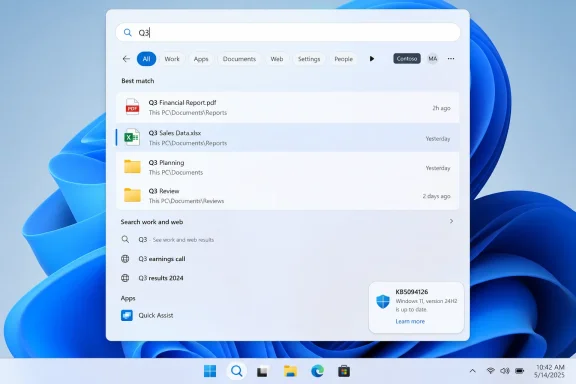
Microsoft’s June 9, 2026 cumulative update KB5094126 for Windows 11 versions 24H2 and 25H2 changes Windows Search so files can be found with as few as two typed characters, while also adjusting ranking so local files surface more usefully. That sounds microscopic until you remember how often Windows makes users negotiate with the operating system instead of simply finding the thing they asked for. The fix matters because it attacks one of Windows 11’s most irritating daily frictions: the search box that behaves as if short filenames, version tags, and human shorthand do not exist. It is also a reminder that Microsoft’s best Windows updates are not always the ones with the largest banners, but the ones that make the machine feel less stubborn.
The old three-character floor in Windows Search was one of those limitations that seemed designed by nobody and tolerated by everybody. It did not usually announce itself as a bug. It simply sat there, turning a perfectly reasonable query like “Q3,” “V2,” “HR,” “PO,” or “AI” into a dead end or a swamp of irrelevant suggestions.
This is the kind of problem that punishes normal behavior. People do not name every document with a verbose, taxonomy-friendly title. They name things quickly, often in the middle of work, and then rely on search to make sense of the mess later. If the search engine refuses to engage until the third character, it is not merely enforcing a technical constraint; it is telling the user that their own filing habits are invalid.
The June update changes that contract. With KB5094126 installed on Windows 11 24H2 or 25H2, Search can begin returning file results from two-character input, and reporting around the update indicates those results are now ranked more sensibly. The important part is not just that Search fires earlier. It is that local files are less likely to be buried beneath the operating system’s ever-expanding appetite for web links, app prompts, and Microsoft service nudges.
That distinction matters. A search box is a promise. On a personal computer, the first promise should be: “I will help you find your stuff.” Windows has spent too much of the Windows 10 and Windows 11 era behaving as though “your stuff” is merely one category among many, competing with Bing, Store suggestions, cloud hooks, and whatever Microsoft would like to promote this quarter.
A one-character reduction is meaningful because many real-world file identifiers live at two characters. Quarter labels, draft numbers, region codes, initials, department abbreviations, project tags, and version markers are all commonly short. A system that cannot search for them directly is not protecting users from bad queries; it is failing at the vocabulary of office work.
Search interfaces also shape behavior. If users learn that short queries do not work, they stop trusting Search and return to manual folder-diving. They open File Explorer, click through nested directories, sort by date, and try to remember whether the file was on the desktop, in Downloads, in OneDrive, or attached to an email. That is not nostalgia for “real file management.” It is an indictment of a search layer that has not earned confidence.
The best search systems reward rough memory. You remember a fragment, a hint, a pattern. You type what you know, and the machine does the rest. Windows Search has too often felt like the opposite: a system that demands the right incantation before it agrees to help.
Two-character search does not make Windows Search brilliant. It makes it less dismissive.
Users open Start or Search looking for a document and get a blend of local files, apps, settings, web answers, suggested actions, and Microsoft ecosystem prompts. In theory, this is modern and unified. In practice, it often feels like searching your own desk and being handed a pamphlet for a shopping mall.
Windows 11 has been especially prone to this tension because Microsoft has tried to make Search a gateway to services rather than a plain utility. Copilot, Bing, Microsoft 365, OneDrive, the Store, and web discovery all have legitimate places in the operating system. The problem begins when those interests crowd out the immediate local task.
If the update really pushes matching files nearer the top, that is more than a convenience tweak. It is a quiet concession that Windows Search has been over-serving Microsoft’s strategic priorities and under-serving the person at the keyboard. A computer that cannot prioritize a local filename match over a generic web suggestion has confused engagement with usefulness.
That packaging is now normal for Windows. Patch Tuesday is no longer only the day administrators brace for security bulletins and reboot windows. It is also a feature delivery mechanism, a quality-update train, a servicing-stack checkpoint, and sometimes a behavioral experiment in how much visible product change can be bundled into a mandatory cumulative release.
This has advantages. Users do not need to chase separate installers for every small Windows improvement. Enterprises can test a predictable monthly payload. Security fixes, reliability fixes, and usability work move together through a known servicing channel.
But it also makes Windows harder to reason about. A “security update” can contain search changes, performance changes, AI component updates, Secure Boot certificate handling, virtualization fixes, and shell behavior tweaks. For home users, that is just Windows being Windows. For administrators, it means every cumulative update deserves both security urgency and application-compatibility suspicion.
The Search fix lives inside that larger reality. It is a welcome usability improvement, but it arrives as part of the same mechanism that can also alter boot behavior, servicing behavior, and enterprise deployment assumptions.
That matters because Windows 11’s reputation problem has never been only raw performance. On modern hardware, the operating system is often fast enough in benchmarks. The irritation comes from micro-delays: Start taking a beat too long, Search hesitating, context menus animating around the thing you need, File Explorer refreshing in a way that makes you wait for the interface rather than the storage device.
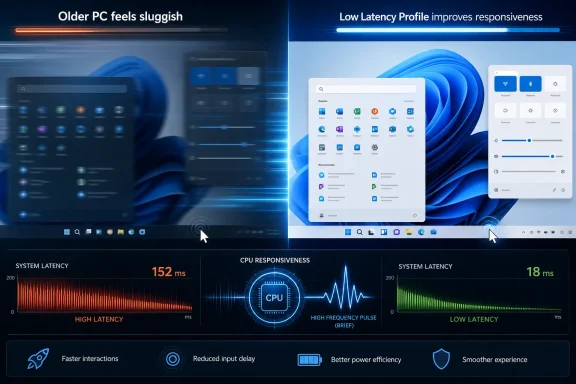
Microsoft appears to be attacking that class of annoyance with a combination of scheduling, responsiveness, and shell-level changes. If Low Latency Profile temporarily boosts processor responsiveness for brief interactions, and Search begins working with shorter inputs, the result is not one dramatic feature. It is a system that interrupts the user less.
That is the right target. Windows does not need another headline feature as badly as it needs fewer moments where users feel the OS is bargaining with them. The best version of Windows 11 would not be one that constantly advertises intelligence. It would be one that feels alert.
For Microsoft, unified search is attractive because it can connect files, apps, settings, web answers, enterprise content, and AI-assisted recommendations. For users, unified search is attractive only when it respects intent. If I type “Q3,” I probably want the spreadsheet, slide deck, folder, or PDF on my machine or in my synced work storage. I almost certainly do not want a web search about fiscal quarters.
This is where Microsoft has frequently overreached. The company sees the search box as a discovery surface. Users see it as a tool. The more Microsoft treats it as a billboard, the more people lose faith in the core function.
The June update suggests a modest course correction. Prioritizing short local filename matches does not mean Microsoft is retreating from cloud-connected Windows. It does mean the company recognizes that the local PC still has a hierarchy of intent, and local files must sit near the top when the query clearly points there.
That may become more important as Copilot+ PC features and semantic indexing spread further through the ecosystem. AI-assisted search can be useful when it expands what the user can find. It becomes invasive when it replaces obvious exact-match behavior with overinterpreted guesses. The machine should be smart enough to understand “find my Q3 file” before it tries to summarize the meaning of Q3.
Microsoft’s release notes for the update describe additional targeting data for devices eligible to receive new Secure Boot certificates, part of the ongoing Secure Boot certificate expiration process that becomes relevant starting in June 2026. The company says devices that have not yet received newer certificates should continue to start and operate normally, while updated certificates continue rolling out through Windows Update. That is reassuring, but it is also the sort of plumbing change administrators do not ignore.
The update also includes fixes for virtualization-related stop errors that could occur after the May preview update on some devices. That matters in shops running Hyper-V, developer workstations, gaming-adjacent hardware, or virtualized test environments. A cumulative update that fixes one class of instability may still need staged rollout discipline, especially when endpoint security tools, shell extensions, sync clients, and virtual desktop infrastructure are part of the fleet.
There is also a folder-customization hardening change involving desktop.ini processing. Microsoft says some custom folder icons or localized folder names may not appear for content from downloaded or remote locations, though folder access itself is not affected. That is exactly the kind of “not broken, but different” change that produces help desk tickets because users notice icons and names before they notice the security rationale.
In other words, the Search improvement is a reason to welcome the update. It is not a reason to skip testing.
The two-character limitation is embarrassing precisely because it is so ordinary. This was not an exotic enterprise edge case. It was a basic interaction visible to anyone who used short filenames. The fact that it survived into 2026 says something about Microsoft’s priorities for Windows Search.
For years, the company has treated Search as part of a broader platform strategy. That strategy has produced useful capabilities, especially in Microsoft 365 environments where cloud documents and organizational knowledge matter. But strategy can blind a product team to small paper cuts. If the team is thinking about semantic intent, AI recall, federated enterprise results, and service integration, a two-letter filename can look quaint.
Users do not experience it that way. They experience it as “Windows can’t find my file.”
The June update is therefore a small repair to a larger trust problem. Every time Search fails on an obvious query, users update their mental model. They stop expecting the OS to help. They build workarounds, install third-party tools, pin folders, or avoid Search entirely. Microsoft now has to earn back that reflex one interaction at a time.
That is powerful. A user can install the update, type two characters, and see whether Windows behaves better. The feedback loop is immediate. If the result appears where expected, the OS gains a little credibility.
This is also why seemingly minor quality-of-life fixes can matter more than marquee features. Windows 11 has accumulated plenty of visible ambition: redesigned surfaces, Copilot hooks, Teams integration, widgets, Snap refinements, Store changes, and AI-branded experiences. Some are useful, some are divisive, and some feel like corporate weather. But a search box that finds “V2” is unambiguously useful.
The lesson for Microsoft is not that every update should be small. It is that Windows earns affection through the mundane. The operating system is judged not only by what it can do in a keynote, but by whether it gets out of the way at 9:17 a.m. when someone needs the latest invoice, deck, log file, or driver package.
That makes Windows maintenance politically difficult inside a company like Microsoft. New features are easier to market than reduced annoyance. AI experiences are easier to package than fewer search misses. A two-character query threshold will not sell a Copilot+ PC, and it will not anchor a launch event.
But it may improve Windows more than half the features that do.
A PC is still, fundamentally, a working environment. The user’s files, apps, windows, peripherals, credentials, and habits form a local context that should be respected. When Windows understands that context quickly, the operating system feels professional. When it ignores that context in favor of web detours or promotional surfaces, it feels like rented space.
The June update moves Search one notch back toward professionalism. Not dramatically. Not completely. But visibly.
For people who live in File Explorer and Start search, the new behavior is worth testing deliberately. Try the filenames Windows used to miss. Try two-letter department codes, version tags, and short project labels. The point is not to admire the feature; the point is to see whether Search becomes trustworthy enough to use reflexively again.
 Microsoft Finally Notices That People Name Files Like Humans
The old three-character floor in Windows Search was one of those limitations that seemed designed by nobody and tolerated by everybody. It did not usually announce itself as a bug. It simply sat there, turning a perfectly reasonable query like “Q3,” “V2,” “HR,” “PO,” or “AI” into a dead end or a swamp of irrelevant suggestions.This is the kind of problem that punishes normal behavior. People do not name every document with a verbose, taxonomy-friendly title. They name things quickly, often in the middle of work, and then rely on search to make sense of the mess later. If the search engine refuses to engage until the third character, it is not merely enforcing a technical constraint; it is telling the user that their own filing habits are invalid.
The June update changes that contract. With KB5094126 installed on Windows 11 24H2 or 25H2, Search can begin returning file results from two-character input, and reporting around the update indicates those results are now ranked more sensibly. The important part is not just that Search fires earlier. It is that local files are less likely to be buried beneath the operating system’s ever-expanding appetite for web links, app prompts, and Microsoft service nudges.
That distinction matters. A search box is a promise. On a personal computer, the first promise should be: “I will help you find your stuff.” Windows has spent too much of the Windows 10 and Windows 11 era behaving as though “your stuff” is merely one category among many, competing with Bing, Store suggestions, cloud hooks, and whatever Microsoft would like to promote this quarter.
One Character Was the Difference Between Useful and Performative
It is tempting to mock the scale of the fix. Microsoft changed a three-character threshold to a two-character threshold, and the Windows world is supposed to applaud. But user experience is often made or broken by changes exactly this small.A one-character reduction is meaningful because many real-world file identifiers live at two characters. Quarter labels, draft numbers, region codes, initials, department abbreviations, project tags, and version markers are all commonly short. A system that cannot search for them directly is not protecting users from bad queries; it is failing at the vocabulary of office work.
Search interfaces also shape behavior. If users learn that short queries do not work, they stop trusting Search and return to manual folder-diving. They open File Explorer, click through nested directories, sort by date, and try to remember whether the file was on the desktop, in Downloads, in OneDrive, or attached to an email. That is not nostalgia for “real file management.” It is an indictment of a search layer that has not earned confidence.
The best search systems reward rough memory. You remember a fragment, a hint, a pattern. You type what you know, and the machine does the rest. Windows Search has too often felt like the opposite: a system that demands the right incantation before it agrees to help.
Two-character search does not make Windows Search brilliant. It makes it less dismissive.
The Ranking Change Is the Real Admission
The more revealing part of this update is not the lower character threshold but the ranking improvement. Microsoft appears to understand that merely returning results is not enough if the useful result is pushed down beneath noise. That has been the larger Windows Search complaint for years.Users open Start or Search looking for a document and get a blend of local files, apps, settings, web answers, suggested actions, and Microsoft ecosystem prompts. In theory, this is modern and unified. In practice, it often feels like searching your own desk and being handed a pamphlet for a shopping mall.
Windows 11 has been especially prone to this tension because Microsoft has tried to make Search a gateway to services rather than a plain utility. Copilot, Bing, Microsoft 365, OneDrive, the Store, and web discovery all have legitimate places in the operating system. The problem begins when those interests crowd out the immediate local task.
If the update really pushes matching files nearer the top, that is more than a convenience tweak. It is a quiet concession that Windows Search has been over-serving Microsoft’s strategic priorities and under-serving the person at the keyboard. A computer that cannot prioritize a local filename match over a generic web suggestion has confused engagement with usefulness.
Patch Tuesday Has Become Microsoft’s Feature Conveyor Belt
KB5094126 is not a tiny hotfix masquerading as a monthly patch. It is part of the June 2026 Patch Tuesday release for Windows 11 24H2 and 25H2, raising systems to OS builds 26100.8655 and 26200.8655 respectively. Microsoft’s own release notes frame it as a cumulative security update that also absorbs earlier non-security improvements from the May preview updates.That packaging is now normal for Windows. Patch Tuesday is no longer only the day administrators brace for security bulletins and reboot windows. It is also a feature delivery mechanism, a quality-update train, a servicing-stack checkpoint, and sometimes a behavioral experiment in how much visible product change can be bundled into a mandatory cumulative release.
This has advantages. Users do not need to chase separate installers for every small Windows improvement. Enterprises can test a predictable monthly payload. Security fixes, reliability fixes, and usability work move together through a known servicing channel.
But it also makes Windows harder to reason about. A “security update” can contain search changes, performance changes, AI component updates, Secure Boot certificate handling, virtualization fixes, and shell behavior tweaks. For home users, that is just Windows being Windows. For administrators, it means every cumulative update deserves both security urgency and application-compatibility suspicion.
The Search fix lives inside that larger reality. It is a welcome usability improvement, but it arrives as part of the same mechanism that can also alter boot behavior, servicing behavior, and enterprise deployment assumptions.
The June Update Is Really About Responsiveness
Search is only one piece of the June 2026 package, and that is part of why this release has attracted attention. Reports around KB5094126 have highlighted a broader push toward making Windows 11 feel faster in everyday interactions, including Microsoft’s gradual rollout of a Low Latency Profile intended to reduce delays during short, interactive tasks.That matters because Windows 11’s reputation problem has never been only raw performance. On modern hardware, the operating system is often fast enough in benchmarks. The irritation comes from micro-delays: Start taking a beat too long, Search hesitating, context menus animating around the thing you need, File Explorer refreshing in a way that makes you wait for the interface rather than the storage device.
Microsoft appears to be attacking that class of annoyance with a combination of scheduling, responsiveness, and shell-level changes. If Low Latency Profile temporarily boosts processor responsiveness for brief interactions, and Search begins working with shorter inputs, the result is not one dramatic feature. It is a system that interrupts the user less.
That is the right target. Windows does not need another headline feature as badly as it needs fewer moments where users feel the OS is bargaining with them. The best version of Windows 11 would not be one that constantly advertises intelligence. It would be one that feels alert.
Local Search Still Has to Compete With Microsoft’s Cloud Ambitions
There is a larger philosophical fight underneath this two-character fix. Windows is both a local operating system and a portal into Microsoft’s cloud services, and Search sits directly on the fault line between those identities.For Microsoft, unified search is attractive because it can connect files, apps, settings, web answers, enterprise content, and AI-assisted recommendations. For users, unified search is attractive only when it respects intent. If I type “Q3,” I probably want the spreadsheet, slide deck, folder, or PDF on my machine or in my synced work storage. I almost certainly do not want a web search about fiscal quarters.
This is where Microsoft has frequently overreached. The company sees the search box as a discovery surface. Users see it as a tool. The more Microsoft treats it as a billboard, the more people lose faith in the core function.
The June update suggests a modest course correction. Prioritizing short local filename matches does not mean Microsoft is retreating from cloud-connected Windows. It does mean the company recognizes that the local PC still has a hierarchy of intent, and local files must sit near the top when the query clearly points there.
That may become more important as Copilot+ PC features and semantic indexing spread further through the ecosystem. AI-assisted search can be useful when it expands what the user can find. It becomes invasive when it replaces obvious exact-match behavior with overinterpreted guesses. The machine should be smart enough to understand “find my Q3 file” before it tries to summarize the meaning of Q3.
Administrators Should Read the Fine Print, Not Just the Feature Hype
For IT departments, KB5094126 is not primarily a feel-good Search update. It is a cumulative security release with servicing implications, Secure Boot certificate changes, and deployment considerations. The Search improvement is user-visible, but the operational story is broader.Microsoft’s release notes for the update describe additional targeting data for devices eligible to receive new Secure Boot certificates, part of the ongoing Secure Boot certificate expiration process that becomes relevant starting in June 2026. The company says devices that have not yet received newer certificates should continue to start and operate normally, while updated certificates continue rolling out through Windows Update. That is reassuring, but it is also the sort of plumbing change administrators do not ignore.
The update also includes fixes for virtualization-related stop errors that could occur after the May preview update on some devices. That matters in shops running Hyper-V, developer workstations, gaming-adjacent hardware, or virtualized test environments. A cumulative update that fixes one class of instability may still need staged rollout discipline, especially when endpoint security tools, shell extensions, sync clients, and virtual desktop infrastructure are part of the fleet.
There is also a folder-customization hardening change involving desktop.ini processing. Microsoft says some custom folder icons or localized folder names may not appear for content from downloaded or remote locations, though folder access itself is not affected. That is exactly the kind of “not broken, but different” change that produces help desk tickets because users notice icons and names before they notice the security rationale.
In other words, the Search improvement is a reason to welcome the update. It is not a reason to skip testing.
The Two-Character Fix Exposes a Decade of Windows Search Drift
Windows Search has carried too many jobs for too long. It is expected to launch apps, find documents, expose settings, index email, surface web results, integrate cloud storage, satisfy enterprise policy, respect privacy boundaries, and increasingly feed AI experiences. No wonder it sometimes fails at the simplest task.The two-character limitation is embarrassing precisely because it is so ordinary. This was not an exotic enterprise edge case. It was a basic interaction visible to anyone who used short filenames. The fact that it survived into 2026 says something about Microsoft’s priorities for Windows Search.
For years, the company has treated Search as part of a broader platform strategy. That strategy has produced useful capabilities, especially in Microsoft 365 environments where cloud documents and organizational knowledge matter. But strategy can blind a product team to small paper cuts. If the team is thinking about semantic intent, AI recall, federated enterprise results, and service integration, a two-letter filename can look quaint.
Users do not experience it that way. They experience it as “Windows can’t find my file.”
The June update is therefore a small repair to a larger trust problem. Every time Search fails on an obvious query, users update their mental model. They stop expecting the OS to help. They build workarounds, install third-party tools, pin folders, or avoid Search entirely. Microsoft now has to earn back that reflex one interaction at a time.
This Is the Kind of Windows Improvement People Actually Feel
There is a reason this story has traveled beyond release-note obsessives. It is easy to understand, easy to test, and tied to a daily annoyance. Unlike many Windows changes, it does not require users to buy new hardware, adopt a new workflow, or believe in a vendor’s long-term AI vision.That is powerful. A user can install the update, type two characters, and see whether Windows behaves better. The feedback loop is immediate. If the result appears where expected, the OS gains a little credibility.
This is also why seemingly minor quality-of-life fixes can matter more than marquee features. Windows 11 has accumulated plenty of visible ambition: redesigned surfaces, Copilot hooks, Teams integration, widgets, Snap refinements, Store changes, and AI-branded experiences. Some are useful, some are divisive, and some feel like corporate weather. But a search box that finds “V2” is unambiguously useful.
The lesson for Microsoft is not that every update should be small. It is that Windows earns affection through the mundane. The operating system is judged not only by what it can do in a keynote, but by whether it gets out of the way at 9:17 a.m. when someone needs the latest invoice, deck, log file, or driver package.
The Best Windows Features Are the Ones That Stop Making Users Think About Windows
There is a paradox at the center of PC operating systems: the better they work, the less visible they become. Nobody praises a file search every time it succeeds. They only notice when it fails.That makes Windows maintenance politically difficult inside a company like Microsoft. New features are easier to market than reduced annoyance. AI experiences are easier to package than fewer search misses. A two-character query threshold will not sell a Copilot+ PC, and it will not anchor a launch event.
But it may improve Windows more than half the features that do.
A PC is still, fundamentally, a working environment. The user’s files, apps, windows, peripherals, credentials, and habits form a local context that should be respected. When Windows understands that context quickly, the operating system feels professional. When it ignores that context in favor of web detours or promotional surfaces, it feels like rented space.
The June update moves Search one notch back toward professionalism. Not dramatically. Not completely. But visibly.
Where the June Patch Leaves Windows 11 Users
The practical advice is simple, but the implications are larger. KB5094126 is a mandatory June 2026 security update for supported Windows 11 24H2 and 25H2 systems, and the Search behavior is one of several user-visible and under-the-hood changes included in the package. Users should expect normal Windows Update delivery, while managed environments should continue to rely on their usual rings, deferrals, and validation workflows.For people who live in File Explorer and Start search, the new behavior is worth testing deliberately. Try the filenames Windows used to miss. Try two-letter department codes, version tags, and short project labels. The point is not to admire the feature; the point is to see whether Search becomes trustworthy enough to use reflexively again.
The Search Box Finally Learns the Language of Real Work
The June update’s most concrete lesson is that Microsoft can still improve Windows by fixing tiny pieces of everyday friction, and those fixes may matter more than the company’s louder platform bets.- Windows 11 KB5094126 shipped on June 9, 2026 for versions 24H2 and 25H2, moving systems to builds 26100.8655 and 26200.8655.
- Windows Search can now return file results from queries as short as two characters, addressing a long-standing mismatch with short real-world filenames.
- The ranking improvements matter because local files are more useful when they appear ahead of web and service-driven suggestions.
- The update is still a cumulative security release, so administrators should evaluate the full package rather than treating it as a Search-only change.
- Secure Boot certificate handling, virtualization fixes, servicing-stack updates, and folder-customization hardening make this a broader operational release.
- The change is a reminder that Windows 11’s credibility depends as much on low-friction basics as on AI and cloud-connected features.
References
- Primary source: Digital Trends
Published: Sat, 13 Jun 2026 10:50:27 GMT
Windows 11 just fixed one of Search’s dumbest limitations, and you’ll wonder how you lived without it - Digital Trends
Windows 11 search just got smarter by exactly one character, and it fixes a problem you've been quietly fighting for years.www.digitaltrends.com - Related coverage: techradar.com
Windows 11's June update is here — these are the 3 most important features, including a huge move to make apps and menus load much faster | TechRadar
Low Latency Profile, shared audio, and a boost for searchwww.techradar.com - Related coverage: windowslatest.com
Windows 11 KB5094126 out with CPU boost for performance, direct download links for offline installer (.msu)
Windows 11 KB5094126 is now rolling out with Low Latency Profile, Shared audio, Secure Boot certificate update, and more. www.windowslatest.com
- Related coverage: allthings.how
KB5094126 for Windows 11 (June 2026): Builds 26200.8655 and 26100.8655
The June Patch Tuesday update brings the Low Latency Profile, Shared Audio, multi-app camera streaming, and the Secure Boot certificate push.allthings.how - Related coverage: windowsreport.com
Windows 11 KB5094126 & KB5093998 June 2026 Patch Tuesday Updates Released
Microsoft has officially released June 2026 Patch Tuesday update KB5094126 for Windows 11 version 24H2 and 25H2. windowsreport.com
- Related coverage: windows-faq.de
Windows 11 KB5094126 Update für 24H2 und 25H2 für Secure Boot & Sicherheit - Windows FAQ
Windows 11 KB5094126 bringt Sicherheitsfixes, Secure Boot Änderungen und Fehlerbehebungen für 24H2 und 25H2.www.windows-faq.de
- Related coverage: tutos-informatique.com
Windows 11 KB5094126 : BSOD corrigés avec le Patch Tuesday
KB5094126 et KB5093998 arrivent pour Windows 11 avec les correctifs de juin 2026, Secure Boot et la correction des BSOD liés à KB5089573.www.tutos-informatique.com - Official source: microsofters.com
Windows 11 (actualización KB5094126): novedades, errores conocidos y cómo instalarla | Microsofters
La actualización KB5094126 de Windows 11 trae numerosas mejoras de estabilidad y rendimiento. ¡Las apps abrirán más rápido que nunca! microsofters.com
- Related coverage: windowsforum.com
Windows 11 KB5094126 (June 2026) Guide: Low Latency, Shared Audio, Secure Boot | Windows Forum
Microsoft released Windows 11 KB5094126 on June 9, 2026, as the June Patch Tuesday security update for Windows 11 versions 25H2 and 24H2, raising systems to...windowsforum.com - Related coverage: technobaboy.com
Windows drops Windows 11 KB5094126 update: Brings CPU boost, Shared Audio - Technobaboy
Windows 11 KB5094126 rolling out. adds CPU boost, shared audio, and camera support with stability fixes. Details here.www.technobaboy.com - Related coverage: techgig.com
Microsoft releases cumulative updates KB5094126 and KB5093998 for Windows 11, TechGig
Microsoft has launched cumulative updates KB5094126 and KB5093998 for Windows 11 versions 25H2, 24H2, and 23H2. These updates address security vulnerabilities and enhance system performance.techgig.com
- Related coverage: windowscentral.com
Here are the 6 biggest features and improvements coming to Windows 11 in the June 2026 update on Tuesday | Windows Central
Microsoft's June 2026 Windows 11 update boosts responsiveness, adds Shared Audio, expands NPU metrics, and improves OOBE.www.windowscentral.com - Official source: techcommunity.microsoft.com