

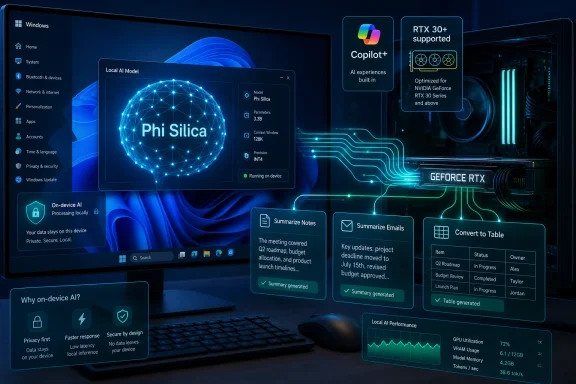
Microsoft has updated Windows 11’s local Language Model APIs so developers can run Phi Silica workloads on non-Copilot+ PCs with Nvidia GeForce RTX 30-series or newer GPUs and at least 6GB of VRAM, extending native on-device AI beyond the NPU-equipped machines Microsoft promoted in 2024. The change is officially a developer preview, not a mass rollout of every Copilot+ feature to every gaming tower. But strategically, it is much bigger than an API compatibility note. Microsoft is admitting, carefully and indirectly, that the future of local AI on Windows cannot be confined to one badge, one silicon block, or one laptop marketing cycle.
When Microsoft introduced Copilot+ PCs, it did not merely describe a new class of hardware. It drew a line through the Windows ecosystem. On one side were machines with at least 16GB of RAM, SSD storage, and an NPU capable of 40 TOPS or more. On the other side were millions of perfectly modern Windows PCs that could game, render, compile, stream, and run local AI tools, but could not qualify for Microsoft’s most visible on-device AI push.
The NPU requirement was not technically absurd. Neural processing units are designed to run certain AI workloads efficiently, often at lower power and with less thermal drama than a discrete GPU. In a thin laptop, that matters. An always-available assistant, a background indexing feature, or a low-latency image tool cannot behave like a game that spins up a 115-watt GPU every time the user opens a document.
But the marketing simplification hardened into something more brittle. “Copilot+ PC” became shorthand for “this is where Windows AI happens,” even though enthusiasts had been running local language models, Stable Diffusion derivatives, transcription engines, and retrieval tools on GPUs long before the badge existed. Microsoft’s claim was strongest when phrased as a battery-life argument. It was weakest when heard as a capability argument.
That distinction matters because Windows is not just a laptop operating system. It is also the platform under gaming rigs, creator workstations, developer desktops, lab machines, and corporate endpoints with discrete graphics hardware. A Windows AI strategy that treats those PCs as second-class citizens was never going to survive contact with the installed base.
Even so, the symbolic shift is hard to miss. A PC no longer needs to be sold as a Copilot+ machine to participate in Microsoft’s native local language model layer. It can qualify because it has the right GPU. The Copilot+ badge remains relevant, but it is no longer the only doorway into Windows’ built-in AI runtime story.
This is a different kind of fragmentation from the one Microsoft started with. Instead of “NPU equals in, no NPU equals out,” Windows AI begins to look more like the rest of PC computing: feature availability depends on the specific accelerator, driver stack, memory budget, OS version, and app framework. That is messier to explain on a retail shelf, but it is more honest about the PC market.
It also gives Microsoft an escape hatch. The company can preserve Copilot+ as a premium category for certain first-party experiences while letting developers target a broader range of capable machines. That is not a retreat so much as a rebalancing. Microsoft still gets to promote efficient AI laptops, but it no longer has to pretend that a desktop RTX card is somehow less “AI capable” than a laptop NPU.
That limitation is part of the point. Phi Silica represents the class of AI work that makes sense to run locally: fast, bounded, privacy-sensitive, and deeply integrated into apps. A mail client does not need a gigantic model to rewrite a paragraph. A notes app does not need a cloud round trip to turn meeting bullets into a cleaner outline. A document tool does not need to upload corporate text to a remote server just to produce a table.
The more important architectural change is distribution. If an app needs the model, Windows can obtain the required components through the system rather than forcing every developer to bundle a model, build a downloader, manage updates, and explain storage consumption to users. That turns the model into something closer to a shared runtime dependency.
This is where Microsoft’s platform instincts show. The company does not merely want AI apps to exist on Windows; it wants Windows to become the place where the app asks for a capability and the operating system brokers the hardware, runtime, model, and updates. That is the same playbook that made graphics, media, printing, accessibility, and security APIs strategically important. AI is being pulled into the operating system’s contract with developers.
That is why this preview matters even if the first supported surface is narrow. Once Windows AI APIs can run across more than one accelerator class, Microsoft can begin abstracting the hardware away. The app can ask whether local language generation is available. Windows can decide whether that means an NPU, a GPU, or perhaps another supported backend in the future.
There is still a long way to go before that vision is clean. Developers will need to know latency, model quality, memory behavior, battery impact, and fallback rules. Enterprises will want policy controls. Users will want a simple answer to whether an app feature works on their machine. Support desks will be less amused by a world where “Windows AI” works on one RTX laptop but not another because of VRAM, driver, OS, or preview-channel requirements.
But the direction is sensible. Microsoft cannot win local AI on Windows by making every developer target one premium laptop category. It can win by making local AI feel like a normal Windows capability that scales across hardware. The RTX move is an early, imperfect version of that broader platform promise.
The problem was not the NPU. The problem was treating the NPU as the defining feature of local AI rather than one implementation of it. GPUs are often better suited for heavier bursts of AI compute, particularly on desktops and gaming laptops where power and thermals are less constrained. CPUs may be appropriate for lighter models or speech and vision tasks. Specialized silicon is not a religion; it is a scheduling decision.
Microsoft now appears to be moving toward that more pragmatic view. Copilot+ PCs can still be the best experience for certain Windows features. RTX systems can become viable targets for local language APIs. Other hardware paths may follow as the stack matures. The platform gets healthier when the operating system stops enforcing a marketing category as if it were a law of physics.
This also puts pressure on Microsoft’s first-party feature strategy. If Phi Silica can run locally on a supported RTX system, users will reasonably ask why some AI experiences remain exclusive to Copilot+ PCs. Sometimes the answer will be privacy, performance, power, or model design. Sometimes the answer will be product segmentation. Microsoft will need to be clearer about which is which.
Enterprises have spent years building controls around software installation, data loss prevention, cloud services, and endpoint telemetry. Local AI complicates that map. If the processing happens on the device, the privacy story may improve because sensitive content does not need to leave the PC. But local processing also means the capability may appear inside apps that previously had no generative features at all.
That will force administrators to think beyond the old cloud-versus-local framing. A locally running model can still summarize confidential documents, transform regulated text, or generate content that must be retained, audited, or governed. The absence of a cloud upload does not eliminate compliance obligations. It merely changes where the risk lives.
Microsoft will therefore need robust controls: which models can be installed, which apps can call them, how usage is logged, whether features can be disabled by policy, and how model updates are validated. If Windows AI APIs become a mainstream platform layer, they cannot be managed like a novelty feature. They will need the same administrative seriousness as browser engines, scripting runtimes, and identity brokers.
For Microsoft, supporting RTX systems buys reach. Copilot+ PCs may define the new laptop shelf, but RTX PCs define a large slice of enthusiast, creator, and gaming Windows. Those are exactly the users most likely to experiment with local AI, notice performance differences, and pressure app developers to support hardware they already own.
For Nvidia, the move reinforces the idea that an RTX GPU is not just for games. The company has been steadily reframing GeForce and RTX PCs as AI platforms, not merely graphics platforms. Microsoft’s Windows AI APIs give that pitch a native OS hook. Instead of every app relying on its own AI runtime, Windows can become part of the acceleration story.
The awkward part is that this may make Copilot+ branding feel less distinct to power users. If a desktop with an RTX 4070 can run local Microsoft-backed language APIs, the badge on a thin laptop becomes less of a gatekeeper and more of an efficiency certification. That is probably where it should have been all along.
That is not elegant. But PC buyers already live in a world of messy capability charts. Games have minimum and recommended GPUs. Video editors depend on codecs and accelerators. Security features depend on firmware and processor support. AI will be no different, no matter how much the industry wants a single logo to simplify it.
The more honest consumer message is that local AI has tiers. A Copilot+ laptop may be the right choice for battery-friendly, integrated, always-on AI features. An RTX desktop may be excellent for higher-power local inference and developer experimentation. A standard business laptop may rely on cloud AI or CPU-bound features. The badge can indicate one path, but it should not pretend to describe the whole map.
The risk is disappointment. If users hear “Windows AI now works on non-Copilot+ PCs,” some will assume Recall, Click to Do, image tools, and every future AI feature are coming to their older machines. That is not what this change says. Microsoft will need to be precise, because the AI PC category is already full of inflated claims and thin distinctions.
Windows sits in the middle of that fight. If Microsoft can make its AI APIs easy, performant, policy-manageable, and widely available, it can turn local AI into a Windows platform advantage. If it keeps the stack too restricted, developers will route around it with their own model runtimes and hardware-specific libraries. That would leave Windows as the host operating system but not the AI platform.
The RTX preview suggests Microsoft understands that danger. A platform API that only works on a narrow class of recently marketed devices is not really a platform API. It is a product feature wearing platform clothing. Broadening support makes the APIs more credible.
Still, Microsoft must avoid creating a maze. Developers will not embrace Windows AI because it has an appealing architecture diagram. They will embrace it if it reduces complexity. The system needs clear capability detection, dependable model availability, transparent performance expectations, and licensing terms that do not make developers nervous after they have built features around it.
The Windows PC ecosystem is too broad for that. A 2021-era RTX desktop may have more raw AI throughput than a newly certified ultralight laptop. A workstation may be plugged in all day and unconcerned with power draw. A corporate fleet may value manageability more than model performance. A developer may care more about API stability than whether the machine carries a consumer-facing label.
By extending local language APIs to supported Nvidia GPUs, Microsoft is acknowledging that the installed base matters. That is good for users who already own capable hardware. It is good for developers who want a larger market. It is good for Windows as a platform, because an operating system should expand the usefulness of PCs rather than reserve useful capabilities for the newest marketing category.
But it also weakens the mystique around Copilot+. Once users understand that some local AI features can run on non-Copilot+ PCs, they will judge the badge more critically. It will need to stand for tangible advantages: battery life, latency, integration, security, and feature breadth. A logo alone will not carry the argument.
 Microsoft’s AI PC Wall Was Always Built on Efficiency, Not Capability
When Microsoft introduced Copilot+ PCs, it did not merely describe a new class of hardware. It drew a line through the Windows ecosystem. On one side were machines with at least 16GB of RAM, SSD storage, and an NPU capable of 40 TOPS or more. On the other side were millions of perfectly modern Windows PCs that could game, render, compile, stream, and run local AI tools, but could not qualify for Microsoft’s most visible on-device AI push.The NPU requirement was not technically absurd. Neural processing units are designed to run certain AI workloads efficiently, often at lower power and with less thermal drama than a discrete GPU. In a thin laptop, that matters. An always-available assistant, a background indexing feature, or a low-latency image tool cannot behave like a game that spins up a 115-watt GPU every time the user opens a document.
But the marketing simplification hardened into something more brittle. “Copilot+ PC” became shorthand for “this is where Windows AI happens,” even though enthusiasts had been running local language models, Stable Diffusion derivatives, transcription engines, and retrieval tools on GPUs long before the badge existed. Microsoft’s claim was strongest when phrased as a battery-life argument. It was weakest when heard as a capability argument.
That distinction matters because Windows is not just a laptop operating system. It is also the platform under gaming rigs, creator workstations, developer desktops, lab machines, and corporate endpoints with discrete graphics hardware. A Windows AI strategy that treats those PCs as second-class citizens was never going to survive contact with the installed base.
The RTX Exception Turns a Badge Into a Negotiation
The new support path does not make every Windows 11 PC an AI PC. It specifically targets systems with Nvidia GeForce RTX 30-series GPUs or newer and at least 6GB of VRAM. That is still a meaningful hardware floor, and it excludes older GTX cards, low-end integrated graphics, many business desktops, and laptops with cramped graphics memory.Even so, the symbolic shift is hard to miss. A PC no longer needs to be sold as a Copilot+ machine to participate in Microsoft’s native local language model layer. It can qualify because it has the right GPU. The Copilot+ badge remains relevant, but it is no longer the only doorway into Windows’ built-in AI runtime story.
This is a different kind of fragmentation from the one Microsoft started with. Instead of “NPU equals in, no NPU equals out,” Windows AI begins to look more like the rest of PC computing: feature availability depends on the specific accelerator, driver stack, memory budget, OS version, and app framework. That is messier to explain on a retail shelf, but it is more honest about the PC market.
It also gives Microsoft an escape hatch. The company can preserve Copilot+ as a premium category for certain first-party experiences while letting developers target a broader range of capable machines. That is not a retreat so much as a rebalancing. Microsoft still gets to promote efficient AI laptops, but it no longer has to pretend that a desktop RTX card is somehow less “AI capable” than a laptop NPU.
Phi Silica Becomes a Windows Component, Not Just a Demo Model
The model at the center of this shift is Phi Silica, Microsoft’s on-device small language model for Windows AI APIs. It is intended for local language tasks such as summarization, rewriting, text generation, formatting, and structured transformations. It is not a full cloud-scale chatbot living inside Windows, and nobody should expect it to behave like the largest frontier models.That limitation is part of the point. Phi Silica represents the class of AI work that makes sense to run locally: fast, bounded, privacy-sensitive, and deeply integrated into apps. A mail client does not need a gigantic model to rewrite a paragraph. A notes app does not need a cloud round trip to turn meeting bullets into a cleaner outline. A document tool does not need to upload corporate text to a remote server just to produce a table.
The more important architectural change is distribution. If an app needs the model, Windows can obtain the required components through the system rather than forcing every developer to bundle a model, build a downloader, manage updates, and explain storage consumption to users. That turns the model into something closer to a shared runtime dependency.
This is where Microsoft’s platform instincts show. The company does not merely want AI apps to exist on Windows; it wants Windows to become the place where the app asks for a capability and the operating system brokers the hardware, runtime, model, and updates. That is the same playbook that made graphics, media, printing, accessibility, and security APIs strategically important. AI is being pulled into the operating system’s contract with developers.
Developers Care Less About the Badge Than the Call
For developers, the distinction between an NPU and a GPU is secondary to whether an API is available, predictable, fast enough, and supportable. A developer building a Windows app does not want to write one feature for Copilot+ laptops, another for RTX desktops, another for CPU fallback, and another for cloud-only machines unless the market forces them to. They want a capability they can query and a behavior they can explain.That is why this preview matters even if the first supported surface is narrow. Once Windows AI APIs can run across more than one accelerator class, Microsoft can begin abstracting the hardware away. The app can ask whether local language generation is available. Windows can decide whether that means an NPU, a GPU, or perhaps another supported backend in the future.
There is still a long way to go before that vision is clean. Developers will need to know latency, model quality, memory behavior, battery impact, and fallback rules. Enterprises will want policy controls. Users will want a simple answer to whether an app feature works on their machine. Support desks will be less amused by a world where “Windows AI” works on one RTX laptop but not another because of VRAM, driver, OS, or preview-channel requirements.
But the direction is sensible. Microsoft cannot win local AI on Windows by making every developer target one premium laptop category. It can win by making local AI feel like a normal Windows capability that scales across hardware. The RTX move is an early, imperfect version of that broader platform promise.
The NPU Was Not a Lie, but the Story Was Too Small
The easy reaction is to say this proves NPUs were unnecessary. That is too neat. NPUs still make sense for certain workloads, especially on mobile hardware where power efficiency and sustained background operation matter. A laptop that can perform AI tasks without hammering battery life or fan noise has a real advantage.The problem was not the NPU. The problem was treating the NPU as the defining feature of local AI rather than one implementation of it. GPUs are often better suited for heavier bursts of AI compute, particularly on desktops and gaming laptops where power and thermals are less constrained. CPUs may be appropriate for lighter models or speech and vision tasks. Specialized silicon is not a religion; it is a scheduling decision.
Microsoft now appears to be moving toward that more pragmatic view. Copilot+ PCs can still be the best experience for certain Windows features. RTX systems can become viable targets for local language APIs. Other hardware paths may follow as the stack matures. The platform gets healthier when the operating system stops enforcing a marketing category as if it were a law of physics.
This also puts pressure on Microsoft’s first-party feature strategy. If Phi Silica can run locally on a supported RTX system, users will reasonably ask why some AI experiences remain exclusive to Copilot+ PCs. Sometimes the answer will be privacy, performance, power, or model design. Sometimes the answer will be product segmentation. Microsoft will need to be clearer about which is which.
Enterprise IT Will See Promise Wrapped in Policy Risk
For administrators, the most interesting part of the change is not that gaming GPUs can run a Microsoft language model. It is that Windows may download AI models as system-managed components when apps request them. That is convenient for developers and consumers, but it also creates new operational questions inside managed environments.Enterprises have spent years building controls around software installation, data loss prevention, cloud services, and endpoint telemetry. Local AI complicates that map. If the processing happens on the device, the privacy story may improve because sensitive content does not need to leave the PC. But local processing also means the capability may appear inside apps that previously had no generative features at all.
That will force administrators to think beyond the old cloud-versus-local framing. A locally running model can still summarize confidential documents, transform regulated text, or generate content that must be retained, audited, or governed. The absence of a cloud upload does not eliminate compliance obligations. It merely changes where the risk lives.
Microsoft will therefore need robust controls: which models can be installed, which apps can call them, how usage is logged, whether features can be disabled by policy, and how model updates are validated. If Windows AI APIs become a mainstream platform layer, they cannot be managed like a novelty feature. They will need the same administrative seriousness as browser engines, scripting runtimes, and identity brokers.
Nvidia Gets the Installed Base Microsoft Needs
The Nvidia angle is not incidental. RTX hardware is the most obvious bridge between Microsoft’s Copilot+ ambitions and the existing population of Windows machines powerful enough to run local AI today. Nvidia has spent years turning its consumer GPUs into AI accelerators by another name, helped by CUDA, tensor cores, and a developer ecosystem that already treats RTX cards as practical local inference hardware.For Microsoft, supporting RTX systems buys reach. Copilot+ PCs may define the new laptop shelf, but RTX PCs define a large slice of enthusiast, creator, and gaming Windows. Those are exactly the users most likely to experiment with local AI, notice performance differences, and pressure app developers to support hardware they already own.
For Nvidia, the move reinforces the idea that an RTX GPU is not just for games. The company has been steadily reframing GeForce and RTX PCs as AI platforms, not merely graphics platforms. Microsoft’s Windows AI APIs give that pitch a native OS hook. Instead of every app relying on its own AI runtime, Windows can become part of the acceleration story.
The awkward part is that this may make Copilot+ branding feel less distinct to power users. If a desktop with an RTX 4070 can run local Microsoft-backed language APIs, the badge on a thin laptop becomes less of a gatekeeper and more of an efficiency certification. That is probably where it should have been all along.
The Consumer Message Gets Messier but More Truthful
Microsoft now has a messaging problem of its own making. For a year, the company trained consumers to associate local Windows AI with Copilot+ PCs. Now it must explain that some Windows AI APIs can run on some non-Copilot+ PCs with certain Nvidia GPUs, while other headline features remain tied to NPU-equipped systems.That is not elegant. But PC buyers already live in a world of messy capability charts. Games have minimum and recommended GPUs. Video editors depend on codecs and accelerators. Security features depend on firmware and processor support. AI will be no different, no matter how much the industry wants a single logo to simplify it.
The more honest consumer message is that local AI has tiers. A Copilot+ laptop may be the right choice for battery-friendly, integrated, always-on AI features. An RTX desktop may be excellent for higher-power local inference and developer experimentation. A standard business laptop may rely on cloud AI or CPU-bound features. The badge can indicate one path, but it should not pretend to describe the whole map.
The risk is disappointment. If users hear “Windows AI now works on non-Copilot+ PCs,” some will assume Recall, Click to Do, image tools, and every future AI feature are coming to their older machines. That is not what this change says. Microsoft will need to be precise, because the AI PC category is already full of inflated claims and thin distinctions.
The Real Battle Is Over the Default AI Runtime
This update is best understood as part of a larger contest over who owns the default local AI runtime on the PC. Microsoft wants developers to call Windows APIs. Nvidia wants developers to exploit RTX acceleration. Intel, AMD, and Qualcomm want NPUs to matter. Cloud AI providers want apps to keep calling hosted models. Open-source developers want portable stacks that are not locked to one vendor’s operating system.Windows sits in the middle of that fight. If Microsoft can make its AI APIs easy, performant, policy-manageable, and widely available, it can turn local AI into a Windows platform advantage. If it keeps the stack too restricted, developers will route around it with their own model runtimes and hardware-specific libraries. That would leave Windows as the host operating system but not the AI platform.
The RTX preview suggests Microsoft understands that danger. A platform API that only works on a narrow class of recently marketed devices is not really a platform API. It is a product feature wearing platform clothing. Broadening support makes the APIs more credible.
Still, Microsoft must avoid creating a maze. Developers will not embrace Windows AI because it has an appealing architecture diagram. They will embrace it if it reduces complexity. The system needs clear capability detection, dependable model availability, transparent performance expectations, and licensing terms that do not make developers nervous after they have built features around it.
The Copilot+ Line Is Thinner Than Microsoft First Drew It
The practical lesson is not that Copilot+ PCs are obsolete. It is that the original boundary was overdrawn. Microsoft needed a launch narrative, OEMs needed a reason to sell new machines, and NPUs gave the industry a clean number to print on spec sheets. But local AI was never going to fit neatly inside that campaign.The Windows PC ecosystem is too broad for that. A 2021-era RTX desktop may have more raw AI throughput than a newly certified ultralight laptop. A workstation may be plugged in all day and unconcerned with power draw. A corporate fleet may value manageability more than model performance. A developer may care more about API stability than whether the machine carries a consumer-facing label.
By extending local language APIs to supported Nvidia GPUs, Microsoft is acknowledging that the installed base matters. That is good for users who already own capable hardware. It is good for developers who want a larger market. It is good for Windows as a platform, because an operating system should expand the usefulness of PCs rather than reserve useful capabilities for the newest marketing category.
But it also weakens the mystique around Copilot+. Once users understand that some local AI features can run on non-Copilot+ PCs, they will judge the badge more critically. It will need to stand for tangible advantages: battery life, latency, integration, security, and feature breadth. A logo alone will not carry the argument.
The New Rules Windows Users Should Actually Remember
This is a preview-era shift, so the immediate impact will be uneven. The important thing is not to overread it as a universal unlock or underread it as a dry SDK footnote. It is the first visible step toward a Windows AI model where capability follows hardware reality rather than a single badge.- Windows 11’s local Language Model APIs are expanding beyond Copilot+ PCs, but the new path currently targets supported Nvidia RTX 30-series or newer GPUs with at least 6GB of VRAM.
- Phi Silica is aimed at local text intelligence such as summarization, rewriting, formatting, table conversion, and prompt-based generation rather than replacing large cloud chatbots.
- Copilot+ PCs still matter because NPUs are better suited to efficient, sustained, battery-conscious AI workloads, especially in thin laptops.
- This change does not automatically bring every Copilot+ feature, including Microsoft’s more visible shell-level AI experiences, to older or non-certified PCs.
- Developers now have a stronger reason to treat Windows AI APIs as a platform layer, provided Microsoft makes availability, policy control, and performance predictable.
- The AI PC badge is becoming less of a hard border and more of a signal about one kind of optimized experience.
References
- Primary source: Digital Trends
Published: Thu, 11 Jun 2026 15:13:03 GMT
Loading…
www.digitaltrends.com - Official source: learn.microsoft.com
Microsoft.Windows.AI Namespace - Windows App SDK | Microsoft Learn
Provides APIs for local, on-device AI features.learn.microsoft.com - Official source: developer.microsoft.com
Windows AI | Microsoft Developer
A unified, reliable and secure platform supporting the AI developer lifecycle from model selection, fine-tuning, optimizing and deployment across CPU, GPU, NPU and cloud.developer.microsoft.com - Related coverage: berrall.com
Loading…
www.berrall.com - Related coverage: windowscentral.com
Loading…
www.windowscentral.com - Official source: microsoft.com