
Microsoft began rolling out Media Player version 11.2605.14.0 to Windows 11 Insider Preview users on June 12, 2026, adding subtitle, library-indexing, and codec-error improvements while renewed testing showed the modern app using far more idle memory than Windows Media Player Legacy. The embarrassment is not that a 2026 Windows app consumes more RAM than a 2009-era Win32 survivor. The embarrassment is that Microsoft’s replacement still struggles to answer the simplest user expectation: double-click a file, play it quickly, and do not send the user shopping for codecs.
The new Media Player has long been one of Windows 11’s quieter bets. It is not Copilot, not Recall, not the Start menu, not a headline feature in Microsoft’s AI-forward operating-system pitch. But it is exactly the sort of utility that shapes whether Windows feels coherent in daily use, and the current Insider build makes the wrong kind of case for modernity.
The Insider update itself is not trivial. Media Player 11.2605.14.0 adds a more explicit banner when the app is still indexing the user’s library, improves the messaging shown when a missing codec blocks playback, and ties subtitle appearance more closely to Windows’ system caption settings. These are sensible changes, particularly for accessibility and for users who have been left staring at opaque playback failures.
That is why the backlash cuts deeper than a simple “new app bad, old app good” nostalgia loop. Microsoft is trying to make the app feel more integrated with Windows 11, more transparent about what it is doing, and less hostile when it fails. Those are the right goals.
But a media player is judged first by latency. It is one of the few desktop apps where the user’s expectation is still almost mechanical: invoke file, see picture, hear sound. If a legacy application can open the same local video almost immediately while the modern replacement hesitates, the modern app has already lost the argument in the user’s mind.
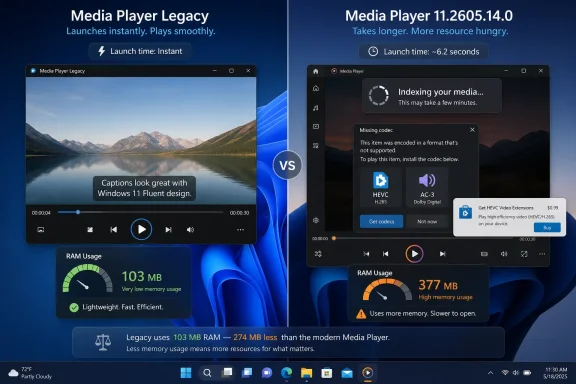
The reported memory comparison sharpens that perception. Tests cited in the latest coverage put the modern Media Player at roughly 377 MB of RAM while idle, compared with about 103 MB for Windows Media Player Legacy under similar conditions. On a high-end desktop, that difference is not a crisis. On principle, however, it is damning.
Windows users have been trained for years to accept that “modern” Windows apps often bring smoother visuals, better DPI behavior, sandboxing, and Store-based updates at the price of overhead. The question is whether the trade is visible to the user. In this case, the visible payoff is modest, and the old app still does the thing people came for.
That old design has plenty of baggage. Windows Media Player Legacy is not a model of modern accessibility, library ergonomics, or codec clarity. It belongs to a generation of Windows components that accumulated features, skins, sync workflows, CD ripping behaviors, and enterprise assumptions over many years.
Yet legacy software often wins because it has been forced through an unforgiving optimization filter. A local file player that survived across hardware generations had to launch quickly, keep state simply, and avoid surprising the user. Its shortcomings are familiar and, in many cases, worked around by muscle memory.
The modern Media Player is carrying a different burden. It has to look like Windows 11, behave like an app that can be serviced independently, fit into Microsoft’s accessibility framework, scan user libraries in a way that feels more like a contemporary media hub, and explain codec problems without exposing the full ugliness of Windows’ media stack. That makes it architecturally more ambitious, but ambition is not the same thing as speed.
This is the recurring Windows 11 problem in miniature. Microsoft is often correct about the direction of travel and careless about the last mile. Users do not reject modernization because they love old chrome; they reject modernization when it arrives slower, heavier, or less capable than what it replaces.
Modern Media Player, like many Windows 11 inbox apps, seems designed around the assumption that local media playback is only one part of a larger experience. The library matters. The queue matters. The app shell matters. The styling matters. The integration with system settings matters. All of that may be true, but none of it can come before file-open performance.
This distinction matters because local media playback is one of the few remaining areas where users still compare Windows directly with lightweight third-party tools. VLC, mpv, MPC-HC derivatives, and other players have trained power users to expect broad format support and fast launches without ceremony. Even casual users have learned that if the Windows app complains, VLC probably will not.
Microsoft’s app therefore competes in two directions at once. Against the old Windows Media Player, it must justify why a native replacement is heavier. Against third-party players, it must justify why a built-in app should be trusted with messy real-world files. Right now, it is not clearly winning either contest.
The Store-era Windows app model has never fully escaped this problem. It is excellent for distribution and servicing, but inbox utilities are emotionally judged as part of the operating system, not as optional apps. When Notepad is slow, Windows feels slow. When Photos is bloated, Windows feels bloated. When Media Player hesitates, the shell feels less immediate.
That is why this story is more than a RAM screenshot. It is another example of Microsoft asking users to accept that the future is less direct than the past.
On Windows 11, playback through Microsoft’s built-in path may require the HEVC Video Extensions package from the Microsoft Store, commonly sold for $0.99. A dollar is not much money. But the moment a user is asked to pay extra to play a video they recorded on their own device, the transaction feels absurd.
This is not simply cheap outrage. The Windows value proposition has always included an implicit promise of broad compatibility. Users pay for the PC, pay for Windows through the OEM license or retail channel, and reasonably assume that ordinary media files will play without a codec scavenger hunt.
Microsoft’s clearer missing-codec dialog in the Insider build is therefore a half-solution. It may reduce confusion, but it also makes the business decision more visible. A better error message does not make a missing capability feel less missing.
Then there is AC-3, the Dolby Digital codec removed from clean installations beginning with Windows 11 version 24H2. The change does not necessarily break every upgraded PC in the same way, because systems that already had codec support may retain it through the upgrade path. But the direction is clear: Windows is moving away from bundling some licensed media plumbing by default.
The technical case is understandable. Codec licensing is messy, usage patterns have changed, and many users never play local Dolby Digital files through Microsoft’s inbox apps. But Windows is not only a consumer streaming appliance. It is also a workstation, a home theater PC, a media archive machine, a school lab device, and a sysadmin’s “please just open the file” platform.
For some users, HEVC support arrives through device manufacturers. For others, it requires the Store extension. For others still, hardware decode may be present but app-level playback remains inconsistent. The result is a support matrix that ordinary people experience as randomness.
This randomness matters more than the price. If Windows consistently said, “This format requires this extension, and once installed it will work everywhere,” the annoyance would be containable. But codecs sit at the intersection of hardware acceleration, app frameworks, Media Foundation, Store licensing, OEM packages, and third-party software. The experience can vary by machine, Windows version, install history, and app.
That is why VLC’s reputation remains so durable. It does not win because it is prettier. It wins because users believe it will try to play the file. In local media, that confidence is worth more than platform-native styling.
Microsoft’s Media Player should have an advantage here. It ships with Windows, follows system accessibility settings, understands Windows libraries, and can be updated independently of major OS releases. But those advantages are undermined every time a common file hits a missing-codec wall.
For enterprise IT, the codec question is not just about movie night. Training videos, archived meeting exports, camera footage, compliance recordings, and vendor-provided media can all arrive in formats that do not map neatly to Microsoft’s default support. The more Windows delegates that support to optional Store packages, the more administrators must decide whether to standardize on Microsoft’s path or bypass it entirely.
That defense is valid but incomplete. Performance impressions harden early because they fit an existing narrative about Windows 11. Users already complain about heavier inbox apps, Start menu web integration, background services, and the sense that Microsoft prioritizes design systems and cloud hooks over local responsiveness.
When an Insider media app appears to use roughly three and a half times the idle RAM of its legacy counterpart, it becomes evidence in that larger trial. The precise number may shift across machines and builds, and memory usage alone is not a complete performance metric. But the story is sticky because it feels plausible.
Microsoft also has a communication problem. The release notes emphasize the improvements Microsoft wants to talk about: indexing visibility, subtitle settings, codec-message clarity. The community conversation focuses on what users feel: slower file opening, heavier idle footprint, paid extensions, and missing legacy codec support. Those are not contradictory narratives, but they are operating at different layers.
For Microsoft, the app is becoming more maintainable and more aligned with Windows 11. For users, the app is becoming a nicer-looking detour on the way to something that used to be instant. That gap is where Windows sentiment turns sour.
Insider builds can change, but they also reveal priorities. If performance is treated as a late-stage optimization pass rather than a foundational requirement, Microsoft will keep shipping apps that look finished before they feel finished.
Windows Media Player Legacy is part of that same pattern. It is officially old, aesthetically mismatched, and no longer the face Microsoft wants for media playback. Yet it remains useful because it is predictable.
This is not just nostalgia. Backward compatibility is Windows’ superpower and its curse. Microsoft cannot casually sever old pathways without breaking workflows that may be invisible from Redmond but critical in the field. The company’s best products often succeed when they respect that inheritance instead of pretending it no longer exists.
The danger for Windows 11 is that the operating system increasingly feels split between two philosophies. One says Windows is a mature platform whose strength is local control, compatibility, and directness. The other says Windows is a continuously serviced experience whose components should be modern, cloud-aware, Store-updated, and visually consistent. Users are not inherently opposed to the second philosophy, but they will not forgive it for degrading the first.
Media Player sits in that fracture. Microsoft wants it to be a polished Windows 11 app. Users want it to open their files. The second requirement is not optional.
If the old app remains the fastest answer, many users will simply keep using it. If third-party tools remain the most compatible answer, power users will keep installing them immediately after Windows setup. In both cases, Microsoft loses the default-app advantage it should own.
A missing codec is not like a missing font or an optional language pack. The user often does not know what codec the file uses, what container it is in, whether the problem is video, audio, DRM, hardware decode, or the app itself. They know only that the file does not play.
The Insider update’s clearer missing-codec message is therefore welcome, but it must be judged against the complexity behind it. A dialog can tell the user what to install, but it cannot erase the feeling that Windows has failed at a basic task. Nor can it guarantee that the Store path is available in managed environments, offline machines, or heavily restricted systems.
This matters in business settings because the Microsoft Store is often controlled, disabled, or mediated through enterprise policy. A home user may click through and spend a dollar. A corporate user may open a help-desk ticket. A school lab may simply fail. A kiosk or offline workstation may have no clean path at all.
The more Microsoft relies on Store-delivered codecs, the more it shifts the burden to administrators. They must preinstall packages, validate playback scenarios, document exceptions, and explain why the built-in player behaves differently across Windows versions. That is not modernization; it is operational tax.
Microsoft’s counterargument would be that serious media workflows should use serious media tools. Fair enough. But the inbox player is not just for serious workflows. It is the default fallback for ordinary files, and defaults are where platform trust is built or lost.
That inversion should bother Microsoft. The company owns the platform, the shell integration, the file associations, the accessibility hooks, and the update channel. It has every structural advantage except user confidence.
VLC’s interface is not a monument to modern design. mpv is famously austere. Neither tries to be the perfect Windows 11 showcase. They are trusted because they prize playback over presentation, and because their format support feels expansive rather than conditional.
Microsoft does not need to clone VLC. It does need to understand why users reach for it. The answer is not merely “free codecs.” It is that VLC behaves like a tool that assumes the user’s file is legitimate and worth attempting to play. Windows Media Player too often behaves like the user has brought it a licensing problem.
There is also a cultural component. Enthusiasts and IT pros have spent years building standard post-install routines around replacing Microsoft defaults. Browser, compression utility, terminal, image viewer, media player: the ritual varies, but the instinct is familiar. Each weak inbox app reinforces the habit.
A better Media Player could break that habit for casual playback. It does not need to satisfy every home-theater obsessive or archivist. But it must be fast, light enough not to invite ridicule, and broad enough in format handling that users do not immediately assume it will fail.
RAM usage is not inherently bad. Modern operating systems cache aggressively, apps preload components, and unused memory is not a moral victory. A richer app may reasonably consume more memory than a legacy binary. But users judge overhead by what they get in return.
In this case, the return is uneven. Better subtitle integration is good. Clearer codec errors are good. A more informative indexing banner is good. But none of those improvements explains why a simple local video should feel slower to start.
This is where Microsoft’s internal metrics may differ from user perception. The app may meet acceptable launch targets on reference hardware. It may perform well after warm start. It may use memory in ways Windows can reclaim under pressure. All of that can be technically true while the user experience still feels worse than the old tool.
The discipline Microsoft needs is not merely optimization but hierarchy. The first priority of Media Player must be playback immediacy. The second must be format clarity. The third can be library experience and interface polish. If that order is inverted, the app will continue to look modern and feel second-rate.
Windows enthusiasts are especially unforgiving here because they remember when Microsoft treated performance as a competitive weapon. The company does not have to return to a minimalist past. It does have to prove that modern Windows can still respect the click.
That includes the person opening a phone video on a family laptop. It includes a teacher playing a downloaded clip in a classroom. It includes an employee double-clicking a training file sent by a vendor. It includes a retiree with a folder of old camcorder footage. These users do not care whether the issue is HEVC, AC-3, Media Foundation, or a Store extension.
For them, the default player is Windows. If it fails, Windows fails. That is the burden of inbox software.
Microsoft has sometimes treated default apps as brand surfaces rather than trust surfaces. The difference is important. A brand surface shows the new design language. A trust surface quietly completes the task and disappears. Media Player should be the second kind.
There is still time for Microsoft to get this right before the Insider changes reach a wider audience. The company can profile cold-start behavior, reduce idle footprint, make codec acquisition less confusing, and ensure that file-open scenarios beat library theatrics. It can also be more honest about what Windows includes by default and what it no longer does.
The worst outcome would be to dismiss the criticism as enthusiast nitpicking. Enthusiasts are often noisy, but they are also early detectors of problems that later become mainstream annoyances. If they say the old player feels faster, Microsoft should treat that as a product requirement, not a vibes problem.
The practical read is straightforward:
The new Media Player has long been one of Windows 11’s quieter bets. It is not Copilot, not Recall, not the Start menu, not a headline feature in Microsoft’s AI-forward operating-system pitch. But it is exactly the sort of utility that shapes whether Windows feels coherent in daily use, and the current Insider build makes the wrong kind of case for modernity.
 Microsoft Polishes the Frame While the Old Engine Still Starts Faster
The Insider update itself is not trivial. Media Player 11.2605.14.0 adds a more explicit banner when the app is still indexing the user’s library, improves the messaging shown when a missing codec blocks playback, and ties subtitle appearance more closely to Windows’ system caption settings. These are sensible changes, particularly for accessibility and for users who have been left staring at opaque playback failures.That is why the backlash cuts deeper than a simple “new app bad, old app good” nostalgia loop. Microsoft is trying to make the app feel more integrated with Windows 11, more transparent about what it is doing, and less hostile when it fails. Those are the right goals.
But a media player is judged first by latency. It is one of the few desktop apps where the user’s expectation is still almost mechanical: invoke file, see picture, hear sound. If a legacy application can open the same local video almost immediately while the modern replacement hesitates, the modern app has already lost the argument in the user’s mind.
The reported memory comparison sharpens that perception. Tests cited in the latest coverage put the modern Media Player at roughly 377 MB of RAM while idle, compared with about 103 MB for Windows Media Player Legacy under similar conditions. On a high-end desktop, that difference is not a crisis. On principle, however, it is damning.
Windows users have been trained for years to accept that “modern” Windows apps often bring smoother visuals, better DPI behavior, sandboxing, and Store-based updates at the price of overhead. The question is whether the trade is visible to the user. In this case, the visible payoff is modest, and the old app still does the thing people came for.
The 17-Year-Old Comparison Is Crude, but It Lands
Calling Windows Media Player Legacy “17 years old” is a useful shorthand rather than a perfect product-history lesson. The classic lineage stretches back much further, and Windows Media Player 12 arrived with Windows 7 in 2009. What matters is that the old player represents a pre-Store, pre-Fluent, pre-Windows-as-a-service style of desktop software that Microsoft has spent the Windows 11 era trying to move beyond.That old design has plenty of baggage. Windows Media Player Legacy is not a model of modern accessibility, library ergonomics, or codec clarity. It belongs to a generation of Windows components that accumulated features, skins, sync workflows, CD ripping behaviors, and enterprise assumptions over many years.
Yet legacy software often wins because it has been forced through an unforgiving optimization filter. A local file player that survived across hardware generations had to launch quickly, keep state simply, and avoid surprising the user. Its shortcomings are familiar and, in many cases, worked around by muscle memory.
The modern Media Player is carrying a different burden. It has to look like Windows 11, behave like an app that can be serviced independently, fit into Microsoft’s accessibility framework, scan user libraries in a way that feels more like a contemporary media hub, and explain codec problems without exposing the full ugliness of Windows’ media stack. That makes it architecturally more ambitious, but ambition is not the same thing as speed.
This is the recurring Windows 11 problem in miniature. Microsoft is often correct about the direction of travel and careless about the last mile. Users do not reject modernization because they love old chrome; they reject modernization when it arrives slower, heavier, or less capable than what it replaces.
A Media Player Is Not Allowed to Feel Like a Portal
The central mistake is conceptual. A built-in media player should not feel like a portal, a catalog, or a service endpoint unless the user asks for those things. It should feel like a tool.Modern Media Player, like many Windows 11 inbox apps, seems designed around the assumption that local media playback is only one part of a larger experience. The library matters. The queue matters. The app shell matters. The styling matters. The integration with system settings matters. All of that may be true, but none of it can come before file-open performance.
This distinction matters because local media playback is one of the few remaining areas where users still compare Windows directly with lightweight third-party tools. VLC, mpv, MPC-HC derivatives, and other players have trained power users to expect broad format support and fast launches without ceremony. Even casual users have learned that if the Windows app complains, VLC probably will not.
Microsoft’s app therefore competes in two directions at once. Against the old Windows Media Player, it must justify why a native replacement is heavier. Against third-party players, it must justify why a built-in app should be trusted with messy real-world files. Right now, it is not clearly winning either contest.
The Store-era Windows app model has never fully escaped this problem. It is excellent for distribution and servicing, but inbox utilities are emotionally judged as part of the operating system, not as optional apps. When Notepad is slow, Windows feels slow. When Photos is bloated, Windows feels bloated. When Media Player hesitates, the shell feels less immediate.
That is why this story is more than a RAM screenshot. It is another example of Microsoft asking users to accept that the future is less direct than the past.
Codec Reality Keeps Puncturing Microsoft’s Simplicity Pitch
The codec issue is where the product story becomes genuinely user-hostile, even if Microsoft can point to licensing and modularity as rational explanations. HEVC, also known as H.265, is widely used by modern phones and cameras because it compresses high-quality video efficiently. It is exactly the kind of format a normal person may encounter after copying a video from a handset to a PC.On Windows 11, playback through Microsoft’s built-in path may require the HEVC Video Extensions package from the Microsoft Store, commonly sold for $0.99. A dollar is not much money. But the moment a user is asked to pay extra to play a video they recorded on their own device, the transaction feels absurd.
This is not simply cheap outrage. The Windows value proposition has always included an implicit promise of broad compatibility. Users pay for the PC, pay for Windows through the OEM license or retail channel, and reasonably assume that ordinary media files will play without a codec scavenger hunt.
Microsoft’s clearer missing-codec dialog in the Insider build is therefore a half-solution. It may reduce confusion, but it also makes the business decision more visible. A better error message does not make a missing capability feel less missing.
Then there is AC-3, the Dolby Digital codec removed from clean installations beginning with Windows 11 version 24H2. The change does not necessarily break every upgraded PC in the same way, because systems that already had codec support may retain it through the upgrade path. But the direction is clear: Windows is moving away from bundling some licensed media plumbing by default.
The technical case is understandable. Codec licensing is messy, usage patterns have changed, and many users never play local Dolby Digital files through Microsoft’s inbox apps. But Windows is not only a consumer streaming appliance. It is also a workstation, a home theater PC, a media archive machine, a school lab device, and a sysadmin’s “please just open the file” platform.
The Dollar Codec Is a Symbol, Not the Whole Problem
It would be easy to reduce the HEVC complaint to a joke about Microsoft charging ninety-nine cents in an age of trillion-dollar market capitalizations. That misses the deeper friction. The actual problem is that Windows has become less predictable about what “included” means.For some users, HEVC support arrives through device manufacturers. For others, it requires the Store extension. For others still, hardware decode may be present but app-level playback remains inconsistent. The result is a support matrix that ordinary people experience as randomness.
This randomness matters more than the price. If Windows consistently said, “This format requires this extension, and once installed it will work everywhere,” the annoyance would be containable. But codecs sit at the intersection of hardware acceleration, app frameworks, Media Foundation, Store licensing, OEM packages, and third-party software. The experience can vary by machine, Windows version, install history, and app.
That is why VLC’s reputation remains so durable. It does not win because it is prettier. It wins because users believe it will try to play the file. In local media, that confidence is worth more than platform-native styling.
Microsoft’s Media Player should have an advantage here. It ships with Windows, follows system accessibility settings, understands Windows libraries, and can be updated independently of major OS releases. But those advantages are undermined every time a common file hits a missing-codec wall.
For enterprise IT, the codec question is not just about movie night. Training videos, archived meeting exports, camera footage, compliance recordings, and vendor-provided media can all arrive in formats that do not map neatly to Microsoft’s default support. The more Windows delegates that support to optional Store packages, the more administrators must decide whether to standardize on Microsoft’s path or bypass it entirely.
Insider Builds Are for Testing, but Perception Hardens Early
Microsoft has one obvious defense: this version is in Insider Preview. The whole point of Insider channels is to expose changes before general release, gather feedback, and fix rough edges. Media Player 11.2605.14.0 is not necessarily the final form of whatever stable-channel users will receive.That defense is valid but incomplete. Performance impressions harden early because they fit an existing narrative about Windows 11. Users already complain about heavier inbox apps, Start menu web integration, background services, and the sense that Microsoft prioritizes design systems and cloud hooks over local responsiveness.
When an Insider media app appears to use roughly three and a half times the idle RAM of its legacy counterpart, it becomes evidence in that larger trial. The precise number may shift across machines and builds, and memory usage alone is not a complete performance metric. But the story is sticky because it feels plausible.
Microsoft also has a communication problem. The release notes emphasize the improvements Microsoft wants to talk about: indexing visibility, subtitle settings, codec-message clarity. The community conversation focuses on what users feel: slower file opening, heavier idle footprint, paid extensions, and missing legacy codec support. Those are not contradictory narratives, but they are operating at different layers.
For Microsoft, the app is becoming more maintainable and more aligned with Windows 11. For users, the app is becoming a nicer-looking detour on the way to something that used to be instant. That gap is where Windows sentiment turns sour.
Insider builds can change, but they also reveal priorities. If performance is treated as a late-stage optimization pass rather than a foundational requirement, Microsoft will keep shipping apps that look finished before they feel finished.
The Legacy App Survives Because Microsoft Still Needs It
One of the quiet ironies of modern Windows is that Microsoft often cannot remove the old thing because the new thing has not earned the right to replace it. Control Panel persists beside Settings. Old dialogs still surface beneath new shells. Win32 utilities remain indispensable even when Microsoft has built modern counterparts.Windows Media Player Legacy is part of that same pattern. It is officially old, aesthetically mismatched, and no longer the face Microsoft wants for media playback. Yet it remains useful because it is predictable.
This is not just nostalgia. Backward compatibility is Windows’ superpower and its curse. Microsoft cannot casually sever old pathways without breaking workflows that may be invisible from Redmond but critical in the field. The company’s best products often succeed when they respect that inheritance instead of pretending it no longer exists.
The danger for Windows 11 is that the operating system increasingly feels split between two philosophies. One says Windows is a mature platform whose strength is local control, compatibility, and directness. The other says Windows is a continuously serviced experience whose components should be modern, cloud-aware, Store-updated, and visually consistent. Users are not inherently opposed to the second philosophy, but they will not forgive it for degrading the first.
Media Player sits in that fracture. Microsoft wants it to be a polished Windows 11 app. Users want it to open their files. The second requirement is not optional.
If the old app remains the fastest answer, many users will simply keep using it. If third-party tools remain the most compatible answer, power users will keep installing them immediately after Windows setup. In both cases, Microsoft loses the default-app advantage it should own.
The Store Codec Model Turns Support Into a Scavenger Hunt
The Microsoft Store was supposed to make optional components easier to distribute. In theory, modular codec packages are a clean solution: do not burden every Windows installation with every licensed decoder, and let users install what they need. In practice, media playback is one of the worst places to expose modularity to normal users.A missing codec is not like a missing font or an optional language pack. The user often does not know what codec the file uses, what container it is in, whether the problem is video, audio, DRM, hardware decode, or the app itself. They know only that the file does not play.
The Insider update’s clearer missing-codec message is therefore welcome, but it must be judged against the complexity behind it. A dialog can tell the user what to install, but it cannot erase the feeling that Windows has failed at a basic task. Nor can it guarantee that the Store path is available in managed environments, offline machines, or heavily restricted systems.
This matters in business settings because the Microsoft Store is often controlled, disabled, or mediated through enterprise policy. A home user may click through and spend a dollar. A corporate user may open a help-desk ticket. A school lab may simply fail. A kiosk or offline workstation may have no clean path at all.
The more Microsoft relies on Store-delivered codecs, the more it shifts the burden to administrators. They must preinstall packages, validate playback scenarios, document exceptions, and explain why the built-in player behaves differently across Windows versions. That is not modernization; it is operational tax.
Microsoft’s counterargument would be that serious media workflows should use serious media tools. Fair enough. But the inbox player is not just for serious workflows. It is the default fallback for ordinary files, and defaults are where platform trust is built or lost.
VLC and mpv Are the Control Group Microsoft Cannot Ignore
Every Windows media complaint eventually arrives at the same answer: install VLC. More technical users may choose mpv, MPC-BE, PotPlayer, or another specialist tool, but the logic is the same. The third-party player is treated as the known-good baseline, while Microsoft’s own app becomes the thing to try only if it is already there.That inversion should bother Microsoft. The company owns the platform, the shell integration, the file associations, the accessibility hooks, and the update channel. It has every structural advantage except user confidence.
VLC’s interface is not a monument to modern design. mpv is famously austere. Neither tries to be the perfect Windows 11 showcase. They are trusted because they prize playback over presentation, and because their format support feels expansive rather than conditional.
Microsoft does not need to clone VLC. It does need to understand why users reach for it. The answer is not merely “free codecs.” It is that VLC behaves like a tool that assumes the user’s file is legitimate and worth attempting to play. Windows Media Player too often behaves like the user has brought it a licensing problem.
There is also a cultural component. Enthusiasts and IT pros have spent years building standard post-install routines around replacing Microsoft defaults. Browser, compression utility, terminal, image viewer, media player: the ritual varies, but the instinct is familiar. Each weak inbox app reinforces the habit.
A better Media Player could break that habit for casual playback. It does not need to satisfy every home-theater obsessive or archivist. But it must be fast, light enough not to invite ridicule, and broad enough in format handling that users do not immediately assume it will fail.
Performance Is a Feature, Not a Cleanup Task
Microsoft has spent much of the Windows 11 era talking about refinement, security, and AI-powered assistance. Those priorities may be strategically defensible, but they can crowd out the older virtue that made Windows indispensable: responsiveness across wildly different hardware. A media player that feels heavier than its predecessor becomes symbolic because it violates that old bargain.RAM usage is not inherently bad. Modern operating systems cache aggressively, apps preload components, and unused memory is not a moral victory. A richer app may reasonably consume more memory than a legacy binary. But users judge overhead by what they get in return.
In this case, the return is uneven. Better subtitle integration is good. Clearer codec errors are good. A more informative indexing banner is good. But none of those improvements explains why a simple local video should feel slower to start.
This is where Microsoft’s internal metrics may differ from user perception. The app may meet acceptable launch targets on reference hardware. It may perform well after warm start. It may use memory in ways Windows can reclaim under pressure. All of that can be technically true while the user experience still feels worse than the old tool.
The discipline Microsoft needs is not merely optimization but hierarchy. The first priority of Media Player must be playback immediacy. The second must be format clarity. The third can be library experience and interface polish. If that order is inverted, the app will continue to look modern and feel second-rate.
Windows enthusiasts are especially unforgiving here because they remember when Microsoft treated performance as a competitive weapon. The company does not have to return to a minimalist past. It does have to prove that modern Windows can still respect the click.
The Real Audience Is the User Who Never Changes Defaults
Power users will survive. They already know the alternatives, understand codec packs, and can route around Microsoft’s decisions within minutes. The users most affected by Media Player’s shortcomings are the ones who do not know why a file failed and do not want to learn.That includes the person opening a phone video on a family laptop. It includes a teacher playing a downloaded clip in a classroom. It includes an employee double-clicking a training file sent by a vendor. It includes a retiree with a folder of old camcorder footage. These users do not care whether the issue is HEVC, AC-3, Media Foundation, or a Store extension.
For them, the default player is Windows. If it fails, Windows fails. That is the burden of inbox software.
Microsoft has sometimes treated default apps as brand surfaces rather than trust surfaces. The difference is important. A brand surface shows the new design language. A trust surface quietly completes the task and disappears. Media Player should be the second kind.
There is still time for Microsoft to get this right before the Insider changes reach a wider audience. The company can profile cold-start behavior, reduce idle footprint, make codec acquisition less confusing, and ensure that file-open scenarios beat library theatrics. It can also be more honest about what Windows includes by default and what it no longer does.
The worst outcome would be to dismiss the criticism as enthusiast nitpicking. Enthusiasts are often noisy, but they are also early detectors of problems that later become mainstream annoyances. If they say the old player feels faster, Microsoft should treat that as a product requirement, not a vibes problem.
The File Still Has to Open Before the Future Can Arrive
Microsoft’s challenge is not to make the new Media Player identical to the old one. It is to make the modern app so obviously better that nobody reaches for the old one out of impatience. The latest Insider build shows useful movement, but it also exposes how far the app still has to go.The practical read is straightforward:
- Media Player version 11.2605.14.0 is currently an Insider Preview update, not a finished stable-channel verdict.
- The update improves subtitle behavior, library-indexing visibility, and missing-codec messaging, which are real quality-of-life changes.
- Reported testing shows the modern app using roughly 377 MB of idle RAM versus about 103 MB for Windows Media Player Legacy, making performance perception a serious problem even if the exact numbers vary.
- HEVC playback can still push users toward a paid Microsoft Store extension, which makes Windows feel less complete for common phone-recorded video.
- Windows 11 version 24H2’s removal of bundled AC-3 support on clean installs adds another compatibility wrinkle for local media and managed environments.
- VLC, mpv, and the classic Windows Media Player remain credible fallbacks because they satisfy the basic expectation that local files should open quickly and predictably.
References
- Primary source: zamin.uz
Published: 2026-06-22T23:10:36.377777
New Windows 11 Media Player App: Slower Than the 17-Year-Old Classic Player – Zamin.uz, 23.06.2026
Microsoft has introduced an Insider Preview version of the updated Media Player app for the Windows 11 operating system. However,… – Zamin.uz, 23.06.2026zamin.uz - Related coverage: gizmochina.com
Windows 11 24H2 will no longer support AC-3 audio codec (Dolby Digital) - Gizmochina
In a quarterly support document Microsoft has confirmed that starting from version 24H2, Windows 11 will no longer support the AC-3 audio codec. For those unfamiliar, it is an audio codec that supports multi-channel (“surround sound”) audio, which is also known as Dolby Digital. However, OEMs... www.gizmochina.com
- Related coverage: windowslatest.com
Microsoft confirms Windows 11 24H2 ditches AC-3 codec (Dolby Digital)
You won't be able to play AC-3 music in native Windows apps with Windows 11 24H2. The update won't include the AC-3 codec.www.windowslatest.com - Related coverage: pcworld.com
Dolby Digital audio support is disappearing from Windows 11 | PCWorld
If you need to reinstall Windows 11 from scratch, you can no longer play files with Dolby Digital's AC-3 codec.nwww.pcworld.com - Official source: learn.microsoft.com
Media Player release notes - Windows Insider Program | Microsoft Learn
Release notes for Media Player updates in Windows Insider builds.learn.microsoft.com - Related coverage: windowsreport.com
Microsoft confirms that Windows 11 24H2 will not have AC-3 codec
Microsoft updated the support page and confirms that starting from Windows 11 24H2, the AC-3 codec (Dolby Digital) is no longer included. windowsreport.com
- Related coverage: ghacks.net
Microsoft drops AC-3 (Dolby Digital) Codec support in Windows 11 version 24H2 - gHacks Tech News
Microsoft's Windows 11 operating system will not support the Ac-3 codec by default going forward, but there is a way to restore support.www.ghacks.net - Related coverage: solvemix.com
Windows 11 24H2 Drops AC-3 (Dolby Digital) Codec: Causes, Impact, and Solutions
Your go-to source for tech guides, how-tos, and the latest news. From smartphones and PCs to consoles and mobility—master your gear with our expert tips.www.solvemix.com
- Related coverage: pcgameshardware.de
- Related coverage: gamingdeputy.com
- Related coverage: spickipedia.com
AC-3 (Dolby Digital) Codec fehlt in Windows 11 24H2: Ursachen, Auswirkungen und Alternativen
Spickipedia bietet Ihnen wertvolle Tipps, Anleitungen und Informationen zu den Themen Smartphone, Computer, Mobilität und vielem mehr.www.spickipedia.com
- Related coverage: manilashaker.com
Windows 11 24H2 Will No Longer Support Dolby Digital (AC-3) – ManilaShaker Philippines | Tech Reviews, Comparisons, and News
Microsoft has announced that Windows 11 24H2 will stop supporting the AC-3 audio codec, known for providing surround sound and also referred to as Dolby Digital. OEMs, however, can still pre-install this codec. This means that you won’t be able to play files with the AC-3 codec using the...manilashaker.com - Related coverage: citimavis.weebly.com
- Related coverage: berrall.com
Microsoft reveals Windows 11’s Media Player isn’t dead, but Legacy still opens videos instantly - Peer Networks UK
Wales & West leading provider of PC repairs & IT support for home & business. Peer Networks delivers prompt, no fuss, PC repair services to customers.www.berrall.com
- Official source: microsoft.fandom.com
Media Player (Windows 11) | Microsoft Wiki | Fandom
Media Player, also referred to as Windows Media Player, is the default video and audio player for Windows 11 developed by Microsoft. It is the successor to Groove Music for Windows 10 (previously Xbox Music), Microsoft Movies & TV and Windows Media Player. It started to be offered to all...microsoft.fandom.com
- Related coverage: tomshardware.com
Windows Media Player’s ‘find album information’ functionality has been removed — you’ll have to find other software for playing and ripping CDs with relevant track information | Tom's Hardware
Even the new Media Player app in Windows 11 has the same issue as the Legacy version, with audio CDs.www.tomshardware.com - Related coverage: howtogeek.com
Windows 11’s Media Player Is Actually Good—Here's Why You Should Use It
It might be one of the best features in Windows 11. www.howtogeek.com
- Related coverage: techspot.com
Windows Media Player Download Free - 11.2604.10.0 | TechSpot
Download Windows Media Player - All-in-one media player that provides a great experience for discovering, playing, and taking your digital entertainment anywhere.www.techspot.com - Related coverage: oldversion.com
Download Old Versions of Windows Media Player - OldVersion.com
Windows media player is the evolutionary multimedia player from Microsoft renowned for its stability, ease of use, sleek user interface and support for a w...www.oldversion.com - Related coverage: moviemaker.minitool.com
Does Windows 11 Have Media Player & What Are They?
Does Windows 11 have a media player? Where is Windows Media Player in Windows 11? Get answers in this article!moviemaker.minitool.com
