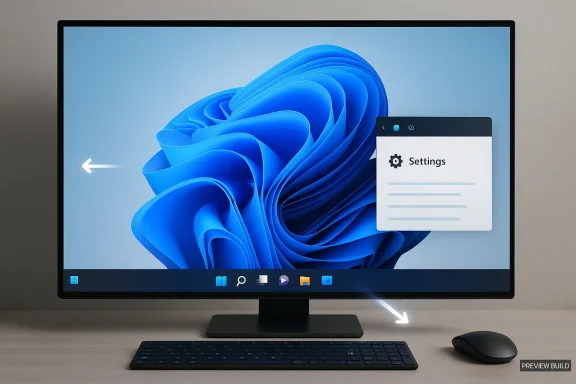
It took nearly five years, but Microsoft is finally moving to give Windows 11 users back one of the platform’s most-requested desktop controls: the ability to move, resize, and better tailor the Taskbar to the way they actually work. The change matters because it is not just a cosmetic tweak; it is a visible sign that Microsoft is rethinking the Windows 11 shell after years of criticism over rigidity, clutter, and missed expectations. Reporting in the uploaded material points to a broader course correction under Pavan Davuluri, with taskbar repositioning emerging as a top priority and resize behavior close behind, especially for users who want a more familiar, more efficient workspace.
Windows has always sold itself as the configurable desktop, not merely a launcher for apps. The Taskbar sat at the center of that promise for decades, letting users change placement, behavior, and density in ways that matched their monitor shape, workflow, and muscle memory. Windows 11 broke that continuity in 2021 by locking the bar to the bottom, centering the icons, and trimming away several behaviors that power users had taken for granted. That decision was presented as simplification, but for many longtime users it felt like a downgrade wrapped in a prettier interface.
That frustration lasted because the Taskbar is not a minor panel. It is the operating system’s control strip, status area, launch surface, and window-management anchor all at once. When Microsoft constrained it, the company changed the way people interacted with the desktop in a way that was immediately obvious, especially on ultrawide screens, portrait monitors, and multi-display setups. The criticism was not only about aesthetics; it was about control, efficiency, and the sense that Windows 11 had become more opinionated than its predecessors.
The current reversal is especially notable because it appears to be part of a larger reset. The uploaded reporting frames Microsoft’s Windows 11 strategy as a move toward less Copilot clutter, more control, and faster reliability, rather than a parade of new surface-level features. That includes not only the Taskbar, but also work on Start, Search, Widgets, File Explorer, and Windows Update. In other words, Microsoft seems to be correcting a pattern: Windows 11 looked modern, but it often behaved as if usability had been subordinated to design purity.
The historical context also matters because the Windows 11 Taskbar was shaped by ideas from the abandoned Windows 10X project. That project was aimed at a more constrained, touch-oriented future, and its influence explains why the Windows 11 shell felt cleaner but thinner. Microsoft’s mistake was assuming that cleaner automatically meant better. The backlash proved that many users define usability as the freedom to arrange the desktop around their work, not around Microsoft’s preferred layout.
This would make the shell more adaptable to different classes of hardware. On ultrawide monitors, a side or top taskbar can preserve more usable horizontal space. On portrait displays, side placement can make the entire desktop feel less cramped. On standard laptops, users may simply want the familiar bottom layout with less wasted room. The point is not that one layout wins; it is that Windows should stop assuming one answer fits everyone.
This also matters because many users want a visible Taskbar without a bulky one. Auto-hide has always been an option, but some people dislike having the bar disappear and reappear during work. A more compact Taskbar offers a middle ground: always available, but less intrusive. That is a better fit for power users, casual users, and anyone working on smaller screens.
The likely lesson is that the company is not simply restoring an old switch. It is trying to make the shell responsive to multiple form factors without creating a cascade of layout bugs. That is a harder problem than it looks, and it explains why this feature has taken so long to reappear. Small UI options are often expensive engineering problems disguised as simple settings.
That is why the change generated such a durable backlash in the first place. Power users built habits around Windows’ older flexibility, and Windows 11 disrupted those habits without offering a clear substitute. When a feature becomes muscle memory, removing it feels like taking away part of the interface contract.
That is why the return of repositioning is being framed as a repair rather than a novelty. Microsoft is not introducing a flashy new widget or AI flourish. It is restoring a basic sense of agency. That carries more weight than many new features because it signals that the company heard the complaint and decided the complaint was valid.
The bigger question is whether Microsoft can preserve visual consistency without flattening choice. That balance is delicate. Too much simplification can make the OS feel clean, but too little flexibility can make it feel patronizing. The Taskbar story is where that trade-off becomes impossible to ignore. The best desktop design is not the one with the fewest options; it is the one with the right options in the right places.
Microsoft is also likely trying to avoid the kind of layout instability that makes users regret getting a feature back. A broken Taskbar would be worse than a missing one because it would convert anticipation into frustration. So the company has to balance flexibility with consistency, and that is often where UI projects live or die. A feature that touches every pixel of the desktop cannot be treated like a toggle in isolation.
The upside is that a compact Taskbar can be genuinely useful on smaller laptops and denser displays. It helps users reclaim real estate without forcing them to hide the Taskbar entirely. That is a better compromise than auto-hide for many people because it respects both visibility and space.
Still, some enthusiasts will dislike losing the immediacy of drag-and-drop. For them, the setting should feel like a restoration of control, not a permission slip. The success of the feature will depend on whether Microsoft makes it easy to find, easy to understand, and hard to break.
Consumers also tend to judge operating system changes by immediacy. This is one of those updates that should be obvious within minutes of use. If Microsoft gets it right, users will not need a long marketing explanation to understand the value. They will simply see the bar move and feel the difference.
That flexibility matters even more in mixed-use households, where one PC may serve multiple people with different preferences. A change that looks cosmetic to one person may be the difference between a comfortable and an awkward daily workflow for someone else. This is one reason the Taskbar issue lasted so long in public discussion. The complaint was never only about power users; it was about fit.
That matters for perception as much as functionality. When users see Microsoft bringing back a beloved setting, they are more likely to believe other shell improvements will be judged against real-world habits instead of abstract design goals. That trust is hard to win back once it is lost.
From an IT perspective, fewer complaints about basic layout choices can translate into less distraction for support staff. Users are often more irritable about interface changes than vendors expect, especially when those changes break habits. Returning control to the user can reduce the number of low-value support calls and improve satisfaction at the margin.
The larger strategic point is that Microsoft seems to be trying to make Windows 11 feel more governable overall. The same material that discusses Taskbar flexibility also mentions trimming Copilot surfaces and improving Windows Update behavior, both of which are friendly to enterprise management. A quieter desktop is easier to support than a noisy one.
That is why enterprises should not dismiss this as a consumer-facing cosmetic repair. In modern Windows deployments, small shell choices can shape the user’s daily sense of whether the platform helps or hinders their work. Microsoft is learning that a respectful desktop often matters more than a flashy one.
Microsoft seems to know that now. Restoring Taskbar positioning is a way of saying that Windows 11 can still be tailored to workflow instead of forcing workflow to adapt to Windows. That may not dominate mainstream marketing, but it matters deeply in enthusiast and professional circles, which often shape the broader reputation of the platform.
That said, third-party tools will still have a role for edge cases and power users who want more than Microsoft is willing to provide natively. But if the built-in experience becomes good enough for most people, the ecosystem around it becomes less about rescue and more about enhancement. That is a much healthier place for Windows to be.
If Microsoft executes well, the return of Taskbar customization will be remembered as more than a feature restore. It will be seen as proof that Windows 11 can still mature, still listen, and still respect the people who rely on it every day. In a platform world increasingly crowded with automation and AI overlays, that kind of old-fashioned control may be the most modern move of all.
Source: Windows Report https://windowsreport.com/taskbar-c...ming-to-windows-11-heres-what-you-can-expect/
 Background
Windows has always sold itself as the configurable desktop, not merely a launcher for apps. The Taskbar sat at the center of that promise for decades, letting users change placement, behavior, and density in ways that matched their monitor shape, workflow, and muscle memory. Windows 11 broke that continuity in 2021 by locking the bar to the bottom, centering the icons, and trimming away several behaviors that power users had taken for granted. That decision was presented as simplification, but for many longtime users it felt like a downgrade wrapped in a prettier interface.That frustration lasted because the Taskbar is not a minor panel. It is the operating system’s control strip, status area, launch surface, and window-management anchor all at once. When Microsoft constrained it, the company changed the way people interacted with the desktop in a way that was immediately obvious, especially on ultrawide screens, portrait monitors, and multi-display setups. The criticism was not only about aesthetics; it was about control, efficiency, and the sense that Windows 11 had become more opinionated than its predecessors.
The current reversal is especially notable because it appears to be part of a larger reset. The uploaded reporting frames Microsoft’s Windows 11 strategy as a move toward less Copilot clutter, more control, and faster reliability, rather than a parade of new surface-level features. That includes not only the Taskbar, but also work on Start, Search, Widgets, File Explorer, and Windows Update. In other words, Microsoft seems to be correcting a pattern: Windows 11 looked modern, but it often behaved as if usability had been subordinated to design purity.
The historical context also matters because the Windows 11 Taskbar was shaped by ideas from the abandoned Windows 10X project. That project was aimed at a more constrained, touch-oriented future, and its influence explains why the Windows 11 shell felt cleaner but thinner. Microsoft’s mistake was assuming that cleaner automatically meant better. The backlash proved that many users define usability as the freedom to arrange the desktop around their work, not around Microsoft’s preferred layout.
What Microsoft Is Reportedly Changing
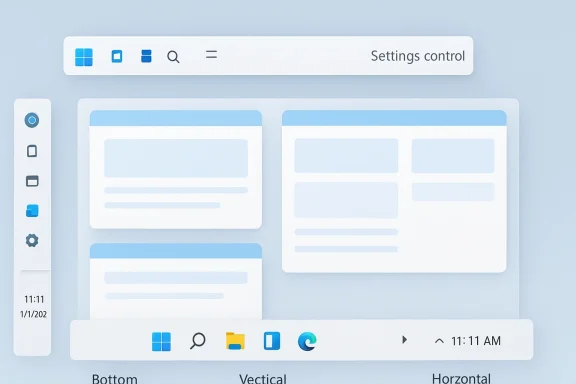
The headline change is straightforward: Taskbar repositioning is coming back, with support for placing the bar at the top, bottom, left, or right of the screen. The reporting also says that Microsoft is working on Taskbar resizing, with icon and bar dimensions shrinking in a manner similar to Windows 10, while date, time, and widget text collapse into a single line to preserve space. That combination is what makes the update more significant than a nostalgia play; it restores practical flexibility rather than merely recreating an old look.Placement and layout
The most important part is that the Taskbar is no longer expected to remain glued to the bottom edge forever. According to the uploaded reporting, Microsoft may allow placement changes through the Settings app rather than simple drag-and-drop, which would be a small but meaningful difference from Windows 10 behavior. That suggests Microsoft wants control over how the feature is exposed, even while restoring the flexibility itself.This would make the shell more adaptable to different classes of hardware. On ultrawide monitors, a side or top taskbar can preserve more usable horizontal space. On portrait displays, side placement can make the entire desktop feel less cramped. On standard laptops, users may simply want the familiar bottom layout with less wasted room. The point is not that one layout wins; it is that Windows should stop assuming one answer fits everyone.
Resizing and compact behavior
Resize support may turn out to be the quieter but more valuable enhancement. The report says the Taskbar’s height and icon size will shrink, and secondary details like time and widget text will collapse to a tighter format. That is the kind of UI refinement that only becomes obvious after a full day of use, when you realize the desktop no longer feels like it is wasting precious pixels.This also matters because many users want a visible Taskbar without a bulky one. Auto-hide has always been an option, but some people dislike having the bar disappear and reappear during work. A more compact Taskbar offers a middle ground: always available, but less intrusive. That is a better fit for power users, casual users, and anyone working on smaller screens.
Practical limits
There is one important limitation in the reporting: the search bar may not appear when the Taskbar is placed vertically because of space constraints. That sounds minor, but it tells you where the engineering difficulty lives. A vertical Taskbar touches multiple components of the shell, and Microsoft has to make Search, Quick Settings, Widgets, notifications, and Start all behave sensibly in every orientation.The likely lesson is that the company is not simply restoring an old switch. It is trying to make the shell responsive to multiple form factors without creating a cascade of layout bugs. That is a harder problem than it looks, and it explains why this feature has taken so long to reappear. Small UI options are often expensive engineering problems disguised as simple settings.
- Top, bottom, left, and right placement is the core promise.
- Compact sizing appears to be part of the rollout.
- Search may be limited on vertical layouts.
- Settings-based control is more likely than drag-and-drop.
- Layout adaptation will be critical for the rest of the shell.
Why the Taskbar Became a Symbol
The Taskbar is symbolic because it lives at the center of nearly everything people do on the Windows desktop. It handles switching apps, checking notifications, launching tools, and orienting the user on screen. When Microsoft locked it down, it did not merely remove a convenience feature; it altered the feel of the entire operating system.Workflow, not wallpaper
For many users, this is not about taste. It is about workflow geometry. A vertical Taskbar can improve reachability and preserve space for code, documents, timelines, or browser content. A top Taskbar can reduce visual travel for users who prefer older desktop conventions or who rely on a specific arrangement of windows and menus.That is why the change generated such a durable backlash in the first place. Power users built habits around Windows’ older flexibility, and Windows 11 disrupted those habits without offering a clear substitute. When a feature becomes muscle memory, removing it feels like taking away part of the interface contract.
Emotional attachment matters
There is also an emotional layer here. Windows customization has always been one of the platform’s defining traits, and the Taskbar sat right at the heart of that identity. People do not just like being able to move it; they expect the operating system to respect the fact that their desktop is personal territory.That is why the return of repositioning is being framed as a repair rather than a novelty. Microsoft is not introducing a flashy new widget or AI flourish. It is restoring a basic sense of agency. That carries more weight than many new features because it signals that the company heard the complaint and decided the complaint was valid.
The Windows 11 identity problem
Windows 11 has spent years trying to reconcile two identities: a modern consumer shell and a productivity platform for serious work. That tension is visible everywhere, from the centered Start menu to the simplified Taskbar to the repeated attempts to weave Copilot into daily use. The reported Taskbar changes suggest Microsoft is finally admitting that a polished shell and a flexible shell are not mutually exclusive.The bigger question is whether Microsoft can preserve visual consistency without flattening choice. That balance is delicate. Too much simplification can make the OS feel clean, but too little flexibility can make it feel patronizing. The Taskbar story is where that trade-off becomes impossible to ignore. The best desktop design is not the one with the fewest options; it is the one with the right options in the right places.
- The Taskbar controls daily navigation.
- Placement affects ergonomics and screen efficiency.
- The feature is tied to muscle memory built over years.
- Its removal became a symbol of rigidity in Windows 11.
- Its return signals a shift toward user control.
The Technical Challenge Behind the Feature
Restoring Taskbar positioning sounds easy until you remember how many surfaces depend on it. Microsoft has to make the Taskbar behave correctly with Start, Search, Widgets, Quick Settings, notifications, system trays, and various flyouts across different screen orientations. The uploaded reporting strongly suggests that layout adaptation is being built into the feature from the start, which is exactly what it should do if Microsoft wants this to feel native rather than patched in.Shell architecture and edge cases
A bottom-only Taskbar is simpler to engineer because the rest of the shell can assume a single geometry. Once the bar can move, every component has to know where to anchor, how to resize, and when to collapse text or icons. That is why details like the missing search bar in vertical mode matter; they are clues to the engineering compromises underneath the UI.Microsoft is also likely trying to avoid the kind of layout instability that makes users regret getting a feature back. A broken Taskbar would be worse than a missing one because it would convert anticipation into frustration. So the company has to balance flexibility with consistency, and that is often where UI projects live or die. A feature that touches every pixel of the desktop cannot be treated like a toggle in isolation.
Why resizing is harder than it sounds
Resize support creates its own complications. Changing bar height affects icon density, notification presentation, clock behavior, widget text, and the spacing of pinned apps. Once the bar becomes compact, Microsoft has to make sure the remaining controls are still legible, clickable, and accessible. That is easy to underestimate if you only look at screenshots.The upside is that a compact Taskbar can be genuinely useful on smaller laptops and denser displays. It helps users reclaim real estate without forcing them to hide the Taskbar entirely. That is a better compromise than auto-hide for many people because it respects both visibility and space.
Settings versus direct manipulation
The report’s suggestion that placement may be controlled through Settings instead of drag-and-drop is revealing. Microsoft may be trying to keep the shell predictable and reduce accidental changes, especially on touch-capable devices or systems where the Taskbar could otherwise be moved by mistake. That would be a trade-off, but not necessarily a bad one if the result is more stable behavior.Still, some enthusiasts will dislike losing the immediacy of drag-and-drop. For them, the setting should feel like a restoration of control, not a permission slip. The success of the feature will depend on whether Microsoft makes it easy to find, easy to understand, and hard to break.
- Edge-aware layouts are mandatory.
- Legibility becomes a design constraint in compact modes.
- The feature has to work across touch, mouse, and keyboard use.
- Stability will matter more than novelty.
- Settings simplicity may reduce accidental misconfiguration.
How This Affects Consumers
For consumers, the most obvious benefit is visual and practical relief. Users who have felt boxed in by Windows 11 will finally get back options that make the desktop feel personal again. That matters most for people on smaller laptops, ultrawide monitors, and mixed-use home systems where one layout cannot serve every task equally well.Everyday usability
A more compact Taskbar means less visual clutter. Repositioning means the OS can adapt to how someone naturally uses a screen instead of forcing everyone into the same layout. Those are small changes in isolation, but together they can make Windows 11 feel much less stubborn.Consumers also tend to judge operating system changes by immediacy. This is one of those updates that should be obvious within minutes of use. If Microsoft gets it right, users will not need a long marketing explanation to understand the value. They will simply see the bar move and feel the difference.
Accessibility and comfort
There is also an accessibility angle that should not be overlooked. Some users may find one Taskbar position easier to reach, easier to scan, or more comfortable over long sessions. The option itself is the accessibility win because it lets users decide which geometry works best for them.That flexibility matters even more in mixed-use households, where one PC may serve multiple people with different preferences. A change that looks cosmetic to one person may be the difference between a comfortable and an awkward daily workflow for someone else. This is one reason the Taskbar issue lasted so long in public discussion. The complaint was never only about power users; it was about fit.
A better story for Windows 11
The broader consumer story is that Microsoft may finally be learning that “modern” should not mean “less customizable.” Windows 11 launched with a sleek design language, but it often came at the cost of familiar behavior. Restoring Taskbar flexibility helps undo the impression that the company had confused simplification with improvement.That matters for perception as much as functionality. When users see Microsoft bringing back a beloved setting, they are more likely to believe other shell improvements will be judged against real-world habits instead of abstract design goals. That trust is hard to win back once it is lost.
- Better fit for small laptops and ultrawide screens.
- Less reliance on auto-hide workarounds.
- Improved comfort for users with specific muscle-memory habits.
- More intuitive desktop layout for households with mixed needs.
- Stronger confidence that Microsoft is listening.
Enterprise Impact Is Different, But Real
Enterprises will not celebrate this update for the same emotional reasons consumers will, but they still stand to benefit. IT departments care about supportability, predictability, and reducing the number of help desk tickets caused by user frustration. A Taskbar that can be shaped around the work environment is one less point of friction in standard desktop deployments.Supportability and standardization
A flexible Taskbar can help organizations with specialized hardware setups, including multi-monitor workstations, developers’ desks, trading floors, and design teams. It also helps environments where the same laptop might dock and undock often, because a screen layout that works on one setup may not work on another. That kind of adaptability is useful even if it is not dramatic.From an IT perspective, fewer complaints about basic layout choices can translate into less distraction for support staff. Users are often more irritable about interface changes than vendors expect, especially when those changes break habits. Returning control to the user can reduce the number of low-value support calls and improve satisfaction at the margin.
Policy and governance
Enterprise teams will also care about whether Microsoft exposes policy controls for the feature. If Taskbar placement can be standardized, companies may prefer that. If it is purely user-controlled, administrators will at least want clear documentation about what can and cannot be managed centrally. The uploaded reporting does not settle that question, so it remains an important thing to watch.The larger strategic point is that Microsoft seems to be trying to make Windows 11 feel more governable overall. The same material that discusses Taskbar flexibility also mentions trimming Copilot surfaces and improving Windows Update behavior, both of which are friendly to enterprise management. A quieter desktop is easier to support than a noisy one.
Business workflow and hybrid work
Hybrid work makes shell flexibility more important than it used to be. People now move between monitors, docking setups, and home-office arrangements constantly. A fixed Taskbar may look fine in a static demo, but it can become awkward when the same machine has to behave well in several different physical setups.That is why enterprises should not dismiss this as a consumer-facing cosmetic repair. In modern Windows deployments, small shell choices can shape the user’s daily sense of whether the platform helps or hinders their work. Microsoft is learning that a respectful desktop often matters more than a flashy one.
- Fewer basic layout complaints.
- Better support for docking and undocking workflows.
- Improved fit for specialized professional displays.
- Potentially stronger manageability if policies exist.
- A more predictable desktop experience for hybrid workers.
The Competitive Context
This change also lands in a more competitive environment than Windows 11 enjoyed at launch. Windows 10 support ended in October 2025, which means many holdouts who preferred the older Taskbar model have already had to move on. That gives Microsoft leverage, but it also makes every missing feature more visible because users have fewer alternatives inside the Windows family.The desktop wars are about feel
On the surface, this is just a UI option. In practice, it is a statement about how much control a desktop OS should give its users. macOS remains stable but opinionated. Linux desktops remain highly flexible but can be more complex. Windows has traditionally tried to sit in the middle, and when it leans too far toward rigidity, it risks losing the very flexibility that made it successful.Microsoft seems to know that now. Restoring Taskbar positioning is a way of saying that Windows 11 can still be tailored to workflow instead of forcing workflow to adapt to Windows. That may not dominate mainstream marketing, but it matters deeply in enthusiast and professional circles, which often shape the broader reputation of the platform.
Why third-party tools thrived
One reason this matters is that the missing feature created an opening for shell utilities and customization tools. When users have to lean on third-party software to recover a basic behavior, it becomes a sign that the native product has lost touch with its own base. Restoring the feature lowers the need for those workarounds and reasserts Microsoft’s control over the desktop experience.That said, third-party tools will still have a role for edge cases and power users who want more than Microsoft is willing to provide natively. But if the built-in experience becomes good enough for most people, the ecosystem around it becomes less about rescue and more about enhancement. That is a much healthier place for Windows to be.
A signal to rivals
There is also a signaling effect. Microsoft is showing that it can listen to complaints and reverse course when necessary, which is the opposite of the “we know better” posture that often irritates desktop users. In a world where productivity software, cloud services, and AI features are all competing for attention, a company still has to get the basics right. The Taskbar is basic, but that is why this move matters so much.- Windows is reaffirming its identity as a customizable desktop.
- Competitors cannot easily copy the emotional value of this change.
- Microsoft is trying to reduce the appeal of third-party shell fixes.
- The move strengthens the case for Windows in enterprise environments.
- It signals responsiveness at a time when platform loyalty is fragile.
Strengths and Opportunities
The biggest strength of this change is that it addresses a long-running complaint with a feature that users can understand instantly. Microsoft does not need to explain why the Taskbar matters; everyone who uses Windows already knows. That makes the feature unusually strong from a product and PR standpoint, especially because it restores trust rather than merely adding novelty.- Restores a core Windows behavior users expected.
- Improves workspace personalization.
- Supports ultrawide, portrait, and multi-monitor setups.
- Reduces the need for workarounds and shell tools.
- Fits a broader push toward performance and reliability.
- Helps Microsoft appear more responsive to feedback.
- Can make Windows 11 feel more mature and complete.
Risks and Concerns
The main risk is that Microsoft could deliver the feature in a limited, buggy, or inconsistent form. Taskbar behavior is deeply intertwined with the rest of the shell, so a partially working implementation could become a fresh source of frustration rather than a relief. That would be especially damaging because expectations are now high and the feature has already been delayed in the public mind for years.- Bugs across different display sizes could undermine trust.
- Vertical placement may create layout gaps or missing controls.
- Auto-hide and notification behavior could regress.
- Touch and tablet interactions may be harder to perfect.
- The rollout may be restricted to Insider builds for too long.
- Users may expect drag-and-drop and get only Settings-based control.
- Search or other features may remain incomplete on vertical bars.
Looking Ahead
The most likely path is that Microsoft will test the Taskbar changes in Insider builds first, then refine behavior before any wider release. That means users should expect iteration, not a perfect finished product on day one. The important question is whether Microsoft uses that testing period to make the feature feel native and coherent rather than merely present.What to watch next
- Insider build previews of Taskbar relocation
- Whether top and side placement both ship cleanly
- Any new compact-mode or icon-density settings
- How Search, Widgets, and Quick Settings adapt
- Whether Microsoft offers policy controls for enterprise management
- Whether the change arrives alongside broader shell simplification
- Whether Microsoft extends the same philosophy to other Windows 11 defaults
If Microsoft executes well, the return of Taskbar customization will be remembered as more than a feature restore. It will be seen as proof that Windows 11 can still mature, still listen, and still respect the people who rely on it every day. In a platform world increasingly crowded with automation and AI overlays, that kind of old-fashioned control may be the most modern move of all.
Source: Windows Report https://windowsreport.com/taskbar-c...ming-to-windows-11-heres-what-you-can-expect/