

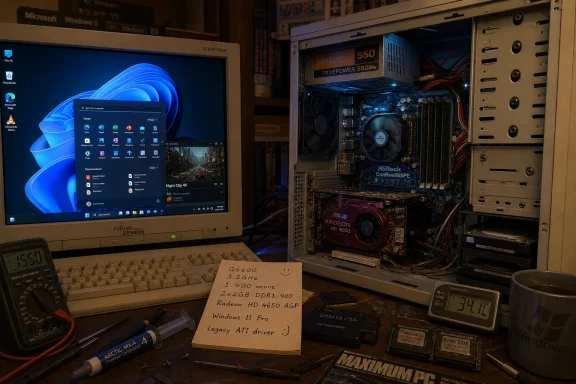
A Windows enthusiast known as O_MORES has demonstrated Windows 11 running on an ASRock ConRoe 865PE system with an Intel Core 2 Quad Q6600, DDR1 memory, and an AGP Radeon HD 4650, using Windows 11 IoT-era support paths and modified legacy graphics drivers. The stunt matters because it exposes a gap between Microsoft’s public Windows 11 hardware story and the operating system’s deeper technical inheritance. This is not proof that everyone should drag a 2000s box back into daily service. It is proof that Windows remains more adaptable than its own marketing suggests.
The Overclocking.com report is the kind of story PC people instinctively understand before they can justify it. A machine built around parts from several incompatible-looking eras — Core 2 Quad, DDR1, AGP graphics, BIOS firmware — should not be a natural home for Microsoft’s current desktop operating system. Yet there it is: Windows 11 booting, browsing, playing video, running benchmarks, and, inevitably, running Crysis.
The heart of the machine is Intel’s Core 2 Quad Q6600, a 2.4GHz Kentsfield-era chip introduced in January 2007. That places it well outside Microsoft’s mainstream Windows 11 CPU support list, which famously starts much later for consumer PCs. The Q6600 was a beloved overclocker’s part in its day, but in Microsoft’s official Windows 11 compatibility narrative, it belongs to the prehistory.
The rest of the platform makes the demonstration more interesting. The ASRock ConRoe 865PE is one of those strange transitional motherboards that could carry newer LGA775 processors while preserving older platform baggage such as DDR1 memory and AGP graphics. It was a bridge board when new, and in 2026 it has become a time machine.
That is why this is more than a “look, it boots” curiosity. Windows 11 is not merely tolerating an old CPU. It is functioning on a machine whose memory subsystem, graphics bus, firmware model, and driver stack all come from a different design age.
There was truth in that argument. A supported Windows 11 laptop with modern firmware, virtualization-based security, current drivers, and measured boot is a very different security object from a BIOS-era desktop assembled from parts bins. Enterprise IT wants predictable fleets, not heroic driver archaeology. Consumers want an update that works, not a forum thread with six registry edits and a prayer.
But the Q6600 build reminds us that “Windows 11 cannot run there” was never quite the same statement as “Windows 11 is not supported there.” Microsoft’s servicing, certification, and OEM ecosystem requirements are policy instruments as much as engineering limits. They define the PC Microsoft is willing to bless, not the absolute boundary of the NT kernel’s ability to execute code.
That distinction has always mattered to enthusiasts. Windows has decades of compatibility sediment built into it, and Microsoft’s own embedded and IoT editions routinely preserve support for use cases that consumer Windows leaves behind. Specialty devices, industrial systems, kiosks, and point-of-sale hardware do not move at the same pace as gaming laptops.
The twist is that enthusiasts have now learned to read those enterprise and IoT carveouts as a map. If Windows 11 IoT Enterprise LTSC can officially tolerate BIOS firmware in certain scenarios, then the consumer story that Windows 11 is inseparable from UEFI starts to look less like physics and more like product segmentation.
According to the report, the key to getting the system usable was forcing the legacy ATI driver stack into service. The latest applicable driver lineage dates from the Windows 7 and early Windows 8 era, long before Windows 11 and long after AGP had become a historical footnote. That is where the demonstration moves from “unsupported install” into genuine PC tinkering.
AGP support is not just a slot shape. It is a graphics path with its own assumptions about memory, bus behavior, chipset support, and driver interaction. Getting AGP 8X working well enough for hardware H.264 decoding on Windows 11 is not the kind of thing that happens because an installer forgot to check a box.
This is also where the demo earns its credibility. A desktop that boots to a wallpaper is cheap theater. A desktop that can use modern browsers, accelerate video playback, complete 3D benchmarks, and run games without immediate collapse is a much stronger claim. Stability, in the enthusiast sense, means the machine survives the tasks people actually use to expose weakness.
The important word is still “enough.” This does not turn a Radeon HD 4650 AGP into a modern graphics device. It does not produce contemporary DirectX 12 feature support, modern media-engine behavior, or a driver model maintained for today’s attack surface. It proves that the old path still has life in it, not that the old path should be reopened for everyone.
Windows 11 IoT Enterprise LTSC is aimed at specialized devices, not hobby desktops. Its hardware requirements and support assumptions differ from mainstream Windows 11 because its market differs. Embedded and fixed-function systems often need long lifecycles, stable images, and compatibility with hardware that would not survive a consumer PC refresh cycle.
That does not make a Core 2 Quad gaming box an official Windows 11 recommendation. It does, however, undermine the simplified version of the Windows 11 story many users absorbed: no modern CPU, no TPM, no UEFI, no Windows 11. The reality is more layered. Microsoft’s platform can still accommodate older boot models and less modern hardware when the business case says it should.
For administrators, that nuance is familiar. Microsoft often draws a bright line for consumer messaging and then maintains a more complicated matrix for enterprise deployment, embedded scenarios, and long-term servicing channels. The marketing version says “move forward.” The field engineering version says “here are the exceptions, constraints, and lifecycle implications.”
For enthusiasts, the IoT angle is an invitation. It suggests that Windows 11 is not a monolith but a family of operating-system configurations with different assumptions. Once that idea enters the bloodstream, the unsupported PC becomes less of an act of rebellion and more of an experiment in product boundaries.
Modern PCs are cleaner but less forgiving. Memory generations are more tightly coupled to platforms. Firmware assumptions are stronger. Security features are not optional ornaments so much as architectural dependencies for the way OEMs, Microsoft, and enterprises want machines managed.
That is why this build resonates. It comes from a time when the PC felt more like a collection of negotiated interfaces than a sealed compliance object. AGP, DDR1, BIOS, LGA775, and a quad-core CPU all coexist because the platform industry had not yet sanded away every rough edge.
There is nostalgia in that, but also a practical lesson. Transitional hardware survives because it was designed to absorb change. The ConRoe 865PE did not know about Windows 11, but it did know how to live between eras. In 2026, that turns out to be a more valuable trait than anyone designing for 2006 likely imagined.
A Q6600 can still perform basic computing tasks if paired with enough memory and a tolerable storage device. Web browsing, light office work, old games, and retro benchmarking are not impossible. Windows itself has become heavier over the years, but it has not become so alien that a 64-bit quad-core CPU cannot participate at all.
The practical limits arrive quickly. Modern web pages are bloated. Current browser engines consume memory aggressively. Security software, background services, telemetry components, and update processes all assume far more headroom than a DDR1-era board was designed to provide. Even if the CPU can cope, the system as a whole is constantly negotiating scarcity.
Then there is the driver problem. A GPU driver from the early 2010s running on a modern OS is not a comfortable long-term security posture. Legacy drivers can be functional without being robust against today’s threat model. Unsupported does not merely mean “Microsoft will not help you.” It often means “nobody is engineering this path with current risk in mind.”
That distinction matters for WindowsForum readers. As a lab build, this is delightful. As a daily driver for banking, work credentials, or production administration, it is a bad idea unless isolated and understood. The same ingenuity that makes the project impressive also makes it unsuitable for casual replication.
The Core 2 Quad demo does not refute that strategy. It does not show that old BIOS systems are just as secure as modern hardware. It does not show that TPM requirements are pointless. It shows that Microsoft’s security baseline is a chosen deployment standard, not an execution prerequisite for every Windows 11 code path.
That may sound like a lawyerly distinction, but it is central to the Windows 11 debate. Microsoft wants a mass-market fleet where modern protections are assumed. Enthusiasts want the freedom to make informed tradeoffs. Enterprise IT wants both: strict baselines for managed endpoints and enough flexibility to support weird edge cases without rewriting the business.
The danger is that Microsoft’s public messaging can blur supportability, security, and technical possibility into one blob. When enthusiasts later demonstrate that the OS runs on hardware Microsoft excludes, some users conclude the requirements were fake. That is too simplistic. A bridge can hold one person walking across it and still be a poor public highway.
The better critique is that Microsoft has not always communicated the tradeoff clearly. Unsupported hardware may run Windows 11. It may even run it well. But it is outside the intended servicing, security, driver, and reliability model that Microsoft wants to normalize.
That makes Windows uniquely fertile ground. Linux has long been the obvious answer for reviving older hardware, and in many cases it remains the better one. But Windows carries the cultural weight of old PC games, familiar tools, DirectX-era nostalgia, and the peculiar thrill of making Microsoft’s newest desktop run where it has no business running.
There is also a preservation angle. Hardware like AGP Radeon cards and DDR1 motherboards will not last forever. Demonstrations like this document not just that the parts still function, but that the software ecosystem can still be coerced into recognizing them. That is valuable even when it has no practical deployment case.
The project also highlights how much of PC history lives in drivers. CPUs get the glory, but compatibility is often won or lost in storage controllers, chipsets, graphics stacks, and firmware assumptions. A working Windows 11 desktop on this machine is a chain of old interfaces still shaking hands across two decades.
But the choice is apt. Crysis belongs to the same cultural universe as the Q6600: late-2000s PC ambition, heat, noise, overclocking forums, GPU anxiety, and the belief that tomorrow’s games would justify today’s ridiculous build. Seeing it run under Windows 11 on an AGP card is a neat collapse of eras.
Benchmarks serve a similar role. They are not just performance measurements here; they are proof of system coherence. If a machine can initialize the GPU properly, sustain a 3D workload, handle memory pressure, and avoid driver crashes, it has cleared a meaningful bar for such an unnatural configuration.
The browser demo may actually be more impressive in practical terms. Modern browsers are among the harshest everyday workloads for old systems. They combine graphics acceleration, media decoding, encryption, JavaScript engines, sandboxing, and memory appetite in one constantly changing package. If a DDR1 machine can browse tolerably, that tells us more about day-to-day viability than a nostalgic game does.
Still, the game matters because PC culture is not purely rational. This project is not an enterprise white paper. It is a reminder that computers are also toys, puzzles, and arguments waiting to happen.
Manufacturing systems, lab equipment, signage, medical-adjacent devices, and industrial controllers often sit outside the consumer refresh fantasy. They may be tied to hardware interfaces that vanished from mainstream PCs years ago. They may need security isolation more than feature velocity. They may run one application for a decade.
That world is why Windows IoT exists. It is not meant to be a loophole for home users who dislike TPM requirements. It is meant to support constrained, purpose-built deployments where the hardware and software stack are validated as a unit. The difference is governance.
The enthusiast build borrows the technical opening without the enterprise discipline. That is fine for a hobby project. It is dangerous if mistaken for an operational recommendation. In a managed environment, the question is not merely “does it boot?” It is “who owns the risk when it fails, and how will we patch, monitor, isolate, and replace it?”
Microsoft’s rationale was not baseless. The PC ecosystem needed a stronger security baseline, and drawing that line at Windows 11 gave OEMs and enterprises a forcing function. But the company’s messaging often sounded more absolute than the engineering reality justified.
Projects like this reopen that wound. If Windows 11 can run on a BIOS-era, DDR1, AGP-equipped machine, users naturally ask why their far newer systems were excluded. The answer — support policy, security baselines, driver certification, reliability telemetry, OEM accountability — is valid but unsatisfying when the excluded machine appears technically capable.
Microsoft’s challenge is that enthusiasts are very good at finding counterexamples. A single weird build does not invalidate a platform policy, but it can puncture a slogan. Once punctured, the slogan must be replaced with a more honest explanation.
That explanation should be simple: Windows 11 can run on more hardware than Microsoft supports, but Microsoft is designing the supported Windows 11 ecosystem around modern security and management assumptions. That sentence would not end the argument, but it would improve it.
That layering is why Windows is frustrating. It is also why Windows is resilient. The same accumulated complexity that makes the platform difficult to simplify allows a 2026 operating system to cooperate with a 2007 CPU, a 2008 AGP GPU, and a memory standard from the early 2000s.
Apple would never permit this kind of mess in the same way. Many Linux distributions would make the machine useful with less drama, but without the same cultural contradiction. Windows is the only major desktop platform where the vendor can insist on modernity while the codebase quietly remembers how to speak to ghosts.
That contradiction has defined Windows for decades. Microsoft wants to move the ecosystem forward. Users want their old things to keep working. Hardware vendors move on. Drivers disappear. Somewhere in the middle, an enthusiast finds a way to make an obsolete graphics card decode H.264 under Windows 11.
 The Old PC Did Not Beat Windows 11 So Much as Find Its Side Door
The Overclocking.com report is the kind of story PC people instinctively understand before they can justify it. A machine built around parts from several incompatible-looking eras — Core 2 Quad, DDR1, AGP graphics, BIOS firmware — should not be a natural home for Microsoft’s current desktop operating system. Yet there it is: Windows 11 booting, browsing, playing video, running benchmarks, and, inevitably, running Crysis.The heart of the machine is Intel’s Core 2 Quad Q6600, a 2.4GHz Kentsfield-era chip introduced in January 2007. That places it well outside Microsoft’s mainstream Windows 11 CPU support list, which famously starts much later for consumer PCs. The Q6600 was a beloved overclocker’s part in its day, but in Microsoft’s official Windows 11 compatibility narrative, it belongs to the prehistory.
The rest of the platform makes the demonstration more interesting. The ASRock ConRoe 865PE is one of those strange transitional motherboards that could carry newer LGA775 processors while preserving older platform baggage such as DDR1 memory and AGP graphics. It was a bridge board when new, and in 2026 it has become a time machine.
That is why this is more than a “look, it boots” curiosity. Windows 11 is not merely tolerating an old CPU. It is functioning on a machine whose memory subsystem, graphics bus, firmware model, and driver stack all come from a different design age.
Microsoft’s Hardware Line Was Always Policy Wearing a Technical Hat
When Windows 11 launched, Microsoft framed its hardware requirements around security, reliability, and performance. TPM 2.0, Secure Boot, supported CPUs, modern firmware, and newer graphics capabilities were not presented as arbitrary gates. They were presented as the baseline for a safer and more predictable Windows PC.There was truth in that argument. A supported Windows 11 laptop with modern firmware, virtualization-based security, current drivers, and measured boot is a very different security object from a BIOS-era desktop assembled from parts bins. Enterprise IT wants predictable fleets, not heroic driver archaeology. Consumers want an update that works, not a forum thread with six registry edits and a prayer.
But the Q6600 build reminds us that “Windows 11 cannot run there” was never quite the same statement as “Windows 11 is not supported there.” Microsoft’s servicing, certification, and OEM ecosystem requirements are policy instruments as much as engineering limits. They define the PC Microsoft is willing to bless, not the absolute boundary of the NT kernel’s ability to execute code.
That distinction has always mattered to enthusiasts. Windows has decades of compatibility sediment built into it, and Microsoft’s own embedded and IoT editions routinely preserve support for use cases that consumer Windows leaves behind. Specialty devices, industrial systems, kiosks, and point-of-sale hardware do not move at the same pace as gaming laptops.
The twist is that enthusiasts have now learned to read those enterprise and IoT carveouts as a map. If Windows 11 IoT Enterprise LTSC can officially tolerate BIOS firmware in certain scenarios, then the consumer story that Windows 11 is inseparable from UEFI starts to look less like physics and more like product segmentation.
The Graphics Driver Was the Real Boss Fight
The CPU is the headline, but the Radeon HD 4650 AGP is the more revealing component. Old processors age gracefully if the instruction set is sufficient and expectations are reasonable. Old GPUs, especially on obsolete buses, age into driver purgatory.According to the report, the key to getting the system usable was forcing the legacy ATI driver stack into service. The latest applicable driver lineage dates from the Windows 7 and early Windows 8 era, long before Windows 11 and long after AGP had become a historical footnote. That is where the demonstration moves from “unsupported install” into genuine PC tinkering.
AGP support is not just a slot shape. It is a graphics path with its own assumptions about memory, bus behavior, chipset support, and driver interaction. Getting AGP 8X working well enough for hardware H.264 decoding on Windows 11 is not the kind of thing that happens because an installer forgot to check a box.
This is also where the demo earns its credibility. A desktop that boots to a wallpaper is cheap theater. A desktop that can use modern browsers, accelerate video playback, complete 3D benchmarks, and run games without immediate collapse is a much stronger claim. Stability, in the enthusiast sense, means the machine survives the tasks people actually use to expose weakness.
The important word is still “enough.” This does not turn a Radeon HD 4650 AGP into a modern graphics device. It does not produce contemporary DirectX 12 feature support, modern media-engine behavior, or a driver model maintained for today’s attack surface. It proves that the old path still has life in it, not that the old path should be reopened for everyone.
Windows 11 IoT Makes the Stunt Less Magical and More Awkward for Microsoft
The most uncomfortable part of the story for Microsoft is not that someone bypassed a check. It is that Windows 11’s own product family contains a legitimate route for some of what the consumer edition publicly discourages.Windows 11 IoT Enterprise LTSC is aimed at specialized devices, not hobby desktops. Its hardware requirements and support assumptions differ from mainstream Windows 11 because its market differs. Embedded and fixed-function systems often need long lifecycles, stable images, and compatibility with hardware that would not survive a consumer PC refresh cycle.
That does not make a Core 2 Quad gaming box an official Windows 11 recommendation. It does, however, undermine the simplified version of the Windows 11 story many users absorbed: no modern CPU, no TPM, no UEFI, no Windows 11. The reality is more layered. Microsoft’s platform can still accommodate older boot models and less modern hardware when the business case says it should.
For administrators, that nuance is familiar. Microsoft often draws a bright line for consumer messaging and then maintains a more complicated matrix for enterprise deployment, embedded scenarios, and long-term servicing channels. The marketing version says “move forward.” The field engineering version says “here are the exceptions, constraints, and lifecycle implications.”
For enthusiasts, the IoT angle is an invitation. It suggests that Windows 11 is not a monolith but a family of operating-system configurations with different assumptions. Once that idea enters the bloodstream, the unsupported PC becomes less of an act of rebellion and more of an experiment in product boundaries.
The Demo Is a Love Letter to Transitional Hardware
The ASRock ConRoe 865PE is doing a lot of symbolic work here. It represents a period when PC platform transitions were messy, generous, and often weird. Users could sometimes keep their old memory, keep their graphics card, and still jump to a newer CPU generation if a motherboard vendor was bold enough to make the bridge.Modern PCs are cleaner but less forgiving. Memory generations are more tightly coupled to platforms. Firmware assumptions are stronger. Security features are not optional ornaments so much as architectural dependencies for the way OEMs, Microsoft, and enterprises want machines managed.
That is why this build resonates. It comes from a time when the PC felt more like a collection of negotiated interfaces than a sealed compliance object. AGP, DDR1, BIOS, LGA775, and a quad-core CPU all coexist because the platform industry had not yet sanded away every rough edge.
There is nostalgia in that, but also a practical lesson. Transitional hardware survives because it was designed to absorb change. The ConRoe 865PE did not know about Windows 11, but it did know how to live between eras. In 2026, that turns out to be a more valuable trait than anyone designing for 2006 likely imagined.
Smooth Is Not the Same as Sensible
The phrase “runs great” does a lot of work in enthusiast culture. It can mean “I would use this every day.” It can also mean “I expected smoke and got a desktop.” In this case, the more responsible reading is that Windows 11 runs impressively well given the absurdity of the platform.A Q6600 can still perform basic computing tasks if paired with enough memory and a tolerable storage device. Web browsing, light office work, old games, and retro benchmarking are not impossible. Windows itself has become heavier over the years, but it has not become so alien that a 64-bit quad-core CPU cannot participate at all.
The practical limits arrive quickly. Modern web pages are bloated. Current browser engines consume memory aggressively. Security software, background services, telemetry components, and update processes all assume far more headroom than a DDR1-era board was designed to provide. Even if the CPU can cope, the system as a whole is constantly negotiating scarcity.
Then there is the driver problem. A GPU driver from the early 2010s running on a modern OS is not a comfortable long-term security posture. Legacy drivers can be functional without being robust against today’s threat model. Unsupported does not merely mean “Microsoft will not help you.” It often means “nobody is engineering this path with current risk in mind.”
That distinction matters for WindowsForum readers. As a lab build, this is delightful. As a daily driver for banking, work credentials, or production administration, it is a bad idea unless isolated and understood. The same ingenuity that makes the project impressive also makes it unsuitable for casual replication.
The Security Argument Survives, but It Looks Less Absolute
Microsoft’s Windows 11 hardware requirements were never only about whether the operating system could paint pixels on a screen. They were about raising the default security floor for the Windows ecosystem. TPM-backed identity, Secure Boot, virtualization-based security, and newer driver expectations are part of that broader strategy.The Core 2 Quad demo does not refute that strategy. It does not show that old BIOS systems are just as secure as modern hardware. It does not show that TPM requirements are pointless. It shows that Microsoft’s security baseline is a chosen deployment standard, not an execution prerequisite for every Windows 11 code path.
That may sound like a lawyerly distinction, but it is central to the Windows 11 debate. Microsoft wants a mass-market fleet where modern protections are assumed. Enthusiasts want the freedom to make informed tradeoffs. Enterprise IT wants both: strict baselines for managed endpoints and enough flexibility to support weird edge cases without rewriting the business.
The danger is that Microsoft’s public messaging can blur supportability, security, and technical possibility into one blob. When enthusiasts later demonstrate that the OS runs on hardware Microsoft excludes, some users conclude the requirements were fake. That is too simplistic. A bridge can hold one person walking across it and still be a poor public highway.
The better critique is that Microsoft has not always communicated the tradeoff clearly. Unsupported hardware may run Windows 11. It may even run it well. But it is outside the intended servicing, security, driver, and reliability model that Microsoft wants to normalize.
Retro Windows Has Become Its Own Discipline
There is now a recognizable genre of Windows experimentation: modern OS, improbable hardware, just enough driver surgery to make it sing. It overlaps with retrocomputing, but it is not the same. Retrocomputing often preserves the original software environment. This kind of project asks how far forward old hardware can be dragged before the chain snaps.That makes Windows uniquely fertile ground. Linux has long been the obvious answer for reviving older hardware, and in many cases it remains the better one. But Windows carries the cultural weight of old PC games, familiar tools, DirectX-era nostalgia, and the peculiar thrill of making Microsoft’s newest desktop run where it has no business running.
There is also a preservation angle. Hardware like AGP Radeon cards and DDR1 motherboards will not last forever. Demonstrations like this document not just that the parts still function, but that the software ecosystem can still be coerced into recognizing them. That is valuable even when it has no practical deployment case.
The project also highlights how much of PC history lives in drivers. CPUs get the glory, but compatibility is often won or lost in storage controllers, chipsets, graphics stacks, and firmware assumptions. A working Windows 11 desktop on this machine is a chain of old interfaces still shaking hands across two decades.
The Crysis Punchline Still Works Because the PC Never Stopped Being Funny
Of course it runs Crysis. It almost has to. The meme has outlived the hardware generation that created it, and at this point “Can it run Crysis?” is less a benchmark than a ritual.But the choice is apt. Crysis belongs to the same cultural universe as the Q6600: late-2000s PC ambition, heat, noise, overclocking forums, GPU anxiety, and the belief that tomorrow’s games would justify today’s ridiculous build. Seeing it run under Windows 11 on an AGP card is a neat collapse of eras.
Benchmarks serve a similar role. They are not just performance measurements here; they are proof of system coherence. If a machine can initialize the GPU properly, sustain a 3D workload, handle memory pressure, and avoid driver crashes, it has cleared a meaningful bar for such an unnatural configuration.
The browser demo may actually be more impressive in practical terms. Modern browsers are among the harshest everyday workloads for old systems. They combine graphics acceleration, media decoding, encryption, JavaScript engines, sandboxing, and memory appetite in one constantly changing package. If a DDR1 machine can browse tolerably, that tells us more about day-to-day viability than a nostalgic game does.
Still, the game matters because PC culture is not purely rational. This project is not an enterprise white paper. It is a reminder that computers are also toys, puzzles, and arguments waiting to happen.
The Lesson for Admins Is Not “Deploy This,” It Is “Know the Exception Path”
For sysadmins, the immediate response should not be to inventory AGP machines for Windows 11 upgrades. It should be to notice how Microsoft’s platform exceptions behave and where they might matter. IoT, LTSC, embedded licensing, and specialized device support are not trivia; they are where real organizations sometimes live.Manufacturing systems, lab equipment, signage, medical-adjacent devices, and industrial controllers often sit outside the consumer refresh fantasy. They may be tied to hardware interfaces that vanished from mainstream PCs years ago. They may need security isolation more than feature velocity. They may run one application for a decade.
That world is why Windows IoT exists. It is not meant to be a loophole for home users who dislike TPM requirements. It is meant to support constrained, purpose-built deployments where the hardware and software stack are validated as a unit. The difference is governance.
The enthusiast build borrows the technical opening without the enterprise discipline. That is fine for a hobby project. It is dangerous if mistaken for an operational recommendation. In a managed environment, the question is not merely “does it boot?” It is “who owns the risk when it fails, and how will we patch, monitor, isolate, and replace it?”
Microsoft Still Has a Communication Problem With Old PCs
The Windows 11 launch left a bruise because it turned hardware compatibility into a trust issue. Many PCs that felt fast enough were declared unsupported. Users who had treated Windows upgrades as mostly software decisions suddenly found themselves negotiating firmware acronyms and CPU generation charts.Microsoft’s rationale was not baseless. The PC ecosystem needed a stronger security baseline, and drawing that line at Windows 11 gave OEMs and enterprises a forcing function. But the company’s messaging often sounded more absolute than the engineering reality justified.
Projects like this reopen that wound. If Windows 11 can run on a BIOS-era, DDR1, AGP-equipped machine, users naturally ask why their far newer systems were excluded. The answer — support policy, security baselines, driver certification, reliability telemetry, OEM accountability — is valid but unsatisfying when the excluded machine appears technically capable.
Microsoft’s challenge is that enthusiasts are very good at finding counterexamples. A single weird build does not invalidate a platform policy, but it can puncture a slogan. Once punctured, the slogan must be replaced with a more honest explanation.
That explanation should be simple: Windows 11 can run on more hardware than Microsoft supports, but Microsoft is designing the supported Windows 11 ecosystem around modern security and management assumptions. That sentence would not end the argument, but it would improve it.
This Tiny Time Capsule Says More About Windows Than About the Q6600
The Q6600 deserves its victory lap, but the more interesting protagonist is Windows itself. The operating system remains a layered artifact: modern shell, old kernel decisions, compatibility glue, enterprise exceptions, consumer policy, embedded pathways, and driver fossils all stacked together.That layering is why Windows is frustrating. It is also why Windows is resilient. The same accumulated complexity that makes the platform difficult to simplify allows a 2026 operating system to cooperate with a 2007 CPU, a 2008 AGP GPU, and a memory standard from the early 2000s.
Apple would never permit this kind of mess in the same way. Many Linux distributions would make the machine useful with less drama, but without the same cultural contradiction. Windows is the only major desktop platform where the vendor can insist on modernity while the codebase quietly remembers how to speak to ghosts.
That contradiction has defined Windows for decades. Microsoft wants to move the ecosystem forward. Users want their old things to keep working. Hardware vendors move on. Drivers disappear. Somewhere in the middle, an enthusiast finds a way to make an obsolete graphics card decode H.264 under Windows 11.
The Q6600 Box Wins the Argument Only If We Grade the Right Test
The concrete lesson is not that Windows 11’s requirements are meaningless. It is that the requirements are a support and security boundary, not a perfect map of technical possibility. That distinction is where the whole story lives.- Windows 11 can be made to run on hardware far older than Microsoft’s mainstream compatibility lists suggest.
- The ASRock ConRoe 865PE matters because it bridges Core 2-era CPUs with DDR1 memory and AGP graphics, making it unusually suited to this kind of stunt.
- The hardest part of the build appears to be graphics support, especially forcing a legacy Radeon HD 4650 AGP driver stack to behave under a modern operating system.
- Windows 11 IoT Enterprise LTSC helps explain why BIOS-era support paths still exist, even though they are not aimed at ordinary consumer desktops.
- The project is a triumph for enthusiasts and preservationists, but it is not a sensible security model for everyday production computing.
- Microsoft’s public Windows 11 hardware story would be stronger if it more clearly separated “unsupported” from “impossible.”
References
- Primary source: Overclocking.com
Published: Mon, 29 Jun 2026 12:27:29 GMT
- Related coverage: tomshardware.com
RAM crisis provokes enthusiast to try Windows 11 on DDR1-era hardware — other key vintage components included the Core 2 Q6600 and ATI Radeon HD 4650 AGP | Tom's Hardware
'The best part,' says our hacky hero. 'It's completely stable.'www.tomshardware.com - Related coverage: pchardware.org
Intel Core 2 Quad Q6600 — Processors — pchardware.org
Intel Core 2 Quad Q6600 processor: quad-core, 2.4 GHz, 8 MB L2 cache, LGA 775, 105 W TDP, released 2007. Learn about this desktop CPU.pchardware.org - Official source: learn.microsoft.com
Minimum System Requirements - Windows IoT Enterprise | Microsoft Learn
Learn about the minimum system requirements for Windows IoT Enterprise.learn.microsoft.com - Related coverage: theregister.com
- Related coverage: bit-tech.net
Intel unveils Core 2 Quad Q6600 | bit-tech.net
Intel has unveiled its second quad-core processor for desktop PCs this morning. The Core 2 Quad Q6600 has a 266MHz lower clock speed than the QX6700, which translates into lower power consumption.bit-tech.net
- Related coverage: computerwoche.de
Vierkerner günstiger: Neuer Core 2 Quad Q6600 im Test | Computerwoche
Nach dem teuren Core 2 Extreme QX6700 bringt Intel mit dem Core 2 Quad Q6600 eine günstigere Vierkern-CPU für Desktop-PCs. Statt 2,66 GHz müssen nun 2,40 GHz Taktfrequenz genügen. Doch selbst damit enteilt die CPU den Dual-Core-Modellen. www.computerwoche.de
- Related coverage: hartware.de
Neue Quad-Core CPUs von Intel – Hartware
 www.hartware.de
- Related coverage: engadget.com
Intel's Core 2 Quad launched -- right in time for Macworld
Intel just spat out their first Core 2 Quad branded processors right on schedule and just hours before Macworld... hmm. As the name implies, Intel packs in 4 cores per processor. Three new quad-core processors were released today, one for desktops and two for entry-level servers. The 2.4GHz Core...www.engadget.com - Related coverage: computerworld.com
Beyond Dual Core: 2007 Desktop CPU Road Map – Computerworld
Based upon the confidential road maps of both Intel and AMD, it's clear that dual-core CPUs are only the launching point for the future of the microprocessor. What advances will 2007 bring to desktop CPUs? www.computerworld.com
- Related coverage: arrow.com