

Windows 11 can be made to run with apparent stability on a DDR1-era desktop built around Intel’s 2006 Core 2 Quad Q6600, an ASRock ConRoe865PE motherboard, 3GB of RAM, and an AGP Radeon HD 4650, provided the installer checks and missing legacy graphics support are worked around. The stunt is not a recommendation, and Microsoft would not call the machine supported in any meaningful sense. But it is a useful reminder that the line between “unsupported,” “unusable,” and “impossible” has never been as clean as the Windows 11 requirements dialog suggests.
The most interesting part of this experiment is not that someone bypassed Windows 11’s installation checks. That has been possible since the operating system’s early public life, and it has become a kind of folk practice among Windows enthusiasts: a registry tweak here, a custom installer there, Rufus doing what Microsoft would rather Setup did not do.
What makes this case different is the sheer archaeological distance between the hardware and the OS. This is not a seventh-generation Core i7 laptop being rejected because it missed Microsoft’s blessed CPU list by a year. It is a platform stitched together from the transition era between old and modern PC design: DDR1 memory, AGP graphics, an Intel 865-series chipset lineage, and a Core 2 Quad that arrived long before TPM 2.0 became part of the everyday Windows vocabulary.
That combination makes the result more revealing than a simple “Windows 11 runs on old PC” headline. It shows that a large part of Windows’ compatibility story still comes from deep layers of inherited engineering, not from the marketing matrix used to sell the current generation of hardware. Windows 11 is heavier than Windows 7, more security-conscious than Windows XP, and much more bound to Microsoft’s modern servicing model than either. Yet underneath, the NT platform still has a stubborn ability to tolerate hardware that should have vanished from the conversation years ago.
The catch is that this tolerance is increasingly accidental. It exists until one kernel assumption, one graphics driver dependency, or one CPU instruction requirement turns a hackable obstacle into a brick wall.
Windows 11 broke that rhythm by making platform eligibility part of the product’s identity. Microsoft said the new floor was about security, reliability, and a modern driver baseline. Critics heard a different message: millions of still-functional machines had been reclassified as e-waste-adjacent because they did not fit a policy line.
Both readings contain truth. Microsoft had real reasons to want newer CPUs, hardware-backed security, virtualization-based protections, and a cleaner driver universe. The modern threat environment is not kind to sentimental compatibility, and Windows remains too large a target to pretend otherwise. But the Omores experiment underscores the other side of the argument: Microsoft’s official boundary is not the same as the operating system’s raw technical boundary.
A Core 2 Quad Q6600 is nowhere near the official Windows 11 CPU list. A DDR1 motherboard with AGP graphics is beyond the unsupported category and into retro-computing territory. Yet Windows 11 version 23H2 can be coaxed into behaving on it, not merely displaying a desktop before collapsing under its own ambition.
That distinction matters because “unsupported” has become a slippery word in the Windows 11 era. Sometimes it means Microsoft will not help you. Sometimes it means Windows Update may withhold something. Sometimes it means performance, security, or driver behavior is unpredictable. And, increasingly, sometimes it means the OS simply will not boot.
By the time Windows 11 arrived, AGP was not merely old; it was outside the assumptions of the contemporary driver stack. The Radeon HD 4650 AGP used in the experiment was one of the last meaningful graphics cards released for the interface, but even that makes it a relic by modern standards. The GPU itself is more capable than many integrated chips from its era, but the bus it hangs from needs legacy plumbing that modern Windows builds no longer provide out of the box.
That missing piece is the Graphics Address Remapping Table driver support needed for proper AGP acceleration. Without it, an AGP graphics card may still appear, may still display an image, and may even tempt the user into thinking the job is done. But hardware acceleration can fail, Device Manager may throw a Code 43, and the machine effectively becomes a museum display with a modern Start menu.
The reported workaround involved extracting Intel’s old AGP440 driver from an early Windows 10 release and pairing it with a modified INF so Windows 11 would recognize the chipset path correctly. Then AMD’s final 64-bit Catalyst AGP driver package from 2012 could do the GPU-side work. That is not a normal installation process; it is restoration work.
It also clarifies why “Windows supports old hardware” is only half true. Windows may still contain enough architectural flexibility to run on strange platforms, but the ecosystem around it has moved on. Drivers, firmware conventions, installer assumptions, servicing decisions, and graphics APIs all become failure points. The operating system can be willing while the platform around it refuses to cooperate.
But stability is a different metric from speed. The noteworthy claim from the experiment is that the system was not merely bootable but usable. Hardware-accelerated H.264 playback reportedly worked. Firefox benefited from GPU assistance. Legacy games and applications ran without major graphical disasters. 3DMark 2001 completed, which is exactly the sort of benchmark that fits the absurdity of the setup.
That is the part that should make Windows veterans smile. A contemporary Windows 11 desktop stack, bent around a 2003-class motherboard architecture and an AGP graphics card, still managed to behave. It is not efficient, and it is not supported, but it is recognizably Windows doing the thing Windows has always been weirdly good at: dragging the past forward by sheer compatibility inertia.
There is a practical lesson here for IT professionals, even if none of them should deploy such a machine. Stability on unsupported hardware is not binary. A machine can be stable for one user’s workload and unacceptable for another’s. It can play old games and decode video while still being a poor candidate for security-sensitive work, managed enterprise fleets, or anything that depends on predictable servicing.
That nuance is often lost in the Windows 11 requirements debate. Enthusiasts see a successful boot and declare Microsoft’s requirements arbitrary. Microsoft sees an unsupported system and wants no part of the downstream risk. Both sides are describing different kinds of truth.
With 24H2, Microsoft introduced a hard CPU instruction requirement around SSE4.2 and POPCNT support. This is not the same kind of gate as a TPM check that can be bypassed during setup. If the operating system expects an instruction the processor cannot execute, the old bypass game stops working. The failure moves from policy to physics.
That leaves Core 2-era systems in a peculiar historical pocket. Windows 11 23H2 can be made to run on some of them if the user is determined enough and the driver story works out. Windows 11 24H2 and later are a different matter. For CPUs without the necessary instruction support, there is no clean registry edit that transforms silicon into something it is not.
This distinction will matter more as Windows 11 ages. Microsoft’s original hardware requirements were controversial because they rejected many machines that seemed entirely capable of running the OS. The 24H2 instruction requirement is narrower but more final. It turns some very old unsupported systems from “not approved” into “not viable.”
That is a meaningful shift in the Windows compatibility saga. The Windows ecosystem has long tolerated soft boundaries, where determined users could proceed at their own risk. Hard architectural dependencies are different. They do not care how experienced the user is, how clever the installer is, or how passionately someone believes a Core 2 Quad deserves one more tour of duty.
But the same experiment also makes Microsoft’s case in a less obvious way. Getting this machine to work required bypassed checks, old driver extraction, modified INF handling, and a willingness to accept performance and servicing compromises. That is an enthusiast’s Saturday afternoon, not an enterprise support model. Microsoft cannot build a mainstream OS policy around the assumption that users will spelunk through legacy driver packages to resurrect AGP acceleration.
The better criticism is not that Microsoft should support everything that can boot. It is that Microsoft’s communication has often blurred the difference between practical support policy and actual technical capability. Windows 11’s supported CPU list was presented as a quality and security line, but enthusiasts have repeatedly shown that the OS can run outside that line with few immediate consequences on some systems.
That gap breeds mistrust. When users see a machine work despite being told it is unsuitable, they become more likely to doubt the next warning, even when the next warning is real. The 24H2 SSE4.2 cutoff is precisely the kind of warning that should be taken seriously, but it arrives after years of compatibility messaging that many power users learned to route around.
Microsoft’s problem is not that it set a floor. Every platform eventually must. The problem is that Windows has a uniquely long tail, and the company is still learning how to move that tail without making enthusiasts feel deceived and administrators feel cornered.
Unsupported systems may miss features, receive inconsistent upgrade paths, or encounter driver issues that never get triaged. Security features that Microsoft expects to be present may be absent or disabled. Firmware may be long abandoned. A graphics driver from 2012 can be historically interesting and operationally useful, but no admin should confuse it with a maintained component in a defensible endpoint strategy.
That does not mean every unsupported Windows 11 install is immediately reckless. A home lab box, an offline retro gaming setup, or a tinkering machine has a different risk profile from a laptop carrying work credentials. But Windows 11’s modern identity is tied to security posture, and old platforms often lack the hardware roots that make that posture credible.
This is where the enthusiast story and the enterprise story diverge. Enthusiasts prize agency: the right to try, to tweak, to learn, to keep old machines useful. Enterprises prize predictability: known-good configurations, patch compliance, driver support, auditability, and vendor accountability. Windows 11’s requirements controversy persists because Microsoft has to serve both cultures with one product.
The Omores build belongs firmly to the enthusiast side. It is a demonstration of skill and persistence, not a deployment template. Its value is not that businesses should reconsider AGP. Its value is that it exposes where Windows’ old compatibility DNA still lives—and where Microsoft is deliberately letting parts of it die.
That split creates two Windows 11 realities. One is the formal operating system that can technically run on low-end hardware, sometimes far below what anyone would enjoy using. The other is the platform Microsoft increasingly wants to sell: Copilot+ PCs, local AI features, better video effects, recall-style indexing concepts, and hardware acceleration beyond the CPU and GPU model of old.
Against that backdrop, a DDR1 Windows 11 machine feels almost satirical. It satisfies none of the future-facing Windows narrative. It has no NPU, no modern firmware security story, no contemporary bus architecture, and barely enough memory to keep the modern web comfortable. Yet it can still run the same branded operating system, at least up to the 23H2 generation.
This is not unique to Microsoft. Every mature platform carries old assumptions while trying to sell a new future. Apple solves the problem by cutting hardware generations more aggressively. Linux solves it by distributing the burden across kernels, desktops, drivers, and communities. Windows tries to preserve broad compatibility while also imposing a managed baseline, and the result is often messy.
The messiness is part of the PC’s identity. A machine like this could exist only because the PC ecosystem was modular, transitional, and weird. A motherboard that paired Core 2 processors with DDR1 and AGP was already a bridge product in its own time. Running Windows 11 on it simply extends that bridge far beyond its intended span.
Windows history is not just made of official releases. It is made of drivers, chipsets, firmware bugs, motherboard oddities, GPU control panels, DirectX versions, installer behaviors, and all the undocumented assumptions that made one build work and another fail. When enthusiasts document how to restore AGP acceleration in a modern Windows environment, they are preserving operational knowledge that vendors have long since discarded.
That matters because old PCs are not merely obsolete appliances. They are software environments. A late AGP system can represent an entire era of games, benchmarks, media codecs, expansion cards, BIOS behavior, and driver models. Running Windows 11 on such a machine is absurd from a productivity standpoint, but valuable as an exploration of continuity.
It also highlights how fragile that continuity is. One missing driver can erase acceleration. One unsigned component can complicate installation. One CPU instruction requirement can end the road permanently. The closer Windows gets to modern hardware assumptions, the more these edge cases will depend on community memory rather than vendor support.
The Windows enthusiast community has always lived in that space. It is why obscure forum threads, archived driver packages, and one-person experiments can matter years later. Today’s odd workaround may become tomorrow’s only known path for keeping a particular hardware configuration alive.
Windows 11 is where that myth starts to fracture. The installer checks were the first visible crack, but they were negotiable. The 24H2 CPU instruction floor is more consequential because it is not asking whether Microsoft approves of the machine. It is asking whether the processor can execute the code.
That is a healthier boundary in one sense. A hard technical requirement is less ambiguous than a support list. Users may dislike it, but there is less room for pretending that a missing instruction set is merely a bureaucratic inconvenience. If the kernel or core system components depend on an operation the CPU lacks, the debate changes.
Still, Microsoft should be careful about how many different kinds of “no” it puts under the same unsupported umbrella. A TPM bypass, a CPU list mismatch, a missing NPU, an old graphics driver, and a nonexistent instruction set are not the same problem. Treating them as one broad compatibility failure makes Windows feel more arbitrary than it needs to.
The Omores experiment succeeds partly because it lives just before the hard wall. It is a final performance by a class of hardware that can still negotiate with Windows 11 23H2 if the right legacy pieces are supplied. With 24H2, that negotiation ends for this generation of machines.
The practical lessons are narrower and more useful than the spectacle suggests.
Windows 11 running on a DDR1-and-AGP relic is delightful because it feels like the old PC world refusing to leave the stage, but it also marks the edge of that world more clearly than Microsoft’s marketing ever could. The next phase of Windows will be defined less by whether enthusiasts can dodge setup checks and more by whether aging hardware can satisfy assumptions now baked into the platform itself. That will make the surviving hacks more impressive, the unsupported installs more fragile, and the boundary between retro fun and practical computing harder to ignore.
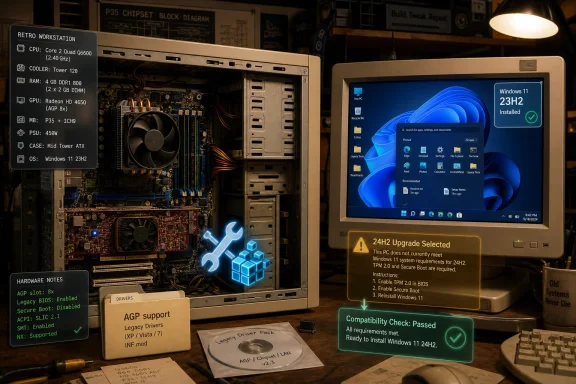 The Real Story Is Not That Windows 11 Booted
The most interesting part of this experiment is not that someone bypassed Windows 11’s installation checks. That has been possible since the operating system’s early public life, and it has become a kind of folk practice among Windows enthusiasts: a registry tweak here, a custom installer there, Rufus doing what Microsoft would rather Setup did not do.What makes this case different is the sheer archaeological distance between the hardware and the OS. This is not a seventh-generation Core i7 laptop being rejected because it missed Microsoft’s blessed CPU list by a year. It is a platform stitched together from the transition era between old and modern PC design: DDR1 memory, AGP graphics, an Intel 865-series chipset lineage, and a Core 2 Quad that arrived long before TPM 2.0 became part of the everyday Windows vocabulary.
That combination makes the result more revealing than a simple “Windows 11 runs on old PC” headline. It shows that a large part of Windows’ compatibility story still comes from deep layers of inherited engineering, not from the marketing matrix used to sell the current generation of hardware. Windows 11 is heavier than Windows 7, more security-conscious than Windows XP, and much more bound to Microsoft’s modern servicing model than either. Yet underneath, the NT platform still has a stubborn ability to tolerate hardware that should have vanished from the conversation years ago.
The catch is that this tolerance is increasingly accidental. It exists until one kernel assumption, one graphics driver dependency, or one CPU instruction requirement turns a hackable obstacle into a brick wall.
Microsoft Drew a Support Boundary, Not a Physics Boundary
Windows 11’s launch controversy was never only about TPM 2.0 or Secure Boot. It was about Microsoft changing the emotional contract of Windows compatibility. For decades, the PC bargain was simple: if the machine was vaguely capable and the drivers could be found, Windows would probably install.Windows 11 broke that rhythm by making platform eligibility part of the product’s identity. Microsoft said the new floor was about security, reliability, and a modern driver baseline. Critics heard a different message: millions of still-functional machines had been reclassified as e-waste-adjacent because they did not fit a policy line.
Both readings contain truth. Microsoft had real reasons to want newer CPUs, hardware-backed security, virtualization-based protections, and a cleaner driver universe. The modern threat environment is not kind to sentimental compatibility, and Windows remains too large a target to pretend otherwise. But the Omores experiment underscores the other side of the argument: Microsoft’s official boundary is not the same as the operating system’s raw technical boundary.
A Core 2 Quad Q6600 is nowhere near the official Windows 11 CPU list. A DDR1 motherboard with AGP graphics is beyond the unsupported category and into retro-computing territory. Yet Windows 11 version 23H2 can be coaxed into behaving on it, not merely displaying a desktop before collapsing under its own ambition.
That distinction matters because “unsupported” has become a slippery word in the Windows 11 era. Sometimes it means Microsoft will not help you. Sometimes it means Windows Update may withhold something. Sometimes it means performance, security, or driver behavior is unpredictable. And, increasingly, sometimes it means the OS simply will not boot.
The AGP Driver Detour Shows Where Compatibility Really Breaks
The graphics subsystem is where this experiment stops being a parlor trick and starts becoming a Windows history lesson. AGP, or Accelerated Graphics Port, was the dominant graphics interface before PCI Express took over. It was designed for a very different era of GPU memory management and chipset behavior.By the time Windows 11 arrived, AGP was not merely old; it was outside the assumptions of the contemporary driver stack. The Radeon HD 4650 AGP used in the experiment was one of the last meaningful graphics cards released for the interface, but even that makes it a relic by modern standards. The GPU itself is more capable than many integrated chips from its era, but the bus it hangs from needs legacy plumbing that modern Windows builds no longer provide out of the box.
That missing piece is the Graphics Address Remapping Table driver support needed for proper AGP acceleration. Without it, an AGP graphics card may still appear, may still display an image, and may even tempt the user into thinking the job is done. But hardware acceleration can fail, Device Manager may throw a Code 43, and the machine effectively becomes a museum display with a modern Start menu.
The reported workaround involved extracting Intel’s old AGP440 driver from an early Windows 10 release and pairing it with a modified INF so Windows 11 would recognize the chipset path correctly. Then AMD’s final 64-bit Catalyst AGP driver package from 2012 could do the GPU-side work. That is not a normal installation process; it is restoration work.
It also clarifies why “Windows supports old hardware” is only half true. Windows may still contain enough architectural flexibility to run on strange platforms, but the ecosystem around it has moved on. Drivers, firmware conventions, installer assumptions, servicing decisions, and graphics APIs all become failure points. The operating system can be willing while the platform around it refuses to cooperate.
The Surprise Is Stability, Not Speed
No one should confuse this result with performance parity. Windows 7 is the natural operating system for a machine like this if the goal is period-correct responsiveness, legacy driver support, and lower overhead. Windows 11 brings a heavier shell, more services, a modern browser environment that expects more memory, and a software ecosystem built around assumptions that 3GB of DDR1 cannot comfortably satisfy.But stability is a different metric from speed. The noteworthy claim from the experiment is that the system was not merely bootable but usable. Hardware-accelerated H.264 playback reportedly worked. Firefox benefited from GPU assistance. Legacy games and applications ran without major graphical disasters. 3DMark 2001 completed, which is exactly the sort of benchmark that fits the absurdity of the setup.
That is the part that should make Windows veterans smile. A contemporary Windows 11 desktop stack, bent around a 2003-class motherboard architecture and an AGP graphics card, still managed to behave. It is not efficient, and it is not supported, but it is recognizably Windows doing the thing Windows has always been weirdly good at: dragging the past forward by sheer compatibility inertia.
There is a practical lesson here for IT professionals, even if none of them should deploy such a machine. Stability on unsupported hardware is not binary. A machine can be stable for one user’s workload and unacceptable for another’s. It can play old games and decode video while still being a poor candidate for security-sensitive work, managed enterprise fleets, or anything that depends on predictable servicing.
That nuance is often lost in the Windows 11 requirements debate. Enthusiasts see a successful boot and declare Microsoft’s requirements arbitrary. Microsoft sees an unsupported system and wants no part of the downstream risk. Both sides are describing different kinds of truth.
The 24H2 Wall Changes the Meaning of Unsupported
The experiment’s most important limit is not the AGP driver hack. It is Windows 11 version 24H2.With 24H2, Microsoft introduced a hard CPU instruction requirement around SSE4.2 and POPCNT support. This is not the same kind of gate as a TPM check that can be bypassed during setup. If the operating system expects an instruction the processor cannot execute, the old bypass game stops working. The failure moves from policy to physics.
That leaves Core 2-era systems in a peculiar historical pocket. Windows 11 23H2 can be made to run on some of them if the user is determined enough and the driver story works out. Windows 11 24H2 and later are a different matter. For CPUs without the necessary instruction support, there is no clean registry edit that transforms silicon into something it is not.
This distinction will matter more as Windows 11 ages. Microsoft’s original hardware requirements were controversial because they rejected many machines that seemed entirely capable of running the OS. The 24H2 instruction requirement is narrower but more final. It turns some very old unsupported systems from “not approved” into “not viable.”
That is a meaningful shift in the Windows compatibility saga. The Windows ecosystem has long tolerated soft boundaries, where determined users could proceed at their own risk. Hard architectural dependencies are different. They do not care how experienced the user is, how clever the installer is, or how passionately someone believes a Core 2 Quad deserves one more tour of duty.
The Experiment Accidentally Defends Microsoft and Undermines It
At first glance, this retro Windows 11 build looks like an argument against Microsoft’s strict requirements. If an AGP-era platform with 3GB of DDR1 can run the OS, surely a 2017 business desktop with TPM quirks should not be treated as radioactive. The emotional force of that argument is real, especially for users who watched perfectly serviceable PCs get excluded.But the same experiment also makes Microsoft’s case in a less obvious way. Getting this machine to work required bypassed checks, old driver extraction, modified INF handling, and a willingness to accept performance and servicing compromises. That is an enthusiast’s Saturday afternoon, not an enterprise support model. Microsoft cannot build a mainstream OS policy around the assumption that users will spelunk through legacy driver packages to resurrect AGP acceleration.
The better criticism is not that Microsoft should support everything that can boot. It is that Microsoft’s communication has often blurred the difference between practical support policy and actual technical capability. Windows 11’s supported CPU list was presented as a quality and security line, but enthusiasts have repeatedly shown that the OS can run outside that line with few immediate consequences on some systems.
That gap breeds mistrust. When users see a machine work despite being told it is unsuitable, they become more likely to doubt the next warning, even when the next warning is real. The 24H2 SSE4.2 cutoff is precisely the kind of warning that should be taken seriously, but it arrives after years of compatibility messaging that many power users learned to route around.
Microsoft’s problem is not that it set a floor. Every platform eventually must. The problem is that Windows has a uniquely long tail, and the company is still learning how to move that tail without making enthusiasts feel deceived and administrators feel cornered.
Old Hardware Is Fun Until It Becomes a Security Decision
There is a world of difference between running Windows 11 on DDR1 for a retro computing experiment and using unsupported Windows 11 as a daily driver. The former is charming. The latter can become a risk calculation.Unsupported systems may miss features, receive inconsistent upgrade paths, or encounter driver issues that never get triaged. Security features that Microsoft expects to be present may be absent or disabled. Firmware may be long abandoned. A graphics driver from 2012 can be historically interesting and operationally useful, but no admin should confuse it with a maintained component in a defensible endpoint strategy.
That does not mean every unsupported Windows 11 install is immediately reckless. A home lab box, an offline retro gaming setup, or a tinkering machine has a different risk profile from a laptop carrying work credentials. But Windows 11’s modern identity is tied to security posture, and old platforms often lack the hardware roots that make that posture credible.
This is where the enthusiast story and the enterprise story diverge. Enthusiasts prize agency: the right to try, to tweak, to learn, to keep old machines useful. Enterprises prize predictability: known-good configurations, patch compliance, driver support, auditability, and vendor accountability. Windows 11’s requirements controversy persists because Microsoft has to serve both cultures with one product.
The Omores build belongs firmly to the enthusiast side. It is a demonstration of skill and persistence, not a deployment template. Its value is not that businesses should reconsider AGP. Its value is that it exposes where Windows’ old compatibility DNA still lives—and where Microsoft is deliberately letting parts of it die.
The AI PC Era Makes the Minimum Spec Look Stranger
There is another tension hovering over this story: Windows 11’s minimum requirements look both strict and strangely modest in 2026. The base OS still lists 4GB of RAM and 64GB of storage as minimums, even as Microsoft’s AI-infused Windows ambitions lean on vastly more capable hardware, especially systems with neural processing units.That split creates two Windows 11 realities. One is the formal operating system that can technically run on low-end hardware, sometimes far below what anyone would enjoy using. The other is the platform Microsoft increasingly wants to sell: Copilot+ PCs, local AI features, better video effects, recall-style indexing concepts, and hardware acceleration beyond the CPU and GPU model of old.
Against that backdrop, a DDR1 Windows 11 machine feels almost satirical. It satisfies none of the future-facing Windows narrative. It has no NPU, no modern firmware security story, no contemporary bus architecture, and barely enough memory to keep the modern web comfortable. Yet it can still run the same branded operating system, at least up to the 23H2 generation.
This is not unique to Microsoft. Every mature platform carries old assumptions while trying to sell a new future. Apple solves the problem by cutting hardware generations more aggressively. Linux solves it by distributing the burden across kernels, desktops, drivers, and communities. Windows tries to preserve broad compatibility while also imposing a managed baseline, and the result is often messy.
The messiness is part of the PC’s identity. A machine like this could exist only because the PC ecosystem was modular, transitional, and weird. A motherboard that paired Core 2 processors with DDR1 and AGP was already a bridge product in its own time. Running Windows 11 on it simply extends that bridge far beyond its intended span.
Retro Windows Is Becoming a Form of Digital Preservation
There is a temptation to treat these experiments as disposable internet curiosities: someone installed a new OS on an old box, everyone applauded, and then the news cycle moved on. But there is a deeper preservation angle here.Windows history is not just made of official releases. It is made of drivers, chipsets, firmware bugs, motherboard oddities, GPU control panels, DirectX versions, installer behaviors, and all the undocumented assumptions that made one build work and another fail. When enthusiasts document how to restore AGP acceleration in a modern Windows environment, they are preserving operational knowledge that vendors have long since discarded.
That matters because old PCs are not merely obsolete appliances. They are software environments. A late AGP system can represent an entire era of games, benchmarks, media codecs, expansion cards, BIOS behavior, and driver models. Running Windows 11 on such a machine is absurd from a productivity standpoint, but valuable as an exploration of continuity.
It also highlights how fragile that continuity is. One missing driver can erase acceleration. One unsigned component can complicate installation. One CPU instruction requirement can end the road permanently. The closer Windows gets to modern hardware assumptions, the more these edge cases will depend on community memory rather than vendor support.
The Windows enthusiast community has always lived in that space. It is why obscure forum threads, archived driver packages, and one-person experiments can matter years later. Today’s odd workaround may become tomorrow’s only known path for keeping a particular hardware configuration alive.
The Compatibility Myth Finally Meets the Silicon Wall
The PC community has long operated with a comforting myth: given enough patience, almost anything can run almost anything. That myth was never fully true, but Windows often made it feel true. Backward compatibility was so central to the platform that even unsupported adventures seemed plausible.Windows 11 is where that myth starts to fracture. The installer checks were the first visible crack, but they were negotiable. The 24H2 CPU instruction floor is more consequential because it is not asking whether Microsoft approves of the machine. It is asking whether the processor can execute the code.
That is a healthier boundary in one sense. A hard technical requirement is less ambiguous than a support list. Users may dislike it, but there is less room for pretending that a missing instruction set is merely a bureaucratic inconvenience. If the kernel or core system components depend on an operation the CPU lacks, the debate changes.
Still, Microsoft should be careful about how many different kinds of “no” it puts under the same unsupported umbrella. A TPM bypass, a CPU list mismatch, a missing NPU, an old graphics driver, and a nonexistent instruction set are not the same problem. Treating them as one broad compatibility failure makes Windows feel more arbitrary than it needs to.
The Omores experiment succeeds partly because it lives just before the hard wall. It is a final performance by a class of hardware that can still negotiate with Windows 11 23H2 if the right legacy pieces are supplied. With 24H2, that negotiation ends for this generation of machines.
The DDR1 Windows 11 Box Leaves Microsoft With an Awkward Lesson
This experiment does not prove that Windows 11’s requirements were pointless. It proves something more uncomfortable: Microsoft’s requirements combine security strategy, support economics, user experience expectations, and hard technical dependencies in ways that users experience as one blunt refusal.The practical lessons are narrower and more useful than the spectacle suggests.
- Windows 11 version 23H2 remains the realistic endpoint for Core 2-era systems that lack SSE4.2 and POPCNT support.
- Bypassing installer checks can get the OS onto unsupported hardware, but it cannot manufacture missing CPU instructions or long-term vendor support.
- Legacy graphics platforms such as AGP may require chipset-level driver workarounds before old GPUs can provide proper acceleration.
- A system can be stable enough for experimentation while still being unsuitable for production, sensitive data, or managed business use.
- Microsoft’s soft compatibility blocks have encouraged a bypass culture, but hard architectural requirements will increasingly limit how far that culture can go.
Windows 11 running on a DDR1-and-AGP relic is delightful because it feels like the old PC world refusing to leave the stage, but it also marks the edge of that world more clearly than Microsoft’s marketing ever could. The next phase of Windows will be defined less by whether enthusiasts can dodge setup checks and more by whether aging hardware can satisfy assumptions now baked into the platform itself. That will make the surviving hacks more impressive, the unsupported installs more fragile, and the boundary between retro fun and practical computing harder to ignore.
References
- Primary source: Neowin
Published: 2026-06-29T18:10:13.953539
Loading…
www.neowin.net - Related coverage: tomshardware.com
RAM crisis provokes enthusiast to try Windows 11 on DDR1-era hardware — other key vintage components included the Core 2 Q6600 and ATI Radeon HD 4650 AGP | Tom's Hardware
'The best part,' says our hacky hero. 'It's completely stable.'www.tomshardware.com - Official source: learn.microsoft.com
Requisitos de Windows 11 | Microsoft Learn
Requisitos de hardware para implementar Windows 11.learn.microsoft.com - Official source: microsoft.com
Loading…
www.microsoft.com - Official source: support.microsoft.com
Loading…
support.microsoft.com - Related coverage: memstechtips.com
How To Check If Your PC Supports Windows 11 24H2 (SSE 4.2)
Windows 11 24H2 requires SSE 4.2 / POPCNT CPU support. Check with CPU-Z or FlyOOBE, and install 23H2 / 22H2 as a fallback on older CPUs.memstechtips.com
- Related coverage: techspot.com
Windows 11 24H2 will block processors that lack the SSE4.2 instruction set | TechSpot
Windows 11 is approaching its third anniversary, and Microsoft is gearing up for the next major upgrade. Following the system requirement policy introduced in 2021, the upcoming...www.techspot.com - Related coverage: arstechnica.com
Windows 11 24H2 goes from “unsupported” to “unbootable” on some older PCs - Ars Technica
New Windows version needs CPU features that became common in the late 00s.arstechnica.com - Related coverage: techyorker.com
How to Check If This PC Can Run Windows 11 24H2 (PopCnt Instruction) - TechYorker
×Recommended: Maximize Your PC's Performance with Chipps AI Assistant →Recommended: Click Here to Fix Windows Issues and Optimize System Performance... techyorker.com
- Related coverage: fr.ittrip.xyz
Loading…
fr.ittrip.xyz - Related coverage: freedom251.com
Loading…
freedom251.com - Related coverage: windowscentral.com
"Not only viable but quite enjoyable": I used Windows 11 with 8GB of RAM to see if it's as bad as everyone says | Windows Central
Windows 11 gets a lot of flak for its RAM appetite, but the reality probably isn't quite what you think.www.windowscentral.com - Related coverage: compusers.hcc.nl