

Windows 11 is finally taking a small but symbolically important step toward fixing one of the platform’s longest-running setup annoyances: the default user folder name created during installation. In a recent Windows Insider Dev Channel build, Microsoft introduced an OOBE change that lets users customize the default profile folder during setup, instead of being stuck with the automatically generated name derived from a Microsoft account. For power users, IT admins, and anyone who has ever regretted a sloppy first-run account name, this is a meaningful quality-of-life improvement. It is also a telling sign of where Microsoft wants the Windows setup experience to go next: more cloud-tied, more opinionated, but with a little more flexibility where the old model has frustrated users for years. (blogs.windows.com)
For a long time, Windows users have treated the user profile folder in
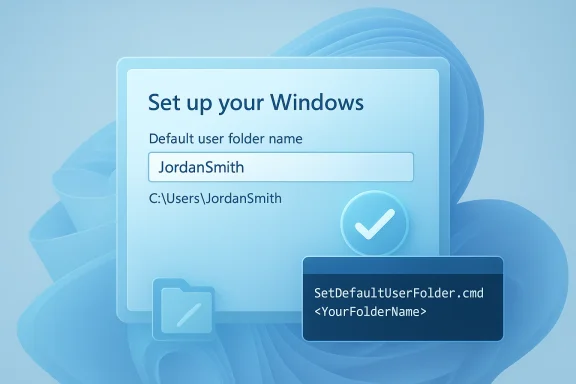
That historical friction is exactly why the new Windows 11 feature matters. Instead of forcing users into a cleanup project after the fact, Microsoft is beginning to expose control during the initial setup flow, when the folder can be created correctly in the first place. In the October 2025 Dev Channel build notes, Microsoft documented an “Ability to name your default user folder in OOBE” feature and described a command-line method invoked from the Microsoft account sign-in page. (blogs.windows.com)
The feature arrives at a moment when Windows setup itself is becoming more restrictive in some areas and more customizable in others. On one hand, Microsoft is removing known local-account workarounds from the setup process. On the other, it is offering a sanctioned route for a long-requested personalization task. That contrast says a lot about the company’s current philosophy: fewer unofficial bypasses, but more official knobs where users can justify them. (blogs.windows.com)
This is not the first time Microsoft has acknowledged how annoying profile-folder naming can be. Microsoft Q&A threads over several years show users running into cases where Windows generates a folder name from the first characters of an email address or account name, and later discover that changing the visible display name does not change the underlying directory. The gap between account identity and filesystem identity has been one of those small but persistent Windows papercuts that people only notice when they are already annoyed.
The practical consequence is straightforward: what looks like a minor setup detail can become a lasting organizational burden. Enterprise IT often needs predictable profile naming. Consumers often want a clean folder label that matches their identity. Creators, developers, and anyone managing multiple machines often find the default generated name clumsy at best and misleading at worst. Windows 11’s new setup option is aimed at that exact pain point. (blogs.windows.com)
Microsoft also says the custom folder name can be up to 16 characters and supports only Unicode characters, with special characters removed. That places the feature firmly in the “structured convenience” category rather than the “free-form anything goes” category. It is flexible enough to solve the common problem, but controlled enough to limit weird edge cases and support complexity. (blogs.windows.com)
A few details make the change especially interesting. First, the feature is tied to Microsoft account sign-in. Second, if you do nothing, Windows still auto-generates a folder name based on the email address. Third, Microsoft is using a command-line step inside setup rather than a graphical dialog. That suggests the company wants to preserve the existing provisioning logic while exposing a narrow override for advanced users. (blogs.windows.com)
This is also why many “rename user folder” guides historically relied on manual registry edits and profile migration steps. Those approaches may work in some cases, but they are not elegant and they are certainly not beginner-friendly. Microsoft’s new setup-time option sidesteps that whole mess by preventing the mismatch from happening in the first place. That is a better design pattern than retrofitting a fix after the profile exists.
For enterprise environments, the importance is even greater. A profile folder named after the first five letters of an email address might be tolerable on a single home PC, but it can become a nuisance in a managed fleet where naming conventions matter. The more accounts are created, the more those little inconsistencies become support tickets, documentation headaches, and onboarding friction.
The broader Windows direction is easy to read in that choice. Microsoft wants account setup to remain consistent, connected, and easier to support, yet it also wants to reduce the number of “I hate this default” complaints that users have carried for years. The new folder-name command is a small concession, but one that could save a lot of frustration. (blogs.windows.com)
There is also a subtle product-quality message here. Microsoft is increasingly willing to expose advanced setup levers for people who know they need them, while still keeping the default experience fairly opinionated. That is not the same thing as fully restoring older Windows flexibility, but it is a sign the company understands that a rigid installer can alienate experienced users. (blogs.windows.com)
For professionals and IT admins, the feature has a more concrete payoff. Standardized profile naming can reduce confusion in support documentation, scripts, and onboarding workflows. It can also help when users have to troubleshoot applications that reference the path directly, because the folder naming is no longer a surprise. (blogs.windows.com)
A cleaner setup experience also matters in environments where users rebuild PCs frequently. If a machine is re-imaged, repurposed, or handed to a new employee, getting the profile name right at the beginning saves future cleanup. That is especially valuable because post-install folder renaming has long been a reliability risk.
By moving the control point to setup, Microsoft reduces that emotional debt. The user can make a better decision once, and the system can proceed without hidden future cost. That may be a small win in engineering terms, but it is a very real win in product experience terms. (blogs.windows.com)
It also helps explain why this feature is arriving now. Windows 11 has spent years balancing modernization with legacy expectations, and the company has learned that removing old annoyances can be as valuable as adding headline features. A better installer is not flashy, but it is where trust is built. (blogs.windows.com)
The new OOBE command is much more limited, but that limitation is precisely the point. It is designed to be used once, at the correct moment, rather than as a repair technique. That makes it safer and more likely to be repeatable across machines. (blogs.windows.com)
There is also a trust dimension here. Users are far more likely to accept a system that says, “Here is the one supported moment to choose your folder name,” than one that expects them to surgically edit the registry afterward. In product design, clean timing often matters more than raw power. (blogs.windows.com)
There is also a subtle win for hybrid environments where device owners may not be deeply technical. Many companies let users sign in with Microsoft-linked identities while expecting IT to keep the environment tidy. A supported folder-name control helps bridge that gap without requiring invasive post-setup interventions. (blogs.windows.com)
Still, enterprises will likely want to test the feature carefully before embracing it broadly. Any customization that affects profile creation has to be validated against line-of-business apps, folder redirection, OneDrive integration, and login automation. The fact that Microsoft is limiting the feature to valid, sanitized values is a good sign, but validation remains essential. (blogs.windows.com)
This feature lets users avoid that tiny but persistent annoyance without forcing them into a later repair. That is a better consumer story than “you can fix it if you are brave enough.” It is also a sign that Windows 11 continues to adopt more user-centered setup flows, even when the mechanism remains somewhat technical behind the scenes. (blogs.windows.com)
At the same time, consumers should not overestimate the scope. This does not mean Windows suddenly allows arbitrary late-stage renaming of profile folders. It means the system is finally giving users a better chance to get the initial folder name right. That is a big improvement, but it is still a bounded one. (blogs.windows.com)
There is another concern: Microsoft is simultaneously removing local-account setup workarounds. That may frustrate users who value offline installs or prefer not to tie every setup to a Microsoft account. In other words, the folder-name customization could feel like a concession wrapped inside a broader restriction. (blogs.windows.com)
Compatibility is the final concern. Even when the folder name is set correctly, apps and services can still behave oddly if they were built with assumptions about account naming, OneDrive paths, or default profile structures. The more tightly Windows integrates identity and cloud services, the more carefully Microsoft has to manage these corner cases. (blogs.windows.com)
The most likely near-term outcome is gradual refinement rather than dramatic expansion. Microsoft tends to test these changes with Insiders, gather feedback, and then decide whether the feature is reliable enough for wider release. That means the next few builds will matter more than the announcement itself. (blogs.windows.com)
Source: Mix Vale https://www.mixvale.com.br/2026/03/...me-user-folder-during-system-installation-en/
 Background
For a long time, Windows users have treated the user profile folder in C:\Users as something you should simply leave alone. That was not because the name never mattered, but because Microsoft’s own guidance and community answers have repeatedly warned that renaming an existing profile folder can break references throughout the system. The underlying issue is that the profile path is deeply tied to the account’s security identity and system settings, which makes post-installation renaming risky and, in many cases, unsupported.That historical friction is exactly why the new Windows 11 feature matters. Instead of forcing users into a cleanup project after the fact, Microsoft is beginning to expose control during the initial setup flow, when the folder can be created correctly in the first place. In the October 2025 Dev Channel build notes, Microsoft documented an “Ability to name your default user folder in OOBE” feature and described a command-line method invoked from the Microsoft account sign-in page. (blogs.windows.com)
The feature arrives at a moment when Windows setup itself is becoming more restrictive in some areas and more customizable in others. On one hand, Microsoft is removing known local-account workarounds from the setup process. On the other, it is offering a sanctioned route for a long-requested personalization task. That contrast says a lot about the company’s current philosophy: fewer unofficial bypasses, but more official knobs where users can justify them. (blogs.windows.com)
This is not the first time Microsoft has acknowledged how annoying profile-folder naming can be. Microsoft Q&A threads over several years show users running into cases where Windows generates a folder name from the first characters of an email address or account name, and later discover that changing the visible display name does not change the underlying directory. The gap between account identity and filesystem identity has been one of those small but persistent Windows papercuts that people only notice when they are already annoyed.
The practical consequence is straightforward: what looks like a minor setup detail can become a lasting organizational burden. Enterprise IT often needs predictable profile naming. Consumers often want a clean folder label that matches their identity. Creators, developers, and anyone managing multiple machines often find the default generated name clumsy at best and misleading at worst. Windows 11’s new setup option is aimed at that exact pain point. (blogs.windows.com)
What Microsoft Actually Changed
The new behavior appears in Windows 11 Insider Preview Build 26220.6772, which Microsoft shipped to the Dev Channel in October 2025. In the Windows Setup Experience section, Microsoft says users can now customize the default user folder name during setup by opening Command Prompt from the Microsoft account sign-in page and runningSetDefaultUserFolder.cmd <YourFolderName>. If the value is valid, Windows applies it when creating the profile; otherwise, Windows generates the folder name automatically from the Microsoft email address. (blogs.windows.com)The Setup Flow in Plain English
This is not a new permanent settings page buried in Windows after installation. It is an out-of-the-box experience change, meaning the decision happens before the account is fully created. That distinction matters because it changes the problem from a repair task to a first-time configuration choice. For users who care about a clean profile name, the difference is enormous. (blogs.windows.com)Microsoft also says the custom folder name can be up to 16 characters and supports only Unicode characters, with special characters removed. That places the feature firmly in the “structured convenience” category rather than the “free-form anything goes” category. It is flexible enough to solve the common problem, but controlled enough to limit weird edge cases and support complexity. (blogs.windows.com)
A few details make the change especially interesting. First, the feature is tied to Microsoft account sign-in. Second, if you do nothing, Windows still auto-generates a folder name based on the email address. Third, Microsoft is using a command-line step inside setup rather than a graphical dialog. That suggests the company wants to preserve the existing provisioning logic while exposing a narrow override for advanced users. (blogs.windows.com)
- The folder name is set during setup, not after the fact.
- The maximum length is 16 characters.
- Only Unicode characters are supported.
- Special characters are stripped out.
- If the field is skipped, Windows falls back to an auto-generated name. (blogs.windows.com)
Why Folder Names Have Always Been a Problem
Windows profile folders are one of those areas where the visible user interface and the underlying system architecture never quite line up. You can rename an account display name, but that does not automatically renameC:\Users\<name>, because the path is wired into many parts of the operating system and associated with the user’s security identifier. Microsoft’s own support discussions have repeatedly emphasized that changing the profile folder later is tricky and can lead to broken paths or a damaged profile.The Registry and SID Reality
The reason this has been painful is technical rather than cosmetic. The profile folder path lives in places Windows depends on during sign-in, app launch, storage access, and shell behavior. If the folder name changes without the rest of the system being updated consistently, you can end up with a mismatch between the account’s SID-backed profile metadata and the actual filesystem path. That is why the old advice was often “don’t do it unless you really know what you are doing.”This is also why many “rename user folder” guides historically relied on manual registry edits and profile migration steps. Those approaches may work in some cases, but they are not elegant and they are certainly not beginner-friendly. Microsoft’s new setup-time option sidesteps that whole mess by preventing the mismatch from happening in the first place. That is a better design pattern than retrofitting a fix after the profile exists.
For enterprise environments, the importance is even greater. A profile folder named after the first five letters of an email address might be tolerable on a single home PC, but it can become a nuisance in a managed fleet where naming conventions matter. The more accounts are created, the more those little inconsistencies become support tickets, documentation headaches, and onboarding friction.
A Sign That Windows Setup Is Changing Direction
Microsoft’s move here is not happening in isolation. In the same build where it introduced default user-folder customization, the company also said it is removing known mechanisms for creating a local account during Windows setup. Microsoft argues those methods often skip critical OOBE screens and can leave a device insufficiently configured. In other words, setup is becoming more guided, more cloud-linked, and more curated. (blogs.windows.com)More Control, But Only in Microsoft’s Lane
This is an important strategic signal. Microsoft is not reopening the broader local-first setup debate. Instead, it is saying: if you are going to use a Microsoft account, we will give you a narrow way to refine the resulting folder name. That is a compromise, but it is a compromise with clear boundaries. (blogs.windows.com)The broader Windows direction is easy to read in that choice. Microsoft wants account setup to remain consistent, connected, and easier to support, yet it also wants to reduce the number of “I hate this default” complaints that users have carried for years. The new folder-name command is a small concession, but one that could save a lot of frustration. (blogs.windows.com)
There is also a subtle product-quality message here. Microsoft is increasingly willing to expose advanced setup levers for people who know they need them, while still keeping the default experience fairly opinionated. That is not the same thing as fully restoring older Windows flexibility, but it is a sign the company understands that a rigid installer can alienate experienced users. (blogs.windows.com)
- Windows setup is becoming more account-centric.
- Microsoft is trimming unsupported local-account bypasses.
- The user-folder override is a controlled exception, not a broad rollback.
- The change favors supportability and consistency over unrestricted customization. (blogs.windows.com)
Who Benefits Most
The most obvious winners are users who care about a tidyC:\Users folder from day one. That includes developers, enthusiasts, and anyone who dislikes seeing an awkward auto-generated folder name every time they browse the filesystem or configure tools that reference the profile path. For these users, the feature removes one of the last reasons to treat initial setup as a disposable throwaway. (blogs.windows.com)Consumers Versus Professionals
For consumers, the benefit is mostly emotional and organizational. A folder that matches the user’s chosen identity feels cleaner, and it avoids the strange disconnect between a polished account name and a messy path. That may sound trivial, but it is exactly the kind of detail that shapes how “finished” a product feels.For professionals and IT admins, the feature has a more concrete payoff. Standardized profile naming can reduce confusion in support documentation, scripts, and onboarding workflows. It can also help when users have to troubleshoot applications that reference the path directly, because the folder naming is no longer a surprise. (blogs.windows.com)
A cleaner setup experience also matters in environments where users rebuild PCs frequently. If a machine is re-imaged, repurposed, or handed to a new employee, getting the profile name right at the beginning saves future cleanup. That is especially valuable because post-install folder renaming has long been a reliability risk.
- Home users get a more polished setup result.
- Developers avoid awkward path names in tooling and scripts.
- IT departments get better naming consistency.
- Resale and reassignment scenarios become less messy.
- Troubleshooting becomes less error-prone when paths are predictable. (blogs.windows.com)
Why This Still Matters in 2026
At first glance, this looks like a niche tweak, and in one sense it is. But Windows survives on layers of tiny quality-of-life decisions, and setup is where a lot of user sentiment gets formed. A bad first impression can linger for years, especially when the issue is embedded in the filesystem and not easily undone.The Emotional Cost of a Bad Default
Many Windows users only discover the profile-folder problem after the fact. They sign in, see the wrong or ugly folder name, and then learn that the fix is either complicated or risky. That creates a sense that Windows is simultaneously powerful and oddly inflexible, which is not the reputation Microsoft wants for a modern consumer OS.By moving the control point to setup, Microsoft reduces that emotional debt. The user can make a better decision once, and the system can proceed without hidden future cost. That may be a small win in engineering terms, but it is a very real win in product experience terms. (blogs.windows.com)
It also helps explain why this feature is arriving now. Windows 11 has spent years balancing modernization with legacy expectations, and the company has learned that removing old annoyances can be as valuable as adding headline features. A better installer is not flashy, but it is where trust is built. (blogs.windows.com)
How It Compares to Past Workarounds
Before this change, users generally had three choices: live with the generated folder name, use a local account or workaround during setup, or attempt a manual rename later. None of those options were elegant. The first was easiest but unsatisfying, the second is increasingly discouraged, and the third carries real risk. (blogs.windows.com)The Old Playbook
The old workaround ecosystem relied on brittle steps and lots of caution. You had to understand profile paths, registry keys, and the timing of account creation. Even then, Microsoft documentation and support responses made it clear that mistakes could lock users out or corrupt the profile. That is the opposite of a consumer-friendly experience.The new OOBE command is much more limited, but that limitation is precisely the point. It is designed to be used once, at the correct moment, rather than as a repair technique. That makes it safer and more likely to be repeatable across machines. (blogs.windows.com)
There is also a trust dimension here. Users are far more likely to accept a system that says, “Here is the one supported moment to choose your folder name,” than one that expects them to surgically edit the registry afterward. In product design, clean timing often matters more than raw power. (blogs.windows.com)
- Manual renaming was error-prone.
- Registry edits could create support nightmares.
- Local-account workarounds are increasingly unwelcome.
- Setup-time customization is cleaner and easier to explain. (blogs.windows.com)
Enterprise Implications
Enterprise administrators will probably care about this more than casual users, even if they are not the loudest audience discussing it online. Folder naming affects standard operating procedures, scripting assumptions, and help-desk efficiency. Anything that reduces one-off exceptions can save real time at scale. (blogs.windows.com)Deployment and Standardization
The new feature does not replace traditional deployment tooling like unattend-based customization, but it does complement a world in which more devices are provisioned through consumer-style OOBE flows. For managed endpoints, predictability is a real asset. If the local profile folder is consistent with internal conventions from the start, downstream support gets simpler.There is also a subtle win for hybrid environments where device owners may not be deeply technical. Many companies let users sign in with Microsoft-linked identities while expecting IT to keep the environment tidy. A supported folder-name control helps bridge that gap without requiring invasive post-setup interventions. (blogs.windows.com)
Still, enterprises will likely want to test the feature carefully before embracing it broadly. Any customization that affects profile creation has to be validated against line-of-business apps, folder redirection, OneDrive integration, and login automation. The fact that Microsoft is limiting the feature to valid, sanitized values is a good sign, but validation remains essential. (blogs.windows.com)
Consumer Impact and Everyday Use
For regular consumers, this is one of those changes that may not look dramatic on paper but feels surprisingly satisfying in practice. People care about the visible names of their PCs, their accounts, and their folders because those labels are part of the sense that the machine belongs to them. A clean default profile folder makes Windows feel less like a factory image and more like a personal device. (blogs.windows.com)Why Small Details Matter
The average user may never edit the registry, inspect a profile path, or think about SID bindings. But many still notice when the system makes an odd assumption on their behalf. A generated folder name based on email fragments can feel impersonal or just plain wrong, especially after a Microsoft account sign-in that already asks for so much identity data.This feature lets users avoid that tiny but persistent annoyance without forcing them into a later repair. That is a better consumer story than “you can fix it if you are brave enough.” It is also a sign that Windows 11 continues to adopt more user-centered setup flows, even when the mechanism remains somewhat technical behind the scenes. (blogs.windows.com)
At the same time, consumers should not overestimate the scope. This does not mean Windows suddenly allows arbitrary late-stage renaming of profile folders. It means the system is finally giving users a better chance to get the initial folder name right. That is a big improvement, but it is still a bounded one. (blogs.windows.com)
Strengths and Opportunities
Microsoft’s new approach has several clear advantages, especially if it makes its way from the Dev Channel into mainstream Windows 11 releases. It addresses a longstanding complaint, improves setup satisfaction, and reduces the need for dangerous post-install workarounds. It also shows Microsoft is willing to refine the boring parts of Windows, not just the flashy AI and productivity features.- Fixes a long-standing annoyance at the point where it is easiest to solve.
- Reduces risky manual renaming after installation.
- Improves first-run polish for home users and enthusiasts.
- Helps standardize deployments for IT teams.
- Makes Windows setup feel more intentional and less accidental.
- Lowers support friction around mismatched user names and profile paths.
- Supports a cleaner branding story for Windows 11 as a modern OS. (blogs.windows.com)
Risks and Concerns
As promising as the change is, it also raises a few practical concerns. The fact that Microsoft is exposing the feature through a command at setup may confuse less technical users, and anything that touches profile creation must be handled carefully to avoid edge-case failures. There is also the possibility that users will assume more flexibility than Microsoft actually provides.Possible Downsides
The feature is limited to 16 characters, strips special characters, and appears to be designed for a narrow supported path. That means some users may still be disappointed if they expect full naming freedom. It may also create confusion if people believe they can retroactively fix existing profile folders without consequences. (blogs.windows.com)There is another concern: Microsoft is simultaneously removing local-account setup workarounds. That may frustrate users who value offline installs or prefer not to tie every setup to a Microsoft account. In other words, the folder-name customization could feel like a concession wrapped inside a broader restriction. (blogs.windows.com)
Compatibility is the final concern. Even when the folder name is set correctly, apps and services can still behave oddly if they were built with assumptions about account naming, OneDrive paths, or default profile structures. The more tightly Windows integrates identity and cloud services, the more carefully Microsoft has to manage these corner cases. (blogs.windows.com)
- The command-line step may be too technical for some users.
- The 16-character limit may frustrate edge cases.
- Users could misread this as a broader renaming tool.
- Removing local-account workarounds may anger some enthusiasts.
- Third-party apps may still expose path-related assumptions.
- Support teams will need to explain the distinction between account names and folder names. (blogs.windows.com)
Looking Ahead
The biggest question is whether Microsoft keeps this feature in its current form and ships it broadly, or whether it remains an Insider-only refinement that evolves further before release. The Dev Channel wording suggests the latter is possible, because Microsoft explicitly says preview features may change, be removed, or never ship at all. That caveat is important, even if the direction looks promising. (blogs.windows.com)What Could Happen Next
If the company keeps going, it could surface the option in a more user-friendly interface, broaden support for related setup controls, or add documentation that makes the command easier to discover. It could also pair the feature with clearer guidance about what folder names mean, which would help reduce future confusion. For now, the command-line approach looks like a proof of concept for a better setup-time customization model. (blogs.windows.com)The most likely near-term outcome is gradual refinement rather than dramatic expansion. Microsoft tends to test these changes with Insiders, gather feedback, and then decide whether the feature is reliable enough for wider release. That means the next few builds will matter more than the announcement itself. (blogs.windows.com)
- Watch for whether the feature stays in the Dev Channel.
- Watch for a more visual or guided version of the command.
- Watch for documentation aimed at admins and power users.
- Watch for reports of edge-case failures or folder/path mismatches.
- Watch for changes to the local-account removal policy in setup. (blogs.windows.com)
Source: Mix Vale https://www.mixvale.com.br/2026/03/...me-user-folder-during-system-installation-en/
