

Microsoft released optional Week D preview updates on May 26, 2026, for Windows 11 versions 24H2, 25H2, and 26H1, with KB5089573 moving 24H2 and 25H2 to builds 26100.8524 and 26200.8524 while KB5089570 moves 26H1 to build 28000.2179. The updates are nominally previews for June’s Patch Tuesday, but they read more like a public rehearsal for Microsoft’s next Windows servicing strategy. The headline is not one feature; it is Microsoft’s attempt to use cumulative updates as a rolling delivery vehicle for performance, AI plumbing, hardware policy, accessibility, and enterprise controls all at once.
The old mental model for Week D updates was simple: optional, non-security, mostly bug fixes, wait if you are cautious. That model is now badly out of date. KB5089573 and KB5089570 still sit in the preview lane, but their payload includes user-facing features, administrator policy changes, Secure Boot preparation, AI component updates, and the kind of performance work Microsoft usually wants measured by perception rather than release-note prose.
For Windows 11 24H2 and 25H2, Microsoft is again treating the two versions as closely paired servicing targets. One KB serves both, differing by build number rather than by the broad feature story. That matters because 25H2 increasingly looks less like a disruptive OS generation and more like an enablement-and-policy layer riding the same servicing foundation as 24H2.
The more interesting shift is 26H1. Thurrott correctly notes that the 26H1 train is no longer visibly lagging a month behind in this preview cycle. That does not mean 26H1 is suddenly mainstream in the same way 24H2 and 25H2 are, but it does suggest Microsoft wants its next Windows branch to participate in the same servicing rhythm before the broader audience is forced to care.
This is the Windows-as-a-service promise in its most compressed form. One Tuesday, three branches, two KBs, and a grab bag of changes that range from “my Start menu opens faster” to “my organization needs to understand a new driver trust posture.”
If Microsoft has actually improved those paths, this preview matters more than yet another Copilot entry point. Windows 11 has spent years carrying the perception that it is attractive, modern, and sometimes heavier than it ought to be. Performance work in the shell is not glamorous engineering, but it is exactly the kind of work that changes whether users describe an update as “finally better” or “more Microsoft stuff.”
There is a catch: Microsoft is using gradual rollout language. Installing the KB does not necessarily mean every feature or improvement lights up immediately. That makes the update harder to evaluate, especially for enthusiasts who install previews, reboot, and then expect to compare before-and-after behavior within minutes.
For IT, that staged rollout is both a safety valve and a source of annoyance. It reduces blast radius, but it also means two machines with the same build number may not behave identically on day one. In a fleet, build number no longer tells the whole truth.
The technical dependency matters. This is not a magic switch for every old Bluetooth headset in the drawer. It depends on modern Bluetooth LE Audio support across the PC, drivers, firmware, and listening devices, which means the feature will initially feel uneven in the real world.
Still, its inclusion is strategically useful. Windows laptops now compete not only with other PCs but with ecosystems where audio handoff, pairing, and sharing are part of the perceived polish. Microsoft cannot fix the entire Bluetooth hardware landscape with one preview update, but it can make Windows better at exploiting the newer one.
On PCs with neural processing units, Task Manager can now expose NPU, NPU Engine, and NPU memory-related columns. It also shows neural engines that are part of a GPU on the Performance page. That is the sort of change that will matter to developers, reviewers, power users, and administrators trying to understand whether a local AI feature is using the hardware Microsoft and OEMs keep selling.
There is a second signal here: Windows is preparing for AI workloads to be mundane enough to troubleshoot. If an app drains battery, spikes latency, or performs badly, “what is the NPU doing?” becomes a normal diagnostic question. Task Manager is where Microsoft turns a platform bet into something measurable.
The 26H1 update goes further into the AI-adjacent interface layer with taskbar monitoring for agents, starting with Researcher in the Microsoft 365 Copilot app. That feature is not just a progress indicator. It is an early attempt to make long-running agentic work feel like a first-class Windows activity rather than a web app spinning somewhere in the background.
Input also gets attention across the updates. KB5089573 improves touch keyboard reliability at sign-in, explorer.exe behavior around the input switcher, and clipboard history performance. KB5089570 adds a cleaner voice typing experience on the touch keyboard and brings back the Arabic 101 Legacy keyboard layout for users who prefer the earlier design.
The 26H1 branch adds haptic feedback support for compatible pens and potentially future mice. That is a small but telling move toward richer input semantics on Windows PCs. Microsoft has spent years trying to make Windows feel natural across keyboard, mouse, touch, pen, and voice; the difficulty has always been consistency across hardware that Microsoft does not fully control.
These changes are not all equal, and not all users will see them. But collectively they show Microsoft still understands that an OS is not only a launcher for cloud services. It is a negotiation between hardware, muscle memory, accessibility, and the stubborn habits of people who use their machines all day.
Putting the choice on the Device Name page is not revolutionary. It is, however, a welcome admission that setup decisions have long tails. A profile path can affect scripts, backups, developer tools, and personal sanity.
This is also where Microsoft’s consumer and professional priorities intersect. A home user may just want a clean folder name. A developer may want predictable paths. An admin may care because the fewer weird profile artifacts a machine carries from first boot, the fewer support oddities appear later.
The update also adds Windows Backup for Organizations policy management around Enterprise State Roaming. That is part of a broader effort to make device replacement and setup less painful without surrendering all state management to unmanaged consumer sync patterns. In hybrid organizations, anything that reduces profile and settings friction without creating compliance headaches will get attention.
The new Windows driver policy change is more serious. Microsoft says default trust for cross-signed drivers is being removed, while WHCP drivers and an allow list of trusted legacy drivers remain permitted. Windows is supposed to audit compatibility for at least 100 hours and three reboots before enforcement, but the implication is clear: the kernel driver trust model is tightening.
That is good security policy and likely unpleasant edge-case policy at the same time. Old peripherals, niche industrial hardware, abandoned vendor drivers, and internal tools often survive in enterprises long after their signing story looks modern. Microsoft is trying to close a class of kernel risk without detonating compatibility all at once; administrators should still assume some forgotten driver will be the first thing to complain.
That language is careful because Secure Boot certificate rotation is exactly the kind of operation that must be both broad and cautious. Push too slowly, and systems remain exposed to a looming expiration problem. Push too aggressively, and boot trust changes can create the sort of failures that make IT departments remember an update for years.
Microsoft is also adding a policy and MDM setting to limit the Secure Boot service data sent to Microsoft by suppressing an event normally used in that process. That is the privacy-versus-servicing tradeoff in miniature. Enterprises want restricted traffic baselines, but the update system increasingly wants telemetry-like signals to decide what a device can safely receive.
This is where the preview label does real work. Microsoft is not merely previewing cosmetic features; it is testing the machinery for a certificate transition that has hard calendar pressure. The calendar, not the marketing department, is driving this part of the release.
Microsoft has a mitigation involving a registry change to alter ESP padding behavior, and it also points to Known Issue Rollback for consumer and unmanaged business systems. For enterprise-managed devices, administrators may need to deploy the appropriate Group Policy rollback. None of that is conceptually shocking, but it is exactly the kind of servicing footnote that separates a safe lab rollout from a careless production push.
The 26H1 KB says Microsoft is not currently aware of issues with that update. That is useful, but not a guarantee. Preview updates are still previews, and the absence of a known issue on day one is not the same thing as a clean bill of health across all hardware, drivers, firmware, and management configurations.
For enthusiasts, the decision is simple: install if you like early access and can tolerate rollback risk. For businesses, the decision should be narrower: test the bits, observe the staged features, validate drivers and boot behavior, and let the June security update carry the payload to broader rings unless a specific fix is urgently needed.
This is the modern Windows paradox. The OS version matters, but the actual experience depends on hardware class, region, policy, rollout wave, account state, and Microsoft’s server-side decisions. Windows 11 has become a platform where the same KB can mean different practical things on different machines.
That is not inherently bad. It lets Microsoft reduce risk and ship capabilities to the devices that can actually use them. But it does complicate support, documentation, and user expectations. When someone says, “I installed the update and do not see the feature,” the answer may be that nothing is broken.
For WindowsForum readers, that means build numbers are necessary but insufficient. The better diagnostic question is now: what branch, what KB, what hardware, what policy, what rollout state, and what feature gate?
But trust is accumulated slowly and lost quickly. Recent Windows servicing history has included paused previews, out-of-band fixes, installation failures, and enough strange regressions to make many administrators instinctively conservative. Microsoft can say “production-quality improvements,” but customers judge production quality by failed installs, driver regressions, broken docks, and whether the help desk lights up after reboot night.
The company’s challenge is therefore not only technical. It must make optional previews useful enough for testers to install, stable enough that testers keep volunteering, and transparent enough that enterprises can explain what changed. That is a difficult balance when one cumulative package includes consumer conveniences, AI substrate, Secure Boot targeting, and management policy changes.
If there is a thesis hiding in this Week D release, it is this: Microsoft wants Windows updates to become the normal delivery path for continuous OS evolution, but users still experience updates as risk events. KB5089573 and KB5089570 are strong examples of both realities.
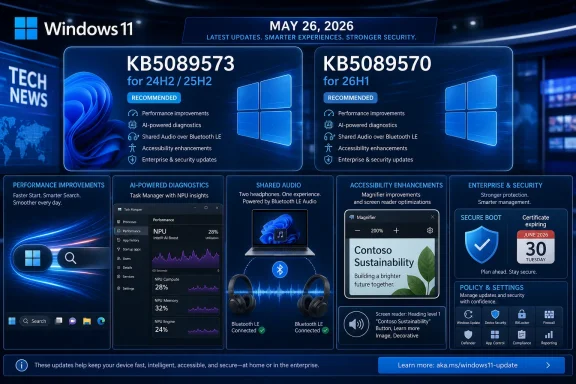 Microsoft Turns the Optional Update Into a Product Launch Vehicle
The old mental model for Week D updates was simple: optional, non-security, mostly bug fixes, wait if you are cautious. That model is now badly out of date. KB5089573 and KB5089570 still sit in the preview lane, but their payload includes user-facing features, administrator policy changes, Secure Boot preparation, AI component updates, and the kind of performance work Microsoft usually wants measured by perception rather than release-note prose.For Windows 11 24H2 and 25H2, Microsoft is again treating the two versions as closely paired servicing targets. One KB serves both, differing by build number rather than by the broad feature story. That matters because 25H2 increasingly looks less like a disruptive OS generation and more like an enablement-and-policy layer riding the same servicing foundation as 24H2.
The more interesting shift is 26H1. Thurrott correctly notes that the 26H1 train is no longer visibly lagging a month behind in this preview cycle. That does not mean 26H1 is suddenly mainstream in the same way 24H2 and 25H2 are, but it does suggest Microsoft wants its next Windows branch to participate in the same servicing rhythm before the broader audience is forced to care.
This is the Windows-as-a-service promise in its most compressed form. One Tuesday, three branches, two KBs, and a grab bag of changes that range from “my Start menu opens faster” to “my organization needs to understand a new driver trust posture.”
The Performance Claim Is the Most Important Feature Because Everyone Can Feel It
Microsoft says KB5089573 accelerates app launch and core shell experiences including Start, Search, and Action Center. That sentence is easy to glide past because Windows release notes have trained readers to distrust vague “performance and reliability” claims. But the shell is where Windows 11’s reputation lives: not in benchmark charts, but in whether the Start menu hesitates, whether Search feels awake, and whether opening common UI surfaces makes a premium PC feel strangely bureaucratic.If Microsoft has actually improved those paths, this preview matters more than yet another Copilot entry point. Windows 11 has spent years carrying the perception that it is attractive, modern, and sometimes heavier than it ought to be. Performance work in the shell is not glamorous engineering, but it is exactly the kind of work that changes whether users describe an update as “finally better” or “more Microsoft stuff.”
There is a catch: Microsoft is using gradual rollout language. Installing the KB does not necessarily mean every feature or improvement lights up immediately. That makes the update harder to evaluate, especially for enthusiasts who install previews, reboot, and then expect to compare before-and-after behavior within minutes.
For IT, that staged rollout is both a safety valve and a source of annoyance. It reduces blast radius, but it also means two machines with the same build number may not behave identically on day one. In a fleet, build number no longer tells the whole truth.
Shared Audio Shows Windows Chasing the Everyday Hardware Gap
Shared Audio is the kind of feature Windows should have had before users had to think about it. It allows two people to listen to the same PC audio stream using Bluetooth LE Audio broadcast technology, assuming supported paired devices are available. In consumer terms, it is simple: two headphones, one laptop, one movie or playlist.The technical dependency matters. This is not a magic switch for every old Bluetooth headset in the drawer. It depends on modern Bluetooth LE Audio support across the PC, drivers, firmware, and listening devices, which means the feature will initially feel uneven in the real world.
Still, its inclusion is strategically useful. Windows laptops now compete not only with other PCs but with ecosystems where audio handoff, pairing, and sharing are part of the perceived polish. Microsoft cannot fix the entire Bluetooth hardware landscape with one preview update, but it can make Windows better at exploiting the newer one.
Task Manager Becomes an AI Accountability Surface
The new Task Manager columns for NPU usage are more than nerd candy. They are Microsoft acknowledging that AI hardware needs observability if it is going to become part of everyday computing. CPU, GPU, memory, disk, and network usage became ordinary because users and admins could see them; NPU usage cannot remain hidden behind marketing slides.On PCs with neural processing units, Task Manager can now expose NPU, NPU Engine, and NPU memory-related columns. It also shows neural engines that are part of a GPU on the Performance page. That is the sort of change that will matter to developers, reviewers, power users, and administrators trying to understand whether a local AI feature is using the hardware Microsoft and OEMs keep selling.
There is a second signal here: Windows is preparing for AI workloads to be mundane enough to troubleshoot. If an app drains battery, spikes latency, or performs badly, “what is the NPU doing?” becomes a normal diagnostic question. Task Manager is where Microsoft turns a platform bet into something measurable.
The 26H1 update goes further into the AI-adjacent interface layer with taskbar monitoring for agents, starting with Researcher in the Microsoft 365 Copilot app. That feature is not just a progress indicator. It is an early attempt to make long-running agentic work feel like a first-class Windows activity rather than a web app spinning somewhere in the background.
Accessibility and Input Improvements Carry More Weight Than the AI Branding
Magnifier improvements in the 24H2 and 25H2 update are easy to underestimate. Clearer announcements when used with a screen reader, better behavior when zooming or switching views, support for magnifying permitted protected content, and smoother lens movement are practical accessibility changes. They do not sell a new PC, but they affect whether Windows remains usable in high-friction moments.Input also gets attention across the updates. KB5089573 improves touch keyboard reliability at sign-in, explorer.exe behavior around the input switcher, and clipboard history performance. KB5089570 adds a cleaner voice typing experience on the touch keyboard and brings back the Arabic 101 Legacy keyboard layout for users who prefer the earlier design.
The 26H1 branch adds haptic feedback support for compatible pens and potentially future mice. That is a small but telling move toward richer input semantics on Windows PCs. Microsoft has spent years trying to make Windows feel natural across keyboard, mouse, touch, pen, and voice; the difficulty has always been consistency across hardware that Microsoft does not fully control.
These changes are not all equal, and not all users will see them. But collectively they show Microsoft still understands that an OS is not only a launcher for cloud services. It is a negotiation between hardware, muscle memory, accessibility, and the stubborn habits of people who use their machines all day.
Setup Finally Gives Power Users a Small Piece of Control
The ability to choose a custom user folder name during Windows setup is one of those tiny changes that will make enthusiasts disproportionately happy. For years, Windows has often derived profile folder names in ways users dislike, especially when Microsoft account setup flows shorten, truncate, or otherwise infer names. Fixing it after the fact is possible but messy enough that most people simply live with the annoyance.Putting the choice on the Device Name page is not revolutionary. It is, however, a welcome admission that setup decisions have long tails. A profile path can affect scripts, backups, developer tools, and personal sanity.
This is also where Microsoft’s consumer and professional priorities intersect. A home user may just want a clean folder name. A developer may want predictable paths. An admin may care because the fewer weird profile artifacts a machine carries from first boot, the fewer support oddities appear later.
Enterprise IT Gets the Real Payload in 26H1
KB5089570 for Windows 11 26H1 carries several changes that look modest in release notes but are consequential for managed environments. The new support for policy-based removal of additional preinstalled Microsoft Store packages gives Enterprise and Education admins more control over the default app footprint, though Microsoft notes the dynamic list is not currently available in the Intune Settings Catalog. That caveat is classic Windows management: the capability exists, but the management surface you actually want may lag behind.The update also adds Windows Backup for Organizations policy management around Enterprise State Roaming. That is part of a broader effort to make device replacement and setup less painful without surrendering all state management to unmanaged consumer sync patterns. In hybrid organizations, anything that reduces profile and settings friction without creating compliance headaches will get attention.
The new Windows driver policy change is more serious. Microsoft says default trust for cross-signed drivers is being removed, while WHCP drivers and an allow list of trusted legacy drivers remain permitted. Windows is supposed to audit compatibility for at least 100 hours and three reboots before enforcement, but the implication is clear: the kernel driver trust model is tightening.
That is good security policy and likely unpleasant edge-case policy at the same time. Old peripherals, niche industrial hardware, abandoned vendor drivers, and internal tools often survive in enterprises long after their signing story looks modern. Microsoft is trying to close a class of kernel risk without detonating compatibility all at once; administrators should still assume some forgotten driver will be the first thing to complain.
Secure Boot Is the Clock Ticking Under the Release Notes
The most sobering note in KB5089573 is not a new feature. Microsoft warns that Secure Boot certificates used by most Windows devices are set to expire starting in June 2026, and that some personal and business devices could be affected if they are not updated in time. In this preview, Windows quality updates include more targeting data to increase coverage for devices eligible to automatically receive new Secure Boot certificates.That language is careful because Secure Boot certificate rotation is exactly the kind of operation that must be both broad and cautious. Push too slowly, and systems remain exposed to a looming expiration problem. Push too aggressively, and boot trust changes can create the sort of failures that make IT departments remember an update for years.
Microsoft is also adding a policy and MDM setting to limit the Secure Boot service data sent to Microsoft by suppressing an event normally used in that process. That is the privacy-versus-servicing tradeoff in miniature. Enterprises want restricted traffic baselines, but the update system increasingly wants telemetry-like signals to decide what a device can safely receive.
This is where the preview label does real work. Microsoft is not merely previewing cosmetic features; it is testing the machinery for a certificate transition that has hard calendar pressure. The calendar, not the marketing department, is driving this part of the release.
The Known Issue Is a Reminder That Optional Still Means Optional
For 24H2 and 25H2, Microsoft lists a known issue tied to the May 2026 security update failing with error 0x800f0922 on some devices with very limited free space on the EFI System Partition, especially at 10 MB or less available. The failure pattern is familiar and ugly: installation begins, restart reaches the mid-30 percent range, Windows rolls back, and the user sees the generic “something didn’t go as planned” experience.Microsoft has a mitigation involving a registry change to alter ESP padding behavior, and it also points to Known Issue Rollback for consumer and unmanaged business systems. For enterprise-managed devices, administrators may need to deploy the appropriate Group Policy rollback. None of that is conceptually shocking, but it is exactly the kind of servicing footnote that separates a safe lab rollout from a careless production push.
The 26H1 KB says Microsoft is not currently aware of issues with that update. That is useful, but not a guarantee. Preview updates are still previews, and the absence of a known issue on day one is not the same thing as a clean bill of health across all hardware, drivers, firmware, and management configurations.
For enthusiasts, the decision is simple: install if you like early access and can tolerate rollback risk. For businesses, the decision should be narrower: test the bits, observe the staged features, validate drivers and boot behavior, and let the June security update carry the payload to broader rings unless a specific fix is urgently needed.
Windows Update Is Becoming Less About Versions and More About Entitlement
The interesting thing about this release is how much is hidden behind eligibility. Shared Audio needs supported Bluetooth LE Audio hardware. NPU visibility needs an NPU or compatible neural engine. AI component updates apply only to Copilot+ PCs where relevant. Secure Boot certificate delivery depends on device targeting and successful update signals. Gradual rollout means even eligible devices may wait.This is the modern Windows paradox. The OS version matters, but the actual experience depends on hardware class, region, policy, rollout wave, account state, and Microsoft’s server-side decisions. Windows 11 has become a platform where the same KB can mean different practical things on different machines.
That is not inherently bad. It lets Microsoft reduce risk and ship capabilities to the devices that can actually use them. But it does complicate support, documentation, and user expectations. When someone says, “I installed the update and do not see the feature,” the answer may be that nothing is broken.
For WindowsForum readers, that means build numbers are necessary but insufficient. The better diagnostic question is now: what branch, what KB, what hardware, what policy, what rollout state, and what feature gate?
The June Patch Tuesday Preview Is Also a Trust Test
Microsoft is trying to make these previews feel more attractive. Better app launches, faster shell surfaces, improved Store downloads, more reliable USB behavior, better Windows Hello behavior, and File Explorer fixes are the sorts of changes users actually want. If the update improves daily friction, the preview channel becomes more than a waiting room for Patch Tuesday.But trust is accumulated slowly and lost quickly. Recent Windows servicing history has included paused previews, out-of-band fixes, installation failures, and enough strange regressions to make many administrators instinctively conservative. Microsoft can say “production-quality improvements,” but customers judge production quality by failed installs, driver regressions, broken docks, and whether the help desk lights up after reboot night.
The company’s challenge is therefore not only technical. It must make optional previews useful enough for testers to install, stable enough that testers keep volunteering, and transparent enough that enterprises can explain what changed. That is a difficult balance when one cumulative package includes consumer conveniences, AI substrate, Secure Boot targeting, and management policy changes.
If there is a thesis hiding in this Week D release, it is this: Microsoft wants Windows updates to become the normal delivery path for continuous OS evolution, but users still experience updates as risk events. KB5089573 and KB5089570 are strong examples of both realities.
The Practical Read Before June’s Mandatory Train Arrives
This release is worth watching because it previews not just code, but Microsoft’s operating posture for the next Windows cycle. The concrete lessons are less flashy than the feature list, but more useful.- Windows 11 24H2 and 25H2 are being serviced closely together, with KB5089573 delivering the same preview build level across both release families.
- Windows 11 26H1 is now receiving a more current Week D preview in KB5089570, suggesting Microsoft wants the branch aligned with the broader monthly servicing cadence.
- The most broadly relevant user improvement is likely the claimed performance work around app launch, Start, Search, Action Center, startup apps, and explorer.exe reliability.
- The most important enterprise items are Secure Boot certificate preparation, tighter driver trust policy in 26H1, policy-based app removal expansion, and new controls around batch file handling.
- The known 0x800f0922 installation issue on some 24H2 and 25H2 systems with cramped EFI System Partitions is a reason to test carefully rather than blindly deploy.
- Gradual rollout means installing the KB may not immediately expose every feature, even when the machine is otherwise eligible.
References
- Primary source: thurrott.com
Published: Tue, 26 May 2026 23:59:55 GMT

Microsoft Issues the Week D Preview Updates for Windows 11
It's the Tuesday of Week D on the Windows Update schedule, and we all know what that means: New preview updates ahead of the Patch Tuesday in June. www.thurrott.com
- Official source: support.microsoft.com
May 26, 2026—KB5089570 (OS Build 28000.2179) Preview - Microsoft Support
 support.microsoft.com
- Related coverage: windowscentral.com
Windows 11's latest OS update is packing serious performance gains
Windows 11 update KB5089573 is now generally available as Microsoft's non-security preview update for May, and is packing genuinely notable performance improvements. www.windowscentral.com
- Official source: blogs.windows.com

Announcing Windows 11 Insider Preview Build 26200.5733 (Dev Channel)
Hello Windows Insiders, today we are releasing Windows 11 Insider Preview Build 26200.5733 (KB5062673) to the Dev Channel. Changes in Dev Channel builds and updates are documented in two buckets: new features, impro blogs.windows.com
- Related coverage: windowsreport.com
- Related coverage: notebookcheck.net

Windows 11 Release Preview: Copilot in Excel and critical security patches now live
Windows 11 Release Preview builds KB5089573 and KB5089570 landed May 14 with Copilot in Excel, zero-day patches, Shared LE Audio, and new IT admin AI controls. www.notebookcheck.net
- Related coverage: elevenforum.com

KB5089573 Windows 11 Cumulative Update Preview build 26100.8524 (24H2) and 26200.8524 (25H2) - May 26
Microsoft Support: May 26, 2026 - KB5089573 (OS Builds 26200.8524 and 26100.8524) Preview This cumulative update for Windows 11, version 25H2 and 24H2 (KB5089573), includes production-quality improvements. Visit the Windows release health dashboard for the latest status on this release... www.elevenforum.com
- Related coverage: tomshardware.com
Microsoft issues emergency update for Windows 11 — fixes broken March preview update rollout from last week
Out-of-band patch addresses installation failures.www.tomshardware.com
- Related coverage: pureinfotech.com
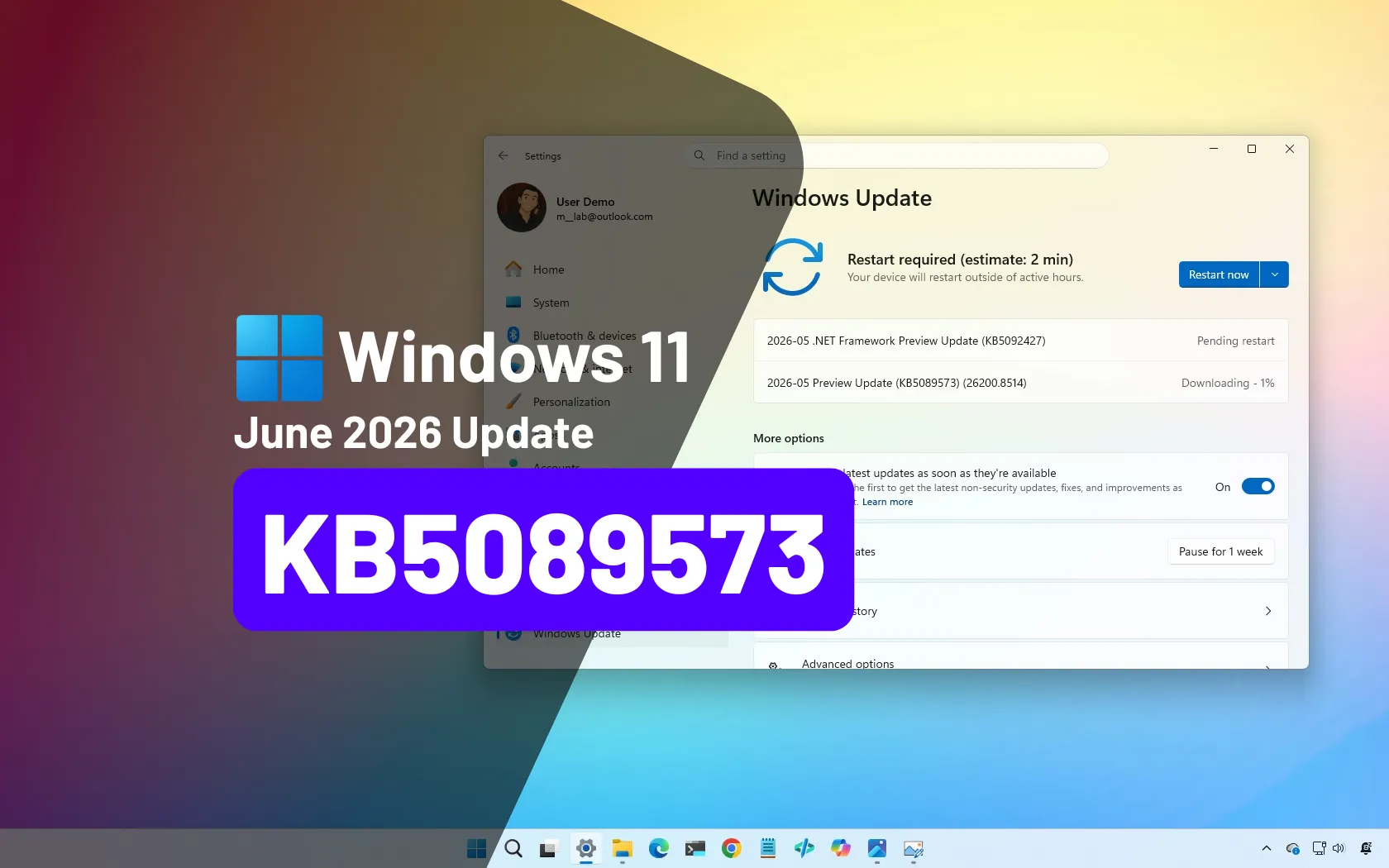
Microsoft rolls out Windows 11 June 2026 update (preview) with major upgrades
KB5089573 (build 26200.8521) for Windows 11 brings Shared Audio, NPU tracking in Task Manager, and faster app launch improvements for 25H2 and 24H2. pureinfotech.com
- Related coverage: itpro.com
Microsoft pledged to simplify Windows 11 updates – it just paused a preview over installation errors
Two weeks after pledging to improve Windows 11 updates, a preview suffers installation issues www.itpro.com
- Official source: techcommunity.microsoft.com