

Passkeys were supposed to make passwords obsolete, yet most people still reach for a password manager, an SMS code, or an old-fashioned recovery link when it is time to sign in. The reason is not that the underlying technology has failed. Passkeys solve major security problems that passwords cannot solve well. The more predictable failure is that the industry has treated them as a cryptographic upgrade when they are really a profound user-experience change.
A password is familiar, even when it is inconvenient and unsafe. A passkey is often faster, more resistant to phishing, and less likely to be stolen in a breach. But it arrives in a confusing prompt, may be stored in an unclear location, and can behave differently depending on whether a person is using Windows, Android, iPhone, Chrome, Edge, Safari, a third-party password manager, or a corporate device.
That gap between technical merit and human understanding explains why passkeys have not displaced passwords at the pace many users expected. The technology is real, standards-based, and increasingly integrated into Windows 11 and major browsers. But a more secure sign-in method cannot become mainstream merely because a dialog box offers to create one.
For decades, the web has taught people a simple authentication ritual:
Passkeys change that model.
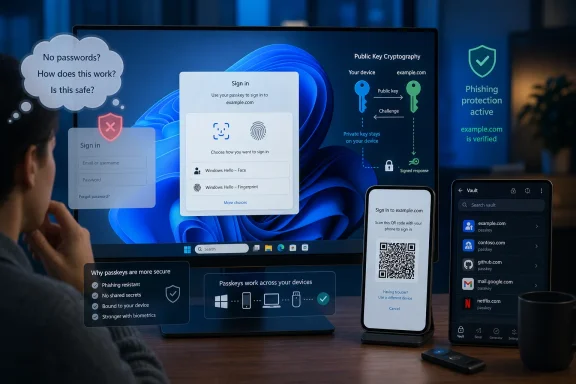
Rather than sending a reusable secret to a website, a passkey uses public-key cryptography. A device or credential manager holds the private portion of the credential, while the website stores a corresponding public key. During sign-in, the device verifies the person locally—using Windows Hello, a PIN, fingerprint, facial recognition, or another approved unlock method—and cryptographically proves possession of the private key.
The server never receives a reusable password equivalent. That makes passkeys fundamentally more resilient against several major password-era threats:
A person who sees “Create a passkey?” while trying to finish a purchase, access a bank statement, or log in to a streaming service is not necessarily thinking about phishing resistance. They are wondering whether the prompt is legitimate, whether they will lose access to the account, and whether tapping Continue will create another problem for them later.
That hesitation is rational.
Many sign-in prompts make this worse by asking users to save a passkey without giving them a meaningful explanation of the consequences. A dialog may offer options such as:
A passkey stored locally with Windows Hello may work exceptionally well on that PC. A passkey stored in a synced credential manager may be available across compatible devices signed in to the same account. A passkey stored on a phone may require cross-device authentication when the user signs in from a PC without that credential available locally.
That is far more complicated than the old choice between “remember this password” and “do not remember this password.”
The industry has often assumed that users will naturally understand the security and recovery trade-offs. They will not. Most people do not want a lecture on credential providers, synchronization boundaries, private keys, or device-bound authentication. They want an answer to three practical questions:
For security-conscious users, ambiguity can create the opposite of trust. People have spent years learning that unexpected authentication prompts can be dangerous. A vague request to create a new sign-in method therefore risks looking like something to dismiss, rather than a feature to embrace.
A successful passkey rollout needs to make the value proposition immediate:
A passkey is not always tied permanently to only one physical device. Synced passkeys can be stored by a credential provider and made available on other compatible devices under the same account. This can make migration to a new PC or phone much smoother than it would be with a strictly device-bound credential.
On Windows 11, passkeys can be used through Windows Hello, Microsoft’s credential management options, supported third-party password managers, and cross-device sign-in mechanisms. Depending on the site and configuration, a Windows user may be able to approve a login from a nearby phone or use a passkey that has synchronized through a chosen credential provider.
That is the optimistic path. The difficult part is that the details still vary.
For example, a passkey may be available on devices connected to one provider but absent on a new platform where the user has not enabled that provider. The backup option may then involve a QR code, Bluetooth proximity check, device approval prompt, or manual selection of a different sign-in method.
All of that is defensible from a security perspective. A remote attacker should not be able to use a QR code from anywhere in the world to silently borrow a victim’s phone-based passkey. Proximity checks and user approval are part of the protection.
From the user’s perspective, however, the flow can feel like a regression:
Users can lose access to every device. They can lose their credential-provider account. They can change ecosystems. They can be locked out by a corporate policy, a damaged phone, or a failed Windows installation. A secure service needs a recovery plan that does not quietly undermine the security benefits of its passkey deployment.
This is a delicate balance. If a service retains an easily reset password as the universal fallback, attackers will target the password-reset process instead of the passkey. If it makes recovery impossible, legitimate customers can be permanently locked out.
A mature passkey strategy should include several carefully protected recovery paths:
This approach is understandable during a transition. Websites cannot simply assume that every customer has a compatible device, understands passkeys, or can recover from a lost phone. But the result is a mixed authentication system in which the strongest method is frequently optional and the weakest method still determines the account’s real-world security ceiling.
If an attacker can reset a password through a compromised email inbox, socially engineer support staff, intercept a weak recovery code, or exploit an old sign-in pathway, then the account remains vulnerable even when the owner has created a passkey.
That is why adoption cannot rely entirely on users clicking “Create passkey” during routine login. Services need to make the transition deliberate and well explained. They should show users where their passkey is being stored, confirm that it works, and teach them how to add a backup method before asking them to rely on it.
There is a meaningful difference between these two experiences:
Enterprise deployments need to consider:
Cross-device authentication exists for a good reason. It lets a person use a passkey stored on a nearby phone to sign in on another computer, including one in a different operating-system ecosystem. It can make a passkey portable without sending the private key to the website or exposing it as a reusable secret.
But a QR code introduces several points of failure:
This does not mean QR-based passkey authentication is broken. It means it should be treated as a contingency path rather than the ideal everyday experience. The best passkey login is usually the one where the credential is already available in the user’s chosen credential manager on the device they are actively using.
The platform challenge is not merely to support these combinations. It is to make them understandable.
A Windows passkey experience should make the storage location and expected availability unmistakable:
The modern password manager is no longer just a vault for strings of text. It can act as a credential manager for passwords, passkeys, recovery codes, payment data, and other identity-related information. It may also provide cross-device synchronization, audit tools, breach alerts, and secure sharing features.
For users who have already learned to trust a password manager, that manager may be the most natural home for passkeys.
This can produce a practical progression:
The concern is that users must know which manager holds the passkey and whether it is synchronized to the device they are using. Credential-manager competition is healthy, but fragmentation becomes a problem when users cannot tell whether a credential is local, cloud-synced, hardware-backed, or accessible only through another phone.
Passkey-first design should mean that a returning user with an available passkey gets a clean, dependable sign-in path. Passwords can remain available during the transition, but they should not dominate the interface forever.
Services should monitor:
The core promise remains compelling. A properly implemented passkey can replace a reusable password with a credential that is harder to phish, harder to steal, and easier to use once it is set up correctly. For Windows users, the combination of Windows Hello, supported credential managers, and hardware security keys provides a strong foundation for passwordless sign-in.
But the phrase “passwordless future” will remain marketing language if the practical experience still involves confusing prompts, unpredictable QR-code handoffs, unclear storage locations, and weak password-based recovery paths.
Passwords earned their dominance not because they were good, but because everyone understood them. Passkeys will earn their place only when the average user can understand them just as quickly—and trust that they will still work when the device, browser, or operating system changes.
A password is familiar, even when it is inconvenient and unsafe. A passkey is often faster, more resistant to phishing, and less likely to be stolen in a breach. But it arrives in a confusing prompt, may be stored in an unclear location, and can behave differently depending on whether a person is using Windows, Android, iPhone, Chrome, Edge, Safari, a third-party password manager, or a corporate device.
That gap between technical merit and human understanding explains why passkeys have not displaced passwords at the pace many users expected. The technology is real, standards-based, and increasingly integrated into Windows 11 and major browsers. But a more secure sign-in method cannot become mainstream merely because a dialog box offers to create one.
 Passwords Are Still the Default Language of the Web
For decades, the web has taught people a simple authentication ritual:- Enter a username or email address.
- Enter a password.
- Complete a second factor if required.
- Reset the password if something goes wrong.
Passkeys change that model.
Rather than sending a reusable secret to a website, a passkey uses public-key cryptography. A device or credential manager holds the private portion of the credential, while the website stores a corresponding public key. During sign-in, the device verifies the person locally—using Windows Hello, a PIN, fingerprint, facial recognition, or another approved unlock method—and cryptographically proves possession of the private key.
The server never receives a reusable password equivalent. That makes passkeys fundamentally more resilient against several major password-era threats:
- Credential stuffing using leaked passwords
- Password reuse across multiple services
- Many phishing attacks involving lookalike websites
- Server-side password database theft
- Users being pressured to invent memorable but weak credentials
A person who sees “Create a passkey?” while trying to finish a purchase, access a bank statement, or log in to a streaming service is not necessarily thinking about phishing resistance. They are wondering whether the prompt is legitimate, whether they will lose access to the account, and whether tapping Continue will create another problem for them later.
That hesitation is rational.
The Biggest Problem Is Not Security—It Is Comprehension
The word passkey is clear only after someone has learned what it means. Before that, it can sound like a password, a security key, a device PIN, an app feature, or an extra verification code. The term does not immediately explain where the credential lives, what happens if a phone is replaced, or whether the user will need the same device every time.Many sign-in prompts make this worse by asking users to save a passkey without giving them a meaningful explanation of the consequences. A dialog may offer options such as:
- Save to Windows Hello
- Save to a password manager
- Save to an iPhone or Android phone
- Use a security key
- Use another device
- Scan a QR code
A Passkey Prompt Is Often an Architecture Decision
When users choose where to store a passkey, they are not simply approving a faster login. They may be deciding which ecosystem will manage access to an important account.A passkey stored locally with Windows Hello may work exceptionally well on that PC. A passkey stored in a synced credential manager may be available across compatible devices signed in to the same account. A passkey stored on a phone may require cross-device authentication when the user signs in from a PC without that credential available locally.
That is far more complicated than the old choice between “remember this password” and “do not remember this password.”
The industry has often assumed that users will naturally understand the security and recovery trade-offs. They will not. Most people do not want a lecture on credential providers, synchronization boundaries, private keys, or device-bound authentication. They want an answer to three practical questions:
- Will this make signing in easier?
- Will I still be able to get in if I replace or lose this device?
- Can I undo it if I do not like the result?
“Use Your Device” Is Not Enough Information
The phrase “use your device” sounds simple but hides critical details. Which device? The Windows PC currently in front of the user? Their iPhone? Their Android phone? A password manager tied to a cloud account? A physical FIDO security key?For security-conscious users, ambiguity can create the opposite of trust. People have spent years learning that unexpected authentication prompts can be dangerous. A vague request to create a new sign-in method therefore risks looking like something to dismiss, rather than a feature to embrace.
A successful passkey rollout needs to make the value proposition immediate:
That is a clearer starting point than a bare prompt with unfamiliar terminology.Sign in with your face, fingerprint, or device PIN instead of typing a password. Save it to your preferred credential manager so you can use it again on your devices.
Passkeys Do Not Eliminate the Recovery Problem
One of the most common fears surrounding passkeys is that a lost, broken, wiped, or replaced device will lock the user out forever. That fear is understandable, but it needs more precision.A passkey is not always tied permanently to only one physical device. Synced passkeys can be stored by a credential provider and made available on other compatible devices under the same account. This can make migration to a new PC or phone much smoother than it would be with a strictly device-bound credential.
On Windows 11, passkeys can be used through Windows Hello, Microsoft’s credential management options, supported third-party password managers, and cross-device sign-in mechanisms. Depending on the site and configuration, a Windows user may be able to approve a login from a nearby phone or use a passkey that has synchronized through a chosen credential provider.
That is the optimistic path. The difficult part is that the details still vary.
Synced Does Not Mean Universally Portable
A user can create a passkey in one ecosystem and discover that it is not immediately available in another. Cross-device authentication can bridge some of those gaps, but it is not the same as seamless synchronization.For example, a passkey may be available on devices connected to one provider but absent on a new platform where the user has not enabled that provider. The backup option may then involve a QR code, Bluetooth proximity check, device approval prompt, or manual selection of a different sign-in method.
All of that is defensible from a security perspective. A remote attacker should not be able to use a QR code from anywhere in the world to silently borrow a victim’s phone-based passkey. Proximity checks and user approval are part of the protection.
From the user’s perspective, however, the flow can feel like a regression:
- Open a website on a Windows PC.
- Select a passkey stored elsewhere.
- Scan a QR code.
- Approve the request on a phone.
- Confirm local authentication.
- Wait for the browser and website to complete the exchange.
- Discover that the login still falls back to a password or another factor.
Recovery Must Be Designed, Not Hand-Waved
The correct answer is not to abandon passkeys. It is to admit that account recovery is still essential.Users can lose access to every device. They can lose their credential-provider account. They can change ecosystems. They can be locked out by a corporate policy, a damaged phone, or a failed Windows installation. A secure service needs a recovery plan that does not quietly undermine the security benefits of its passkey deployment.
This is a delicate balance. If a service retains an easily reset password as the universal fallback, attackers will target the password-reset process instead of the passkey. If it makes recovery impossible, legitimate customers can be permanently locked out.
A mature passkey strategy should include several carefully protected recovery paths:
- Multiple enrolled passkeys across trusted devices
- A synced passkey provider for consumer accounts where appropriate
- Hardware security keys for high-value or administrator accounts
- Recovery codes stored securely offline
- Strong identity-verification processes for account recovery
- Clear alerts when new passkeys or recovery methods are added
- Delays or additional verification for sensitive recovery actions
The Password Fallback Is the Weakest Link
A passkey can provide phishing-resistant sign-in, but only if the service actually lets it carry the security burden. Many sites currently deploy passkeys as an optional convenience layer while keeping passwords, SMS codes, and weak recovery routes fully active.This approach is understandable during a transition. Websites cannot simply assume that every customer has a compatible device, understands passkeys, or can recover from a lost phone. But the result is a mixed authentication system in which the strongest method is frequently optional and the weakest method still determines the account’s real-world security ceiling.
If an attacker can reset a password through a compromised email inbox, socially engineer support staff, intercept a weak recovery code, or exploit an old sign-in pathway, then the account remains vulnerable even when the owner has created a passkey.
Optional Security Rarely Becomes Universal Security
When a website gives people a choice between a known process and an unfamiliar one, most will choose the known process unless the new method offers an obvious and immediate benefit.That is why adoption cannot rely entirely on users clicking “Create passkey” during routine login. Services need to make the transition deliberate and well explained. They should show users where their passkey is being stored, confirm that it works, and teach them how to add a backup method before asking them to rely on it.
There is a meaningful difference between these two experiences:
- “A passkey is available. Skip for now.”
- “You can sign in without typing passwords. Save this passkey to your password manager so it is available on your other approved devices. Add a backup passkey before removing your password.”
Strong Authentication Requires Strong Recovery
For organizations, this issue is even more consequential. A business can deploy passkeys to reduce phishing and help-desk password-reset volume, yet still leave a substantial attack surface if recovery and exception policies are poorly designed.Enterprise deployments need to consider:
- Shared and managed Windows devices
- Bring-your-own-device policies
- Administrator and privileged-account protection
- Temporary workers and contractors
- Lost or replaced company hardware
- Help-desk identity verification
- Regulatory retention and audit requirements
- Conditional access rules
- Compatibility with legacy applications
QR Codes Are Useful, but They Are Not Frictionless
The QR-code passkey flow is one of the clearest examples of the difference between a technically elegant protocol and a sometimes awkward human experience.Cross-device authentication exists for a good reason. It lets a person use a passkey stored on a nearby phone to sign in on another computer, including one in a different operating-system ecosystem. It can make a passkey portable without sending the private key to the website or exposing it as a reusable secret.
But a QR code introduces several points of failure:
- The phone camera may be slow to recognize the code.
- Bluetooth may be unavailable, disabled, or unreliable.
- The devices may not pass a proximity check.
- The user may authenticate with the wrong phone.
- A browser may present unclear options.
- The website may have an inconsistent implementation.
- The process may end in a password fallback after several steps.
This does not mean QR-based passkey authentication is broken. It means it should be treated as a contingency path rather than the ideal everyday experience. The best passkey login is usually the one where the credential is already available in the user’s chosen credential manager on the device they are actively using.
Windows Users Need Better Credential Clarity
Windows is in a particularly important position because many people work across platforms. A Windows 11 PC may be paired with an Android phone or iPhone. The user may switch between Microsoft Edge, Google Chrome, Firefox, and work-managed browsers. They may use Microsoft Password Manager, Google Password Manager, iCloud Keychain through a mobile device, or a third-party password manager.The platform challenge is not merely to support these combinations. It is to make them understandable.
A Windows passkey experience should make the storage location and expected availability unmistakable:
- Saved on this Windows PC with Windows Hello
- Saved in Microsoft Password Manager and synchronized
- Use a passkey from your nearby phone
- Saved to your hardware security key
- Choose another credential manager
Password Managers Are Not the Enemy of Passkeys
There is a tempting but misleading narrative that passkeys and password managers are competing ideas. In practice, password managers are likely to remain central to the transition away from passwords.The modern password manager is no longer just a vault for strings of text. It can act as a credential manager for passwords, passkeys, recovery codes, payment data, and other identity-related information. It may also provide cross-device synchronization, audit tools, breach alerts, and secure sharing features.
For users who have already learned to trust a password manager, that manager may be the most natural home for passkeys.
The Familiarity Advantage
A password manager solves a major adoption problem: users already know where to look when they need a login. If their passkeys live beside their passwords in the same trusted interface, the mental transition is less disruptive.This can produce a practical progression:
- Use a password manager to generate unique passwords.
- Protect autofill with Windows Hello or a device unlock.
- Begin saving passkeys in the same credential manager.
- Use passkeys where supported.
- Gradually remove passwords from accounts that offer secure recovery and reliable passkey support.
The concern is that users must know which manager holds the passkey and whether it is synchronized to the device they are using. Credential-manager competition is healthy, but fragmentation becomes a problem when users cannot tell whether a credential is local, cloud-synced, hardware-backed, or accessible only through another phone.
What Better Passkey Adoption Would Look Like
Passkeys do not need a new cryptographic breakthrough. They need better product design, clearer policy decisions, and more disciplined implementation.Websites Should Explain the Benefit Before Asking for Consent
A passkey prompt should not feel like an unexplained interruption. It should briefly explain:- That no password needs to be remembered
- That the passkey is tied to the genuine site, helping resist phishing
- Where the credential will be saved
- How the user can add another device or backup method
- How to manage or remove the passkey later
Services Should Stop Treating Passkeys as a Decorative Option
A site can support passkeys without truly promoting them. If the passkey button is buried behind a password form, if the password remains the default every time, or if the fallback flow is easier and more reliable, users will naturally stick with passwords.Passkey-first design should mean that a returning user with an available passkey gets a clean, dependable sign-in path. Passwords can remain available during the transition, but they should not dominate the interface forever.
Every Passkey Must Have a Visible Management Path
Users need a simple account-security page that shows:- Every passkey registered to the account
- The approximate device or credential-manager label
- Creation dates and recent usage where appropriate
- Options to rename, revoke, or add passkeys
- Existing password and recovery methods
- Security-key and backup-code options
Reliability Must Be Measured as Aggressively as Security
The industry is right to emphasize phishing resistance. But it must measure usability with the same seriousness.Services should monitor:
- Passkey creation completion rates
- Passkey sign-in success rates
- Cross-device authentication failures
- Password fallback frequency
- Account-recovery volume after passkey enrollment
- Browser and platform inconsistencies
- Abandonment during QR-code workflows
- Help-desk tickets involving device replacement
The Real Verdict on Passkeys
Passkeys are not failing because public-key cryptography is too complicated, Windows Hello is inadequate, or users secretly prefer typing passwords. They are struggling because the authentication industry has underestimated how much trust, explanation, recovery planning, and interoperability matter.The core promise remains compelling. A properly implemented passkey can replace a reusable password with a credential that is harder to phish, harder to steal, and easier to use once it is set up correctly. For Windows users, the combination of Windows Hello, supported credential managers, and hardware security keys provides a strong foundation for passwordless sign-in.
But the phrase “passwordless future” will remain marketing language if the practical experience still involves confusing prompts, unpredictable QR-code handoffs, unclear storage locations, and weak password-based recovery paths.
Passwords earned their dominance not because they were good, but because everyone understood them. Passkeys will earn their place only when the average user can understand them just as quickly—and trust that they will still work when the device, browser, or operating system changes.
References
- Primary source: How-To Geek
Published: 2026-07-23T17:22:12+00:00
Passkeys were supposed to replace passwords, but they're failing for the most predictable reason
It was meant to make things easier. www.howtogeek.com
- Official source: support.microsoft.com
What are passkeys and why they matter | Microsoft Support
Learn about passkeys and how they are used in Windows.support.microsoft.com