

Windows 11 Pro finally gives IT teams and business leaders a cohesive, modern platform that combines a stricter hardware security baseline with built-in productivity tools — positioning the Pro edition as the practical choice for organizations that need stronger defenses, simpler identity, and clearer device management without stitching together multiple third‑party products.
Windows 11 launched as more than a visual refresh: Microsoft rethought the client OS for a cloud‑centric, hybrid world. The company raised the minimum hardware baseline to make certain security primitives available by default, then layered enterprise features in the Pro SKU so organizations can get stronger protections and management controls out of the box. Those design choices underpin claims that Windows 11 Pro “sets the standard” for secure and productive business PCs — but those claims require translation into concrete trade‑offs for deployers and administrators.
This article summarizes the technical and deployment realities behind that statement, examines the security and productivity features that matter for business, highlights where Windows 11 Pro delivers measurable benefits, and flags the practical risks and operational overhead IT teams must plan for.
What to expect operationally:
Key enterprise device benefits:
However, the transition is not without friction. Expect cost and scheduling for hardware refreshes, driver and legacy app remediation, and some short‑term performance and compatibility testing. The most successful adopters will be those who treat the move as a program — inventory, pilot, vendor coordination, and phased rollout — rather than a single click upgrade.
In plain terms: Windows 11 Pro does set a higher, more defendable standard for business PCs, provided organizations plan for the hardware and operational changes required to realize those benefits in practice.
By making TPM, Secure Boot, and virtualization‑based protections foundational, and by aligning OEMs and cloud services around that baseline, Microsoft and its partners have created an ecosystem where enterprise security is easier to deliver and manage — but not without intentional planning and vendor collaboration to address the practical risks and compatibility costs that come with raising the bar.
Source: MyBroadband https://mybroadband.co.za/news/indu...d-for-secure-and-productive-business-pcs.html
 Background
Windows 11 launched as more than a visual refresh: Microsoft rethought the client OS for a cloud‑centric, hybrid world. The company raised the minimum hardware baseline to make certain security primitives available by default, then layered enterprise features in the Pro SKU so organizations can get stronger protections and management controls out of the box. Those design choices underpin claims that Windows 11 Pro “sets the standard” for secure and productive business PCs — but those claims require translation into concrete trade‑offs for deployers and administrators.This article summarizes the technical and deployment realities behind that statement, examines the security and productivity features that matter for business, highlights where Windows 11 Pro delivers measurable benefits, and flags the practical risks and operational overhead IT teams must plan for.
Overview: what Windows 11 Pro changes for business PCs
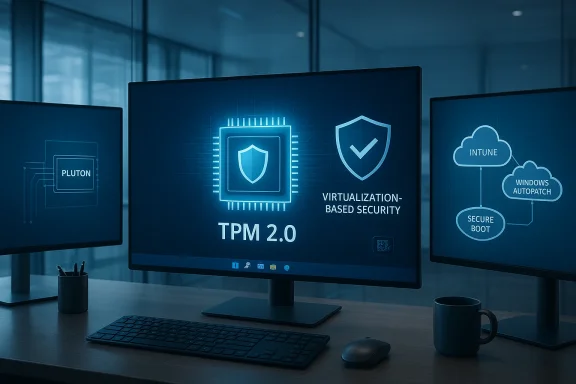
At its core, Windows 11 Pro is the same modern client OS as Windows 11 Home, but with additional controls and features tailored for professional and business use. The Pro edition bundles:- Security baseline tied to hardware: TPM 2.0, UEFI Secure Boot, and requirements that enable Virtualization‑Based Security (VBS) on supported chips.
- Identity and passwordless options: Windows Hello with TPM‑backed credentials and integrated multifactor capabilities intended to reduce reliance on passwords.
- Encryption by default for business devices: BitLocker and device encryption that leverage TPM to protect disk keys.
- Enterprise management and app control: Device and policy controls that integrate with Microsoft Intune, Windows Autopatch, and application control features such as Smart App Control.
- Productivity enhancements: UI improvements, Snap layouts, File Explorer tabs, and tighter integration with Microsoft 365 and Teams to support hybrid work.
Security deep dive: what “most secure version of Windows” means in practice
TPM 2.0 and hardware‑backed credentials
Windows 11 requires TPM 2.0 as a baseline. The TPM acts as a hardware root of trust: it stores secrets (like disk encryption keys and credential material) in a way that is much harder for attackers to extract than software‑only stores. TPM‑backed credentials enable passwordless flows through Windows Hello, making phishing‑resistant authentication practical for everyday users. Microsoft has cited telemetry that organizations moving away from legacy authentication and toward MFA or passwordless saw significantly fewer compromises.What to expect operationally:
- TPM presence means BitLocker and device encryption can be enabled without additional key escrow complexities on many devices.
- TPM‑bound credentials reduce the window for credential theft techniques that have driven several high‑profile breaches.
UEFI Secure Boot and chain‑of‑trust
UEFI Secure Boot is enforced on Windows 11 devices, ensuring boot code must be signed by trusted parties. The practical effect is to reduce the class of attacks that can compromise a system before the operating system loads — attacks that historically have been devastating because they subvert antivirus and endpoint tools by executing earlier in the boot chain. Secure Boot has been pushed by Microsoft and endorsed by national security agencies as a best practice for preventing pre‑boot compromises.Virtualization‑Based Security (VBS) and HVCI
VBS uses hardware virtualization to isolate sensitive runtime components, such as credential handling and code integrity checks. When enabled, Hypervisor‑Protected Code Integrity (HVCI) and memory integrity make it far harder for kernel‑level exploits to succeed and for drivers to load unsigned or malicious code. Microsoft has said VBS is enabling capabilities used by high‑security customers, and the DoD requires similar protections for certain devices. Windows 11’s minimum system requirements were chosen to ensure most new devices can support VBS — Microsoft plans to enable VBS on many new PCs in coordination with OEMs and silicon partners.Microsoft Pluton and secured‑core PCs
Pluton is Microsoft’s hardware security processor architecture (integrated into silicon) that further reduces attack surface by keeping secrets on the CPU die instead of on separate buses. On supported ARM and x86 platforms, Pluton and other secure elements — when combined with secured‑core PC labeling — provide chip‑to‑cloud attestation, stronger firmware protections, and firmware update integration with Windows Update. These advances are meaningful for high‑value targets and regulated industries.Smart App Control and application reputation
Windows 11 introduced Smart App Control — an AI‑driven policy that blocks untrusted, unsigned, or malicious executables and scripts. For organizations without full MDM adoption, Smart App Control can provide immediate hardening on new Windows 11 devices or clean installs by rejecting high‑risk application types before they run. It’s built on the same engine as Windows Defender Application Control and augments endpoint defenses.Productivity and management: building a business‑grade user experience
Windows 11 Pro is not security‑first at the expense of productivity. Microsoft has invested in features to improve hybrid work, collaboration, and device management at scale.Collaboration and cloud integration
Tighter integration with Microsoft Teams and Microsoft 365 means less friction for video conferencing, file sharing, and remote collaboration. Features such as improved webcams, AI noise cancellation, and system‑level integration for phone‑to‑PC experiences are part of the overall pitch for modern business PCs. OEM partners shipped business‑focused devices preconfigured with Windows 11 Pro and add‑ons like Galaxy‑to‑PC connectors, enhancing the hybrid work experience.File Explorer, Snap layouts, and workflows
Small but frequently used adjustments — tabs in File Explorer, enhanced Snap layouts, and a more centralized Widgets/Start experience — aim to reduce context switching and speed up common workflows. For power users, File Explorer tabs and better window management can translate into measurable time savings over weeks and months.Device and update management
Windows 11 Pro integrates with Microsoft’s cloud management stack (Intune, Windows Autopatch, and Windows Update). Microsoft has also invested in “hotpatch” delivery and restartless security fixes enabled by VBS — a capability that matters for service continuity in large fleets. The management story for Pro devices is that organizations can move to a largely cloud‑based lifecycle: provisioning, policy enforcement, patching, and telemetry can all be handled with fewer on‑prem components.Device ecosystem: secured‑core PCs and vendor alignment
Hardware OEMs quickly aligned with Microsoft’s vision, offering secured‑core and business devices shipping with Windows 11 Pro. Examples include Samsung’s Galaxy Book2 Pro family (first consumer lineup meeting secured‑core requirements), Lenovo’s Snapdragon‑based ThinkPad X13s with Pluton support, and rugged devices like Getac and Panasonic TOUGHBOOK models preloaded with enterprise configurations. These offerings bring the platform’s security features into tangible products that IT departments can buy and standardize on.Key enterprise device benefits:
- Preconfigured secured‑core devices reduce setup friction and ensure firmware/driver hygiene.
- Rugged devices with TPM, smart card readers, and Windows Hello options simplify field and first‑responder deployments.
- ARM‑based devices with Pluton expand choice, although x86 compatibility for enterprise apps remains a consideration.
Where Windows 11 Pro delivers measurable benefits
- Reduced attack surface: Hardware‑backed security features like TPM, Secure Boot, and VBS materially increase the work required for attackers to achieve persistent system compromise. Microsoft’s telemetry and independent industry recommendations back these design choices.
- Easier passwordless deployment: Windows Hello and TPM integration make passwordless authentication more practical at scale, reducing phishing risk and credential theft, which have been dominant attack vectors.
- Stronger default encryption: BitLocker leveraging TPM is effectively easier to deploy by default on many business PCs, helping protect data when devices are lost or stolen.
- Simplified lifecycle through cloud tooling: Intune and Windows Autopatch reduce manual update work and provide telemetry for compliance and security posture — particularly valuable for distributed workforces.
- Modern device choices: OEMs have produced a range of Windows 11 Pro systems — from consumer‑grade secured‑core laptops to rugged field units — letting IT standardize hardware where it matters.
Risks, trade‑offs, and operational challenges
Windows 11 Pro’s strengths come with real operational trade‑offs that IT must weigh.1. Hardware compatibility and upgrade friction
Raising the minimum system requirements excludes many aging PCs. Organizations with large, heterogeneous fleets will face costs to refresh hardware or maintain Windows 10 for legacy machines until October 14, 2025 (extended support timelines vary by SKU and region). Migrating apps and ensuring driver compatibility on older devices can be non‑trivial.2. Performance and compatibility with VBS/HVCI
VBS and HVCI add isolation layers that can have measurable performance overhead on some hardware and can expose driver incompatibilities. The Windows team has data showing unsupported hardware saw higher crash rates, but enabling VBS fleetwide requires testing: drivers must meet modern driver models and vendors must provide signed, VBS‑compatible drivers. Organizations should expect pilot phases and potential remediation work with hardware vendors.3. Operational complexity for older applications
Legacy business applications — particularly those that interact with kernel components or use undocumented interfaces — may fail under a stricter kernel integrity regime. App Assure and vendor partnerships have mitigated a large portion of compatibility issues, but compatibility assessment remains a necessary step for enterprise migrations.4. Supply chain and firmware‑level trust
Features such as Pluton and secured‑core PCs improve resilience to firmware attacks, but they also increase reliance on OEM‑supplied firmware and update pipelines. Organizations must validate OEM update practices and ensure firmware updates are managed and audited. The chain is stronger, but it’s not immune.5. Vendor lock‑in and cloud dependency
The most streamlined management scenarios — Windows Autopatch, Intune, and chip‑to‑cloud attestation — work best within the Microsoft cloud ecosystem. Organizations that prefer different MDM or patching infrastructures must evaluate integration points and potential limits to feature parity. Smart App Control and other features add security but depend on cloud‑linked reputation services for maximum utility.Practical rollout recommendations for IT teams
Moving to Windows 11 Pro across an organization should be a project with clear phases and measurable acceptance criteria. Here is a practical checklist:- Inventory and assessment
- Audit existing hardware for TPM 2.0, Secure Boot, and VBS‑capable CPUs.
- Identify business‑critical legacy apps and drivers that require testing.
- Pilot
- Build a multi‑phase pilot including knowledge workers, power users, and at least one group that runs legacy apps.
- Enable VBS and HVCI in a controlled pilot; measure performance and crash telemetry.
- Update and vendor engagement
- Coordinate with OEMs and ISVs for driver and firmware updates; prioritize secured‑core SKUs where security posture is critical.
- Identity and access
- Roll out Windows Hello for Business and start moving groups to passwordless authentication with TPM‑backed keys.
- Management and patching
- Integrate Intune and Windows Autopatch (or your chosen management tool) and validate hotpatch and restartless patching behavior where supported.
- Training and change management
- Educate end users about new sign‑in experiences, Smart App Control prompts, and any workflow changes.
- Operationalize telemetry and incident response
- Set up dashboards for VBS/HVCI status, Secure Boot and TPM health, and BitLocker coverage. Practice incident response for firmware and kernel anomalies.
What to watch next: futureproofing and where Microsoft needs to prove its claims
- Broader VBS adoption at scale: Microsoft’s plan to enable VBS across more new PCs this year will test supply chains and driver ecosystems. Organizations should monitor driver maturity and the real‑world performance impact as VBS becomes a common default.
- Pluton and chip‑level trust on x86 and ARM: Pluton’s promise is compelling, but real security gains depend on secure firmware update paths, coordinated vendor support, and transparent attestation mechanisms. Continued cross‑vendor testing and independent validation will be key.
- Hotpatching and restartless updates: The operational benefits of hotpatching hinge on wide VBS support and reliable update paths. Early adopters should validate hotpatch behavior in their environments before committing fleetwide.
- App compatibility for specialized software: Industries that rely on bespoke or legacy applications must maintain a compatibility plan and leverage App Assure or vendor remediation services where required.
Final analysis: is Windows 11 Pro the right baseline for business?
Windows 11 Pro marks a meaningful step forward in tying the OS security posture to hardware capabilities while preserving a modern productivity surface for users. For organizations that can afford a planned hardware refresh and have tested their app estate, the security and management gains are real: hardware roots of trust, default encryption, VBS isolation, and richer cloud management substantially lower attack surface and reduce operational friction for identity and patching.However, the transition is not without friction. Expect cost and scheduling for hardware refreshes, driver and legacy app remediation, and some short‑term performance and compatibility testing. The most successful adopters will be those who treat the move as a program — inventory, pilot, vendor coordination, and phased rollout — rather than a single click upgrade.
In plain terms: Windows 11 Pro does set a higher, more defendable standard for business PCs, provided organizations plan for the hardware and operational changes required to realize those benefits in practice.
By making TPM, Secure Boot, and virtualization‑based protections foundational, and by aligning OEMs and cloud services around that baseline, Microsoft and its partners have created an ecosystem where enterprise security is easier to deliver and manage — but not without intentional planning and vendor collaboration to address the practical risks and compatibility costs that come with raising the bar.
Source: MyBroadband https://mybroadband.co.za/news/indu...d-for-secure-and-productive-business-pcs.html
