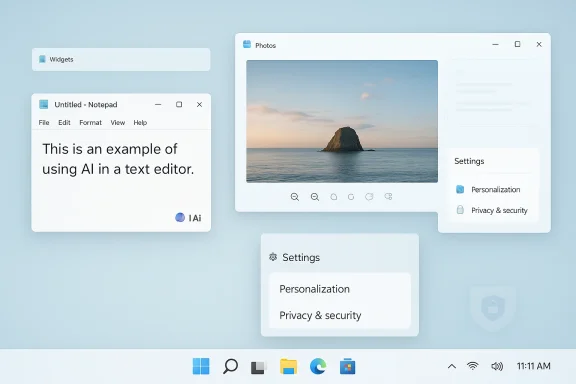
Microsoft is beginning to unwind one of Windows 11’s most criticized habits: placing Copilot too close to everyday work and too far from user intent. In the latest Insider-facing direction, the company is reportedly reducing unnecessary Copilot entry points in Notepad, Photos, Snipping Tool, and Widgets, while also revisiting taskbar flexibility and other quality-of-life changes that long-time Windows users have wanted for years. That does not signal an abandonment of AI; it signals a reset in how aggressively Microsoft wants AI to appear inside the desktop.
Windows 11 launched with a clear promise: a cleaner desktop, a more modern shell, and a platform that could better carry Microsoft into the next era of personal computing. That promise resonated with some users immediately, especially those who wanted a visual refresh after the long life of Windows 10. But from the beginning, the redesign also came with trade-offs that many power users found frustrating, particularly the more rigid taskbar behavior and the sense that Microsoft was narrowing customization in the name of simplicity. ew as Microsoft began weaving Copilot into more and more corners of the Windows experience. In broad terms, the company wanted Windows to be the front door to the AI era, with Copilot acting as a layer across the OS, inbox apps, and Microsoft services. In practice, though, that often meant surfacing AI in places where users expected a fast utility, not a conversation. The pattern was easy to see in apps like Notepad and Snipping Tool: the more Microsoft tried to make AI feel ambient, the more some users felt surrounded by prompts they never asked for.
Microsoft’s own offiRecall made the stakes even clearer. The company spent months explaining how the feature would work, how it would be secured, and how it would remain local, opt-in, and protected by additional safeguards such as Windows Hello, encryption, and isolated processing. That careful architecture was a response to major privacy concerns, and it shows how sensitive Microsoft has become to the optics of system-level AI. Recall’s rocky path also shaped the broader conversation around trust in Windows AI.
That matters because Windows is not just another app or service. It is the operating system for work, school, gaming, administration, and creative use all at once. Microsoft can move a lot faster in a standalone app, but in Windows every surface carries symbolic weight. A button in Notepad is not just a button; it is a statement about what the company thinks the desktop should be. And when those statements accumulate, users notice. The current Copilot rollback, then, is not only about removing clutter. It is about rebalancing the relationship between Microsoft’s AI ambitions and the everyday reality of the Windows desktop.
This is not the same thing as removing AI functionality outright. Instead, it suggests Microsoft has concluded that the visibility of AI matters as much as the capability itself. A feature can be technically impressive and still be poorly placed. If Copilot is front and center in a quick-capture app, the interaction can feel less like assistance and more like a nudge toward a brand message. That distinction is at the heart of the backlash.
The update also appears to fit a broader trend in Windows messaging. Microsoft has been emphasizing performance, reliability, and more intentional use of AI in recent Insider-era changes. That is a meaningful shift in tone. It suggests the company knows that the old “AI everywhere” pitch has diminishing returns if users feel the desktop is becoming crowded, noisy, or prescriptive.
Microsoft appears to be learning that lesson the hard way. The new direction is less “Copilot everywhere” and more “Copilot where it fits.” That is a much healthier model for desktop software, especially in apps where speed and simplicity are the whole point.
Photos and Snipping Tool are different, but the logic is similar. Photos is a place where AI can clearly be useful, especially for editing and image understanding, yet the app still needs to feel like a straightforward image tool first. Snipping Tool is even more obvious: users typically want to capture a screenshot and move on. If Copilot appears too aggressively there, it can feel like the operating system is interrupting a workflow that should have taken seconds.
Widgets sit in a slightly different category. They are designed to be quick, glanceable, and context-light. That makes them a poor place for persistent AI prompting unless the AI is genuinely adding value at a glance. When Microsoft pushes too much into that surface, Widgets stop feeling like a dashboard and start feeling like a billboard. That is not a good trade.
That can be dangerous for Microsoft, because AI adoption depends heavily on perceived relevance. If the company wants users to embrace AI in Windows, it has to prove that the assistant appears when it matters, not merely where it can be placed. In the long run, restraint may sell Copilot better than saturation ever did.
But the larger issue was never just technical. It was emotional. Recall triggered immediate concerns about surveillance, data retention, and the possibility that a system feature meant to help users remember things might instead feel like a built-in memory recorder. Even if Microsoft’s safeguards are strong, the controversy exposed a simple truth: users are much less forgiving when AI seems to watch too much, remember too much, or appear too deeply in the system.
That context matters to the Copilot rollback. If Microsoft has learned anything from Recall, it is that platform-level AI requires not just good engineering but visible restraint. Users want confidence that the OS is helping them, not examining them. Reducing intrusive Copilot surfaces is one way to signal that the company understands the line.
Recall showed that Microsoft can do a lot right technically and still lose the perception battle. That lesson almost certainly informs the current move toward a quieter Copilot. The company may be trying to rebuild trust by proving that AI can be present without being intrusive.
If Microsoft is now truly revisiting that decision, the symbolism is hard to miss. The company would be acknowledging that simplification is not always the same thing as improvement. A rigid interface may look cleaner in a demo, but for real users it can feel like the vendor is deciding how their desktop should work. Restoring choice is a direct way to counter that impression.
This is also a good example of how small UI changes can carry disproportionate emotional weight. Taskbar placement has become a proxy for a larger question: how much control should users retain over the system they use every day? When Microsoft removes or restores a feature like this, it sends a message about whether it sees Windows as a configurable platform or a more opinionated appliance.
That is why restoring taskbar flexibility would matter beyond the enthusiast crowd. When Microsoft gives that control back, it shows that it is willing to let users shape the environment around the work rather than forcing the work to fit the environment.
That makes user trust more important, not less. If people are being pushed toward Windows 11, they need reasons to stay enthusiastic once they get there. AI branding alone will not do the job. A quieter OS, better update behavior, and more control over the shell may be far more persuasive than another round of Copilot messaging.
There is a practical business side to this as well. Microsoft has spent years framing Windows as the platform for the next wave of PCs, especially Copilot+ hardware. But hardware positioning only works if the software experience feels better, not busier. If the most visible result of AI is more clutter, the pitch weakens. If the visible result is less friction, the pitch gets stronger.
The enterprise side also has to think about compliance and trust. If Microsoft can make Windows feel less intrusive while still keeping AI available on demand, it will be easier for organizations to justify adopting newer features without worrying that they are imposing too much change on staff.
This is a classic platform lesson. When a company is excited about a new capability, it often overuses it. The feature becomes a hammer, and every interface problem starts to look like a nail. Microsoft seems to have done that with Copilot in Windows 11, and the current rollback suggests it finally recognizes that overexposure can turn a strength into a liability.
That does not mean AI is going away from Windows. Far from it. Microsoft is still betting heavily on Copilot+, on local AI features, and on the broader idea that the PC should become more intelligent. But intelligence is not the same thing as interruption. If the company can preserve the capability while trimming the noise, Windows 11 may become much easier to live with.
The risk, of course, is that Microsoft could swing too far and make Copilot feel hidden or inconsistent. That would weaken the assistant’s discoverability and make the company’s AI story harder to tell. The sweet spot is selective visibility: obvious when needed, invisible when not.
A second question is whether taskbar flexibility and other user-control features continue to return in a consistent way. If Microsoft is really listening, these changes should not stop at a few Insider builds. They should become part of a broader pattern of making Windows 11 less rigid and more respectful of different workflows.
Finally, the company still has to prove that it can keep shipping AI without letting AI dominate the conversation. That means better placement, better defaults, and fewer moments where ordinary users feel they are being sold to by their own operating system.
Source: AIBase Microsoft Cuts the Clumsy Copilot Entry: Windows 11 Returns to Simplicity
 Background
Windows 11 launched with a clear promise: a cleaner desktop, a more modern shell, and a platform that could better carry Microsoft into the next era of personal computing. That promise resonated with some users immediately, especially those who wanted a visual refresh after the long life of Windows 10. But from the beginning, the redesign also came with trade-offs that many power users found frustrating, particularly the more rigid taskbar behavior and the sense that Microsoft was narrowing customization in the name of simplicity. ew as Microsoft began weaving Copilot into more and more corners of the Windows experience. In broad terms, the company wanted Windows to be the front door to the AI era, with Copilot acting as a layer across the OS, inbox apps, and Microsoft services. In practice, though, that often meant surfacing AI in places where users expected a fast utility, not a conversation. The pattern was easy to see in apps like Notepad and Snipping Tool: the more Microsoft tried to make AI feel ambient, the more some users felt surrounded by prompts they never asked for.Microsoft’s own offiRecall made the stakes even clearer. The company spent months explaining how the feature would work, how it would be secured, and how it would remain local, opt-in, and protected by additional safeguards such as Windows Hello, encryption, and isolated processing. That careful architecture was a response to major privacy concerns, and it shows how sensitive Microsoft has become to the optics of system-level AI. Recall’s rocky path also shaped the broader conversation around trust in Windows AI.
That matters because Windows is not just another app or service. It is the operating system for work, school, gaming, administration, and creative use all at once. Microsoft can move a lot faster in a standalone app, but in Windows every surface carries symbolic weight. A button in Notepad is not just a button; it is a statement about what the company thinks the desktop should be. And when those statements accumulate, users notice. The current Copilot rollback, then, is not only about removing clutter. It is about rebalancing the relationship between Microsoft’s AI ambitions and the everyday reality of the Windows desktop.
What Microsoft Appears to Be Changing
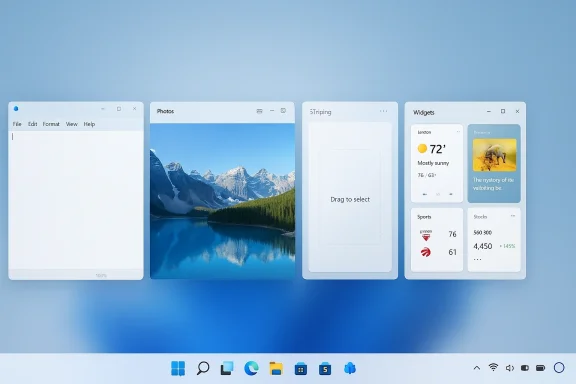
The clearest sign of the reset is that Microsoft is reportedly reducing Copilot entry points in several inbox apps rather than broadening them further. The apps named most often in the current wave are Notepad, Photos, Snipping Tool, and Widgets. That is a telling list because each of those apps exists for a very specific task, and each one works best when it gets out of the user’s way quickly.This is not the same thing as removing AI functionality outright. Instead, it suggests Microsoft has concluded that the visibility of AI matters as much as the capability itself. A feature can be technically impressive and still be poorly placed. If Copilot is front and center in a quick-capture app, the interaction can feel less like assistance and more like a nudge toward a brand message. That distinction is at the heart of the backlash.
The update also appears to fit a broader trend in Windows messaging. Microsoft has been emphasizing performance, reliability, and more intentional use of AI in recent Insider-era changes. That is a meaningful shift in tone. It suggests the company knows that the old “AI everywhere” pitch has diminishing returns if users feel the desktop is becoming crowded, noisy, or prescriptive.
Why placement matters more than volume
The problem with excessive AI surfaces is not that they are useless. It is that they are ambient, and ambient features are judged by friction as much as capability. A user may never touch a Copilot button in Notepad, but if the button is always there, the app starts to feel less like a utility and more like a platform for upsell. That changes the emotional tone of the software. It makes a lightweight tool feel heavier.Microsoft appears to be learning that lesson the hard way. The new direction is less “Copilot everywhere” and more “Copilot where it fits.” That is a much healthier model for desktop software, especially in apps where speed and simplicity are the whole point.
- Notepad should remain immediate and low-friction.
- Snipping Tool should capture and disappear.
- Photos can benefit from AI, but not if it constantly interrupts basic editing.
- Widgets should stay glanceable, not promotional.
Why Notepad, Photos, and Snipping Tool Became Symbolic
Among Windows users, Notepad has always represented a kind of design purity. It is the classic minimal app: open it, type, close it. That is precisely why AI integration in Notepad became controversial. Microsoft has been modernizing it with richer features over time, including text enhancements and other quality-of-life additions, but every added layer risks diluting the app’s identity as the simplest place to jot something down.Photos and Snipping Tool are different, but the logic is similar. Photos is a place where AI can clearly be useful, especially for editing and image understanding, yet the app still needs to feel like a straightforward image tool first. Snipping Tool is even more obvious: users typically want to capture a screenshot and move on. If Copilot appears too aggressively there, it can feel like the operating system is interrupting a workflow that should have taken seconds.
Widgets sit in a slightly different category. They are designed to be quick, glanceable, and context-light. That makes them a poor place for persistent AI prompting unless the AI is genuinely adding value at a glance. When Microsoft pushes too much into that surface, Widgets stop feeling like a dashboard and start feeling like a billboard. That is not a good trade.
The branding problem
There is also a deeper issue: when every app has a Copilot button, Copilot starts to look like a branding layer rather than a feature layer. That weakens trust because users stop seeing the difference between a useful assistant and a corporate label attached to familiar tools. The more often Microsoft repeats the same pattern, the more users tune it out.That can be dangerous for Microsoft, because AI adoption depends heavily on perceived relevance. If the company wants users to embrace AI in Windows, it has to prove that the assistant appears when it matters, not merely where it can be placed. In the long run, restraint may sell Copilot better than saturation ever did.
- Fewer accidental clicks.
- Cleaner interfaces.
- Better task focus.
- Lower cognitive overhead.
- Higher perceived quality.
Recall’s Shadow Still Shapes the Conversation
No discussion of Windows AI can ignore Recall. The feature became one of Microsoft’s most visible trust tests, and the company’s response told us a lot about how seriously it took the criticism. Microsoft has repeatedly emphasized that Recall is local, encrypted, opt-in, and protected by Windows Hello, along with additional security architecture meant to keep snapshots isolated and private. That is the official answer, and it reflects a substantial engineering effort.But the larger issue was never just technical. It was emotional. Recall triggered immediate concerns about surveillance, data retention, and the possibility that a system feature meant to help users remember things might instead feel like a built-in memory recorder. Even if Microsoft’s safeguards are strong, the controversy exposed a simple truth: users are much less forgiving when AI seems to watch too much, remember too much, or appear too deeply in the system.
That context matters to the Copilot rollback. If Microsoft has learned anything from Recall, it is that platform-level AI requires not just good engineering but visible restraint. Users want confidence that the OS is helping them, not examining them. Reducing intrusive Copilot surfaces is one way to signal that the company understands the line.
Privacy, trust, and the Windows brand
Windows has always depended on trust because it sits closest to the user’s work. When Microsoft pushes a feature that feels invasive, it does more than irritate power users. It risks weakening the entire platform’s credibility. That is especially true now, when AI features are increasingly tied to the personal computer itself rather than just cloud services.Recall showed that Microsoft can do a lot right technically and still lose the perception battle. That lesson almost certainly informs the current move toward a quieter Copilot. The company may be trying to rebuild trust by proving that AI can be present without being intrusive.
- Local processing helps, but perception still matters.
- Opt-in controls reduce risk, but they do not erase concern.
- Security architecture is necessary, but not sufficient.
- The user experience must feel respectful, not just safe.
- System-level AI needs more caution than app-level AI.
Taskbar Flexibility Signals a Larger Philosophy Shift
The reported return of taskbar positioning options is arguably just as important as the Copilot changes. For a subset of users, the ability to move the taskbar to the top or sides of the screen is not cosmetic at all; it is a productivity choice grounded in monitor layout, muscle memory, and workflow design. Windows 10 had more flexibility here, and Windows 11’s more locked-down approach became one of the most enduring complaints about the new shell. Microsoft Q&A responses over the past year still reflected that limitation, making clear that native top or side docking remained unsupported in the current release.If Microsoft is now truly revisiting that decision, the symbolism is hard to miss. The company would be acknowledging that simplification is not always the same thing as improvement. A rigid interface may look cleaner in a demo, but for real users it can feel like the vendor is deciding how their desktop should work. Restoring choice is a direct way to counter that impression.
This is also a good example of how small UI changes can carry disproportionate emotional weight. Taskbar placement has become a proxy for a larger question: how much control should users retain over the system they use every day? When Microsoft removes or restores a feature like this, it sends a message about whether it sees Windows as a configurable platform or a more opinionated appliance.
Why power users care so much
Power users notice platform drift first because they live inside the shell all day. They think in terms of pointer travel, monitor geometry, and muscle memory. For them, a side-docked taskbar on an ultrawide display is not nostalgia; it is ergonomics. A top-aligned taskbar can also better match certain workflows, especially on setups where horizontal space is valuable.That is why restoring taskbar flexibility would matter beyond the enthusiast crowd. When Microsoft gives that control back, it shows that it is willing to let users shape the environment around the work rather than forcing the work to fit the environment.
- Better support for ultrawide displays.
- Improved fit for vertical or rotated monitors.
- More adaptable multi-monitor setups.
- Potential accessibility benefits.
- A stronger sense of ownership.
The End of Windows 10 Support Changes the Stakes
Microsoft is making these adjustments in a very different market context than it had a year or two ago. With Windows 10 support having ended on October 14, 2025, the company can no longer rely on the old operating system as an easy fallback for holdouts. Windows 11 now has to stand on its own as the default path forward for consumers and businesses alike.That makes user trust more important, not less. If people are being pushed toward Windows 11, they need reasons to stay enthusiastic once they get there. AI branding alone will not do the job. A quieter OS, better update behavior, and more control over the shell may be far more persuasive than another round of Copilot messaging.
There is a practical business side to this as well. Microsoft has spent years framing Windows as the platform for the next wave of PCs, especially Copilot+ hardware. But hardware positioning only works if the software experience feels better, not busier. If the most visible result of AI is more clutter, the pitch weakens. If the visible result is less friction, the pitch gets stronger.
Consumer and enterprise are not the same audience
Consumers tend to notice annoyance first, especially in day-to-day tasks like screenshots, notes, and photo edits. Enterprises notice management risk first. For IT admins, a restrained Copilot is attractive because it suggests clearer control over the user experience and fewer accidental prompts in shared environments. That matters a great deal in large deployments where consistency is a virtue.The enterprise side also has to think about compliance and trust. If Microsoft can make Windows feel less intrusive while still keeping AI available on demand, it will be easier for organizations to justify adopting newer features without worrying that they are imposing too much change on staff.
- Consumers want convenience without interruption.
- Enterprises want control without surprise.
- Both groups want fewer distractions.
- Both groups care about reliability.
- Both groups notice when basic workflows become noisy.
The Bigger Message: Microsoft Is Learning Restraint
The most interesting part of this story is not any single feature change. It is the broader philosophical shift. Microsoft appears to be moving from a world where AI had to be visible everywhere to one where AI has to earn its place. That sounds subtle, but in product strategy it is huge. It reflects a company learning that presence is not the same as usefulness.This is a classic platform lesson. When a company is excited about a new capability, it often overuses it. The feature becomes a hammer, and every interface problem starts to look like a nail. Microsoft seems to have done that with Copilot in Windows 11, and the current rollback suggests it finally recognizes that overexposure can turn a strength into a liability.
That does not mean AI is going away from Windows. Far from it. Microsoft is still betting heavily on Copilot+, on local AI features, and on the broader idea that the PC should become more intelligent. But intelligence is not the same thing as interruption. If the company can preserve the capability while trimming the noise, Windows 11 may become much easier to live with.
Where this could go next
Microsoft now has a chance to reframe Copilot as something users choose to invoke, not something they must constantly notice. That would be a healthier long-term position for both the product and the brand. It also creates room for more thoughtful AI integration in areas where it truly adds value.The risk, of course, is that Microsoft could swing too far and make Copilot feel hidden or inconsistent. That would weaken the assistant’s discoverability and make the company’s AI story harder to tell. The sweet spot is selective visibility: obvious when needed, invisible when not.
- More contextual AI entry points.
- Fewer always-on assistant surfaces.
- Better shell customization.
- Calmer update and setup behavior.
- Stronger user control over defaults.
Strengths and Opportunities
Microsoft’s new direction has several real strengths. First, it acknowledges user feedback in a way that is easy to understand and easy to feel. Second, it improves the perception of Windows 11 at a time when the company needs the OS to be seen as trustworthy, not merely modern.- Restores user agency in areas that matter daily.
- Reduces visual clutter in fast-launch utility apps.
- Improves Copilot credibility by making it feel more contextual.
- Helps enterprise adoption by signaling greater control.
- Supports different workflows across monitor types and user styles.
- Strengthens Windows 11’s value proposition after Windows 10 support ended.
- Creates room for better AI design in future releases.
Risks and Concerns
The risks are equally real. Microsoft has a long history of making the right adjustment but not always following through consistently. A partial rollback can help at first, but if the company reintroduces clutter elsewhere, users will notice quickly.- Inconsistent rollout could make the change feel cosmetic.
- Discoverability may suffer if Copilot becomes too hidden.
- Brand confusion could grow if Microsoft keeps changing AI surfaces.
- Enterprise admins may still want more control than consumers get.
- Privacy concerns around Recall remain unresolved in the public mind.
- Overcorrection could make Windows feel stripped down rather than refined.
- Trust recovery takes time even after visible improvements.
Looking Ahead
The next few Windows 11 release cycles will tell us whether this is a genuine course correction or just a tactical pause. The most important question is not whether Copilot remains in Windows, because it clearly will. The question is whether Microsoft can make the assistant feel intentional instead of omnipresent.A second question is whether taskbar flexibility and other user-control features continue to return in a consistent way. If Microsoft is really listening, these changes should not stop at a few Insider builds. They should become part of a broader pattern of making Windows 11 less rigid and more respectful of different workflows.
Finally, the company still has to prove that it can keep shipping AI without letting AI dominate the conversation. That means better placement, better defaults, and fewer moments where ordinary users feel they are being sold to by their own operating system.
- Watch whether Copilot prompts disappear from more inbox apps.
- Watch whether taskbar repositioning reaches mainstream builds.
- Watch whether Windows Update becomes less intrusive.
- Watch whether Recall’s trust model improves in practice, not just in documentation.
- Watch whether Microsoft extends the same restraint to other shell surfaces.
Source: AIBase Microsoft Cuts the Clumsy Copilot Entry: Windows 11 Returns to Simplicity