

Windows 11’s first quarter of 2026 did not arrive with a single blockbuster redesign. Instead, Microsoft spent January through March shipping a cluster of quality updates that quietly made the OS more useful, more recoverable, and more secure. The headline additions are easy to spot: cross-device resume for Android apps, a built-in network speed test, native Sysmon support, and expanded Windows Hello Enhanced Sign-in Security options. Taken together, they suggest a familiar Microsoft strategy in 2026: move everyday utilities into the operating system itself and reduce the need for third-party workarounds.
That approach matters because Windows is now in a more mature phase of its lifecycle. Microsoft’s Windows 11 servicing model continues to deliver monthly security updates and periodic non-security previews, while 26H1 is reserved for select new devices rather than existing PCs. In other words, the first quarter of 2026 was less about a new flagship release and more about steady platform refinement. The result is an update cycle that feels incremental on paper but meaningful in practice, especially for people who rely on Windows 11 for work, gaming, or mobile-to-PC continuity.
Microsoft has spent the last several years turning Windows 11 into a continuous innovation platform rather than a once-a-year feature drop. That shift is important because it changes how users experience improvements: instead of waiting for a major version bump, they get smaller features woven into monthly quality updates, preview releases, and configuration changes. The Q1 2026 cycle fits that pattern almost perfectly, with Microsoft adding capabilities that were previously confined to a separate app, an optional toolset, or enterprise-only workflows.
This also reflects a broader change in Windows priorities. Microsoft has increasingly focused on resilience, security, and cross-device workflows, especially as laptops, phones, and cloud services overlap more than ever. Features like Quick Machine Recovery and Cross-device Resume are not flashy in the way a redesigned Start menu might be, but they speak directly to real-world pain points: boot failures, interrupted workflows, and friction between a phone and a PC.
A key backdrop to this quarter is the structure of Windows 11 servicing itself. Microsoft says Windows 11 receives annual feature updates in the second half of the calendar year, while monthly releases carry security fixes and cumulative quality improvements. Separately, Windows 11, version 26H1, is targeted at select new devices in early 2026 and is not meant as an in-place upgrade for existing systems. That means most users will see the first-quarter improvements through their current Windows 11 branch, not through a major new edition.
The other important context is support timing. Windows 10 support ended on October 14, 2025, which has kept pressure on Microsoft to make Windows 11 feel more complete and more compelling for holdouts, especially in consumer and small-business markets. Every incremental quality improvement helps reduce the sense that Windows 11 is missing pieces compared with its predecessors or with better-integrated mobile ecosystems.
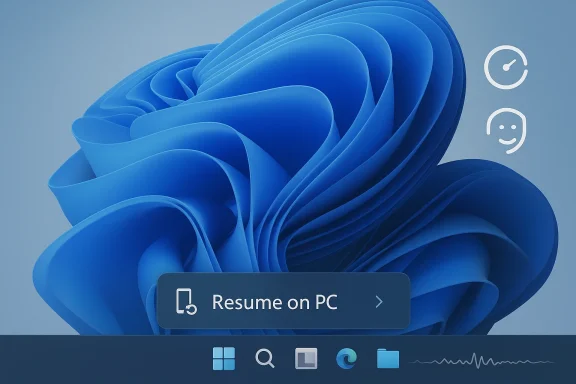
What makes this feature notable is not the novelty of continuity itself, but the way Microsoft is surfacing it. The taskbar is the right place for resume prompts because it is persistent, low-friction, and already part of the user’s muscle memory. Instead of forcing users into the Phone Link interface, Microsoft is trying to make cross-device work feel ambient rather than explicit. That is a subtle but important UX decision.
The practical impact will vary by audience. For consumers, it means less time re-opening apps and more time continuing tasks. For businesses, the value is narrower but real: reducing context switching can shave off friction in mobile-first workflows, especially for staff who use Microsoft 365 on phones and desktops throughout the day. That said, the feature only helps if users already live inside the supported app set and device ecosystem.
Source: windowscentral.com Windows 11 now resumes Android apps, adds built‑in speed tests, improves security, and more in its first 2026 updates
That approach matters because Windows is now in a more mature phase of its lifecycle. Microsoft’s Windows 11 servicing model continues to deliver monthly security updates and periodic non-security previews, while 26H1 is reserved for select new devices rather than existing PCs. In other words, the first quarter of 2026 was less about a new flagship release and more about steady platform refinement. The result is an update cycle that feels incremental on paper but meaningful in practice, especially for people who rely on Windows 11 for work, gaming, or mobile-to-PC continuity.
 Background
Microsoft has spent the last several years turning Windows 11 into a continuous innovation platform rather than a once-a-year feature drop. That shift is important because it changes how users experience improvements: instead of waiting for a major version bump, they get smaller features woven into monthly quality updates, preview releases, and configuration changes. The Q1 2026 cycle fits that pattern almost perfectly, with Microsoft adding capabilities that were previously confined to a separate app, an optional toolset, or enterprise-only workflows.This also reflects a broader change in Windows priorities. Microsoft has increasingly focused on resilience, security, and cross-device workflows, especially as laptops, phones, and cloud services overlap more than ever. Features like Quick Machine Recovery and Cross-device Resume are not flashy in the way a redesigned Start menu might be, but they speak directly to real-world pain points: boot failures, interrupted workflows, and friction between a phone and a PC.
A key backdrop to this quarter is the structure of Windows 11 servicing itself. Microsoft says Windows 11 receives annual feature updates in the second half of the calendar year, while monthly releases carry security fixes and cumulative quality improvements. Separately, Windows 11, version 26H1, is targeted at select new devices in early 2026 and is not meant as an in-place upgrade for existing systems. That means most users will see the first-quarter improvements through their current Windows 11 branch, not through a major new edition.
The other important context is support timing. Windows 10 support ended on October 14, 2025, which has kept pressure on Microsoft to make Windows 11 feel more complete and more compelling for holdouts, especially in consumer and small-business markets. Every incremental quality improvement helps reduce the sense that Windows 11 is missing pieces compared with its predecessors or with better-integrated mobile ecosystems.
Cross-Device Resume Becomes More Practical
The most visible consumer-facing change in the first quarter is Cross-device Resume, which lets users continue certain Android activities on a linked Windows 11 PC directly from the taskbar. Microsoft’s support documentation says the feature works with a supported Android device and PC, and as of January 2026, supported scenarios include Spotify playback and Microsoft 365 Copilot file continuation on certain Android phones from HONOR, OPPO, Samsung, vivo, and Xiaomi.What makes this feature notable is not the novelty of continuity itself, but the way Microsoft is surfacing it. The taskbar is the right place for resume prompts because it is persistent, low-friction, and already part of the user’s muscle memory. Instead of forcing users into the Phone Link interface, Microsoft is trying to make cross-device work feel ambient rather than explicit. That is a subtle but important UX decision.
Why it matters
Cross-device workflows are one of the few areas where Windows can still differentiate itself without chasing Apple’s exact playbook. Apple has long owned the “it just continues where you left off” story, while Android-to-PC continuity has often depended on a patchwork of vendor tools. Microsoft is trying to normalize that behavior inside Windows itself, which could make the PC feel more like a hub than a destination.The practical impact will vary by audience. For consumers, it means less time re-opening apps and more time continuing tasks. For businesses, the value is narrower but real: reducing context switching can shave off friction in mobile-first workflows, especially for staff who use Microsoft 365 on phones and desktops throughout the day. That said, the feature only helps if users already live inside the supported app set and device ecosystem.
Adoption caveats
There are still meaningful constraints. The feature depends on linked devices, the Link to Windows and Phone Link stack, and compatible Android apps and vendors. That means Microsoft has not solved the universal cross-device problem; it has solved a very specific one. The result is useful, but not yet broad enough to become a default expectation for everyone.- It is strongest for users already tied into Microsoft 365 and Spotify.
- It is most valuable on phones from supported OEMs.
- It works best when users keep both phone and PC actively linked.
- It will feel invisible to anyone outside the supported ecosystem.
- It is a platform play as much as a feature play.
Windows MIDI Services Finally Looks Native
Microsoft’s Windows MIDI Services upgrade is one of the most technically significant additions in Q1 2026, even if it will fly under the radar for most casual users. The company says the new stack includes support for MIDI 1.0 and 2.0, full WinMM and WinRT MIDI 1.0 support with built-in translation, shared MIDI ports across apps, custom port names, loopback, and app-to-app MIDI. That is a serious modernization of a subsystem that has historically been held together by compatibility layers and third-party utilities.Source: windowscentral.com Windows 11 now resumes Android apps, adds built‑in speed tests, improves security, and more in its first 2026 updates
