

Microsoft is quietly changing the story it tells about Copilot inside Windows 11, and the shift is more revealing than a simple UI refresh. In preview builds, the company has started stripping Copilot branding from some core apps and replacing it with more neutral labels such as “writing tools” in Notepad, while also removing or hiding some Copilot entry points in apps like Snipping Tool. The AI capabilities are still there, but the branding is being softened, and that suggests Microsoft is recalibrating after a year of aggressive AI promotion and mixed user reaction.
Microsoft’s Windows strategy over the past two years has been built around a simple thesis: Windows 11 is the AI PC operating system. That message has shown up everywhere, from taskbar integration to app-level AI buttons to broader Copilot+ PC marketing. In practice, that meant not just putting Copilot in front of users, but embedding it into familiar tools like Photos, Paint, Snipping Tool, and Notepad. The aim was clear: make AI feel native, ambient, and unavoidable.
That approach initially looked bold and modern. For Microsoft, it aligned Windows with its broader cloud and AI ambitions, tied Copilot more tightly to Microsoft 365, and created a premium narrative for new hardware. It also gave the company a way to defend Windows as more than a commodity desktop OS in an era when much of computing attention had shifted to mobile, web apps, and cloud services. The problem was that the same strategy that looked visionary in a keynote often felt pushy on the desktop.
Users did not always welcome the new layer of AI branding. A lot of Windows customers want their apps to behave like tools, not like demos for a product strategy. When the company turned routine actions into Copilot moments, the result was frequently friction rather than delight. Microsoft’s own public moves show it has noticed the tension: the company backed away from some of its more ambitious AI placements, scaled back some planned integrations, and started reorganizing features under broader labels instead of the Copilot name.
What makes the current change important is not that Microsoft is removing AI. It is doing the opposite of that. The AI functions remain present, but the surface area is changing. That distinction matters because it reveals a brand problem, not a feature problem. Microsoft appears to believe that Copilot may be more powerful when it is less visually dominant, especially in places where users mainly want a quick, reliable workflow.
The timing also matters. By 2026, Microsoft has spent enough time testing how people react to persistent AI prompting to know the difference between adoption and annoyance. Early enthusiasm for AI often runs into the reality of daily use, where users judge software by speed, clarity, and predictability. If an AI label becomes a distraction, Microsoft has an incentive to reframe it, even if the underlying technology stays exactly the same.
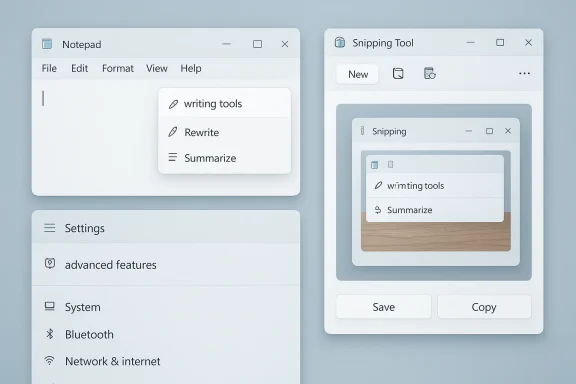
In Notepad, for example, the old Copilot-branded button has been replaced by a pen-style icon that opens a writing tools menu. The menu still offers rewrite, summarize, and generate capabilities, but the branding no longer foregrounds Copilot. This is a subtle move, but it speaks volumes. Microsoft is preserving the feature set while changing the emotional tone.
Snipping Tool shows the same pattern. Microsoft has said it wants to reduce “unnecessary Copilot access points” in apps like Snipping Tool, Photos, Widgets, and Notepad. In preview builds, that means Copilot buttons that once appeared after a screen capture have been removed, and the extra Copilot prompt has disappeared as well. Again, the action is not the removal of the AI function; it is the removal of the extra layer of insistence.
This matters because Windows is full of low-stakes interactions where users do not want a sales pitch, even a well-designed one. A screenshot tool should feel immediate. A note editor should feel quiet. A settings page should help you finish a task quickly. When Microsoft wraps those experiences in Copilot branding, it risks turning convenience into ceremony.
That is why this change looks tactical, not cosmetic. Microsoft is adjusting the psychological weight of its AI features. By reducing visible Copilot labels, it may hope to lower resistance while preserving usage.
This is where the backlash became strategically important. Some customers saw the omnipresent Copilot push as clutter. Others viewed it as unnecessary duplication, especially when similar actions already existed in apps or in Microsoft’s broader ecosystem. If a feature can rewrite text, summarize content, or clean up a screenshot, the user may appreciate it. If the interface keeps announcing that it is powered by Copilot, the benefit can start to feel secondary.
The company has therefore begun separating the capability from the mascot. In the best case, this makes the features easier to use and easier to ignore when not needed. In the worst case, it risks making Microsoft’s AI strategy feel muddled, as if the company is trying to have both a bold AI narrative and a quiet UX at the same time.
That is why the move from a bright Copilot button to a more restrained writing tools icon is so telling. Microsoft is keeping the AI text functions, including rewrite and summarize, but it is dressing them in quieter clothing. The result is a better fit for the app’s identity, at least on paper.
This is also a reminder that the best AI UI may not be the most obvious UI. When a function is good enough, the interface can fade into the background. Microsoft may be discovering that the most elegant AI in Windows is the one that does its job quietly.
By removing the post-capture Copilot prompt and the visible Copilot button in preview builds, Microsoft is acknowledging that capture workflows need to stay lightweight. A screenshot tool is fundamentally about immediacy. If the app tries to cross-sell AI right after a capture, it can feel like the UI is working against the user’s intent.
A cleaner Snipping Tool is likely to feel more natural to users. It keeps the AI features available without making them the star of every interaction. That matters because screen capture is often a utility task, not a creative one.
That shift is important because system-level placements carry a different kind of weight. If AI shows up in notifications, settings, and desktop utilities all at once, users may conclude that Windows itself is becoming too opinionated. By consolidating those features, Microsoft can preserve its AI vision while reducing the feeling of sprawl.
That is why moving some AI controls into an advanced features area is so interesting. It signals that Microsoft sees a distinction between mainstream workflow and power-user experimentation. That is a more mature approach than simply putting Copilot everywhere.
That broader ecosystem is important because it shows the company is not backing away from AI investment. It is simply becoming more selective about where and how loudly it advertises it. In creative apps, AI has a stronger fit because the user already expects transformation, assistance, and experimentation.
That is very different from Notepad, where users may only want to jot a thought down. The same AI that feels useful in a creative context can feel excessive in a minimalist one. Microsoft’s branding adjustments suggest the company is starting to recognize that distinction.
The company likely learned that branding saturation does not automatically create adoption. In fact, it can do the opposite if the product begins to feel self-conscious. Users may eventually ignore the brand, but they still notice when the interface gets crowded.
That is a smart instinct. Brands tend to weaken when they are stretched across too many unrelated experiences. A quieter Windows UI may actually help Copilot remain more credible in the places where it still makes sense.
That matters because the market is entering a more mature phase of AI integration. Early winners are not necessarily the companies that shout the loudest. They may be the ones that can make AI disappear into the workflow without making users feel manipulated.
For Apple, Google, and other platform players, the message is straightforward. AI should assist, not dominate. Users may appreciate help, but they resent clutter dressed up as innovation.
It is also possible that Microsoft is preparing for a broader shift in how Windows markets AI. Instead of selling Copilot as the centerpiece of every interaction, it may increasingly present AI as a set of background accelerators that quietly improve productivity. That would be a more sustainable strategy, especially if users continue to push back against branded overload.
Source: extremetech.com Microsoft Pulls Copilot Branding From Core Windows 11 Apps
 Background
Microsoft’s Windows strategy over the past two years has been built around a simple thesis: Windows 11 is the AI PC operating system. That message has shown up everywhere, from taskbar integration to app-level AI buttons to broader Copilot+ PC marketing. In practice, that meant not just putting Copilot in front of users, but embedding it into familiar tools like Photos, Paint, Snipping Tool, and Notepad. The aim was clear: make AI feel native, ambient, and unavoidable.That approach initially looked bold and modern. For Microsoft, it aligned Windows with its broader cloud and AI ambitions, tied Copilot more tightly to Microsoft 365, and created a premium narrative for new hardware. It also gave the company a way to defend Windows as more than a commodity desktop OS in an era when much of computing attention had shifted to mobile, web apps, and cloud services. The problem was that the same strategy that looked visionary in a keynote often felt pushy on the desktop.
Users did not always welcome the new layer of AI branding. A lot of Windows customers want their apps to behave like tools, not like demos for a product strategy. When the company turned routine actions into Copilot moments, the result was frequently friction rather than delight. Microsoft’s own public moves show it has noticed the tension: the company backed away from some of its more ambitious AI placements, scaled back some planned integrations, and started reorganizing features under broader labels instead of the Copilot name.
What makes the current change important is not that Microsoft is removing AI. It is doing the opposite of that. The AI functions remain present, but the surface area is changing. That distinction matters because it reveals a brand problem, not a feature problem. Microsoft appears to believe that Copilot may be more powerful when it is less visually dominant, especially in places where users mainly want a quick, reliable workflow.
The timing also matters. By 2026, Microsoft has spent enough time testing how people react to persistent AI prompting to know the difference between adoption and annoyance. Early enthusiasm for AI often runs into the reality of daily use, where users judge software by speed, clarity, and predictability. If an AI label becomes a distraction, Microsoft has an incentive to reframe it, even if the underlying technology stays exactly the same.
Overview
The current Windows 11 shift is best understood as a branding correction rather than a product retreat. Microsoft is not abandoning AI in the OS; it is trying to make AI feel less performative and more utilitarian. That means fewer colorful Copilot badges, fewer interruptive prompts, and more generic language that emphasizes the task rather than the assistant.In Notepad, for example, the old Copilot-branded button has been replaced by a pen-style icon that opens a writing tools menu. The menu still offers rewrite, summarize, and generate capabilities, but the branding no longer foregrounds Copilot. This is a subtle move, but it speaks volumes. Microsoft is preserving the feature set while changing the emotional tone.
Snipping Tool shows the same pattern. Microsoft has said it wants to reduce “unnecessary Copilot access points” in apps like Snipping Tool, Photos, Widgets, and Notepad. In preview builds, that means Copilot buttons that once appeared after a screen capture have been removed, and the extra Copilot prompt has disappeared as well. Again, the action is not the removal of the AI function; it is the removal of the extra layer of insistence.
This matters because Windows is full of low-stakes interactions where users do not want a sales pitch, even a well-designed one. A screenshot tool should feel immediate. A note editor should feel quiet. A settings page should help you finish a task quickly. When Microsoft wraps those experiences in Copilot branding, it risks turning convenience into ceremony.
Why branding matters more than Microsoft may want to admit
Branding is not just decoration in software. It frames how users interpret a feature’s purpose, complexity, and trustworthiness. A feature labeled Copilot feels broader, smarter, and more ambitious, but also potentially heavier and more cloud-dependent. A feature labeled writing tools feels narrower, calmer, and more local, even if the backend behavior is almost identical.That is why this change looks tactical, not cosmetic. Microsoft is adjusting the psychological weight of its AI features. By reducing visible Copilot labels, it may hope to lower resistance while preserving usage.
- The AI remains in place.
- The branding becomes less intrusive.
- The workflow feels more like a utility than a pitch.
- The user is less likely to perceive the app as “AI-first” at every turn.
The Copilot Problem
Microsoft’s biggest challenge was never whether Copilot could do useful things. The challenge was whether users wanted those useful things injected into everyday Windows moments. In many cases, people were happy to try AI on their own terms, but less happy to have it called out constantly in places they already understood.This is where the backlash became strategically important. Some customers saw the omnipresent Copilot push as clutter. Others viewed it as unnecessary duplication, especially when similar actions already existed in apps or in Microsoft’s broader ecosystem. If a feature can rewrite text, summarize content, or clean up a screenshot, the user may appreciate it. If the interface keeps announcing that it is powered by Copilot, the benefit can start to feel secondary.
The difference between utility and theater
Microsoft’s recent pivot suggests it learned that the theater of AI can undermine the utility of AI. If every task becomes a branded moment, the product can feel less efficient, not more. That is especially true in Windows, where users often care about muscle memory and speed more than novelty.The company has therefore begun separating the capability from the mascot. In the best case, this makes the features easier to use and easier to ignore when not needed. In the worst case, it risks making Microsoft’s AI strategy feel muddled, as if the company is trying to have both a bold AI narrative and a quiet UX at the same time.
Why this is different from a normal UI refresh
A normal UI refresh changes icons or layout to improve clarity. Microsoft’s Copilot change goes further because it changes the meaning attached to the function. The new labels reduce the sense that users are stepping into a separate AI product. That shift is as much about brand politics as interface design.- It reduces visual noise.
- It softens the perception of forced AI adoption.
- It may improve usability for skeptical users.
- It also makes the company’s messaging more ambiguous.
Notepad as the Most Telling Example
Notepad is the clearest window into Microsoft’s new thinking because it is one of the most historically restrained Windows apps. For decades, Notepad has symbolized simplicity, speed, and near-zero friction. It is not where users expect a heavy branded assistant to show up.That is why the move from a bright Copilot button to a more restrained writing tools icon is so telling. Microsoft is keeping the AI text functions, including rewrite and summarize, but it is dressing them in quieter clothing. The result is a better fit for the app’s identity, at least on paper.
A familiar app getting a new identity
The current Notepad approach suggests Microsoft wants AI features to feel like extensions of editing, not like separate destinations. That distinction may seem minor, but it is crucial for adoption. People are more likely to use writing assistance if it feels like part of writing, not like a detour into a product demo.This is also a reminder that the best AI UI may not be the most obvious UI. When a function is good enough, the interface can fade into the background. Microsoft may be discovering that the most elegant AI in Windows is the one that does its job quietly.
What changes for users
For everyday users, the practical experience changes less than the branding suggests. The tools still help with text generation, rewriting, and summarization. But the app feels more like Notepad again and less like an advertisement for Microsoft’s AI ecosystem.- The button is less visually aggressive.
- The feature set remains mostly intact.
- The app identity stays closer to its roots.
- The AI feels more contextual and less promotional.
Snipping Tool and the Case for Fewer Entry Points
Snipping Tool is another revealing test case because it occupies a different kind of trust relationship with the user. People open it for one reason: capture something quickly. Anything that interrupts that task risks feeling like an extra step.By removing the post-capture Copilot prompt and the visible Copilot button in preview builds, Microsoft is acknowledging that capture workflows need to stay lightweight. A screenshot tool is fundamentally about immediacy. If the app tries to cross-sell AI right after a capture, it can feel like the UI is working against the user’s intent.
The logic of cleanup over expansion
Microsoft says it wants fewer unnecessary Copilot access points. That phrase is doing a lot of work. It implies the company now sees some of its own integrations as redundant, awkward, or overdesigned. In practical terms, this may be the healthiest admission Microsoft has made about Windows 11 AI so far.A cleaner Snipping Tool is likely to feel more natural to users. It keeps the AI features available without making them the star of every interaction. That matters because screen capture is often a utility task, not a creative one.
Why this matters beyond screenshots
The broader lesson is that users tolerate AI better when it is opt-in and obviously useful. The moment an AI prompt appears simply because a user clicked a common button, the product starts to feel agenda-driven. Microsoft’s new direction may reduce that friction and help build trust over time.- Capture remains the primary action.
- AI becomes a secondary option.
- The app feels less crowded.
- The workflow becomes easier to predict.
Settings, Windows, and the New AI Layer
Microsoft’s changes are not limited to individual apps. The company has also reorganized how AI appears in Windows 11 settings and other system-level surfaces. Instead of scattering Copilot references throughout the OS, it has been grouping AI functions under more generic or more hidden categories, including advanced features.That shift is important because system-level placements carry a different kind of weight. If AI shows up in notifications, settings, and desktop utilities all at once, users may conclude that Windows itself is becoming too opinionated. By consolidating those features, Microsoft can preserve its AI vision while reducing the feeling of sprawl.
Why system surfaces need extra restraint
Core OS surfaces are not like app-level surfaces. They are the places where users expect orientation, not persuasion. When Microsoft overbrands these areas, it risks making Windows feel less like an operating system and more like a platform trying to direct behavior.That is why moving some AI controls into an advanced features area is so interesting. It signals that Microsoft sees a distinction between mainstream workflow and power-user experimentation. That is a more mature approach than simply putting Copilot everywhere.
The enterprise vs. consumer split
This also plays differently across audiences. Consumers may like AI features when they are visible and playful, but enterprises usually care more about control, policy, and predictable supportability. A quieter AI presentation helps Microsoft speak to both groups without forcing the same tone on everyone.- Consumers get access to the tools.
- Enterprises get more room to manage the experience.
- The OS feels less cluttered.
- Microsoft can keep promoting AI without overexposing it.
Photos, Paint, Clipchamp, and the Wider AI Ecosystem
Microsoft’s branding shift in Notepad and Snipping Tool does not mean the company has lost interest in AI-heavy apps. Far from it. Windows 11 still includes a broad set of AI and cloud-powered functions in apps like Photos, Paint, and Clipchamp, and Microsoft continues to describe Windows as an AI-first platform.That broader ecosystem is important because it shows the company is not backing away from AI investment. It is simply becoming more selective about where and how loudly it advertises it. In creative apps, AI has a stronger fit because the user already expects transformation, assistance, and experimentation.
Creative apps can tolerate more AI
Photos and Paint are easier places to justify AI because their purposes are inherently generative or corrective. Features like background removal, image editing, relighting, or generative cleanup align with the user’s expectations. A user editing an image is already in a mode where assistance feels welcome.That is very different from Notepad, where users may only want to jot a thought down. The same AI that feels useful in a creative context can feel excessive in a minimalist one. Microsoft’s branding adjustments suggest the company is starting to recognize that distinction.
Cloud and local AI are converging
Another notable point is that Microsoft’s interface changes do not always reveal whether a feature is local, cloud-backed, or a hybrid. That opacity can be useful from a branding standpoint, but it can also create confusion about privacy, performance, and account requirements. As Microsoft blends more AI into Windows, those questions become harder to avoid.- Creative apps remain the friendliest place for AI branding.
- Productivity apps need a lighter touch.
- Users care about what a feature does more than what Microsoft calls it.
- Cloud dependence can make branding feel heavier than the UI suggests.
Why Microsoft Is Reframing Instead of Retreating
The most important thing to understand is that Microsoft is not abandoning AI ambition. It is trying to make the AI feel less like a campaign and more like a capability. That is a meaningful difference, and it reflects a maturing product strategy.The company likely learned that branding saturation does not automatically create adoption. In fact, it can do the opposite if the product begins to feel self-conscious. Users may eventually ignore the brand, but they still notice when the interface gets crowded.
A brand can become a burden
There is a point where a successful product brand starts to get in its own way. If Copilot becomes the answer to everything, it may stop meaning anything specific. Microsoft may be trying to preserve the value of the Copilot name by using it more selectively.That is a smart instinct. Brands tend to weaken when they are stretched across too many unrelated experiences. A quieter Windows UI may actually help Copilot remain more credible in the places where it still makes sense.
A course correction, not a surrender
This is not a sign that Microsoft has lost faith in AI. It is a sign that the company understands distribution, UX, and user sentiment better than it did a year ago. In that sense, the current shift looks less like retreat and more like operational realism.- Less branding can mean more adoption.
- Fewer prompts can mean fewer objections.
- Better fit can matter more than louder promotion.
- A calmer UI can increase trust.
Competitive Implications
Microsoft’s recalibration will not happen in a vacuum. Competitors in operating systems, productivity software, and AI assistants are all watching how users react to embedded AI. If Microsoft pulls back on Copilot branding while keeping features intact, it may set an example for other vendors facing the same backlash.That matters because the market is entering a more mature phase of AI integration. Early winners are not necessarily the companies that shout the loudest. They may be the ones that can make AI disappear into the workflow without making users feel manipulated.
The lesson for rivals
Rivals should notice that integration is not enough if the presentation is wrong. Putting AI into every corner of an interface can look impressive in demos, but the long-term winner will probably be the product that feels most respectful of user intent. Microsoft’s shift suggests that taste now matters almost as much as capability.For Apple, Google, and other platform players, the message is straightforward. AI should assist, not dominate. Users may appreciate help, but they resent clutter dressed up as innovation.
The market narrative may shift
If Microsoft succeeds, the phrase “AI in Windows” could become less about visible branding and more about invisible utility. That would be a significant narrative change. The market has spent a long time treating AI as a foreground feature; Microsoft may be helping move it toward the background where mature software usually lives.- Competitors may copy the quieter approach.
- Branding may become more selective across the industry.
- UX restraint could become a differentiator.
- Users may reward products that feel less self-promotional.
Strengths and Opportunities
Microsoft’s new direction has several obvious advantages. It reduces friction, fits legacy app identities better, and may help users discover useful AI without feeling pressured by it. If executed carefully, the company could preserve the upsides of Copilot while improving Windows 11’s everyday feel.- Better UX fit in minimalist apps like Notepad and Snipping Tool.
- Lower user resistance from people tired of constant AI branding.
- More room for task-first design instead of assistant-first design.
- Higher trust when AI appears only where it adds clear value.
- Stronger enterprise appeal because quieter features are easier to govern.
- Cleaner branding that keeps Copilot meaningful instead of overextended.
- Improved adoption odds for genuinely useful AI tools that now feel less intrusive.
Risks and Concerns
The biggest risk is that Microsoft may create confusion by keeping the same functionality under different names. If users cannot tell which features are Copilot, which are “writing tools,” and which are simply AI-powered utilities, the product story becomes harder to understand. That could weaken the very brand Microsoft spent so much time building.- Brand dilution if Copilot disappears from surfaces where it still matters.
- Feature confusion when similar AI functions appear under generic labels.
- Potential inconsistency across apps, builds, and update channels.
- User skepticism if the company appears to be hiding the same experience under softer language.
- Support complexity for admins and power users trying to document features.
- Missed monetization signaling if the brand no longer clearly ties to subscriptions or paid services.
- Execution risk if Microsoft changes labels faster than users can adapt.
Looking Ahead
The next phase will likely be defined less by flashy announcements and more by refinement. Microsoft has enough evidence now to know that Windows users want AI that is useful, fast, and selective. The company will probably continue to embed AI into apps, but with a smaller visual footprint and a tighter relationship to actual user tasks.It is also possible that Microsoft is preparing for a broader shift in how Windows markets AI. Instead of selling Copilot as the centerpiece of every interaction, it may increasingly present AI as a set of background accelerators that quietly improve productivity. That would be a more sustainable strategy, especially if users continue to push back against branded overload.
What to watch for next
- Whether Copilot branding continues to shrink in more Windows 11 apps.
- Whether Microsoft standardizes neutral labels like writing tools across the suite.
- Whether Settings and system surfaces become even more feature-gated.
- Whether consumer and enterprise versions of Windows diverge more clearly in AI presentation.
- Whether Microsoft begins emphasizing outcomes over brand names in future Windows messaging.
Source: extremetech.com Microsoft Pulls Copilot Branding From Core Windows 11 Apps
Last edited:
