

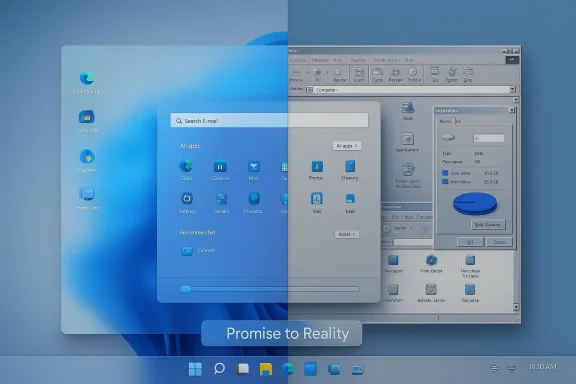
What Microsoft promised in 2021 — a modern, coherent, and transformative Windows that would bring better visuals, tighter mobile integration, console-grade gaming tech, and the first meaningful on-device AI experiences — still feels incompletely delivered nearly five years later. The PCMag UK piece that prompted this conversation catalogues ten Windows 11 features that were hyped, then underwhelmed: widgets, File Explorer tabs, Android app support, the visual overhaul, Teams Chat, Phone Link, touch friendliness, Xbox features such as DirectStorage and Auto HDR, virtual desktops, and the Copilot+ PC AI toolset. Those criticisms deserve a sober read: many are legitimate usability problems, others are examples of feature misfires or of expectations set unrealistically high. This feature examines each failure mode, verifies the technical facts where possible, and offers pragmatic remedies Microsoft should prioritize if it wants Windows to feel chosen — not merely tolerated. rview
Windows 11 launched as a statement of design intent: rounded corners, centered Start, fresh icons, and a renewed focus on productivity and gaming. Microsoft also bundled ambitious platform projects — the Windows Subsystem for Android (WSA), tighter Teams/communication hooks, console-derived gaming APIs like DirectStorage, and later, an on-device AI stack under the Copilot+ brand. But follow-through matters. Over the last 18–36 months Microsoft has re-evaluated or retired several of those initiatives, and user feedback has increasingly shifted from polite disappointment to frustrated demands for polish, stability, and predictable privacy behavior. Independent reporting confirms concrete outcomes: WSA was deprecated with a formal retirement schedule, Copilot recall features attracted regulatory scrutiny and technical delays, and Microsoft removed or pared back certain taskbar integrations that created friction for real-world use.
Windows still has enormous advantages — reach, hardware variety, an unmatched install base — but today’s landscape rewards products that earn attention through quality, not just novelty. Microsoft’s clearer public commitment to fix “performance, reliability, and the overall experience of Windows” is a promising sign; the company now needs visible, verifiable results. Prioritize stability, respect user privacy, and deliver a few unmistakable quality wins — and the conversation can shift from “overhyped and underwhelming” to “steady, indispensable platform.”
Source: PCMag UK Overhyped and Underwhelming: 10 Windows 11 Features That Missed the Mark
Windows 11 launched as a statement of design intent: rounded corners, centered Start, fresh icons, and a renewed focus on productivity and gaming. Microsoft also bundled ambitious platform projects — the Windows Subsystem for Android (WSA), tighter Teams/communication hooks, console-derived gaming APIs like DirectStorage, and later, an on-device AI stack under the Copilot+ brand. But follow-through matters. Over the last 18–36 months Microsoft has re-evaluated or retired several of those initiatives, and user feedback has increasingly shifted from polite disappointment to frustrated demands for polish, stability, and predictable privacy behavior. Independent reporting confirms concrete outcomes: WSA was deprecated with a formal retirement schedule, Copilot recall features attracted regulatory scrutiny and technical delays, and Microsoft removed or pared back certain taskbar integrations that created friction for real-world use.
 1. Widgets: a noisy, low-adoption experience
What was promised
Widgets were billed as a lightweight, glanceable surface for app developers to deliver live info (calendar, mail, stocks) without breaking the desktop flow.What happened
Out of the gate, the widgets board felt like an MSN/Edge marketing feed for many users instead of a developer-rich micro-app platform. Adoption from third-party developers never reached critical mass, and default content often pushed news and promotional items rather than the personal productivity signals people wanted. The result: many users mute or hide the board and treat it like a weather card — useful, but hardly transformative. The PCMag criith community reaction: widgets are present, but underused and noisy.Why it missed the mark
- Microsoft’s placement of news-first content undermined developer incentives: few teams want their app next to a feed of clickbait.
- The experience tied too closely to Microsoft services, limiting appeal for people who live in Google, Apple, or third-party ecosystems.
- There was no clear monetization or distribution model to entice independent developers to invest in widget creation for a comparatively small Windows board.
Fixes that would work
- Open an explicit third-party widget marketplace with easy onboarding and clear privacy rules.
- Let users pin widgets from any app (including web PWAs) and decide defaults during OOBE (out-of-box experience).
- Replace news-first defaults with clear productivity-first templates for calendar, mail, task lists, and cloud-notes.
2. File Explorer tabs: convenience came at the cost of reliability
What was promised
Tabbed file browsing — long missing from native File Explorer — was a clear productivity win, and Microsoft eventually delivered tabs to Explorer.What happened
Tabs arrived but have been accompanied by wider reliability and performance complaints: crashes during large file transfers, odd address-bar behavior, and regressions that make power users prefer third-party file managers (Total Commander, Directory Opus, and others). Community troubleshooting threads and support guides over the past two years record recurring problems with tabbed sessions, tab switching, and address-bar dropdown glitches after the 23H2 era.Why it missed the mark
- Tabs added UI surface area while legacy code paths and many edge cases (network shares, elevated permission transfers, long paths) still rely on older components.
- Stability and speed are baseline requirements for file management; adding features before core reliability is resolved frustrates more than it delights.
Fixes that would work
- Prioritize stability backports: make tabbed Explorer an optional preview until the underlying transfer and multi-window edge cases are fully validated.
- Ship telemetry-driven diagnostics that surface the most frequent crash contexts from consenting Insider builds.
- Provide official migration tooling and robust API hooks for third-party extensions so power users can bridge gaps safely.
3. True Android app support: engineering done, ecosystem missing
What was promised
The Windows Subsystem for Android (WSA) was a marquee capability: run Android apps natively on Windows, bringing touch-first apps and mobile services to PCs.What happened
Microsoft shipped WSA and a limited partnership with the Amazon Appstore, but adoption lagged. In March 2024 Microsoft announced WSA deprecation and set a retirement date of March 5, 2025; Amazon in turn announced phased wind-down plans for the Amazon Appstore on Windows. The result: the technical plumbing existed, but there was no sustainable distribution strategy and the feature was quietly retired. Independent reporting and the Amazon developer notices confirm this timeline.Why it missed the mark
- Relying on Amazon’s Appstore created a poor alignment of incentives: Amazon’s catalog and developer base didn’t match the breadth of Google Play.
- Sideloading APKs was possible but clunky and insecure for average users.
- For tablets and convertible PCs, touch-first apps would have been a major win — but most mobile app developers had little motivation to target the Windows surface.
Fixes that would work
- If Microsoft reconsiders, it must either enable first-class support for Google Play (with appropriate legal and engineering work), or create a much more attractive developer program with simple build/test tools and clear benefits (billing, analytics, promotion).
- Alternatively, lean into web PWAs and improve web-to-desktop parity for touch-first experiences — a pragmatic route with fewer dependency headaches.
4. A cohesive visual redesign: promising aesthetics, inconsistent reality
What was promised
Windows 11’s visual refresh was pitched as a new design language — rounded geometry, fluent motion, unified controls — that would gradually replace older Control Panel-era UI.What happened
The visuals were a real improvement in many places, but the system still feels like a two-speed OS: modern Settings and apps sit beside legacy Control Panel dialogs, ancient MMC consoles, and Win32 dialogs with mismatched draws. Dark Mode has improved, but inconsistencies persist. The issue isn’t lack of aesthetic intent; it’s the enormous surface area of Windows and the slow pace of porting or modernizing legacy components. Users feel a lack of singular vision. Community sentiment agrees: the UI is better, but far from unified.Why it missed the mark
- Backwards compatibility is a strength of Windows, but it’s also the enemy of a unified design: migrating long-lived admin tools is a years-to-decades job.
- Different teams ship UI across the ecosystem (Office, Edge, Control Panel), producing uneven experiences.
- Cosmetic touch-ups without systemic modernization create the impression of half-finished work.
Fixes that would work
- Publish a clear, time-bound “modernization roadmap” for core admin surfaces (Control Panel, Device Manager, MMC) with visible milestones.
- Create a compatibility layer that can automatically skin legacy dialogs to the system theme (while preserving functionality) as a stopgap.
- Keep baking user-facing polish but make the modernization plan public and measurable.
5. Teams Chat: taskbar integration removed after confusion
Microsoft baked a personal Teams Chat tile into the Windows 11 taskbar, but it used the consumer variant of Teams and not the enterprise tenant many organizations run. The mismatch confused users and enterprises; Microsoft removed the Chat icon from the taskbar in 2023 and later provided admin controls for hiding or disabling it. Microsoft’s own documentation shows how enterprises can manage the Chat icon, and feature lists note the removal. The lesson: platform-level chat hooks must respect enterprise contexts or they’ll cause fragmentation and user friction.6. Phone Link: great concept, uneven reality
What was promised
Phone Link (and Link to Windows on Android) promised seamless cross-device continuity: messages, calls, notifications, and app streaming on the desktop.What happened
Phone Link is genuinely useful for many — copy/paste of SMS codes, seeing messages — but reliability varies wildly across phone models and Android versions. Google’s Android 15 privacy changes altered how some notification types are surfaced to third-party apps, causing Phone Link to lose access to certain “sensitive” notifications unless the phone shipped with Link to Windows preinstalled (Samsung devices enjoy a privileged path). Community threads and Microsoft support documentation document persistent disconnects, audio quality issues for call forwarding, and device-specific quirks. The reality is Phone Link feels like a beta for many users, especially Pixel owners.Why it missed the mark
- The experience depends on OS-level permissions and OEM partnerships; not all Android vendors play the same way.
- Phone firmware, battery optimization, and manufacturer-supplied Link implementations produce inconsistent expectations.
- Cross-vendor cooperation (Google, Samsung, Microsoft) was never fully solved.
Fixes that would work
- Build a stronger “companion device” standard with Google and OEMs so that Phone Link has a reliable, auditable capability set across phones.
- Offer a Microsoft-maintained companion service that can negotiate permissions more reliably (with user consent).
- Expand troubleshooting telemetry and automated self-healing flows (relink QR retry, credential refresh, battery-optimization guidance).
7. Touch-screen devices: the promise of tablet-first Windows evaporated
Windows 8’s aggressive push into touch had a painful reception; Microsoft pulled back for Windows 10. Windows 11’s tabletnservative: there’s no distinct “tablet mode” like in Windows 10; instead, the UI scales touch targets modestly when a keyboard is detached. For users of Surface and convertible devices, that minimalism feels like under-support for touch — especially when many competitors (iPadOS, ChromeOS) invest in touch-first app ecosystems. The market still buys touch-capable PCs; Microsoft needs a stronger, coherent tablet UX to make those machines shine. Community feedback captured across forums echoes that sentiment.8. Xbox features: DirectStorage and Auto HDR underdeliver for gamers
DirectStorage: technical promise, limited uptake
DirectStorage was promoted as a console-driven storage API that would reduce load times by streaming compressed assets from NVMe directly to the GPU, offloading CPU decompression. Technically it works and a handful of titles (Forspoken, Ratchet & Clank on PC ports, Forza Motorsport and several newer releases) implemented DirectStorage, but the number of shipping games that fully exploit DirectStorage’s GPU decompression features remains small. Multiple technical write-ups and industry summaries show only a modest list of fully realized DirectStorage titles; many games ship with SDK files present but without full runtime benefit, and adoption has been slower than Microsoft hoped. That gap explains why many gamers don’t feel a tangible platform-level “Xbox transformation” on Windows.Auto HDR and HDR woes
Auto HDR and HDR handling on Windows have also been a mixed bag. Users report washed-out desktop colors, inconsistent game behavior, and the need to toggle HDR manually to correct display issues. The widely used keyboard shortcut Windows Key + Alt + B toggles HDR, and many players rely on that to restore correct in-game color, but needing a manual toggle is not a great user experience. Guides and community threads document the pervasiveness of HDR issues across devices.How Microsoft can salvage the gaming promise
- Provide clear, widely accessible SDK docs and reference implementations so studios ship DirectStorage-ready pipelines at launch.
- Encourage middleware (Unreal, Unity) to bake DirectStorage support as a default option.
- Invest in HDR calibration and auto-detection tools that handle multi-monitor setups gracefully and do not require manual keyboard toggles as primary fixes.
9. Multiple desktops: a curious feature that remained incsktops (Task View) have the right idea — separate work contexts — but the ergonomics are poor. There’s no easy way to persist window layouts across reboots, and moving windows between desktops lacks a simple global hotkey. Microsoft PowerToys offers partial workarounds (Workspaces), but the out-of-the-box Task View still feels unfinished for users who want persistent, keyboard-driven workspace setups. A simple hotkey like “move window to next virtual desktop” could dramatically increase adoption; the lack of it after the Windows 10–11 transition is a missed opportunity. Community feedback repeatedly requests improved keyboard affordances and workspace persistence.
10. Copilot+ PC features: big promises, small returns — and real privacy questions
What Copilot+ promised
Copilot+ PCs were promoted as devices where on-device AI — NPU-accelerated features like Recall (a continuous, searchable visual history), semantic search, and advanced multimodal assistance — would transform productivity.What happened
The Recall feature, which periodically captures screenshots to build a searchable personal timeline, raised immediate privacy red flags. Regulators and privacy advocates pushed back, Microsoft delayed the feature, and developers raised compatibility and blocking concerns. Microsoft reworked Recall to store snapshots in secure enclaves and to require explicit opt-in in some builds, but many users still find Recall’s value limited: the cadence of captures and the signal-to-noise ratio make it less useful than advertised. Independent reporting and follow-ups document the privacy controversy, the delays, and the mixed reception of the on-device features.Why it underdelivered
- Recall’s “photographic memory” is technically ambitious but socially fraught: capturing screenshots every few seconds is conceptually useful, but practically noisy and a privacy minefield.
- On-device AI features need to be excellent at core use cases to justify the complexity and opt-in overhead. Many Copilot+ features feel experimental, not indispensable.
- Messaging and marketing overpromised the immediate benefits of NPU acceleration while ignoring the slow pace of the software ecosystem adapting to those capabilities.
Fixes that would work
- Reframe Copilot+ as a set of opt-in power features with granular controls and transparent local-only defaults.
- Prioritize use cases with high signal — e.g., reliable semantic search for documents, screenshots on-demand with smart summarization, or meeting transcriptions — rather than broad continuous capture.
- Ship small, high-quality wins that build trust: fast semantic search of local files, or an on-device summarizer that genuinely reduces friction.
Cross-cutting strengths and risks
Strengths Microsoft still owns
- Vast reach and compatibility: Windows runs on the world’s desktops; even imperfect features can reach millions fast.
- A strong hardware partner ecosystem (OEMs, Intel, AMD, Qualcomm) that can drive platform capabilities like NPUs and specialized codecs.
- A large developer and enterprise base: once Microsoft commits to a feature and irons out platform APIs, integration at scale is possible.
Risks, if Microsoft doesn’t course-correct
- Eroding trust: repeated feature toggles, privacy scares (e.g., Recall), and reliability regressions can make users question the quality bar.
- Fragmentation by OEMs and third-party tooling: when default experiences disappoint, users adopt third-party replacements, decreasing Microsoft’s influence on the desktop experience.
- Competitive pressure: macOS and ChromeOS continue to gain traction in niches where Windows loses its polish advantage (creativity, education, simple tablet workflows).
Practical priority list: what Microsoft should fix first
- System reliability and core app polish (File Explorer stability, taskbar regressions).
- Phone/PC continuity reliability (Phone Link reliability across major OEMs, clearer companion-device standards).
- Privacy-first AI rollouts (fix Recall’s defaults, give developers granular controls, and publish clear audits).
- Gaming primitives where ecosystem matters (push middleware to adopt DirectStorage, improve HDR tooling).
- UI unification roadmap (announce concrete modernization milestones for legacy admin surfaces).
A better future for Windows 11: small changes, big impact
Windows will always be a balancing act between new capabilities and the heavy burdens of compatibility and privacy. The path from “feature announcement” to “feature that people love” is long and iterative. Two immediate, high-impact shifts Microsoft can make:- Slow down feature PR and accelerate quality metrics. Use fewer splashy launches; publish measurable reliabp the community updated on progress.
- Lead with developer and OEM cooperation where features depend on an ecosystem. Android apps, Phone Link, DirectStorage, and even HDR work better when Microsoft coordinates standards and delegates authority sensibly.
Conclusion
The PCMag critique — that many Windows 11 features were overhyped and underdelivered — is not an unfair assessment. Microsoft shipped important innovations, but several of the most visible ones failed to move the needle for daily productivity, reliability, or privacy confidence. Some features were retired (WSA/Amazon tie-in), some were rolled back (taskbar Chat), and others remain functionally unfinished or fragile (File Explorer tabs, Phone Link, Auto HDR, Copilot+ features). Independent sources corroborate the major technical facts: WSA’s retirement timeline, Recall’s privacy and rollout delays, the limited adoption of DirectStorage, and persistent Phone Link reliability problems.Windows still has enormous advantages — reach, hardware variety, an unmatched install base — but today’s landscape rewards products that earn attention through quality, not just novelty. Microsoft’s clearer public commitment to fix “performance, reliability, and the overall experience of Windows” is a promising sign; the company now needs visible, verifiable results. Prioritize stability, respect user privacy, and deliver a few unmistakable quality wins — and the conversation can shift from “overhyped and underwhelming” to “steady, indispensable platform.”
Source: PCMag UK Overhyped and Underwhelming: 10 Windows 11 Features That Missed the Mark
