

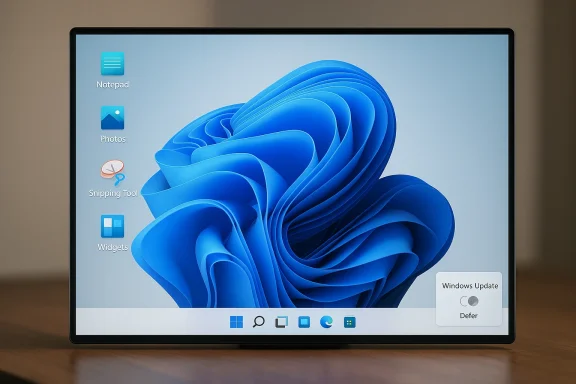
Microsoft appears to be making a quiet but important correction to one of Windows 11’s most criticized habits: putting Copilot in places where users simply wanted a fast, lightweight tool. The latest Insider-facing changes suggest that Microsoft is reducing unnecessary Copilot entry points in inbox apps such as Notepad, Photos, Snipping Tool, and Widgets, while also restoring familiar desktop controls that long-time Windows users have been asking for. That is not the same as abandoning AI in Windows, but it does show a company that has finally noticed the difference between useful integration and persistent clutter. The shift arrives after months of pressure from users, power users, and IT admins who have increasingly described Windows 11 as too busy, too opinionated, and too eager to sell the company’s AI story at every turn. rn Windows did not begin as a minor product tweak. It was framed as a platform-wide strategy meant to make Windows the front door to the AI era, with the assistant spanning the operating system, Edge, and Microsoft 365. In practice, that meant Copilot started showing up in more and more places where users had traditionally expected a quiet, distraction-free workflow. That included common utilities like Notepad and Paint, where Microsoft added AI-driven features and Copilot-adjacent entry points over time.
The problem with that approach was nevered. It was that Microsoft kept surfacing it in places where the job to be done was obvious and quick. When someone opens Notepad, they usually want a note, not a conversation. When they use Snipping Tool, they want to capture something and move on. When they check Widgets, they want a glanceable dashboard, not an upsell. The deeper Microsoft embedded Copilot, the more it risked feeling like a branding layer rather than a productivity layer.
That tension became more visible because Windows 11 itself has often been judged thrc have complained about reduced customization, intrusive update behavior, and a shell that sometimes feels more tightly managed than earlier versions of Windows. Microsoft’s willingness to revisit taskbar placement, update flow, and Copilot placement suggests it has recognized that the old “more modern by default” formula was not winning enough goodwill.
There is also a historical backdrop here. Microsoft has a long pattern of introducing a bold platform vision, then pulling back n the demos suggested. The Copilot story in Windows is following that familiar arc: broad ambition first, practical correction second. The difference this time is that AI is not a side project anymore; it is the central narrative for Windows, Office, and Microsoft’s hardware strategy. That makes any retreat feel more consequential, even if the company insists it is only being more selective.
The most important part of this change is not that Microsoft is removing Copilot altogether. It is scaling back the places where Copilotrg to the current Windows Insider messaging surfaced in the community materials, Microsoft is reducing unnecessary Copilot entry points in apps like Notepad, Snipping Tool, Photos, and Widgets. That is a philosophical shift as much as a design change, because it moves the company away from “Copilot everywhere” and toward “Copilot where it fits.”
The broader implication is that Microsoft is learning to distinguish between presence and utility. A feature can be technically useful and still be badly placed. That distinction is especially important in fast-launch apps, because speed and simplicity aoposition. If Microsoft preserves the capability but trims the visual noise, it may actually improve Copilot’s reputation over time.
The irony is that the more Microsoft improves Notepad, the more it risks undermining the very identity that made Notepad beloved in the first place. Users do not necessarily object to optional power features. They object when the app starts feeling heavier, slower, or more promotional. In that sense, scaling back Copilot visibility in Notepad is not a retreat from progress; it is an attempt to restore the app’s low-friction personality.
The change also speaks to a broader product lesson: tiny restrictions can create enormous resentment when they land on a daily-use surface. Users may tolerate a new feature they do not love, but they rarely forget when a familiar control is taken away. That is why taskbar customization remains one of the most emotionally loaded Windows topics in the enthusiast community.
Microsoft may see this as a minor restoration. Enthusiasts see it as proof that the cos Windows as a configurable system rather than a fixed appliance. That distinction matters if Microsoft wants to preserve loyalty among the users who often influence the wider conversation around the OS.
That is important because Windows 11 has already accumulated enough criticism for its UI choices. If Microsoft also leaves the update experience feeling heavy-handed, it compounds the impression that the platform is more managed than governed. A quieter update flow is not glamorous, but it is the kind of fix that can meaningfully improve trust.
That does not mean enterprises want to ignore security maintenance. It means they want control over when and how that maintenance happens. Microsoft seems to be acknowledging that the bes not the most aggressive one, but the most manageable one. That’s an important distinction in large deployments.
Selective placement is a smarter answer because it aligns AI with context. An AI feature feels more valuable when it appears after a user shows intent, not before. That is why hidden or gesture-driven invocation often lands better than a toolbar icon that never goes away. Microsoft is not giving up on AI; it is admitting that AI needs boundaries to feel useful.
That is a subtle but important correction. Brands lose power when they are sprayed everywhere. They gain power when they are associated with useful, well-timed experiences. Microsoft may be discovering that less logo-driven AI can actuallption of the platform as a whole.
The issue is partly aesthetic, but it is al users begin to feel that an OS is trying to sell them a strategy instead of helping them complete a task, trust erodes. That kind of erosion is slow, but it can have long-term consequences for feature adoption and platform goodwill.
The appetite for control is especially strong in the Windows community because control has always been part of the platform’s identity. Even when Windows was messy, it was usually your mess. Windows 11’s more prescriptive direction has collided with that expectation, and the backlash around Copilot is one of the clearest signs of the mismatch.
Microsoft’s reviefore be less about retreat and more about survival. If the company keeps pushing Copilot too hard inside the shell, it risks turning a strategic advantage into a brand liability. Trimming the footprint while preserving the platform’s AI capability is a way to keep momentum without provoking more resistance.
That split is important because Microsoft needs both audiences. A calmer Windows 11 may help in the enterprise market by reducing the sense of surprise, while also reassuring consumers that the OSy. If Microsoft can satisfy both groups at once, it will have solved a major product problem.
This is why Microsoft’s rebalancing is smart even if it is overdue. Different apps have different emotional contracts with users. Break those contracts, and even a technically good feature can feel like a mistake. Respect them, and AI becomes easier to acceptn principle
There is a useful design principle underneath all of this: context beats ubiquity. When a feature appears in the right place, at the right time, it feels smart. When it appears everywhere, it starts to feel desperate. Microsoft appears to be learning that lesson in real time.
That lesson may shape more than these few apps. If the company applies the same logic elsewhere in the shell, Windows 11 could become less noisy without losing its AI identity. That would be the most durable outcome of this reversal.
The key question is whether Microsoft is prepared to treat restraint as a feature. That would mean fewer assumptions about where Copilot belongs, fewer forced updates to the user experience, and more respect for the long-standing Windows promise that people can shape the desktop around their own habits. If the company keeps that promise, Windows 11 could finally settle into a more balanced identity. If it does not, users will likely keep reading every AI tweak as another reminder that Microsoft still has not fully learned the lesson.
Source: Windows Latest Microsoft responds to Microslop criticism by scaling back Copilot in Windows 11, starting with Notepad and other apps
The problem with that approach was nevered. It was that Microsoft kept surfacing it in places where the job to be done was obvious and quick. When someone opens Notepad, they usually want a note, not a conversation. When they use Snipping Tool, they want to capture something and move on. When they check Widgets, they want a glanceable dashboard, not an upsell. The deeper Microsoft embedded Copilot, the more it risked feeling like a branding layer rather than a productivity layer.
That tension became more visible because Windows 11 itself has often been judged thrc have complained about reduced customization, intrusive update behavior, and a shell that sometimes feels more tightly managed than earlier versions of Windows. Microsoft’s willingness to revisit taskbar placement, update flow, and Copilot placement suggests it has recognized that the old “more modern by default” formula was not winning enough goodwill.
There is also a historical backdrop here. Microsoft has a long pattern of introducing a bold platform vision, then pulling back n the demos suggested. The Copilot story in Windows is following that familiar arc: broad ambition first, practical correction second. The difference this time is that AI is not a side project anymore; it is the central narrative for Windows, Office, and Microsoft’s hardware strategy. That makes any retreat feel more consequential, even if the company insists it is only being more selective.
 What Microsoft Is Scaling Back
The most important part of this change is not that Microsoft is removing Copilot altogether. It is scaling back the places where Copilotrg to the current Windows Insider messaging surfaced in the community materials, Microsoft is reducing unnecessary Copilot entry points in apps like Notepad, Snipping Tool, Photos, and Widgets. That is a philosophical shift as much as a design change, because it moves the company away from “Copilot everywhere” and toward “Copilot where it fits.”Fewer AI interrupts
This matters because entry points shape perception. A user may never actually use a Copilot feature in Notepad, but if the button is always present, the app stops feeling like a utility andaop OS, that kind of ambient pressure accumulates quickly. The more often Windows nudges people toward AI, the more likely they are to experience it as friction rather than help.The broader implication is that Microsoft is learning to distinguish between presence and utility. A feature can be technically useful and still be badly placed. That distinction is especially important in fast-launch apps, because speed and simplicity aoposition. If Microsoft preserves the capability but trims the visual noise, it may actually improve Copilot’s reputation over time.
Why Notepad matters most
Notepad is the clearest symbol of the issue because it has historically represented the most minimal kind of Windows software. Microsoft has already been modernizing it with Markdown support, tabs, spellcheck, autosave, and AI text features, includinr write and summarize actions. That makes it a useful test case for the company’s new balance between modernization and restraint.The irony is that the more Microsoft improves Notepad, the more it risks undermining the very identity that made Notepad beloved in the first place. Users do not necessarily object to optional power features. They object when the app starts feeling heavier, slower, or more promotional. In that sense, scaling back Copilot visibility in Notepad is not a retreat from progress; it is an attempt to restore the app’s low-friction personality.
Taskbar Freedom Returns
One of the clearest signs that Microsoft is listening is the renewed attention on taskbar customization. Windows 11 originally narrowed the taskbar experience in ways that frustrated long-time users, especially those who relied on the ability to move it to different edges of the display. Restoring that flexibility is not aure, but it is the kind of change users notice immediately.A small change with outsized meaning
The taskbar is not just a UI strip. It is the most visible expression of how much control Microsoft believes users should have over their own desktop. When that control is reduced, even power users who never touch Copilot begin to feel that Windows is becoming less theirs and more Microsoft’s. Bringing back positioning options tglic as well as functional.The change also speaks to a broader product lesson: tiny restrictions can create enormous resentment when they land on a daily-use surface. Users may tolerate a new feature they do not love, but they rarely forget when a familiar control is taken away. That is why taskbar customization remains one of the most emotionally loaded Windows topics in the enthusiast community.
Why enthusiasts care so much
Power rst to notice platform drift because they interact with the shell all day. They are also the most likely to view a desktop as something to be shaped, not merely consumed. For that audience, taskbar placement is not nostalgia; it is a proxy for workflow efficiency and desktop ergonomics.Microsoft may see this as a minor restoration. Enthusiasts see it as proof that the cos Windows as a configurable system rather than a fixed appliance. That distinction matters if Microsoft wants to preserve loyalty among the users who often influence the wider conversation around the OS.
Windows Update Gets Less Aggressive
Another important part of the story is Microsoft’s effort to make Windows Update less intrusive. The compang it easier to skip updates during setup and reducing the chance that users get trapped in install cycles at shutdown or during first-run configuration. That may sound mundane, but update control is one of the oldest and most persistent sources of Windows frustration.Why timing matters
Users do not objecple. They object to surprise, bad timing, and the feeling that the machine is making decisions on its own schedule. When Windows interrupts setup with patching, or forces a restart at the worst possible moment, it turns maintenance into conflict. Microsoft’s new approach appears to be aimed at reducing exactly that kind of friction.That is important because Windows 11 has already accumulated enough criticism for its UI choices. If Microsoft also leaves the update experience feeling heavy-handed, it compounds the impression that the platform is more managed than governed. A quieter update flow is not glamorous, but it is the kind of fix that can meaningfully improve trust.
Enterprise implications
For IT departments, update behavior is about predictability, not convenience. Every forced reboot, unclear prompt, or opaque install cycle increases support o confidence in endpoint management. If Microsoft makes updates easier to defer or better timed by default, it gives administrators a little more breathing room.That does not mean enterprises want to ignore security maintenance. It means they want control over when and how that maintenance happens. Microsoft seems to be acknowledging that the bes not the most aggressive one, but the most manageable one. That’s an important distinction in large deployments.
The Copilot Recalibration
The deeper story here is not UI housekeeping. It is that Microsoft appears to be recalibrating the entire Copilot strategy inside Windows. The company is moving away from treating Copilot as a ubiquitous marker of progress and toward presenting it as a more selective capability that should appear only when it has a clear purpose. That is a meaningful change in product philosophy.From everywhere to appropriate
For much of the last two years, Microsoft behaved as though visibility alone would create adoption. That made sense on paper, especially for a strategic product l, the constant Copilot surfacing made the assistant feel less like a helpful companion and more like a persistent campaign. The result was predictable: the more Microsoft pushed, the more users pushed back.Selective placement is a smarter answer because it aligns AI with context. An AI feature feels more valuable when it appears after a user shows intent, not before. That is why hidden or gesture-driven invocation often lands better than a toolbar icon that never goes away. Microsoft is not giving up on AI; it is admitting that AI needs boundaries to feel useful.
The branding problem
There is also a branding consequence. Copilot has become so broadly attached to Microsoft’s product stack that it risks losing specificity. When the same badge appears across Windows, Microsoft 365, apps, and cloud services, it can become harder for users to understand what exactly they are getting. Reducing the visible Copilot footprint in some inbox apps may help preserve the value of the brand by making it feel more intentional.That is a subtle but important correction. Brands lose power when they are sprayed everywhere. They gain power when they are associated with useful, well-timed experiences. Microsoft may be discovering that less logo-driven AI can actuallption of the platform as a whole.
Why Users Pushed Back
The criticism around Copilot in Windows has rarely been a pure anti-AI argument. It has mostly been about placement, frequency, and tone. Users have been telling Microsoft, in effect, that they do not mind AI if it stays in the background until they need it. What they resent is being nudged into it at every turn.The clutter complaint
Windows 11 already has a lot going on: notifications, cloud prompts, app recommendations, update banners, widget surfaces, and system alerts. Adding more visible AI entry points into that mix can make the desktop feel crowded even when the underlying features are useful. That is where the “AI clutter” label comes from, and why it has stuck.The issue is partly aesthetic, but it is al users begin to feel that an OS is trying to sell them a strategy instead of helping them complete a task, trust erodes. That kind of erosion is slow, but it can have long-term consequences for feature adoption and platform goodwill.
Desktop users want control
Windows is not a single-purpose app. It is a general-purpose environment used by consumers, gamers, schools, power users, and enterprises. That means any new feature has to survive a much wider range of use cases than a standalone service would. A Copilot experience that looks great in a demo can become a liability in a business workflow or a speed-focused desktop setup.The appetite for control is especially strong in the Windows community because control has always been part of the platform’s identity. Even when Windows was messy, it was usually your mess. Windows 11’s more prescriptive direction has collided with that expectation, and the backlash around Copilot is one of the clearest signs of the mismatch.
Competitive Implications
Microsoft’s shift is also significant because it changes how other major platforms. Apple has generally been more conservative about surfacing systemwide AI, while Google has leaned heavily into AI across services without carrying the same desktop-shell burden. Microsoft has been trying to make Windows feel like the primary AI PC environment, but that makes it more exposed to backlash when AI appears in the wrong places.A different burden than rivals
Windown macOS or ChromeOS because it has to serve everyone at once. It must satisfy consumers who want simplicity, enterprises that want control, and enthusiasts who want flexibility. That makes every AI decision more politically charged. A badge in Notepad is not just a badge; it is a statement about who the OS is being optimized for.Microsoft’s reviefore be less about retreat and more about survival. If the company keeps pushing Copilot too hard inside the shell, it risks turning a strategic advantage into a brand liability. Trimming the footprint while preserving the platform’s AI capability is a way to keep momentum without provoking more resistance.
Enterprise versus consumer reactions
Enterprises are likely to see this as a win, at least initially. They usually prefer AI to be available but controlled, visible but not invasive, and easy to manage through policy. Consumers and enthusiasts are more likely to care about aesthetic clutter and day-to-day annoyance, which means they will judge the change by whether the desktop feels calmer.That split is important because Microsoft needs both audiences. A calmer Windows 11 may help in the enterprise market by reducing the sense of surprise, while also reassuring consumers that the OSy. If Microsoft can satisfy both groups at once, it will have solved a major product problem.
What This Means for Notepad, Photos, and Widgets
The apps named in the reported rollback are not accidental. They are all high-frequency, low-friction surfaces where users expect immediate utility. Notepad is for speed, Photos is for viewing and ligool is for capture, and Widgets are for quick glances. These are not places where people generally want a long AI detour.App-specific expectations
Notepad must remain fast and predictable, or it loses its core appeal. Photos can support AI enhancement, but only if the default experience stays optional and unobtrusive. Widgets should feel lightweight and glanceable rather than promotional. And Snipping Tool works best when it gets out of the way after the capture is complete.This is why Microsoft’s rebalancing is smart even if it is overdue. Different apps have different emotional contracts with users. Break those contracts, and even a technically good feature can feel like a mistake. Respect them, and AI becomes easier to acceptn principle
There is a useful design principle underneath all of this: context beats ubiquity. When a feature appears in the right place, at the right time, it feels smart. When it appears everywhere, it starts to feel desperate. Microsoft appears to be learning that lesson in real time.
That lesson may shape more than these few apps. If the company applies the same logic elsewhere in the shell, Windows 11 could become less noisy without losing its AI identity. That would be the most durable outcome of this reversal.
Strengths and Opportunities
Microsoft’s course correction has several obvious advantages if the company follows through. It can reduce annoyance without dismantling the broader Copilot strategy, and it can make Windows 11 feel more respectful of user intent. The cp the improvements consistent across the shell rather than limiting them to a few visible examples.- Less visual clutter in everyday apps should make Windows feel calmer and more usable.
- Better taskbar control restores a familiar power-user workflow.ate behavior** should reduce setup frustration and awkward restarts.
- Selective AI placement may improve Copilot’s reputation by making it feel earned.
- Improved enterprise trust could make Windows 11 easier to manage in business environments.
- Higher user goodwill may help Microsoft defend Windows 11 against lingering criticism.
- Stronger app identity lets Notepad, Photos, and Snipping Tool stay true to their core purpose.
Risks and Concerns
The risk is that Microsoft could turn this into a cosmetic retreat rather than a meaningful shift. If Copilotrent surfaces while the desktop remains just as cluttered, users will conclude that the company only changed the packaging. Worse, Microsoft could create confusion if it keeps pushing AI in some places while trimming it in others.- Mixed messaging could make users wonder whether Microsoft knows what role Copilot should play.
- Incomplete rollback may not solve the broader “AI clutter” complaint.
- Enterprise skepticism will remain if admins cannot clearly control feature exposure.
- Overcorrection could slow legitimate innovation in useful AI workflows.
- Update control changes could be misunderstood as permission to ignore security maintenance.
- Feature fragmentation may make Copilot feel less coherent across Windows.
- User fatigue may persist if Microsoft continues adding prompts elsewhere in the shell.
Looking Ahead
The next few months will reveal whether this is a real product reset or just another turn in Microsoft’s long cycle of push, backlash, and partial retreat. The company has already shown that it can make Windows 11 more flexible in small but visible ways, and that should give users a reason to watch closely. If Microsoft extends the same restraint beyond Notepad and a few inbox apps, the platform could begin to feel more mature and less defensive.The key question is whether Microsoft is prepared to treat restraint as a feature. That would mean fewer assumptions about where Copilot belongs, fewer forced updates to the user experience, and more respect for the long-standing Windows promise that people can shape the desktop around their own habits. If the company keeps that promise, Windows 11 could finally settle into a more balanced identity. If it does not, users will likely keep reading every AI tweak as another reminder that Microsoft still has not fully learned the lesson.
- Watch whether the Copilot changes spread beyond Notepad, Photos, Widgets, and Snipping Tool.
- Watch whether taskbar positioning returns broadly or remains limited in scope.
- Watch whether Windows Update becomes genuinely easier to defer during setup.
- Watch whether Microsoft reduces AI surfaces in other high-frequency Windows utilities.
- Watch whether enterprise policy controls become clearer and easier to manage.
Source: Windows Latest Microsoft responds to Microslop criticism by scaling back Copilot in Windows 11, starting with Notepad and other apps
