

Microsoft today outlined a clear, multi‑year strategy to make Windows 11 materially more resilient — tightening driver certification, expanding Microsoft-supplied in‑box drivers and user‑mode APIs, and adding cloud‑aware recovery tools like Point‑in‑Time Restore (PITR) alongside the existing Quick Machine Recovery (QMR) and a new Cloud Rebuild flow to shrink downtime for both single PCs and managed fleets.
Microsoft framed these changes at its recent Ignite and Windows team briefings as part of a broader Windows Resiliency Initiative: an effort to prevent, manage, and recover from incidents that can cascade across organizations and consumer devices. The push is a direct reaction to high‑impact update and driver incidents over the past two years, and it pairs platform hardening with new recovery tooling and management plane controls. The initiative has two complementary strands:
That said, the technical and operational details matter: network and backup health, BitLocker key management, driver coverage and the governance of destructive recovery actions are all critical planning items. Organizations should treat the current releases as an opportunity to pilot and harden their recovery posture, not as a silver bullet that eliminates the need for backups, testing and sensible configuration management.
For consumers, PITR signals a promising path away from the old, unreliable System Restore — but broad availability and user‑facing tooling will lag enterprise preview cycles. Home users should continue regular backups and ensure recovery keys are safely stored while watching for consumer rollouts of these tools.
The direction is right: Windows is moving from ad‑hoc recovery playbooks to platform‑integrated resiliency. The next 12–24 months will determine how quickly that promise turns into measurable reductions in real‑world downtime.
Source: TechRadar https://www.techradar.com/computing...reliable-and-help-you-recover-from-disasters/
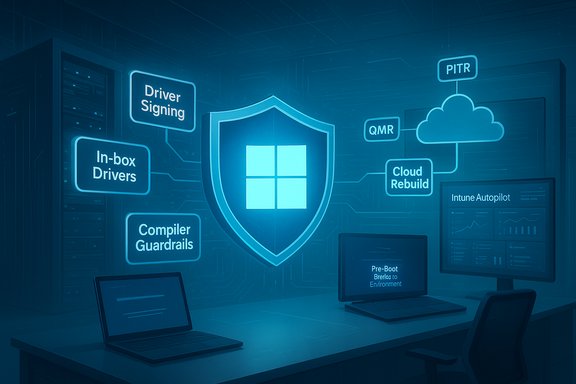 Background / Overview
Microsoft framed these changes at its recent Ignite and Windows team briefings as part of a broader Windows Resiliency Initiative: an effort to prevent, manage, and recover from incidents that can cascade across organizations and consumer devices. The push is a direct reaction to high‑impact update and driver incidents over the past two years, and it pairs platform hardening with new recovery tooling and management plane controls. The initiative has two complementary strands:- Prevention and containment: raising the quality bar for drivers and moving more logic into user mode or Microsoft-provided in‑box drivers to reduce kernel‑mode surface area.
- Rapid recovery and management: cloud‑assisted, pre‑boot remediation (QMR), point‑in‑time rollback (PITR) that restores OS, apps and local files, and a Cloud Rebuild for zero‑touch reinstall/reprovision via Intune/Autopilot/OneDrive.
What Microsoft is changing for drivers: technical detail and intent
The problem being addressed
Kernel‑mode drivers have historically been a major source of system instability. A faulty driver can crash the kernel and render devices unbootable, multiplying into fleet‑level outages. Microsoft’s response is to reduce those systemic risks by both tightening certification and offering safer, supported alternatives.Key technical measures Microsoft announced
- Higher driver signing and certification bar: New mandatory tests and validation checks for signed drivers, raising security and resiliency requirements for partners submitting drivers.
- Expanded in‑box drivers and APIs: Microsoft will provide more standardized Windows drivers for common device classes (networking, cameras, USB, storage, audio, printers) so partners can replace custom kernel drivers where appropriate. This reduces third‑party kernel code in the field.
- Stronger compiler and runtime guardrails: Mandatory compiler safeguards for kernel drivers to constrain risky behaviors and reduce the chance of a single driver crashing the whole OS.
- Driver isolation and DMA‑remapping: Measures to limit the blast radius of driver faults and prevent accidental driver access to kernel memory. These are designed to contain failures rather than letting them propagate into OS‑wide outages.
- User‑mode alternatives and WESP: The Windows Endpoint Security Platform (WESP) and other APIs encourage partner security products to operate in user mode, significantly reducing kernel hooks for AV and endpoint security. Microsoft previewed moving AV enforcement out of kernel mode in favor of user‑mode APIs earlier in 2025; the new work expands this playbook beyond AV.
What remains in kernel mode
Microsoft makes explicit that some drivers — most notably GPU/graphics drivers — will remain kernel mode for performance reasons. The intent is not to eliminate third‑party kernel drivers, but to reduce unnecessary kernel surface and add guardrails where kernel mode is still needed.The practical takeaway for hardware and driver vendors
- Expect a non‑trivial certification and engineering effort as driver partners revalidate code against the new tests.
- OEMs and ISVs should inventory kernel drivers, prioritize refactoring high‑risk classes, and engage early with Microsoft’s compatibility tests.
- The shift will take years to fully materialize in the field; devices and drivers will not become automatically safer overnight.
Recovery tools: Quick Machine Recovery, Point‑in‑Time Restore, and Cloud Rebuild
Quick Machine Recovery (QMR) — the pre‑existing first‑line fix
QMR extends WinRE (Windows Recovery Environment) with cloud connectivity and a remediation catalog: when a device repeatedly fails to boot, WinRE can connect to the network, upload diagnostics, query Microsoft’s cloud for a remediation package (or Windows Update), download and apply it pre‑boot, and attempt a normal startup. QMR is a best‑effort, policy‑governed recovery path designed to avoid mass reimaging. Operational notes:- QMR depends on WinRE networking (wired Ethernet and certain Wi‑Fi modes are supported; enterprise Wi‑Fi support is rolling out).
- Administrators manage QMR through Intune, Group Policy, and local settings; behavior differs by SKU (Home vs Pro/Enterprise defaults).
Point‑in‑Time Restore (PITR) — a modern system snapshot and rollback
PITR is presented as a modern, reliable supercharged replacement for the legacy System Restore concept. Unlike old System Restore, PITR aims to:- Take frequent, automated system snapshots (restore points) covering the OS, installed apps, settings, and local files.
- Allow an admin or user (under policy) to roll a PC back to the exact state at a selected restore point — reversing problematic updates, driver conflicts, or configuration regressions quickly and reliably.
- Cadence and retention: Preview defaults include restore points every 24 hours with configurable cadences (4, 6, 12, 16, 24 hours) and short retention windows (72 hours default in preview) and a configurable maximum disk usage limit. Not all devices will have it on by default (Microsoft applies a storage threshold). These specifics are preview settings and likely to evolve.
- Scope: PITR’s stated scope includes the OS, apps, system and user settings, and local files — broader than classic System Restore which generally skipped user files and many apps. That makes PITR a far more capable rollback tool for common failure scenarios.
- Management: In enterprise scenarios PITR is designed to be triggerable and manageable via Intune for single devices or device groups; initially the preview is targeted at managed devices and admin workflows.
- Microsoft’s early messaging leaves open several critical implementation questions: where snapshots are stored long term (local vs cloud), encryption and integrity guarantees, how PITR handles credentials/secrets/certificates, and how third‑party firmware or drivers that write outside the OS will be treated. Until full product documentation is published, those technical specifics should be treated as preview caveats.
Cloud Rebuild — remote, zero‑touch reimage and reprovision
Cloud Rebuild is a remote reinstall flow for devices too corrupted to repair. In combination with Intune, Autopilot and Windows Backup/OneDrive, Cloud Rebuild can:- Trigger a fresh install of Windows 11,
- Install drivers and reprovision Autopilot/MDM settings,
- Rehydrate user data via OneDrive and Windows Backup where applicable.
How these tools differ from legacy System Restore and reimaging
- System Restore (legacy): traditionally only protected certain system files and registry settings. It did not reliably include apps, app data, or local user files.
- PITR: designed to capture a fuller snapshot — OS, apps, settings and local files — intended for rapid rollback in minutes rather than hours of manual troubleshooting or full reimage. It’s engineered to be managed at scale via Intune for enterprises.
- QMR: operates pre‑boot, using WinRE to apply targeted remediation packages from the cloud — aimed at boot failures specifically.
- Cloud Rebuild: remote reinstall/reprovision, intended when rollback or automated remediation can’t restore service.
Management plane, WinRE networking, and governance
Intune, Autopatch and WinRE visibility
Microsoft is integrating these recovery actions tightly with Intune and Autopatch:- Administrators will see devices that enter WinRE and can remotely trigger PITR or Cloud Rebuild flows (subject to policy and approvals).
- Autopatch will gain update readiness reporting and the ability to approve QMR remediations and schedule phased rollouts to reduce surprise failures.
WinRE networking and driver injection
WinRE will reuse OS network configurations (where available) so pre‑boot networking is more reliable. Supported connection methods include wired Ethernet and preconfigured WPA/WPA2 Wi‑Fi; enterprise WPA2/3 and certificate‑based Wi‑Fi support are being added in stages. Some Wi‑Fi chipsets will still need WinRE‑side drivers injected to connect reliably in recovery. Administrators should validate WinRE networking for their hardware fleet.Governance and auditing
Because these recovery flows can be destructive (PITR and Cloud Rebuild can remove data after the restore point), Microsoft and Microsoft partners recommend strong governance:- Role‑based access for recovery actions,
- Approval gates for destructive flows,
- Auditing and telemetry to track who initiated restores and why.
Practical guidance: what IT admins should do now (and what consumers can check)
For IT administrators (concise checklist)
- Inventory kernel‑mode drivers across your estate and classify risk‑critical drivers for refactoring or testing.
- Pilot QMR, PITR and Cloud Rebuild on a small hardware cohort; validate WinRE networking, BitLocker recovery key escrow, and driver coverage.
- Verify BitLocker recovery key escrow and TPM/credential policies before enabling pre‑boot cloud remediation — missing keys can make recovery impossible.
- Configure Intune approval workflows, role separation, and auditing for any team allowed to trigger PITR or Cloud Rebuild.
- Ensure OneDrive/Windows Backup policies are consistent and healthy if you intend to rely on Cloud Rebuild rehydration.
For power users and consumers
- Keep an up‑to‑date backup (local + cloud). PITR and Cloud Rebuild are powerful, but they are not a substitute for verified off‑device backups for critical long‑term retention.
- Confirm your BitLocker recovery key is backed up to your Microsoft account (or business escrow) — pre‑boot recovery flows that need the key will fail without it.
- Expect PITR and Cloud Rebuild to be introduced initially as managed/preview features for enterprise customers; broader consumer availability may follow but is not guaranteed in the preview tranche.
Strengths: why this is a meaningful step forward
- Platform‑level focus on resilience: Microsoft is treating recovery as a first‑class capability rather than an afterthought — integrating pre‑boot remediation, rollback and reprovisioning with device management tools. That reduces mean time to repair (MTTR) for many real‑world failure modes.
- Reduced blast radius for driver bugs: driver certification changes, compiler safeguards and driver isolation reduce the odds that a buggy third‑party update will cause fleet‑wide outages.
- Faster, broader restores: PITR’s broader snapshot scope (apps + user files) is a practical improvement over legacy System Restore, aligning rollback capability with how people actually use PCs today.
Risks and limitations: what to watch closely
- Network dependency for recovery: QMR, PITR (in some modes) and Cloud Rebuild require network connectivity in WinRE — poor or nonexistent connectivity (or air‑gapped devices) will limit utility. Plan fallback recovery methods for network‑constrained environments.
- Data and credential consistency: Rolling a machine back to an earlier point can break recent changes to credentials, certificates, secrets and cloud sync states. PITR may cause loss of locally changed data made after the snapshot — users and admins must understand RPO and retention limits before invoking restores.
- Telemetry and privacy implications: Diagnostic data will flow to Microsoft during QMR and related flows; organizations with strict telemetry or compliance requirements need to evaluate policy before enabling cloud remediation.
- Driver and OEM coverage: Legacy or uncommon hardware may lack WinRE driver support; some devices will still need manual driver injection or on‑site intervention.
- Preview vs GA uncertainty: Many of these features are previewed and Microsoft’s timelines and retention configurations may change. Treat initial promises as preview guidance until Microsoft publishes final service limits and GA dates.
Verification and cross‑checking of key claims
To ensure accuracy, key claims in this article were cross‑checked across multiple Microsoft and industry sources:- The Windows Experience Blog and Windows IT Pro posts confirm Microsoft’s driver signing and resiliency playbook and the shift to expanded in‑box drivers and compiler guardrails.
- Ignite and Microsoft’s Book of News detail the recovery tools announced (PITR, Cloud Rebuild) and their intended management via Intune/Autopatch. Independent coverage from reputable outlets (detailed technical coverage and analysis) corroborates the feature scope and preview status.
- Community and operations reporting (internal preview notes and forum summaries) outline real‑world caveats — WinRE driver requirements, BitLocker key dependencies, and the need for pilot testing before broad enterprise adoption. These community documents help fill operational detail not fully enumerated in product marketing.
What to expect next and realistic timelines
- Preview windows: Microsoft has indicated QMR, PITR and Cloud Rebuild items will enter Insider previews and enterprise previews in staged waves. Some management and QMR features are already testable; PITR and Cloud Rebuild are in preview for testing and pilot in the near term. GA timelines are still being set and may stretch into 2026 for full enterprise readiness.
- Multi‑year driver transition: The driver resiliency work is explicitly multi‑year. OEMs and driver partners will need time to rearchitect, revalidate and pass the new certification tests. Expect incremental reliability gains, not overnight guarantees.
Final assessment
Microsoft’s latest resiliency roadmap addresses fundamental weaknesses that have caused significant real‑world outages: by tightening driver certification and expanding safer driver models, and by adding cloud‑aware, managed recovery tools, the company is shifting Windows toward a model where both prevention and fast recovery are baked into the platform.That said, the technical and operational details matter: network and backup health, BitLocker key management, driver coverage and the governance of destructive recovery actions are all critical planning items. Organizations should treat the current releases as an opportunity to pilot and harden their recovery posture, not as a silver bullet that eliminates the need for backups, testing and sensible configuration management.
For consumers, PITR signals a promising path away from the old, unreliable System Restore — but broad availability and user‑facing tooling will lag enterprise preview cycles. Home users should continue regular backups and ensure recovery keys are safely stored while watching for consumer rollouts of these tools.
The direction is right: Windows is moving from ad‑hoc recovery playbooks to platform‑integrated resiliency. The next 12–24 months will determine how quickly that promise turns into measurable reductions in real‑world downtime.
Source: TechRadar https://www.techradar.com/computing...reliable-and-help-you-recover-from-disasters/
