

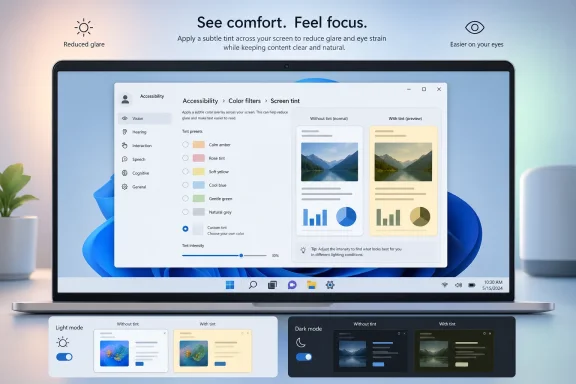
Microsoft is reportedly preparing a new Windows 11 display accessibility feature called Screen Tint, and if it ships the way preview-build sleuths describe it, it could become one of the most practical eye-comfort additions Windows has seen in years. Unlike the current Night Light setting, which mainly shifts the display toward warmer tones, Screen Tint appears to offer multiple presets, a custom tint option, and an intensity slider. That would put Windows closer to a more flexible, system-level solution for people sensitive to glare, harsh contrast, or certain color environments. Microsoft already frames existing accessibility tools such as color filters and contrast themes as ways to make Windows easier to see, but Screen Tint would broaden that idea from visibility to comfort.
Windows has spent the last several years quietly expanding its accessibility toolkit, and display comfort has become a bigger part of that effort. Microsoft already supports Color filters, contrast themes, dark mode, Magnifier, and a dedicated accessibility flyout, all of which are meant to help users work more comfortably in different visual conditions. The company’s support guidance is explicit that color filters can help when it is hard to see what is on the screen, while contrast themes are intended to improve legibility for people with low vision or poor color combinations.
The proposed Screen Tint feature fits naturally into that lineage, even though it seems to go a step beyond what Windows already offers. Night Light reduces blue light by warming the screen, but it is essentially a single-purpose control. A broader tinting system would let Microsoft address a wider set of use cases, including visual stress, glare sensitivity, migraine triggers, and photophobia. Microsoft’s own accessibility materials already recognize that users benefit from different color and contrast treatments depending on lighting, eye sensitivity, and the kind of content on screen.
This is also part of a larger pattern in Windows Insider development. Microsoft frequently ships features in preview builds before documenting them formally, and enthusiasts often uncover incomplete or hidden UI elements before the company announces them. That practice has become routine across Windows 11, where preview builds often carry features in an unfinished state, with the official rollout coming later through staged deployment. The Windows Insider blog regularly notes that features may arrive gradually and can change before general availability.
There is also a broader market context here. Accessibility is no longer just a compliance category or a niche assistive-technology story; it is increasingly a differentiator in consumer and enterprise operating systems. Users now expect operating systems to adapt to their environments, not the other way around. In that sense, Screen Tint is not just a new display setting. It is another sign that Microsoft wants Windows 11 to feel more adaptive, more inclusive, and more personalized at the system layer.
The most interesting part is the breadth of presets. The reportedly discovered list includes Calm amber, Rose tint, Soft yellow, Cool blue, Gentle green, and Natural grey. That is a much more nuanced palette than Night Light, and it points to Microsoft thinking in terms of symptom-specific comfort rather than one-size-fits-all warmth. If those descriptions survive to release, Screen Tint would effectively be a menu of comfort profiles for different kinds of sensitivity.
There is also reportedly a Custom tint mode, which is arguably the most important feature of the bunch. Presets are useful for discovery, but custom controls are what make accessibility meaningful to people with unique needs. If Microsoft truly gives users the ability to define a tint and then tune intensity, Screen Tint could become a real personalization tool rather than just another checkbox in Settings.
Key implications:
Then there are Windows Color filters, which already exist as an accessibility feature. Microsoft says those filters can help if it is hard to see what is on the screen and that they are useful for distinguishing items that differ only by color. That is a different problem from the one Screen Tint appears to address. Color filters are primarily about accessibility and color differentiation; Screen Tint seems more about overall viewing comfort and reducing strain through a tinted overlay.
It also matters that Microsoft has been reorganizing accessibility settings for discoverability. The company has already grouped assistive technologies and improved the visibility of accessibility tools in the Windows 11 interface. Putting Screen Tint in the Accessibility section next to color filters, contrast themes, and Magnifier would reinforce the idea that it belongs to the same family of system tools, even if its real-world usage is more broad than strictly medical or assistive.
What stands out:
There is also a competitive angle. Apple, Google, and many monitor vendors already market display comfort and accessibility features aggressively. Microsoft cannot afford to let Windows feel less adaptive than competing platforms, especially when it wants Windows 11 to be the default choice for both creative and enterprise users. A better built-in tinting tool is not flashy, but it is the kind of small improvement that adds up over an eight-hour workday.
The timing also aligns with the Windows Insider model itself. Microsoft often uses preview channels to test interface concepts quietly before broad rollout, and recent builds continue to show that pattern. If Screen Tint is already exposed in hidden code paths, that usually means the feature has moved beyond pure experimentation and into late-stage integration. It does not guarantee release, but it does suggest Microsoft thinks the idea is mature enough to surface.
Why this matters now:
Microsoft’s support guidance already recognizes that color and contrast adjustments can help people with low vision, photosensitivity, and general readability issues. Screen Tint extends that idea by moving from static contrast toward a more nuanced, whole-screen color environment. In practical terms, that could make Windows easier to use for people who find pure white backgrounds exhausting, especially when they are reading for long stretches.
That broader reach is good for adoption, but it also raises a design challenge. Accessibility features can lose clarity when they try to serve everyone at once. If Screen Tint becomes too hidden, too confusing, or too similar to other controls, it may frustrate the very users who need it most. The best accessibility features are discoverable, predictable, and easy to reverse.
Takeaways:
A built-in tinting feature also matters because enterprises prefer controls they can manage centrally. If Screen Tint arrives as a standard Windows setting, IT teams can document it, support it, and potentially standardize its use more easily than third-party utilities. That is particularly useful in regulated or accessibility-conscious organizations where system-level consistency matters more than individual experimentation.
Still, enterprises will want guardrails. Anything that modifies the display globally can interfere with branding, color-critical workflows, or accessibility testing itself. Organizations in design, healthcare, and manufacturing may need to treat tinting as a user-specific accommodation rather than a default baseline. In other words, the feature is promising, but it should be opt-in by design.
Enterprise implications:
The consumer story is especially strong for readers, students, gamers, and late-night workers. The reported presets map neatly onto common complaints: glare, bright backgrounds, screen harshness, and general fatigue. If the feature ships cleanly, it could become one of those quietly beloved Windows settings that gets recommended by word of mouth rather than official marketing.
The flip side is that consumer features can be misread as cosmetics when they are actually accessibility tools. Microsoft will need to explain the purpose clearly, or users may lump Screen Tint in with simple theme personalization and never discover its real utility. The best-case outcome is that people use it casually, but also recognize that it was built to help those with more serious visual sensitivities.
Consumer takeaways:
There is a subtle but important design shift here. Earlier generations of Windows often treated accessibility as a separate destination, something you visited when you needed help. Windows 11 increasingly treats accessibility as part of the normal device experience. That is a healthier model because it avoids making users feel as though they are stepping outside the main product to solve a problem.
That said, Microsoft must avoid feature sprawl. Accessibility menus can become overwhelming if every problem gets its own toggle and every toggle gets its own panel. The challenge is to make Windows feel more helpful without turning Settings into a maze of overlapping visual controls. Good design here will be less about adding options and more about curating them.
Design direction highlights:
For hardware vendors, this may also influence display tuning and OEM software behavior. Many laptop makers already bundle their own eye-comfort modes, blue-light reduction tools, or display enhancement apps, but those utilities are often inconsistent and duplicated across brands. A native Windows tinting layer could reduce fragmentation and give users a common baseline, which is exactly what platform owners want.
The broader market implication is that “comfort features” are becoming standard expectations. Just as dark mode moved from novelty to norm, tint and filtering options may follow the same path. If that happens, the real competition will not be who has the feature, but who has the most usable, least intrusive, and most intelligently integrated version of it.
Competitive points:
A second thing to watch is how Microsoft positions it relative to existing settings. If the company explains Screen Tint as part of a broader comfort and accessibility toolkit, it will be easier to understand and adopt. If it arrives without guidance, it may be dismissed as another hidden tweak that only enthusiasts will ever find.
A third issue is rollout scope. Microsoft often tests features in the Insider channels before wider release, and that means Screen Tint could shift, rename, or disappear before it reaches everyone. That is normal for Windows preview development, but it also means enthusiasts should treat the current evidence as promising, not confirmed.
Source: Windows 11 is getting a new feature to make displays easier on the eyes
 Background
Windows has spent the last several years quietly expanding its accessibility toolkit, and display comfort has become a bigger part of that effort. Microsoft already supports Color filters, contrast themes, dark mode, Magnifier, and a dedicated accessibility flyout, all of which are meant to help users work more comfortably in different visual conditions. The company’s support guidance is explicit that color filters can help when it is hard to see what is on the screen, while contrast themes are intended to improve legibility for people with low vision or poor color combinations.The proposed Screen Tint feature fits naturally into that lineage, even though it seems to go a step beyond what Windows already offers. Night Light reduces blue light by warming the screen, but it is essentially a single-purpose control. A broader tinting system would let Microsoft address a wider set of use cases, including visual stress, glare sensitivity, migraine triggers, and photophobia. Microsoft’s own accessibility materials already recognize that users benefit from different color and contrast treatments depending on lighting, eye sensitivity, and the kind of content on screen.
This is also part of a larger pattern in Windows Insider development. Microsoft frequently ships features in preview builds before documenting them formally, and enthusiasts often uncover incomplete or hidden UI elements before the company announces them. That practice has become routine across Windows 11, where preview builds often carry features in an unfinished state, with the official rollout coming later through staged deployment. The Windows Insider blog regularly notes that features may arrive gradually and can change before general availability.
There is also a broader market context here. Accessibility is no longer just a compliance category or a niche assistive-technology story; it is increasingly a differentiator in consumer and enterprise operating systems. Users now expect operating systems to adapt to their environments, not the other way around. In that sense, Screen Tint is not just a new display setting. It is another sign that Microsoft wants Windows 11 to feel more adaptive, more inclusive, and more personalized at the system layer.
What Screen Tint Appears to Be
At a high level, Screen Tint looks like a color overlay system for the whole display. According to the feature description shared by enthusiasts, Microsoft’s own wording suggests that it “shows a color overlay on your display to reduce eye strain and improve viewing comfort.” That is important because it implies the feature is not just about blue-light reduction or color correction; it is about applying a visual layer that changes how the entire screen is perceived.The most interesting part is the breadth of presets. The reportedly discovered list includes Calm amber, Rose tint, Soft yellow, Cool blue, Gentle green, and Natural grey. That is a much more nuanced palette than Night Light, and it points to Microsoft thinking in terms of symptom-specific comfort rather than one-size-fits-all warmth. If those descriptions survive to release, Screen Tint would effectively be a menu of comfort profiles for different kinds of sensitivity.
Why the presets matter
A preset model matters because eye comfort is contextual. Someone working at night may want an amber tone, while someone dealing with fluorescent office lighting might prefer another hue entirely. The inclusion of Natural grey is especially notable, because it suggests Microsoft is not assuming warmth is always the answer; some users may simply want to reduce stark contrast without pushing the screen heavily toward yellow or red.There is also reportedly a Custom tint mode, which is arguably the most important feature of the bunch. Presets are useful for discovery, but custom controls are what make accessibility meaningful to people with unique needs. If Microsoft truly gives users the ability to define a tint and then tune intensity, Screen Tint could become a real personalization tool rather than just another checkbox in Settings.
Key implications:
- It is broader than Night Light.
- It is likely positioned as a comfort and accessibility feature.
- It appears to be built for whole-display tinting.
- It may offer both guided presets and advanced customization.
- It could bridge consumer convenience and assistive technology.
How It Differs From Night Light and Color Filters
The obvious comparison is Night Light, because Night Light already changes the display color temperature and is widely used to make screens easier to tolerate at night. But Night Light is deliberately simple. It reduces blue light by shifting the display warmer, which is helpful in some situations but not adaptable enough to cover a wide range of visual sensitivities. Screen Tint, by contrast, seems to recognize that not every eye-comfort problem is the same.Then there are Windows Color filters, which already exist as an accessibility feature. Microsoft says those filters can help if it is hard to see what is on the screen and that they are useful for distinguishing items that differ only by color. That is a different problem from the one Screen Tint appears to address. Color filters are primarily about accessibility and color differentiation; Screen Tint seems more about overall viewing comfort and reducing strain through a tinted overlay.
The practical difference
That distinction matters because accessibility settings often overlap but do not substitute for one another. A color-blind user may need a color filter; a migraine-sensitive user may want a warmer or softer overlay; someone with glare issues in a bright office might need something else entirely. The strength of Screen Tint is that it appears to be designed as a middle layer between pure color correction and pure theme customization.It also matters that Microsoft has been reorganizing accessibility settings for discoverability. The company has already grouped assistive technologies and improved the visibility of accessibility tools in the Windows 11 interface. Putting Screen Tint in the Accessibility section next to color filters, contrast themes, and Magnifier would reinforce the idea that it belongs to the same family of system tools, even if its real-world usage is more broad than strictly medical or assistive.
What stands out:
- Night Light is a single warmth control.
- Color filters are about distinguishing colors and accessibility.
- Contrast themes improve legibility through stronger separation.
- Screen Tint appears aimed at comfort, sensitivity, and personalized filtering.
- Together, they point to a more layered Windows vision.
Why Microsoft Would Add This Now
Microsoft’s timing makes sense. Windows 11 has been steadily accumulating quality-of-life improvements across display, accessibility, and personalization, and the company is increasingly framing these as core parts of the platform rather than fringe add-ons. The move also reflects a broader shift in how people use PCs: more hours, more multitasking, more bright OLED and HDR panels, and more time in front of screens under mixed lighting. That combination makes visual comfort a legitimate platform problem.There is also a competitive angle. Apple, Google, and many monitor vendors already market display comfort and accessibility features aggressively. Microsoft cannot afford to let Windows feel less adaptive than competing platforms, especially when it wants Windows 11 to be the default choice for both creative and enterprise users. A better built-in tinting tool is not flashy, but it is the kind of small improvement that adds up over an eight-hour workday.
Accessibility as product strategy
Accessibility has become a platform strategy, not just a responsibility. Microsoft’s support and developer documentation repeatedly emphasizes vision support, contrast, and screen readability because these tools help everyone, not just users who identify as disabled. Screen Tint seems to sit directly in that philosophy: a feature that may originate in accessibility but ends up benefitting general productivity, especially in mixed lighting or during long sessions.The timing also aligns with the Windows Insider model itself. Microsoft often uses preview channels to test interface concepts quietly before broad rollout, and recent builds continue to show that pattern. If Screen Tint is already exposed in hidden code paths, that usually means the feature has moved beyond pure experimentation and into late-stage integration. It does not guarantee release, but it does suggest Microsoft thinks the idea is mature enough to surface.
Why this matters now:
- More users spend long hours in front of screens.
- Display hardware and lighting conditions vary more than before.
- Accessibility is a mainstream product expectation.
- Microsoft is actively refining Windows 11’s settings architecture.
- Preview builds are increasingly used as a proving ground.
The Accessibility Angle
The most important thing about Screen Tint is that it appears to live inside Accessibility, not just Display. That placement changes how users will interpret it. A normal display control suggests convenience; an accessibility control suggests accommodation, support, and personalization for real-world sensitivity. That distinction is subtle, but it shapes both adoption and trust.Microsoft’s support guidance already recognizes that color and contrast adjustments can help people with low vision, photosensitivity, and general readability issues. Screen Tint extends that idea by moving from static contrast toward a more nuanced, whole-screen color environment. In practical terms, that could make Windows easier to use for people who find pure white backgrounds exhausting, especially when they are reading for long stretches.
Accessibility beyond diagnosis
What is noteworthy is that Screen Tint may appeal to users without a formal accessibility need. Plenty of people experience eye fatigue without having a diagnosed vision condition, and many simply want a calmer screen while working late or sitting under harsh office lighting. If Microsoft gets the design right, Screen Tint could be one of those rare accessibility features that reaches a much broader audience than its original target group.That broader reach is good for adoption, but it also raises a design challenge. Accessibility features can lose clarity when they try to serve everyone at once. If Screen Tint becomes too hidden, too confusing, or too similar to other controls, it may frustrate the very users who need it most. The best accessibility features are discoverable, predictable, and easy to reverse.
Takeaways:
- Placement in Accessibility sends an important signal.
- It may help users with and without formal vision conditions.
- It broadens Windows’ comfort toolkit.
- It must remain simple enough to be trustworthy.
- It should complement, not replace, existing filters and themes.
Enterprise Impact
Enterprises should pay attention because display comfort has direct consequences for worker fatigue, productivity, and support requests. In a hybrid-work world, employees spend enormous amounts of time in front of laptops, external monitors, and bright conferencing setups. Even a modest comfort improvement can reduce friction in environments where people are already juggling eye strain, long meetings, and inconsistent lighting.A built-in tinting feature also matters because enterprises prefer controls they can manage centrally. If Screen Tint arrives as a standard Windows setting, IT teams can document it, support it, and potentially standardize its use more easily than third-party utilities. That is particularly useful in regulated or accessibility-conscious organizations where system-level consistency matters more than individual experimentation.
Support and policy implications
The support burden could be meaningful. Help desks regularly receive complaints that are not strictly technical but are rooted in comfort, sensitivity, or “the screen feels wrong.” A richer built-in tinting system could help IT staff steer users toward a Microsoft-supported solution instead of ad hoc adjustments. It may also reduce reliance on external software that can be blocked, patched inconsistently, or fail under lockdown policies.Still, enterprises will want guardrails. Anything that modifies the display globally can interfere with branding, color-critical workflows, or accessibility testing itself. Organizations in design, healthcare, and manufacturing may need to treat tinting as a user-specific accommodation rather than a default baseline. In other words, the feature is promising, but it should be opt-in by design.
Enterprise implications:
- Could reduce eye-strain complaints.
- Might simplify support for comfort-related issues.
- Fits centralized Windows management better than third-party tools.
- Needs careful policy handling in color-sensitive workflows.
- Should remain user-controlled rather than forced.
Consumer Impact
For consumers, Screen Tint could be one of those features people do not think about until they try it. Many users already fiddle with Night Light, dark mode, or monitor settings when their eyes feel tired, but those tools are blunt instruments. A set of tint presets with intensity control is more flexible and may produce a more immediate sense of relief.The consumer story is especially strong for readers, students, gamers, and late-night workers. The reported presets map neatly onto common complaints: glare, bright backgrounds, screen harshness, and general fatigue. If the feature ships cleanly, it could become one of those quietly beloved Windows settings that gets recommended by word of mouth rather than official marketing.
Why customization matters at home
Home users are less constrained by policy, which makes Custom tint particularly valuable. People can tune the screen to their own taste, their own light levels, and their own monitor characteristics. That kind of flexibility is often the difference between a feature that sounds good on paper and one that becomes part of a daily routine.The flip side is that consumer features can be misread as cosmetics when they are actually accessibility tools. Microsoft will need to explain the purpose clearly, or users may lump Screen Tint in with simple theme personalization and never discover its real utility. The best-case outcome is that people use it casually, but also recognize that it was built to help those with more serious visual sensitivities.
Consumer takeaways:
- More adaptable than Night Light.
- Useful for long reading and screen sessions.
- Likely to appeal to students and remote workers.
- Customization could be the killer feature.
- Clear labeling will determine adoption.
How It Fits Into the Windows 11 Design Direction
Screen Tint also makes sense as part of the broader Windows 11 philosophy, which has leaned increasingly toward calm interfaces, layered settings, and more thoughtful defaults. Windows has spent the last few years cleaning up its accessibility pathways, moving options into Settings, and making visual adjustments easier to reach. This feature would continue that trend by making comfort controls more visible and more intentional.There is a subtle but important design shift here. Earlier generations of Windows often treated accessibility as a separate destination, something you visited when you needed help. Windows 11 increasingly treats accessibility as part of the normal device experience. That is a healthier model because it avoids making users feel as though they are stepping outside the main product to solve a problem.
The normalization of assistive controls
This normalization has side benefits for discovery. When features like color filters, contrast themes, voice access, and screen readers sit inside a more unified accessibility section, users are more likely to stumble onto related tools they did not know they needed. Screen Tint would benefit from that ecosystem effect, especially if Microsoft pairs it with onboarding copy that explains why each tint exists rather than just listing colors.That said, Microsoft must avoid feature sprawl. Accessibility menus can become overwhelming if every problem gets its own toggle and every toggle gets its own panel. The challenge is to make Windows feel more helpful without turning Settings into a maze of overlapping visual controls. Good design here will be less about adding options and more about curating them.
Design direction highlights:
- Accessibility is becoming mainstream Windows UI.
- The Settings app is the likely home for deeper controls.
- User education will matter as much as the feature itself.
- Simplicity must survive expansion.
- Curated choices are better than endless toggles.
Competitive Implications
Screen Tint may not grab headlines the way AI features do, but it still matters competitively. Operating systems increasingly compete on comfort, consistency, and accessibility polish. If Windows 11 offers better built-in color comfort than rival platforms, Microsoft can claim another small but meaningful advantage in the daily-use category.For hardware vendors, this may also influence display tuning and OEM software behavior. Many laptop makers already bundle their own eye-comfort modes, blue-light reduction tools, or display enhancement apps, but those utilities are often inconsistent and duplicated across brands. A native Windows tinting layer could reduce fragmentation and give users a common baseline, which is exactly what platform owners want.
The ecosystem effect
If Microsoft executes well, third-party display utilities may become less necessary for mainstream users. That does not eliminate specialized software, especially for color professionals or users with unique needs, but it does raise the floor for what Windows provides out of the box. In practical terms, that is a win for users and a mild pressure point for vendors who have depended on utility bundling.The broader market implication is that “comfort features” are becoming standard expectations. Just as dark mode moved from novelty to norm, tint and filtering options may follow the same path. If that happens, the real competition will not be who has the feature, but who has the most usable, least intrusive, and most intelligently integrated version of it.
Competitive points:
- Raises Windows’ quality-of-life baseline.
- Could reduce reliance on OEM utilities.
- May pressure rivals to expand comfort settings.
- Strengthens Microsoft’s accessibility story.
- Makes display personalization a platform feature, not a bolt-on.
Strengths and Opportunities
Screen Tint’s biggest strength is that it addresses a problem many users feel but few operating systems solve elegantly: the gap between raw visibility and comfortable visibility. If Microsoft ships the feature with solid presets, a clear custom option, and a reliable intensity slider, it could become one of Windows 11’s most useful everyday accessibility additions. It also has the rare advantage of being easy to explain and easy to recommend, which is exactly what helps a feature spread beyond its original niche.- Strong fit for accessibility-first design
- More flexible than Night Light
- Could help users with glare sensitivity and visual stress
- Likely useful across consumer and enterprise scenarios
- Custom tint would make it highly personal
- Built-in placement improves discoverability
- Could reduce third-party utility dependence
Risks and Concerns
The biggest risk is that Screen Tint could land as a confusing duplicate of features people already know, such as Night Light, color filters, and contrast themes. If Microsoft does not make the distinctions obvious, users may ignore the feature or use it incorrectly. There is also the danger that a global overlay can alter important colors in apps where accuracy matters, which would make some users wary of leaving it enabled for long periods.- Overlap with existing Windows display settings
- Potential confusion about when to use it
- Risk of interfering with color-critical workflows
- Might be hidden too deeply in Settings
- Could feel unnecessary if presets are poorly chosen
- Accessibility users need reliability, not novelty
- Mislabeling it as cosmetic could hurt adoption
What to Watch Next
The next step is straightforward: Microsoft needs to decide whether Screen Tint stays an internal preview artifact or graduates into a formally documented Windows 11 feature. If it does appear in a future Insider build, the details will matter far more than the name. Users will want to know whether the tint applies at the OS level, whether it can be scheduled, whether it works with HDR, and whether it survives app switching cleanly.A second thing to watch is how Microsoft positions it relative to existing settings. If the company explains Screen Tint as part of a broader comfort and accessibility toolkit, it will be easier to understand and adopt. If it arrives without guidance, it may be dismissed as another hidden tweak that only enthusiasts will ever find.
A third issue is rollout scope. Microsoft often tests features in the Insider channels before wider release, and that means Screen Tint could shift, rename, or disappear before it reaches everyone. That is normal for Windows preview development, but it also means enthusiasts should treat the current evidence as promising, not confirmed.
- Formal announcement or Insider documentation
- Final name and UI placement
- Whether custom tint supports saved profiles
- Compatibility with HDR and multi-monitor setups
- Whether the feature reaches Dev, Beta, or Release Preview first
Source: Windows 11 is getting a new feature to make displays easier on the eyes
