

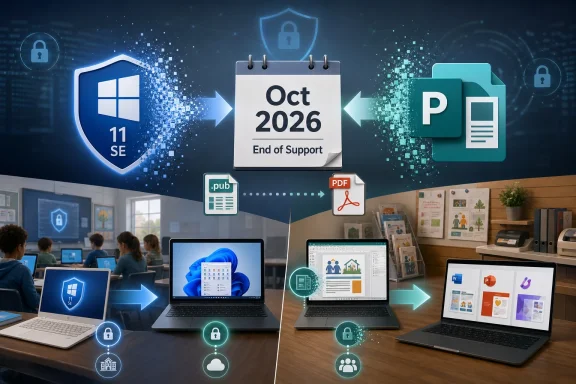
Microsoft is ending support in October 2026 for Windows 11 SE, its locked-down education edition for low-cost school PCs, and Microsoft Publisher, the desktop publishing app that has survived inside Office for more than three decades. The dates are not merely housekeeping entries on a lifecycle calendar. They mark two retreats from markets where Microsoft once believed Windows and Office could win by offering specialized, tightly scoped products. In both cases, the message is the same: Microsoft would rather consolidate users onto broader platforms than keep niche editions alive.
Microsoft’s end-of-support calendar for 2026 is crowded enough that any single product can look like routine lifecycle churn. Office LTSC 2021, Windows 11 Home and Pro version 24H2, several server-era products, developer frameworks, and smaller enterprise tools all hit milestones during the year. For IT departments, that means another round of asset inventories, upgrade rings, licensing decisions, and support exceptions.
But Windows 11 SE and Publisher stand out because they were not just old versions. They were product bets. Windows 11 SE was Microsoft’s answer to Chromebooks in classrooms, while Publisher was the approachable page-layout tool that sat below professional publishing software and above Word’s more limited design capabilities.
Their retirements show Microsoft pruning at both ends of its portfolio. At the operating-system layer, the company is giving up on a special Windows edition for inexpensive, school-managed devices. At the productivity layer, it is removing a familiar standalone-style creative app and pushing users toward Word, PowerPoint, Designer, or more modern alternatives.
That is not accidental. Microsoft’s current strategy favors cloud-managed, subscription-connected, AI-adjacent platforms over small, purpose-built applications with separate identities. The old Microsoft sold a tool for every job. The current Microsoft wants fewer front doors and more services behind them.
The problem was that ChromeOS already owned that mental model. Google’s education pitch was not simply that Chromebooks were inexpensive. It was that the entire experience, from deployment to reset to classroom administration, had been built around low-friction fleet management. Microsoft tried to answer with Windows familiarity, but Windows familiarity cuts both ways.
A locked-down Windows device is still judged against Windows expectations. Users expect legacy app compatibility, broad peripheral support, and the ability to customize. Administrators expect the full complexity of Windows policy, imaging, updates, identity, and security. Windows 11 SE tried to subtract from Windows without always escaping the assumptions attached to Windows.
The Surface Laptop SE captured that tension. It was inexpensive by Surface standards and aimed squarely at schools, but the value proposition was never as clean as a Chromebook. If a district wanted the simplest managed browser-and-app machine, ChromeOS was already there. If it wanted Windows, it usually wanted real Windows.
Microsoft’s own support language now makes the retreat plain. Windows 11 SE version 24H2 is the final release for the edition, and support ends in October 2026. Devices will continue to function after that, but without software updates, security fixes, or technical assistance, they become unsuitable for managed school environments where compliance and child safety obligations matter.
That changes the calculus. Once security fixes stop, administrators have to treat remaining SE machines as aging endpoints with a hard retirement clock. Keeping them around may be tempting if budgets are tight, but unsupported school laptops are exactly the kind of low-status fleet assets that can linger until they become someone else’s incident report.
The timing also matters because Windows 11 itself has moved on. The general Windows 11 release cadence gives Home and Pro editions 24 months of support and Enterprise and Education editions 36 months. Version 24H2 reaches end of updates for Home and Pro on October 13, 2026, while Enterprise and Education editions have a longer runway. Windows 11 SE, however, is not being carried forward as a special education branch.
That means schools with SE fleets cannot simply wait for the next feature update to solve the problem. Microsoft’s recommendation is effectively to move to devices that support another edition of Windows 11. In procurement terms, that is not a patch plan. It is a replacement plan.
For IT admins, the work should start well before the deadline. They need to identify SE devices, confirm whether any can be repurposed, review enrollment and management profiles, migrate user data, and decide whether the replacement path is standard Windows 11 hardware, Chromebooks, iPads, or something else entirely. The support date is October 2026, but the practical deadline is the budget cycle before that.
That usefulness came from its position in the middle. Word was for documents. PowerPoint was for slides. Publisher was for the thing you wanted to print, fold, tape to a wall, hand out, or send to a local shop. It understood layout in a way Word only pretended to, while remaining friendlier than Adobe InDesign or QuarkXPress.
The awkward truth is that Publisher became less strategically important as the definition of publishing changed. The rise of browser-based design tools, template marketplaces, Canva-style workflows, PDF-first sharing, and social-media graphics shrank the space Publisher occupied. Microsoft still had the app, but it no longer looked like a growth product.
Microsoft says Publisher will no longer be supported after October 2026. Office LTSC 2024 does not include it, and the company has pointed users toward other Microsoft 365 apps depending on the task. Flyers and ads can move to Word, PowerPoint, or Designer. Brochures can move to Word or PowerPoint. Labels and envelopes can move to Word. The recommendation is practical, but it also gives away the strategy: Publisher’s jobs are being redistributed, not replaced by a new Publisher.
That matters because Publisher files are not generic memories. They are
That advice sounds simple until you imagine the file share. A small organization may have hundreds or thousands of
PDF conversion preserves appearance, but it does not preserve editability in the same way. A PDF is a final-form document, not a living Publisher project. For some use cases, that is fine. For a certificate template, newsletter masthead, label sheet, or recurring program, someone will eventually need to edit the layout again.
That is where Microsoft’s proposed replacements become uneven. Word can handle labels and letters. PowerPoint can produce surprisingly effective flyers and signs. Designer may be useful for quick graphics in Microsoft’s modern ecosystem. But none of these are a one-to-one replacement for Publisher’s page-layout model, especially for users who understood Publisher precisely because it was not Word.
Professional alternatives exist, but they bring their own trade-offs. Adobe InDesign remains the industry heavyweight, but it is expensive and subscription-based. Scribus is open source and capable, but it is not a frictionless migration path for casual Office users. Affinity Publisher earned a following among people who wanted a modern non-Adobe layout tool, though its long-term direction changed after Serif was acquired by Canva.
The likely outcome is messy. Larger organizations will standardize on approved tools. Designers will use professional software. Casual users will stretch Word and PowerPoint further than they should. And a long tail of Publisher files will become digital sediment: not quite gone, not quite usable, and rediscovered only when someone urgently needs last year’s template.
But the pattern is still revealing. Microsoft is shrinking the number of places where users can live outside its preferred platform lanes. Education customers are nudged toward standard supported Windows devices rather than a special low-cost Windows variant. Office users are nudged toward Microsoft 365 apps and cloud-connected design workflows rather than an old desktop publishing application.
This is the post-perpetual-license Microsoft. The company still sells LTSC releases and on-premises products where the market demands them, but its center of gravity is unmistakable. Microsoft 365, Entra, Intune, Defender, Copilot, OneDrive, SharePoint, Teams, and Azure are where the product energy goes.
That creates a tension for the customers most affected by these retirements. Schools and small organizations often choose legacy tools precisely because they are predictable, inexpensive, and already understood. A school laptop fleet is not refreshed on the same emotional schedule as a consumer gadget. A small office does not want to rethink its flyer workflow because the vendor’s design strategy moved on.
Yet unsupported software is not a protest vote that Microsoft has to count. Once the patch stream stops, the risk moves to the customer. That is the blunt force behind lifecycle policy: Microsoft can end support, but administrators have to live with the leftovers.
Sometimes the answer is yes in narrow contexts. S mode can make sense for managed or security-sensitive devices. Intune policies can create locked-down Windows environments that work well for enterprises and schools. Assigned access and kiosk modes have real value.
But as a product identity, constrained Windows has struggled. If it is too constrained, buyers compare it with Chromebooks and ask why it is not simpler or cheaper. If it is not constrained enough, administrators inherit the complexity of Windows without the full payoff. SE sat in that uncomfortable middle.
The irony is that Microsoft has improved Windows on modern hardware in exactly the areas that once justified special editions. ARM-based Windows devices are more credible than they were a few years ago. Cloud management is stronger. Security baselines are better. Browser-based workflows are normal. But those improvements make a separate SE edition less necessary, not more.
The future of education Windows is therefore likely to be standard Windows managed better, not a separate Windows for schools. That may be more honest. It also means Microsoft has effectively conceded that the Chromebook market will not be beaten by creating a Windows-flavored Chromebook.
That kind of software is easy to underestimate. In many organizations, the most important tool is not the most sophisticated one. It is the one that a receptionist, teacher, volunteer, office manager, or small-business owner can open without training and use to finish a job before lunch.
Publisher lived in that category. Its disappearance will not break the Fortune 500, but it will annoy the corners of the world where Office is less a productivity suite than a shared cultural language. People know where the templates are. They know which file to copy from last year. They know how to nudge a text box into place.
The challenge for Microsoft is that these users are often the least excited about migration narratives. They do not want a content creation platform. They want to print the winter concert program. They do not want to evaluate design ecosystems. They want the church bulletin to look the way it looked last Sunday, except with new names.
That is why Publisher’s retirement needs more than a lifecycle notice. It needs file discovery, conversion, replacement templates, user training, and some empathy for workflows that are small only from Redmond’s point of view.
 Microsoft’s 2026 Cleanup Is Really a Consolidation Campaign
Microsoft’s end-of-support calendar for 2026 is crowded enough that any single product can look like routine lifecycle churn. Office LTSC 2021, Windows 11 Home and Pro version 24H2, several server-era products, developer frameworks, and smaller enterprise tools all hit milestones during the year. For IT departments, that means another round of asset inventories, upgrade rings, licensing decisions, and support exceptions.But Windows 11 SE and Publisher stand out because they were not just old versions. They were product bets. Windows 11 SE was Microsoft’s answer to Chromebooks in classrooms, while Publisher was the approachable page-layout tool that sat below professional publishing software and above Word’s more limited design capabilities.
Their retirements show Microsoft pruning at both ends of its portfolio. At the operating-system layer, the company is giving up on a special Windows edition for inexpensive, school-managed devices. At the productivity layer, it is removing a familiar standalone-style creative app and pushing users toward Word, PowerPoint, Designer, or more modern alternatives.
That is not accidental. Microsoft’s current strategy favors cloud-managed, subscription-connected, AI-adjacent platforms over small, purpose-built applications with separate identities. The old Microsoft sold a tool for every job. The current Microsoft wants fewer front doors and more services behind them.
Windows 11 SE Lost the Chromebook Fight Before the Deadline Arrived
Windows 11 SE was introduced as a simplified Windows edition for education, available only preinstalled on devices from manufacturers. It was designed for web-first school use, with Microsoft 365 integration, Intune for Education management, and a curated approach to apps. On paper, that sounded like the Windows version of the Chromebook proposition: cheap hardware, centralized control, reduced complexity, and fewer ways for students to break the machine.The problem was that ChromeOS already owned that mental model. Google’s education pitch was not simply that Chromebooks were inexpensive. It was that the entire experience, from deployment to reset to classroom administration, had been built around low-friction fleet management. Microsoft tried to answer with Windows familiarity, but Windows familiarity cuts both ways.
A locked-down Windows device is still judged against Windows expectations. Users expect legacy app compatibility, broad peripheral support, and the ability to customize. Administrators expect the full complexity of Windows policy, imaging, updates, identity, and security. Windows 11 SE tried to subtract from Windows without always escaping the assumptions attached to Windows.
The Surface Laptop SE captured that tension. It was inexpensive by Surface standards and aimed squarely at schools, but the value proposition was never as clean as a Chromebook. If a district wanted the simplest managed browser-and-app machine, ChromeOS was already there. If it wanted Windows, it usually wanted real Windows.
Microsoft’s own support language now makes the retreat plain. Windows 11 SE version 24H2 is the final release for the edition, and support ends in October 2026. Devices will continue to function after that, but without software updates, security fixes, or technical assistance, they become unsuitable for managed school environments where compliance and child safety obligations matter.
The Security Problem Makes SE’s End More Than a Footnote
For a consumer, running unsupported software is a bad habit. For a school district, it can become an institutional risk. Windows 11 SE devices are not gaming rigs forgotten in a closet; they are classroom endpoints used by minors, connected to school networks, identity systems, cloud storage, and learning platforms.That changes the calculus. Once security fixes stop, administrators have to treat remaining SE machines as aging endpoints with a hard retirement clock. Keeping them around may be tempting if budgets are tight, but unsupported school laptops are exactly the kind of low-status fleet assets that can linger until they become someone else’s incident report.
The timing also matters because Windows 11 itself has moved on. The general Windows 11 release cadence gives Home and Pro editions 24 months of support and Enterprise and Education editions 36 months. Version 24H2 reaches end of updates for Home and Pro on October 13, 2026, while Enterprise and Education editions have a longer runway. Windows 11 SE, however, is not being carried forward as a special education branch.
That means schools with SE fleets cannot simply wait for the next feature update to solve the problem. Microsoft’s recommendation is effectively to move to devices that support another edition of Windows 11. In procurement terms, that is not a patch plan. It is a replacement plan.
For IT admins, the work should start well before the deadline. They need to identify SE devices, confirm whether any can be repurposed, review enrollment and management profiles, migrate user data, and decide whether the replacement path is standard Windows 11 hardware, Chromebooks, iPads, or something else entirely. The support date is October 2026, but the practical deadline is the budget cycle before that.
Publisher’s Retirement Ends the Last Office App That Felt Like a Print Shop
Publisher’s story is different because it did succeed, at least for a long time. Released in 1991, it gave small businesses, churches, schools, clubs, and local offices a way to make newsletters, flyers, brochures, certificates, menus, labels, and signs without buying professional desktop publishing software. It was not glamorous, but it was useful.That usefulness came from its position in the middle. Word was for documents. PowerPoint was for slides. Publisher was for the thing you wanted to print, fold, tape to a wall, hand out, or send to a local shop. It understood layout in a way Word only pretended to, while remaining friendlier than Adobe InDesign or QuarkXPress.
The awkward truth is that Publisher became less strategically important as the definition of publishing changed. The rise of browser-based design tools, template marketplaces, Canva-style workflows, PDF-first sharing, and social-media graphics shrank the space Publisher occupied. Microsoft still had the app, but it no longer looked like a growth product.
Microsoft says Publisher will no longer be supported after October 2026. Office LTSC 2024 does not include it, and the company has pointed users toward other Microsoft 365 apps depending on the task. Flyers and ads can move to Word, PowerPoint, or Designer. Brochures can move to Word or PowerPoint. Labels and envelopes can move to Word. The recommendation is practical, but it also gives away the strategy: Publisher’s jobs are being redistributed, not replaced by a new Publisher.
That matters because Publisher files are not generic memories. They are
.pub files sitting in shared drives, church offices, print-shop archives, school folders, municipal departments, and small businesses. Some are disposable. Some are templates that people have reused for 15 years. Some are the only editable versions of recurring forms and local publications.The File Format Is the Real Deadline
The hardest part of Publisher’s retirement is not that users will lose a familiar ribbon. It is that organizations may lose easy access to their own layouts. Microsoft has told users to convert important Publisher files before the retirement date, including by saving them as PDFs or using bulk conversion methods where appropriate.That advice sounds simple until you imagine the file share. A small organization may have hundreds or thousands of
.pub files with inconsistent names, duplicate versions, missing fonts, linked images, and unknown owners. Some will open cleanly. Some will not. Some will be archival records; others will be active production templates hiding in a folder last touched by an employee who retired in 2018.PDF conversion preserves appearance, but it does not preserve editability in the same way. A PDF is a final-form document, not a living Publisher project. For some use cases, that is fine. For a certificate template, newsletter masthead, label sheet, or recurring program, someone will eventually need to edit the layout again.
That is where Microsoft’s proposed replacements become uneven. Word can handle labels and letters. PowerPoint can produce surprisingly effective flyers and signs. Designer may be useful for quick graphics in Microsoft’s modern ecosystem. But none of these are a one-to-one replacement for Publisher’s page-layout model, especially for users who understood Publisher precisely because it was not Word.
Professional alternatives exist, but they bring their own trade-offs. Adobe InDesign remains the industry heavyweight, but it is expensive and subscription-based. Scribus is open source and capable, but it is not a frictionless migration path for casual Office users. Affinity Publisher earned a following among people who wanted a modern non-Adobe layout tool, though its long-term direction changed after Serif was acquired by Canva.
The likely outcome is messy. Larger organizations will standardize on approved tools. Designers will use professional software. Casual users will stretch Word and PowerPoint further than they should. And a long tail of Publisher files will become digital sediment: not quite gone, not quite usable, and rediscovered only when someone urgently needs last year’s template.
The Pattern Is Bigger Than Two Products
Microsoft’s 2026 retirements are easy to frame as normal lifecycle discipline. Software cannot be supported forever, and every supported product carries engineering, security, documentation, testing, and customer-support costs. The company is not wrong to retire products that no longer fit its roadmap.But the pattern is still revealing. Microsoft is shrinking the number of places where users can live outside its preferred platform lanes. Education customers are nudged toward standard supported Windows devices rather than a special low-cost Windows variant. Office users are nudged toward Microsoft 365 apps and cloud-connected design workflows rather than an old desktop publishing application.
This is the post-perpetual-license Microsoft. The company still sells LTSC releases and on-premises products where the market demands them, but its center of gravity is unmistakable. Microsoft 365, Entra, Intune, Defender, Copilot, OneDrive, SharePoint, Teams, and Azure are where the product energy goes.
That creates a tension for the customers most affected by these retirements. Schools and small organizations often choose legacy tools precisely because they are predictable, inexpensive, and already understood. A school laptop fleet is not refreshed on the same emotional schedule as a consumer gadget. A small office does not want to rethink its flyer workflow because the vendor’s design strategy moved on.
Yet unsupported software is not a protest vote that Microsoft has to count. Once the patch stream stops, the risk moves to the customer. That is the blunt force behind lifecycle policy: Microsoft can end support, but administrators have to live with the leftovers.
The Windows Lesson Is That “Simpler Windows” Keeps Running Into Windows
Windows 11 SE joins a long line of Microsoft attempts to make Windows lighter, safer, cheaper, or more appliance-like without losing the advantage of being Windows. Windows RT, Windows 10 S, Windows 10X, S mode, and now SE all orbit the same unresolved question: can Microsoft create a constrained Windows experience that customers perceive as a benefit rather than a limitation?Sometimes the answer is yes in narrow contexts. S mode can make sense for managed or security-sensitive devices. Intune policies can create locked-down Windows environments that work well for enterprises and schools. Assigned access and kiosk modes have real value.
But as a product identity, constrained Windows has struggled. If it is too constrained, buyers compare it with Chromebooks and ask why it is not simpler or cheaper. If it is not constrained enough, administrators inherit the complexity of Windows without the full payoff. SE sat in that uncomfortable middle.
The irony is that Microsoft has improved Windows on modern hardware in exactly the areas that once justified special editions. ARM-based Windows devices are more credible than they were a few years ago. Cloud management is stronger. Security baselines are better. Browser-based workflows are normal. But those improvements make a separate SE edition less necessary, not more.
The future of education Windows is therefore likely to be standard Windows managed better, not a separate Windows for schools. That may be more honest. It also means Microsoft has effectively conceded that the Chromebook market will not be beaten by creating a Windows-flavored Chromebook.
The Office Lesson Is That Familiarity Does Not Equal Strategic Value
Publisher’s retirement is more emotionally resonant because it is the sort of app people used quietly for decades. It was not the center of Microsoft’s developer conferences. It was not a flagship for AI. It did not define enterprise productivity strategy. But it helped real people make real things.That kind of software is easy to underestimate. In many organizations, the most important tool is not the most sophisticated one. It is the one that a receptionist, teacher, volunteer, office manager, or small-business owner can open without training and use to finish a job before lunch.
Publisher lived in that category. Its disappearance will not break the Fortune 500, but it will annoy the corners of the world where Office is less a productivity suite than a shared cultural language. People know where the templates are. They know which file to copy from last year. They know how to nudge a text box into place.
The challenge for Microsoft is that these users are often the least excited about migration narratives. They do not want a content creation platform. They want to print the winter concert program. They do not want to evaluate design ecosystems. They want the church bulletin to look the way it looked last Sunday, except with new names.
That is why Publisher’s retirement needs more than a lifecycle notice. It needs file discovery, conversion, replacement templates, user training, and some empathy for workflows that are small only from Redmond’s point of view.
October 2026 Is the Date That Turns Old Habits Into Open Tickets
The practical work now is not complicated, but it is easy to postpone because both products will keep working until they do not fit the support model anymore. That is how technical debt accumulates: one harmless exception at a time.- Organizations with Windows 11 SE devices should inventory them now and treat October 2026 as a fleet replacement deadline, not a reminder to check Windows Update.
- Schools should decide whether their next low-cost classroom device strategy is standard Windows 11, ChromeOS, iPadOS, or a mixed environment before procurement windows close.
- Publisher users should locate
.pubfiles, identify which ones are still operationally important, and convert or rebuild them while Publisher is still available. - IT teams should not assume PDF export is enough for templates that require regular editing, because preserving appearance and preserving workflow are different goals.
- Microsoft 365 administrators should prepare users for Word, PowerPoint, Designer, or third-party tools based on actual publishing tasks rather than issuing a generic “use something else” memo.
- Security teams should treat unsupported SE devices and abandoned Publisher installations as lifecycle risks, even if the software appears to keep running normally.
References
- Primary source: aol.com
Published: 2026-05-17T16:30:07.032484
Two Legacy Products Microsoft Is Ending Support For In 2026 - AOL
Microsoft will be ending a number of legacy products throughout 2026, meaning it may already be time for you to find replacements or upgrade software.www.aol.com - Related coverage: windowslatest.com
Microsoft Publisher: You won't be able to access Publisher or open files (.pub) in October 2026
Microsoft Publisher is retiring this year in October, and the Microsoft is issuing new warnings about the upcoming dismissal. www.windowslatest.com
- Official source: learn.microsoft.com
Ending Support in 2026 - Microsoft Lifecycle | Microsoft Learn
Find out which products will retire, reach end of support or move from mainstream support to extended support in 2026.learn.microsoft.com - Related coverage: techrepublic.com
Windows 11 SE: Microsoft Support Ends in 2026
Microsoft's Windows 11 SE, aimed at challenging Chromebooks in schools with low-cost PCs, will lose support in 2026 following version 24H2.www.techrepublic.com
- Official source: microsoft.com
Your request has been blocked. This could be due to several reasons.
www.microsoft.com
- Related coverage: windowscentral.com
Microsoft is killing Windows 11 SE — support to end in 2026 | Windows Central
Microsoft has confirmed that Windows 11 SE will not get the upcoming 'version 25H2' update later this year, and that support for Windows 11 SE will outright end in October 2026.www.windowscentral.com
- Official source: support.microsoft.com
Microsoft Publisher will no longer be supported after October 2026 | Microsoft Support
Microsoft Publisher will no longer be supported after October 2026support.microsoft.com - Related coverage: tomshardware.com
Microsoft ending Windows 11 SE support October 2026 — Chrome OS competitor also won't get version 25H2 update coming later this year | Tom's Hardware
Microsoft suggests transitioning to a device that supports another edition of Windows 11www.tomshardware.com - Related coverage: techradar.com
Microsoft has all but given up on Windows 11 SE – and it looks like the war against Chromebooks has been lost | TechRadar
Surface Laptop SE owners may well be confused here, too - with good reasonwww.techradar.com - Related coverage: tomsguide.com
Windows 10 support officially ends — are you upgrading to Windows 11? | Tom's Guide
Windows 10 has reached its end of life, but millions of PCs are still using Microsoft's older OS. Tell us if you're upgrading to Windows 11 or keeping your Windows 10 PC!www.tomsguide.com - Related coverage: as.com
Adiós a uno de los programas más míticos de Microsoft: carpetazo tras 35 años luchando por ser el software alternativo - Meristation
Un programa de maquetación y diseño gráfico que salió al mercado en 1991 y dirá adiós definitivamente en 2026.as.com - Official source: download.microsoft.com
