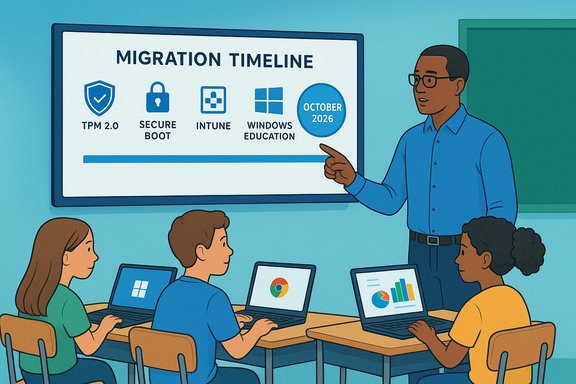
Microsoft's quiet withdrawal from the K–8 classroom OS wars has a clear deadline: Windows 11 SE will stop receiving feature updates and security servicing after Windows 11 SE, version 24H2, with support ending in October 2026 — a fact Microsoft has reflected in its lifecycle documentation and confirmed by subsequent reporting.
Windows 11 SE was introduced as a deliberately constrained, education-first edition of Windows aimed at the price-sensitive K–8 segment that Chrome OS has dominated. The SKU bundled simplified UI, a tightly curated app surface, and managed-deployment tooling — Intune for Education being a central element — and it launched alongside low-cost hardware such as the Surface Laptop SE that undercut mainstream Windows devices on sticker price.
From the outset Microsoft pitched SE as a pragmatic answer to Chromebook ubiquity: retain Windows compatibility and Microsoft 365 integration while imposing administrative controls and a web-first application model to reduce distraction and management overhead. In practice, however, adoption lagged and SE devices were ultimately tied to a single final feature release: 24H2. Microsoft’s lifecycle entry now states that SE will not receive a feature update beyond 24H2, and that the edition’s servicing — including security updates and technical assistance — ends in October 2026.
This is not necessarily a failure: it’s a strategic reallocation. But it does carry reputational and contractual costs for districts that purchased SE devices under the expectation of longer-term OS servicing. Procurement teams should now demand clearer lifecycle commitments and upgrade guarantees in future contracts.
On social platforms and forums, community sentiment has ranged from disappointment to pragmatic resignation. Many administrators who adopted SE appreciate the clarity of Microsoft’s timeline; the announcement lets them plan instead of operate under uncertainty, albeit with constrained budgets and compressed timelines.
Recommended executive summary for district leadership:
The lifecycle timeline is straightforward and unavoidable: Windows 11 SE’s final feature release is 24H2 and support ends in October 2026 — districts should plan accordingly and treat that date as a hard milestone for migration planning.
Source: WebProNews Microsoft Ends Windows 11 SE Support in 2026 Amid Low Adoption
 Background
Windows 11 SE was introduced as a deliberately constrained, education-first edition of Windows aimed at the price-sensitive K–8 segment that Chrome OS has dominated. The SKU bundled simplified UI, a tightly curated app surface, and managed-deployment tooling — Intune for Education being a central element — and it launched alongside low-cost hardware such as the Surface Laptop SE that undercut mainstream Windows devices on sticker price.From the outset Microsoft pitched SE as a pragmatic answer to Chromebook ubiquity: retain Windows compatibility and Microsoft 365 integration while imposing administrative controls and a web-first application model to reduce distraction and management overhead. In practice, however, adoption lagged and SE devices were ultimately tied to a single final feature release: 24H2. Microsoft’s lifecycle entry now states that SE will not receive a feature update beyond 24H2, and that the edition’s servicing — including security updates and technical assistance — ends in October 2026.
What Microsoft announced (the facts)
- Final feature release: Windows 11 SE — version 24H2 is the last feature update planned for the SE SKU.
- End of support: October 2026 is the month Microsoft has attached to the SE servicing lifecycle; reporting and lifecycle pages indicate October 13, 2026 as the broader 24H2 / Office 2021 end-of-servicing milestone.
- Upgrade path: SE devices will not be upgraded to Windows 11 25H2 as a managed feature update; districts must plan to migrate devices to another Windows edition or replace them.
Why this matters: the practical impact on schools
For K–12 districts that standardized on Windows 11 SE, the decision compresses a migration timeline already complicated by budget cycles, OEM upgrade policies, and hardware constraints.- Security risk: After October 2026, SE devices will no longer receive patches for newly discovered vulnerabilities. For endpoints that access student data, testing platforms, or administrative services, that creates a growing liability and potential compliance issue.
- Budgetary pressure: Many districts chose SE devices for their low acquisition cost and expected multi-year support. The need to reimage or replace devices ahead of the 2026 deadline forces districts to accelerate refresh plans and reallocate funds.
- Operational effort: SE’s locked-down model simplified daily classroom management but increased the risk of management “lock-in.” Migrating to full Windows editions, Chromebooks, or other platforms will require imaging, pilot testing, teacher training, and verification of app compatibility.
The roots of SE’s limited uptake
A mix of technical, market, and ecosystem factors constrained Windows 11 SE’s adoption.Technical trade-offs
- SE was a Windows variant at its core, and despite being branded “lightweight,” it retained the platform’s baseline overhead. On extremely low-end silicon that budget devices used, users and IT reported sluggish performance and disappointing battery life compared with Chromebooks.
- The curated app model — restricting installations to approved Microsoft Store apps, PWAs, and IT-approved catalog items — reduced distraction but created friction for teachers requiring specific win32 applications or tools that weren’t packaged as PWAs. That administrative overhead undercut the value proposition for many districts.
Market dynamics
- Chromebooks had already established scale in many U.S. K–12 districts by the time SE arrived, bringing lower hardware complexity, long battery life, and a mature management ecosystem (Google Admin Console) that district IT teams trusted.
- OEM channel momentum in the ultra-low-cost classroom segment favored Chrome OS vendors. Microsoft’s SE device catalog was modest in comparison, restricting procurement flexibility for districts shopping at scale.
Perception and timing
- SE arrived at a moment when Microsoft had already experimented with constrained Windows SKUs (Windows 10 S Mode, the shelved Windows 10X) and when Windows 11 hardware prerequisites (TPM 2.0, UEFI Secure Boot) were increasingly visible to buyers. For districts balancing cost against compatibility and lifecycle, SE’s late arrival and unclear upgrade guarantees made it a less attractive long-term bet.
Strengths SE delivered — and why they matter
Despite the outcome, Windows 11 SE achieved tangible benefits that explain why some administrators adopted it.- Simplicity for younger learners: a reduced interface and predictable workflows lowered the learning curve for teachers and students.
- Management control: Intune for Education and curated app catalogs made large-scale device policy enforcement simpler for IT teams accustomed to managing thin-client style fleets.
- Lower upfront cost: bundling SE with devices like the Surface Laptop SE made Windows-based 1:1 programs financially accessible to cash-strapped districts.
Migration reality: what districts should do now
The clock is real. Districts need a staged, pragmatic migration plan that balances security, instructional continuity, and cost.Immediate checklist (actionable)
- Inventory every SE device by model, serial number, BIOS/UEFI version, and installed Windows 11 SE build. Flag devices that are critical for testing infrastructure or that hold sensitive data.
- Confirm upgradeability with OEMs: check whether each device can be reimaged to Windows 11 Home/Pro/Education and whether firmware supports Secure Boot/TPM requirements. Do not assume in-place reimage is guaranteed.
- Prioritize replacements by risk: devices used for assessments, administrative tasks, or with access to confidential data get higher priority.
- Pilot reimaging and replacements on a small scale to validate imaging scripts, MDM enrollment, and software compatibility before broad rollouts.
- Harden and segment SE devices that must remain online during the transition — use network segmentation, robust endpoint protection, and limited access to sensitive systems as interim mitigations.
Migration paths to evaluate
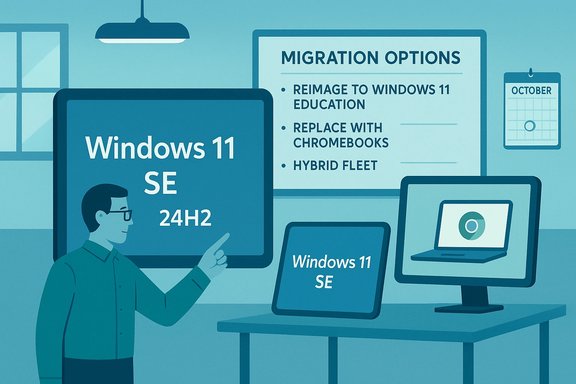
- Reimage eligible devices to Windows 11 Education/Pro and enroll them in the district management stack where hardware supports it. This preserves Windows-based workflows but requires firmware and driver support.
- Replace with Chromebooks where low cost, battery life, and the Google management ecosystem provide stronger long-term value for general student devices.
- Adopt a hybrid strategy: retain capable Windows devices for labs and specialty software; use Chromebooks for general-purpose student access.
Technical nuance: can SE devices be upgraded in-place?
This depends on OEM policies and hardware capability. Some SE devices may meet Windows 11 minimum requirements (TPM 2.0, UEFI Secure Boot, minimum RAM and storage), but OEM firmware locks or absent driver support can prevent a straightforward in-place conversion. Microsoft’s lifecycle guidance does not guarantee an automatic SKU upgrade for SE devices; administrators must verify per-model upgrade paths with vendors. Treat upgrade feasibility as a per-device technical assessment rather than a fleet-wide assumption.Economic and security ramifications
- Short term, the end of SE support will accelerate device refresh cycles and create procurement demand for vendors selling Windows 11-compatible hardware and Chromebooks alike. For device manufacturers and resellers, that represents a revenue opportunity. For underfunded districts, it is an unwelcome expense that risks widening the digital divide.
- Security-wise, unsupported endpoints become primary targets. Cybersecurity experts routinely advise organizations to remove unpatched systems from sensitive networks or to apply compensating controls until replacements are in place. The stakes are especially high in education, where student privacy regulations and high-profile ransomware attacks make unpatched fleets a direct liability.
Strategic reflections: what this says about Microsoft’s approach to education
Microsoft’s discontinuation of SE as a dedicated, evolving SKU signals a strategic consolidation. Instead of maintaining a separate lightweight OS to chase ultra-low-cost classrooms, Microsoft appears to be folding education-oriented features back into mainstream Windows 11 and emphasizing Microsoft 365 Education and cloud-based identity and management tools. That reduces SKU fragmentation and lets engineering resources focus on broader, unified improvements, but it concedes the ultra-low-cost classroom slice to Chrome OS and other alternatives unless Microsoft develops a different hardware-software approach.This is not necessarily a failure: it’s a strategic reallocation. But it does carry reputational and contractual costs for districts that purchased SE devices under the expectation of longer-term OS servicing. Procurement teams should now demand clearer lifecycle commitments and upgrade guarantees in future contracts.
Voices from the field: educator perspectives and real classroom trade-offs
Feedback from teachers and IT staff has been mixed. Some educators valued SE’s reduced distraction surface and simpler workflows for young learners. Others found the restrictions stifled necessary instructional flexibility, requiring frequent administrative exceptions or workarounds. This tension — between order and flexibility — is central to educational technology procurement: the best solution is the one that supports instruction with the least friction, and SE’s rigid model sometimes failed that test in practice.On social platforms and forums, community sentiment has ranged from disappointment to pragmatic resignation. Many administrators who adopted SE appreciate the clarity of Microsoft’s timeline; the announcement lets them plan instead of operate under uncertainty, albeit with constrained budgets and compressed timelines.
Lessons learned for technology leaders
- Balance specialization with upgradeability. Niche SKUs can solve short-term problems but create long-term procurement and lifecycle complexity.
- Require explicit lifecycle and reimage guarantees in procurement contracts, especially for devices bought for constrained budgets. Vendor commitments should include upgrade paths to mainstream editions and driver/firmware support timelines.
- Invest in management and teacher workflows. The most successful device deployments are those where teachers can use devices reliably without IT friction; that requires pilot testing and ongoing training during any platform transition.
What’s next: plausible scenarios and open questions
- Microsoft could double down on mainstream Windows 11 Education features and inject specific low-friction tooling (cloud images, lightweight management profiles) that replicate some of SE’s benefits without a separate SKU. This would be consistent with the company’s consolidation strategy.
- Alternatively, Microsoft might develop a modular, update-friendly strategy for lightweight deployments (for example, cloud-first images optimized for low-end hardware) that avoids separate SKUs yet preserves a Windows identity in classrooms. This remains speculative until Microsoft publishes a roadmap. Flag: any claim about future Microsoft product plans is speculative unless the company publishes it.
Final assessment and recommended steps for districts
Microsoft’s decision to stop feature updates for Windows 11 SE after version 24H2 and to retire the edition’s servicing in October 2026 is a definitive, date-driven inflection point that requires immediate planning.Recommended executive summary for district leadership:
- Treat October 2026 as a firm deadline for migrating SE devices off unsupported software.
- Start inventory and hardware eligibility assessments now; validate OEM upgrade paths on a per-model basis.
- Prioritize devices used in high-risk contexts (testing labs, administrative consoles) for earliest replacement or reimaging.
- Explore hybrid fleet strategies to balance cost, instructional needs, and long-term manageability.
The lifecycle timeline is straightforward and unavoidable: Windows 11 SE’s final feature release is 24H2 and support ends in October 2026 — districts should plan accordingly and treat that date as a hard milestone for migration planning.
Source: WebProNews Microsoft Ends Windows 11 SE Support in 2026 Amid Low Adoption