

Microsoft added Search by Substring to Windows 11 Insider Preview Build 26300.8553 in the Experimental Channel and Build 26220.8544 in the Beta Channel on May 29, 2026, letting Windows Search find files when the typed term appears anywhere in a filename or file content. That sounds like a footnote until you remember how often Windows Search has failed at the most human version of search: I know part of the name, not the whole thing. The change is small, late, and quietly damning. It suggests Microsoft is finally fixing Windows 11 not by inventing a new interface layer, but by removing the petty frictions that made the old one feel less trustworthy than it should.
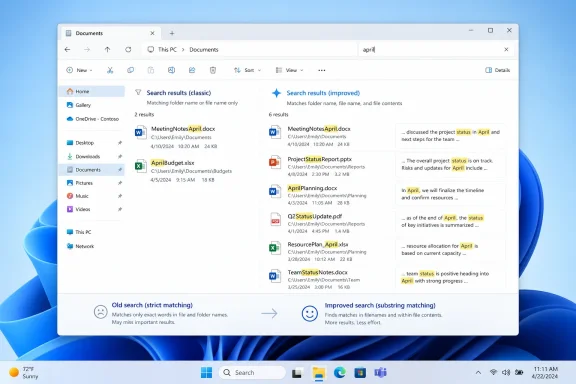
The example Microsoft gives is almost comically ordinary: type “april,” and a file named MeetingNotesApril can now appear. Type “status,” and ProjectStatusReport can be found. This is not semantic AI, not Recall, not a Copilot-branded knowledge graph. It is substring matching, the kind of behavior users have expected from search boxes for years.
That ordinariness is the story. Windows users do not usually fail to find files because they lack an AI assistant capable of summarizing their desktop. They fail because the operating system behaves as though filenames are formal database keys rather than messy human artifacts. People remember the project, the month, the client, the version, or the noun in the middle. They do not reliably remember whether a document began with “Final,” “Draft,” “Client,” or “Q2.”
Search by Substring does not make Windows Search brilliant. It makes it less brittle. And for a utility that sits in the Start menu, the taskbar, File Explorer, and the operating system’s broader navigation model, less brittle may matter more than another layer of intelligence.
The timing also matters. Microsoft is pushing this into both its Experimental and Beta channels, with the Beta build tied to Windows 11 version 25H2 via an enablement package. That does not guarantee general availability, and Microsoft’s own Insider language always leaves room for features to change, vanish, or ship later. But Beta placement is still a signal that this is not merely a throwaway lab experiment.
That is why substring matching has an outsized impact. The practical failure mode it addresses is one of the most common: compound filenames. Modern work is full of them. ProjectStatusReport, BudgetReviewMay, ClientDeckFinal, MeetingNotesApril, SecurityAuditDraft, VendorRenewal2026 — these are not edge cases. They are how people keep themselves organized without building a taxonomy every time they save a document.
The old behavior rewarded users who knew the beginning of the filename. That is an engineer’s kind of memory. Real users remember fragments, contexts, and associations. If the remembered fragment was buried in the middle of a camel-cased or space-free filename, Windows could behave as if the file had disappeared.
There is also a deeper psychological penalty. Search is supposed to reduce the need for perfect organization. When it fails on partial recall, it pushes users back toward defensive filing habits: more folders, more naming rules, more anxiety about where something was saved. That is tolerable in a managed enterprise document library. It is absurd on a personal computer.
The problem was that Windows is not only a consumer appliance. It is also a workbench. Enthusiasts, administrators, developers, accountants, teachers, and support staff all bend Windows into workflows Microsoft cannot fully predict. When the shell removes flexibility or makes basic retrieval feel unreliable, users do not experience that as modernization. They experience it as the operating system getting in the way.
Search by Substring lands differently because it does not ask users to adopt a new habit. It adapts to an existing one. That distinction is crucial. The best Windows improvements often feel almost invisible because they reduce the number of times the user has to think like Windows.
This is where the build’s other changes matter as context. The Experimental build also introduces more Start menu control, including section-level toggles, size options, and the renaming of Recommended to Recent. Those changes point in the same direction: Microsoft appears to be conceding that the Start experience needs to be more adjustable and more literal. “Recommended” carried an algorithmic implication. “Recent” is plainer, less ambitious, and probably more honest.
The new Experimental-channel Start menu controls are therefore not just cosmetic. Section-level toggles let users decide which parts of the Start surface deserve space. Size options acknowledge that a 13-inch laptop, a 27-inch monitor, and a couch PC do not need the same launcher geometry. Privacy-related controls around visible account identity also recognize that the Start menu often appears in shared, projected, or screen-recorded contexts.
Search by Substring benefits from this same philosophical shift. The Start menu is most useful when it lets users move quickly from intent to result. If the search box can find only what the user names in exactly the right way, the interface becomes a quiz. If it can match the remembered fragment, it becomes navigation.
There is still a tension here. Microsoft continues to layer Windows with cloud suggestions, account prompts, Copilot surfaces, Store recommendations, and policy-controlled experiences. The company clearly wants Windows to be a services platform, not just a local operating system. But the substring change is powerful precisely because it belongs to the older tradition of Windows improvements: make the machine do the obvious thing, locally and predictably, without turning every interaction into a product funnel.
Even so, the dual-channel release matters. Build 26300.8553 in the Experimental Channel is where Microsoft can trial bigger ideas, including the more configurable Start menu. Build 26220.8544 in the Beta Channel is a closer-to-release lane, based on Windows 11 version 25H2 through an enablement package. Search by Substring appearing in both suggests Microsoft sees it as a broadly applicable improvement rather than a speculative interface experiment.
That does not tell us when the feature will reach mainstream Windows 11 users. It also does not tell us whether it will behave identically across indexed locations, OneDrive-synced folders, corporate-managed devices, or non-indexed paths. Search features often depend on indexing state, file type handlers, content filters, and policy. A feature that sounds universal in a changelog may still have practical edges.
For administrators, the right posture is optimism with testing. If substring search expands the set of results users see, help desks may get fewer “I can’t find the file” complaints, but they may also see confusion if results become broader or slower. Enterprises with strict document-management practices will want to know how this interacts with indexing scope and whether content matching respects existing search boundaries. A better search box is still part of a larger data-governance surface.
Content search is only as good as its indexing and filters, but when it works, it turns local storage into something closer to a personal archive. Users do not have to remember whether the word was in the title, the body, or a comment. They only need to remember that the word was associated with the thing they are trying to retrieve.
That is exactly the territory Microsoft has been trying to claim with more ambitious Windows intelligence features. The difference is that substring matching is deterministic and understandable. If a term appears in a filename or indexed content, it can be matched. Users can form a mental model of that. They do not need to wonder whether an AI system inferred the wrong intent, skipped a source, or decided a different result was more relevant.
This is not an argument against AI in Windows. It is an argument for foundations before flourishes. If Windows cannot reliably find a file from a remembered fragment, then wrapping the desktop in conversational search risks becoming a glossy layer over an old frustration. Substring matching is plumbing, but plumbing is what keeps the house habitable.
That criticism is fair, but it should not obscure the value of the change. Operating systems carry decades of compatibility constraints, performance trade-offs, localization issues, indexing decisions, and security boundaries. A search behavior that feels obvious at the UI level can still require careful integration below it, especially if it spans filenames and file contents.
Still, users judge by outcomes. If a search box fails a simple remembered-fragment test, the architectural explanation does not matter. The feature’s lateness is part of its significance because it reflects how much of Windows 11’s user experience debate has been about priorities. Microsoft found time to promote cloud integrations, redesign surfaces, and push new AI affordances while a basic local-search annoyance persisted.
That is why this build feels like a small correction in direction. It suggests Microsoft is paying attention not only to the future-facing story of Windows, but also to the accumulated papercuts that make daily use feel heavier than it should.
Search by Substring needs to avoid becoming another feature people read about but cannot rely on. Search is infrastructure. It should not feel like a lottery tied to channel membership, regional rollout, or hidden feature flags once Microsoft decides it is ready. If the company ships it broadly, it should document the boundaries clearly: where it works, what it indexes, which file types support content matching, and how administrators can manage it.
Performance will also matter. Broader matching can mean broader result sets. If Windows Search becomes more complete but slower, users will notice. If it surfaces too many irrelevant matches, users will blame the feature rather than their query. The challenge is not merely matching substrings; it is ranking them in a way that makes the expected file appear near the top.
Microsoft’s examples are clean because examples always are. Real machines are full of duplicates, sync conflicts, temporary files, downloads, exported PDFs, Teams attachments, and documents with reused corporate templates. The win will come if Windows can find the buried file without flooding the user with every artifact that happens to contain the same common word.
The likely benefit is obvious: fewer users losing time because a file does not appear when searched by a remembered middle fragment. That matters in environments where filenames are generated from templates or conventions that put the most human-readable term somewhere other than the beginning. It may be especially useful in departments that live in compound names: legal, finance, project management, compliance, and education.
But administrators will want to test content matching carefully. If users expect Windows Search to behave like a document-management system, they may overestimate what is indexed. If sensitive documents become easier to discover within the bounds of a user’s access, that is not a permissions failure, but it can change user perception. Search improvements often reveal messy storage habits that were previously hidden by poor retrieval.
There is also the support angle. Once users learn that partial terms work, they will expect them to work everywhere: Start, File Explorer, Settings-adjacent search surfaces, cloud-backed locations, and perhaps even within app-specific document lists. Any inconsistency will become the next annoyance. Microsoft should treat this not as a one-off search tweak, but as a consistency mandate.
Trust has to be earned through repetition. The next time a user types the middle of a filename and Windows finds it, that is one small repair. The tenth time, it becomes a new habit. The first time it fails inexplicably, the old skepticism returns.
This is why Microsoft’s quality bar should be higher for small utilities than for flashy previews. A new AI feature can be forgiven for being experimental because users understand it as new. Search is not new. It is part of the operating system’s contract. When it fails, users do not see a preview technology falling short; they see Windows failing at Windows.
Search by Substring is therefore more than a convenience. It is a trust-rebuilding mechanism. It tells users, in a tiny but meaningful way, that Windows can meet them where their memory actually is.
 Microsoft Finally Teaches Windows Search How People Remember
The example Microsoft gives is almost comically ordinary: type “april,” and a file named MeetingNotesApril can now appear. Type “status,” and ProjectStatusReport can be found. This is not semantic AI, not Recall, not a Copilot-branded knowledge graph. It is substring matching, the kind of behavior users have expected from search boxes for years.That ordinariness is the story. Windows users do not usually fail to find files because they lack an AI assistant capable of summarizing their desktop. They fail because the operating system behaves as though filenames are formal database keys rather than messy human artifacts. People remember the project, the month, the client, the version, or the noun in the middle. They do not reliably remember whether a document began with “Final,” “Draft,” “Client,” or “Q2.”
Search by Substring does not make Windows Search brilliant. It makes it less brittle. And for a utility that sits in the Start menu, the taskbar, File Explorer, and the operating system’s broader navigation model, less brittle may matter more than another layer of intelligence.
The timing also matters. Microsoft is pushing this into both its Experimental and Beta channels, with the Beta build tied to Windows 11 version 25H2 via an enablement package. That does not guarantee general availability, and Microsoft’s own Insider language always leaves room for features to change, vanish, or ship later. But Beta placement is still a signal that this is not merely a throwaway lab experiment.
The Old Search Problem Was Never Just About Search
Windows Search has long suffered from a credibility gap. Users type something they know exists, Windows does not find it, and the lesson learned is not “I should refine my query.” The lesson is “Windows Search cannot be trusted.” Once that trust breaks, users route around the system with third-party tools, manual folder trees, cloud search portals, or the application that created the file in the first place.That is why substring matching has an outsized impact. The practical failure mode it addresses is one of the most common: compound filenames. Modern work is full of them. ProjectStatusReport, BudgetReviewMay, ClientDeckFinal, MeetingNotesApril, SecurityAuditDraft, VendorRenewal2026 — these are not edge cases. They are how people keep themselves organized without building a taxonomy every time they save a document.
The old behavior rewarded users who knew the beginning of the filename. That is an engineer’s kind of memory. Real users remember fragments, contexts, and associations. If the remembered fragment was buried in the middle of a camel-cased or space-free filename, Windows could behave as if the file had disappeared.
There is also a deeper psychological penalty. Search is supposed to reduce the need for perfect organization. When it fails on partial recall, it pushes users back toward defensive filing habits: more folders, more naming rules, more anxiety about where something was saved. That is tolerable in a managed enterprise document library. It is absurd on a personal computer.
A Small Fix Exposes a Big Windows 11 Pattern
Windows 11 has spent much of its life making users argue about affordances. The centered taskbar, the simplified right-click menu, the revised Start menu, the Recommended section, the removed or delayed customization options — these were not merely design changes. They were Microsoft asking users to accept a more curated desktop in exchange for visual cleanliness and consistency.The problem was that Windows is not only a consumer appliance. It is also a workbench. Enthusiasts, administrators, developers, accountants, teachers, and support staff all bend Windows into workflows Microsoft cannot fully predict. When the shell removes flexibility or makes basic retrieval feel unreliable, users do not experience that as modernization. They experience it as the operating system getting in the way.
Search by Substring lands differently because it does not ask users to adopt a new habit. It adapts to an existing one. That distinction is crucial. The best Windows improvements often feel almost invisible because they reduce the number of times the user has to think like Windows.
This is where the build’s other changes matter as context. The Experimental build also introduces more Start menu control, including section-level toggles, size options, and the renaming of Recommended to Recent. Those changes point in the same direction: Microsoft appears to be conceding that the Start experience needs to be more adjustable and more literal. “Recommended” carried an algorithmic implication. “Recent” is plainer, less ambitious, and probably more honest.
The Start Menu Is Becoming a Negotiation Again
The Start menu has always been more than an app launcher. It is the symbolic front door of Windows, which is why every redesign becomes a referendum on Microsoft’s priorities. Windows 11’s Start menu was cleaner than Windows 10’s tile-heavy sprawl, but it also felt strangely fixed, as though Microsoft had mistaken tidiness for user control.The new Experimental-channel Start menu controls are therefore not just cosmetic. Section-level toggles let users decide which parts of the Start surface deserve space. Size options acknowledge that a 13-inch laptop, a 27-inch monitor, and a couch PC do not need the same launcher geometry. Privacy-related controls around visible account identity also recognize that the Start menu often appears in shared, projected, or screen-recorded contexts.
Search by Substring benefits from this same philosophical shift. The Start menu is most useful when it lets users move quickly from intent to result. If the search box can find only what the user names in exactly the right way, the interface becomes a quiz. If it can match the remembered fragment, it becomes navigation.
There is still a tension here. Microsoft continues to layer Windows with cloud suggestions, account prompts, Copilot surfaces, Store recommendations, and policy-controlled experiences. The company clearly wants Windows to be a services platform, not just a local operating system. But the substring change is powerful precisely because it belongs to the older tradition of Windows improvements: make the machine do the obvious thing, locally and predictably, without turning every interaction into a product funnel.
The Beta Channel Placement Makes This More Than a Toy
Insider builds are not promises. Anyone who has followed Windows development knows that features can arrive behind controlled rollouts, behave differently depending on account type or hardware, and sometimes disappear after feedback. Microsoft says as much in its release notes, and that caveat should be taken seriously.Even so, the dual-channel release matters. Build 26300.8553 in the Experimental Channel is where Microsoft can trial bigger ideas, including the more configurable Start menu. Build 26220.8544 in the Beta Channel is a closer-to-release lane, based on Windows 11 version 25H2 through an enablement package. Search by Substring appearing in both suggests Microsoft sees it as a broadly applicable improvement rather than a speculative interface experiment.
That does not tell us when the feature will reach mainstream Windows 11 users. It also does not tell us whether it will behave identically across indexed locations, OneDrive-synced folders, corporate-managed devices, or non-indexed paths. Search features often depend on indexing state, file type handlers, content filters, and policy. A feature that sounds universal in a changelog may still have practical edges.
For administrators, the right posture is optimism with testing. If substring search expands the set of results users see, help desks may get fewer “I can’t find the file” complaints, but they may also see confusion if results become broader or slower. Enterprises with strict document-management practices will want to know how this interacts with indexing scope and whether content matching respects existing search boundaries. A better search box is still part of a larger data-governance surface.
File Content Matching Raises the Stakes
Microsoft’s description does not stop at filenames. It also says substring search applies to content within files, which is where the improvement becomes more consequential. Finding ProjectStatusReport by typing “status” is convenient. Finding a document because “status” appears inside it changes the relationship between Windows Search and the user’s working memory.Content search is only as good as its indexing and filters, but when it works, it turns local storage into something closer to a personal archive. Users do not have to remember whether the word was in the title, the body, or a comment. They only need to remember that the word was associated with the thing they are trying to retrieve.
That is exactly the territory Microsoft has been trying to claim with more ambitious Windows intelligence features. The difference is that substring matching is deterministic and understandable. If a term appears in a filename or indexed content, it can be matched. Users can form a mental model of that. They do not need to wonder whether an AI system inferred the wrong intent, skipped a source, or decided a different result was more relevant.
This is not an argument against AI in Windows. It is an argument for foundations before flourishes. If Windows cannot reliably find a file from a remembered fragment, then wrapping the desktop in conversational search risks becoming a glossy layer over an old frustration. Substring matching is plumbing, but plumbing is what keeps the house habitable.
The Feature Microsoft Should Have Shipped Years Ago Still Counts
It is tempting to mock Microsoft for arriving late to a basic search behavior. Many users have long relied on tools that perform fast partial-name searches with less ceremony. Developers and power users know that substring matching is not an exotic concept. Even ordinary users are trained by web search, email search, browser address bars, and mobile launchers to expect partial terms to work.That criticism is fair, but it should not obscure the value of the change. Operating systems carry decades of compatibility constraints, performance trade-offs, localization issues, indexing decisions, and security boundaries. A search behavior that feels obvious at the UI level can still require careful integration below it, especially if it spans filenames and file contents.
Still, users judge by outcomes. If a search box fails a simple remembered-fragment test, the architectural explanation does not matter. The feature’s lateness is part of its significance because it reflects how much of Windows 11’s user experience debate has been about priorities. Microsoft found time to promote cloud integrations, redesign surfaces, and push new AI affordances while a basic local-search annoyance persisted.
That is why this build feels like a small correction in direction. It suggests Microsoft is paying attention not only to the future-facing story of Windows, but also to the accumulated papercuts that make daily use feel heavier than it should.
The Risk Is That Better Search Becomes Another Partial Rollout
The Windows Insider Program is both useful and maddening because it shows users the future in pieces. A feature appears in one channel, rolls out gradually within that channel, depends on a toggle, behaves differently across machines, and may arrive in stable Windows months later under a different name. For enthusiasts, that is part of the game. For normal users and IT departments, it is ambiguity.Search by Substring needs to avoid becoming another feature people read about but cannot rely on. Search is infrastructure. It should not feel like a lottery tied to channel membership, regional rollout, or hidden feature flags once Microsoft decides it is ready. If the company ships it broadly, it should document the boundaries clearly: where it works, what it indexes, which file types support content matching, and how administrators can manage it.
Performance will also matter. Broader matching can mean broader result sets. If Windows Search becomes more complete but slower, users will notice. If it surfaces too many irrelevant matches, users will blame the feature rather than their query. The challenge is not merely matching substrings; it is ranking them in a way that makes the expected file appear near the top.
Microsoft’s examples are clean because examples always are. Real machines are full of duplicates, sync conflicts, temporary files, downloads, exported PDFs, Teams attachments, and documents with reused corporate templates. The win will come if Windows can find the buried file without flooding the user with every artifact that happens to contain the same common word.
Administrators Should Watch the Boring Details
For enterprise IT, the headline improvement is less interesting than its operational boundaries. Search behavior intersects with indexing policy, user profile design, OneDrive Known Folder Move, redirected folders, information protection, endpoint performance, and support workflows. A change that improves discoverability for users can still require validation in managed environments.The likely benefit is obvious: fewer users losing time because a file does not appear when searched by a remembered middle fragment. That matters in environments where filenames are generated from templates or conventions that put the most human-readable term somewhere other than the beginning. It may be especially useful in departments that live in compound names: legal, finance, project management, compliance, and education.
But administrators will want to test content matching carefully. If users expect Windows Search to behave like a document-management system, they may overestimate what is indexed. If sensitive documents become easier to discover within the bounds of a user’s access, that is not a permissions failure, but it can change user perception. Search improvements often reveal messy storage habits that were previously hidden by poor retrieval.
There is also the support angle. Once users learn that partial terms work, they will expect them to work everywhere: Start, File Explorer, Settings-adjacent search surfaces, cloud-backed locations, and perhaps even within app-specific document lists. Any inconsistency will become the next annoyance. Microsoft should treat this not as a one-off search tweak, but as a consistency mandate.
The Real Competitor Is User Workarounds
Microsoft is not competing only with macOS Spotlight, third-party launchers, or dedicated file-search utilities. It is competing with the habits Windows users built after deciding the built-in search could not be trusted. Those habits are sticky. A user who has spent years opening Everything, browsing OneDrive in a browser, searching Outlook attachments, or drilling through folder trees does not immediately return to Windows Search because of one Insider build.Trust has to be earned through repetition. The next time a user types the middle of a filename and Windows finds it, that is one small repair. The tenth time, it becomes a new habit. The first time it fails inexplicably, the old skepticism returns.
This is why Microsoft’s quality bar should be higher for small utilities than for flashy previews. A new AI feature can be forgiven for being experimental because users understand it as new. Search is not new. It is part of the operating system’s contract. When it fails, users do not see a preview technology falling short; they see Windows failing at Windows.
Search by Substring is therefore more than a convenience. It is a trust-rebuilding mechanism. It tells users, in a tiny but meaningful way, that Windows can meet them where their memory actually is.
The Humble Fix That Says the Most About 25H2
The practical story here is straightforward, but the implications are broader than the examples in Microsoft’s notes. If this feature survives Insider testing and ships widely, it will make Windows 11 feel less pedantic in one of its most frequently used paths.- Search by Substring is available now to Insiders in Experimental Build 26300.8553 and Beta Build 26220.8544, both released on May 29, 2026.
- The feature lets Windows Search match text that appears in the middle or end of compound filenames, not only at the beginning.
- Microsoft says the improvement also applies to file content, which could make local search more useful when users remember a word inside a document rather than its title.
- The Experimental build also advances Microsoft’s broader Start menu rethink with more sizing and section-level controls, while the Beta build carries the search change into a more release-oriented channel.
- The feature’s real-world success will depend on indexing coverage, ranking quality, performance, and whether Microsoft makes the behavior consistent across Windows search surfaces.
- For IT departments, the change is worth testing because better discoverability can reduce support friction while also exposing old assumptions about file organization and indexed locations.
References
- Primary source: Digital Trends
Published: Mon, 01 Jun 2026 08:09:01 GMT
Loading…
www.digitaltrends.com - Official source: learn.microsoft.com

Windows 11 Insider Experimental Preview Build 26300.8553 - Windows Insider Program
Release notes for Windows 11 Insider Experimental Preview Build 26300.8553learn.microsoft.com - Related coverage: notebookcheck.net

Windows 11 Insider Build 26300.8553 finally lets you customize the Start menu
Windows 11 Insider Preview Build 26300.8553 brings a modular Start menu with Small, Large, and Automatic size presets and new privacy tools to the Experimental channel. www.notebookcheck.net
- Related coverage: windowslatest.com

Microsoft is killing Windows 11 Search's biggest annoyance, lets you find files with just 2 characters
Microsoft is improving Windows 11 Search with a new Substring feature to find files with compound names and fast two-character local indexing. www.windowslatest.com
- Related coverage: fdaytalk.com

Windows 11 Finally Lets You Resize the Start Menu
Windows 11 build 26300.8553 adds a modular Start menu with section toggles, resize options, and profile hiding. See every change in the May 2026 Insider builds. www.fdaytalk.com
- Related coverage: pureinfotech.com

Windows 11 build 26300.8553 adds major Start menu upgrades and Search changes
Builds 26300.8553 and 26220.8544 for Windows 11 add Start menu resizing, smarter Search, taskbar fixes, and new loading animations. pureinfotech.com
- Related coverage: windowsforum.com
Loading…
windowsforum.com - Official source: blogs.windows.com
Loading…
blogs.windows.com - Related coverage: windowsreport.com
Loading…
windowsreport.com - Related coverage: computerworld.com

Windows 11 Insider Previews: What’s in the latest build?
Get the latest info on new preview builds of Windows 11 as they roll out to Windows Insiders. Now updated for Build 26220.8491 for the Beta Channel, Build 26300.8497 for the Experimental Channel, Build 28020.2149 for the Experimental 26H1 Channel, and Build 29595.1000 for the Experimental Future... www.computerworld.com
- Official source: download.microsoft.com
Loading…
download.microsoft.com