

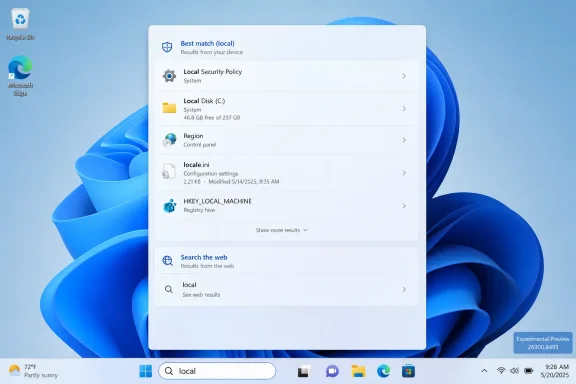
Microsoft is testing a Windows 11 Search Box change in Experimental Preview Build 26300.8493, released May 15, 2026, that makes local files and apps appear ahead of web suggestions when the local content is a stronger match for Windows Insiders in the former Dev Channel. That sounds almost comically obvious, which is precisely why the change matters. For years, Windows search has too often behaved less like an operating-system feature and more like a traffic funnel for Bing, Edge, and whatever Microsoft wanted users to notice next. The new ranking tweak is small, unfinished, and not guaranteed for every production PC yet, but it points to a larger admission: Windows is more useful when it stops trying to monetize the moment of intent.
The most revealing word in Microsoft’s note is not “search,” “files,” or “apps.” It is “ahead.” The company is not removing web results from the Windows 11 taskbar search box, nor is it saying that the operating system will become a clean local launcher overnight. It is simply adjusting the order so that when a user’s own content is the better match, that content is more likely to appear before a web suggestion.
That distinction matters because Windows Search has long been caught between two identities. Users expect it to behave like a command surface: press the Windows key, type a few letters, open an app, find a document, jump to a setting. Microsoft has increasingly treated it as a blended discovery surface, with local results, cloud content, web answers, trending topics, and service promotion competing for the same tiny patch of attention.
The result has been a familiar Windows 11 irritation: you type the name of an app or file, and the system offers an internet result that feels less relevant than the thing sitting on your own drive. The failure is not merely aesthetic. Search is one of the few operating-system features that is supposed to collapse friction; every irrelevant result adds it back.
Microsoft’s new wording suggests the company understands that relevance is not just about finding something. It is about ranking the thing the user most likely intended. A search box that technically contains the right answer somewhere below a noisy web card still feels broken if the wrong thing wins the top slot.
Microsoft has not been shy about using Windows to reinforce its services. Edge prompts, Bing integrations, widgets, account nudges, Microsoft 365 recommendations, Start menu suggestions, and web-backed search are all part of the same strategic pattern. Individually, each can be defended as convenience. Together, they make Windows feel like a platform that keeps interrupting the user’s intent to make a pitch.
The search box is the most sensitive version of that problem because search has a special contract with the user. Typing into it is an act of trust. The user is saying, in effect, “I know this exists somewhere; take me there.” When Windows responds with a web suggestion above a local app or file, it breaks that contract in a way that feels more intrusive than a normal advertisement.
This is why TechRadar’s irritation lands. The issue is not that web search exists in Windows. Plenty of users like quick conversions, web lookups, and navigational shortcuts from the taskbar. The issue is priority. When Microsoft puts the web first in cases where the local answer is plainly stronger, the operating system looks less helpful and more self-interested.
The tension is visible in Microsoft’s own language. The company says it has “started making changes” to make the Windows Search Box more relevant, and that users should expect additional relevance improvements. That is product-management phrasing for a gradual course correction, not a dramatic rollback. It leaves room for Microsoft to improve the worst cases while preserving the broader model of blended search.
That matters for administrators and power users because the complaint has never been only “sometimes the wrong result appears.” The deeper complaint is that Windows increasingly treats the desktop as a negotiated space. Local workflows, cloud experiences, advertising-like prompts, AI features, and web services all contend for placement. The user may own the PC, but Microsoft often behaves as though it still rents the interface.
The company’s belated adjustment is therefore a signal, not a surrender. Microsoft is not saying web suggestions were a mistake. It is saying that the balance became bad enough, visible enough, and irritating enough that it had to move local results upward.
That caution is important because Windows Insider builds now serve several purposes at once. They preview near-term improvements, expose longer-term ideas, and test concepts Microsoft may never bring to the stable channel. The new Experimental naming also reflects Microsoft’s attempt to make the Insider program’s channel structure easier to follow, but the underlying reality remains: anything in this lane is provisional.
The build itself is not just about search. It also includes taskbar experiments such as alternate taskbar positions and a smaller taskbar, quieter Widgets badging behavior, voice access and voice typing improvements, updated spinner visuals across boot and update flows, File Explorer and Run fixes, and reliability work. Search is one line in a broader quality push.
That context cuts both ways. On the positive side, Microsoft appears to be spending real energy on long-standing Windows 11 fit-and-finish complaints rather than only adding AI surfaces and cloud tie-ins. On the negative side, the search change is still described as a ranking improvement, not a user-facing policy switch. The difference between “better most of the time” and “fully controllable” is exactly where Windows arguments tend to live.
These are not catastrophic engineering failures. They are failures of judgment. Windows 11 often feels as though it was designed around what Microsoft wanted to surface rather than what users wanted to do quickly.
That is why this search tweak feels bigger than its changelog entry. It belongs to a category of fixes that could be described as restoring obviousness. If someone searches for an installed application, show the application. If someone searches for a file, show the file. If someone searches for a setting, show the setting. Web content can still exist, but it should not win by default just because it is useful to Microsoft’s ecosystem metrics.
The best operating-system features disappear into muscle memory. Windows Search has too often done the opposite: it makes the user stop, visually parse, and decide whether the top result is actually sane. That turns a launcher into a slot machine.
Many organizations already use policy controls, registry settings, or management tooling to reduce consumer-style Windows experiences. The reason is not merely aesthetic purism. In a workplace, every unexpected prompt or irrelevant result has a cost. It can send users down the wrong path, generate help desk noise, or create uncertainty about whether a search is local, organizational, or public-web-facing.
Microsoft’s relevance improvement may reduce one class of annoyance, but it does not remove the need for administrative control. Enterprises do not want a search box that is merely less likely to show the wrong thing. They want clear rules for what categories of content appear, when they appear, and whether those behaviors can be disabled without side effects.
That is especially true as Windows becomes more deeply entangled with Microsoft 365, Copilot, organizational search, and cloud identity. A future Windows search surface may be genuinely powerful if it can unify local files, SharePoint content, Teams conversations, settings, apps, and web knowledge. But power without governance becomes clutter. For admins, relevance is only half the story; policy is the other half.
Classic search mistakes are easy to spot. You type “Notepad,” and Windows shows something obviously unrelated. AI-assisted search can fail more subtly. It may infer intent, summarize content, blend local and cloud sources, or offer an action rather than a file. If users already distrust the basic result order, they will be less willing to trust the more ambitious version.
This is why Microsoft’s local-first correction is foundational. Before Windows can credibly become an intelligent assistant, it has to be a competent launcher. Before users accept semantic search, they need confidence that the system respects the obvious match. AI cannot paper over a broken priority model; it amplifies it.
There is also a privacy dimension. Microsoft has emphasized on-device processing for some newer Windows AI features, and that matters. But users will still judge the experience by what they see. If a local search box behaves like a web funnel, assurances about intelligent local assistance will have a harder time landing.
Windows 11 has too often collapsed those layers into one competitive feed. That makes the interface look busy and the ranking feel arbitrary. It also forces users to understand Microsoft’s categories instead of simply getting where they meant to go.
There is a reason third-party tools and old-school habits remain popular among Windows enthusiasts. Some users pin everything. Some use PowerToys Run. Some install Everything for lightning-fast filename search. Some disable web search wherever possible. These workarounds exist because the default experience has not earned enough confidence.
Microsoft does not need to remove every advanced feature from Windows Search. It needs to make the first answer feel dependable. The operating system can be clever after it has been correct.
The encouraging reading is that Microsoft is listening, however late, and that Windows 11 may be entering a phase where the company fixes the daily irritations that made the OS feel more managed than helpful. The skeptical reading is that Microsoft is sanding down the sharpest edges while preserving the same strategic machinery underneath. Both can be true. The next test is whether this becomes a durable, configurable principle across stable Windows releases — local intent first, web assistance second — or whether it remains another Insider-era promise that made sense right up until the business model got a vote.
 Microsoft Finally Treats Local Search as a Local Problem
The most revealing word in Microsoft’s note is not “search,” “files,” or “apps.” It is “ahead.” The company is not removing web results from the Windows 11 taskbar search box, nor is it saying that the operating system will become a clean local launcher overnight. It is simply adjusting the order so that when a user’s own content is the better match, that content is more likely to appear before a web suggestion.That distinction matters because Windows Search has long been caught between two identities. Users expect it to behave like a command surface: press the Windows key, type a few letters, open an app, find a document, jump to a setting. Microsoft has increasingly treated it as a blended discovery surface, with local results, cloud content, web answers, trending topics, and service promotion competing for the same tiny patch of attention.
The result has been a familiar Windows 11 irritation: you type the name of an app or file, and the system offers an internet result that feels less relevant than the thing sitting on your own drive. The failure is not merely aesthetic. Search is one of the few operating-system features that is supposed to collapse friction; every irrelevant result adds it back.
Microsoft’s new wording suggests the company understands that relevance is not just about finding something. It is about ranking the thing the user most likely intended. A search box that technically contains the right answer somewhere below a noisy web card still feels broken if the wrong thing wins the top slot.
The Search Box Became a Billboard Because Windows Had the Leverage
Windows has always had an unusual advantage in search: it is present before the browser, before the app, before the website, and before the user has fully decided what they want. That position is enormously valuable. It is also dangerous, because the operating system can quietly convert a user’s local action into a web query.Microsoft has not been shy about using Windows to reinforce its services. Edge prompts, Bing integrations, widgets, account nudges, Microsoft 365 recommendations, Start menu suggestions, and web-backed search are all part of the same strategic pattern. Individually, each can be defended as convenience. Together, they make Windows feel like a platform that keeps interrupting the user’s intent to make a pitch.
The search box is the most sensitive version of that problem because search has a special contract with the user. Typing into it is an act of trust. The user is saying, in effect, “I know this exists somewhere; take me there.” When Windows responds with a web suggestion above a local app or file, it breaks that contract in a way that feels more intrusive than a normal advertisement.
This is why TechRadar’s irritation lands. The issue is not that web search exists in Windows. Plenty of users like quick conversions, web lookups, and navigational shortcuts from the taskbar. The issue is priority. When Microsoft puts the web first in cases where the local answer is plainly stronger, the operating system looks less helpful and more self-interested.
The Fix Is Late Because the Incentives Were Never Neutral
It is tempting to treat this as a simple quality bug finally getting attention. That is too generous. Windows 11 search did not become web-heavy by accident; it evolved inside a company with powerful incentives to drive usage of Bing, Edge, Microsoft accounts, and cloud-connected services.The tension is visible in Microsoft’s own language. The company says it has “started making changes” to make the Windows Search Box more relevant, and that users should expect additional relevance improvements. That is product-management phrasing for a gradual course correction, not a dramatic rollback. It leaves room for Microsoft to improve the worst cases while preserving the broader model of blended search.
That matters for administrators and power users because the complaint has never been only “sometimes the wrong result appears.” The deeper complaint is that Windows increasingly treats the desktop as a negotiated space. Local workflows, cloud experiences, advertising-like prompts, AI features, and web services all contend for placement. The user may own the PC, but Microsoft often behaves as though it still rents the interface.
The company’s belated adjustment is therefore a signal, not a surrender. Microsoft is not saying web suggestions were a mistake. It is saying that the balance became bad enough, visible enough, and irritating enough that it had to move local results upward.
The Experimental Channel Is a Warning Label, Not a Release Date
The change is currently tied to Windows 11 Insider Experimental Preview Build 26300.8493, a pre-release build for testers. Microsoft also notes that features in these builds can change, roll out gradually, disappear, or never ship broadly. In other words, this is not a promise that every Windows 11 machine will behave differently after the next Patch Tuesday.That caution is important because Windows Insider builds now serve several purposes at once. They preview near-term improvements, expose longer-term ideas, and test concepts Microsoft may never bring to the stable channel. The new Experimental naming also reflects Microsoft’s attempt to make the Insider program’s channel structure easier to follow, but the underlying reality remains: anything in this lane is provisional.
The build itself is not just about search. It also includes taskbar experiments such as alternate taskbar positions and a smaller taskbar, quieter Widgets badging behavior, voice access and voice typing improvements, updated spinner visuals across boot and update flows, File Explorer and Run fixes, and reliability work. Search is one line in a broader quality push.
That context cuts both ways. On the positive side, Microsoft appears to be spending real energy on long-standing Windows 11 fit-and-finish complaints rather than only adding AI surfaces and cloud tie-ins. On the negative side, the search change is still described as a ranking improvement, not a user-facing policy switch. The difference between “better most of the time” and “fully controllable” is exactly where Windows arguments tend to live.
Windows 11’s Quality Problem Has Never Been Just Bugs
Microsoft has spent the last few years telling users, directly and indirectly, that Windows 11 is modern, secure, and ready for the AI PC era. Yet many of the loudest complaints from everyday users have been stubbornly mundane. The taskbar lost familiar flexibility. The Start menu became less dense and less configurable. Context menus added extra clicks. Search mixed local intent with web promotion. Widgets demanded attention from users who never asked for them.These are not catastrophic engineering failures. They are failures of judgment. Windows 11 often feels as though it was designed around what Microsoft wanted to surface rather than what users wanted to do quickly.
That is why this search tweak feels bigger than its changelog entry. It belongs to a category of fixes that could be described as restoring obviousness. If someone searches for an installed application, show the application. If someone searches for a file, show the file. If someone searches for a setting, show the setting. Web content can still exist, but it should not win by default just because it is useful to Microsoft’s ecosystem metrics.
The best operating-system features disappear into muscle memory. Windows Search has too often done the opposite: it makes the user stop, visually parse, and decide whether the top result is actually sane. That turns a launcher into a slot machine.
The Enterprise View Is Less About Annoyance and More About Control
For home users, irrelevant web suggestions are mostly aggravating. For enterprise IT, they raise a different set of concerns: predictability, training, privacy posture, support tickets, and user trust. A desktop search experience that changes ranking behavior or surfaces web results in unexpected places can complicate managed environments, especially where administrators are trying to keep workflows consistent.Many organizations already use policy controls, registry settings, or management tooling to reduce consumer-style Windows experiences. The reason is not merely aesthetic purism. In a workplace, every unexpected prompt or irrelevant result has a cost. It can send users down the wrong path, generate help desk noise, or create uncertainty about whether a search is local, organizational, or public-web-facing.
Microsoft’s relevance improvement may reduce one class of annoyance, but it does not remove the need for administrative control. Enterprises do not want a search box that is merely less likely to show the wrong thing. They want clear rules for what categories of content appear, when they appear, and whether those behaviors can be disabled without side effects.
That is especially true as Windows becomes more deeply entangled with Microsoft 365, Copilot, organizational search, and cloud identity. A future Windows search surface may be genuinely powerful if it can unify local files, SharePoint content, Teams conversations, settings, apps, and web knowledge. But power without governance becomes clutter. For admins, relevance is only half the story; policy is the other half.
AI Makes the Ranking Problem Harder, Not Easier
Microsoft’s timing is not accidental. The company is pushing Windows toward a more AI-mediated future, especially on Copilot+ PCs, where semantic search and on-device models can help users find files by meaning rather than exact filename. That could make Windows search dramatically better. It could also make the ranking problem far more consequential.Classic search mistakes are easy to spot. You type “Notepad,” and Windows shows something obviously unrelated. AI-assisted search can fail more subtly. It may infer intent, summarize content, blend local and cloud sources, or offer an action rather than a file. If users already distrust the basic result order, they will be less willing to trust the more ambitious version.
This is why Microsoft’s local-first correction is foundational. Before Windows can credibly become an intelligent assistant, it has to be a competent launcher. Before users accept semantic search, they need confidence that the system respects the obvious match. AI cannot paper over a broken priority model; it amplifies it.
There is also a privacy dimension. Microsoft has emphasized on-device processing for some newer Windows AI features, and that matters. But users will still judge the experience by what they see. If a local search box behaves like a web funnel, assurances about intelligent local assistance will have a harder time landing.
The Best Version of Windows Search Is Boring Until It Is Brilliant
A good Windows search experience should have layers. The first layer should be fast, local, and predictable: apps, settings, files, and recent work. The second layer should expand into organizational and cloud content when the user is signed in and policy allows it. The third layer can offer web results, answers, and AI help when those are clearly relevant or explicitly requested.Windows 11 has too often collapsed those layers into one competitive feed. That makes the interface look busy and the ranking feel arbitrary. It also forces users to understand Microsoft’s categories instead of simply getting where they meant to go.
There is a reason third-party tools and old-school habits remain popular among Windows enthusiasts. Some users pin everything. Some use PowerToys Run. Some install Everything for lightning-fast filename search. Some disable web search wherever possible. These workarounds exist because the default experience has not earned enough confidence.
Microsoft does not need to remove every advanced feature from Windows Search. It needs to make the first answer feel dependable. The operating system can be clever after it has been correct.
The Small Changelog Line That Says the Quiet Part Out Loud
The practical lesson from Build 26300.8493 is simple, but the implications reach across Windows 11’s design philosophy.- Microsoft is testing a ranking change that makes files and apps appear before web suggestions more reliably when local content is the stronger match.
- The change is currently in an Experimental Windows Insider build, so it should not be treated as a guaranteed production rollout for all users.
- Web suggestions are not being removed from Windows Search, which means the debate is shifting from their existence to their priority and controllability.
- The fix responds to a long-running complaint that Windows 11 search can feel polluted by irrelevant web results and service promotion.
- Administrators should still watch for policy options, because better relevance does not automatically equal enterprise-grade control.
- The change is a prerequisite for Microsoft’s bigger AI ambitions, because users will not trust intelligent search if basic local search feels compromised.
The encouraging reading is that Microsoft is listening, however late, and that Windows 11 may be entering a phase where the company fixes the daily irritations that made the OS feel more managed than helpful. The skeptical reading is that Microsoft is sanding down the sharpest edges while preserving the same strategic machinery underneath. Both can be true. The next test is whether this becomes a durable, configurable principle across stable Windows releases — local intent first, web assistance second — or whether it remains another Insider-era promise that made sense right up until the business model got a vote.
References
- Primary source: TechRadar
Published: Wed, 20 May 2026 09:40:58 GMT
- Official source: support.microsoft.com
Windows Search and privacy - Microsoft Support
Learn how to connect Windows Search with your accounts in the cloud, manage your Windows Search and SafeSearch settings, clear search history, and more. support.microsoft.com
- Related coverage: windowscentral.com
- Related coverage: windowslatest.com
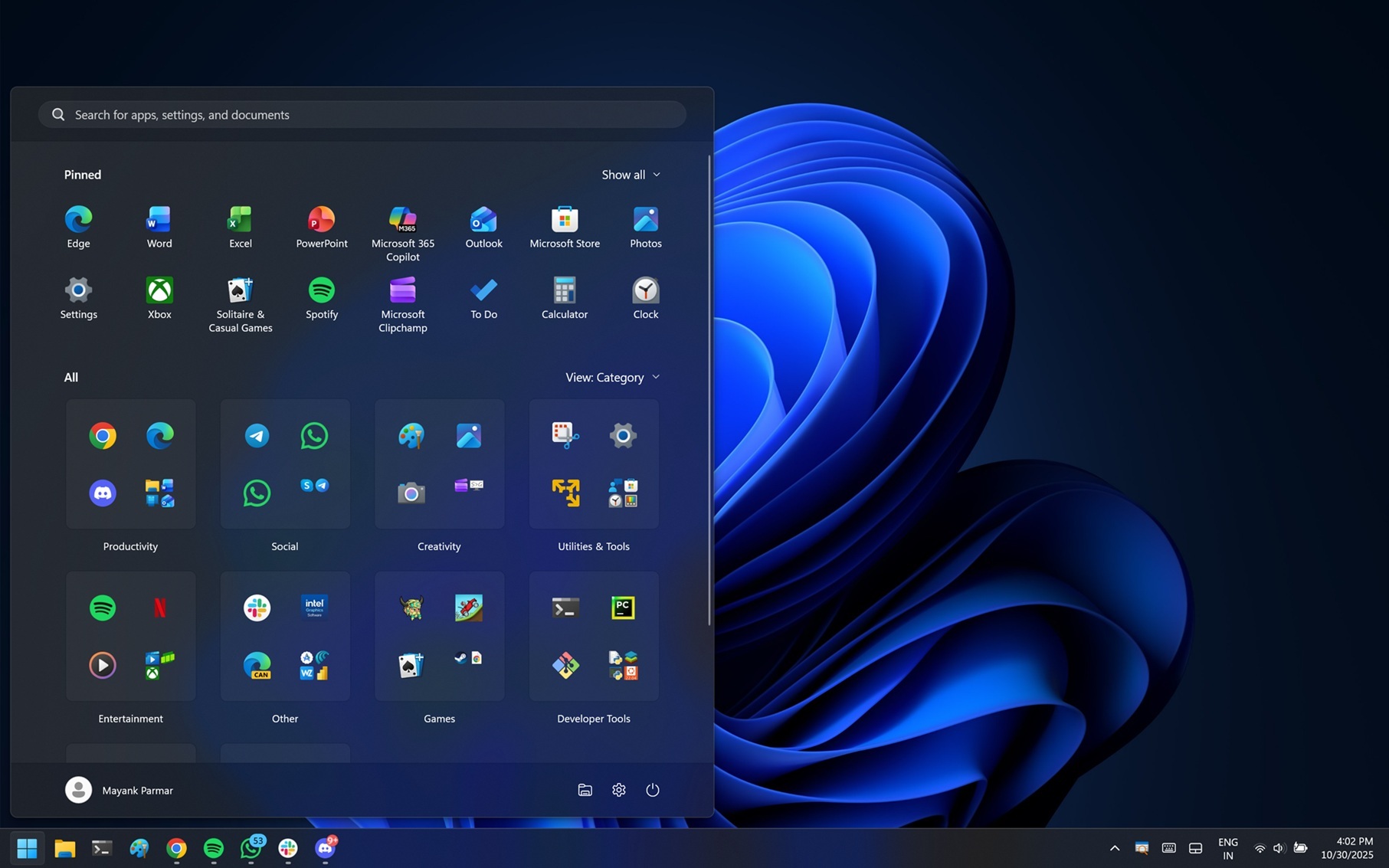
Windows 11 Start menu's hide Recommended toggle also disables Recent files in File Explorer
Windows 11's new Start menu turns off Recommended feed, but there's a trade off. It also turns off the Recent files in File Explorer. www.windowslatest.com
- Related coverage: tomshardware.com

How to Disable Windows Web Search and Speed Up Your PC
Stop Windows from showing you web results when you just want files and apps.www.tomshardware.com
- Official source: techcommunity.microsoft.com
Customizing search on the Windows 11 taskbar | Microsoft Community Hub
Search on the taskbar can be customized by IT admins and the users in their organization. Learn how. techcommunity.microsoft.com
- Related coverage: pcworld.com

Can't find that file? These advanced Windows Search tips can help
Windows Search doesn't look particularly effective. But with a little knowledge and tweaking, you can find almost anything you're looking for. www.pcworld.com
- Related coverage: digitaltrends.com

Windows 11’s Search box gets Copy & Search, saving you time and clicks
Windows 11’s new Copy & Search cuts a step from everyday lookups. Copy text, tap a paste gleam in the taskbar search box, and your query appears instantly. www.digitaltrends.com
- Official source: blogs.windows.com

Previewing Improved Windows Search on Copilot+ PCs with Windows Insiders in the Dev Channel
Hello Windows Insiders, today we are releasing Windows 11 Insider Preview Build 26120.2992 (KB5050083) to the Dev Channel. With this update, we are previewing improved Windows Search with Windows Insiders with Snapdr blogs.windows.com
- Official source: learn.microsoft.com

Windows 11 Insider - Build 26300.8493 - 25H2 - canal Dev - Expérimental - Microsoft Q&A
Vos commentaires sur l'installation de cette Build Insider Windows 11 Insider - Build 26300.8493 - 25H2 - canal Dev - Expérimental https://learn.microsoft.com/en-us/windows-insider/release-notes/experimental/preview-build-26300-8493 Consultez l'article…learn.microsoft.com
