

Microsoft’s May 26, 2026 optional Windows 11 preview update adds a small but overdue Search improvement for Windows 11 versions 24H2 and 25H2, while a newer Insider build tests substring matching for compound file names in the Beta and Experimental channels. The headline sounds minor: two-character results now, mid-word filename discovery later. But the story is bigger than one search box. Microsoft is quietly admitting that Windows Search has spent too long optimizing for Microsoft’s ambitions and not enough for the basic act of finding the file you already know exists.
For years, Windows Search has been a paradox: technically everywhere, emotionally unreliable. It lives in the taskbar, Start menu, File Explorer, Settings, and enterprise search experiences, yet many users still reach for third-party tools because the built-in option too often fails the “I know the word, find the file” test.
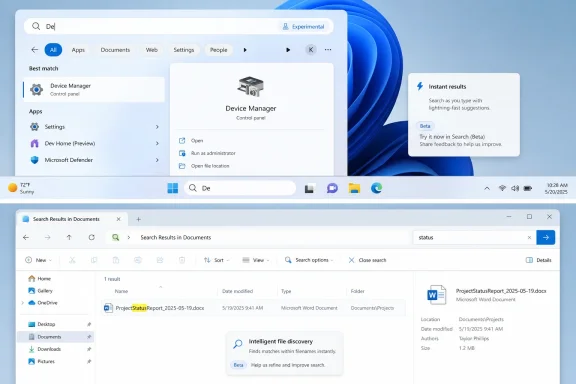
The latest changes attack that credibility gap at the most practical level. The production-facing improvement in KB5089573 lets Windows Search “find and prioritize files with as few as two characters,” according to Microsoft’s update notes. That does not mean every two-letter query will become magic, but it should make the system feel less inert during the first keystrokes.
The more interesting change is still in preview. Microsoft’s May 29 Insider builds add Search by Substring, which means files with compound names such as MeetingNotesApril or ProjectStatusReport can be found by typing a word in the middle, like “April” or “Status.” That is the sort of behavior users expect from any search system built after the Napster era, and its absence has made Windows feel strangely brittle.
This matters because users do not name files for search engines. They name them in the middle of work: BudgetDraftFinal, ClientPresentationMay, RouterConfigBackup, VacationPhotosSorted, DriverNotesThinkPad. A search tool that only behaves well when the user remembers the beginning of the filename is not search so much as a typing assistant with a long memory.
Windows 11 has had a perception problem here. Even when Search eventually produces the right result, it often gives the impression that local files, settings, apps, and web suggestions are all competing inside a box that cannot decide what job it was hired to do. A result appearing after two characters does not solve prioritization by itself, but it changes the rhythm of interaction.
That rhythm is important. Power users judge search by whether it supports muscle memory. Type “de,” hit Enter, open Device Manager. Type “pa,” get Paint or PowerPoint. Type “in,” expect the invoice folder, not a sponsored suggestion or a web panel pretending to be useful. Microsoft’s new behavior suggests the company knows Search has to become more immediate if it wants users to stop treating it as a last resort.
There is a risk, of course. Two-character matching can produce noise. Anyone who has searched a large drive for “re” knows how quickly helpfulness can turn into a haystack. Microsoft’s wording says Windows will “find and prioritize” files, and that second word will do a lot of work. If priority ranking is weak, faster results simply become faster clutter.
The old model effectively rewarded users who remembered prefixes and punished users who remembered meaning. If you knew a file began with “Project,” you had a chance. If you remembered that it was the April notes, Windows might shrug. That is not how human memory works, and it is not how modern search expectations work.
This is also why the feature feels more important than its changelog footprint. Microsoft is not unveiling a new app, a new AI layer, or a new cloud subscription tie-in. It is fixing a local retrieval problem that has irritated Windows users in offices, schools, home labs, and support desks for years. The lack of spectacle is precisely the point.
The best Windows improvements often look boring from Redmond and enormous from the desk where someone is trying to locate a file before a meeting starts. Substring search is one of those changes. It does not need a keynote. It needs to work reliably at 8:58 a.m. when the projector is already on.
That tension is not new. The Start menu search box has become one of the most contested spaces in Windows because it sits between operating system navigation and commercial discovery. From Microsoft’s perspective, the box is a gateway. From the user’s perspective, it is a tool. Those goals overlap only when the tool gets the answer right.
This is why reports that Microsoft is also reducing the prominence of web results in Windows 11 Search matter. Even if web content remains present, lowering its priority acknowledges a basic truth: when someone types the name of an app, a setting, or a file, the operating system should not behave like a search-engine results page. Local intent should win unless the user clearly asks otherwise.
Windows enthusiasts have complained about this for years because it turns a productivity feature into a trust problem. A search box that sometimes opens the wrong thing is annoying. A search box that appears to be serving someone else’s business goal is worse. The substring and two-character updates do not erase that history, but they move the product in the right direction.
Compound file names are common because they are a natural compromise. Spaces can be annoying in scripts. Underscores and hyphens are inconsistent. CamelCase and run-together names are easy to create in a hurry. Windows should not need users to adopt a document-management philosophy before it can find a file.
For IT pros, this matters in less obvious ways. Search failures increase support friction because users assume data is missing when it is merely undiscoverable. A better local search experience reduces the number of “I lost the file” incidents that are actually indexing, naming, or folder-memory problems. That is not glamorous infrastructure work, but it is real productivity.
There is also an accessibility angle. Search is a navigation tool for people who do not want to or cannot comfortably dig through nested folders. If the system requires exact prefixes, it raises the cognitive burden. Substring matching lowers that burden by letting people search with the fragment they remember.
The current production change arrives through an optional cumulative preview update for Windows 11 24H2 and 25H2. That means many enterprise devices will not see it immediately, depending on update policy. The substring feature is even further out, living in Insider builds rather than broad release. This is a staged path, not a flip switched across the installed base.
That staging is wise. Search indexing is one of those components where a small ranking change can feel like a regression to a user with a particular workflow. If the system starts surfacing more partial matches, administrators will want to know whether that affects network locations, OneDrive-backed files, offline content, redirected folders, and file types with indexed contents.
Microsoft also needs to be clear about scope. The Insider note mentions compound names or content, which suggests the improvement is not limited to filenames. That could be powerful, but it also raises questions about where substring matching applies, how it interacts with indexed versus non-indexed locations, and whether results differ between File Explorer, taskbar Search, and Start.
Substring search is the opposite of an AI moonshot. It is conventional, understandable, and easy to evaluate. Type the middle of a name; get the file. No prompt engineering, no cloud dependency, no “AI-powered” explanation needed.
That distinction matters because Windows users have become wary of grand feature narratives that arrive before the foundational experience feels polished. If File Explorer hesitates, Start search misses obvious results, or Settings search buries a control, another Copilot button does not feel like progress. It feels like misallocated attention.
The healthiest reading of this update is that Microsoft may be rebalancing. AI features can continue for the hardware and workloads that benefit from them, but the operating system still has to earn trust in the boring paths users take hundreds of times a week. Search is one of those paths.
That gradualism is a double-edged sword. It lets Microsoft monitor reliability and avoid pushing a flawed change everywhere at once. It also frustrates users and IT staff who read about a feature, install the latest update, and still do not see the same behavior demonstrated elsewhere. Windows as a service has trained users to expect ambiguity.
For enthusiasts, this is familiar territory: build numbers, enablement packages, controlled feature rollouts, Insider channels, and optional previews all blur together. A user may be on the right version of Windows but the wrong rollout cohort. An administrator may have the patch but not the feature. A reviewer may describe behavior that a reader cannot reproduce.
Microsoft should be more explicit when it ships these quality-of-life fixes. A search improvement is not a hidden experiment in a social media app. It is core operating-system behavior. If it is rolling out gradually, say so prominently. If it requires indexing to rebuild or only applies to certain locations, say that too.
File Explorer search in particular has often been a sore point. Searching “This PC” or multiple drives can feel dramatically different from searching an indexed folder. Results can depend on file type, indexing status, content settings, and whether Windows decides it is looking at names, contents, or metadata. Microsoft has made reliability and performance improvements here, but the reputation damage is real.
Substring matching could help File Explorer feel less archaic, but only if it is implemented consistently. Users should not need to remember which search box supports which kind of matching. If “status” finds ProjectStatusReport from the taskbar but not from the folder search field, the improvement will create a new kind of confusion.
This is where third-party tools like Everything have earned their following. They are fast, predictable, and narrow in purpose. They do not try to be a web portal, assistant launcher, and settings broker at the same time. Microsoft does not need to copy every design choice, but it should understand the lesson: users forgive limited scope when the tool is excellent at its core job.
That “about time” sentiment is important. Windows 11 has improved substantially since launch, but Microsoft has too often spent its political capital on features users did not ask for while leaving daily irritants unresolved. The Start menu changed. The taskbar lost and then slowly regained capabilities. Context menus were redesigned, then patched around. Search was asked to become more than local search before it had fully earned the right.
The new Search work sits within a broader 2026 push to make Windows feel faster and more responsive. That is the correct priority. Performance and reliability are not side quests; they are the product. A beautiful interface that makes users wait is not modern. A cloud-connected OS that cannot find a local file is not intelligent.
Still, Microsoft needs to resist declaring victory too soon. Search quality is cumulative. One good update can improve behavior, but trust returns only after repeated successful use. If users type fragments and get the right files for months, habits change. If they hit another wave of inconsistent ranking or web clutter, the old cynicism returns immediately.
 Microsoft Finally Fixes the Search Problem Users Actually Feel
For years, Windows Search has been a paradox: technically everywhere, emotionally unreliable. It lives in the taskbar, Start menu, File Explorer, Settings, and enterprise search experiences, yet many users still reach for third-party tools because the built-in option too often fails the “I know the word, find the file” test.The latest changes attack that credibility gap at the most practical level. The production-facing improvement in KB5089573 lets Windows Search “find and prioritize files with as few as two characters,” according to Microsoft’s update notes. That does not mean every two-letter query will become magic, but it should make the system feel less inert during the first keystrokes.
The more interesting change is still in preview. Microsoft’s May 29 Insider builds add Search by Substring, which means files with compound names such as MeetingNotesApril or ProjectStatusReport can be found by typing a word in the middle, like “April” or “Status.” That is the sort of behavior users expect from any search system built after the Napster era, and its absence has made Windows feel strangely brittle.
This matters because users do not name files for search engines. They name them in the middle of work: BudgetDraftFinal, ClientPresentationMay, RouterConfigBackup, VacationPhotosSorted, DriverNotesThinkPad. A search tool that only behaves well when the user remembers the beginning of the filename is not search so much as a typing assistant with a long memory.
The Two-Character Change Is About Speed, but Also Trust
The two-character improvement is the less glamorous of the two additions, but it may be the one more users notice first. Search is partly about accuracy, but it is also about latency. If a result appears while you are still forming the query, the system feels attentive; if it waits until the fifth or sixth character, users start assuming it has already failed.Windows 11 has had a perception problem here. Even when Search eventually produces the right result, it often gives the impression that local files, settings, apps, and web suggestions are all competing inside a box that cannot decide what job it was hired to do. A result appearing after two characters does not solve prioritization by itself, but it changes the rhythm of interaction.
That rhythm is important. Power users judge search by whether it supports muscle memory. Type “de,” hit Enter, open Device Manager. Type “pa,” get Paint or PowerPoint. Type “in,” expect the invoice folder, not a sponsored suggestion or a web panel pretending to be useful. Microsoft’s new behavior suggests the company knows Search has to become more immediate if it wants users to stop treating it as a last resort.
There is a risk, of course. Two-character matching can produce noise. Anyone who has searched a large drive for “re” knows how quickly helpfulness can turn into a haystack. Microsoft’s wording says Windows will “find and prioritize” files, and that second word will do a lot of work. If priority ranking is weak, faster results simply become faster clutter.
Substring Search Is the Real Admission of Guilt
The Insider-only substring feature is the more damning fix because it exposes how primitive the old behavior was. A file called ProjectStatusReport should be discoverable by “status.” A file called MeetingNotesApril should be discoverable by “April.” Nobody outside an indexing-engine meeting thinks this is controversial.The old model effectively rewarded users who remembered prefixes and punished users who remembered meaning. If you knew a file began with “Project,” you had a chance. If you remembered that it was the April notes, Windows might shrug. That is not how human memory works, and it is not how modern search expectations work.
This is also why the feature feels more important than its changelog footprint. Microsoft is not unveiling a new app, a new AI layer, or a new cloud subscription tie-in. It is fixing a local retrieval problem that has irritated Windows users in offices, schools, home labs, and support desks for years. The lack of spectacle is precisely the point.
The best Windows improvements often look boring from Redmond and enormous from the desk where someone is trying to locate a file before a meeting starts. Substring search is one of those changes. It does not need a keynote. It needs to work reliably at 8:58 a.m. when the projector is already on.
Windows Search Has Been Pulled Between Utility and Monetization
The reason this fix lands with such relief is that Windows Search has not merely been imperfect; it has often felt conflicted. Users open Search to find local things. Microsoft has repeatedly used the same surface to expose web results, Bing integrations, suggested content, and broader Microsoft ecosystem hooks.That tension is not new. The Start menu search box has become one of the most contested spaces in Windows because it sits between operating system navigation and commercial discovery. From Microsoft’s perspective, the box is a gateway. From the user’s perspective, it is a tool. Those goals overlap only when the tool gets the answer right.
This is why reports that Microsoft is also reducing the prominence of web results in Windows 11 Search matter. Even if web content remains present, lowering its priority acknowledges a basic truth: when someone types the name of an app, a setting, or a file, the operating system should not behave like a search-engine results page. Local intent should win unless the user clearly asks otherwise.
Windows enthusiasts have complained about this for years because it turns a productivity feature into a trust problem. A search box that sometimes opens the wrong thing is annoying. A search box that appears to be serving someone else’s business goal is worse. The substring and two-character updates do not erase that history, but they move the product in the right direction.
The Practical Win Is Bigger for Messy Real-World File Systems
The users who benefit most from substring search are not the people with immaculate folder hierarchies and rigid naming conventions. They are everyone else. That includes small-business owners with years of invoices, students with renamed downloads, sysadmins with exported logs, and family PCs where photos and PDFs accumulate like sediment.Compound file names are common because they are a natural compromise. Spaces can be annoying in scripts. Underscores and hyphens are inconsistent. CamelCase and run-together names are easy to create in a hurry. Windows should not need users to adopt a document-management philosophy before it can find a file.
For IT pros, this matters in less obvious ways. Search failures increase support friction because users assume data is missing when it is merely undiscoverable. A better local search experience reduces the number of “I lost the file” incidents that are actually indexing, naming, or folder-memory problems. That is not glamorous infrastructure work, but it is real productivity.
There is also an accessibility angle. Search is a navigation tool for people who do not want to or cannot comfortably dig through nested folders. If the system requires exact prefixes, it raises the cognitive burden. Substring matching lowers that burden by letting people search with the fragment they remember.
The Enterprise Question Is Whether This Can Be Controlled and Predicted
For managed environments, the obvious concern is not whether substring search is useful. It is whether its behavior will be predictable, supportable, and documented well enough for administrators to trust it. Search changes can affect workflows, help-desk scripts, training materials, and user expectations.The current production change arrives through an optional cumulative preview update for Windows 11 24H2 and 25H2. That means many enterprise devices will not see it immediately, depending on update policy. The substring feature is even further out, living in Insider builds rather than broad release. This is a staged path, not a flip switched across the installed base.
That staging is wise. Search indexing is one of those components where a small ranking change can feel like a regression to a user with a particular workflow. If the system starts surfacing more partial matches, administrators will want to know whether that affects network locations, OneDrive-backed files, offline content, redirected folders, and file types with indexed contents.
Microsoft also needs to be clear about scope. The Insider note mentions compound names or content, which suggests the improvement is not limited to filenames. That could be powerful, but it also raises questions about where substring matching applies, how it interacts with indexed versus non-indexed locations, and whether results differ between File Explorer, taskbar Search, and Start.
This Is Not an AI Story, and That Is Refreshing
One reason the Search update feels notable is that it is not being sold as artificial intelligence. Microsoft has spent the last several years wrapping Windows 11 in Copilot branding, semantic search, Recall controversy, and NPU-driven features. Some of that work is genuinely interesting, especially on Copilot+ PCs. But much of the user base is still waiting for the basics to behave.Substring search is the opposite of an AI moonshot. It is conventional, understandable, and easy to evaluate. Type the middle of a name; get the file. No prompt engineering, no cloud dependency, no “AI-powered” explanation needed.
That distinction matters because Windows users have become wary of grand feature narratives that arrive before the foundational experience feels polished. If File Explorer hesitates, Start search misses obvious results, or Settings search buries a control, another Copilot button does not feel like progress. It feels like misallocated attention.
The healthiest reading of this update is that Microsoft may be rebalancing. AI features can continue for the hardware and workloads that benefit from them, but the operating system still has to earn trust in the boring paths users take hundreds of times a week. Search is one of those paths.
The June Patch Cycle Will Test Microsoft’s Rollout Discipline
The timing makes this update more than a preview curiosity. KB5089573 is a May 26 optional preview update, and optional preview content often rolls into the following month’s cumulative update for supported systems. That puts the two-character Search behavior on track for wider visibility during the June update cycle, though gradual rollout mechanics can still mean some users wait longer than others.That gradualism is a double-edged sword. It lets Microsoft monitor reliability and avoid pushing a flawed change everywhere at once. It also frustrates users and IT staff who read about a feature, install the latest update, and still do not see the same behavior demonstrated elsewhere. Windows as a service has trained users to expect ambiguity.
For enthusiasts, this is familiar territory: build numbers, enablement packages, controlled feature rollouts, Insider channels, and optional previews all blur together. A user may be on the right version of Windows but the wrong rollout cohort. An administrator may have the patch but not the feature. A reviewer may describe behavior that a reader cannot reproduce.
Microsoft should be more explicit when it ships these quality-of-life fixes. A search improvement is not a hidden experiment in a social media app. It is core operating-system behavior. If it is rolling out gradually, say so prominently. If it requires indexing to rebuild or only applies to certain locations, say that too.
File Explorer Still Has to Carry Its Share of the Burden
Windows Search is not one thing. Users encounter it through the taskbar, Start menu, Settings, and File Explorer, and each surface has its own history of quirks. Improvements in one layer do not automatically fix the emotional residue left by years of inconsistent behavior.File Explorer search in particular has often been a sore point. Searching “This PC” or multiple drives can feel dramatically different from searching an indexed folder. Results can depend on file type, indexing status, content settings, and whether Windows decides it is looking at names, contents, or metadata. Microsoft has made reliability and performance improvements here, but the reputation damage is real.
Substring matching could help File Explorer feel less archaic, but only if it is implemented consistently. Users should not need to remember which search box supports which kind of matching. If “status” finds ProjectStatusReport from the taskbar but not from the folder search field, the improvement will create a new kind of confusion.
This is where third-party tools like Everything have earned their following. They are fast, predictable, and narrow in purpose. They do not try to be a web portal, assistant launcher, and settings broker at the same time. Microsoft does not need to copy every design choice, but it should understand the lesson: users forgive limited scope when the tool is excellent at its core job.
Better Search Will Not Fix Windows 11’s Trust Deficit by Itself
The reaction to this change is likely to be a mix of relief and sarcasm. Relief because the fix is useful. Sarcasm because, frankly, users are right to ask why this took so long. Substring search for local files is not a futuristic capability.That “about time” sentiment is important. Windows 11 has improved substantially since launch, but Microsoft has too often spent its political capital on features users did not ask for while leaving daily irritants unresolved. The Start menu changed. The taskbar lost and then slowly regained capabilities. Context menus were redesigned, then patched around. Search was asked to become more than local search before it had fully earned the right.
The new Search work sits within a broader 2026 push to make Windows feel faster and more responsive. That is the correct priority. Performance and reliability are not side quests; they are the product. A beautiful interface that makes users wait is not modern. A cloud-connected OS that cannot find a local file is not intelligent.
Still, Microsoft needs to resist declaring victory too soon. Search quality is cumulative. One good update can improve behavior, but trust returns only after repeated successful use. If users type fragments and get the right files for months, habits change. If they hit another wave of inconsistent ranking or web clutter, the old cynicism returns immediately.
The Small Fix That Says the Most About Windows in 2026
The most concrete reading of this update is straightforward, and it is useful enough to separate from the broader argument.- Windows 11 versions 24H2 and 25H2 received KB5089573 as an optional preview update on May 26, 2026, with a Search change that can find and prioritize files after as few as two typed characters.
- Microsoft’s May 29, 2026 Insider builds for the Beta and Experimental channels added Search by Substring for compound names and content.
- Search by Substring is designed to find files such as MeetingNotesApril or ProjectStatusReport when users type internal fragments such as “April” or “Status.”
- The two-character improvement is closer to broad availability, while substring search remains a preview feature and may change before general release.
- The practical benefit is strongest for users with messy real-world filenames, large document folders, project archives, and imperfect memory of exact file names.
- The remaining test is whether Microsoft can make the behavior consistent across Start, taskbar Search, File Explorer, indexed locations, and managed enterprise environments.
References
- Primary source: TechRadar
Published: Tue, 02 Jun 2026 13:58:17 GMT
Loading…
www.techradar.com - Related coverage: windowslatest.com

Microsoft is killing Windows 11 Search's biggest annoyance, lets you find files with just 2 characters
Microsoft is improving Windows 11 Search with a new Substring feature to find files with compound names and fast two-character local indexing. www.windowslatest.com
- Related coverage: digitaltrends.com

Windows 11 is finally addressing key annoyances with the universal Search system
Windows 11's latest Insider Preview build introduces Search by Substring, type "april" and find MeetingNotesApril, type "status" and surface ProjectStatusReport. www.digitaltrends.com
- Related coverage: windowscentral.com
Loading…
www.windowscentral.com - Official source: support.microsoft.com
Loading…
support.microsoft.com - Related coverage: b92.net
Loading…
www.b92.net
- Official source: microsoft.com
Loading…
www.microsoft.com - Official source: learn.microsoft.com
Loading…
learn.microsoft.com - Related coverage: teachucomp.com
Loading…
www.teachucomp.com - Related coverage: mywebuniversity.com
Loading…
www.mywebuniversity.com - Official source: blogs.windows.com

Announcing new builds for 29 May 2026
Hello Windows Insiders, This week we continue to expand the rollout of the new Windows Insider Program changes to devices in channels already announced. New builds this week Today we are releasing new Windows 11 Insider Preview B blogs.windows.com
- Related coverage: notebookcheck.net

Windows 11 update KB5089573: Shared audio & partition fix
Microsoft's KB5089573 preview adds Shared Audio and NPU tracking to Windows 11, while flagging an EFI partition install failure on older OEM hardware. www.notebookcheck.net
- Related coverage: windowsreport.com
Loading…
windowsreport.com - Related coverage: pcworld.com

Windows 11's new update actually makes your PC faster. Here's how to get it
Windows 11's new optional May update KB5089573 reduces app launch lag and UI stutters. Here's what it does and how to get it early. www.pcworld.com
- Official source: catalog.update.microsoft.com
Loading…
catalog.update.microsoft.com - Related coverage: techrepublic.com

New Windows 11 Update Promises Faster App Launches, Smoother Core Features
Microsoft’s optional Windows 11 KB5089573 update adds 30 changes, including faster app launches, Windows Hello fixes, and NPU visibility.www.techrepublic.com