

Microsoft is moving to fix one of the most frustrating parts of Windows 11, and this time the emphasis is squarely on ranking quality, local-first results, and a cleaner search interface. That matters because Windows Search is not a niche feature; it is one of the main ways users launch apps, open files, and reach system tools, so even small improvements can have an outsized impact on daily usability. The core promise is simple: make search faster, less cluttered, and more predictable. If Microsoft delivers, it could quietly restore trust in a part of Windows that has become a symbol of the platform’s broader usability problems.
Windows Search has spent years carrying a reputation problem that goes well beyond one bad build or one annoying bug. In Windows 11, the feature often feels like a tug-of-war between local indexing and web integration, with users regularly reporting that obvious app or file hits are buried under suggestions, promotions, or Bing-driven content. That tension is important because search is supposed to be invisible when it works well; users should type, click, and move on without thinking about the machinery underneath. Instead, the experience has sometimes felt like the operating system is negotiating with them.
The latest reporting says Microsoft is responding to that criticism by putting a dedicated team on the problem and focusing on the parts that matter most: ranking, interface simplicity, and response speed. In public remarks, Windows Shell leadership reportedly said the team has “a lot of improvements coming for search” and that the goal is a “simpler and less distracting” experience. Just as important, Microsoft is said to be adjusting rankers so installed apps and system items appear where they should. That kind of language suggests Microsoft now sees Search as a core shell problem, not a cosmetic annoyance.
The timing is notable because Microsoft has already been signaling a broader quality-first reset across Windows 11. Recent commentary from the Windows team has pointed to improvements in File Explorer, taskbar behavior, update reliability, and other shell surfaces. Search fits naturally into that story because it sits at the center of the user experience: if users cannot trust search, they start distrusting the entire OS.
There is also a strategic angle here. Microsoft has spent years trying to make search smarter through AI and semantic understanding, especially on newer Copilot+ hardware. But the complaint from many users is not that search lacks intelligence; it is that search lacks discipline. People do not want the operating system to think harder than they do when they are simply trying to open Notepad or find a PDF. The best search experience is often the one that gets out of the way.
This is why the current criticism has stuck for so long. Windows 11 search often feels overbuilt for a task that most users expect to be immediate and obvious. If the system can’t surface a known local app or system component cleanly, then all the extra layers—cloud signals, web suggestions, Copilot entry points—read as noise instead of help. The frustration is not merely technical; it is emotional. Users feel like the machine is resisting a simple instruction.
That loss of trust has consequences far beyond search itself. If people do not trust the shell’s most basic discovery mechanism, they become less forgiving of the rest of the platform. A laggy or cluttered search experience makes every other Windows complaint feel more believable. Once that mindset sets in, product fixes need to do more than function; they need to feel obviously better.
Microsoft is also reportedly reducing the emphasis on web integration and search clutter. That means fewer competing elements in the search panel and a smaller chance that a local query is hijacked by content the user did not ask for. In practical terms, this would make Windows Search feel more like a launcher and less like a content discovery surface. That is the right direction if Microsoft wants to rebuild confidence among both casual users and power users.
That matters because users judge search by outcome and by feel. If a local app appears instantly at the top, the UI feels calmer even if the underlying code is complex. If the same result is buried below web suggestions, the whole interaction feels broken. The experience is psychological as much as technical.
If Microsoft gets this right, the system should behave more deterministically. A known app should show up instantly. A system tool should not be hidden behind web noise. A file search should not resemble a browser search. The more predictable the result, the more trustworthy the feature becomes.
A cleaner interface would do more than reduce clutter. It would restore a clear mental model for the feature. Users need to know, instantly, what kind of result they are looking at: local, web, system, or recommendation. When those categories blur together, confidence falls. When they are clearly separated, users can trust the box again.
This is also where the consumer experience and enterprise experience overlap. Home users want something that just works. IT-managed users want a feature that is predictable enough to avoid support tickets and training headaches. A stripped-down search panel helps both groups because it makes behavior easier to understand at a glance.
A faster-feeling search experience does not necessarily require a massive architectural rewrite. Sometimes the most effective improvement is simply making the interface respond more immediately to typing, selection, and result display. If the UI feels crisp, users forgive a lot more. If it feels laggy, every other complaint gets louder.
This broader reset matters because the complaints about Windows 11 have rarely been about one feature alone. They have been about accumulated friction. A slightly annoying taskbar here, a noisy search panel there, a sluggish Explorer window somewhere else—none of those issues are catastrophic by themselves, but together they create the impression that Windows has become less polished than it should be.
That shift also gives Microsoft a stronger story to tell around Windows 11 quality. Instead of emphasizing constant novelty, the company can point to reliability, responsiveness, and user control. Those are not flashy marketing terms, but they are the ones that matter when users are deciding whether the OS feels mature.
That consistency is especially valuable in File Explorer, where people spend real time moving work, media, and archives. Microsoft’s recent work on Explorer search and file operations suggests it understands that discovery and file management are inseparable from everyday productivity. Better Explorer search makes Windows feel faster even when the rest of the system is unchanged.
That creates pressure from two directions. On one side are enthusiast users, who are often the first to complain publicly and the first to recommend alternatives. On the other are enterprise admins, who care less about aesthetics and more about predictability, supportability, and training costs. When both groups agree that a native feature is underperforming, the product team has a real problem.
That comparison is embarrassing, but it is also instructive. It shows Microsoft knows how to build a leaner launcher-style experience when it chooses to constrain the scope. The real challenge is bringing that discipline into the core shell without turning Search into another overloaded surface. If Microsoft can do that, it can win back users who have already decided the default search box is the wrong tool for the job.
In that sense, improving Windows Search may actually help Copilot rather than compete with it. If the shell becomes the fast local layer and Copilot becomes the more conversational layer, users get a clearer choice. The trick is making sure the fast layer remains fast and the conversational layer does not leak into every basic task.
Enterprises, meanwhile, will care about predictability. A search feature that reliably surfaces installed apps and local tools reduces support friction and cuts down on user confusion. In a managed environment, even small improvements matter because they scale across many seats, many workflows, and many help desk interactions.
There is also a subtle psychological benefit to a more local-first design. It makes Windows feel like your PC again. That phrase matters because many of the most common complaints about Windows 11 are really about the sense that the OS is less user-centered than it used to be. A cleaner search surface helps reverse that impression.
Enterprises also tend to be cautious about web-heavy surfaces inside the operating system. They want clear boundaries between local system functions and online content, especially when training, policy, and compliance are involved. A more restrained search experience is not just cleaner; it is easier to defend operationally.
Another concern is fragmentation. If search behaves differently across Start, taskbar, File Explorer, Settings, and Copilot, users will still experience inconsistency. The shell needs coherence more than it needs isolated wins. Otherwise, the feature will continue to feel unpredictable.
The best outcome would be a search experience that feels boring in the best possible way. A user should type an app name and get the app. They should search for a local file and get the file. They should not have to wonder whether the result is local, online, or promotional unless they explicitly want those other paths.
Microsoft’s search overhaul may never be the flashiest Windows story of the year, but it could end up being one of the most important. Search sits at the center of how people experience the OS, and when that center feels unstable, everything else feels harder to trust. If Microsoft finally gets the balance right—local first, relevant, quick, and quiet—it will have repaired not just a feature, but a piece of Windows identity itself.
Source: Windows Report https://windowsreport.com/microsoft...-with-better-ranking-and-local-first-results/
 Overview
Windows Search has spent years carrying a reputation problem that goes well beyond one bad build or one annoying bug. In Windows 11, the feature often feels like a tug-of-war between local indexing and web integration, with users regularly reporting that obvious app or file hits are buried under suggestions, promotions, or Bing-driven content. That tension is important because search is supposed to be invisible when it works well; users should type, click, and move on without thinking about the machinery underneath. Instead, the experience has sometimes felt like the operating system is negotiating with them.The latest reporting says Microsoft is responding to that criticism by putting a dedicated team on the problem and focusing on the parts that matter most: ranking, interface simplicity, and response speed. In public remarks, Windows Shell leadership reportedly said the team has “a lot of improvements coming for search” and that the goal is a “simpler and less distracting” experience. Just as important, Microsoft is said to be adjusting rankers so installed apps and system items appear where they should. That kind of language suggests Microsoft now sees Search as a core shell problem, not a cosmetic annoyance.
The timing is notable because Microsoft has already been signaling a broader quality-first reset across Windows 11. Recent commentary from the Windows team has pointed to improvements in File Explorer, taskbar behavior, update reliability, and other shell surfaces. Search fits naturally into that story because it sits at the center of the user experience: if users cannot trust search, they start distrusting the entire OS.
There is also a strategic angle here. Microsoft has spent years trying to make search smarter through AI and semantic understanding, especially on newer Copilot+ hardware. But the complaint from many users is not that search lacks intelligence; it is that search lacks discipline. People do not want the operating system to think harder than they do when they are simply trying to open Notepad or find a PDF. The best search experience is often the one that gets out of the way.
Why Windows Search Became a Problem
The biggest issue with Windows Search is not that it fails dramatically. It is that it fails credibility. When users type an app name and get a web result, a recommendation, or a promotional tile before the local app, the feature stops feeling like a utility and starts feeling like a storefront. That is a subtle distinction on paper, but in practice it changes how people interpret the whole operating system.This is why the current criticism has stuck for so long. Windows 11 search often feels overbuilt for a task that most users expect to be immediate and obvious. If the system can’t surface a known local app or system component cleanly, then all the extra layers—cloud signals, web suggestions, Copilot entry points—read as noise instead of help. The frustration is not merely technical; it is emotional. Users feel like the machine is resisting a simple instruction.
The trust gap
Search has become a trust feature, and that is the most important lens through which to understand Microsoft’s response. A search box is not just a lookup tool; it is a promise that the most relevant thing will appear first. If that promise breaks often enough, users stop relying on it and fall back to pinned apps, mouse navigation, third-party launchers, or PowerToys alternatives.That loss of trust has consequences far beyond search itself. If people do not trust the shell’s most basic discovery mechanism, they become less forgiving of the rest of the platform. A laggy or cluttered search experience makes every other Windows complaint feel more believable. Once that mindset sets in, product fixes need to do more than function; they need to feel obviously better.
- Users want local apps first.
- Users want files and settings to appear without friction.
- Users want web content to be clearly secondary.
- Users want the interface to look like a tool, not a feed.
- Users want the result they intended, not the one Microsoft prefers.
What Microsoft Is Changing
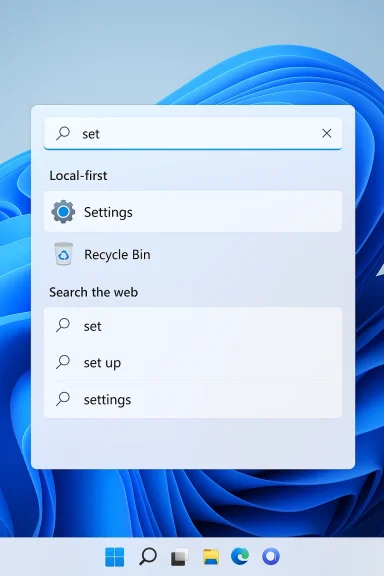
The clearest reported change is the ranking layer. Microsoft is said to be reworking how results are ordered so that installed apps, local files, and system items such as the Recycle Bin are more likely to rise to the top. That sounds modest, but ranking is the invisible engine that determines whether search feels intelligent or irritating. If the rankers are wrong, everything above them is irrelevant.Microsoft is also reportedly reducing the emphasis on web integration and search clutter. That means fewer competing elements in the search panel and a smaller chance that a local query is hijacked by content the user did not ask for. In practical terms, this would make Windows Search feel more like a launcher and less like a content discovery surface. That is the right direction if Microsoft wants to rebuild confidence among both casual users and power users.
Ranking versus presentation
It is worth separating the backend changes from the visual ones. A better ranker can improve relevance, but if the interface still looks crowded or promotional, users will continue to interpret the feature as noisy. Microsoft appears to know this, which is why the reported plan includes both algorithmic changes and a cleaner UI. Search quality and search appearance need to improve together.That matters because users judge search by outcome and by feel. If a local app appears instantly at the top, the UI feels calmer even if the underlying code is complex. If the same result is buried below web suggestions, the whole interaction feels broken. The experience is psychological as much as technical.
Local-first by default
The phrase “local-first” may sound like a small design preference, but in Windows it is really a statement of intent. It tells users that the operating system is prioritizing the machine in front of them before the wider Microsoft ecosystem. That is especially important in an era when Windows increasingly mixes local results with online and AI-assisted ones.If Microsoft gets this right, the system should behave more deterministically. A known app should show up instantly. A system tool should not be hidden behind web noise. A file search should not resemble a browser search. The more predictable the result, the more trustworthy the feature becomes.
- Installed apps should surface consistently.
- Local files should be prioritized above web content.
- System tools should be easy to locate.
- Suggestions should not dominate the search pane.
- Ranking should reflect direct user intent.
Why the UI Matters as Much as the Engine
Microsoft’s reported plan is not only about search logic. It is also about making the interface less distracting, which is crucial because the current problem is partly visual. Windows 11 Search often feels like a hybrid between an app launcher, a web portal, and a recommendation feed. That ambiguity confuses users before a single result is even selected.A cleaner interface would do more than reduce clutter. It would restore a clear mental model for the feature. Users need to know, instantly, what kind of result they are looking at: local, web, system, or recommendation. When those categories blur together, confidence falls. When they are clearly separated, users can trust the box again.
Less noise, more intent
The phrase “less distracting” is doing a lot of work here. It implies that Microsoft understands the problem is not just that results are slow or incomplete, but that the surface itself competes too aggressively for attention. That competition may be tolerable in a content feed, but it is toxic in a utility. Search should reduce cognitive load, not add to it.This is also where the consumer experience and enterprise experience overlap. Home users want something that just works. IT-managed users want a feature that is predictable enough to avoid support tickets and training headaches. A stripped-down search panel helps both groups because it makes behavior easier to understand at a glance.
Native feel and responsiveness
Performance is part of the UI story, too. Microsoft is reportedly leaning more on native frameworks like WinUI 3 to make interactions feel faster and more responsive. That matters because search is one of the most frequently repeated interactions in the OS, and tiny delays become very noticeable when they happen all day long.A faster-feeling search experience does not necessarily require a massive architectural rewrite. Sometimes the most effective improvement is simply making the interface respond more immediately to typing, selection, and result display. If the UI feels crisp, users forgive a lot more. If it feels laggy, every other complaint gets louder.
The Broader Windows 11 Reset
Search is not being fixed in isolation. Microsoft’s larger Windows 11 direction in 2026 appears to be moving toward a calmer, less intrusive shell. That includes updates to File Explorer, the taskbar, Widgets, and other surfaces that users touch constantly. The logic is simple: if Windows can remove friction from the core shell, it can repair the platform’s reputation without needing a blockbuster feature launch.This broader reset matters because the complaints about Windows 11 have rarely been about one feature alone. They have been about accumulated friction. A slightly annoying taskbar here, a noisy search panel there, a sluggish Explorer window somewhere else—none of those issues are catastrophic by themselves, but together they create the impression that Windows has become less polished than it should be.
A quality-first narrative
Microsoft’s willingness to talk about these issues publicly is important. Companies usually do not acknowledge product pain at this level unless they believe the pain is large enough to affect the brand. By speaking about search as something that needs to be simpler and less distracting, Microsoft is implicitly admitting that the old design philosophy went too far.That shift also gives Microsoft a stronger story to tell around Windows 11 quality. Instead of emphasizing constant novelty, the company can point to reliability, responsiveness, and user control. Those are not flashy marketing terms, but they are the ones that matter when users are deciding whether the OS feels mature.
Search, Explorer, and shell consistency
One of the most important themes in the reporting is that search is being treated as part of a unified shell experience, not a standalone box. That means improvements in the taskbar, Start menu, File Explorer, and Settings search all reinforce each other. If they behave differently, users still feel fragmentation. If they behave consistently, the whole OS feels more coherent.That consistency is especially valuable in File Explorer, where people spend real time moving work, media, and archives. Microsoft’s recent work on Explorer search and file operations suggests it understands that discovery and file management are inseparable from everyday productivity. Better Explorer search makes Windows feel faster even when the rest of the system is unchanged.
- Search should feel the same across surfaces.
- Explorer should not behave like a separate product.
- Start and taskbar search should share expectations.
- Settings search should return exact matches quickly.
- The shell should feel unified, not fragmented.
Competitive Implications
Microsoft’s search overhaul is not just a housekeeping move. It is also a competitive response to the growing expectation that desktop tools should be fast, local, and low-friction. If Windows Search keeps feeling noisy, users will continue to migrate toward third-party launchers and command utilities that do one thing well. Microsoft has effectively been reminded that people will seek alternatives the moment the native experience becomes more complicated than it needs to be.That creates pressure from two directions. On one side are enthusiast users, who are often the first to complain publicly and the first to recommend alternatives. On the other are enterprise admins, who care less about aesthetics and more about predictability, supportability, and training costs. When both groups agree that a native feature is underperforming, the product team has a real problem.
PowerToys as a benchmark
The most awkward comparison for Windows Search is not another operating system but Microsoft’s own PowerToys Command Palette. That tool is described as faster, keyboard-first, and focused on actions rather than clutter. In other words, it behaves the way many people wish Windows Search behaved by default.That comparison is embarrassing, but it is also instructive. It shows Microsoft knows how to build a leaner launcher-style experience when it chooses to constrain the scope. The real challenge is bringing that discipline into the core shell without turning Search into another overloaded surface. If Microsoft can do that, it can win back users who have already decided the default search box is the wrong tool for the job.
Copilot and search can coexist
There is also a bigger architectural question at play. Microsoft seems to be splitting search across multiple surfaces: Windows Search for quick local lookup, Copilot for broader discovery and assistance, and newer semantic indexing for richer queries. That separation can make sense if the boundaries are clear. It becomes a problem only when users cannot tell which surface is supposed to do what.In that sense, improving Windows Search may actually help Copilot rather than compete with it. If the shell becomes the fast local layer and Copilot becomes the more conversational layer, users get a clearer choice. The trick is making sure the fast layer remains fast and the conversational layer does not leak into every basic task.
Enterprise versus Consumer Impact
Consumers will judge this change mostly through feel. They will notice whether an app launch is immediate, whether local files are easier to find, and whether the search panel still looks crowded with web suggestions. Most home users will not measure latency or ranking precision; they will simply decide whether the feature feels calmer. That is why Microsoft needs visible improvements, not just backend tuning.Enterprises, meanwhile, will care about predictability. A search feature that reliably surfaces installed apps and local tools reduces support friction and cuts down on user confusion. In a managed environment, even small improvements matter because they scale across many seats, many workflows, and many help desk interactions.
Consumer expectations
For home users, the emotional test is simple: does search feel like an assistant or a billboard? If a user types the name of a local app and gets it immediately, the OS feels respectful. If they get web clutter first, the system feels as though it is trying to sell them something before helping them. That is why presentation matters as much as ranking.There is also a subtle psychological benefit to a more local-first design. It makes Windows feel like your PC again. That phrase matters because many of the most common complaints about Windows 11 are really about the sense that the OS is less user-centered than it used to be. A cleaner search surface helps reverse that impression.
Enterprise expectations
For enterprise buyers, the issue is trust in workflow. Search is part of how employees find files, settings, and tools, and inconsistency creates unnecessary friction. If Microsoft can make behavior more deterministic across Start, taskbar search, and File Explorer, it will reduce the number of small annoyances that turn into support calls.Enterprises also tend to be cautious about web-heavy surfaces inside the operating system. They want clear boundaries between local system functions and online content, especially when training, policy, and compliance are involved. A more restrained search experience is not just cleaner; it is easier to defend operationally.
Strengths and Opportunities
Microsoft’s decision to tackle search head-on is smart because it addresses a feature that sits at the heart of daily Windows use. The company has an opportunity not just to improve one box in the shell, but to reset the tone of the entire platform. If the fix is visible, consistent, and durable, it could become one of the most appreciated quality-of-life improvements in Windows 11.- Ranking improvements can make obvious local results appear first.
- Cleaner UI can reduce the feed-like clutter users dislike.
- Local-first behavior can restore confidence in the shell.
- Better performance can make search feel more responsive while typing.
- Unified behavior across Start, taskbar, and Explorer can reduce confusion.
- Enterprise support gains can lower help desk friction.
- Consumer goodwill can improve if the feature feels calmer and more respectful.
Risks and Concerns
The main risk is that Microsoft changes the ranking behind the scenes but leaves the visible experience too cluttered. If the search panel still looks like a content feed, users may not feel much improvement even if the backend is better. That would leave Microsoft with the worst of both worlds: more engineering complexity without a meaningful trust reset.Another concern is fragmentation. If search behaves differently across Start, taskbar, File Explorer, Settings, and Copilot, users will still experience inconsistency. The shell needs coherence more than it needs isolated wins. Otherwise, the feature will continue to feel unpredictable.
- Improvements could arrive gradually rather than all at once.
- Web and promotional elements could still dominate visually.
- Different Windows surfaces could remain inconsistent.
- Users may not notice backend changes if the UI stays noisy.
- Microsoft could overcorrect and hide useful functionality.
- Performance may still feel weak if the broader shell remains sluggish.
- Enterprise admins may want stronger policy controls than Microsoft provides.
Looking Ahead
The next phase will be about execution, not announcement. Microsoft has already established that it knows search needs work; the harder task is making the improvement obvious in real-world use. That means the company has to deliver not just better ranking, but a cleaner mental model of what Search is supposed to do.The best outcome would be a search experience that feels boring in the best possible way. A user should type an app name and get the app. They should search for a local file and get the file. They should not have to wonder whether the result is local, online, or promotional unless they explicitly want those other paths.
What to watch next
- Whether Microsoft reduces web content in the default search pane.
- Whether installed apps and system tools appear more consistently.
- Whether File Explorer search becomes faster and more reliable.
- Whether taskbar and Start search behave more deterministically.
- Whether Microsoft exposes clearer controls for local-only behavior.
Microsoft’s search overhaul may never be the flashiest Windows story of the year, but it could end up being one of the most important. Search sits at the center of how people experience the OS, and when that center feels unstable, everything else feels harder to trust. If Microsoft finally gets the balance right—local first, relevant, quick, and quiet—it will have repaired not just a feature, but a piece of Windows identity itself.
Source: Windows Report https://windowsreport.com/microsoft...-with-better-ranking-and-local-first-results/
