

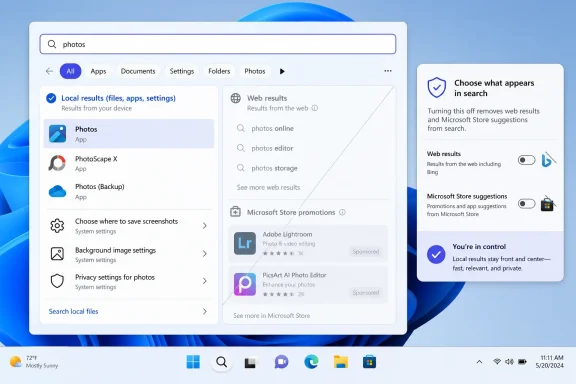
Microsoft is preparing Windows 11 controls that would let users turn off web results and Microsoft Store suggestions in desktop search, with the change reportedly shown in an unreleased internal build and expected to reach public preview testing after years of complaints about Bing-driven clutter. The move is small in interface terms and large in symbolic terms. It acknowledges that one of Windows 11’s most visible daily workflows has been serving two masters: the user trying to find something, and Microsoft trying to route attention through its services.
That tension has defined Windows search for years. The Start menu search box is supposed to be the fastest path to a file, app, setting, or command. Too often, it has behaved like a billboard with a keyboard shortcut.
The most important part of this reported change is not that Microsoft may add another toggle to Settings. Windows is full of toggles, many of them poorly named, half-buried, or overridden by policy. The important part is that Microsoft appears ready to treat local search as a user task rather than an engagement surface.
That distinction matters. When someone opens Start and types “printer,” “Excel budget,” or “display,” they are usually not asking the operating system to consult the web. They are trying to complete a local action. Injecting Bing suggestions, web answers, or Store promotions into that moment turns a utility into a funnel.
Microsoft has long argued, implicitly and sometimes explicitly, that blending local and web search makes Windows more helpful. There are cases where that is true. A user who types a general query into the taskbar may appreciate a direct web handoff. But Windows never solved the basic context problem: the same box used to launch Notepad also tried to behave like a browser search field.
The result was a familiar irritation. A feature designed to save seconds often cost them instead, forcing users to visually separate local results from internet suggestions. That is not merely aesthetic clutter. It is friction inside one of the operating system’s core loops.
That is why this reported Settings toggle matters. A Registry workaround is not user choice in any meaningful consumer sense. It is a back door for people who already know the name of the door, the shape of the key, and the risk of breaking something else while they are in there.
For Windows 11 Home users, the situation has been even more awkward. Group Policy is not exposed in the same way as it is on Pro, Enterprise, and Education editions, so many users were pushed toward Registry changes or unofficial utilities. That created the usual Windows split: the people most annoyed by the feature could often disable it, while the people least comfortable modifying system internals were stuck with the default.
Microsoft knows the difference between a supported setting and a tolerated workaround. Putting a control in Settings says: this preference is legitimate. Leaving it in policy and Registry says: this is something administrators and enthusiasts may do, but Microsoft would rather most users not notice.
That is the deeper reason Windows search became a trust issue. If a local query produces a Bing result above a matching app or file, the user sees more than a bad ranking decision. They see Microsoft choosing business strategy over interface clarity. Whether the company describes that as discovery, assistance, or personalization does not change the lived experience.
Windows occupies a unique position on a PC. It is not just another app competing for attention; it is the layer that mediates nearly everything else. When that layer starts steering users toward Edge, Bing, Copilot, or Microsoft Store suggestions at moments when they did not ask for them, the steering feels more intrusive than it would inside a browser or app store.
That is why the phrase search spam stuck. It captures the feeling that Windows is not simply returning too many results, but returning results with an agenda. Even when those results are technically useful in some cases, the loss of user confidence is hard to reverse.
The Microsoft Store has improved since the darkest days of Windows 8 and early Windows 10. It carries more conventional desktop apps, better packaging, and a cleaner developer story than it once did. But users do not open Start search to browse a storefront. They open it because they want the machine to respond.
That distinction is especially sharp in professional environments. A sysadmin looking for Event Viewer, a developer launching Terminal, or an accountant opening a spreadsheet does not need a Store recommendation competing for attention. Even a harmless suggestion can become a signal that the operating system is not fully focused on the user’s task.
Removing or suppressing Store suggestions through a normal setting would be a quiet win for daily productivity. It would also be a rare admission that not every surface in Windows needs to become a merchandising surface.
It would be too neat to say this toggle exists only because of regulators. Windows users everywhere have complained about web search clutter, and Microsoft has been making broader changes to improve local result ranking. Still, the policy environment matters. A company that once could assume the Windows shell was its own private distribution channel now has to think harder about whether every integration can survive scrutiny.
The risk for Microsoft is not just a fine or a forced regional change. It is the emergence of two Windows experiences: one where users get visible controls because regulators demanded them, and another where everyone else gets whatever Microsoft prefers by default. That split is bad for trust and bad for documentation.
A global Settings toggle would be cleaner. It would say Microsoft is not merely complying where it must, but acknowledging a broader design principle: the operating system should not make users fight to keep local actions local.
If users already believe the Start menu is a delivery vehicle for Bing and Store promotions, they will be less inclined to trust the next layer of intelligent assistance. The objection will not be only about privacy. It will be about motive. Is Windows helping me, or is it routing my behavior into Microsoft’s ecosystem?
That is why a humble web-search toggle can carry more strategic weight than another Copilot demo. Microsoft does not need to convince enthusiasts that AI can summarize documents or interpret screenshots. It needs to convince them that the shell will respect boundaries.
A local search box that stays local when asked is a foundation for that trust. Without it, every new AI affordance arrives carrying the baggage of old defaults.
Many organizations already disable web search through policy because they want clean separation between local device search, enterprise search, and the open internet. That separation can matter for regulated industries, schools, public-sector deployments, and shared devices. It can also matter for simple productivity: fewer irrelevant results mean fewer misclicks and fewer explanations.
The reported consumer-facing toggle does not replace enterprise policy. Administrators will still need centralized controls, compliance documentation, and assurances that user-facing settings cannot undermine managed baselines. But a visible Settings option can reduce the cultural gap between managed and unmanaged Windows.
When a feature is only controllable by admins, Microsoft can frame it as a business concern. When the same preference appears in Settings, it becomes a mainstream user preference. That shift may make it easier for IT teams to justify stricter defaults without looking like they are fighting the operating system.
For some users, that is fine. They want one box for everything and are happy as long as the local result comes first. For others, the presence of web results at all is the issue. They want Start search to behave like a launcher and file finder, not a search engine.
Both preferences are reasonable. That is exactly why a toggle is the right design answer. Microsoft does not have to pick one universal philosophy for hundreds of millions of PCs. It can let the user decide whether Windows search should be blended or local-first.
The danger is implementation. If the toggle is buried, renamed into ambiguity, region-limited, reset by updates, or paired with nagging prompts, Microsoft will squander the goodwill before it arrives. Windows users have long memories for settings that look like choices but behave like negotiations.
Microsoft should resist the temptation to over-explain. Users understand the distinction between searching their PC and searching the web. The setting can say exactly that. If web results are off, Start search should return local apps, files, settings, and permitted organizational content. If Store suggestions are off, promotional app recommendations should disappear.
There is also a performance angle, though it should not be oversold. A cleaner local search experience can feel faster because it removes network-dependent panels and visual clutter. But Windows search performance has many other variables: indexing health, storage speed, OneDrive integration, file locations, account state, and shell reliability.
The more defensible claim is not that the toggle will magically make every PC faster. It is that it can make search feel more direct. In interface design, that often matters just as much.
A PC operating system is not a social feed. Its most valuable surfaces are valuable precisely because users rely on them for intent-driven work. When those surfaces become contested territory for product growth, the operating system starts to feel less like infrastructure and more like a marketplace.
This is the same mistake that made parts of Windows 10 feel noisy and parts of Windows 11 feel oddly adversarial. Microsoft would introduce a refined visual design, then undercut it with recommendations, badges, and prompts. The company’s design teams would polish the glass while its growth teams taped flyers to it.
A web-search toggle will not fix that by itself. But it is a concrete reversal in one of the places users notice most. It suggests, at least for this feature, that Microsoft may be willing to trade a little service promotion for a lot of user goodwill.
If the toggle survives the trip from internal build to public release, it will be one of those Windows changes that seems obvious the moment it appears. That is usually a sign it should have shipped years earlier. But late is still better than never, and for Windows 11 users who just want their PC to find what is on their PC, this may be the rare modern Microsoft concession that improves the operating system by making it do less.
That tension has defined Windows search for years. The Start menu search box is supposed to be the fastest path to a file, app, setting, or command. Too often, it has behaved like a billboard with a keyboard shortcut.
 Microsoft Finally Admits Search Is Not a Portal
The most important part of this reported change is not that Microsoft may add another toggle to Settings. Windows is full of toggles, many of them poorly named, half-buried, or overridden by policy. The important part is that Microsoft appears ready to treat local search as a user task rather than an engagement surface.That distinction matters. When someone opens Start and types “printer,” “Excel budget,” or “display,” they are usually not asking the operating system to consult the web. They are trying to complete a local action. Injecting Bing suggestions, web answers, or Store promotions into that moment turns a utility into a funnel.
Microsoft has long argued, implicitly and sometimes explicitly, that blending local and web search makes Windows more helpful. There are cases where that is true. A user who types a general query into the taskbar may appreciate a direct web handoff. But Windows never solved the basic context problem: the same box used to launch Notepad also tried to behave like a browser search field.
The result was a familiar irritation. A feature designed to save seconds often cost them instead, forcing users to visually separate local results from internet suggestions. That is not merely aesthetic clutter. It is friction inside one of the operating system’s core loops.
The Registry Hack Was the Real Indictment
Power users have never been completely helpless here. For years, disabling web search in Windows has been possible through Group Policy, Registry edits, third-party debloating tools, or enterprise configuration profiles. The problem is that none of those paths belong in the life of an ordinary PC owner.That is why this reported Settings toggle matters. A Registry workaround is not user choice in any meaningful consumer sense. It is a back door for people who already know the name of the door, the shape of the key, and the risk of breaking something else while they are in there.
For Windows 11 Home users, the situation has been even more awkward. Group Policy is not exposed in the same way as it is on Pro, Enterprise, and Education editions, so many users were pushed toward Registry changes or unofficial utilities. That created the usual Windows split: the people most annoyed by the feature could often disable it, while the people least comfortable modifying system internals were stuck with the default.
Microsoft knows the difference between a supported setting and a tolerated workaround. Putting a control in Settings says: this preference is legitimate. Leaving it in policy and Registry says: this is something administrators and enthusiasts may do, but Microsoft would rather most users not notice.
Bing Was Never Just a Search Result
The backlash against web results in Windows search has always been partly about relevance, but only partly. Users were not merely objecting to the existence of the internet. They were objecting to Microsoft using the operating system shell to privilege its own services.That is the deeper reason Windows search became a trust issue. If a local query produces a Bing result above a matching app or file, the user sees more than a bad ranking decision. They see Microsoft choosing business strategy over interface clarity. Whether the company describes that as discovery, assistance, or personalization does not change the lived experience.
Windows occupies a unique position on a PC. It is not just another app competing for attention; it is the layer that mediates nearly everything else. When that layer starts steering users toward Edge, Bing, Copilot, or Microsoft Store suggestions at moments when they did not ask for them, the steering feels more intrusive than it would inside a browser or app store.
That is why the phrase search spam stuck. It captures the feeling that Windows is not simply returning too many results, but returning results with an agenda. Even when those results are technically useful in some cases, the loss of user confidence is hard to reverse.
Store Suggestions Made the Problem Look Cheaper
If Bing results made Windows search feel confused, Microsoft Store suggestions made it feel cheap. There is a difference between helping a user find an installed app and recommending an app they do not have. There is also a difference between surfacing a missing dependency and using the Start menu as promotional real estate.The Microsoft Store has improved since the darkest days of Windows 8 and early Windows 10. It carries more conventional desktop apps, better packaging, and a cleaner developer story than it once did. But users do not open Start search to browse a storefront. They open it because they want the machine to respond.
That distinction is especially sharp in professional environments. A sysadmin looking for Event Viewer, a developer launching Terminal, or an accountant opening a spreadsheet does not need a Store recommendation competing for attention. Even a harmless suggestion can become a signal that the operating system is not fully focused on the user’s task.
Removing or suppressing Store suggestions through a normal setting would be a quiet win for daily productivity. It would also be a rare admission that not every surface in Windows needs to become a merchandising surface.
The European Shadow Hangs Over the Toggle
Microsoft’s reported move also lands in a regulatory climate that has become much less tolerant of platform self-preferencing. In Europe, the Digital Markets Act has pushed major platform owners to open defaults, unbundle services, and give users more meaningful control over built-in integrations. Windows has already seen region-specific concessions around browser choice, search behavior, and uninstallable components.It would be too neat to say this toggle exists only because of regulators. Windows users everywhere have complained about web search clutter, and Microsoft has been making broader changes to improve local result ranking. Still, the policy environment matters. A company that once could assume the Windows shell was its own private distribution channel now has to think harder about whether every integration can survive scrutiny.
The risk for Microsoft is not just a fine or a forced regional change. It is the emergence of two Windows experiences: one where users get visible controls because regulators demanded them, and another where everyone else gets whatever Microsoft prefers by default. That split is bad for trust and bad for documentation.
A global Settings toggle would be cleaner. It would say Microsoft is not merely complying where it must, but acknowledging a broader design principle: the operating system should not make users fight to keep local actions local.
AI Makes the Old Search Fight More Urgent
This would have been a useful change five years ago. In 2026, it is more than useful because Microsoft is layering AI features across Windows at speed. Copilot, semantic search, Recall-style memory features on supported hardware, AI actions in File Explorer, and cloud-assisted workflows all depend on one fragile asset: user permission.If users already believe the Start menu is a delivery vehicle for Bing and Store promotions, they will be less inclined to trust the next layer of intelligent assistance. The objection will not be only about privacy. It will be about motive. Is Windows helping me, or is it routing my behavior into Microsoft’s ecosystem?
That is why a humble web-search toggle can carry more strategic weight than another Copilot demo. Microsoft does not need to convince enthusiasts that AI can summarize documents or interpret screenshots. It needs to convince them that the shell will respect boundaries.
A local search box that stays local when asked is a foundation for that trust. Without it, every new AI affordance arrives carrying the baggage of old defaults.
Enterprise IT Sees a Policy Problem, Not a Cosmetic One
For IT departments, Windows search clutter is not mainly about annoyance. It is about predictability, supportability, and governance. A desktop search experience that mixes local corporate resources with consumer web suggestions can confuse users, create help-desk noise, and complicate hardening baselines.Many organizations already disable web search through policy because they want clean separation between local device search, enterprise search, and the open internet. That separation can matter for regulated industries, schools, public-sector deployments, and shared devices. It can also matter for simple productivity: fewer irrelevant results mean fewer misclicks and fewer explanations.
The reported consumer-facing toggle does not replace enterprise policy. Administrators will still need centralized controls, compliance documentation, and assurances that user-facing settings cannot undermine managed baselines. But a visible Settings option can reduce the cultural gap between managed and unmanaged Windows.
When a feature is only controllable by admins, Microsoft can frame it as a business concern. When the same preference appears in Settings, it becomes a mainstream user preference. That shift may make it easier for IT teams to justify stricter defaults without looking like they are fighting the operating system.
The Ranking Fix Was Not Enough
Microsoft has also been testing improvements that make apps and files appear more reliably ahead of web suggestions when they are stronger matches. That is welcome, but it does not fully solve the problem. Better ranking still assumes web results belong in the same experience unless they are outranked.For some users, that is fine. They want one box for everything and are happy as long as the local result comes first. For others, the presence of web results at all is the issue. They want Start search to behave like a launcher and file finder, not a search engine.
Both preferences are reasonable. That is exactly why a toggle is the right design answer. Microsoft does not have to pick one universal philosophy for hundreds of millions of PCs. It can let the user decide whether Windows search should be blended or local-first.
The danger is implementation. If the toggle is buried, renamed into ambiguity, region-limited, reset by updates, or paired with nagging prompts, Microsoft will squander the goodwill before it arrives. Windows users have long memories for settings that look like choices but behave like negotiations.
The Setting Must Be Boring to Be Good
The best version of this feature would be almost dull. A clear switch in Settings. Plain language. No dark pattern. No “recommended” warning implying that disabling web results will break Windows. No periodic re-enablement after feature updates. No separate hidden dependency that leaves sponsored or AI tiles behind.Microsoft should resist the temptation to over-explain. Users understand the distinction between searching their PC and searching the web. The setting can say exactly that. If web results are off, Start search should return local apps, files, settings, and permitted organizational content. If Store suggestions are off, promotional app recommendations should disappear.
There is also a performance angle, though it should not be oversold. A cleaner local search experience can feel faster because it removes network-dependent panels and visual clutter. But Windows search performance has many other variables: indexing health, storage speed, OneDrive integration, file locations, account state, and shell reliability.
The more defensible claim is not that the toggle will magically make every PC faster. It is that it can make search feel more direct. In interface design, that often matters just as much.
Windows Needs Fewer Growth Hacks in the Shell
This episode fits a larger pattern in modern Windows. Microsoft has repeatedly used high-traffic shell surfaces to promote adjacent services: Edge prompts, Microsoft account nudges, OneDrive reminders, Copilot entry points, Start menu recommendations, and search integrations. Each individual prompt can be defended as useful. The cumulative effect is harder to defend.A PC operating system is not a social feed. Its most valuable surfaces are valuable precisely because users rely on them for intent-driven work. When those surfaces become contested territory for product growth, the operating system starts to feel less like infrastructure and more like a marketplace.
This is the same mistake that made parts of Windows 10 feel noisy and parts of Windows 11 feel oddly adversarial. Microsoft would introduce a refined visual design, then undercut it with recommendations, badges, and prompts. The company’s design teams would polish the glass while its growth teams taped flyers to it.
A web-search toggle will not fix that by itself. But it is a concrete reversal in one of the places users notice most. It suggests, at least for this feature, that Microsoft may be willing to trade a little service promotion for a lot of user goodwill.
The Windows 11 Search Reset Users Actually Asked For
This reported change should be judged by what it gives back: control over a daily habit. If Microsoft ships it broadly and cleanly, Windows 11 search can become less of a running argument between Redmond and its customers.- Users should be able to disable web results from Windows 11 search without editing the Registry or relying on Group Policy.
- Microsoft Store suggestions should be treated as optional recommendations, not unavoidable furniture in the search interface.
- Local files, apps, and settings should remain the default priority when the user’s query clearly points to something on the PC.
- Enterprise administrators will still need policy-level controls that override or preconfigure the consumer-facing setting.
- Microsoft’s broader AI push will be easier to trust if the company proves that basic shell features can respect user intent.
If the toggle survives the trip from internal build to public release, it will be one of those Windows changes that seems obvious the moment it appears. That is usually a sign it should have shipped years earlier. But late is still better than never, and for Windows 11 users who just want their PC to find what is on their PC, this may be the rare modern Microsoft concession that improves the operating system by making it do less.
References
- Primary source: The Hans India
Published: 2026-06-08T14:10:11.258167
Loading…
www.thehansindia.com - Related coverage: windowslatest.com
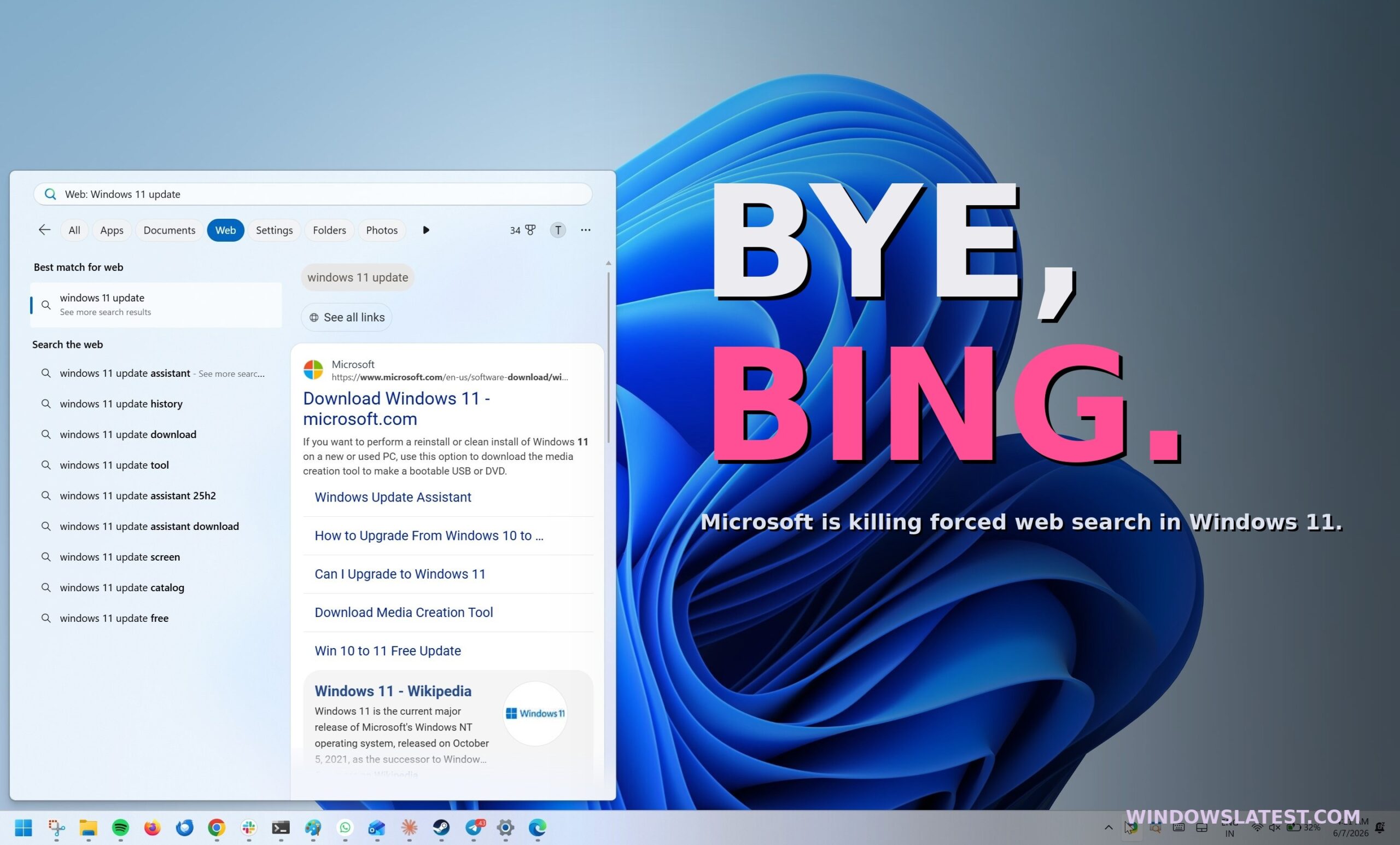
Microsoft is letting you kill Bing in Windows 11 Search, after years of forcing it on every PC
Microsoft is testing a new Windows 11 Search toggle that disables Bing, MSN, and Microsoft Store results, ending years of forced web results. www.windowslatest.com
- Official source: support.microsoft.com
Windows Search and privacy - Microsoft Support
Learn how to connect Windows Search with your accounts in the cloud, manage your Windows Search and SafeSearch settings, clear search history, and more. support.microsoft.com
- Related coverage: makeuseof.com

How to Disable Bing Web Searches in Windows 11
Sick of Bing giving its opinion on your Windows 11 searches? Here's how to turn it off. www.makeuseof.com
- Related coverage: windowscentral.com
Loading…
www.windowscentral.com - Related coverage: pureinfotech.com
Loading…
pureinfotech.com
- Related coverage: techradar.com
Loading…
www.techradar.com - Official source: learn.microsoft.com
Loading…
learn.microsoft.com - Related coverage: tomshardware.com

How to Disable Windows Web Search and Speed Up Your PC
Stop Windows from showing you web results when you just want files and apps.www.tomshardware.com
- Related coverage: pcworld.com
Loading…
www.pcworld.com - Related coverage: tech.yahoo.com
Microsoft to Let Windows 11 Users Disable Web Results in Search
At a Windows Insider meetup in San Francisco, Microsoft previewed a few upcoming enhancements to the OS, including a way to shut off web search from the main search function.tech.yahoo.com
- Related coverage: teachucomp.com
Loading…
www.teachucomp.com - Related coverage: cyber.gov.au
Loading…
www.cyber.gov.au - Related coverage: askwoody.com
Loading…
www.askwoody.com - Official source: blogs.windows.com

Announcing Windows 11 Insider Preview Build 26300.7939 (Dev Channel)
Hello Windows Insiders, today we are releasing Windows 11 Insider Preview Build 26300.7939 (KB 5077243) to the Dev Channel. Changes in Dev Channel builds and updates are documented in two buckets: new features, and improvements (inc blogs.windows.com