

Microsoft is developing a Windows 11 setting that will let users turn off web results in the operating system’s search experience, a change shown at a Windows Insider meetup in San Francisco on June 1, 2026, ahead of Microsoft Build. It is a small toggle with a long shadow. For years, Windows Search has behaved less like a local tool and more like a funnel into Bing, Edge, Microsoft Store, and whatever else Redmond wanted to surface. Now Microsoft appears to be conceding what users have been saying since Windows 11 launched: search should first be about the computer in front of you.
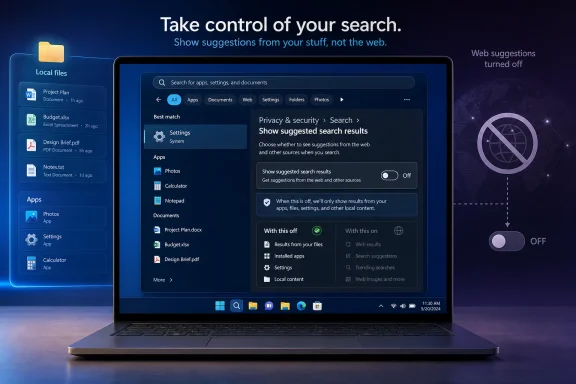
The reported setting is expected to live under Privacy & security > Search, in a section called “Show suggested search results.” That placement matters. Microsoft is not framing this as a power-user tweak, a registry escape hatch, or an enterprise-only policy. It is placing the switch where ordinary users might plausibly find it.
That is a reversal in spirit, if not yet in shipping code. Windows 11’s search box has long mixed local apps, documents, settings, web suggestions, Bing results, and promotional surfaces into one panel. Microsoft’s argument was always convenience: type once, find anything. The lived experience was often different: type the name of an app and watch the operating system suggest the internet.
This is why the change feels bigger than its setting label. Windows users have not merely complained that web results exist. They have complained that web results interrupt the basic muscle memory of using a desktop operating system. A search box that cannot reliably prioritize installed software and local files is not “integrated”; it is distracted.
The registry workaround also created the usual Windows split-brain problem. Enthusiasts could fix the behavior. Managed enterprise fleets could suppress parts of it through policy. Everyone else had to accept the default, even if the default made the machine feel slower and more cluttered.
Microsoft has always had an uneasy relationship with defaults. The company knows that most users never change them, which is why Windows defaults are so commercially valuable. Search is especially valuable because it sits at the junction between user intent and Microsoft’s services. Every accidental Bing query is a tiny reminder that the operating system is also a distribution channel.
That is the heart of the backlash. Users were not imagining that Windows Search had become promotional real estate. They were reacting to a design that routinely blurred the line between finding something on your PC and sending a query to Microsoft’s web stack.
But privacy is only half the story. The more common complaint is performance. Windows Search has too often felt slower than it should because the interface is doing more than one job. It is not just finding a file or app; it is also preparing suggestions, fetching remote results, and deciding how to rank Microsoft’s ecosystem against the user’s local machine.
That matters because search is one of the most frequently touched parts of Windows. A delay of half a second, repeated dozens of times a day, becomes part of the emotional texture of the OS. It is the difference between a computer that feels responsive and one that feels as if it is negotiating with a server before obeying you.
Microsoft reportedly also said it has been improving search speeds, File Explorer launch performance, and bulk delete performance. Those are not glamorous Build-stage demos. They are exactly the sort of improvements Windows users have been asking for while the company has spent much of the last two years talking about Copilot, agents, and AI PCs.
Windows 11 has often treated search as a recommendation engine. That is a subtle but important design choice. A search engine answers intent; a recommendation engine tries to shape it. Microsoft’s problem is that Windows users usually open Start search with a very specific intention: launch Notepad, open Device Manager, find a document, change a setting.
The Store belongs in that flow only when it is clearly subordinate. If Microsoft lets users reduce or disable Store suggestions, it would signal a broader shift away from the idea that every Windows surface must cross-promote another Microsoft property.
That would be welcome, but it also raises a question Microsoft cannot avoid: why did it take this long? Windows 11 launched in 2021. The frustration with web results, Store suggestions, and search clutter is not new. The company is now correcting a mistake that users identified almost immediately.
Taken together, these are not random quality-of-life tweaks. They look like a strategic course correction. Microsoft appears to understand that Windows 11’s reputation problem is not only about missing features. It is about trust.
Users tolerated Windows 11’s redesign when it felt like the beginning of a cleaner, more modern desktop. They became less forgiving when basic customization disappeared, ads and recommendations multiplied, and AI features arrived faster than fixes for old regressions. The complaint was never simply “we hate change.” It was “why are you changing the parts we use every day while ignoring the parts you broke?”
The movable taskbar is a useful comparison. Microsoft removed a long-standing Windows capability, spent years hearing complaints, and is now testing its return. The web-search toggle follows the same pattern: remove or obscure user control, absorb years of annoyance, then reintroduce the obvious option as a fresh improvement.
That means regular Windows 11 users should not expect the switch to appear immediately. It may land first in an Insider channel, and even there it could be limited by feature flags or staged rollout logic. Microsoft increasingly ships Windows features as experiments rather than discrete releases, which makes timelines harder to predict.
For IT administrators, the key question is whether this becomes manageable through policy. A consumer-facing toggle is good. A policy-backed control is better. Enterprises, schools, and regulated environments need predictable behavior, not a per-user scavenger hunt through Settings.
If Microsoft is serious about reducing Windows noise, it should expose the control cleanly for management tools. Search behavior is not cosmetic in a business environment. It affects training, help desk calls, privacy posture, and user productivity.
The company wants Windows to become more intelligent and more predictive. That future requires users to trust the OS with more context, not less. But trust is cumulative. If the search box cannot respect a user who only wants to find Calculator, why should that user trust deeper AI features that index activity, summarize content, or route requests through cloud services?
Microsoft’s challenge is not technical ambition. It is restraint. The best version of AI in Windows will need to know when to disappear. The best version of search will need to know when the answer is already on the PC.
That is why this toggle is symbolically powerful. It suggests Microsoft may be learning that control is not the enemy of engagement. Sometimes the way to make users like a feature is to let them turn part of it off.
The PC is not a phone home screen. It is where people reconcile spreadsheets, manage servers, edit photos, write code, troubleshoot drivers, configure networks, and do thousands of other tasks that depend on speed and predictability. Search sits at the front door of that workflow.
When Microsoft inserts web noise into that doorway, it makes Windows feel less like an operating system and more like a portal. That distinction may sound philosophical, but it shows up in everyday frustration. The user types. The machine hesitates. The result is not the thing the user asked for.
A toggle cannot undo years of irritation, but it can mark a change in posture. It says the user’s local intent deserves priority. For Windows, that should never have been controversial.
 Microsoft Finally Admits Search Became a Billboard
The reported setting is expected to live under Privacy & security > Search, in a section called “Show suggested search results.” That placement matters. Microsoft is not framing this as a power-user tweak, a registry escape hatch, or an enterprise-only policy. It is placing the switch where ordinary users might plausibly find it.That is a reversal in spirit, if not yet in shipping code. Windows 11’s search box has long mixed local apps, documents, settings, web suggestions, Bing results, and promotional surfaces into one panel. Microsoft’s argument was always convenience: type once, find anything. The lived experience was often different: type the name of an app and watch the operating system suggest the internet.
This is why the change feels bigger than its setting label. Windows users have not merely complained that web results exist. They have complained that web results interrupt the basic muscle memory of using a desktop operating system. A search box that cannot reliably prioritize installed software and local files is not “integrated”; it is distracted.
The Registry Hack Was the Real Product Feedback
Until now, users who wanted to remove web search results often had to rely on registry edits, group policy, third-party scripts, or unofficial guides. That is never a healthy sign for a mainstream feature. When the recommended fix for a daily annoyance begins with opening Registry Editor, the product has already failed the average user.The registry workaround also created the usual Windows split-brain problem. Enthusiasts could fix the behavior. Managed enterprise fleets could suppress parts of it through policy. Everyone else had to accept the default, even if the default made the machine feel slower and more cluttered.
Microsoft has always had an uneasy relationship with defaults. The company knows that most users never change them, which is why Windows defaults are so commercially valuable. Search is especially valuable because it sits at the junction between user intent and Microsoft’s services. Every accidental Bing query is a tiny reminder that the operating system is also a distribution channel.
That is the heart of the backlash. Users were not imagining that Windows Search had become promotional real estate. They were reacting to a design that routinely blurred the line between finding something on your PC and sending a query to Microsoft’s web stack.
Privacy Is the Right Drawer, but Performance Is the Bigger Complaint
Putting the control under Privacy & security is logical. Web search means typed queries may leave the local machine. Even if Microsoft handles that data under published privacy rules, many users do not want local intent transmitted externally by default.But privacy is only half the story. The more common complaint is performance. Windows Search has too often felt slower than it should because the interface is doing more than one job. It is not just finding a file or app; it is also preparing suggestions, fetching remote results, and deciding how to rank Microsoft’s ecosystem against the user’s local machine.
That matters because search is one of the most frequently touched parts of Windows. A delay of half a second, repeated dozens of times a day, becomes part of the emotional texture of the OS. It is the difference between a computer that feels responsive and one that feels as if it is negotiating with a server before obeying you.
Microsoft reportedly also said it has been improving search speeds, File Explorer launch performance, and bulk delete performance. Those are not glamorous Build-stage demos. They are exactly the sort of improvements Windows users have been asking for while the company has spent much of the last two years talking about Copilot, agents, and AI PCs.
The Microsoft Store Toggle Would Be Another Quiet Concession
The same interface reportedly hints at a separate ability to suppress Microsoft Store results from search. If that ships, it may be nearly as important as the web toggle. Store results can be useful when a user clearly wants to install something, but they are irritating when they crowd out installed software or system utilities.Windows 11 has often treated search as a recommendation engine. That is a subtle but important design choice. A search engine answers intent; a recommendation engine tries to shape it. Microsoft’s problem is that Windows users usually open Start search with a very specific intention: launch Notepad, open Device Manager, find a document, change a setting.
The Store belongs in that flow only when it is clearly subordinate. If Microsoft lets users reduce or disable Store suggestions, it would signal a broader shift away from the idea that every Windows surface must cross-promote another Microsoft property.
That would be welcome, but it also raises a question Microsoft cannot avoid: why did it take this long? Windows 11 launched in 2021. The frustration with web results, Store suggestions, and search clutter is not new. The company is now correcting a mistake that users identified almost immediately.
Build 2026 Is Becoming a Windows Apology Tour
The timing is hard to ignore. Microsoft showed the search toggle a day before Build 2026, while also highlighting Insider work on the taskbar and other shell improvements. The same recent wave of Windows 11 changes includes testing movable taskbar positions, smaller taskbar options, and refinements to search ranking.Taken together, these are not random quality-of-life tweaks. They look like a strategic course correction. Microsoft appears to understand that Windows 11’s reputation problem is not only about missing features. It is about trust.
Users tolerated Windows 11’s redesign when it felt like the beginning of a cleaner, more modern desktop. They became less forgiving when basic customization disappeared, ads and recommendations multiplied, and AI features arrived faster than fixes for old regressions. The complaint was never simply “we hate change.” It was “why are you changing the parts we use every day while ignoring the parts you broke?”
The movable taskbar is a useful comparison. Microsoft removed a long-standing Windows capability, spent years hearing complaints, and is now testing its return. The web-search toggle follows the same pattern: remove or obscure user control, absorb years of annoyance, then reintroduce the obvious option as a fresh improvement.
Insiders Get the Levers First, Everyone Else Gets the Waiting Game
There is no confirmed public release date for the web-search toggle. The likely path is familiar: internal builds, Windows Insider testing, controlled rollout, and eventually mainstream availability if telemetry and feedback satisfy Microsoft.That means regular Windows 11 users should not expect the switch to appear immediately. It may land first in an Insider channel, and even there it could be limited by feature flags or staged rollout logic. Microsoft increasingly ships Windows features as experiments rather than discrete releases, which makes timelines harder to predict.
For IT administrators, the key question is whether this becomes manageable through policy. A consumer-facing toggle is good. A policy-backed control is better. Enterprises, schools, and regulated environments need predictable behavior, not a per-user scavenger hunt through Settings.
If Microsoft is serious about reducing Windows noise, it should expose the control cleanly for management tools. Search behavior is not cosmetic in a business environment. It affects training, help desk calls, privacy posture, and user productivity.
The AI Context Makes This More Than a Search Story
This change also lands in the middle of Microsoft’s aggressive AI push. Windows has become a staging ground for Copilot, Recall, semantic search, cloud-connected suggestions, and agentic workflows. In that environment, a simple “turn off web results” option becomes a referendum on consent.The company wants Windows to become more intelligent and more predictive. That future requires users to trust the OS with more context, not less. But trust is cumulative. If the search box cannot respect a user who only wants to find Calculator, why should that user trust deeper AI features that index activity, summarize content, or route requests through cloud services?
Microsoft’s challenge is not technical ambition. It is restraint. The best version of AI in Windows will need to know when to disappear. The best version of search will need to know when the answer is already on the PC.
That is why this toggle is symbolically powerful. It suggests Microsoft may be learning that control is not the enemy of engagement. Sometimes the way to make users like a feature is to let them turn part of it off.
The Desktop Still Belongs to the Person Sitting at It
Windows remains the default operating system for much of the world’s practical computing. That gives Microsoft enormous freedom, but it also gives the company a duty to avoid turning the desktop into a perpetual upsell surface. Users are not wrong to expect the Start menu and search box to behave like utilities rather than campaigns.The PC is not a phone home screen. It is where people reconcile spreadsheets, manage servers, edit photos, write code, troubleshoot drivers, configure networks, and do thousands of other tasks that depend on speed and predictability. Search sits at the front door of that workflow.
When Microsoft inserts web noise into that doorway, it makes Windows feel less like an operating system and more like a portal. That distinction may sound philosophical, but it shows up in everyday frustration. The user types. The machine hesitates. The result is not the thing the user asked for.
A toggle cannot undo years of irritation, but it can mark a change in posture. It says the user’s local intent deserves priority. For Windows, that should never have been controversial.
The Toggle That Carries More Weight Than Its Label
The practical take is straightforward: if Microsoft ships this broadly and implements it cleanly, Windows 11 search will become less annoying for a large group of users. The strategic take is more interesting. Microsoft is quietly retreating from one of its most disliked assumptions: that the Windows shell should always be an entry point to Microsoft’s online services.- Windows 11 is expected to gain a user-facing setting to disable web results in Search rather than requiring registry edits.
- The control was shown in Settings under Privacy & security > Search, which suggests Microsoft understands the privacy dimension of local queries.
- Microsoft appears to be considering similar control over Microsoft Store suggestions in search results.
- The change has no confirmed general release date and will likely reach Windows Insider builds before stable Windows 11 systems.
- The move fits a broader pattern of Microsoft restoring user control after years of complaints about Windows 11’s taskbar, search, and shell behavior.
- The real test will be whether Microsoft gives consumers, enterprises, and managed fleets durable controls rather than another partially rolled-out experiment.
References
- Primary source: PCMag
Published: Tue, 02 Jun 2026 19:55:20 GMT
Loading…
www.pcmag.com - Official source: support.microsoft.com
Windows Search and privacy - Microsoft Support
Learn how to connect Windows Search with your accounts in the cloud, manage your Windows Search and SafeSearch settings, clear search history, and more. support.microsoft.com
- Related coverage: howtogeek.com

Windows 11 Lets You Move the Taskbar to the Left or Right, But It's Broken
Does this mean we could have an official option soon? www.howtogeek.com
- Related coverage: fdaytalk.com
Loading…
www.fdaytalk.com - Related coverage: techradar.com
Loading…
www.techradar.com - Related coverage: thefpsreview.com
Microsoft Finally Lets You Move the Windows 11 Taskbar After Nearly Five Years
It only took about five years, but Microsoft has finally relented. Windows Insiders in the Experimental channel can now move the Windows 11 taskbar to the top, bottom, left, or right of the screen, restoring a feature that Windows users had for decades before Windows 11 launched in October 2021... www.thefpsreview.com
- Related coverage: windowsforum.com
Loading…
windowsforum.com - Related coverage: windowscentral.com

The movable taskbar is finally back in Windows 11 — and yes, you can try it right now
Windows 11 Build 26300.8493 introduces the ability to move the Taskbar and resize icons, reversing a major launch-day limitation. www.windowscentral.com
- Related coverage: windowslatest.com

Microsoft confirms major Windows 11 Search improvements after years of complaints
Microsoft's Windows Shell Product Head confirms updates for Windows 11 Search, promising a simpler and less distracting user experience. www.windowslatest.com
- Related coverage: pureinfotech.com

Windows 11 Search keeps showing web results? Here’s how to turn it off – Goodbye Bing
To disable web search in Start menu or Windows Search box, use Group Policy or Registry on Windows 11. This also removes the Copilot button. pureinfotech.com
- Related coverage: alternativeto.net
Loading…
alternativeto.net - Related coverage: dignited.com

Windows 11 Insiders Can Now Move the Taskbar to Any Screen Edge - Dignited
Microsoft is rolling out a movable, resizable taskbar to Windows 11 Insiders — restoring a feature that's been missing since the OS launched in October 2021. www.dignited.com
- Related coverage: windowsreport.com
Loading…
windowsreport.com - Related coverage: tomshardware.com

How to Disable Windows Web Search and Speed Up Your PC
Stop Windows from showing you web results when you just want files and apps.www.tomshardware.com
- Related coverage: pcgamer.com
Microsoft announces plans to let you put the taskbar in Windows 11 pretty much anywhere you want
Top, bottom, left and right.www.pcgamer.com
- Related coverage: tomsguide.com
- Official source: microsoft.com
Microsoft Build 2026: Skalierbare KI-Systeme und -Agenten im Fokus - TechWiese
Die Microsoft Build 2026 rückt die Entwicklung und Skalierung von Agenten-Workflows sowie Multi-Model-Systemen für die globale Developer-Community in den Mittelpunkt.www.microsoft.com - Official source: build.microsoft.com

Microsoft Build
Go deep on real code and real systems with the teams building and scaling AI at Microsoft Build, June 2–3, 2026, in San Francisco and online.build.microsoft.com
- Related coverage: notebookcheck.com
Microsoft Build 2026: Das erwartet Zuschauer bei der Keynote am 2. Juni
Die Microsoft Build 2026 beginnt am 2. Juni in San Francisco. Im Mittelpunkt stehen KI-Agenten, Neuerungen für GitHub Copilot sowie lokale KI-Funktionen für Windows. Das können Entwickler von der Konferenz erwarten. www.notebookcheck.com
- Related coverage: chatforest.com

Microsoft Build 2026 Preview — AI Agents, Azure AI Foundry, and the Return to San Francisco — ChatForest
Microsoft Build 2026 heads to Fort Mason, San Francisco (June 2–3) with AI agents as the central theme. Here's what developers can expect from Satya Nadella's keynote, Azure AI Foundry, GitHub Copilot, and the multi-model Copilot platform. chatforest.com
- Official source: news.microsoft.com

Microsoft Build Live
The home for real-time coverage of the news as it is announced from Microsoft Build, June 2-3, 2026. news.microsoft.com
- Related coverage: sageweekly.com
Microsoft Build 2026 Dates Announced: Developer Event Returns to San Francisco - SageWeekly
Microsoft Build 2026 will take place June 2–3 in San Francisco. Discover what developers can expect from Microsoft’s biggest AI and cloud developer event. sageweekly.com
- Related coverage: lensmor.com
Microsoft Build 2026: Sessions & Speakers | Lensmor
Get the Microsoft Build 2026: Sessions & Speakers guide: exhibitor lists, key dates & venue details. Updated 2026 B2B event intelligence from Lensmor.www.lensmor.com
- Official source: blogs.windows.com

Windows quality update: May
Hey Windows Insiders, One of the best parts of the work is hearing directly from the people using Windows every day. I was recently in Hyderabad and Taipei meeting with local Windows Insiders, and those conversations gave me a lot of energy heading blogs.windows.com